Headless WordPress Benefits: 7 Key Wins & Trade-offs (2026)
By wpmew
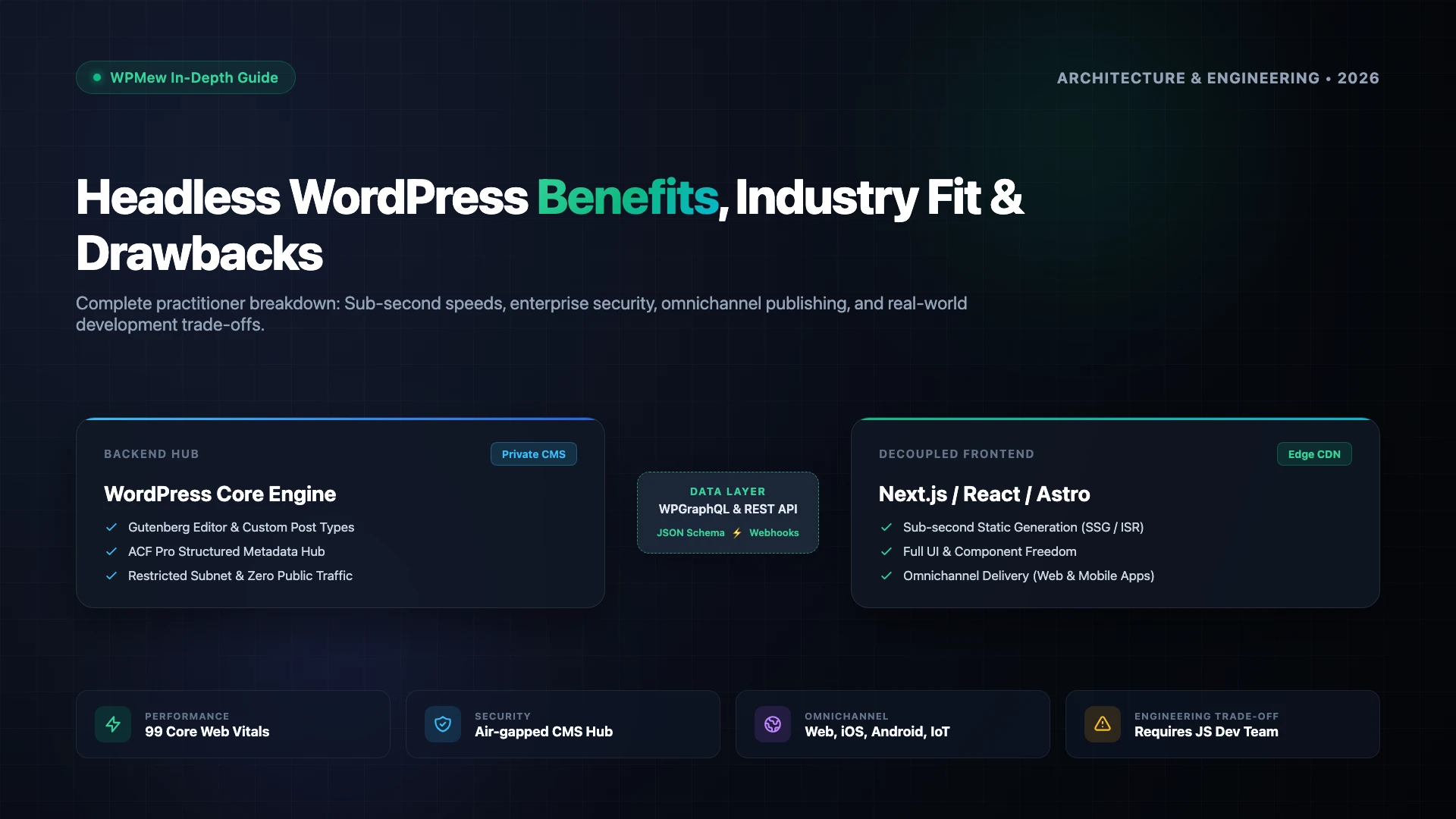
Evaluating headless WordPress benefits requires looking past frontend hype to measure real performance gains, operational costs, and developer workflows. By decoupling WordPress’s content management backend from the frontend display layer, engineering teams gain incredible rendering speed and architectural freedom. However, going headless also introduces infrastructure overhead and workflow shifts that are not suitable for every project. This guide analyzes the core advantages, industry use cases, and key disadvantages.
Table of Contents
Table of Contents
What is Headless WordPress?
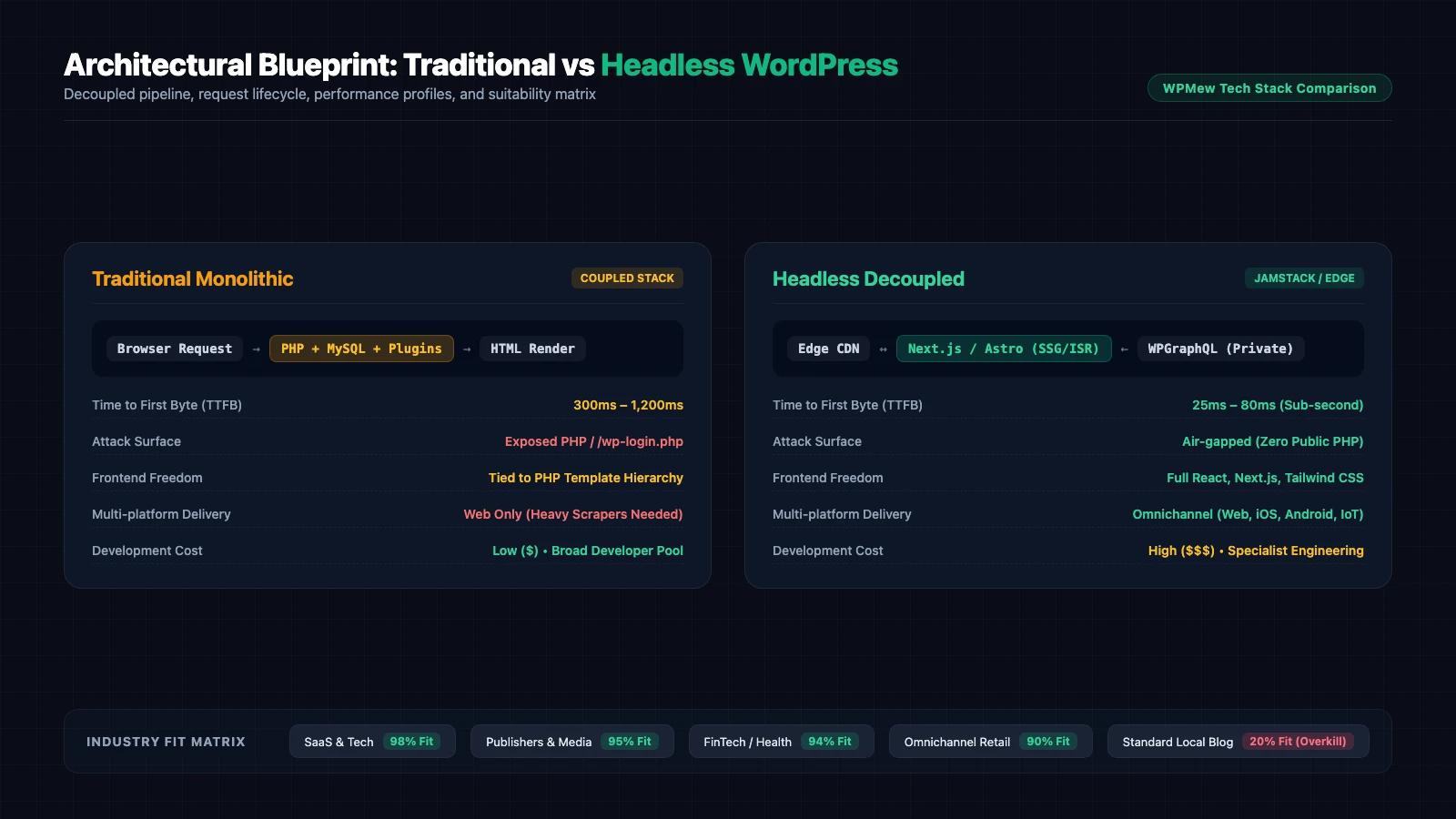
Traditional WordPress operates as a monolithic application. When a user requests a URL, the web server executes PHP code, queries MySQL tables, processes active plugins, and merges data into an active theme to render complete HTML in the browser. Both the content management dashboard (the “body”) and the public presentation template (the “head”) live inside the exact same codebase and server environment.
Headless WordPress decouples this relationship entirely. The WordPress installation functions exclusively as an administrative content management system (CMS) behind private access layers. Content editors create and publish posts, pages, and custom post types using familiar Gutenberg blocks and Advanced Custom Fields. Instead of rendering theme templates, WordPress exposes structured JSON data via the WordPress REST API or WPGraphQL.
A separate, standalone frontend framework—such as Next.js, Nuxt, Remix, or Astro—consumes this API data and serves compiled static HTML and JavaScript assets across global edge content delivery networks (CDNs). The frontend and backend run on isolated servers, communicate exclusively through structured network calls, and scale independently. Developers can inspect the official Next.js documentation to understand how modern edge routing and server components consume decoupled CMS data.
Top 7 Headless WordPress Benefits
Decoupling your CMS architecture delivers transformative advantages for modern engineering teams. The top headless WordPress benefits focus on unmatched speed, ironclad security boundaries, and multi-channel flexibility.
1. Sub-Second Page Speeds and Near-Perfect Core Web Vitals
Monolithic WordPress sites often struggle with Time to First Byte (TTFB) and Cumulative Layout Shift (CLS) because every uncached request triggers database queries, PHP execution, and bloated plugin asset queues. Even with aggressive page caching, mobile performance frequently drops below recommended thresholds.
With headless WordPress, your frontend generates static pages ahead of time using Static Site Generation (SSG) or Incremental Static Regeneration (ISR). Pages live directly on edge servers (such as Cloudflare or Vercel) within milliseconds of global visitors. Browsers receive lightweight, pre-rendered HTML without waiting for WordPress database lookups, consistently yielding 95+ Google Lighthouse scores and sub-50ms TTFB.
2. Air-Gapped Security and Minimal Attack Surface
WordPress powers over 43% of the web, making standard /wp-login.php endpoints, theme vulnerabilities, and outdated third-party plugins frequent targets for automated brute force attacks and SQL injection exploits.
A decoupled architecture closes these attack vectors. Your public visitors never interact with the server hosting WordPress. You can place the WordPress administrative backend on an internal subnet, restrict access behind VPNs or Cloudflare Zero Trust, and enforce strict IP whitelisting. If an attacker inspects your public frontend, there is no PHP engine to exploit, no exposed database connection, and zero access to administrative credentials.
3. True Omnichannel Content Distribution
Traditional WordPress themes output HTML intended solely for desktop and mobile web browsers. Sharing that same content to mobile applications, smart displays, or partner syndication networks often requires messy web scraping or custom export pipelines.
Headless WordPress treats content as pure structured data. A single post published by your marketing team can simultaneously feed your Next.js web application, native iOS and Android apps, digital signage kiosks, smartwatches, and third-party syndication feeds via GraphQL queries. Technical teams can reference the WPGraphQL documentation to structure flexible schemas that serve multiple endpoints from one single source of truth.
4. Complete Frontend Developer Freedom
Traditional WordPress development forces engineers into the legacy PHP template hierarchy, functions.php hooks, and rigid enqueue scripts. Finding modern frontend developers eager to write PHP templates and jQuery scripts has become increasingly difficult.
By moving to a decoupled model, engineering teams can build frontend user interfaces using modern tooling: React, Next.js, Vue, TypeScript, and Tailwind CSS. Developers leverage modern component libraries, server actions, and automated testing frameworks without fighting WordPress theme restrictions. For offloading heavy media and file assets, teams can easily connect Google Drive to WordPress and stream media directly through API components.
5. Elastic Scalability Under Viral Traffic Spikes
A sudden surge of 100,000 concurrent visitors can quickly crash a standard monolithic WordPress instance by exhausting PHP workers and MySQL database connections. Preventing downtime usually demands expensive autoscaling clusters and complex Redis caching.
In a headless architecture, public visitors hit high-performance edge networks. Because the edge serves static HTML and cached API payloads, your WordPress origin server receives zero additional traffic during viral traffic spikes. Your hosting bills remain predictable, and your site stays online regardless of audience surges.
6. Modern CI/CD Workflows and Version Control
Deploying changes to traditional WordPress sites often involves database migration headaches, staging server synchronization, and manual plugin update checks. Mistakes in production can lead to instant fatal errors.
With decoupled frontends, your entire presentation layer lives in a Git repository. Every pull request automatically generates an isolated preview deployment. Engineering teams can run automated linting, end-to-end integration tests, and performance audits before merging changes into production. Rollbacks take seconds with zero risk of database corruption.
7. Familiar Editorial Experience for Marketing Teams
Engineering teams frequently advocate for modern headless CMS platforms like Contentful, Sanity, or Strapi. However, marketing and editorial teams often resist these tools because they miss WordPress’s intuitive Gutenberg block editor, media manager, and revision history.
Headless WordPress bridges this gap perfectly. Content creators continue drafting articles inside the familiar WordPress dashboard, while developers enjoy the flexibility of a modern JavaScript stack. No extensive re-training is required for non-technical writers.
Which Industries Truly Need Headless WordPress?
While the headless WordPress benefits are substantial, decoupling is an architectural investment. Certain industries gain massive strategic value from headless WordPress, while others find the added complexity unnecessary. Below are the five business sectors that benefit most.
1. High-Growth SaaS and Technology Companies
Software-as-a-Service (SaaS) companies need marketing sites that load instantly, feature interactive product calculators, and match the design system of their web applications. Traditional WordPress themes struggle to integrate complex React components or handle dynamic authentication states.
By using headless WordPress, SaaS teams can embed real-time app widgets, share authentication tokens, and run marketing sites on the exact same frontend framework as their core software product. Marketers can publish feature release notes and documentation independently without submitting engineering pull requests.
2. Digital Media Publishers and High-Volume News Outlets
Publishers producing dozens of articles daily require instant content delivery, dynamic ad injection, and multi-platform syndication. When major news breaks, monolithic servers often buck under sudden traffic waves from social media.
Headless WordPress allows publishers to serve millions of readers from global edge caches with sub-second page rendering. Editorial teams draft articles in Gutenberg, and webhooks trigger instantaneous cache invalidations via ISR, keeping news fresh without overloading server hardware.
3. Multi-Platform and Enterprise eCommerce
Brands selling across multiple digital channels—such as web, mobile apps, social shops, and physical point-of-sale systems—need a central product catalog and uniform brand messaging. Monolithic WooCommerce installations often feel sluggish on mobile devices and restrict checkout optimizations.
Headless commerce pairs WordPress’s flexible catalog management and editorial capabilities with dedicated frontend checkout funnels. Developers can build blazing-fast single-page checkouts, reducing cart abandonment and driving higher conversion rates.
4. Healthcare, FinTech, and Regulated Industries
Organizations operating in finance, healthcare, and insurance must adhere to strict regulatory standards, including HIPAA, GDPR, and SOC2 compliance. Exposing a standard WordPress database and administrative interface to the public internet creates unacceptable liability.
Headless architecture enables these organizations to place the WordPress backend inside a secure, private corporate network. The public frontend contains static assets and interacts strictly with vetted API gateways. Security teams can protect internal administrative data while maintaining a sleek, compliant public presence.
5. Digital Agencies and Multi-Brand Portfolios
Enterprise agencies managing dozens of client sites or multi-brand conglomerates often spend hundreds of hours maintaining individual WordPress themes and plugin updates. A vulnerability in one theme can compromise an entire client portfolio.
With a decoupled setup, agencies maintain a single, reusable design system and component library across multiple frontends. Client marketing teams manage content in their respective WordPress instances, while engineering teams roll out visual enhancements and security patches globally across all sites simultaneously.
What Are the Disadvantages of Headless WordPress?
Despite the powerful headless WordPress benefits, going headless is not a silver bullet. Decoupling introduces significant technical trade-offs that can derail projects if not planned carefully. Before deciding to transition, evaluate these five major disadvantages.
1. Substantially Higher Development and Maintenance Costs
Building a monolithic WordPress website is relatively affordable because thousands of pre-built themes and visual page builders are available out of the box. Non-technical users can launch a fully functional site in days.
Headless WordPress requires a team of specialized JavaScript and React developers to build custom frontend routing, state management, layouts, and API integrations from scratch. Senior frontend engineers command significantly higher salaries than standard WordPress theme developers, driving initial launch costs and ongoing retainer budgets much higher.
2. Loss of Native WordPress Plugin UI and Visual Page Builders
The greatest strength of the traditional WordPress ecosystem is its 60,000+ plugin directory. Popular tools like Elementor, Divi, Beaver Builder, and slider plugins rely heavily on PHP hooks to inject HTML, CSS, and JavaScript directly into theme templates.
In a headless architecture, visual page builders do not work on the frontend. If a content editor installs a social sharing plugin, an accordion widget, or a related posts extension, nothing appears on the public website until an engineer manually exposes the plugin data via the API and codes a corresponding React component.
3. Complex Live Content Previews and Editorial Friction
In standard WordPress, clicking “Preview Changes” opens an immediate draft view of the published page. In a decoupled architecture, the frontend server and backend CMS operate independently, meaning draft previews require custom API authentication tokens, preview routes, and webhook synchronization.
If your preview pipeline is improperly configured, writers may experience delays of several minutes before drafted edits reflect on the frontend. This friction can frustrate marketing teams accustomed to instant visual feedback.
4. Disconnected Forms, Comments, and Search Indexing
Everyday WordPress features that site owners take for granted require custom engineering in headless setups. Traditional forms (such as Gravity Forms or Contact Form 7) submit data via admin-ajax or PHP endpoints. On a static frontend, you must build custom API endpoints, handle cross-origin resource sharing (CORS), and integrate third-party submission services.
Similarly, native WordPress search and native comment systems do not work out of the box. Teams must integrate external search services like Algolia or Meilisearch, further expanding the software stack and recurring licensing expenses.
5. Multi-System Infrastructure and Monitoring Overhead
With traditional WordPress, you maintain a single hosting account. Choosing a reputable host from our guide on managed WordPress hosting vs VPS performance covers your server, database, and caching layers in one location.
A headless architecture requires managing at least two distinct hosting environments: the backend WordPress CMS and the frontend application layer (such as Vercel, Netlify, or AWS). Debugging production issues requires tracing requests across edge caches, API gateways, webhook listeners, and backend databases, increasing operational complexity.
Headless WordPress vs Traditional WordPress: Complete Comparison
To help you evaluate whether the headless WordPress benefits outweigh the technical trade-offs for your specific project, review this comprehensive architectural comparison.
| Capability | Traditional Monolithic WordPress | Headless Decoupled WordPress |
|---|---|---|
| Architecture | Tightly coupled PHP, MySQL, & Theme engine | Decoupled CMS connected to React/Next.js via API |
| Average Page Speed (LCP) | 1.2s – 3.5s (Dependent on caching & plugins) | 0.3s – 0.8s (Static edge delivery) |
| Security Surface | Publicly exposed PHP, theme hooks, & wp-login | Air-gapped CMS behind private firewalls |
| Frontend Tech Stack | PHP templates, HTML, CSS, jQuery | React, Next.js, Vue, TypeScript, Tailwind |
| Multi-Channel Delivery | Web browser only (Scraping required) | Omnichannel (Web, iOS, Android, Smart IoT) |
| Plugin Compatibility | Full native support for 60,000+ plugins | API-compatible plugins only (No frontend UI) |
| Initial Build Budget | Low to Moderate ($2,000 – $10,000) | High to Enterprise ($15,000 – $60,000+) |
| Ongoing Maintenance | Single hosting bill, standard WP updates | Dual hosting environments & JS dev maintenance |
When Should You NOT Choose Headless WordPress?
Despite marketing enthusiasm around modern Jamstack architectures, going headless is often a costly mistake for standard web projects. You should avoid headless WordPress under the following conditions:
- Small Business and Brochure Websites: If your website consists of 10 to 30 static pages, a well-optimized monolithic WordPress site on quality hosting will load in under 1.5 seconds at a fraction of the cost.
- Teams Without Dedicated JavaScript Developers: If your organization lacks experienced React or Next.js developers, you will face severe bottlenecks whenever simple frontend template modifications are needed.
- Heavy Reliance on Visual Page Builders: If your marketing team relies extensively on Elementor, Divi, or Beaver Builder to drag and drop layouts, moving to headless will completely break their daily editorial workflows.
- Strict Budgetary Constraints: If your initial capital or ongoing monthly software maintenance budget is tight, maintaining separate hosting platforms and developer contracts is not economically viable.
Final Verdict: Is Headless WordPress Worth It?
Deciding whether to leverage headless WordPress benefits comes down to matching your organizational resources with your technical demands. If you run a high-traffic media publication, an enterprise SaaS marketing site, or an omnichannel digital brand where sub-second page speeds, bulletproof security, and design freedom directly influence revenue, headless WordPress delivers unmatched competitive advantages.
However, if your website primarily serves local business inquiries, company portfolios, or content marketing with modest traffic, traditional monolithic WordPress remains the most efficient, cost-effective, and practical content management system on the web.