BACK TO DIRECTORY

Add Links to Pages

by Andy Charrington

5.0
(1 ratings)

Easily display page specific links on any page or post by quickly adding a link directly from the add/edit page/post screen.

Delete links by clicking the trashcan next to the link.

Supports adding URL, name, target and description.

Screenshots

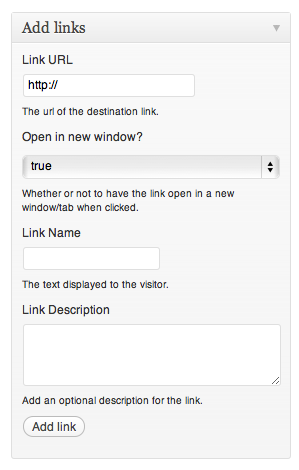
The new section that is added to the add/edit page screen.

The new section that is added to the add/edit page screen.

Add at least a url and name and hit "Add link". Your link then shows up at the bottom of this section.

Add at least a url and name and hit "Add link". Your link then shows up at the bottom of this section.

Multiple links are no problem and the handy trash icon allows you to quickly delete a link.

Multiple links are no problem and the handy trash icon allows you to quickly delete a link.

Choose the widget titled "Add links to page".

Choose the widget titled "Add links to page".

The widget! Add a title of your choosing.

The widget! Add a title of your choosing.

The widget will render in style with your site perfectly.

The widget will render in style with your site perfectly.

Plugin Details

Active Installs
40
Total Downloads
13,437
Version
0.2
Requires WP
3.0
Requires PHP
Tested Up To
3.2.1
Added
2011-08-03
Last Updated
2011-08-26 8:27am GMT

Ratings

5
1
4
0
3
0
2
0
1
0