
Admin Posts Navigation solves a common WordPress admin workflow problem: having to go back to the post list every time you want to edit the next or previous post.
Key Features:
- Seamless Navigation: Navigate directly between posts without returning to the post list
- Customizable Sorting: Choose between Date Published, Alphabetical, Post ID, or Sort Order (the manual order used by the page Order attribute and plugins such as Simple Custom Post Order)
- User Preferences: Each user’s sort preferences are saved per post type
- Universal Support: Works with posts, pages, and all custom post types automatically
- Dual Editor Support: Full compatibility with both Classic Editor and Gutenberg Block Editor
- Smart Ordering: Sort Order by default for pages and any post type with a manual order; Date Published for everything else
- Position Tracking: Shows your current position (e.g., “Position: 3 of 15 posts”)
- Security First: Rate limiting, nonce verification, and capability checks
- Performance Optimized: Intelligent caching and optimized database queries
- Developer Friendly: Multiple filter hooks for customization
How It Works:
In the Classic Editor, navigation buttons appear below the post title with a sorting dropdown that lets you choose between Date Published, Alphabetical, Post ID, or Sort Order.
In Gutenberg, a “Post Navigation” panel appears in the Document Settings sidebar with Previous/Next buttons and a sorting dropdown for customizing the navigation order.
Sorting Options:
- Date Published: Navigate by publication date, newest first
- Alphabetical: Navigate by post title in alphabetical order (A-Z)
- Post ID: Navigate by WordPress post ID in ascending order
- Sort Order: Navigate by the manual order (menu order) — the page “Order” attribute, or the drag-and-drop order set by plugins such as Simple Custom Post Order. This is the default for pages and for any post type those plugins manage.
Each user’s sorting preference is remembered per post type, so you can have different sorting for posts vs. pages vs. custom post types.
Perfect For:
- Content managers editing multiple posts in sequence
- Bloggers reviewing and updating existing content
- Developers working with custom post types
- Anyone who finds the default WordPress admin workflow tedious
The plugin automatically detects all your custom post types and provides navigation for any content type you can edit.
Developer Hooks
Filters:
twf_admin_posts_navigation_excluded_types– Exclude specific post types from navigationtwf_admin_posts_navigation_orderby– Customize ordering for specific post types (receives WP_Query array form, e.g.array('menu_order' => 'ASC', 'title' => 'ASC'); returning a string is still supported)twf_admin_posts_navigation_order– Sort direction, used only whentwf_admin_posts_navigation_orderbyreturns a stringtwf_admin_posts_navigation_query_args– Modify the query arguments for finding poststwf_admin_posts_navigation_default_sort– Default sort method for a post type (date,alphabetical,post_id,menu_order)twf_admin_posts_navigation_max_posts– Maximum posts considered per type (default-1, all)
Example Usage:
`php
// Exclude a custom post type
add_filter(‘twf_admin_posts_navigation_excluded_types’, function($excluded) {
$excluded[] = ‘my_private_post_type’;
return $excluded;
});
// Custom ordering for events (array form, one direction per column)
add_filter(‘twf_admin_posts_navigation_orderby’, function($orderby, $post_type) {
if ($post_type === ‘event’) {
return array(‘meta_value’ => ‘ASC’, ‘ID’ => ‘ASC’);
}
return $orderby;
}, 10, 2);
// Always navigate products in Sort Order by default
add_filter(‘twf_admin_posts_navigation_default_sort’, function($default, $post_type) {
return $post_type === ‘product’ ? ‘menu_order’ : $default;
}, 10, 2);
// Navigate only through featured posts
add_filter(‘twf_admin_posts_navigation_query_args’, function($args, $current_post) {
if ($current_post->post_type === ‘post’) {
$args[‘meta_query’] = array(
array(
‘key’ => ‘featured_post’,
‘value’ => ‘1’,
‘compare’ => ‘=’
)
);
}
return $args;
}, 10, 2);
`
Screenshots
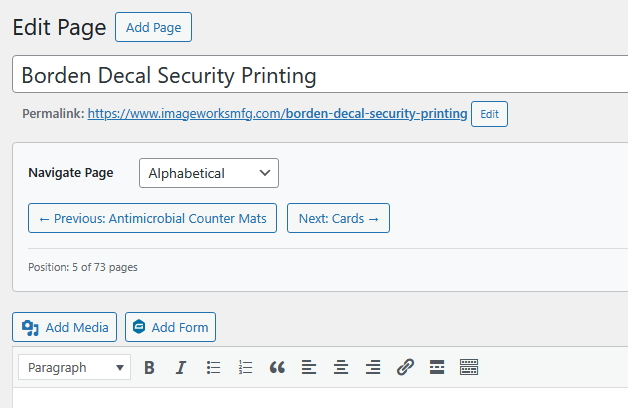
Classic Editor navigation buttons with sorting dropdown below the post title
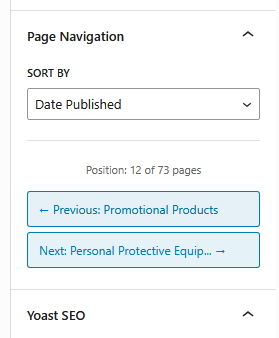
Gutenberg navigation panel with sorting control in the Document Settings sidebar
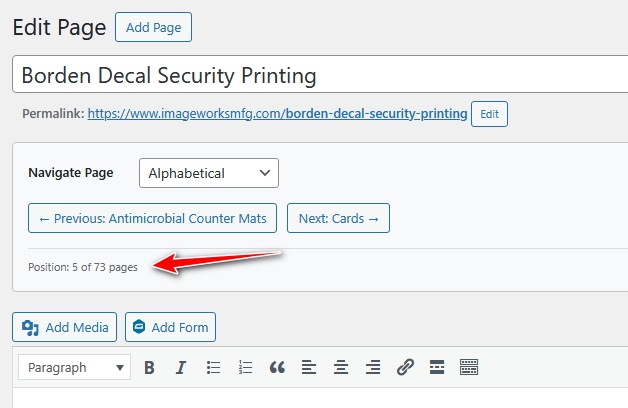
Position counter showing current location in post sequence
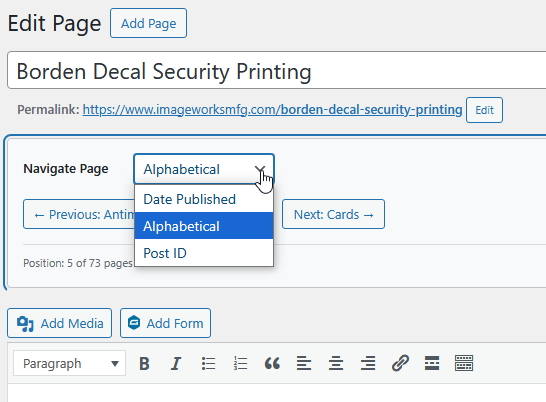
Sorting dropdown with Date Published, Alphabetical, Post ID, and Sort Order options