
AdPriva verifies your traffic with cryptographic proofs so you can tell real, human visits from
abusive bots. Install the plugin, click Connect with AdPriva (a secure OAuth sign-in — no API keys
to copy), and the plugin will:
- Register and verify your site with AdPriva automatically.
- Provision a site placement and load the AdPriva verification tag on your site from the AdPriva CDN.
- Show a traffic & validity summary right on your WordPress dashboard, with a link to your full
AdPriva console.
The plugin is self-sufficient inside wp-admin:
- Settings page — control where the tag loads (post types, exclude logged-in users,
administrators, or specific URLs), choose whether the tag waits for visitor consent (consent
mode), toggle the dashboard widget, and (advanced) override the AdPriva endpoints. Consent
plugins can suppress the tag through theadpriva_should_load_tagfilter. - In-admin dashboard — KPI cards, a human vs. bot verdict breakdown, and a trend chart over the
last 7, 30, or 90 days, all without leaving WordPress.
No personal data about your visitors is collected by this plugin. Verification happens server-side at
AdPriva using privacy-preserving signals.
Connecting
After activating, open the AdPriva menu in wp-admin and click Connect with AdPriva. You will be
sent to AdPriva to approve the connection for your organization, then returned to your site — connected.
External services
This plugin connects to AdPriva, a third-party service, to verify your traffic. This is required for
the plugin to function.
1. AdPriva API — https://api.adpriva.com
Used to: complete the “Connect with AdPriva” sign-in (OAuth 2.0 authorization-code with PKCE), register
and verify your site’s domain, provision a site placement, and fetch your traffic summary and per-day
trend for the dashboard widget and the in-admin dashboard.
Data sent: your site’s domain, the OAuth authorization parameters, and the access token issued to this
install. No visitor personal data is sent by the plugin.
Terms: https://adpriva.com/terms — Privacy Policy: https://adpriva.com/privacy
2. AdPriva verification tag (CDN) — https://cdn.adpriva.com/tag.js
Used to: load the lightweight verification tag on your site’s front end so AdPriva can verify
traffic. The tag identifies your site by its domain. The script is served from AdPriva’s CDN and
loads asynchronously. Before 1.3.0 the plugin loaded it from https://cdn.adpriva-ads.com/tag.js,
which serves the same file and stays available (Settings Advanced Tag script URL).
Terms: https://adpriva.com/terms — Privacy Policy: https://adpriva.com/privacy
3. AdPriva ingest server — https://ingest.adpriva.com
Used by the tag (in your visitors’ browsers, not by the plugin) to send one page-view event per page
load. A tag loaded from the legacy https://cdn.adpriva-ads.com/tag.js sends to
https://server.adpriva-ads.com instead, the same service under its old name. Data sent: aggregate interaction counts, automation hints, a low-detail device snapshot (screen
and window size, platform, colour depth), the page path and the referrer. Like any web request, it
also reaches the server with the visitor’s IP address and browser user agent. With the consent mode
set to TCF or Manual, the tag sends nothing until the visitor consents.
Terms: https://adpriva.com/terms — Privacy Policy: https://adpriva.com/privacy
Privacy
- The plugin stores a single option in your database holding the AdPriva connection: access/refresh
tokens (encrypted at rest using your site’s WordPress salts), your placement ID, and your domain. - The plugin does not set cookies and does not collect or store your visitors’ personal data.
- You can disconnect at any time from the AdPriva settings page; this revokes the access token and
deletes the stored connection. Uninstalling the plugin removes all stored data. - Respecting consent: the tag only loads when connected and when your Settings Tag targeting rules
allow it, and a consent/privacy plugin can always suppress it via theadpriva_should_load_tag
filter (the filter is the final override). - Consent mode (Settings Visitor consent): with TCF the tag waits for consent from your IAB TCF
v2 consent banner; with Manual it waits until your site callsAdPriva.grantConsent(). In both
modes it sends nothing before consent and stops when consent is withdrawn. Off (the default)
starts the tag at page load. The plugin prints the chosen mode on the tag’s script in every mode,
Off included, so it always wins over a consent preset set elsewhere on the page. - Settings are stored in a separate
adpriva_settingsoption; they contain no visitor data.
Screenshots

The AdPriva dashboard — KPI cards, verdict breakdown, and a trend chart, inside wp-admin.
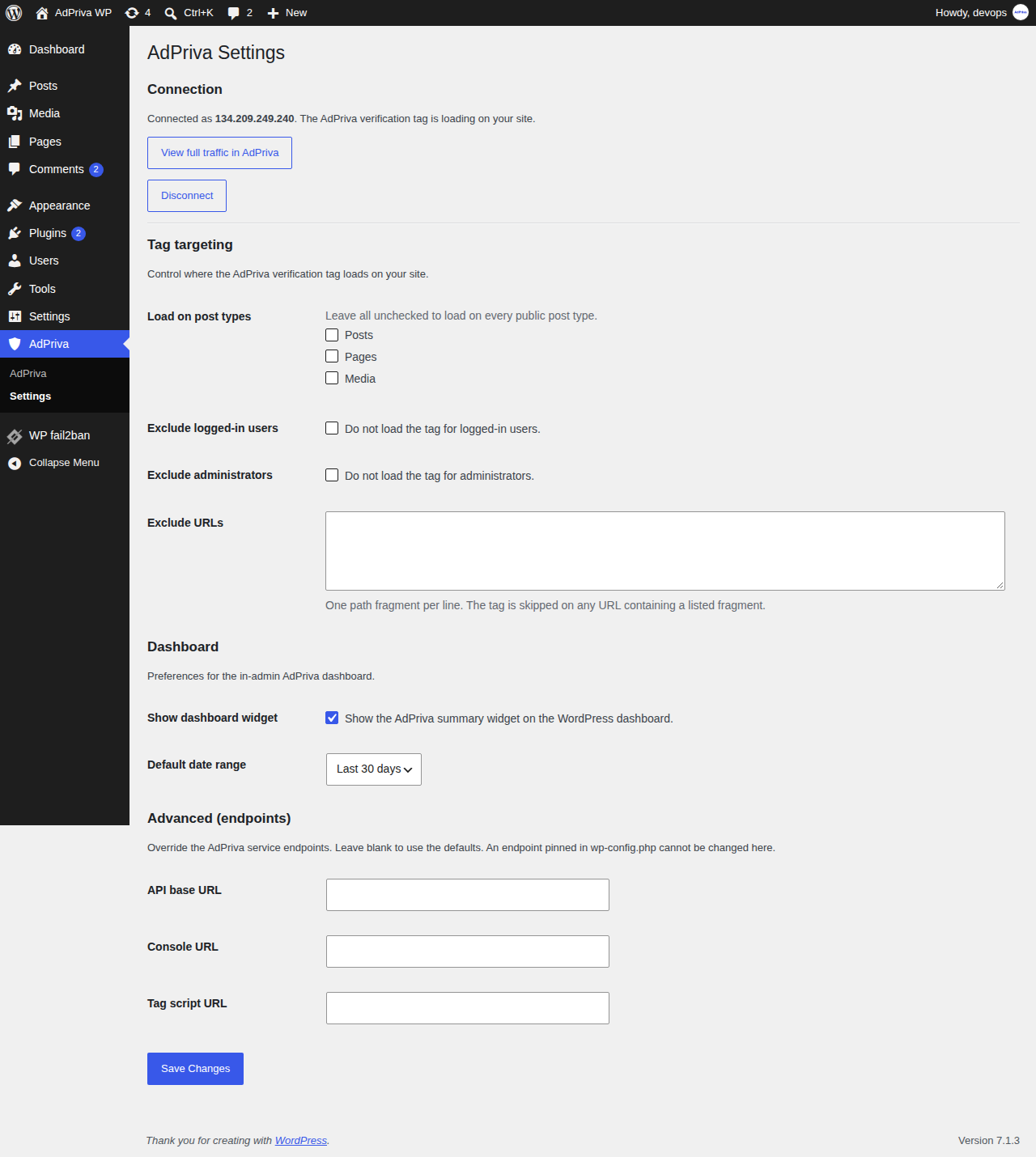
The AdPriva Settings page — tag targeting, dashboard, and advanced endpoint controls.

The AdPriva dashboard widget — verified events with a human vs. abusive-bot breakdown.