Agent Abilities for MCP – Connect Claude and ChatGPT with Permission Controls and Audit Log
by Unaib Amir
WordPress MCP server for ChatGPT and Claude, with limited access and an audit log
Agent Abilities for MCP connects ChatGPT, Claude, Cursor and other AI agents to your WordPress site over the Model Context Protocol (MCP), through 179 curated WordPress abilities (tools). The agent acts as a real WordPress user you choose, never with an admin key, so it can only do what that user’s role allows. Run it on one site or on several, each with its own user, switches and audit log. It is built on the WordPress 6.9 Abilities API and comes with the official MCP Adapter bundled, so there is nothing else to install.
Nothing this plugin serves is exposed until you turn it on. Every call to this plugin’s tools is checked against the chosen user’s permissions and written to the audit log before it runs, denied attempts included. An Editor account can write and publish posts but cannot install plugins or change settings, so you add reach as you build trust. To approve new posts before they go live, switch on Force draft and review what the agent wrote on the Needs review card on the Dashboard. See External Services below for exactly what the plugin can reach on its own.
Quick links: Website | Documentation | Getting started | Supported clients | Prompt Library | GitHub
What is a WordPress MCP server?
A WordPress MCP server lets an AI assistant work on your site directly, instead of copying text between a chat window and wp-admin. MCP (Model Context Protocol) is an open standard that tells an AI client which tools a service offers and how to call them, so Claude, ChatGPT, or any other MCP client can list your posts, draft one, or update a WooCommerce order.
Short walkthrough:
What people use it for
- Run several sites from one AI chat. Install it on each site and add each one to ChatGPT or Claude as its own connector. Each site keeps its own user, its own switches and its own audit log, so an agency can hand one client’s site to the agent without touching the others.
- Let ChatGPT or Claude write and edit posts without admin access. Connect the agent as an Editor, Author or Contributor account. It can only do what that role can do in wp-admin.
- Have the agent save drafts for you to approve. Turn on Force draft on create and anything the agent creates or tries to publish is saved as a draft. The Needs review card on the Dashboard lists the drafts and pending posts an agent starts, with Preview, Open in editor, Publish and Discard (Discard moves the post to the Trash). To stop it changing posts that are already live as well, connect it as a Contributor.
- Let AI read your site without changing anything. Read-only mode stops every write tool from loading, including write tools you have bridged from your other plugins.
- Tell the agent about your site once. Write a few lines in Site Brief on the Settings tab, for example your house style or what to leave alone. This plugin sends it to every agent that connects, when its session starts.
- Find out why an agent cannot connect. Connection Doctor on the Connection tab checks the connection from your own server and names the fix, for example a host that strips the Authorization header.
- Fix typos and refresh old posts. The agent can search your posts, read one and update it, and every step through this plugin is logged.
- Use your other plugins through the agent. Plugins that register WordPress abilities, such as WPForms, show up on the Other plugins screen and stay off until you switch them on.
🛡️ Permission controls and an audit log on every call
- Least privilege by design. The AI agent connects as a real, scoped WordPress user through OAuth or an Application Password, never an admin-equivalent key.
- Off by default. None of this plugin’s tools are exposed until you enable them, and an update never switches one on. The one thing an update can change is the Adapter’s default server, which other plugins publish to. The FAQ explains it.
- Read-only mode. One switch stops every write ability from registering at all, whatever is ticked, abilities bridged from other plugins included, and your selections are untouched when you switch it back off. Tools another plugin publishes straight to the Adapter’s default server are outside it.
- Two-layer capability gating. A connection only sees the tools its user can call, and every call re-checks that capability before it runs. One exception: a tool bridged from another plugin whose own check needs an item id is listed to anyone who can edit posts, and that plugin’s check still decides every call.
- Per-role and per-connection allowlist. Narrow what one role, or one connection, can reach on top of the global list. The lists only narrow: an ability has to clear the global list, the role’s list, and that connection’s list before an agent can call it. A site that never opens the screen sees no change.
- Honest audit log. Every call to this plugin’s tools is recorded, denied attempts included, along with the user or connection that made the call, the argument keys, and a short identifier-only note of what it touched. Free-text argument content is never stored, and the log lives in your own database.
- Bounded by construction. No arbitrary option or meta access, no code execution. Uploads are validated by their real bytes against an image allow-list, and a URL upload refuses private, loopback, or link-local targets with no redirects followed. A new user gets the default role, never admin, and the last administrator can never be removed. Anything destructive is off by default, capability-gated, and routed to Trash where supported.
- Optional safety controls. Switch on a per-minute rate limit, an IP allowlist, a force-to-draft mode, or a title-length cap. All four stay off until you set them.
- No content leaves your site. The plugin contacts no AI provider and has no telemetry; see External Services below for the two outbound requests it can make on its own.
- Two ways to connect. Approve an agent over OAuth (no secret in a config file) or point a dedicated low-privilege user at an Application Password; a guided screen builds the config for you. An Application Password is a whole-site credential scoped only by that user’s role, so this plugin’s own limits (allowlist, high-risk floor, audit log) apply only to calls through its MCP endpoint. OAuth has no such limit, since a token this plugin issues only ever authenticates this one endpoint.
🤖 Built on the WordPress Abilities API and MCP Adapter
WordPress 6.9 ships the Abilities API. The official MCP Adapter (wordpress/mcp-adapter) comes bundled with this plugin, so you do not install it separately. If the standalone Adapter plugin is active too, this plugin works with whichever copy loads first, from 0.6.1 through 0.7.x. Agent Abilities for MCP registers a curated, governed set of abilities on top of them rather than inventing its own protocol or server, so there’s no bespoke transport to trust. A Settings switch (Automatic, Always on, Always off) controls the Adapter’s default server, which other plugins can publish tools to. Automatic, the default, starts it only when another plugin publishes tools there, and this plugin’s own tools never appear on it.
📦 179 governed abilities
The plugin ships 179 governed abilities: 85 across WordPress core and 94 from auto-detected integrations, every one off until you enable it, scoped, capability-gated, and logged. It can also bridge abilities from your other plugins (see below).
WordPress core (85 abilities). Reads plus guarded writes across your whole site:
- 📝 Posts & Pages: list, read, create, update, and delete, with destructive actions off by default and deletes routed to Trash.
- 🏷️ Terms & Taxonomies: manage categories, tags, and custom taxonomy terms.
- 💬 Comments: read and moderate the comment queue.
- 🖼️ Media: list and read the library, and add images from inline data or an HTTPS URL, validated by their real bytes against an allow-list.
- 🗂️ Post Meta: read and write only administrator-allowlisted meta keys; protected, underscore-prefixed, and authentication keys can never be allowlisted.
- 👥 Users: read and manage users within capability limits; a new user gets the default role, never admin, and the last administrator can’t be removed.
- 🧭 Site structure: work with menus and the structural pieces that hold the site together.
- 🕓 Revision history: read the revision trail for content.
- 🧱 Blocks & Templates: work with reusable blocks, themes, and templates.
- ⚙️ Limited settings & site health: a tightly scoped set of settings, plus read-only site health and plugin status.
- 🔍 Site-wide search: one search that spans every post type at once.
Integrations (94 abilities). Detected automatically per active plugin, off until you turn them on, capability-gated, logged, and only present while that plugin is active:
- 🛒 WooCommerce MCP (52 abilities): read and write products, orders, and customers to help run your store. These touch personal data (names, emails, addresses), so they sit behind a clear admin notice and stay off until enabled.
- 🧩 Advanced Custom Fields (7 abilities): read and write ACF field data; like WooCommerce, these can reach personal data and sit behind the same notice.
- 📈 Rank Math SEO (5 abilities): read and manage Rank Math SEO data.
- 📈 Yoast SEO (3 abilities): read and manage Yoast SEO data.
- 📈 All in One SEO (3 abilities): read and manage AIOSEO data.
- 📅 The Events Calendar (13 abilities): read and manage events, venues, and organizers.
- 🎫 Event Tickets (3 abilities): read tickets and attendees for an event. No ticket-purchase write is exposed.
- 📈 Slim SEO (2 abilities): read and manage Slim SEO data.
- 🎨 Avada / Fusion Builder (2 abilities): read a page’s raw Fusion Builder markup and replace text without disturbing the shortcode layout.
- 📍 GeoDirectory (4 abilities, off by default): read and manage business and place listings; stays off even when active, turn it on in the Integrations tab.
🔗 Abilities from your other plugins (new in 1.1.0)
WordPress 6.9 lets any plugin register its own abilities, not just this one, and Agent Abilities for MCP can bring those in too. Abilities from other active plugins appear on a dedicated Other plugins screen, grouped by plugin, every one off until you enable it – then it becomes a governed MCP tool under the same rules as the built-in catalog: scoped, capability-checked, rate-limited, and logged with identifiers only.
One limit worth knowing: since it’s the other plugin’s code doing the work, WordPress can only check a bridged ability’s answer against a description if that plugin publishes one. The governance above (permissions, scoping, rate limiting, the audit log) applies in full either way.
Some plugins skip this screen and publish tools straight to the Adapter’s default server. Those tools are outside this plugin’s controls (see the FAQ on the default server).
Any plugin that speaks the Abilities API can be handed to your agent, with a whole plugin’s set toggled at once. The bundled WP-CLI command wp aafm catalog export prints a site’s discoverable abilities as JSON.
Page builder pages: refused, not silently broken
Elementor, Divi, Beaver Builder, and Avada keep their layout outside the normal post content, so a write that reports success can leave the front end exactly as it was. Since 1.7.4 the plugin checks before it writes and refuses the call with an error naming the builder that owns the page. This is a guard, not an integration with any of them, and OptimizePress is not covered yet.
Connect Claude to WordPress
Install the plugin, switch on the abilities you want Claude to have, add your site’s MCP endpoint as a custom connector in Claude, and approve the OAuth sign-in once. No API key or config file. The claude.ai app, Claude Desktop, and Claude Code share this flow, and Claude only ever acts as the WordPress user who approved it.
Connect ChatGPT to WordPress
Turn on Developer Mode in ChatGPT (Settings, then Connectors, then Advanced), add your site’s MCP endpoint as a custom connector, and approve it once over OAuth – a beta feature on ChatGPT’s paid plans, not the plugin’s limit. If it will not connect, run Connection Doctor on the Connection tab. ChatGPT then reaches only the abilities you switched on, acting as the WordPress user that approved the connection.
🔌 Supported AI platforms
Your AI client connects in over MCP; the plugin never calls out to an AI provider, so there’s no model API key to add. Anthropic Claude, OpenAI ChatGPT, Manus, and Google Gemini (via its CLI) all work today; the hosted Gemini app does not yet.
🧩 Compatible clients and frameworks
Any MCP client that can reach your endpoint can connect, over OAuth or with an Application Password.
- Hosted apps: ChatGPT, Claude, and Manus, by URL over OAuth.
- Editors and IDEs: Claude Code, Cursor, VS Code, and Windsurf.
- Command line: Gemini CLI.
- Bridged clients: the open-source
mcp-remoteor@automattic/mcp-wordpress-remotebridge runs on your machine for clients that cannot connect directly.
⚖️ Disclaimer
Model Context Protocol (MCP) is an open specification originally developed by Anthropic. Claude, ChatGPT, Cursor, VS Code, Gemini, and other product names are trademarks of their respective owners. Agent Abilities for MCP is a third-party plugin and is not affiliated with, endorsed by, or sponsored by any of them.
External Services
This plugin contacts no AI provider and includes no analytics or telemetry.
It makes two kinds of outbound HTTP request on its own: the Connection tab’s checks (a few requests your site makes to its own address, to see whether the MCP endpoint answers and, with OAuth on, whether the discovery documents load), and, only when you enable the off-by-default upload-media-from-url ability, a fetch of the exact HTTPS URL your AI client supplies so that file can be added to your media library. That fetch is SSRF-hardened against private, reserved, and redirect-based targets, and carries none of your content, credentials, or site data – it only reads what’s already public at that URL.
Connecting a client is done by the client, not this plugin. Some reach your endpoint directly; others use a bridge such as the open-source mcp-remote or @automattic/mcp-wordpress-remote, run on your own machine and not bundled with this plugin:
- mcp-remote: https://www.npmjs.com/package/mcp-remote
- @automattic/mcp-wordpress-remote: https://www.npmjs.com/package/@automattic/mcp-wordpress-remote
Screenshots
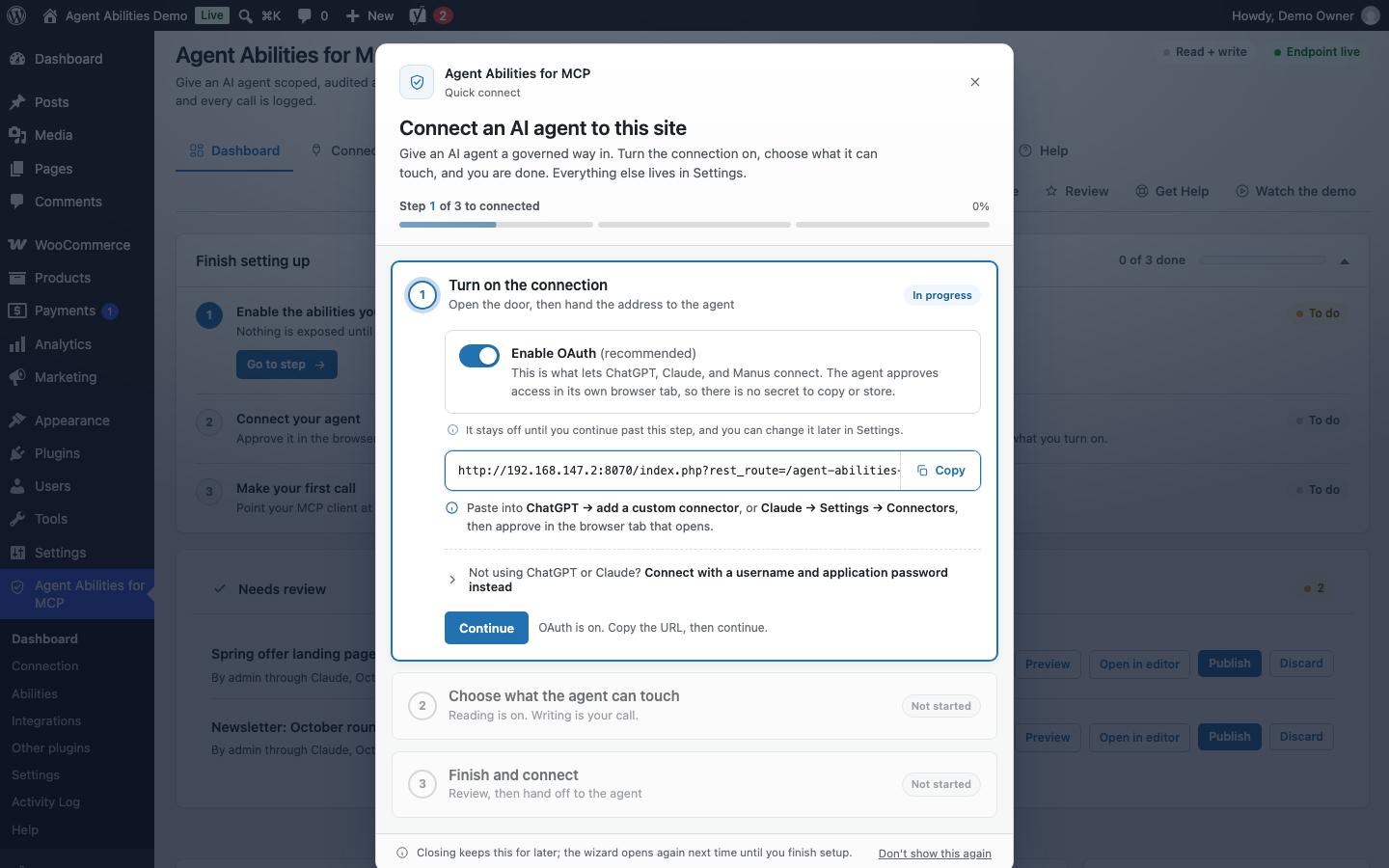
The first run walks you through connecting an agent in three steps: turn the connection on, choose what it can touch, then finish and hand the endpoint to your AI client.
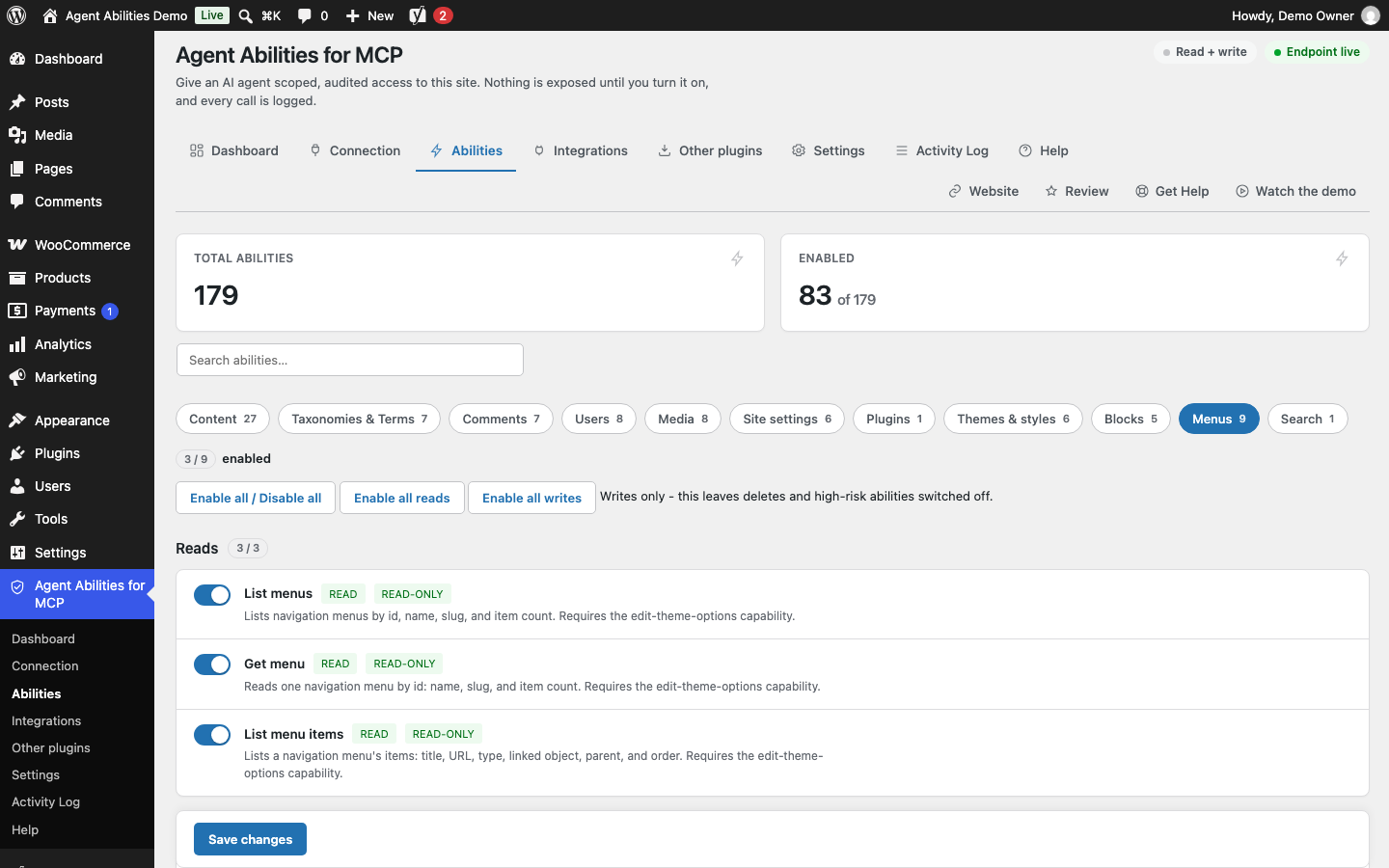
None of this plugin's 179 abilities is exposed until you switch it on. They are grouped by section, here Menus with its three reads on and its writes off, and each section has buttons to enable all reads or all writes at once.
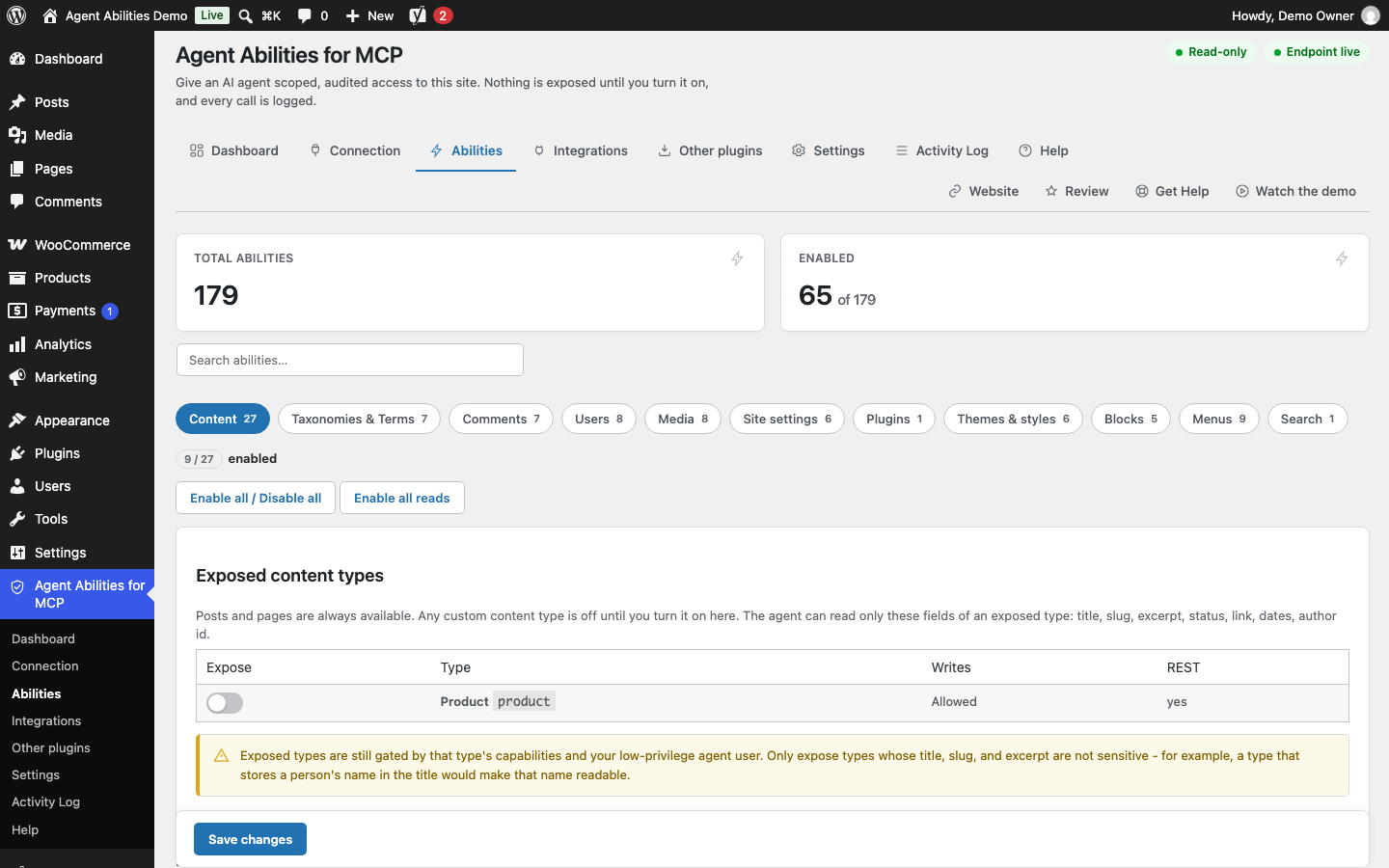
Read-only mode in force. The header badge reads Read-only and the Content section drops its Enable all writes button, because while the mode is on no ability that writes can be switched on.
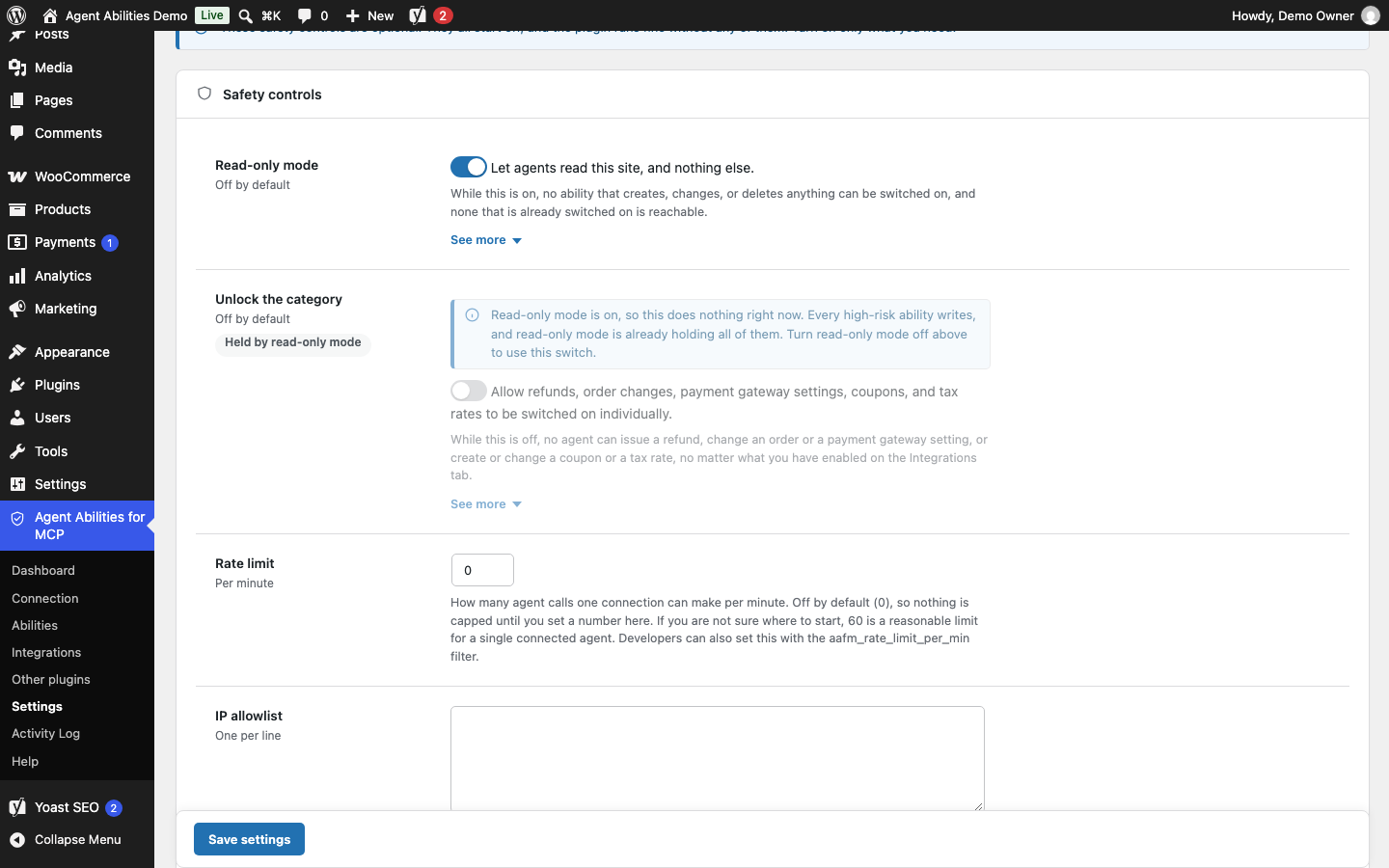
Read-only mode is a single switch under Safety controls on the Settings tab. While it is on, the high-risk unlock beneath it is held as well and says so instead of sitting there looking live.
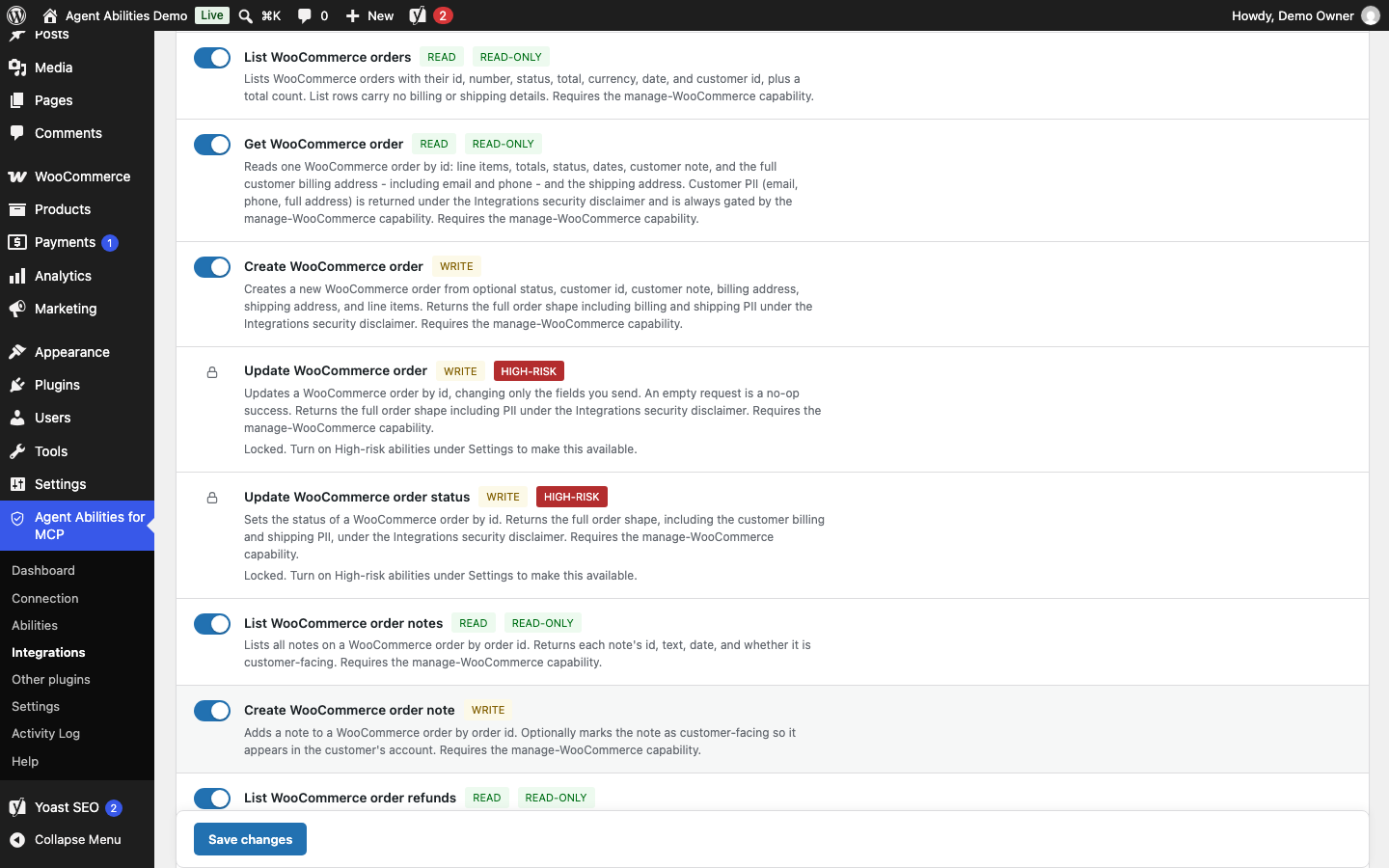
WooCommerce abilities that change orders, issue refunds, or touch payment settings stay padlocked behind a second switch on the Settings tab, sitting among ordinary writes you can turn on one at a time.
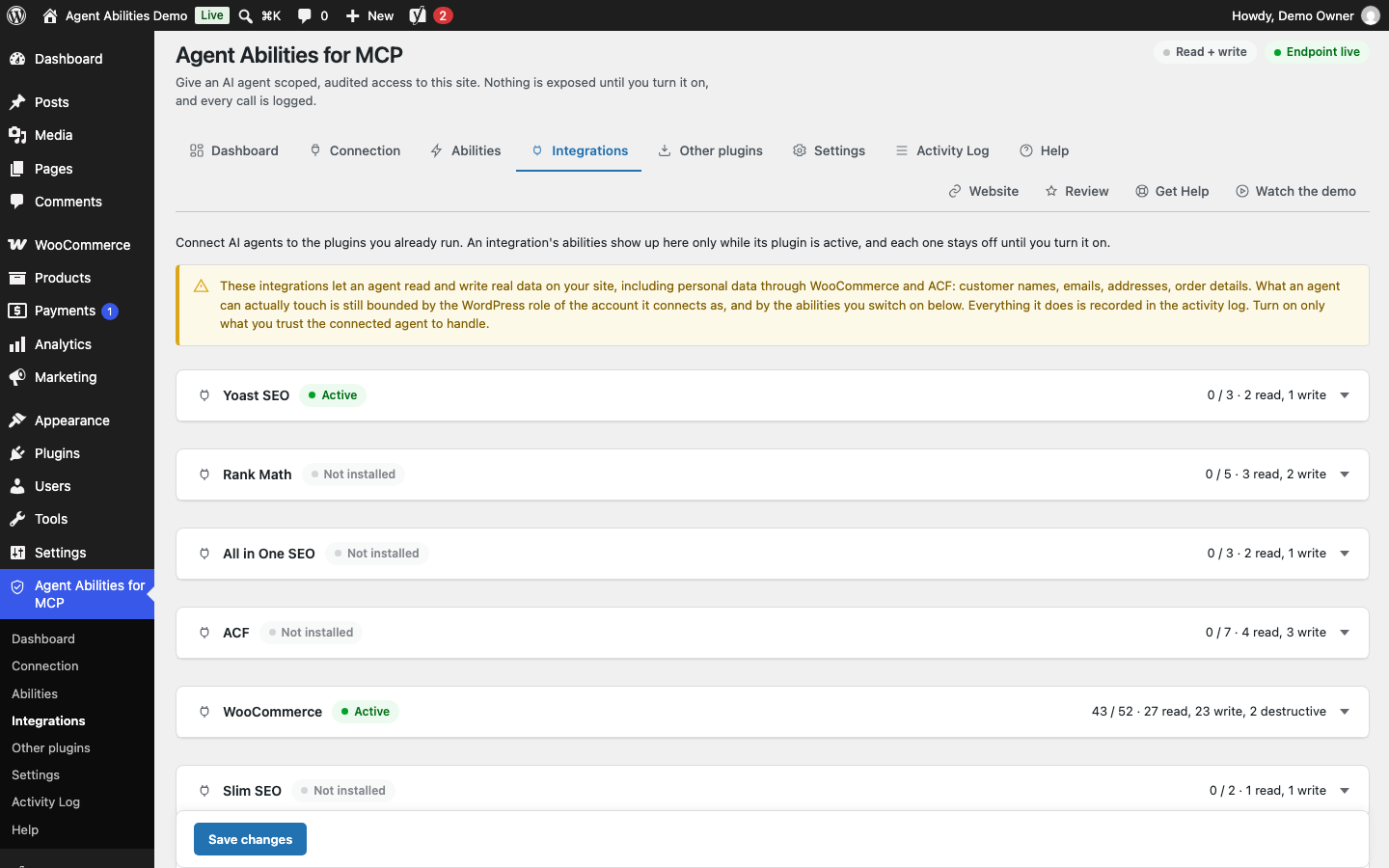
Each integration has a card that says whether its plugin is active and how many of its abilities are on. WooCommerce and Yoast SEO are active here, Rank Math, All in One SEO, ACF and the rest are marked Not installed, and every ability starts off until you turn it on.
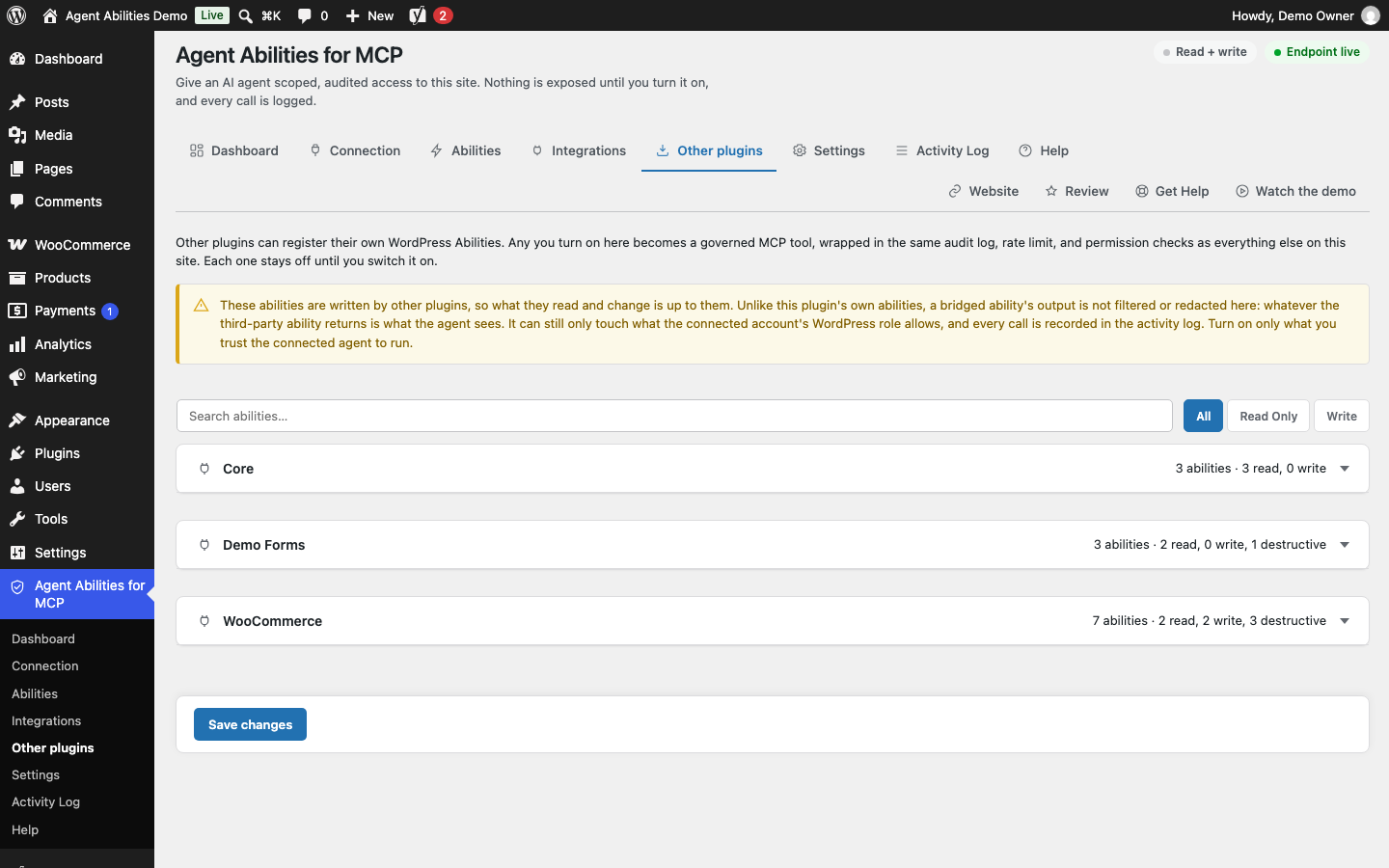
Abilities that other plugins register for themselves, grouped by the plugin that declared them and off until you turn them on. A warning reminds you that this plugin does not filter what a bridged ability returns.
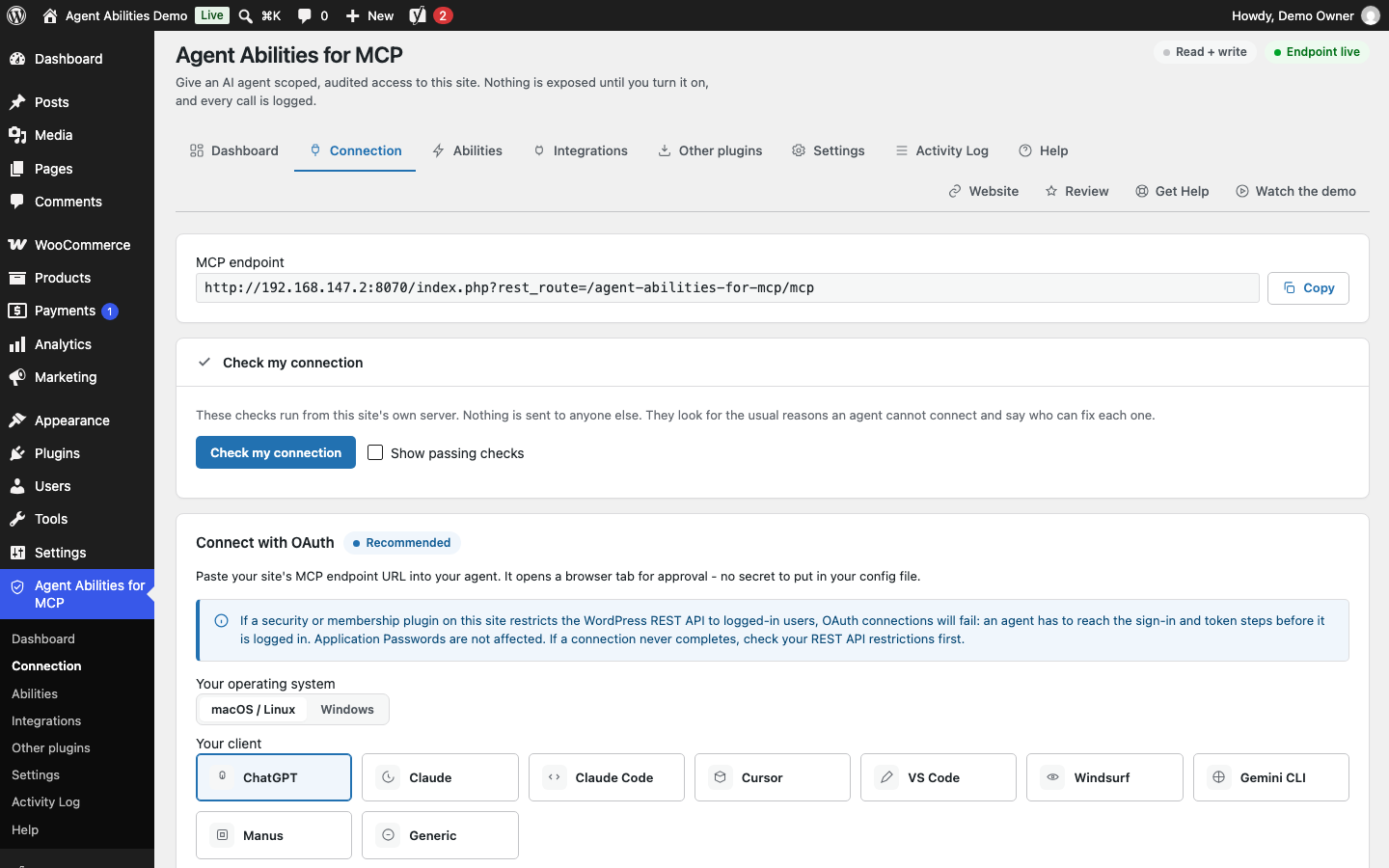
The Connection tab shows your MCP endpoint, a Check my connection button, and the OAuth route: pick your operating system and client, paste the endpoint into your agent, and approve it in the browser, with no secret to put in a config file.
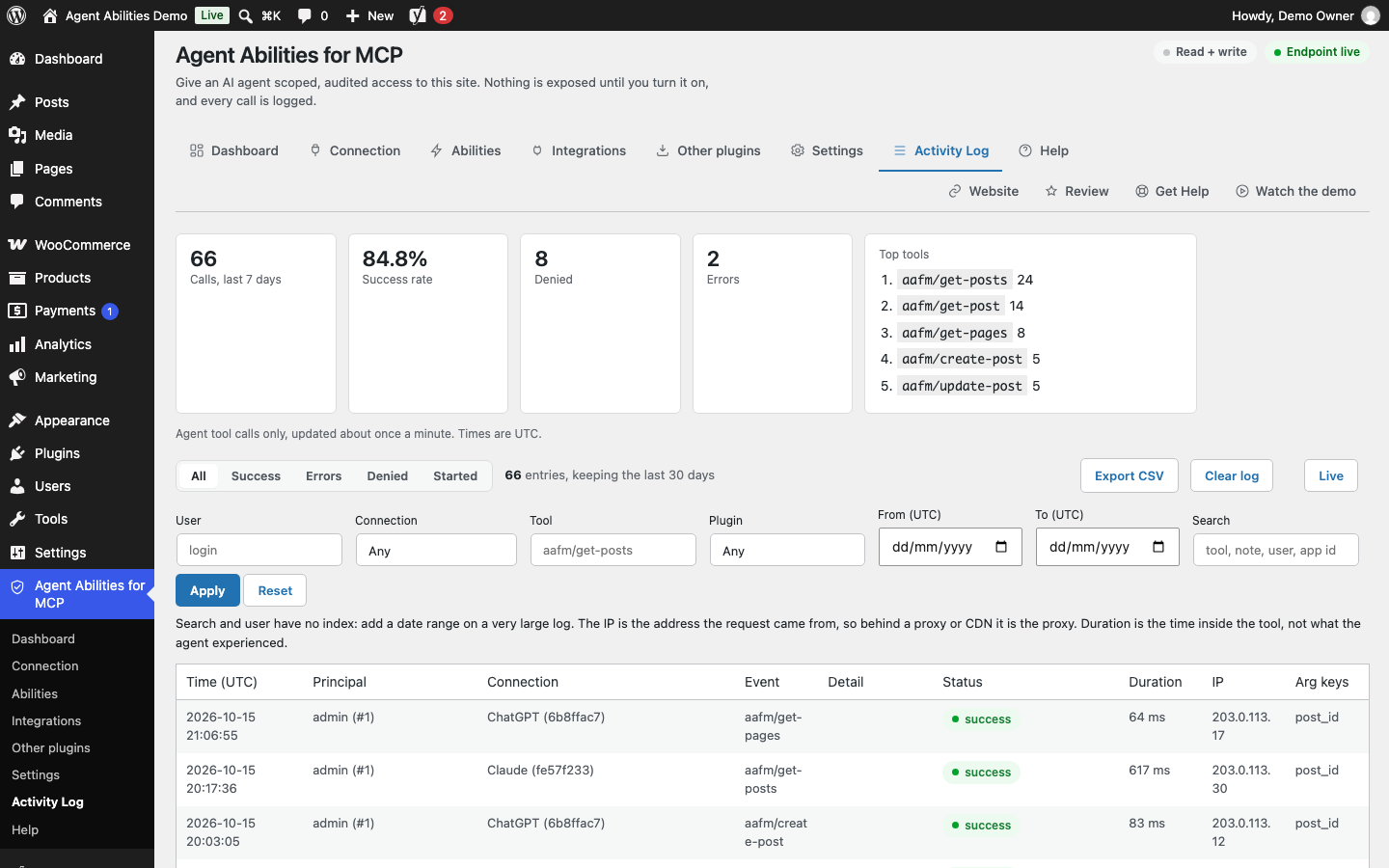
The Activity Log with a 7-day summary, filters for user, connection, tool, plugin, date and text, the connection and IP of each call, the duration of calls that ran, a Live view, and a CSV export that follows the filters.
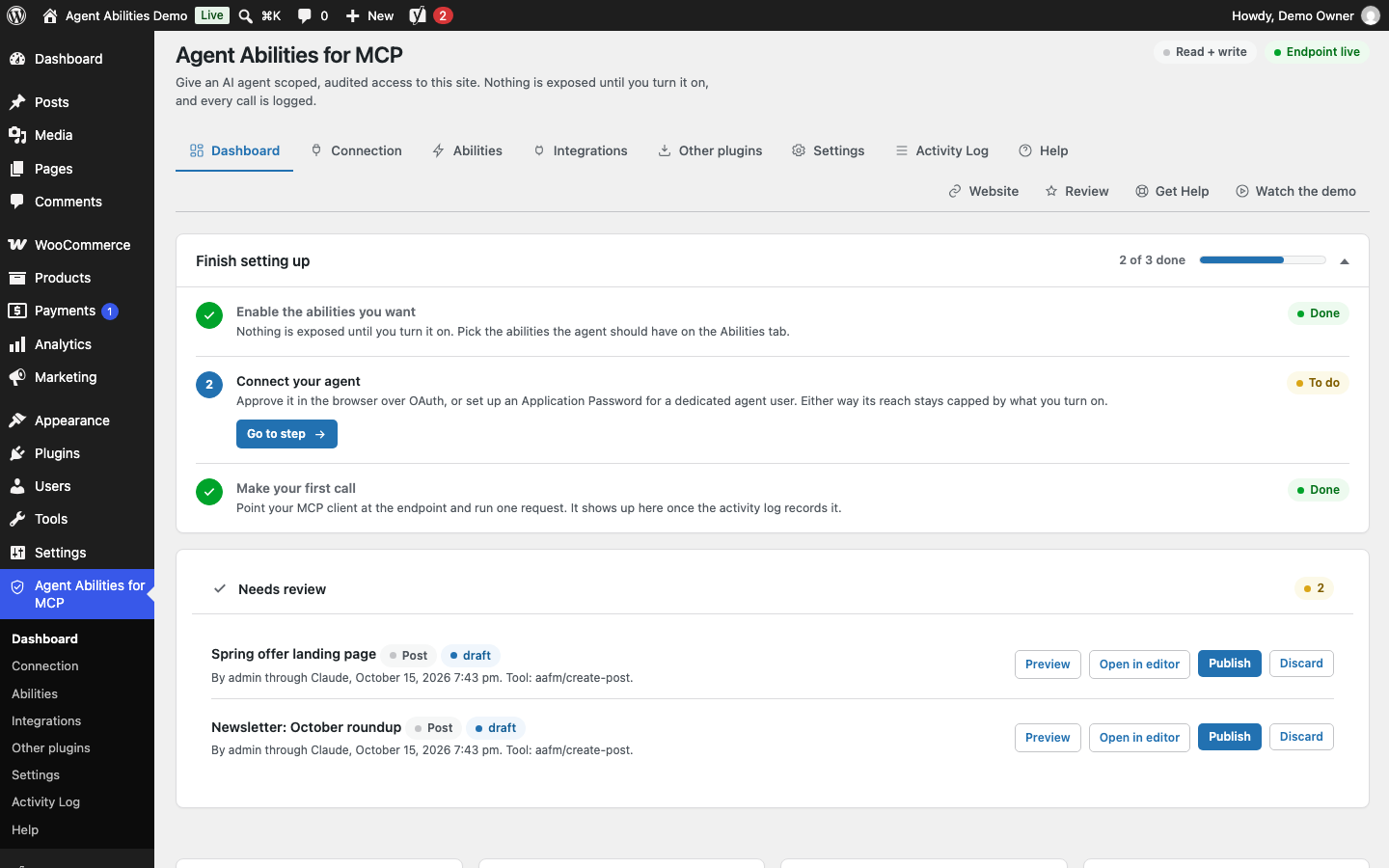
The dashboard opens with a setup checklist that ticks off as you go, then the Needs review card and, further down, enabled abilities, recent agents, audit history, your endpoint and the versions in play.
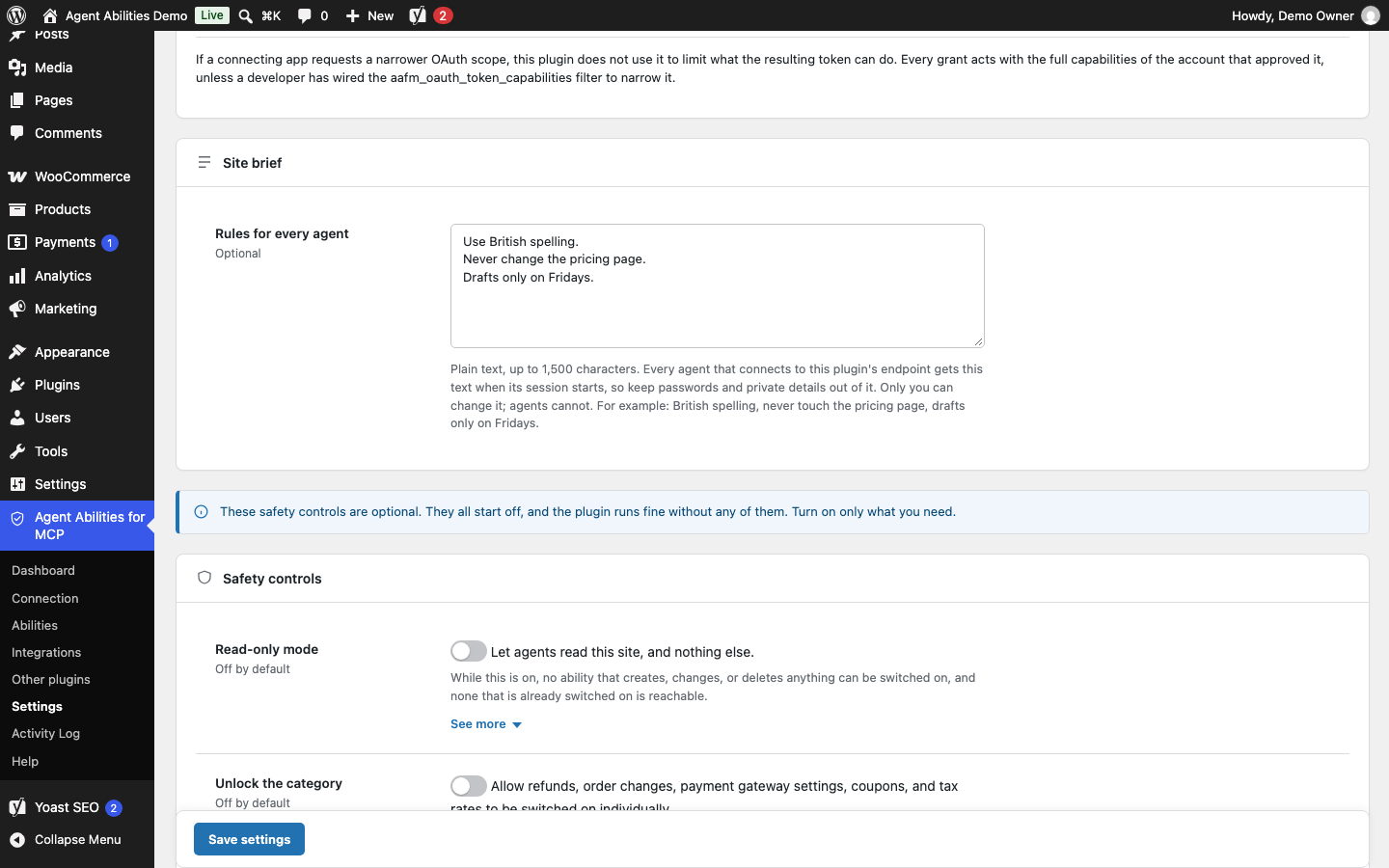
The Site Brief: a few plain rules every connected agent reads when its session starts, such as spelling and what to leave alone.
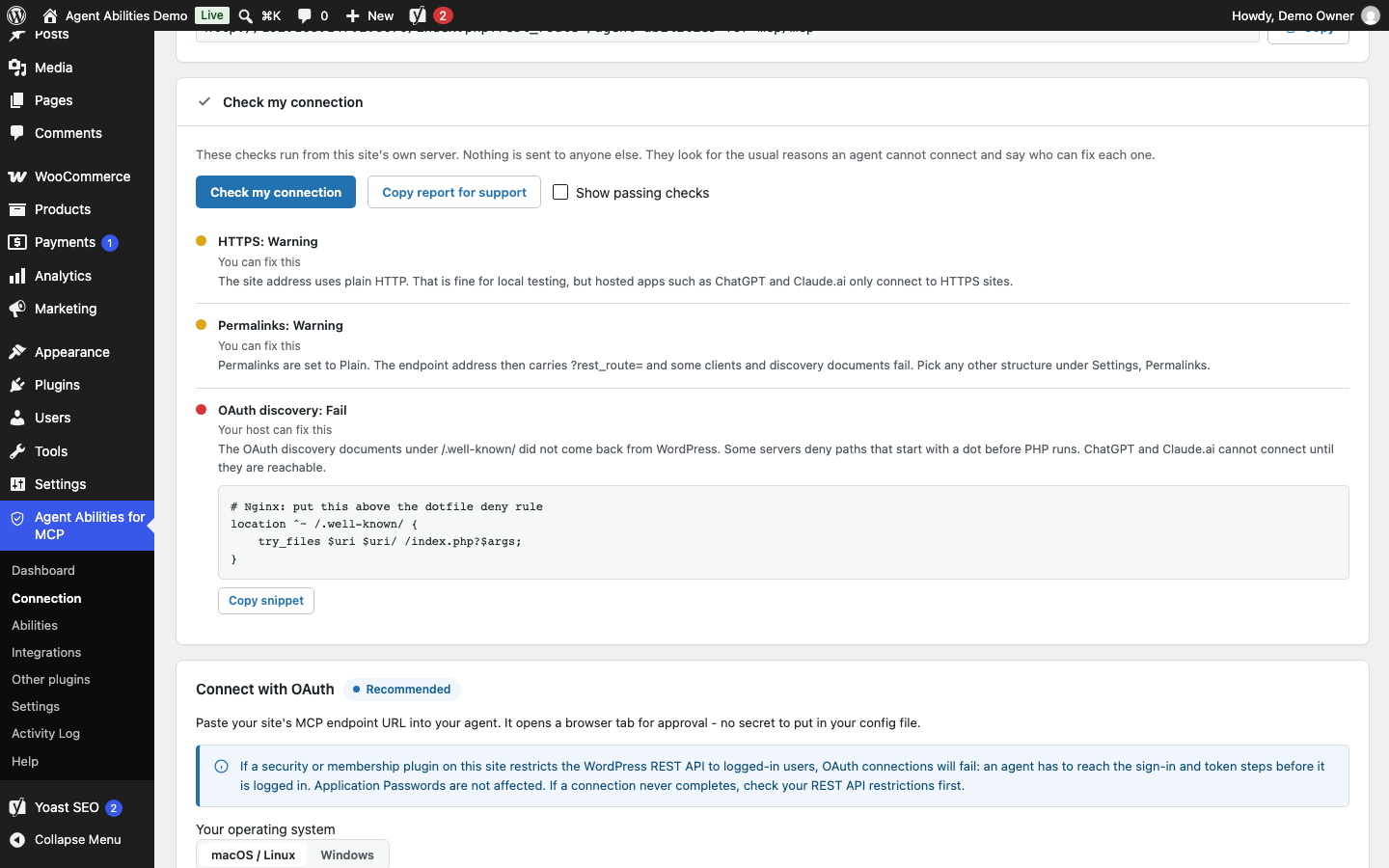
The Connection Doctor checks the connection from your own server and says what to fix. Each finding says whether you or your host can fix it, and some come with a snippet to paste.
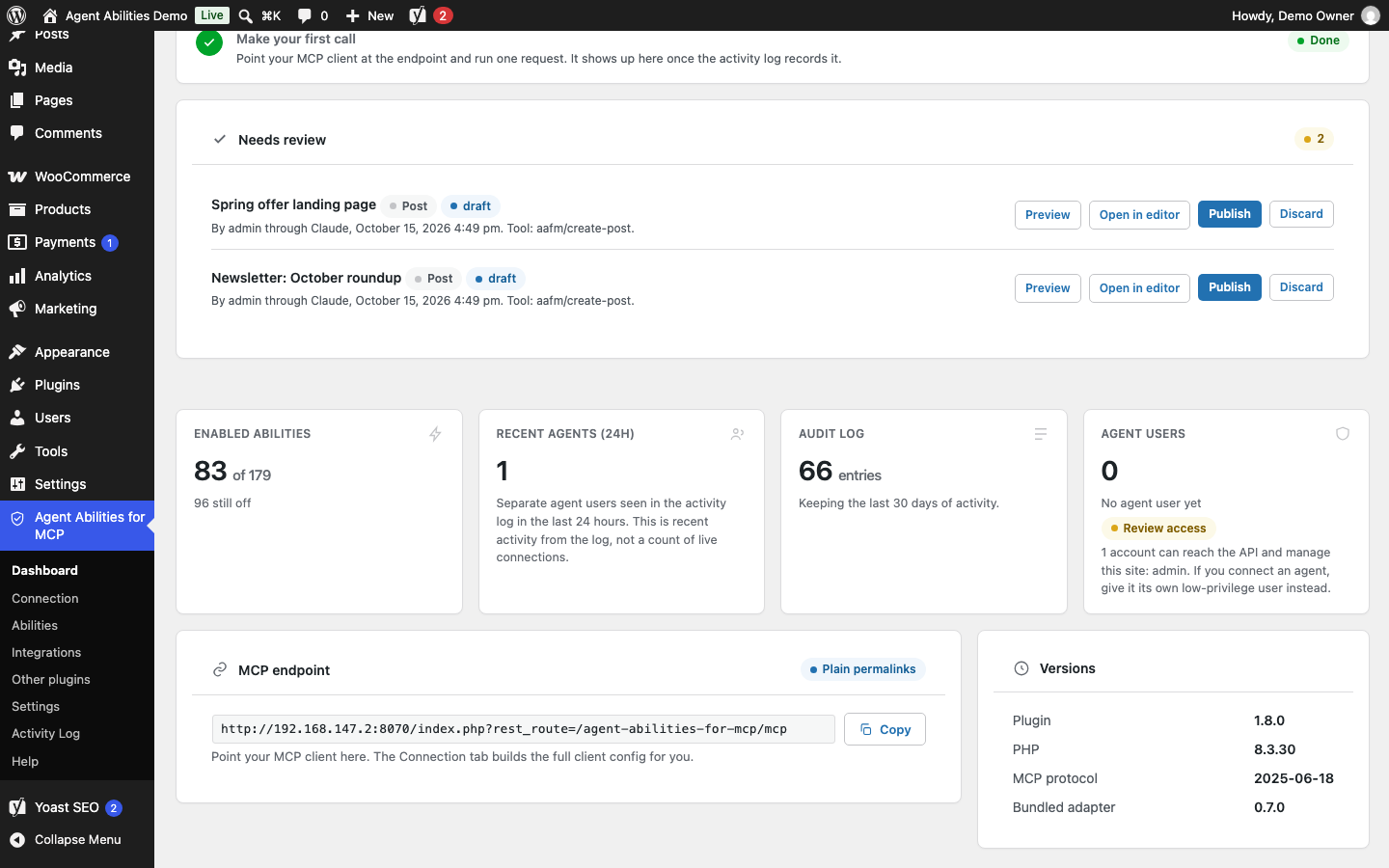
Needs review: drafts and pending posts your agents wrote wait here, with Preview, Open in editor, Publish and Discard.
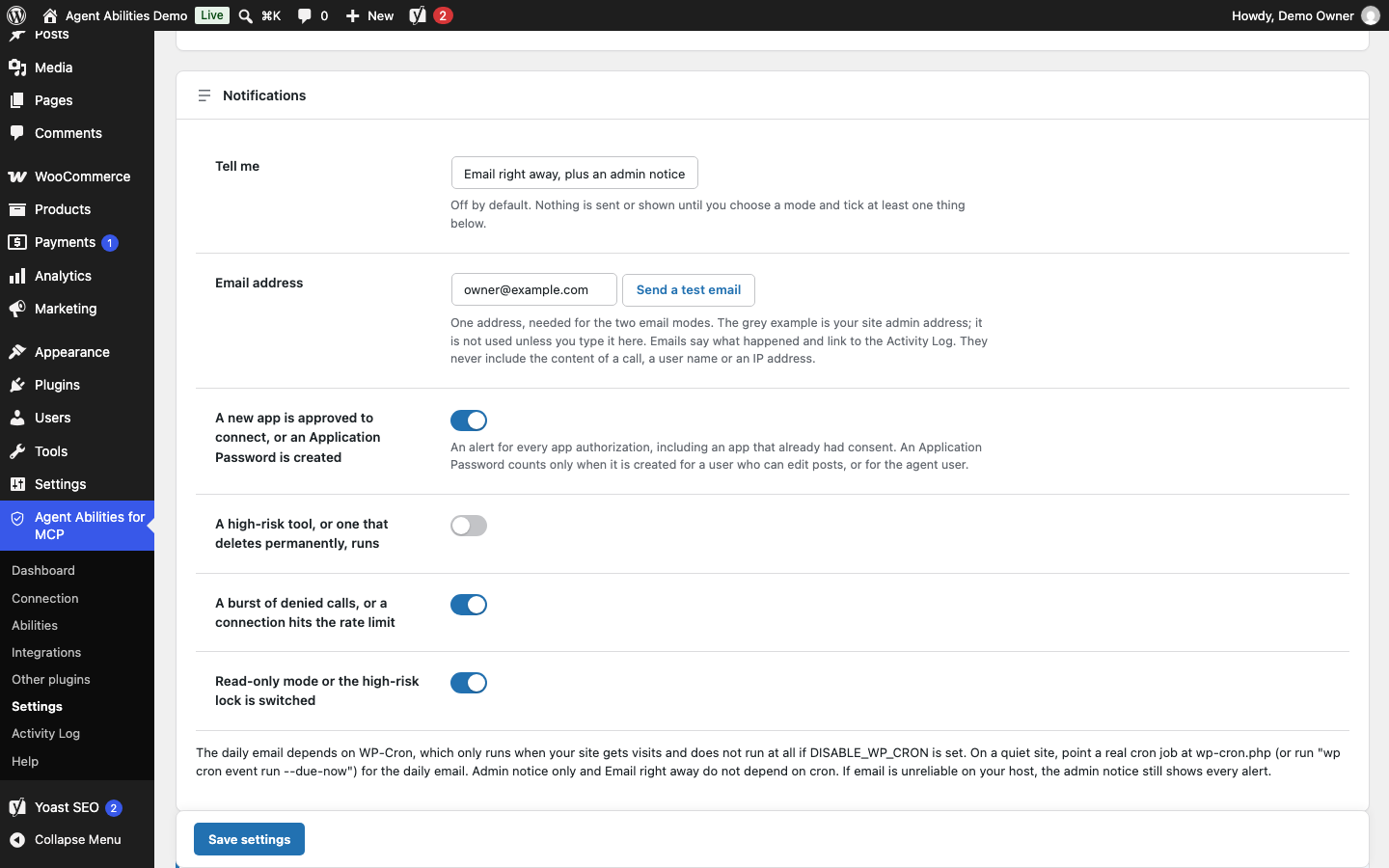
Notifications, off until you choose how to be told: an admin notice, an email right away or a daily email, for the events you tick.