AgeWallet adds age verification and age estimation to your WordPress website, with content gating and an age-gated checkout for WooCommerce. Verification is backed by the AgeWallet™ service over OpenID Connect (OIDC), giving your WordPress or WooCommerce store a compliant, privacy-respecting age gate that visitors complete once.
Whether you need document-based age verification, AI-assisted age estimation, or a full content-gating age gate, AgeWallet is straightforward to set up, fully customizable, and works on every WordPress host — including sites behind aggressive page caches (Cloudflare, Varnish, WP Rocket, LiteSpeed).
Age verification and age estimation methods
Multiple age-assurance methods are supported, so you can meet age-restriction requirements without collecting or storing sensitive identity data yourself. Every verification can carry an opaque metadata payload (≤4KB) that round-trips through the OIDC flow and surfaces on /userinfo, letting integrators correlate age checks with their own records.
Two protection modes
Standard (Overlay) hides gated content via a client-side overlay — SEO-friendly, works on any cached page. High Security (Strict) short-circuits the page entirely until the visitor passes age verification, using a cookieless “skeleton” template that pairs with “Cache Everything” CDN rules.
Built for WooCommerce
WooCommerce is supported out of the box: one Age verification choice per product (verify to view and buy, verify to buy only, follow the store’s rules, or never), a store-wide Checkout gating rule, and category and tag flags. Shoppers browse and add to the cart as usual; the cart and checkout pages ask them to verify, an order placed without verifying is refused before it exists, and the rest of your catalog stays open.
Flexible age-gate rules
Rules cover the whole site, individual URL paths, taxonomies (categories, tags, custom taxonomies), per-post overrides via the editor sidebar, and the [agewallet_protected] shortcode for inline content — so you gate exactly where your content needs it.
Fully customizable gate
Customize the age gate from the Gate Appearance tab (logo, copy, colours, button radii) and override anything else from Appearance Customize Additional CSS. Strict-mode analytics (Google Analytics 4, Google Tag Manager, Facebook Pixel) are configurable from the Strict Mode Analytics section of the Strict Mode Settings page.
For the full feature list see Other Notes. Setup walkthroughs, the CSS hook reference, and the developer hook list ship with the plugin — see AgeWallet Usage Guide, CSS Guide, and Developer Hooks in your WordPress admin.
External services
This plugin connects to one required third-party service and, optionally, to analytics services you choose to enable. Nothing is contacted until a visitor begins age verification (the AgeWallet service) or until you enter an analytics ID and use High Security (Strict) mode (the analytics services).
AgeWallet age-verification service (required)
The plugin’s core purpose is to verify a visitor’s age through the AgeWallet™ service using the OpenID Connect (OIDC) Authorization Code flow with PKCE. When a visitor starts verification, their browser is redirected to the AgeWallet authorization endpoint; the plugin’s server then exchanges the returned authorization code for the verification outcome and requests the result from the userinfo endpoint.
- Endpoints contacted:
https://app.agewallet.io/user/authorize,https://app.agewallet.io/user/token, andhttps://app.agewallet.io/user/userinfo. - Data sent: your site’s AgeWallet Client ID, a one-time authorization code, OIDC PKCE / state / nonce values, and an optional opaque metadata string that you configure (the plugin attaches no personal data of its own). The service returns only the pass / fail age-verification result.
- When: each time a visitor begins age verification on your site.
- This service is provided by AgeWallet LLC, which publishes separate Terms and Privacy policies for the two parties involved in a verification:
- Your visitors — the end users being verified: End-User Privacy Policy (https://agewallet.com/end-user-privacy-policy/) and End-User Terms & Conditions (https://agewallet.com/end-user-terms-conditions/).
- You — the site owner, an AgeWallet “Client”: Client Privacy Policy (https://agewallet.com/privacy-policy/) and Client Terms of Service (https://agewallet.com/terms-conditions/).
Google Analytics 4 and Google Tag Manager (optional)
Only if you enter a GA4 Measurement ID or a Google Tag Manager Container ID in the Strict Mode Analytics section of the Strict Mode Settings page, and only while High Security (Strict) mode is active, the plugin outputs Google’s official analytics snippet into the strict-mode loading screen (where your theme’s own tags cannot run). The plugin sends no data itself; the snippet is Google’s standard tag, executed in the visitor’s browser using the ID you supply.
- Loaded from:
https://www.googletagmanager.com. - This service is provided by Google. Terms of Service: https://policies.google.com/terms — Privacy Policy: https://policies.google.com/privacy
Facebook (Meta) Pixel (optional)
Only if you enter a Facebook Pixel ID in the Strict Mode Analytics section of the Strict Mode Settings page, and only while High Security (Strict) mode is active, the plugin outputs Meta’s official Pixel snippet into the strict-mode loading screen using the ID you supply. The plugin sends no data itself.
- Loaded from:
https://connect.facebook.net(with ahttps://www.facebook.comno-script fallback image). -
This service is provided by Meta Platforms, Inc. Terms of Service: https://www.facebook.com/legal/terms — Privacy Policy: https://www.facebook.com/privacy/policy/= Features =
-
Legal compliance: leverages the AgeWallet™ service, designed to comply with modern age-verification laws in major jurisdictions.
- Secure verification flow: OIDC Authorization Code Flow with PKCE.
- Cryptographic cookie integrity: HMAC-signed verification cookies, mathematically verified server-side.
- Two protection modes:
- Standard (Overlay): a lightweight, SEO-friendly overlay that hides content via CSS and JavaScript.
- High Security (Strict): prevents protected content from loading until verification is complete. Uses a cookieless skeleton page compatible with “Cache Everything” CDN rules.
- Smart caching architecture: Strict mode uses a split-cache system (singular vs. archives) for fast performance with immediate invalidation when content changes.
- Automated cache management: configurable garbage-collection schedule plus invalidation triggers for menu / theme / taxonomy changes.
- Fully customizable gate appearance: dedicated logo, WYSIWYG copy editor, colour pickers (overlay / card / text / buttons), card and button border-radius, plus Customizer Additional CSS for advanced overrides.
- Strict-mode analytics: structured Google Analytics 4, Google Tag Manager, and Facebook Pixel ID fields render the official snippets directly into the skeleton page (where the theme’s own analytics tags can’t fire).
- Flexible content protection rules:
- Full-site protection (with or without the homepage).
- Granular taxonomy control across Categories, Tags, and Custom Taxonomies (e.g. WooCommerce Product Categories).
- Path-based protection on specific URL paths (e.g.
/shop/,/videos/premium/). - Per-post overrides via the editor sidebar.
- Inline
[agewallet_protected]shortcode for specific page elements.
- WooCommerce integration:
- One Age verification choice per product: Follow store rules, Require verification to view and buy, Require verification to buy only, or Never require verification.
- Three Checkout gating rules: None, Only the products you flag, All products except those you exempt.
- Shoppers browse and add to the cart as usual; the cart and checkout pages ask them to verify, with express checkout buttons and Place order hidden until they do; an order placed without verifying is refused by the server before it exists.
- Listing cards of products whose page is gated are masked until the shopper verifies.
- Per-category and per-tag flags on the term-edit screens (products inherit from any of their categories or tags).
- A verification record on every order placed by a verified shopper, shown on the order’s edit screen, an action for it, and a note, log line and email for paid orders without one.
- Cart-context metadata (cart hash, total, currency, line-item count, billing country) attached to verifications that start from the cart or checkout page. In Conditional-on-Cart mode, these verifications also carry a cart_triggers audit trail that captures which products / categories / tags fired the gate.
- Metadata pass-through: attach an opaque per-verification string (up to 4 KB) — static text or auto-composed JSON of selected request-context fields — that round-trips through the OIDC flow and surfaces on the
/userinforesponse.
License
This plugin is licensed under the GNU General Public License v2.0 or later. A copy of the license is included in LICENSE.txt and is available at https://www.gnu.org/licenses/gpl-2.0.html.
Screenshots

The age gate overlay shown to unverified visitors in Standard (Overlay) mode.
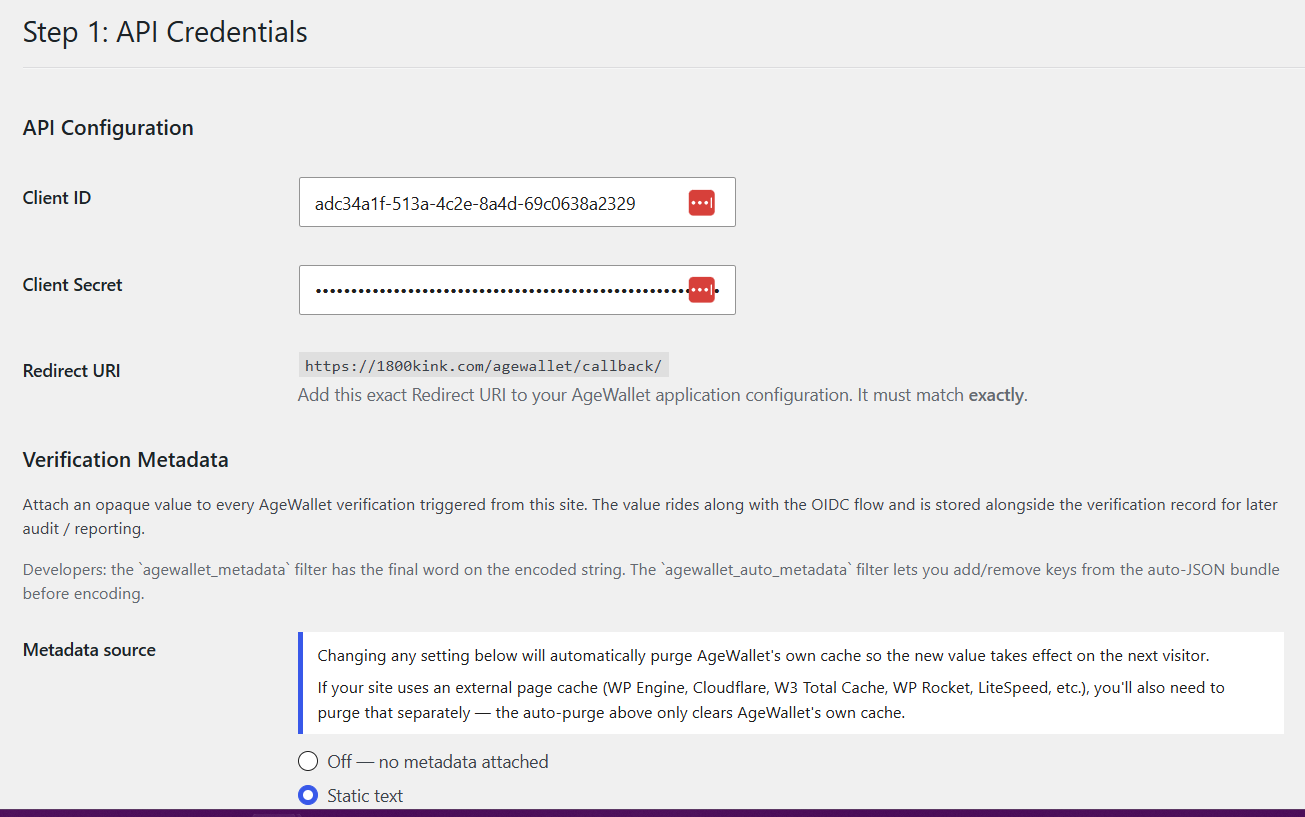
The plugin's setup wizard — Step 1 (API Credentials).
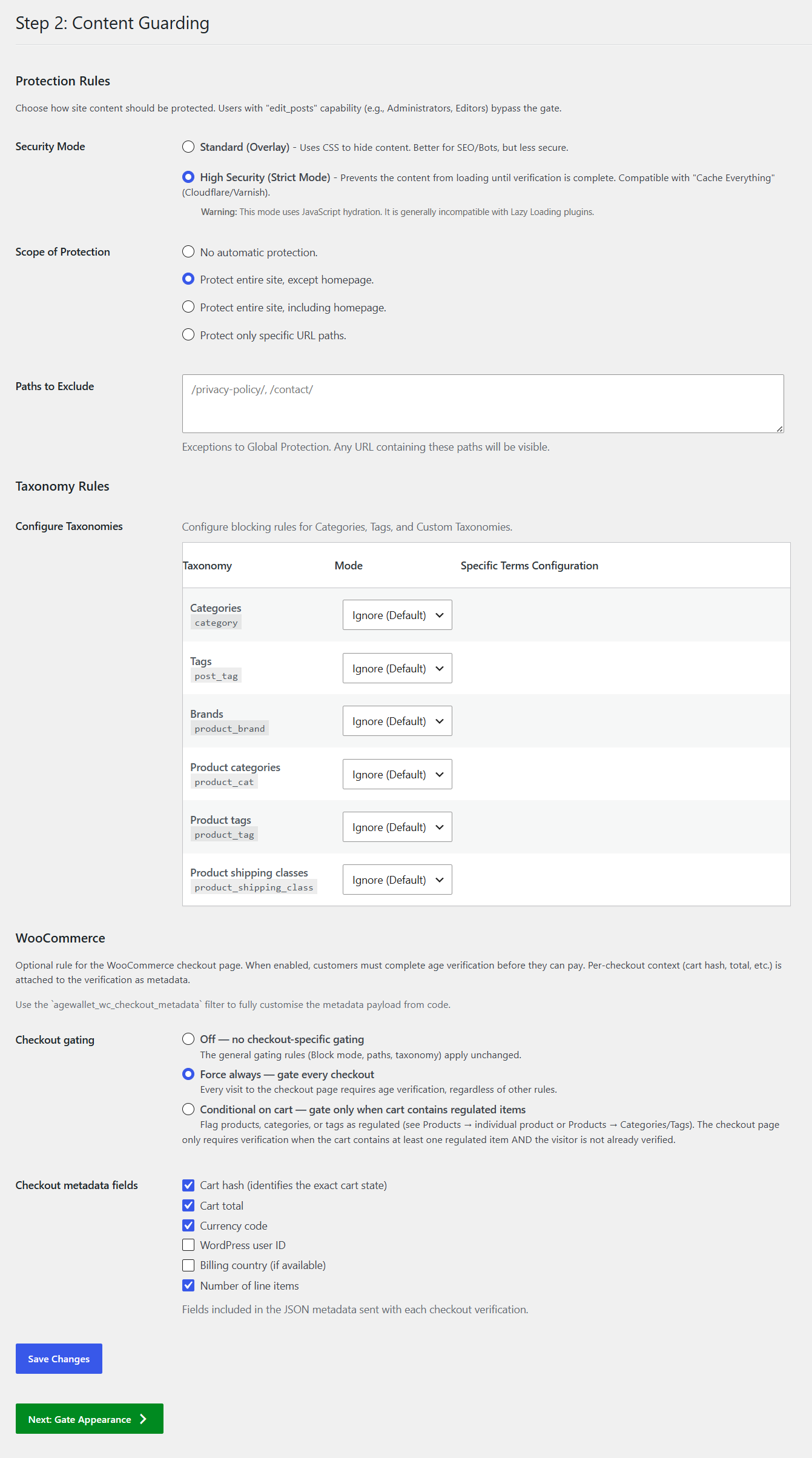
The Content Guarding screen — taxonomy, path, and global protection rules, plus the WooCommerce "gate the checkout" setting.
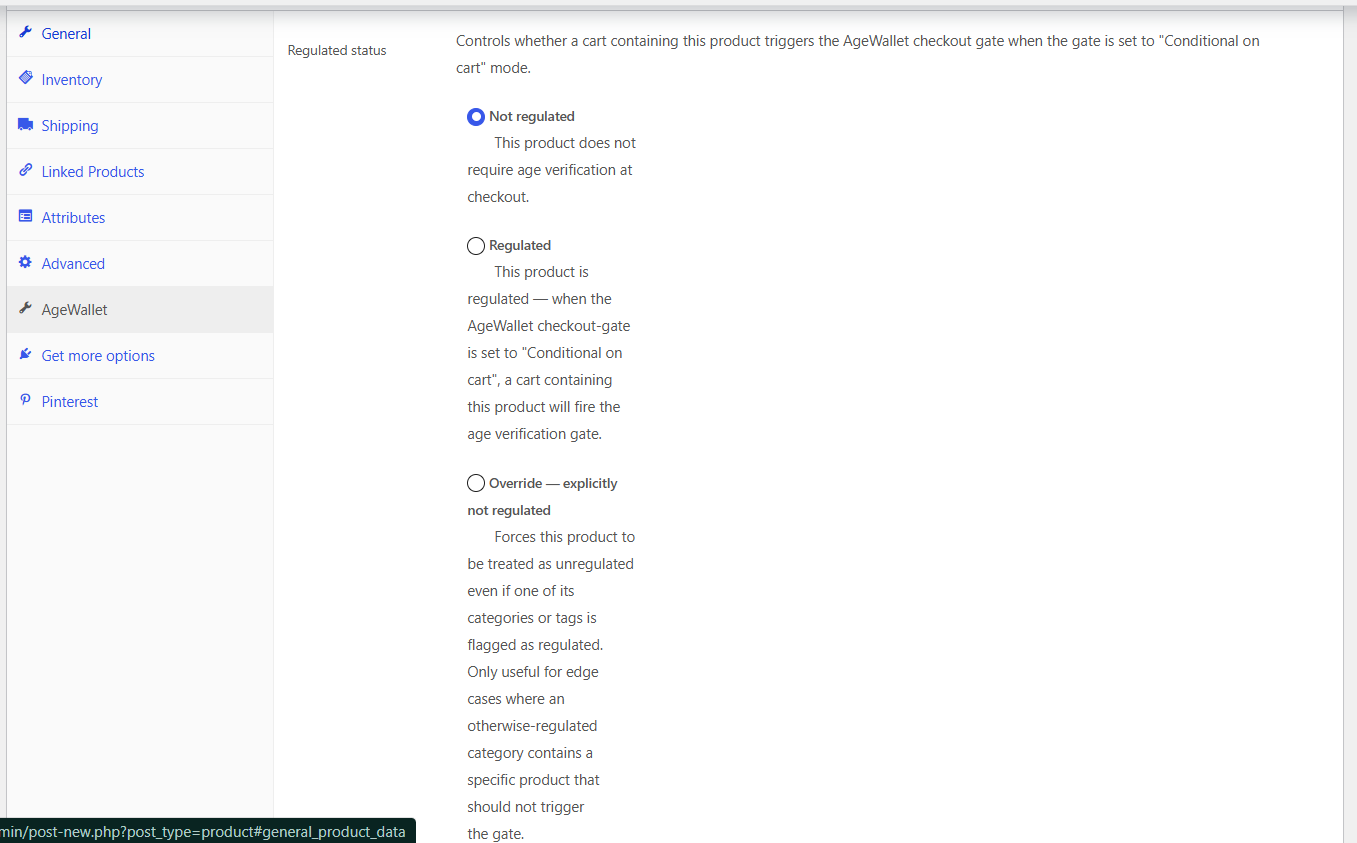
The per-product Age verification choice on the WooCommerce product edit screen.