The Agreement plugin helps to create pop-up licence agreement or term to use before download any thing from post or page. It will give freedom to change text in pop-up. After activation of plugin in post/page add file from “Add Media”, then change editor type from Visual to text and give id to that media file. Id will be like this id=”agreement”. Your link will be like ‘id=”agreement” href=”http://yourdomain.com/wp-content/uploads/2016/01/pdf.pdf”‘ or you can use custom HTML block too. Now save post/page.
Example
{a id=”agreement” href=”http://yourdomain.com/wp-content/uploads/2016/01/pdf.pdf”} file name {a}
This plugin works for multiple item in single page.
After activation there is a sub menu in Settings called Agreement. Click on this and there is a option to change license agreement text called “Enter your License Agreement setting text below:”. You can also insert html tag like ul,li, br, hr from agreement option in settings.
Requirements
- WordPress 3.5.1 or greater
- PHP 5.2.6 or greater (5.3 recommended)
- MySQL 4.1.2 or greater (5.x recommended)
Screenshots

Add id in media file link.

Change pop-up text in admin panel.
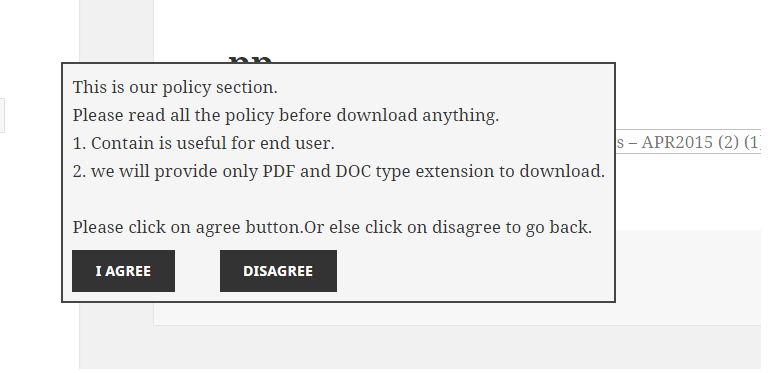
How it looks like in front end. UI may be differ as per your template.