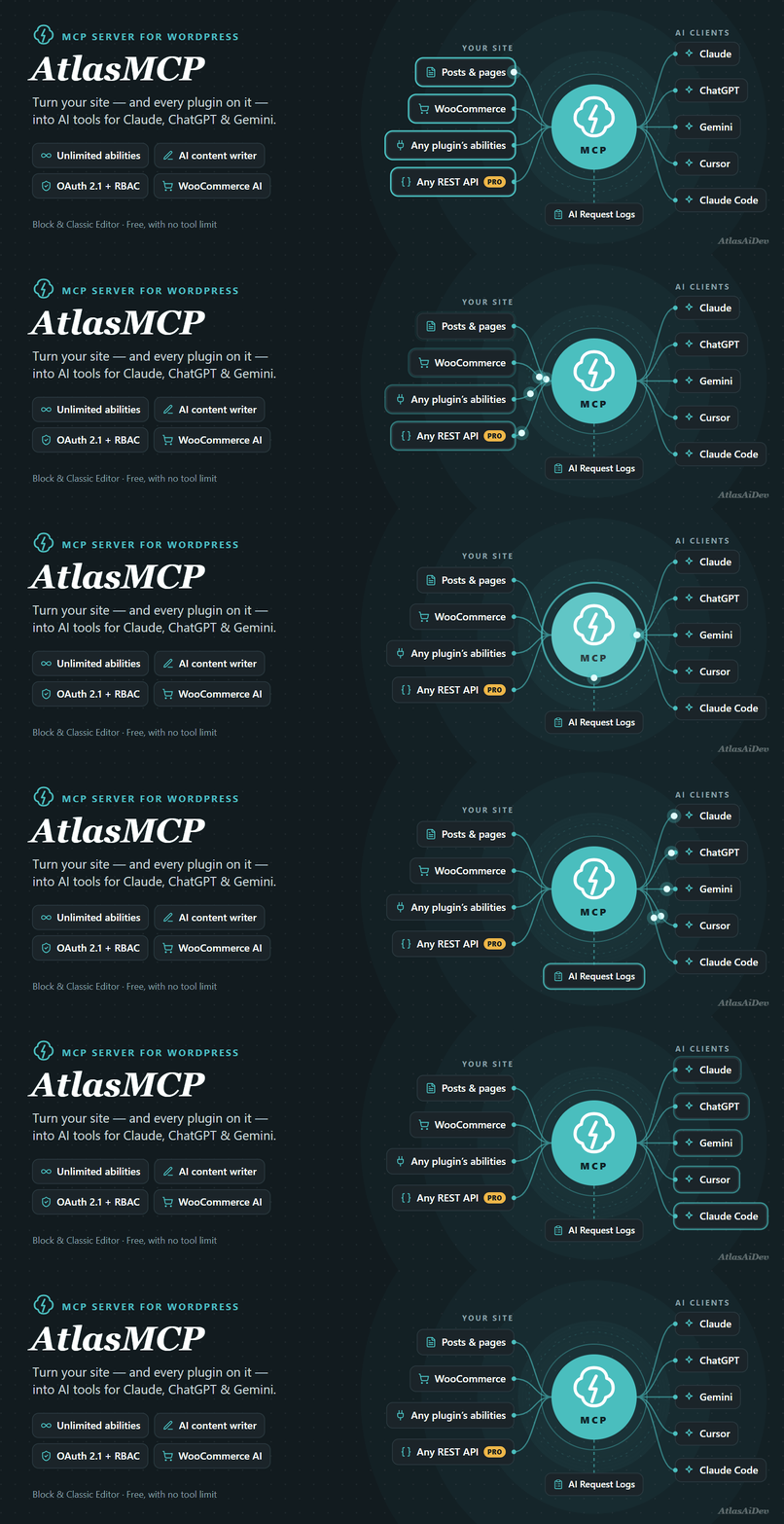
AtlasMCP turns your WordPress site into an MCP server, so the AI app you already use can do everything your WordPress role allows — in WordPress and in any plugin — straight from the chat. Ask Claude, ChatGPT, Gemini, Cursor or Claude Code to write and fix posts, change a page built with Elementor, clear a cache, update your SEO plugin’s settings, or refund a WooCommerce order, and it happens on your site with your permissions.
- Direct, no middleman. The AI app talks straight to your site. There is no AtlasMCP account, no relay server, and your content never passes through us.
- We never count or limit tool calls. Not in the free plugin, not in any Pro plan.
- Every change can be undone. Each AI change is recorded with how it looked before; undo it from the Activity log in one click.
- Your role is the permission. A connection acts as a WordPress user and can never do more than that user can do in wp-admin.
How do I connect Claude, ChatGPT or Gemini to WordPress?
A setup guide walks a new site from install to “my AI app answered a question”. Any time later, open AtlasMCP Connections and click Connect an AI app: Claude opens with your site already filled in, Cursor and VS Code add it in one click, and ChatGPT, Claude Code and Gemini CLI get short steps. You approve on your own site and choose what the app may do — Full by role, Read only or Content only — and the screen tells you the moment the app is connected. No tokens to copy. Scripts can use an access token or an Application Password instead.
Everything your role can do, in any plugin
There is no “enable tools first” step. What the connecting user may do in wp-admin, the AI app may do:
- Content: posts, pages, any custom post type, categories, tags, custom fields; change one block of a post without rewriting the rest; list, compare and restore revisions; find and replace across content, after a preview; media from a web address or your computer, with alt text and captions; comments, replies and moderation.
- Site: menus, widgets, block templates, global styles, site settings (with a protected list), users and roles (never the last administrator, never a role above the caller).
- Any plugin’s settings: read and change the saved settings of SEO, cache, multilingual, feed, invoice and ad plugins. Keys, passwords and core settings stay locked.
- SEO plugins: SEO title, description, focus keyword, canonical and indexing of any post, in Yoast SEO, Rank Math, All in One SEO, SEOPress, The SEO Framework and Slim SEO.
- Advanced Custom Fields: list field groups, read and change field values.
- Any plugin’s content and API: every ability other plugins register through the WordPress Abilities API, every plugin’s REST API as tools (reads and writes), and every post type and taxonomy a plugin adds.
- Plugin actions: safe one-step jobs your plugins offer — clear a cache, rebuild a sitemap, regenerate a feed, run a scheduled task.
- Plugins and themes: install from WordPress.org, activate, update, deactivate and switch themes. A backup is made first, the site is checked after, and it is put back by itself if it stops answering.
- Database and files, read only: table sizes, autoload, a cleanup report, read-only queries and theme or plugin files.
WooCommerce AI agent
Products, variations, stock, orders, order notes, refunds, coupons, customers and sales reports. Bulk jobs change hundreds of products in the background (titles, prices, a sale for a category) and can be undone as one job. Refunds always ask first.
Page builders, by element
The AI app reads an Elementor page as an outline of sections, containers and widgets with their ids, and changes one element at a time: a heading, a text, a button, an image, colours, page settings; or it adds, moves, duplicates and removes elements. Saves go through Elementor itself, a copy of the design is kept before every change, and undo rebuilds the page’s CSS. Elementor V4 (atomic) elements are read only. Beaver Builder, Bricks and Divi 4 pages can be read and changed by element too, and block-based builders such as Kadence and GenerateBlocks work through the block tools.
Approve and upload inside the chat
In apps that show panels, such as Claude, AtlasMCP opens a panel right in the chat. Before something is removed or replaced you see what will change, with Approve, Decline and Request changes buttons. To add files, drag them from your computer into the upload panel. Other AI apps ask you in words instead.
Search, traffic and security data
Connect your own Google account and the AI app can read Search Console queries and Analytics reports; connect your own Semrush key and it can read domain and keyword figures. Your site talks to these services directly, and nothing is sent until you connect. A read-only security checklist looks at waiting updates, HTTPS, administrators, users with extra powers and unlisted plugin folders, and the AI app can read Wordfence and Solid Security findings.
Safety you can see
- Undo journal: every AI write is recorded with its before-state for 7 days; undo or redo it from Activity log Changes.
- Checkpoints: a backup of files or tables before risky changes, restored from Versions Checkpoints.
- Ask before deleting: the AI app shows you what will be removed and waits for your yes in the chat.
- Dry run: any change can be previewed first, without changing anything.
- New content starts as a draft: an optional switch, so nothing an AI app creates goes public on its own.
- Tool calls per minute: an optional limit you set yourself, for a site or host that needs less traffic. It is off by default, and no plan changes it.
- Hard locks: the last administrator, your own account, AtlasMCP itself, keys and core files can never be changed by an AI app.
- Pause, read-only and safe mode: pause all AI access with one switch, make any app read only, or define
AWFAH_SAFE_MODEto refuse every write. - Connections screen: every app, token and app password, who it acts as and when it was last used, with one-click disconnect and a health check.
Multisite
On a network, each site keeps its own MCP address, apps, limits and undo history, and a site administrator’s AI app works on that site only. Network tools — list sites, create a site, network-activate a plugin, network settings — are for super admins only. Network Admin shows every site with a pause switch.
AI writing in the editor
Six panels in both the Block Editor and the Classic Editor: full content generation, excerpts, title suggestions, summaries, featured images and alt text, on your own AI provider (OpenAI, Google or Anthropic through the WordPress AI Client). AtlasMCP works with the official AI plugin and the official MCP Adapter instead of competing with them.
Site health
A connection health check (HTTPS, permalinks, the login header, security plugins, page caches), one-click roll back to an earlier AtlasMCP version, and an Error Debugger with email alerts and a copy-paste fix command for any AI assistant.
AtlasMCP Pro
The free plugin never breaks a site and is complete on its own. AtlasMCP Pro adds power, development and governance: a development pack (theme and plugin code on a draft copy with syntax check, preview, publish with backup and automatic roll back; new child themes and plugins; SQL writes with a dry run; install from a ZIP), design a whole site from a brief, workflows (“when this happens, do that”: triggers, conditions and any tool as an action, with AI steps, webhooks, templates and scheduled agent jobs), 1-year undo with a signed audit export, per-tool access and approval rules, the Shopping assistant, an AI error fixer and an agency sites list. Every Pro plan has the same features; plans differ only in the number of sites, and none counts tool calls.
External services
AtlasMCP connects to the outside services below only for the features named. Nothing else leaves your site, and the MCP server itself does not send your content anywhere: the AI apps you connect call your site, not the other way round.
Google Search Console and Google Analytics (only if you connect them)
If you paste a Google service account key under Tools Add from plugins Data sources, your site signs in at oauth2.googleapis.com and asks www.googleapis.com (Search Console) and analyticsdata.googleapis.com (Analytics) for the reports an AI app or you request. Your site talks to Google directly and sends only the report request. Nothing is sent before you connect. Google Terms of Service · Privacy Policy
Semrush (only if you connect it)
If you enter a Semrush API key on the same screen, your site sends that key and the domain or keyword asked about to api.semrush.com and www.semrush.com, and each report uses your own Semrush API units. Nothing is sent before you connect. Semrush Terms of Service · Privacy Policy
AtlasMCP connection check (AtlasAiDev)
When you press Run check on the Connections screen, the last step asks an AtlasAiDev server at voice.atlasvoice.cloud to call your site from the internet, the way Claude and ChatGPT do. It sends your site address and your MCP server address, nothing else. The server then reads only your site’s public sign-in addresses; it never signs in or changes anything, and it keeps no record beyond a short technical log. It runs only when you press the button, and it is skipped for local sites. Terms, Privacy policy. Developers can point it elsewhere or switch it off with the awfah_reachability_endpoint filter.
WordPress.org
The Versions screen asks the WordPress.org plugin directory (api.wordpress.org) for this plugin’s released versions when you open it, and downloads a version from downloads.wordpress.org only when you press Roll back. The Our Plugins page reads the public ratings of our plugins from api.wordpress.org. When an AI app (or you) installs or updates a plugin or theme with the plugins and themes tools, the package is downloaded from downloads.wordpress.org, the same place WordPress’s own updates come from. Only the plugin or theme names are sent. Privacy policy.
GitHub (raw.githubusercontent.com)
The Our Plugins page and the dashboard’s occasional offers read two public JSON files we publish on GitHub, cached for 12 hours. The request is a plain download; no information about your site is sent. Terms, Privacy policy.
Usage tracking (AtlasAiDev, opt-in)
Only if an administrator clicks Allow on the opt-in notice or ticks Share anonymous usage data in the setup guide, the plugin sends track.atlasaidev.com the site name, language and address, the administrator’s name and email, the number of plugins, which AtlasMCP modules are on, and feature-usage counts. Never post content, credentials or tokens. You can opt out at any time. Terms, Privacy policy.
Your AI provider (OpenAI, Google or Anthropic)
The AI experiments (content, excerpts, titles, summaries, featured images, alt text) send the text or image you are working on to the AI provider you set up under Settings Connectors, through WordPress’s AI Client, only when you press a generate button. Generated images are then downloaded from the provider into your Media Library. The provider’s own terms apply: OpenAI (Terms, Privacy), Google (Terms, Privacy), Anthropic (Terms, Privacy).
Screenshots
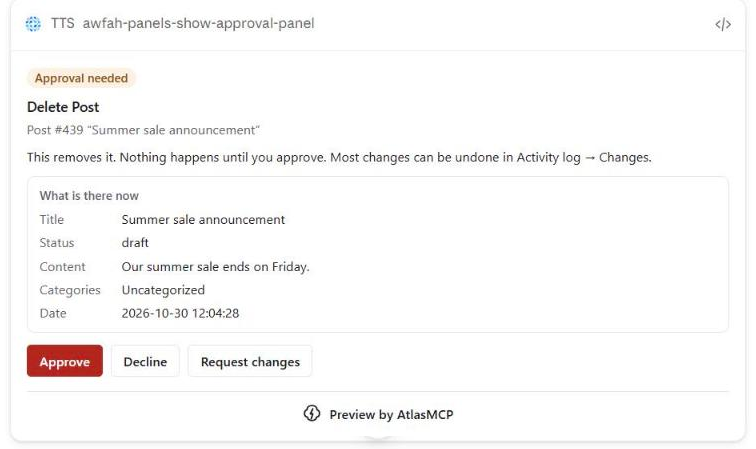
Approve a change inside the chat: see what will change, then Approve, Decline or Request changes.

Add files from your computer with the upload panel inside the chat.
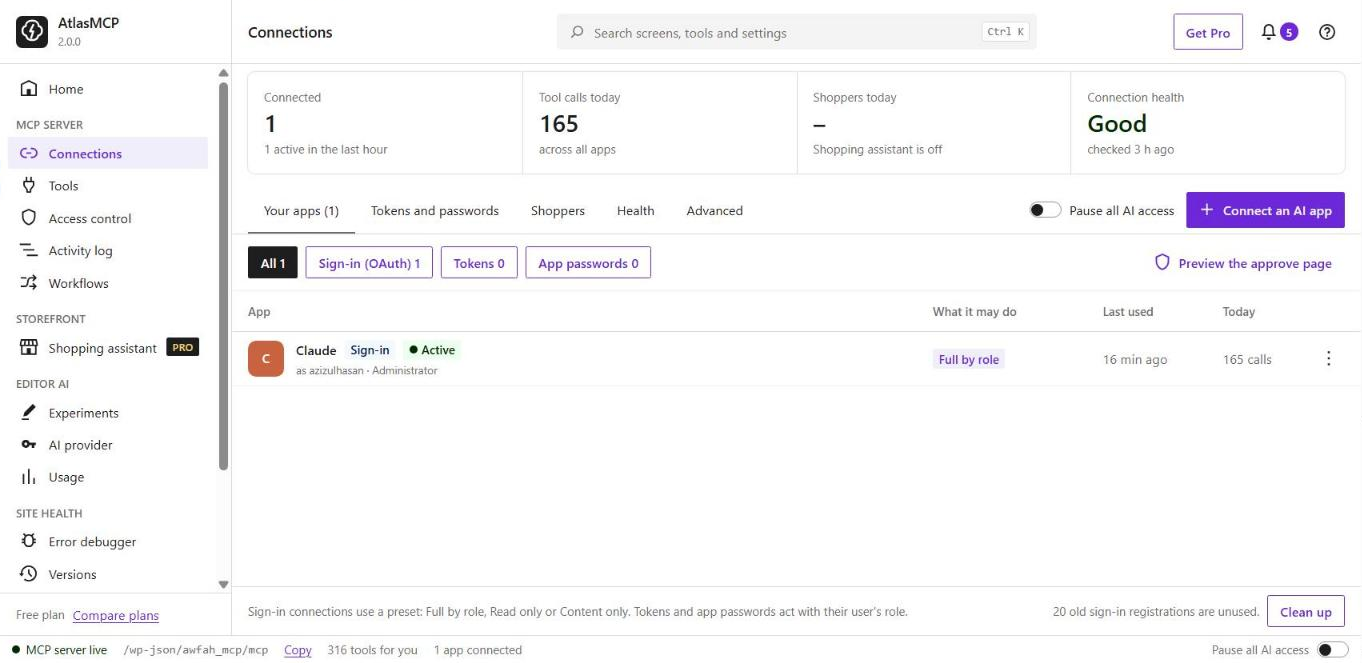
Connections: every AI app that can use your site, what it may do and when it was last used.
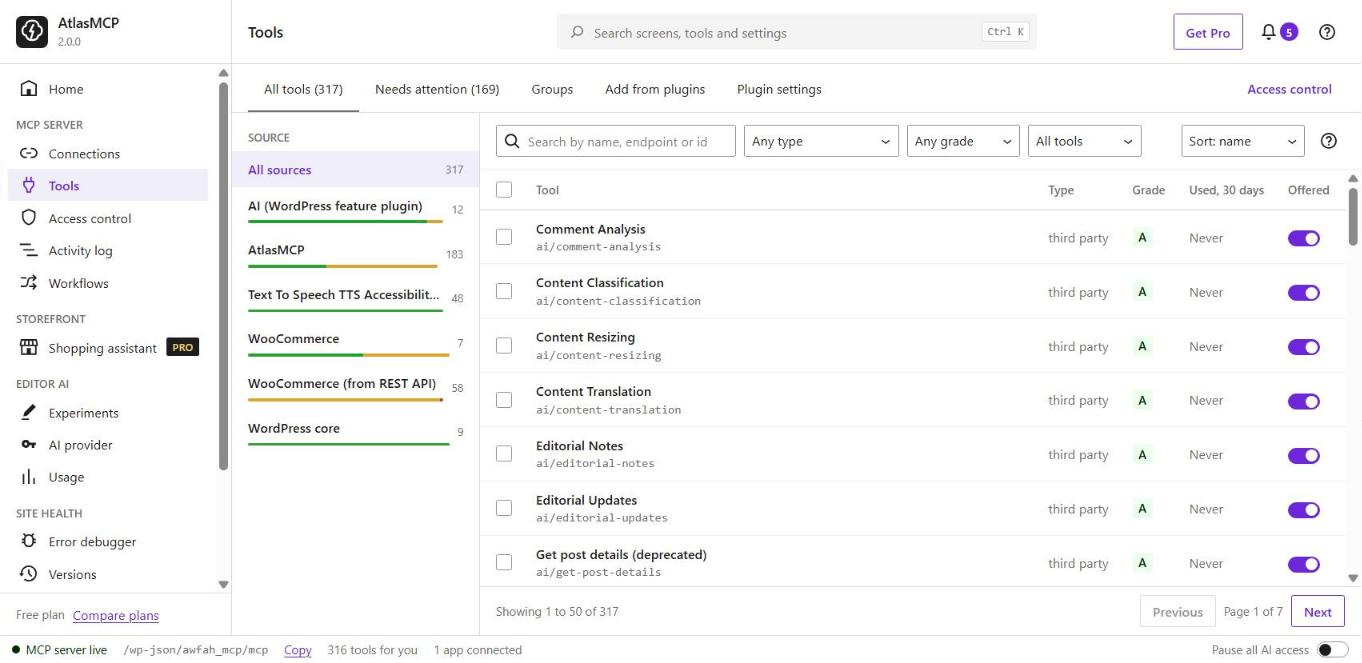
Tools: every tool your AI apps are offered, from WordPress and from your other plugins.
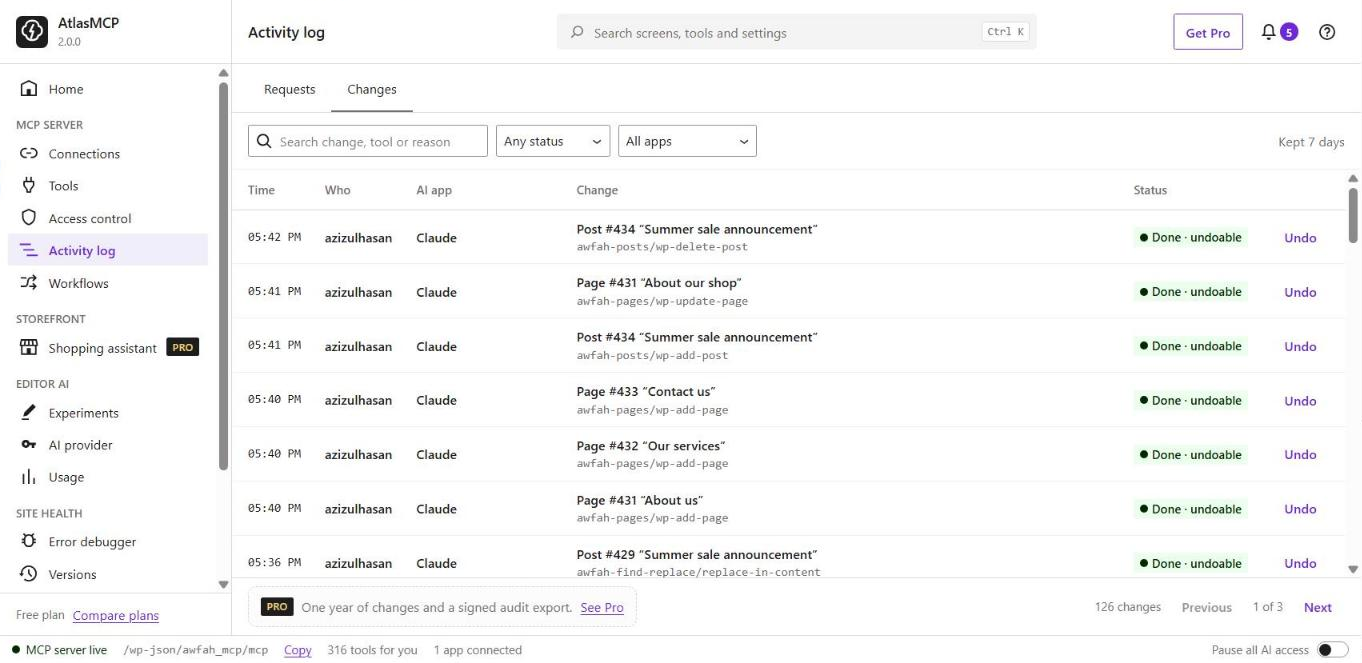
Activity log: every change an AI app made, with Undo.
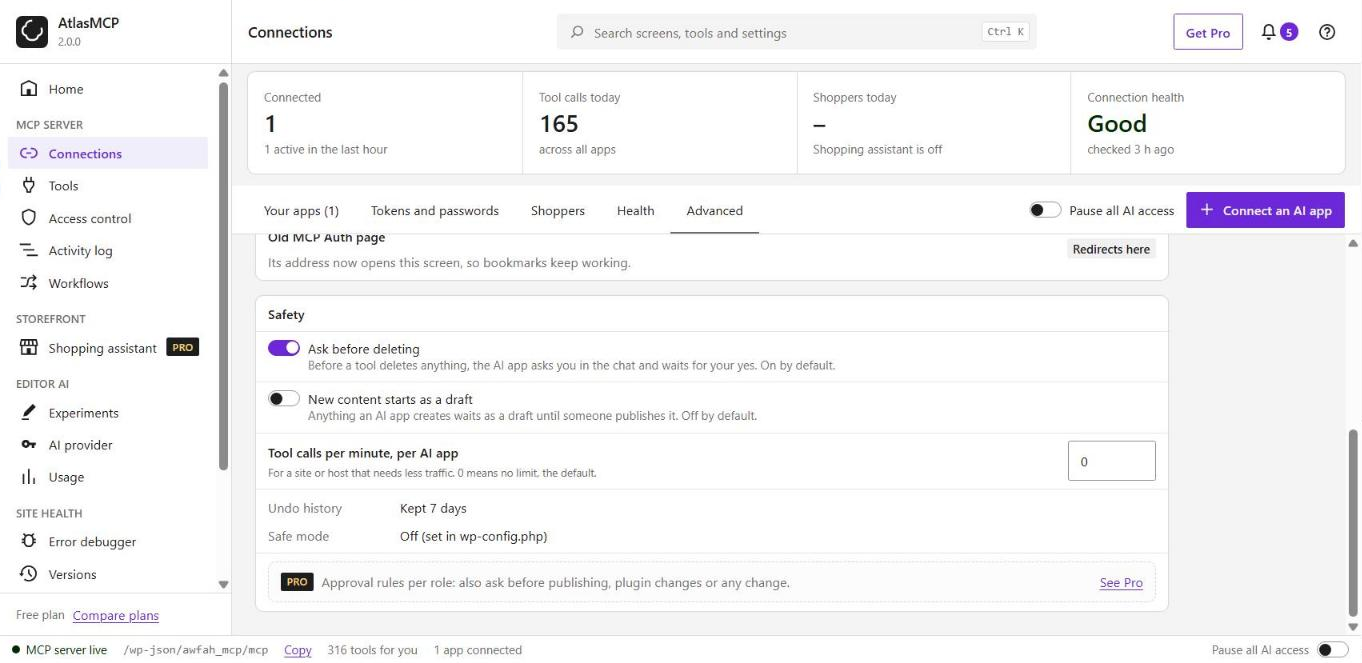
Safety settings: ask before deleting, new content starts as a draft, and tool call limits.
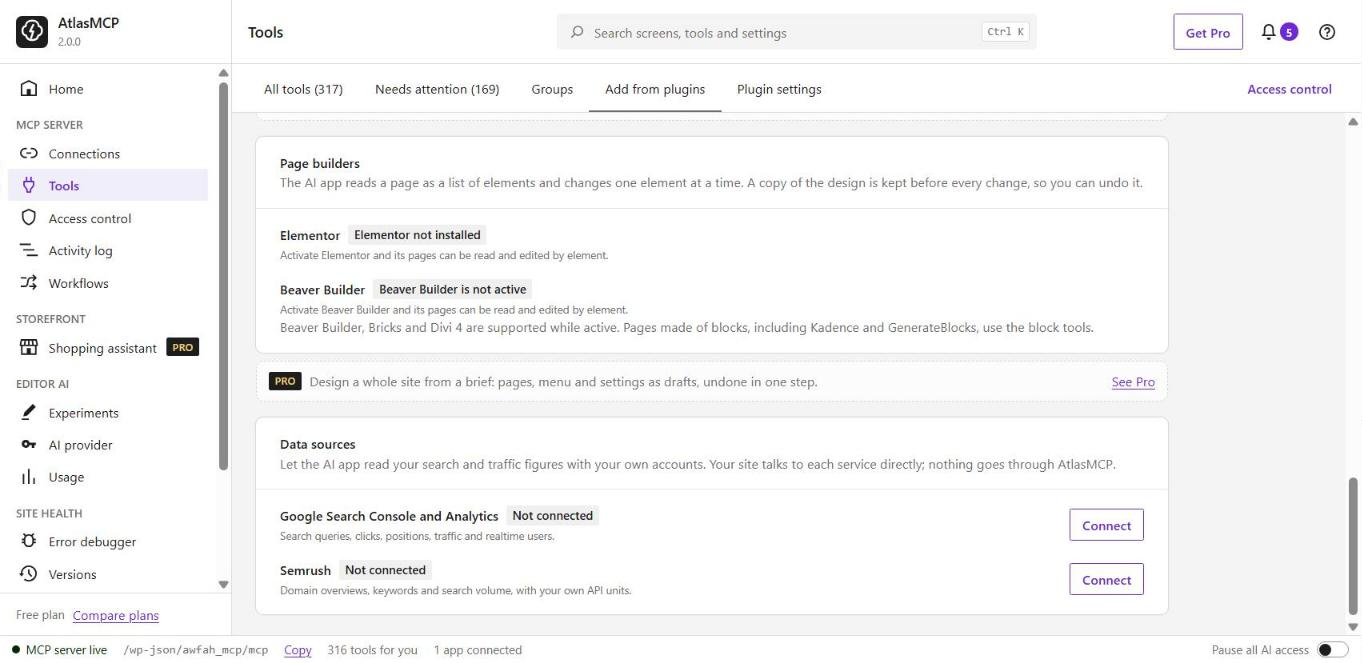
Add from plugins: page builders and your own Search Console, Analytics and Semrush accounts.
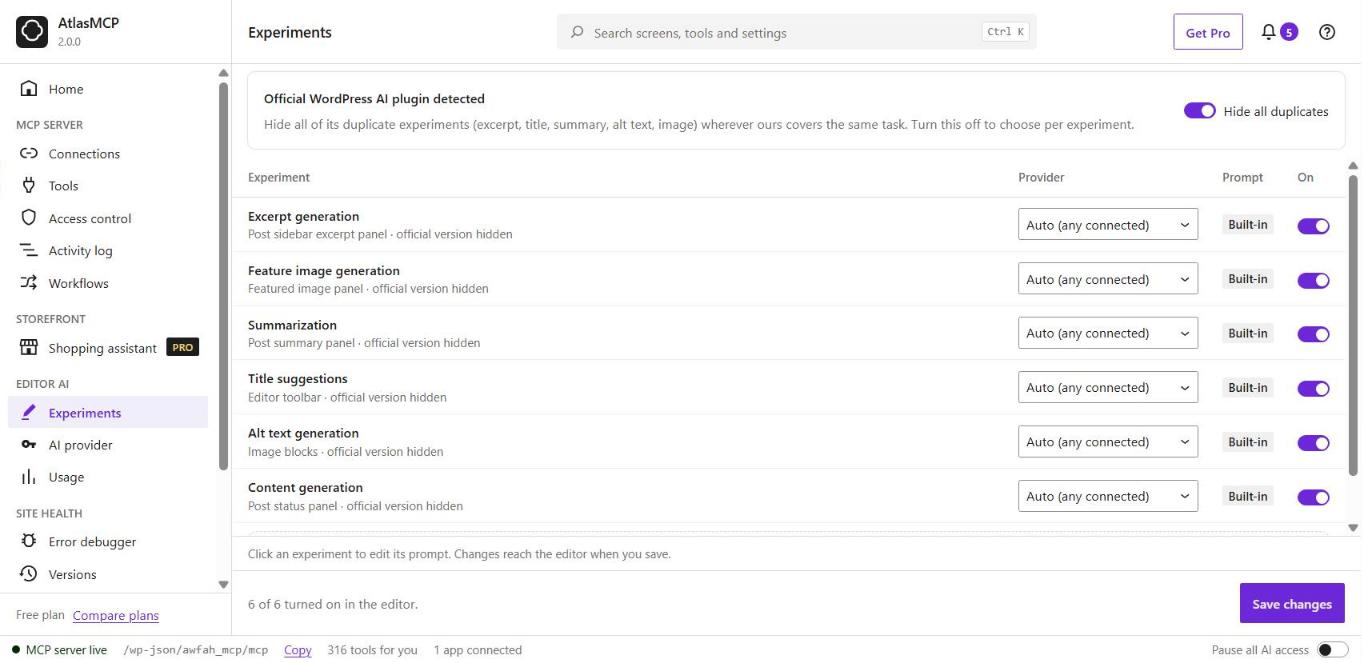
AI writing in the editor, on your own AI provider.