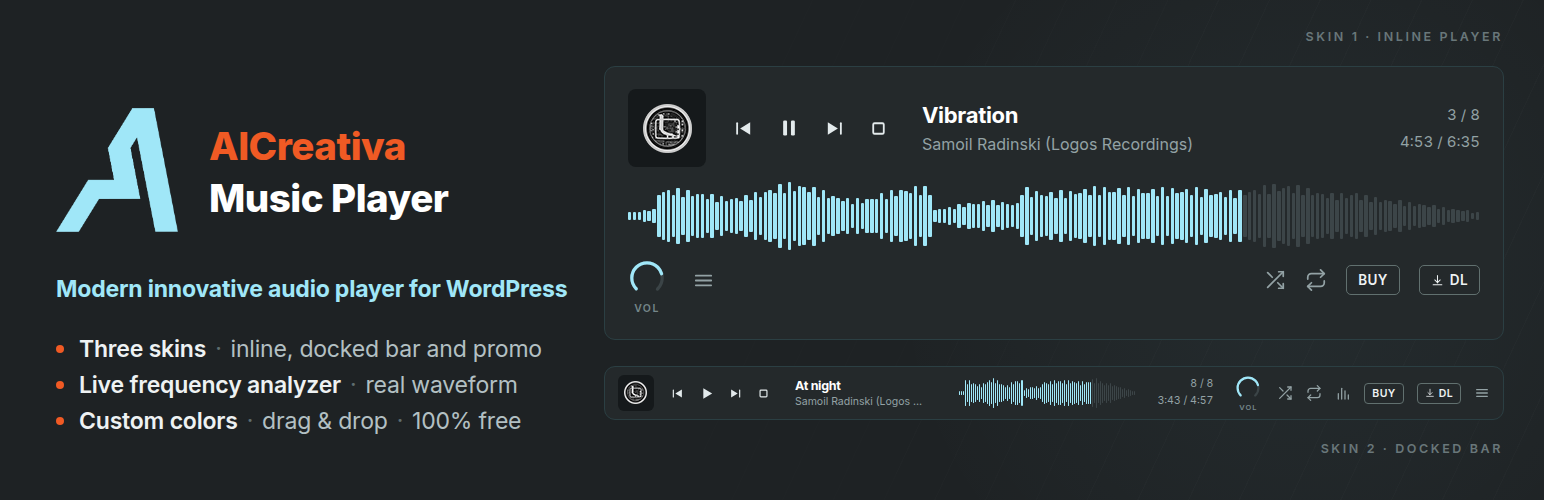
AICreativa Music Player is a modern audio player for WordPress, built for DJs, producers, labels and musicians who care how their music is presented. Real waveform analysis, a live frequency analyzer, and three very different skins — including a promo player for sending music out before it is released. Fast, and it adds nothing you did not ask for.
Three skins, one player
- Skin 1 — inline player. Sits inside your content as a single track or a full playlist with artwork, waveform and track list.
- Skin 2 — docked bar. A slim bar fixed to the bottom of the screen, with a collapsible playlist and analyzer panel. Put it on a single page with a shortcode, or on every page from Settings, and let it carry on playing as visitors move around the site.
- Skin 3 — promo player. For sending music out before release: the same playlist, with a feedback form, a download on every track, and no BUY button.
Why it stands out
- Modern and fast — no page builder, no framework, no jQuery on the front end. Just the player, rendered from a shortcode.
- Precise analyzer — a real-time frequency spectrum with logarithmic frequency mapping, spectral tilt compensation and peak-hold lines. It reads like studio metering, not a decorative animation.
- Real waveform — the actual amplitude of your audio file, analysed in the browser with the Web Audio API. Not a generic placeholder shape.
- Custom colors — set the accent, background and text colors and the whole player follows: waveform, knobs, transport icons, playlist and the BUY/DL buttons.
- Beautifully designed — flat transport controls, arc knobs for volume and sensitivity, hairline dividers and the Inter typeface throughout.
- Keeps playing — the docked bar remembers the track, position and volume and picks them back up on the next page. Visitors who would rather not listen can dismiss it, and a small play button stays in the corner in case they change their mind.
- Lightweight — one PHP file, CSS and JavaScript loaded only where a player will actually appear.
- Drag & drop — reorder tracks in the admin playlist builder, and let visitors reorder their own view on the front end.
- Download option — offer your audio for download, or switch the button off globally in one click.
- 100% free — every feature, no paid tier, no upsells, no account required.
Sending a promo
Skin 3 turns a playlist into a promo page. The BUY button disappears, every track gets its own download, and a feedback form appears under the player asking for a favourite track, a rating and a comment.
- Build the playlist as usual
- Fill in Promo notes on that playlist: a heading, the press release, and a press kit file
- Copy the Skin 3 shortcode from the sidebar and place it on a page
- Set that page to Private or noindex so it stays out of search results
- Send the link
Replies collect under Promo feedback, and arrive by email if you set an address in Settings. Downloads stay locked until someone sends feedback, or you can leave them open and simply ask.
One thing worth knowing: the lock asks rather than enforces. Audio files still sit at ordinary URLs, so anyone determined can find them. It sets an expectation with people you are already sending music to; it is not a security measure.
Everything included
- Real waveform visualization with click-to-seek
- Live frequency spectrum analyzer with a sensitivity control (Skin 2)
- Broad format support — plays MP3, WAV, FLAC and OGG across modern browsers (lossless-ready for labels), plus AIFF uploads
- Album artwork display, uploaded directly via the Media Library
- Previous / Play / Next transport controls
- Shuffle and repeat modes: off, repeat one, repeat all
- Arc knobs for volume and analyzer sensitivity — drag, scroll, or double-click to reset
- Media Session support: lock screen artwork and hardware media keys
- Drag & drop track reordering, in the admin builder and on the front end
- Optional autoplay: on first interaction, or instant and muted
- Optional download button, disabled globally from Settings
- BUY button with a custom label for Bandcamp, Beatport or any store
- Playlist support with track list, track counter and collapsible list
- Dashboard with play, completion and download stats per track — privacy-first, aggregate counts only, no visitor tracking
- Adjustable player width, 300px to 1400px
- Site-wide docked bar, from a playlist you choose in Settings
- Continuous playback, so the bar picks the track back up on the next page
- Dismissible bar, with a corner button to bring it back mid-track
- Adjustable Skin 2 opacity, with a blur behind the translucent bar
- Optional Inter webfont, which you can switch off to avoid any external request
- Simple shortcodes: [aicmp_track id=”X”] and [aicmp_playlist id=”X”], with skin=”2″ for the docked bar and skin=”3″ for the promo player
- Promo player with feedback form, per-track downloads, press release and press kit
- Promo feedback inbox in the admin, with CSV export and email alerts
- Shortcode displayed and copyable directly from the Track/Playlist edit screen
Perfect for
- Musicians and producer portfolios
- DJ promo and mix pages
- Label release pages
- Music blogs and radio shows
- Anyone who wants a player that looks like it belongs on the page
Donate
If AICreativa Music Player helps your music career, consider supporting its development:
- Buy music and enjoy! https://logosrecordings.bandcamp.com/
- USDT (ERC-20): 0xA68faD7448335ae6AE5dDE693b52ea679bad8Ca6
Thank you for your support!
Screenshots

Single track player with artwork and waveform

Playlist player with drag & drop track reordering

Skin 2, the docked bar, with the frequency analyzer open

Skin 3, the promo player, with its feedback form