AIPCF connects WordPress to Cloudflare Workers AI. Once connected, the AI features built into WordPress 7.0+ and the WordPress AI plugin run on Cloudflare’s models: excerpts, titles and meta descriptions in the editor, alt text on upload, image generation. On top of that, AIPCF can search your posts by meaning, answer questions from them, suggest related posts and internal links, and let AI agents such as Claude and ChatGPT search and quote your site. Everything runs inside Cloudflare’s free daily allowance of 10,000 neurons, and a daily budget keeps a busy day from turning into a bill.
AIPCF is an independent community plugin, not an official Cloudflare or WordPress product. It was built out of need, and love for the idea that every small site should get useful AI without a bill.
New in 2.0
- A guided setup, and one simple menu: AIPCF > Home, Features, Insights, Settings, Activity and Help.
- Better answers: your words and their meaning together, with a second check by a reranking model.
- Best matches above your site’s own search results, for the members you choose.
- Answers for AI agents such as Claude and ChatGPT, read-only, through the MCP adapter.
- A daily budget that can count the whole Cloudflare account’s use.
What it costs, measured on a live site
- a meta description, excerpt or title: about 2 neurons (about 5,000 a day inside the allowance)
- a generated 1024×1024 image: about 170 neurons (about 55 a day)
- describing an image for alt text: about 17 neurons
- a search by meaning: about 0.03 neurons; an answer from the Site assistant: 10 to 30 neurons
- translating a sentence: under 1 neuron
What you get
- In the editor, with the WordPress AI plugin: excerpts, titles, meta descriptions, summaries, alt text on upload, image generation.
- Across your archive: Backfill fills missing meta descriptions (Yoast, Rank Math, AIOSEO, SEOPress) and image alt text in the background, a few at a time, within its daily limit. It works with or without the AI plugin. A 140-post backlog cost about 175 neurons on a real site.
- A receipt after every action: feature, model, neurons and time, shown in the editor. Today’s total sits in the admin bar. A monthly email sums up requests, tokens and neurons.
- Translation for any theme or plugin:
aipcf_translate( $text, 'mr' ), 100 languages via M2M100 and 22 Indian languages via IndicTrans2.
What you need
- A Cloudflare account. No credit card is needed for the Workers AI daily allowance.
- An API token created from the “Workers AI” template at dash.cloudflare.com/profile/api-tokens. To keep the content index in Cloudflare Vectorize, add Account > Vectorize > Edit. To count the whole account’s use, add Account > Account Analytics > Read.
- Your Account ID, the 32-character code on the right of the Workers & Pages page in the Cloudflare dashboard.
The setup walks through all three.
How it stays inside the allowance
- Recommended settings: Gemma 4 26B for writing, Granite 4 Micro for short tasks, a daily budget of 10,000 neurons, no paid fallbacks, caching on. The setup applies them in one step.
- Daily budget: email at 80%; at 100% either pause until midnight UTC or switch text requests to the cheapest model instead of failing (everything that is not text pauses). It can count the whole Cloudflare account’s use, read from Cloudflare’s analytics every 15 minutes, so other sites and apps on the same account are included.
- Daily limits per feature, so one feature cannot use up what the others need.
- Short tasks on a small model: titles, excerpts, meta descriptions, moderation and alt text go to a model that costs a fraction of the neurons; long-form keeps your default.
- Caching: repeated identical prompts are answered from cache for zero neurons, at Cloudflare’s edge through AI Gateway or locally. A “Regenerate” click within ten minutes bypasses it so you get a new answer.
- Never fall back to paid providers: one switch keeps Anthropic, Google and OpenAI out of the AI plugin’s fallback list.
The content index
The features that search your content need a content index: the posts you choose, turned into embeddings (lists of numbers that capture what a text is about) and kept in Cloudflare Vectorize, Qdrant or PostgreSQL. It stays in sync as you edit, shows its cost before anything is sent, and is off until you switch it on, on Settings > Content index. Indexing whoisabhi.com (166 posts and pages) took about 60 neurons.
What the content index is used for
Each feature is off until you switch it on under AIPCF > Features, and each has a daily limit.
- Site assistant: a chat that answers from your posts and pages, cites them, and says when it cannot find the answer. For members you choose, or every visitor. Built-in guardrails plus your own rules, blocked topics and an optional safety check. Chats are saved only with consent. When its daily limit is used up, it goes offline.
- Related posts:
[aipcf_related], or added automatically (after the content, before it or after a paragraph). Lists are built in the background from the index: no neurons, nothing runs when a visitor opens a page. Each entry can say why it is related. - Search:
[aipcf_search]finds posts by meaning, for the logged-in members you choose. It can also add Best matches above your site’s own search results, and list the matches by meaning when the words typed find nothing. Visitors who are not logged in get the normal WordPress search, so nobody outside can spend your neurons. Results only, no generated answers. - Link assistant (for everyone who can edit posts): for a post, which posts it should link to and which should link back, with the exact word to link and the sentence it is in. A word is only suggested if it is really there. “Posts with no links to them” lists every post without internal links to it. A chat answers questions about the suggestions. Nothing in your posts is changed.
- Search insights (AIPCF > Insights): what people search for on the site, which searches found nothing, and the content gaps: searches your posts do not answer well. “What to write next” groups the gaps into topics and suggests an article or a post to extend for each. No user, IP address or browser details are stored.
- AI agents: lets agents such as Claude and ChatGPT search your site, get an answer with sources and find related posts, through the MCP adapter. An agent signs in as a user with an application password; you choose which users may connect. Read-only, limited to 30 calls a minute and its own daily limit, and every call is listed in Activity.
The AI plugin (recommended)
AIPCF is the engine. The WordPress AI plugin adds the block-editor features that use it: excerpts, titles, meta descriptions, alt text on upload, summaries, image generation. It is recommended, not required; AIPCF’s own features (Backfill, the content index and the features on it, usage tracking, the daily budget, and aipcf_translate() for developers) work without it.
External Services
This plugin sends data to Cloudflare, Inc. to run AI inference on Cloudflare Workers AI. If you switch the content index on, it also stores content in the vector store you choose: Cloudflare Vectorize, a Qdrant server (yours or Qdrant Cloud), or your PostgreSQL database. Nothing is sent to any other third party, nothing is sent until you have entered your Cloudflare credentials, and nothing goes to a vector store until you switch the content index on and configure it.
What is sent, and when
- When an AI feature runs (you or another plugin ask for text, an image, a translation, or an image description): your API token, the model id, and the prompt (post title and content, messages, and any attached image data) go to
https://api.cloudflare.com/client/v4/accounts/{account_id}/ai/v1/chat/completionsfor chat models, orhttps://api.cloudflare.com/client/v4/accounts/{account_id}/ai/run/{model}for image, vision and translation models. - When an AI Gateway name is configured, the same requests go to
https://gateway.ai.cloudflare.com/v1/{account_id}/{gateway}/...instead, with request metadata attached: your site’s host name, the WordPress feature, the model id, the current user’s numeric ID and the plugin version. Cloudflare stores these in the gateway’s logs according to your gateway settings; the “Log prompts” option controls whether prompt and response text are stored there. - On a schedule, if you enable Backfill: the hourly job sends the title and content of posts that lack a meta description, and the image files (or their public URLs, read by the plugin) of attachments that lack alt text, to the endpoints above. This runs in the background until the backlog is done or Backfill’s daily limit is reached. It is off by default.
- Credentials checks: “Test connection” and the settings save send your Account ID and API token to
https://api.cloudflare.com/client/v4/accounts/{account_id}/ai/models/search; the Connectors screen’s key validation sends the token tohttps://api.cloudflare.com/client/v4/user/tokens/verify. The model list is read from the models/search endpoint and cached for 12 hours. - Prompt tests and license re-checks on the settings page send one request on demand, as above.
- The content index, only when switched on (off by default): the text of the content you selected (title, content and the other fields you ticked, split into passages) goes to
https://api.cloudflare.com/client/v4/accounts/{account_id}/ai/run/{embedding model}(or through your AI Gateway) to be turned into vectors. This happens once for existing content, then when selected content is saved, and within the Embeddings daily limit. The vectors are then written, with each passage’s text (unless “Store the text” is off) and its post ID, type, title, URL, publish date, language and a site ID, to the vector store you chose: - Content index in Cloudflare Vectorize:
https://api.cloudflare.com/client/v4/accounts/{account_id}/vectorize/v2/indexes/..., with your Cloudflare API token. - Content index in Qdrant: the URL you enter (a Qdrant Cloud cluster or your own server), with the API key you enter.
- Content index in PostgreSQL: the database server you enter, over the PostgreSQL protocol, with the user and password you enter.
- Search, only when switched on and only for the logged-in members you choose: the words typed into
[aipcf_search](or into the site’s own search, if Best matches is on) go to Cloudflare Workers AI to be embedded, then the vector store is queried. Cached for an hour per query. - Reranking: for AI agents, the Site assistant (unless you switch it off) and Search (if you switch it on), the question and the text of the 20 best parts of posts go to
.../ai/run/@cf/baai/bge-reranker-base, which orders them by how well each answers it. - AI agents, only when switched on: an agent signed in as one of your users calls the site’s abilities through the MCP adapter; its question then goes to Cloudflare Workers AI as a search or a Site assistant question, as above. Nothing is sent to the agent’s provider by this plugin: the agent receives the results it asked for, as any signed-in user would.
- The whole account’s use, only when the daily budget counts it (on by default): every 15 minutes in the background, your Account ID and API token go to
https://api.cloudflare.com/client/v4/graphqlto read today’s Workers AI neurons for the account. Nothing about your content is sent. Without the “Account Analytics: Read” permission Cloudflare refuses, and the plugin stops asking for six hours. - Search insights, only when switched on: the searches recorded on your site are sent to Cloudflare Workers AI in the background, each distinct search once, to compare them with your content; “What to write next” sends the content-gap searches and the titles of your closest posts to your default model.
- Link assistant chat: the suggestions for the chosen post (titles, dates, shared words and quoted sentences from your posts) and the editor’s question go to your light model (or default model).
- Site assistant, only when switched on: the question is embedded and the vector store queried as above; then the question, up to ten earlier turns and the matching passages go to your default text model. With the safety check on, the question and answer also go to
.../ai/run/@cf/meta/llama-guard-3-8b. The asker’s name, account and IP address are not sent. - Cloudflare Turnstile, only in the Site assistant’s public mode and only if Simple Cloudflare Turnstile’s keys are set: once a day, the visitor’s browser loads
https://challenges.cloudflare.com/turnstile/v0/api.js, and your site sends the token with your secret key tohttps://challenges.cloudflare.com/turnstile/v0/siteverify. - Related posts sends nothing to Workers AI: it queries the vector store with vectors that are already there.
- Keeping the vector store in sync: deleting, trashing or unselecting content deletes its vectors there. Through an AI Gateway, embedding requests are sent with payload logging off (
cf-aig-collect-log-payload: false), whatever the “Log prompts” setting says. “Test connection”, “Create index”, “Test search” and “Delete vectors” contact the same vector store on demand, and Test search also embeds your query. Site Health reads the vector store’s status (cached for a minute).
The neuron meter and the monthly email (generated locally from stored totals) send nothing. Site Health sends none of your content: it only reads the model list and the vector store’s status, both cached.
Service provider
Cloudflare Workers AI and AI Gateway are provided by Cloudflare, Inc.
- Workers AI documentation: https://developers.cloudflare.com/workers-ai/
- AI Gateway documentation: https://developers.cloudflare.com/ai-gateway/
- Cloudflare Terms of Service: https://www.cloudflare.com/terms/
- Cloudflare Privacy Policy: https://www.cloudflare.com/privacypolicy/
- Vectorize documentation: https://developers.cloudflare.com/vectorize/
- Turnstile documentation: https://developers.cloudflare.com/turnstile/
- Turnstile privacy addendum: https://www.cloudflare.com/turnstile-privacy-policy/
Qdrant, used only if you choose it as the vector store, is open-source software; Qdrant Cloud is provided by Qdrant Solutions GmbH.
- Qdrant documentation: https://qdrant.tech/documentation/
- Qdrant Terms and Conditions: https://qdrant.tech/legal/terms_and_conditions/
- Qdrant Privacy Policy: https://qdrant.tech/legal/privacy-policy/
PostgreSQL with pgvector, used only if you choose it, runs on a database server you provide; no third party is involved beyond that server’s host. pgvector: https://github.com/pgvector/pgvector
Roadmap
- Inserting a suggested internal link in one click, from the Link assistant.
- Speech-to-text (Whisper) for transcripts, and text-to-speech “listen to this post”.
- Per-site budgets on multisite sharing one gateway.
- WP-CLI commands for backfill, translation and usage (the content index has them already).
- Best matches and the Site assistant in more languages than BGE-M3 covers well.
Screenshots
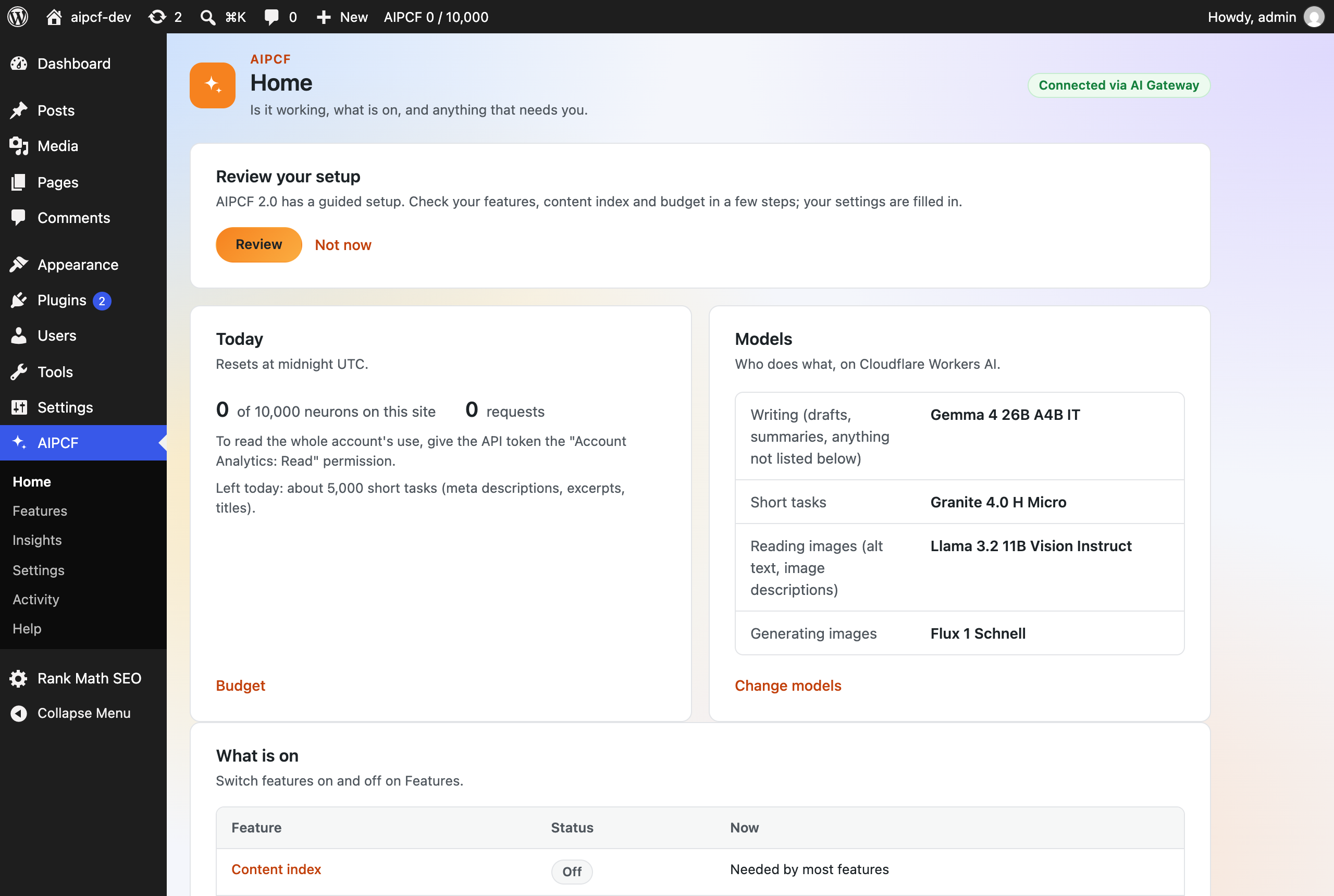
Home: whether it works, today's neurons, which model does what, and what is on.
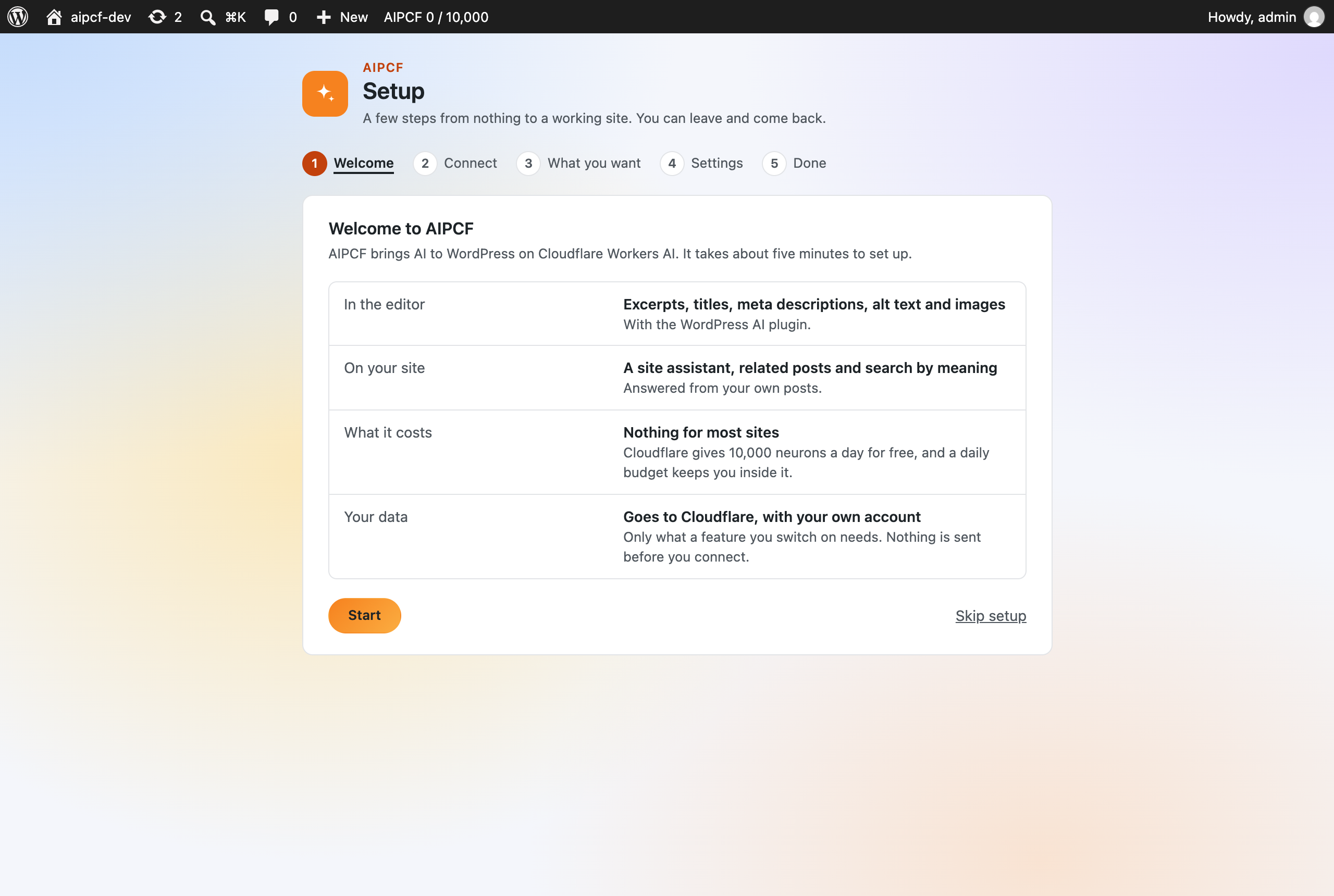
The setup, from nothing to a working site: what AIPCF does, what it costs and where your data goes.
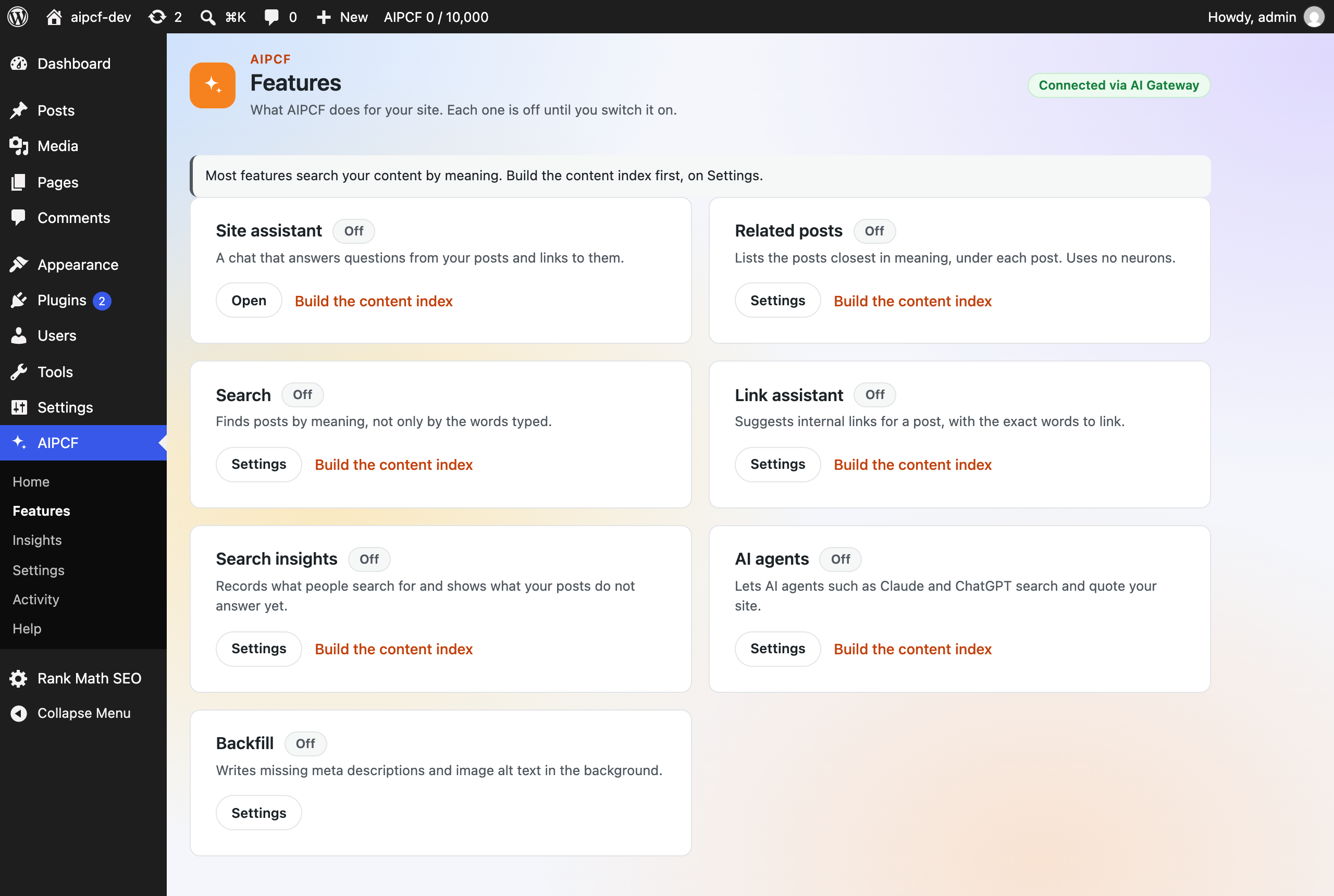
Features: one card for each feature, each off until you switch it on.
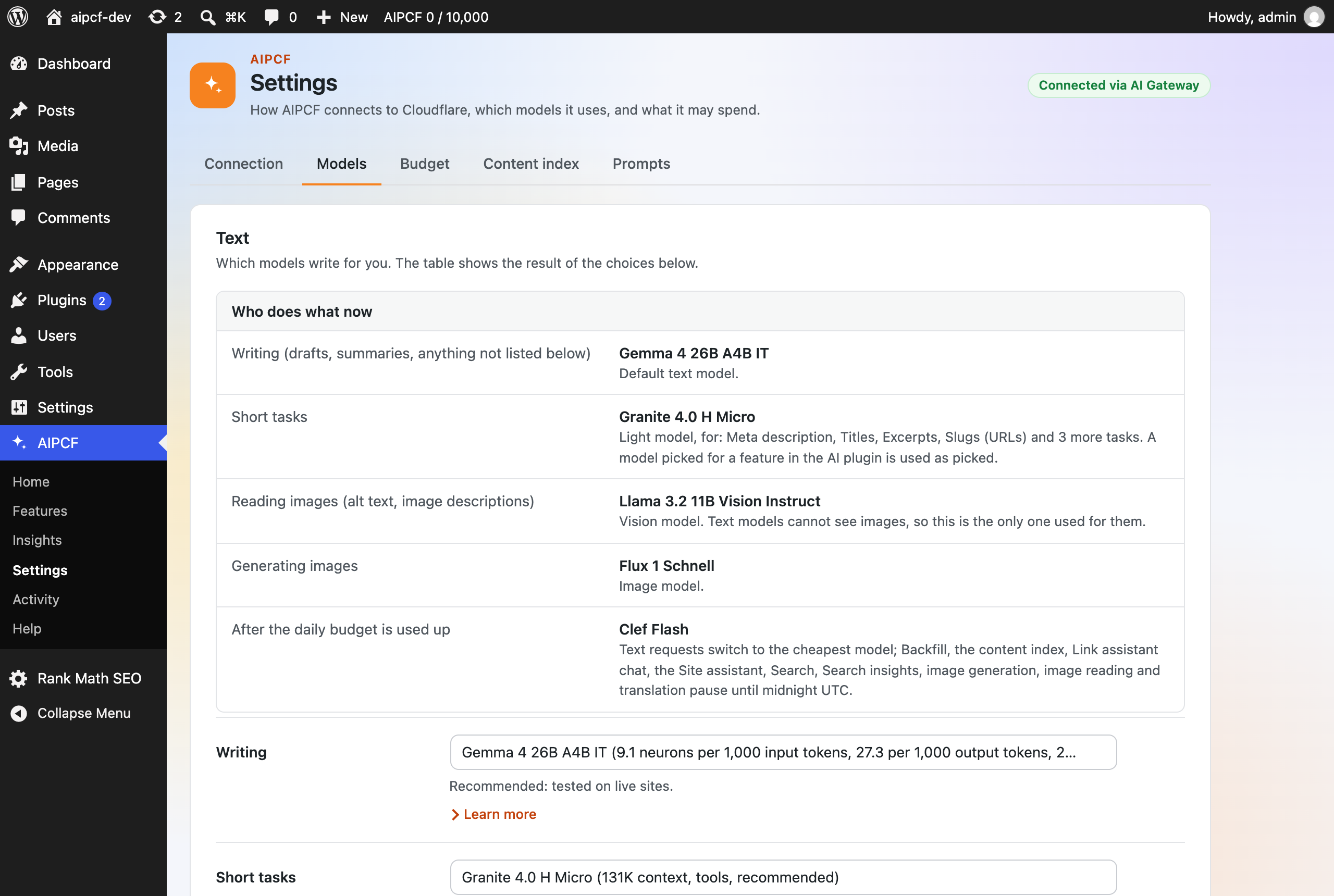
Settings > Models: who does what now, and the model for each kind of request, with its cost.
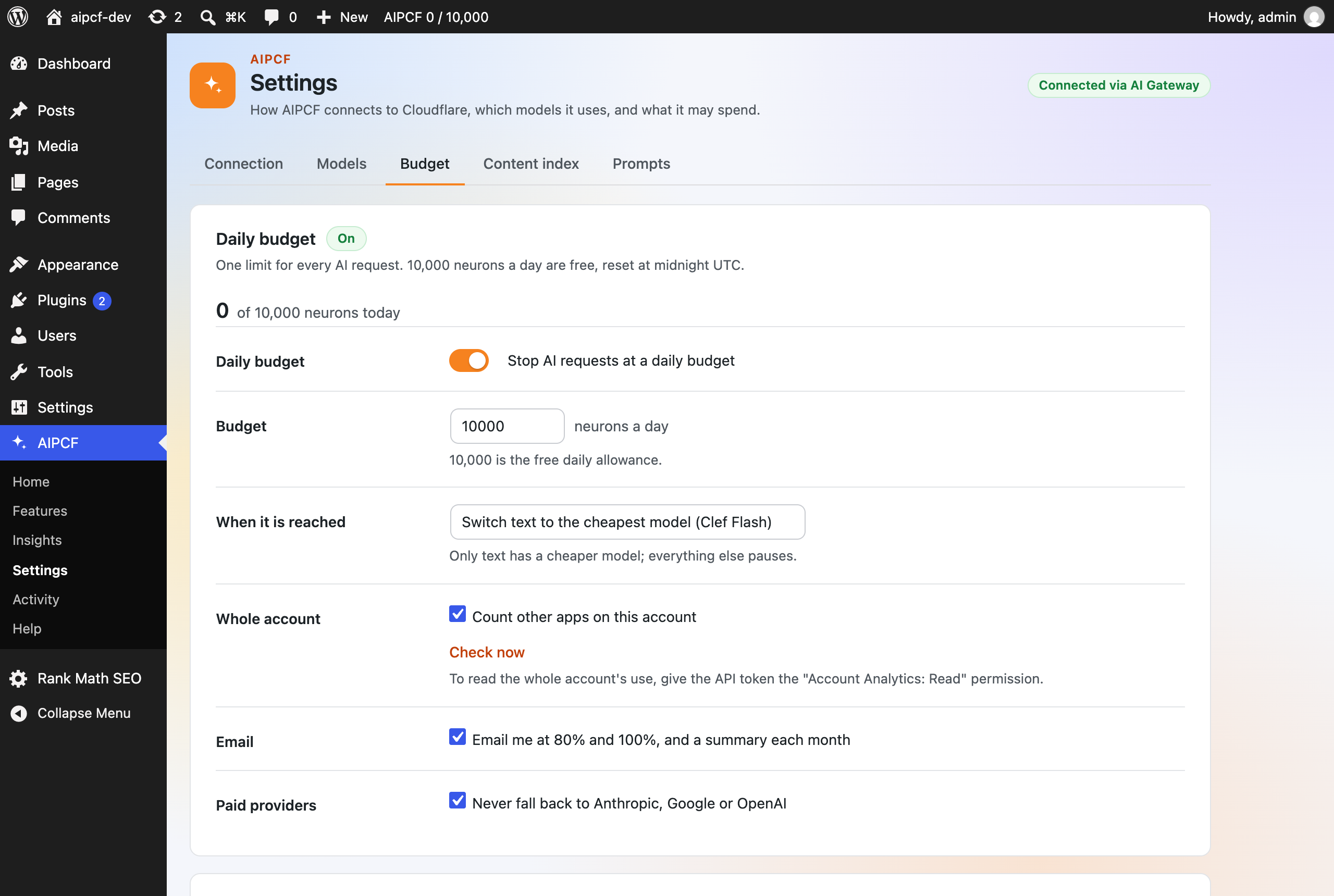
Settings > Budget: the daily budget, what happens when it is reached, and the whole account's use.
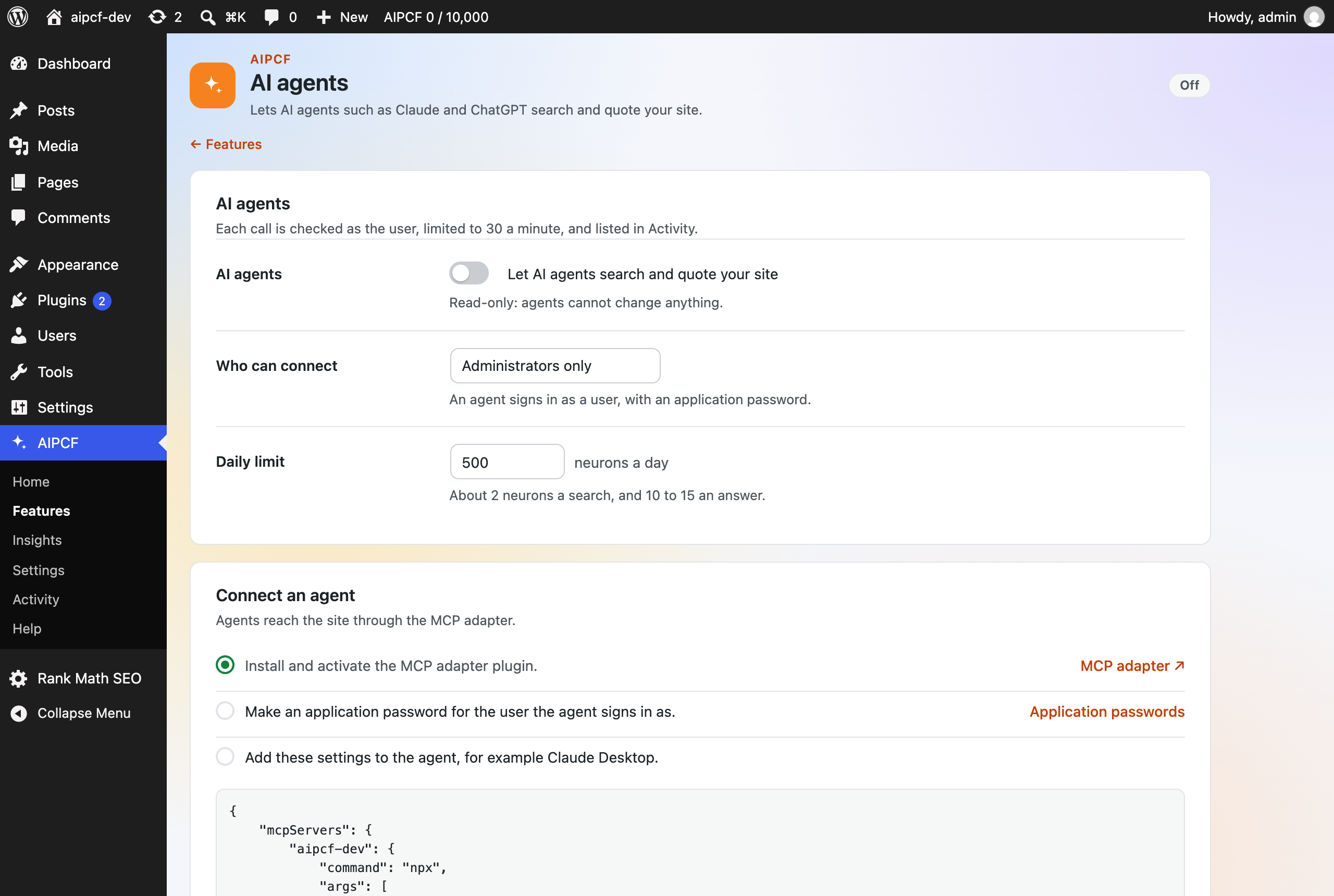
AI agents: let agents such as Claude search and quote your site, read-only, with how to connect them.
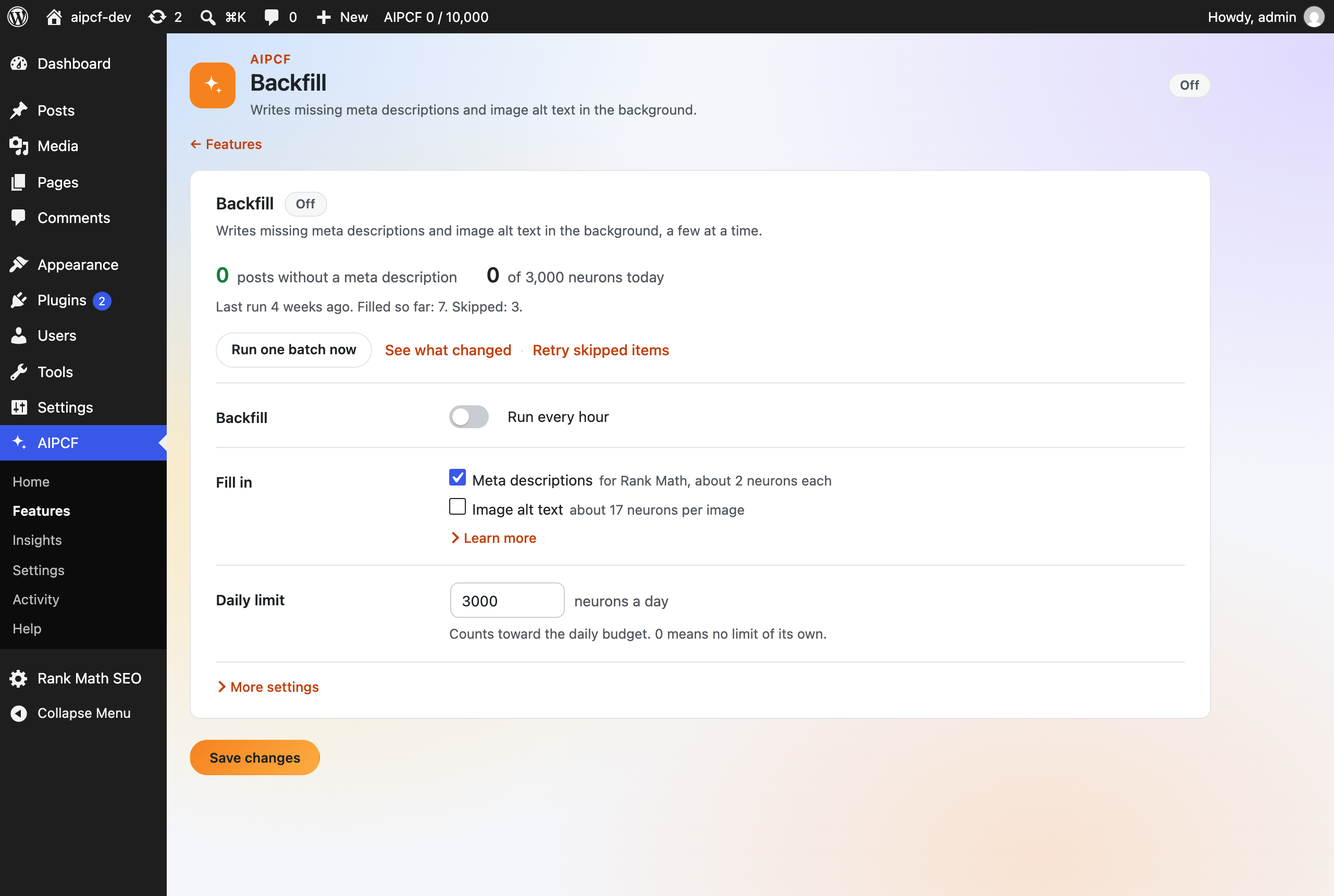
Backfill: missing meta descriptions and alt text, filled in the background within a daily limit.

Help: checks, recent errors and a diagnostics report for support.