
Aivastark is an AI chatbot for WordPress and WooCommerce. It learns your website, files and product catalogue, answers visitors 24/7 in 80+ languages, captures leads, and hands the chat to your team when a person should take over.
One field. That’s it. Paste your Widget Key from the Aivastark dashboard and the widget is live site-wide. You can also use the [aivastark key="..."] shortcode on individual pages.
Run it without leaving WordPress. Click Connect once to securely link your site to your Aivastark project. Aivastark then opens as a full-screen app inside wp-admin, with its own navigation: the Widget editor, the Inbox, the Knowledge base, Leads, Analytics, AI agent settings and more, already signed in. No second login each time.
Decide where it shows. Display rules choose the pages (by type, by page or by URL path), the devices, the visitors (everyone, logged out, logged in, or not certain roles) and how early the widget loads, all without code.
AI chatbot for WooCommerce
Connect your WooCommerce store from the Aivastark dashboard: enter your store URL, then approve the connection in your own WordPress admin. There are no API keys to copy. The chatbot then answers from live store data:
- Searches your catalogue by meaning, price and stock, and sends the shopper a link that adds the product to their cart
- Tracks orders: the customer gives the order number and billing email, and the agent reads the order’s status
- Changes the delivery address on an order that hasn’t shipped, once the customer confirms
- Checks return eligibility and files the return as a ticket for your team
- Once you switch ordering on, places a cash-on-delivery order (if COD is enabled in your store) or sends a checkout link
It cannot take payment, see a shopper’s cart, refund, edit products or cancel orders. Connecting your store doesn’t need a paid plan; letting the agent place orders needs Starter or above.
Live chat with your team
With human handoff switched on (Solo and above), the agent passes the conversation to your team when a customer asks for a person, sounds upset or still isn’t helped. The chat lands in your Aivastark inbox, which opens right inside wp-admin, with the full thread attached.
One agent on every channel
The same agent and knowledge base can also answer on WhatsApp, Instagram, Facebook Messenger, Telegram and email (Starter and above), with every conversation in one inbox.
Features
- AI chatbot trained on your website, files (PDF, DOCX, TXT and Markdown), FAQs and WooCommerce catalogue
- Replies in 80+ languages, detected from the visitor’s first message, on every plan
- Your agent’s name, colours and persona on every plan; hide the Aivastark badge on Scale; custom white-label arrangements on Enterprise, on request
- Lead capture (trigger by message count, keyword, idle time, or manual)
- Human handoff to your team’s inbox, with realtime notifications (Solo and above)
- A full-screen Aivastark app inside wp-admin: widget editor, inbox, knowledge base, leads, tickets, analytics and AI agent settings, via a secure one-click connection
- Display rules: show the widget on every page, only on some, or everywhere but some; desktop, phones or both; everyone, logged-out visitors or logged-in users; hide it from chosen roles
- Load the widget right away, after a delay, or on the visitor’s first interaction
- Knowledge sync: your knowledge base flags itself when you publish or update content here
- Or manage everything from the Aivastark dashboard — your choice
- Domain whitelisting enforced server-side
- Conversation and rate limits enforced server-side
- Markdown-formatted responses
- Lightweight — the widget is loaded asynchronously and never blocks page rendering
Get a Widget Key
You need a free Aivastark account. Sign up at aivastark.com, create a project, and copy the Widget Key from the Integrations page.
Third-party service notice
This plugin is a client for the Aivastark hosted service. To function, it loads the widget script from https://www.aivastark.com/widget.js and chat conversations are processed by the Aivastark backend. Full disclosure of every endpoint and the data sent is in the External services section below.
By installing this plugin you agree to the Aivastark Terms of Service and Privacy Policy.
External services
This plugin connects to the Aivastark hosted service to function. Without this connection there is no chat widget — the plugin cannot work locally only.
1. Widget script (CDN)
- What it does: Loads the JavaScript file that renders the chat widget on your site’s front-end.
- Endpoint:
https://www.aivastark.com/widget.js - When: On every front-end page load where the Widget Key is configured (site-wide or via shortcode).
- Data sent: A standard browser HTTP GET — User-Agent, Referer, IP address. No site content, no visitor PII.
2. Chat backend (runtime, browser Aivastark API)
- What it does: Handles the chat conversation between the visitor and the AI assistant.
- Endpoint:
https://www.aivastark.com/api/*(subdomains may be used; all requests originate from the visitor’s browser, not from the WordPress server). - When: Only when a visitor actively opens the widget and sends a message. No requests are made until the visitor interacts.
- Data sent: The visitor’s chat messages, the Widget Key (identifies your project), an anonymous session ID, the page URL the chat was opened from, and standard browser headers. If the visitor submits a lead form inside the widget, the fields they enter (typically name, email, phone) are also sent.
- Data sent — only if you enable “Know your logged-in visitors” (off by default): for signed-in visitors only, their WordPress user ID, display name, email address and primary role, so the assistant can address them by name and avoid re-asking for details. Nothing extra is sent for visitors who are not logged in, and the setting can be switched off at any time from Aivastark Settings.
3. Pairing & customization (optional — only if you click Connect)
- What it does: Securely links this WordPress site to one Aivastark project (OAuth Authorization Code + PKCE) and lets you open the Aivastark sections (widget editor, inbox, knowledge base, leads, analytics and the rest) inside wp-admin. The site stores a scoped, revocable access token; only a hashed copy is kept on the server. The token is used to mint a one-time sign-in ticket each time you open one of those sections.
- Endpoints:
https://xckrihmmdwddvcwohvaz.supabase.co/functions/v1/wordpress-tokenand.../wordpress-sso(called from your WordPress server). The connection-approval pagehttps://www.aivastark.com/authorize/wordpressand the Aivastark apphttps://www.aivastark.com/embed/wp/appare loaded in your browser (the latter inside an iframe in wp-admin, where it then shows pages underhttps://www.aivastark.com/dashboard). - When: Only after you click Connect (the approval page) and when you open an Aivastark section in wp-admin (the iframe + ticket). Nothing is sent until you opt in by connecting.
- Data sent: Your site URL, the chosen Aivastark project id, and the scoped token. While a section is open, what you do there (widget appearance, AI settings, knowledge base edits, replies you send from the inbox) is saved to your Aivastark project, exactly as in the Aivastark dashboard. No WordPress site content or visitor data is sent by this flow.
- Data received: alongside the token, Aivastark returns this project’s signing secret. It is stored locally (autoload off, never displayed) and used only to compute an HMAC of the logged-in user’s ID when Know your logged-in visitors is on, so Aivastark can verify that identity. It is deleted when you disconnect or delete the plugin.
4. Knowledge sync (only while connected, and switchable off)
- What it does: Tells Aivastark that this site’s content changed, so the knowledge base can show a “Site changed” badge with a Refresh button instead of going stale. It never starts a re-crawl by itself.
- Endpoint:
https://xckrihmmdwddvcwohvaz.supabase.co/functions/v1/kb-change-signal(called from your WordPress server, on WP-Cron). - When: At most once every five minutes, after a public post or page is published, updated, unpublished, trashed or deleted. Only while the site is connected, and only if Knowledge sync is on (it is on by default; switch it off in Aivastark Settings or on Home).
- Data sent: The scoped token (which identifies your project) and the fixed reason
content_update. No post title, URL, content or user data.
5. Deactivation feedback (optional — only if you click “Submit & Deactivate”)
- What it does: When you deactivate the plugin, an optional prompt asks why. If you choose to submit, your selected reason, optional comment, and the email shown (your WordPress account email) are sent to Aivastark to help improve the product.
- Endpoint:
https://xckrihmmdwddvcwohvaz.supabase.co/functions/v1/wordpress-feedback(called from your WordPress server). - When: Only when you click Submit & Deactivate in the feedback prompt. Clicking Skip & Deactivate or Cancel sends nothing.
- Data sent: The reason you selected, your optional comment, the email shown in the prompt, your site URL, the plugin version, and your WordPress version. No site content or visitor data.
Service provider
- Provider: Aivastark
- Terms of Service: https://www.aivastark.com/terms
- Privacy Policy: https://www.aivastark.com/privacy
Screenshots

The chatbot on a demo store, answering from the catalogue with the product and a link to it.
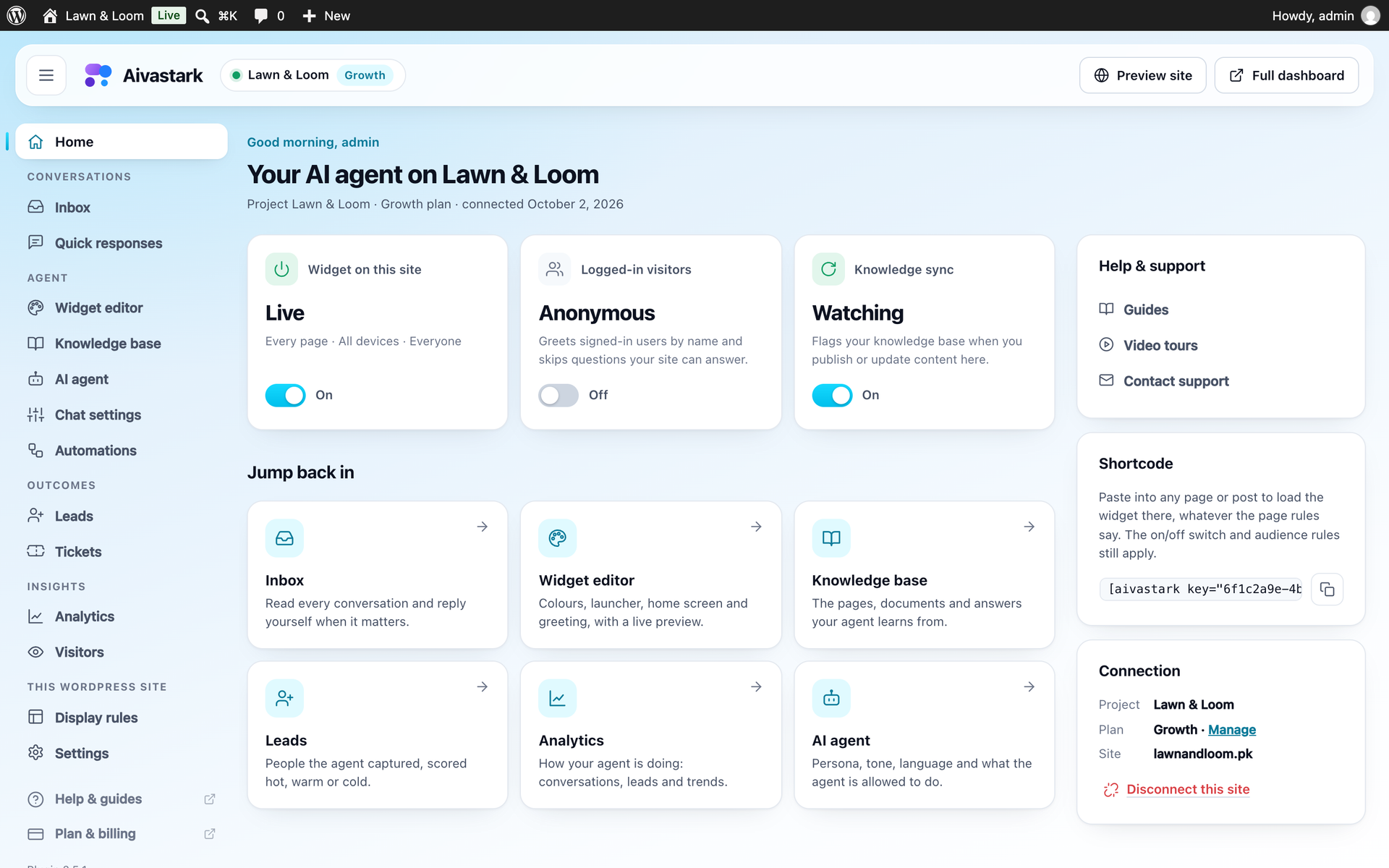
Aivastark inside wp-admin: switch the widget on, sync your knowledge base and open any section.

The inbox inside WordPress, with a chat the agent handed to your team.
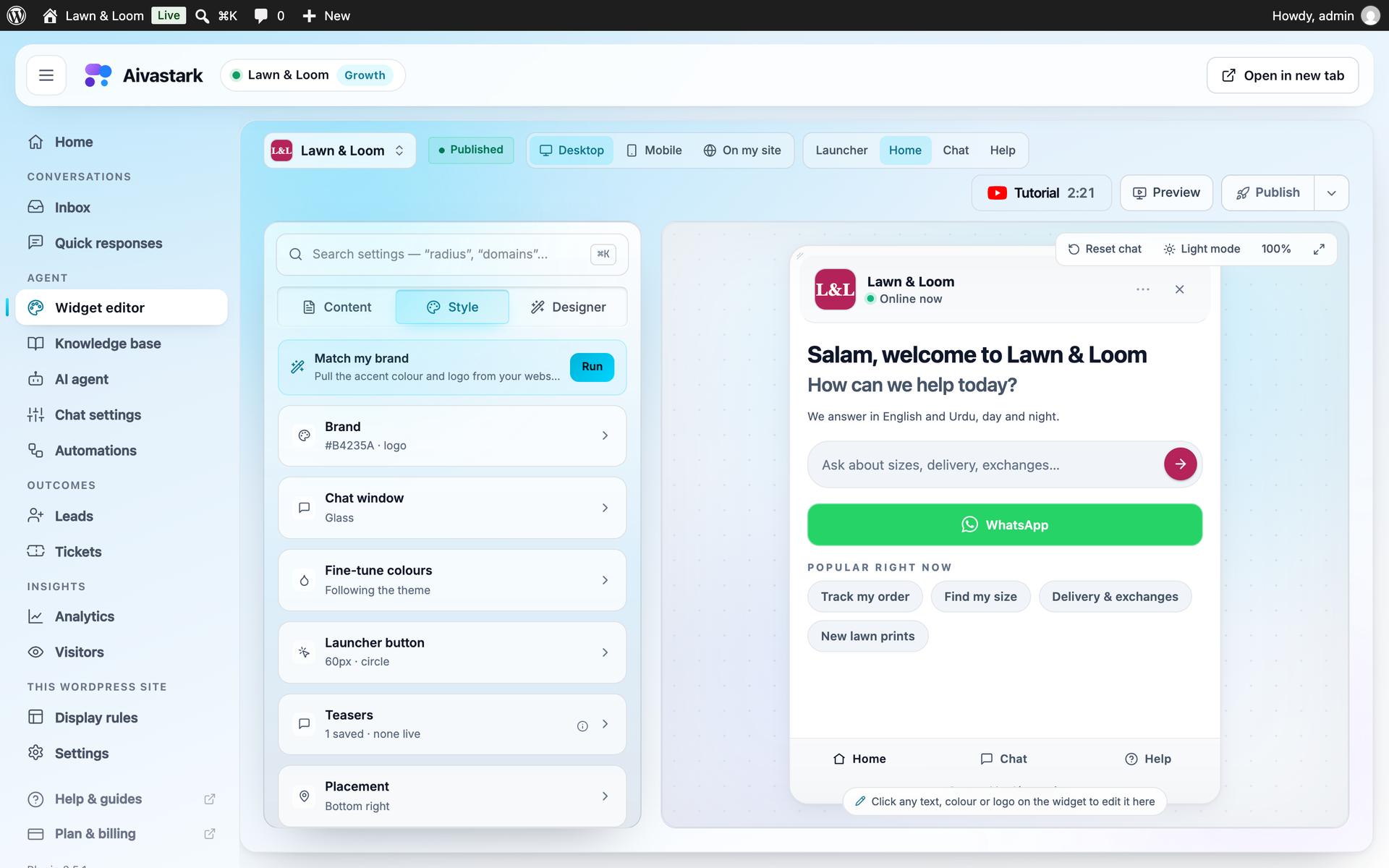
The widget editor: your colours, logo, welcome message and quick questions, with a live preview.
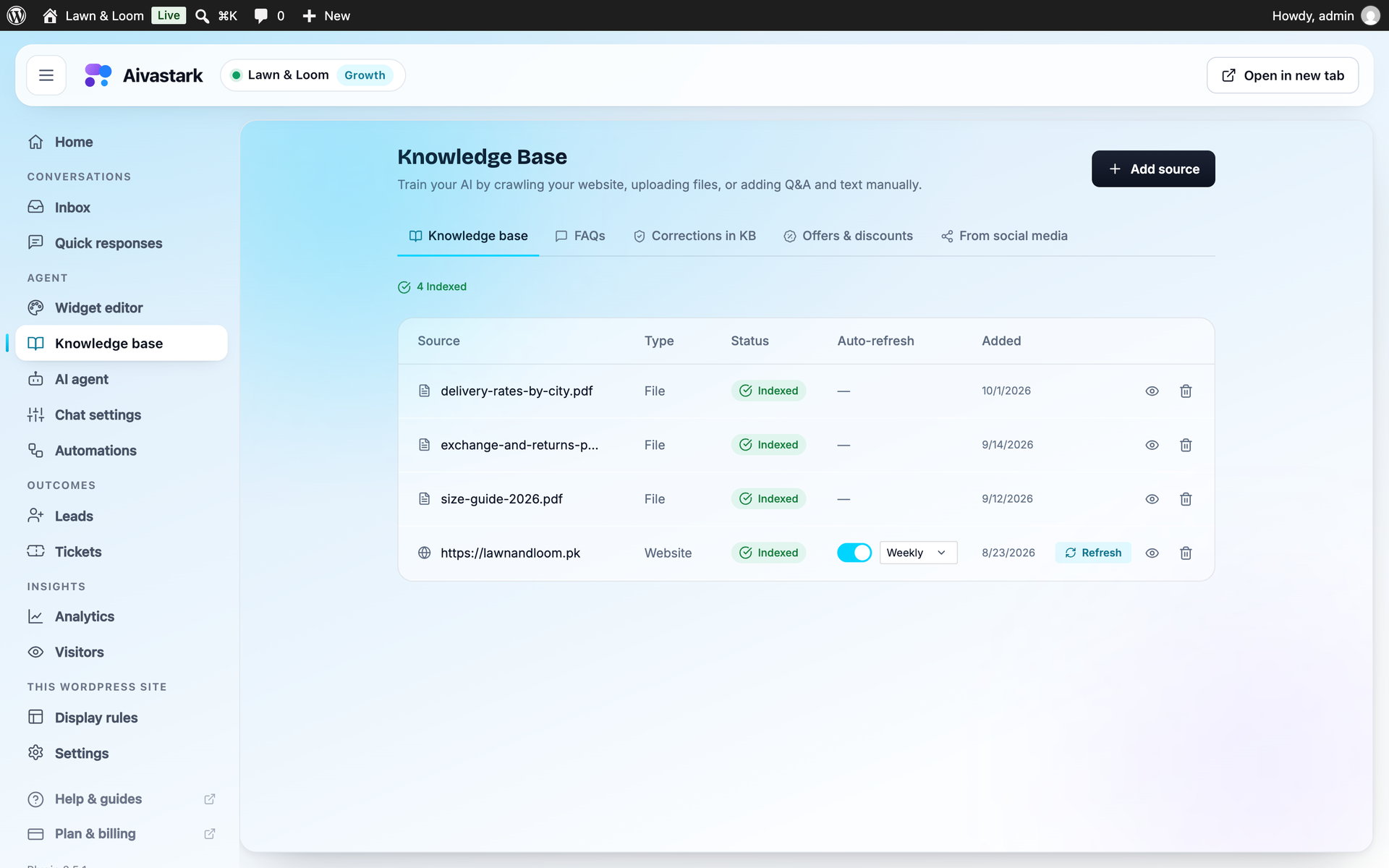
The knowledge base: your website, files and FAQs.
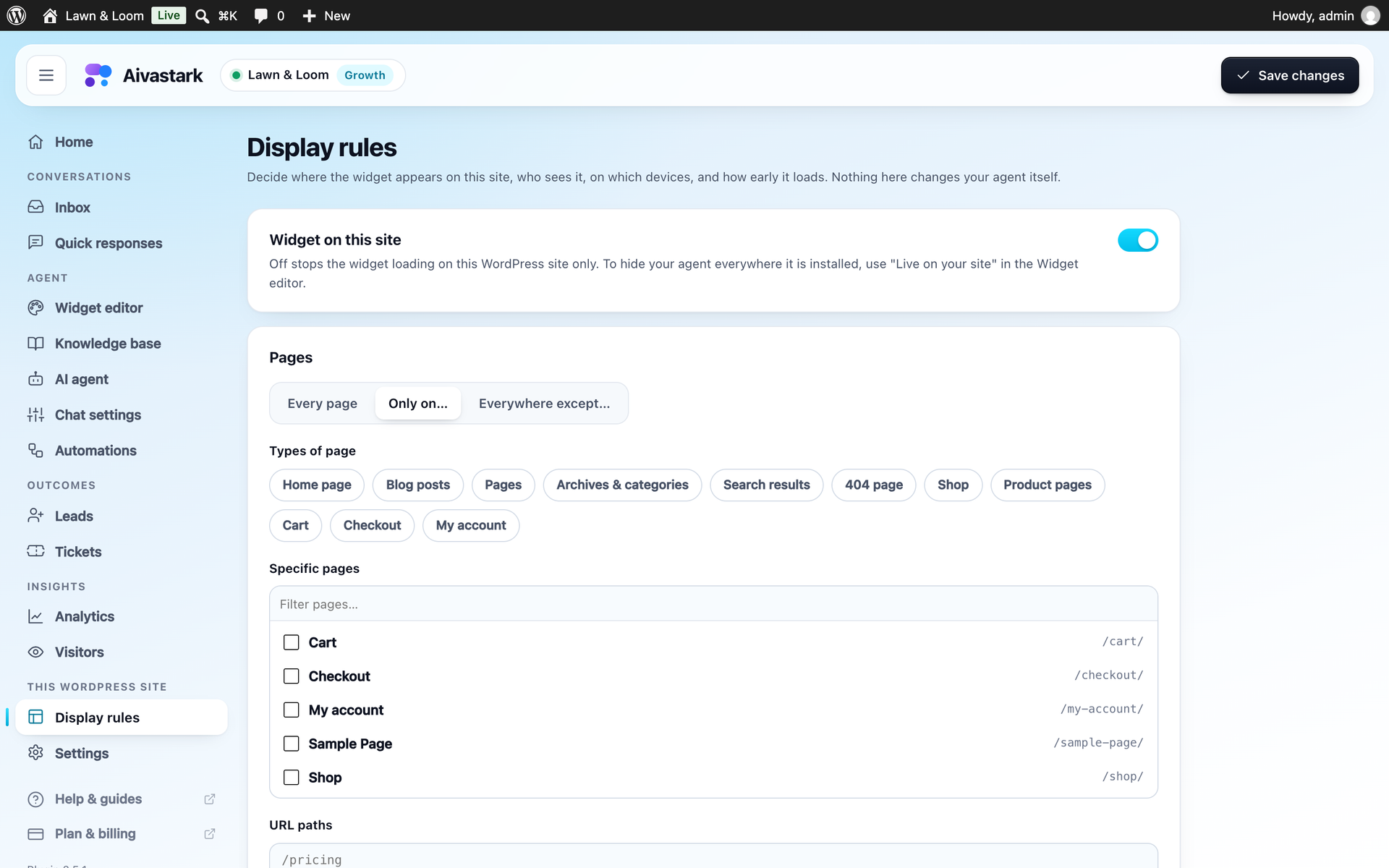
Display rules: pick the pages (WooCommerce shop, product, cart and checkout pages included), devices and visitors.
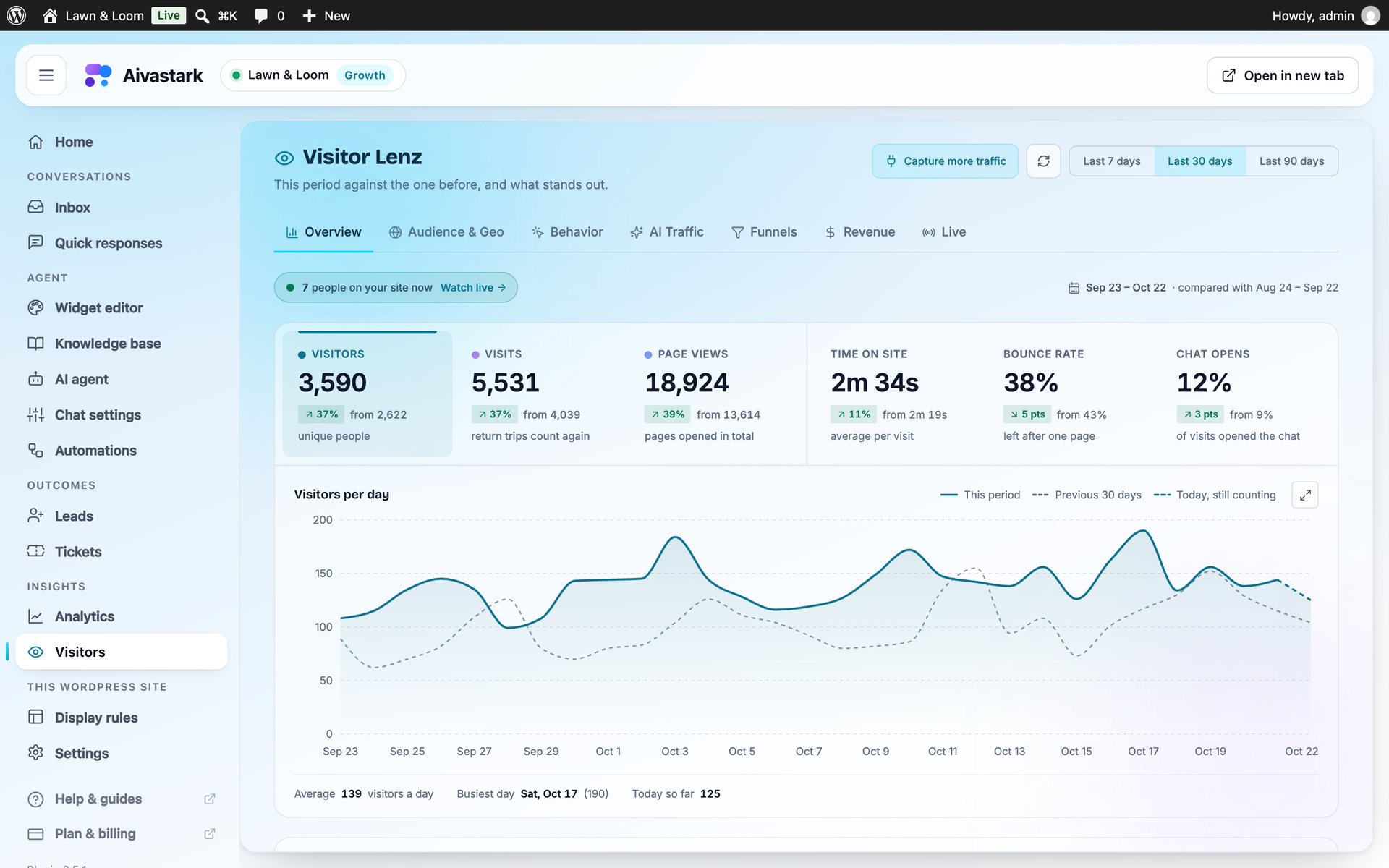
Visitor analytics: who visits your site and what they do (Starter and above).