
AltoGraph – AI Alt Text Generator & SEO Meta Descriptions
by The Really Useful App Company
No API key. No account. No setup. Unlike most AI tools, which make you sign up for OpenAI or Anthropic and paste in your own paid API key, AltoGraph runs the AI on our hosted service. Free for 10 items every month.
Your Media library gets an Alt text column, so you can see at a glance which images have none, and a Generate button on each one that does not. One click writes alt text from the picture itself. There is a bulk action for a backlog, and a Generate button in the Attachment details panel too.
Nothing is sent anywhere until you ask for it. If you would rather not click, you can switch on automatic alt text for new uploads, and automatic SEO meta descriptions with JSON-LD structured data when you save a post, in Settings. Both are off until you turn them on. AltoGraph never overwrites alt text you have written yourself.
AltoGraph Pro raises that limit (subject to fair use).
What is included
- Alt text written from the image itself, for one image or many at once (better accessibility and image SEO).
- Concise, on-topic meta descriptions for posts and pages, written when you save a post once you switch that on.
- Article JSON-LD structured data for richer search results, added with each meta description.
- A backfill action for images that have no alt text yet.
- Alt text you have written yourself is never overwritten.
Privacy-friendly by design
Automation is off until you switch it on, and AltoGraph only ever sends what it needs to do the job (see the External Services section below). A site ID (a hash of your site URL) is used for usage counting; it does not need any personal data about your site’s visitors. You can also choose to give us an email address for release notes and product updates; it is optional, and nothing stops working without it.
External services
This plugin connects to the AltoGraph API to generate alt text and metadata. It is required for the plugin’s core features.
- What is sent and when:
- Alt text: the plugin sends the image URL and filename to the AltoGraph API on each of these actions:
- when you upload an image with automatic alt text switched on
- when you run the backfill action
- when you use the Generate button in the Media library Alt text column
- when you use the Alt text bulk action in the Media library
- when you use the Generate button in the Attachment details panel
- Meta descriptions: the plugin sends the post title and post content when you save a post with automatic meta descriptions switched on.
- Usage counting: a site ID (a hash of your site URL) and the plugin version accompany each request. We treat the site ID as personal data, because it can be matched to your site’s address. Our privacy policy explains how we use it. Whether this site’s review prompt was shown, snoozed, dismissed or clicked is also sent, so we can tell whether that prompt is working. It records the site, not the individual user, and says nothing about what you did on WordPress.org afterwards. If you choose to give us an email address, it is sent on its own, only when you submit your email address on the settings screen. It is optional, you are asked once (and again only after we have deleted it), and every feature keeps working if you skip or dismiss it. It is sent only if you tick the sign-up box, together with the wording you agreed to. We use it to send release notes and product updates and to give you a way to reach us. These emails are sent from our Microsoft 365 mailbox. You can unsubscribe from any message, and we delete it 24 months after your last contact with us. Whether this site’s email prompt was shown, dismissed or submitted is also sent, so we can tell whether it is working; it does not include the address itself.
- Where it goes: the AltoGraph API (default
https://api.thereallyusefulappcompany.com), which uses Anthropic as an AI subprocessor to generate the text. - Service terms and privacy:
- AltoGraph Terms: https://thereallyusefulappcompany.com/altograph/terms
- AltoGraph Privacy Policy: https://thereallyusefulappcompany.com/altograph/privacy
- Anthropic Privacy Policy: https://www.anthropic.com/legal/privacy
Nothing is sent until you use one of the Generate buttons or the bulk action, run the backfill, or upload an image or save a post with automation switched on. If you choose to give us an email address, it is sent when you submit it.
Screenshots

The AltoGraph settings screen with the external-service notice and automation toggles.
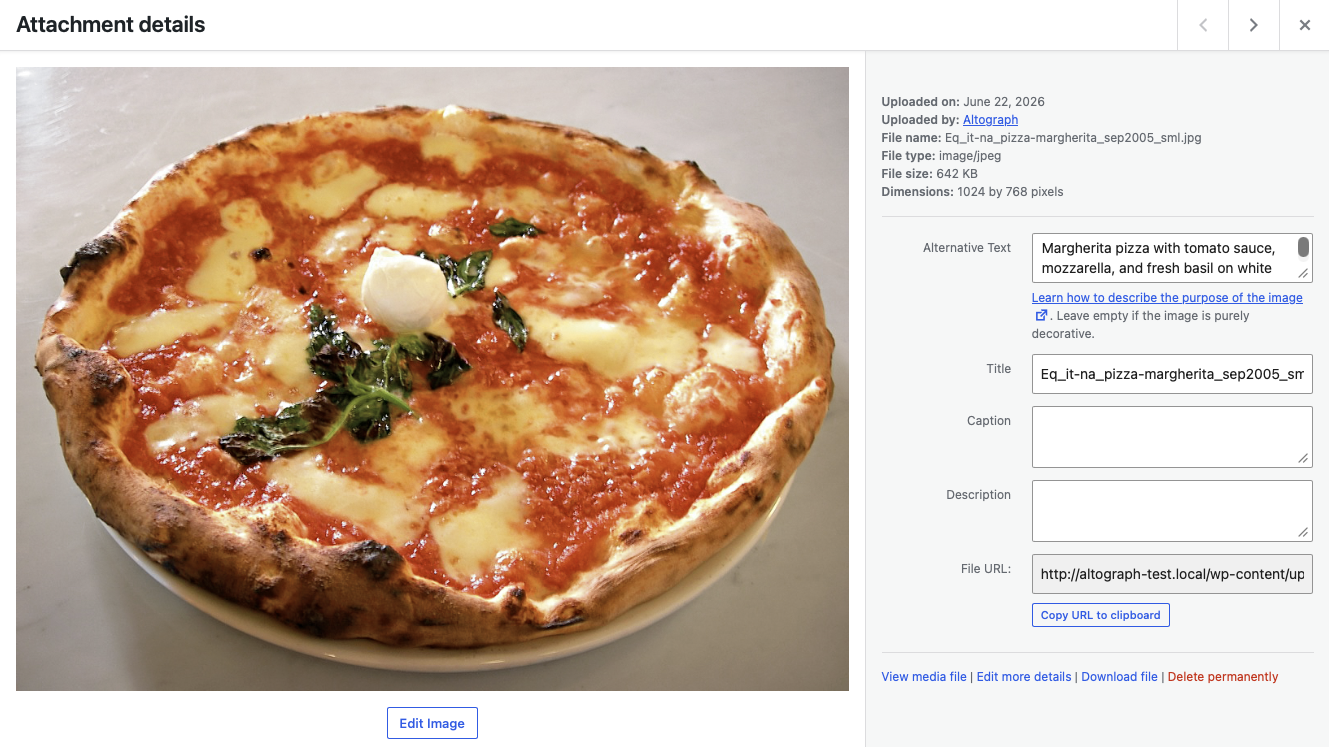
Alt text for a newly uploaded image, written with automatic alt text switched on in Settings.