DockAccess Accessibility Widget (formerly Assist For WCAG) adds the dockaccess.org accessibility widget to every page of your website. Visitors open it with a button and adjust the page to their needs: contrast and colours, text size and spacing, a readable font for dyslexia, text to speech, hidden animations, a bigger cursor, and ready-made profiles for blindness, low vision, colour blindness, dyslexia, epilepsy, ADHD, motor and cognitive disabilities.
Demo: https://dockaccess.org/#wcag-open
The widget is set up in your dockaccess.org account: its colours and position, the options it offers, your own selectors and the accessibility statement it links to. The plugin only puts it on your pages and shows you its status.
Connected with your account
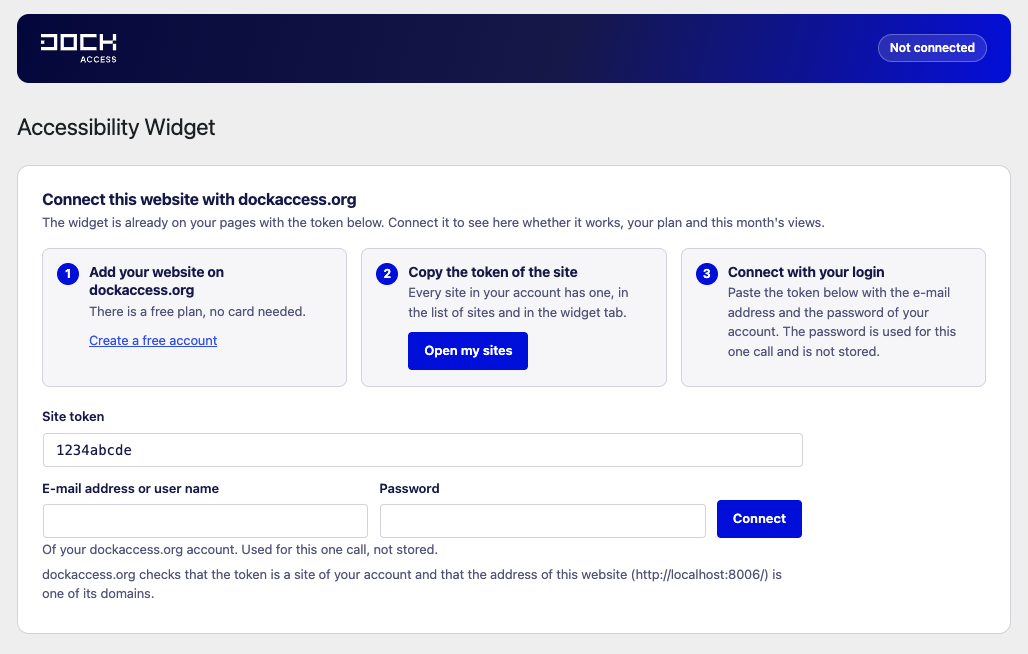
Paste the token of the site with the login and password of your dockaccess.org account and press Connect. The password is used for this one call and is not stored. The settings screen then shows:
- whether the widget works on your website,
- why not, with the way out: the widget is switched off for the site, paused by your plan, or this month’s views are used up,
- your plan and this month’s widget views,
- a link to a bigger plan when there is one, and to the widget settings in your account.
Your account shows in the widget tab of the site that the widget was installed with this plugin, and when the plugin last checked in.
A widget alone does not make a website accessible. It supports your visitors, while the content and the code of the website still have to follow WCAG. dockaccess.org also offers automatic and expert audits.
External services
This plugin uses the dockaccess.org service run by Dock sp. z o.o. (Gdańsk, Poland). Nothing is sent before you save a token.
- The widget: every page of your website loads
https://dockaccess.org/accessibility/{token}/start.js, which loads the widget in the visitor’s browser. - The connection (
https://dockaccess.org/fast-api/widget/connect,/widget/status,/widget/disconnect): when you press Connect, when you open the settings screen (at most every ten minutes), once a day in the background and when you press Refresh or Disconnect. Connecting sends the site token, the login and password of your dockaccess.org account (over HTTPS, for this one call; the plugin does not store them), the address of this website, the WordPress version, the plugin version and the language of the admin screen. The later calls send the site token and the connection secret instead of the password. They receive the status of the widget, the plan, this month’s views and links to your account.
Terms of service: https://dockaccess.org/rules-regulations/widget-terms-of-service/
Privacy policy: https://dockaccess.org/rules-regulations/privacy-policy/
Screenshots