
Your categories sort themselves.
What sells most moves up. What is sold out moves down. New arrivals get their
place. And you review the order before publishing it.
What sells
Net units over the last 30 days, with refunds deducted. Each run takes a
complete snapshot of that period and shows you which orders were counted and
which were not.
What is left
The availability your catalog reported at the time of the run. What cannot be
bought goes to the end, however many units it sold before.
What has just arrived
A new product gets its place for a window you set per category: 14 days by
default, from 1 to 90.
You keep the last word
Turning the plugin on changes nothing in your store. Preview shows what would
move and why. You review the order before publishing it. Pin products to keep
them in place, pause a category, restore WooCommerce’s native order, or return
to an earlier published order. No black boxes: every position comes with its
explanation.
Free is complete
No limits on categories, products, or orders. No account, key, or expiry.
Pro
Pro adds named, versioned strategies, net revenue as a weighted signal, and
scheduled editorial promotions for each category. Pro replaces Free as the
sorting edition; both can stay installed, but only one sorts at a time. Pro
keeps working if you do not renew.
What it does not do
- It doesn’t promise more sales. It sorts by an observed signal; what happens
next depends on your store. - No AI, “smart” scores, per-visitor personalisation or random order.
- It does not know real-time stock or the units actually free at checkout.
- It does not collect impressions, clicks, or sessions.
Privacy
All calculations run on your server. The plugin sends no telemetry or store
data, depends on no external service, and makes no network request to sort
products. WordPress itself may still check WordPress.org for updates.
Where it sorts and where it does not
The plugin sorts only when it can identify one category unambiguously.
It serves the ranking in:
- The main category archive of a classic theme when WooCommerce uses its
default or manual order. - The Product Collection block in Default/inherit mode inside the category
template. - The Product Collection block in Custom+Manual mode when the category is
unambiguous and no other ordering criterion exists, including editor preview.
It keeps the native order for: an explicit order selected by the visitor,
search, the main shop archive, queries spanning several categories, the Store
API, external search engines, and custom SQL queries from other plugins.
Not claimed as supported: shortcodes, page builders, headless setups,
WPML/Polylang, and page or CDN caches. The dashboard is available in English
and Spanish, is ready for translation, and supports RTL; multilingual catalog
sorting has not been verified.
WordPress Multisite is not supported. The plugin detects it, explains the
limitation, and does nothing else: no tables, no scheduled work, and no
storefront intervention on any site in the network.
Development
Admin source: admin-ui/src/; compiled files: assets/admin/. With Node 20+
and npm 10+, rebuild with npm ci && npm run build:assets. To rebuild the PHP
autoloader, run composer install --no-dev --classmap-authoritative. The
plugin includes its production assets and autoloader.
Screenshots
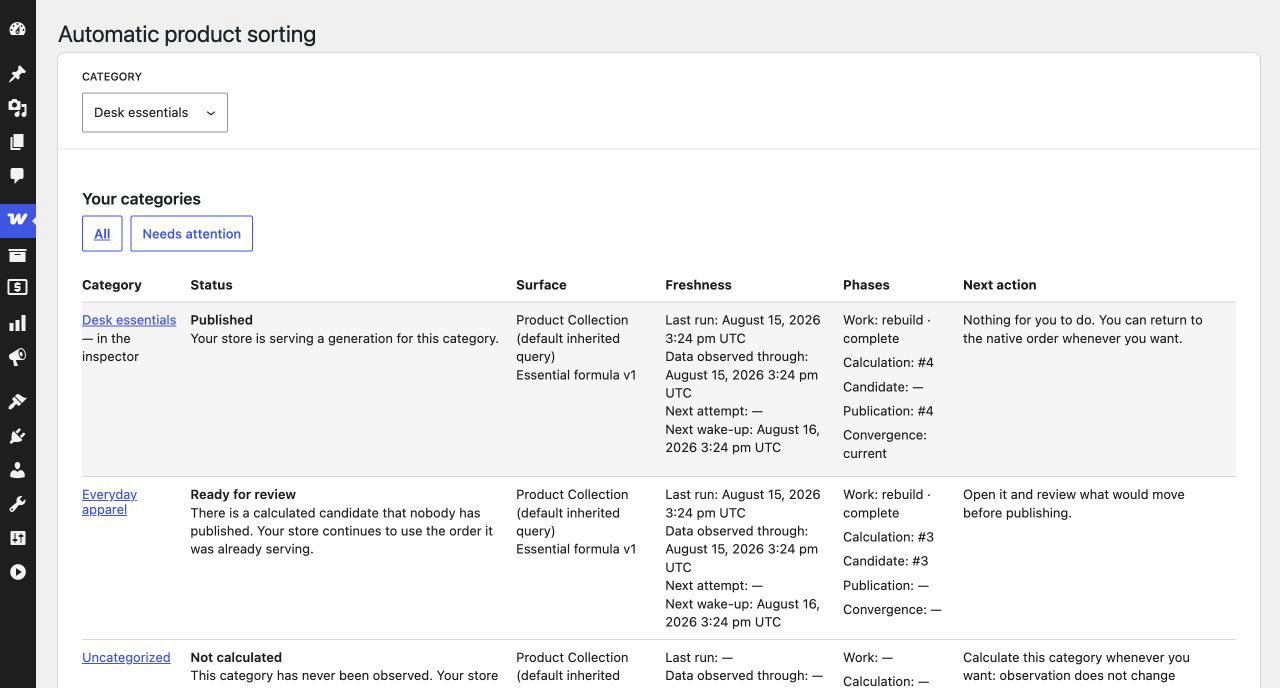
Every category at a glance: sorted, waiting for review or paused, and what to do next.
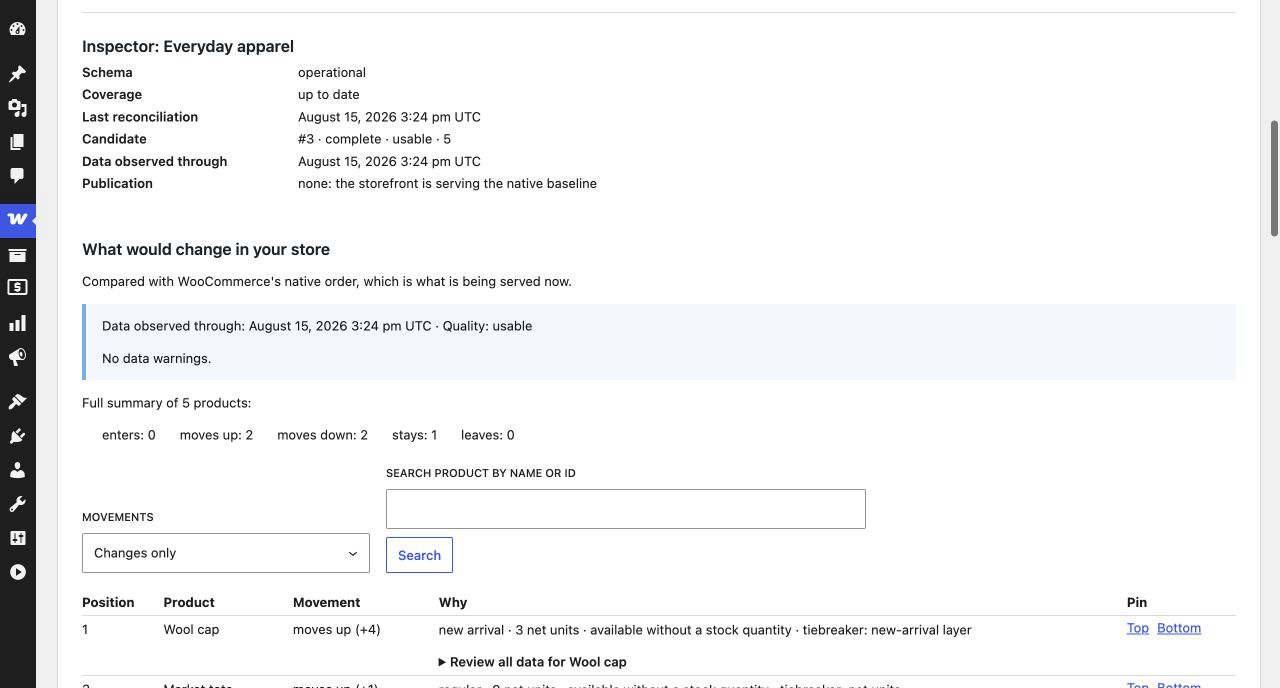
Preview: see what would move and why, before you publish anything.
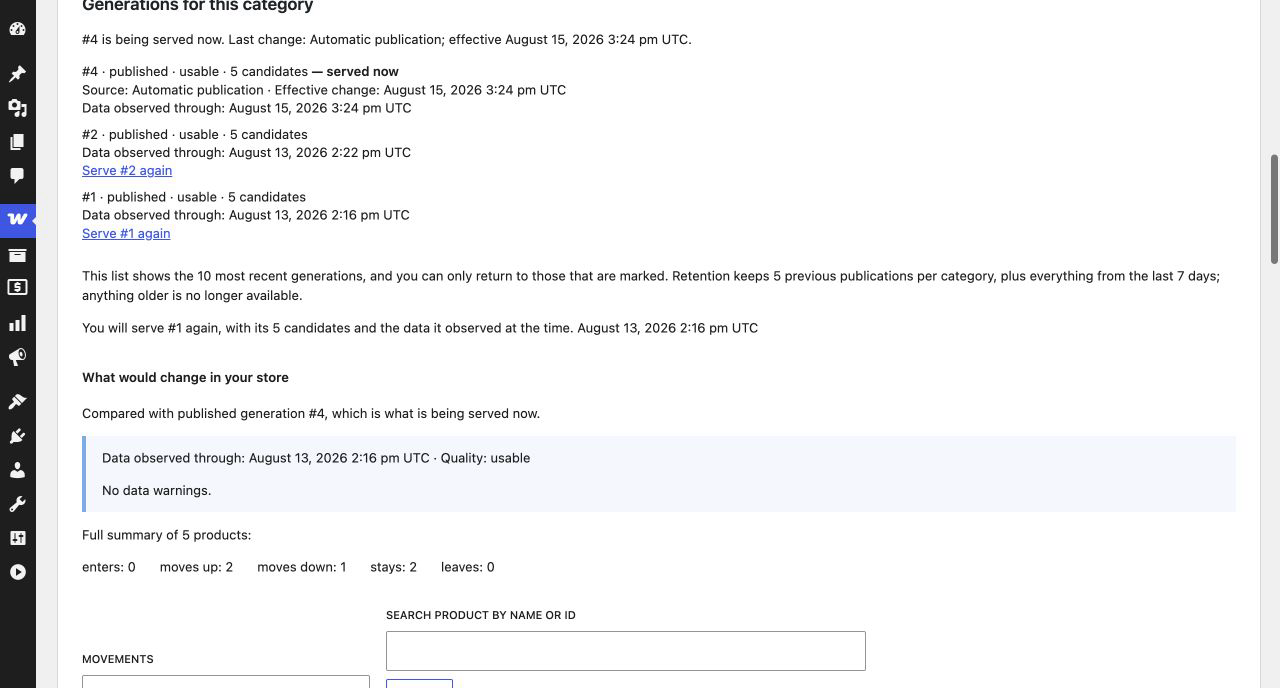
History: go back to an earlier order after seeing exactly what changes.