Authica™ is a WordPress login security and login customization plugin built for site owners, agencies, and developers who want a safer, more professional login experience.
Use Authica to customize the WordPress login page, protect login forms with Cloudflare Turnstile, add two-factor authentication, reduce brute force attacks, hide or rename wp-login.php, manage login redirects, restrict login access by IP, and monitor login activity with security logs and reports.
Instead of using separate plugins for login branding, CAPTCHA, 2FA, brute force protection, login redirects, hide login, and activity logs, Authica brings these features together in one polished WordPress admin experience.
Highlights:
WordPress Login Customization
Customize the default WordPress login page with your own logo, background, colors, overlays, typography, Google Fonts, welcome messages, error messages, and responsive layout controls.
Cloudflare Turnstile Bot Protection
Protect WordPress login, registration, and password reset forms with privacy-focused Cloudflare Turnstile verification.
Two-Factor Authentication for WordPress
Add app-based TOTP two-factor authentication to improve account security for administrators, users, and client sites.
Hide or Rename wp-login.php
Move the default WordPress login URL away from automated bot targets and reduce noise from common brute force attempts.
Brute Force Protection
Limit repeated failed login attempts and help protect accounts from password guessing and credential stuffing attacks.
Web Application Firewall
Inspect incoming requests for suspicious patterns such as SQL injection, cross-site scripting, path traversal, remote code execution, sensitive file probes, scanner traffic, and known malicious user-agents.
IP Restriction
Create allow, deny, and stealth access rules for login protection based on IP addresses or IP ranges.
Login Activity Logs and Security Reports
Monitor login attempts, blocked events, user activity, countries, IP addresses, and suspicious login behavior from the Authica dashboard.
Login and Logout Redirect Rules
Send users to the correct page after login or logout with simple redirect controls and role-based flows.
Email Verification
Require users to confirm their email address before signing in, helping reduce fake accounts, spam registrations, and bot-created users.
Modern Authica Admin UI
Manage login security and login branding from a polished, consistent WordPress admin interface built for agencies and serious site owners.
Authica Free includes full visual branding tools plus core security features. Upgrade to Authica Pro for advanced controls and premium protections.
Learn more: https://authica.net
Contributors
emilsim (Emil Simunovic)
Features
Login Branding and Design
- Custom logo
- Background image and color controls
- Overlay controls
- Form styling
- Button styling
- Input styling
- Google Fonts
- Custom welcome and error messages
- Mobile-friendly login layout
- Live preview through the WordPress Customizer
Login Security
- Cloudflare Turnstile bot protection
- Brute force protection
- Web Application Firewall
- Two-factor authentication / TOTP
- Hide or rename wp-login.php
- IP restriction rules
- Email verification
- Login activity logs
- Security reports and alerts
Login Flow Controls
- Login redirects
- Logout redirects
- Role-based redirect support
- Magic link controls
- Passkey
- Social Login
- AJAX-powered login form
Agency and Professional Features
- Polished Authica admin interface
- Client-friendly login branding
- Security reporting
- White-label mode in Pro
- Premium support in Pro
Privacy
This plugin uses an optional opt-in to collect non-sensitive diagnostic data and plugin usage information to help improve the product. The opt-in is presented on first use and can be changed at any time under Authica Account.
Collected data may include: WordPress/site version, language, plugin/theme list and versions, admin email (for license/updates), and anonymized site URL. No personal content or passwords are collected.
Data is processed by our licensing/telemetry provider and by us for support and update delivery.
• Provider’s Privacy & Terms: https://freemius.com/privacy/ , https://freemius.com/terms/
If you choose not to opt in, only the information required to deliver updates to your site is stored (license/installation ID, if you activate a license).
External services
Cloudflare Turnstile (human verification)
This plugin can integrate with Cloudflare Turnstile to protect login, registration, and password-reset forms from automated abuse.
• What is it used for?
Turnstile provides a human verification widget to reduce bot signups and credential-stuffing attempts.
• What data is sent and when?
– On pages where the widget is shown, the Turnstile JavaScript file is loaded from
https://challenges.cloudflare.com/turnstile/v0/api.js. When loaded, Cloudflare
may receive standard browser/connection data (e.g., IP address, user agent, referrer)
and evaluate device/browser signals to determine risk, per Cloudflare’s documentation.
– When a verification token is produced by the widget, your WordPress site makes a
server-to-server request to:
https://challenges.cloudflare.com/turnstile/v0/siteverify
The server-to-server verification includes the user’s response token and your secret key.
When a valid client IP is available, the optional remoteip value may also be sent to Cloudflare to improve verification accuracy.
– If you enable the optional Turnstile Analytics feature, the site sends an authenticated request to
https://api.cloudflare.com/client/v4/graphql to retrieve aggregate Turnstile event counts.
The request includes the configured Cloudflare account ID, date range, and account API token.
• Where can I learn more?
– Cloudflare Turnstile: https://www.cloudflare.com/products/turnstile/
– Turnstile docs: https://developers.cloudflare.com/turnstile/
– Cloudflare Privacy Policy: https://www.cloudflare.com/privacypolicy/
– Cloudflare Terms of Service: https://www.cloudflare.com/terms/
• How do I disable it?
Turnstile integrations and optional analytics can be disabled at Authica Turnstile & Edge Security, which stops the
widget from loading and the related service endpoints from being called.
Email delivery
This plugin uses WordPress wp_mail() to send email verification messages. Mail delivery
is handled by your hosting provider or any SMTP/email plugin you configure. If you connect
a third-party email service (e.g., via an SMTP plugin), that service’s privacy terms apply.
This plugin does not send verification data to any email vendor on its own.
Creator Program
We invite WordPress creators to publish an honest Authica walkthrough on YouTube (no positive review required).
Find out more: authica.net/creator-program
Trademark
Authica™ is a trademark claimed by Emil Simunovic. Registration pending.
WordPress is a registered trademark of the WordPress Foundation, used under license.
Screenshots

Authica custom WordPress login page with branded background, logo, form styling, and modern login layout.
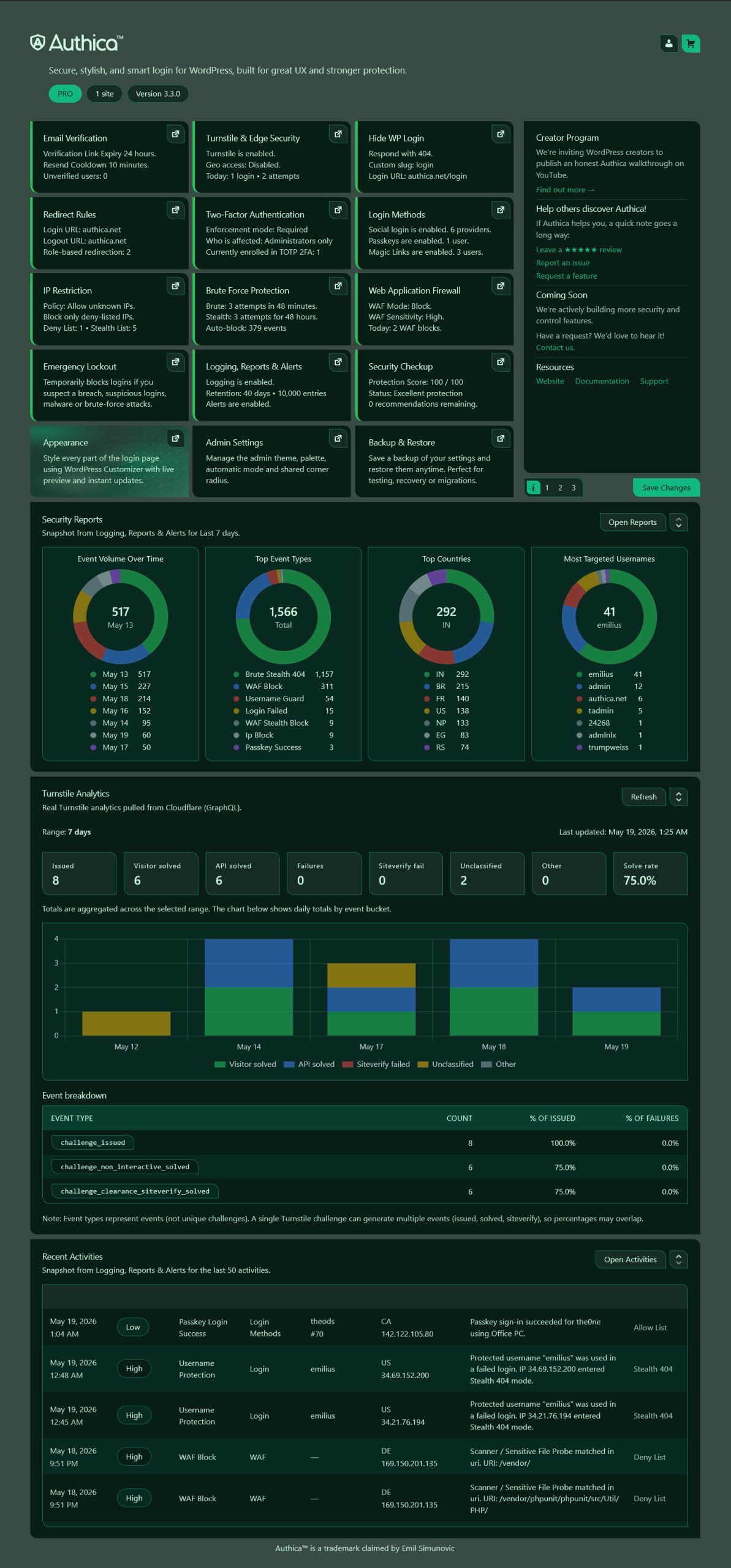
Authica dashboard showing login security status, activity, reports, and quick access to protection modules.

Cloudflare Turnstile settings for protecting WordPress login, registration, and password reset forms.

Hide WP Login settings for renaming wp-login.php and reducing automated login attacks.

Two-factor authentication settings with TOTP protection and trusted device controls.

Brute force protection settings for limiting repeated failed login attempts.

Logging, reports, and alerts showing login events, blocked activity, IPs, countries, and security summaries.

IP restriction controls for allow, deny, and stealth login access rules.

Web Application Firewall settings for SQL injection, XSS, path traversal, RCE, scanner probes, malicious user-agents, block responses, exclusions, and WAF statistics.

Security Checkup showing the Login Protection Score, configured protections, access controls, threat detection, monitoring, alerts, and recovery tools.