ByteCoreStack – MCP Connector for AI Tools turns your WordPress site into a Model Context Protocol (MCP) server. MCP is an open standard that lets AI assistants call “tools” provided by other software. Once connected, an AI client such as Claude, ChatGPT, or Cursor can read and manage your site through clearly defined WordPress actions, and you just describe what you want in plain language.
For example, you can ask your AI assistant to:
- “Draft a post about our spring sale, add it to the News category, and leave it as a draft for me to review.”
- “List WooCommerce orders that are still processing from the last 7 days and summarise them.”
- “Find posts with no SEO meta description and suggest one for each.”
- “Show me pending comments and mark the obvious spam.”
- “Check site health and tell me which plugins have updates available.”
- “Move the call-to-action block on the About page above the team section and change its button text.”
- “Set up a shipping zone for Canada with a flat rate of 15 and free shipping over 100.”
Every action runs as the WordPress user who approved the connection and is checked against that user’s normal capabilities. An Editor’s AI client can do what an Editor can do in wp-admin, and nothing more.
What’s included
360 tools across WordPress core and popular plugins. Integration tools only appear when the plugin they work with is active, so your AI client only sees tools that work on your site.
- Content: posts, pages, revisions, scheduling, post formats, page templates, reusable blocks, search-and-replace, duplication, bulk create, update and Trash, and a content calendar.
- Block editing: list a post’s blocks, then insert, change, move, or remove a single block (including blocks inside Groups and Columns) without rewriting the rest of the post.
- Site Editor (block themes, read-only): list and read templates and template parts, and read Global Styles.
- Media: browse the Media Library, upload from a URL or file data, set featured images, edit titles, captions and alt text, find images missing alt text, find orphaned media, and regenerate thumbnails.
- Taxonomies, menus and widgets: categories, tags, custom taxonomies and term meta, navigation menus and menu locations, and classic widgets.
- Comments: list, create, approve, spam, trash, edit, and moderate in bulk.
- Users: list users and roles, update profile fields, assign roles (with promote_users), send password-reset emails, view or end sessions, and export users to CSV. No tool creates new users.
- Site administration: site info and health, full Site Health tests, plugin and theme listing, install and update from WordPress.org, core updates, cron events, transients, cache flush, rewrite rules, database size, debug and error logs, SSL status, and broken-link checks.
- WooCommerce: products, variations, attributes, stock, orders (including creating manual orders), order notes, refunds, coupons, customers, product reviews (moderate and reply), shipping zones and methods, tax rates, payment gateways, sales reports, top sellers, low stock, customer lifetime value, Subscriptions, Bookings, and Memberships.
- SEO: read and update titles, meta descriptions and focus keywords, run bulk SEO audits, and check site-wide SEO settings for Yoast SEO, Rank Math, All in One SEO, SEOPress, Slim SEO, and The SEO Framework.
- Page builders and fields: Elementor (templates, page outlines, text and image replacement, global widgets), Bricks, Divi, and Advanced Custom Fields (fields, field groups, repeaters, options pages).
- Forms: Gravity Forms, WPForms, Ninja Forms, Formidable Forms, Contact Form 7, and WP Simple Pay.
- Commerce, membership and learning: Easy Digital Downloads, MemberPress, Restrict Content Pro, LearnDash, GiveWP, AffiliateWP, Ultimate Member, and User Registration.
- Community and events: BuddyPress, bbPress, and The Events Calendar.
- Marketing and analytics: FluentCRM, Mailchimp for WP, Google Site Kit, MonsterInsights, and WP Statistics.
- Translation: WPML, Polylang, and TranslatePress.
- Backups, security and operations: UpdraftPlus, Duplicator, All-in-One WP Migration, Wordfence, Sucuri, Two Factor, Akismet, Jetpack, WP Mail SMTP, WP All Import/Export, Custom Post Type UI, Code Snippets, Redirection, Broken Link Checker, and cookie-consent status for CookieYes and Complianz.
The server also provides MCP resources (your 20 most recent published posts and pages) and ready-made prompts for writing a post, auditing a post’s SEO, moderating comments, and summarising the site.
Guided connection setup
The Connect tab gets you connected in about a minute. Copy the server URL, pick Claude, ChatGPT, Gemini, Cursor or another app, and follow the short instruction shown for it. One button copies the URL and opens the app’s connector page. When you approve the connection, the app shows up on the Overview straight away. Any other client that supports MCP over Streamable HTTP with OAuth can connect too, and older clients can use the legacy SSE transport.
Built with security in mind
- Off until you turn it on. The MCP server is disabled after activation and accepts no connections until an administrator enables it.
- OAuth 2.0 with PKCE (S256), no shared API keys. Each AI client registers itself (Dynamic Client Registration), you approve it on a consent screen while logged in, and it receives short-lived access tokens (1 hour) and refresh tokens. Tokens are stored only as SHA-256 hashes.
- A consent screen you can trust. It shows the domain access will be sent to, warns when a client uses a well-known AI product’s name but sends access somewhere else, and cannot be embedded in another site (clickjacking protection).
- Only trusted roles can connect. By default only accounts that can edit posts (Contributor and above) can approve an AI client. Subscribers and customers cannot. Developers can require a higher capability with a filter.
- Permissions are re-checked on every request. The MCP endpoint checks the token in WordPress’s REST permission callback, and every tool checks the connected user’s capability for its specific action. If you demote or delete a user, their AI clients lose access straight away. You can also disconnect any single client, or all of them, at any time.
- Guard-rails on sensitive data. Role and capability changes are never possible through user meta. Protected meta follows WordPress core rules. Attachment file paths cannot be changed. Credential-like values and whole secret options (passwords, API keys, tokens, salts, secrets) are redacted from tool output and from the Activity log.
- Administrator-only power tools. Running shortcodes, reading plugin settings and logs, installing or updating software, and resetting two-factor need the same administrator capabilities as in wp-admin, and changing an email address needs
edit_users. No tool accepts PHP code, edits files, runs SQL supplied by the AI, or creates users. - No site-wide design or settings changes. Templates, template parts, Global Styles, custom CSS, and site settings can be read by administrators but never changed through MCP. Block markup from the AI is always cleaned of scripts and unsafe attributes, even for administrators.
- Rate limiting: 60 MCP requests per minute per IP address, plus a separate limit on client registration.
- Clear tool labels for AI apps. Every tool tells the AI app whether it only reads, changes, or deletes something (MCP tool annotations). Apps such as Claude and ChatGPT use this to skip approval prompts for read-only tools and keep them for deletes.
- Plugin and theme installs come only from WordPress.org by directory slug. No tool accepts an arbitrary download URL.
Undo for AI changes
114 tools return a single-use undo token valid for 7 days whenever they actually change something: post, page and block edits, SEO and custom fields, things the AI creates, Trash actions, WooCommerce products, stock, coupons and order statuses, comments, terms, menus, widgets, ACF, user profiles and roles, and changes in many supported plugins. Your AI client can call bcs_undo_operation with the token, or you can click Undo in Activity.
When undone, edited items return to exactly how they were, items the AI created go to Trash (or are removed when they have no Trash), deleted terms, menu items and rows come back with their original IDs, and trashed items return to their previous status. An undo is refused if anything it would restore has changed again since, so newer work is never overwritten, or if the user no longer has the needed permission. Only the same user and AI client can use a token, tokens are stored as hashes, and the saved values stay in your database and are deleted after 7 days.
Some actions cannot be undone and return no token: permanent deletes, deleting media, users, menus or form entries, sending email, payments and refunds, subscriptions and memberships, mailing-list sign-ups, software installs and updates, cache actions, and new WooCommerce orders, shipping zones and tax rates.
One screen, five tabs
Everything lives on a single MCP Connector screen in wp-admin:
- Overview: one status banner that tells you what to do next, key numbers (connected apps, tool calls today and over 90 days, changes you can undo, tools available), a 7, 30 or 90-day chart of tool calls, and quick actions.
- Connect: three short steps: copy the server URL, pick your app (Claude, ChatGPT, Gemini, Cursor or another MCP app), and follow its one-line instructions. Your connected apps sit alongside, with Disconnect for each one and Disconnect all, plus a few example prompts.
- Activity: every tool call and every rejected connection attempt (expired or revoked token, rate limit), grouped by day. Search by tool, filter by result or app, open an entry to see its arguments and response, undo supported changes in one click, and export to CSV. Times are shown in your site’s time zone. Entries are kept for 90 days, then removed automatically.
- Settings: turn the server on or off, run a connection check (HTTPS, permalinks, OAuth discovery, and the MCP endpoint, each problem with a short explanation), and turn on the monthly report email.
- WordPress dashboard widget: a 7-day activity chart for administrators. You can hide it from Screen Options.
Privacy
The plugin does not collect telemetry and never sends data to ByteCoreStack. Your Activity log stays in your own database. When you connect an AI client, the results of the tools it calls are sent to that client’s provider (for example Anthropic, OpenAI, or Cursor) and handled under their terms. See External Services below for every case in which the plugin or its tools contact another service.
For developers
- Register your own tools with
bcs_mcp_register_tool( $name, $description, $input_schema, $callback ), or filter the tool list withbcs_mcp_tools. Your callback must check capabilities and validate its input. - React to completed tool calls with the
bcs_mcp_tool_calledaction ($name, $args, $result). - Change who may connect AI clients with the
bcs_mcp_connect_capabilityfilter (defaultedit_posts).
Claude, ChatGPT, Gemini, Cursor, and the other product names mentioned here are trademarks of their respective owners. This plugin is not affiliated with or endorsed by them.
External Services
This plugin does not send telemetry, analytics, or usage data to the plugin author, and it does not contact any ByteCoreStack server. Nothing below happens until a site administrator enables the MCP server and approves an AI client.
The AI client you connect
The plugin is an MCP server: an AI client you choose and authorize (for example Claude by Anthropic, ChatGPT by OpenAI, or Cursor) calls its tools over OAuth. The plugin does not choose or contact these services itself. When a connected client calls a tool, the result, which can include post content, user names and emails, orders, form entries, or settings, depending on the tool and your account’s permissions, is returned to that client and handled by its provider under their terms and privacy policy. You can disconnect a client at any time from the Connect tab.
- Anthropic (Claude): Terms, Privacy Policy
- OpenAI (ChatGPT): Terms, Privacy Policy
- Cursor: Terms, Privacy Policy
Requests made only when a specific tool is called
- Plugin, theme, and core install/update tools use WordPress core’s installer and updater to contact the official WordPress.org API, exactly like Plugins Add New. Only a WordPress.org directory slug is accepted, never an arbitrary download URL. Core update checks send the standard version, locale, and environment details WordPress core sends. WordPress.org Privacy Policy
- wp_upload_media_from_url and wp_set_featured_image (with image_url) download the image from the URL given to the tool into the Media Library. Private and loopback addresses are blocked, and downloads are limited to 20 MB.
- wp_find_broken_links sends HEAD requests to the links found in the posts being checked (up to 25 per call) to see whether they respond. Private and loopback addresses are blocked.
Requests made through other plugins you have installed
Some integration tools call another plugin’s own API, and that plugin may contact its service using its existing configuration. The plugin adds no credentials or data of its own:
- Mailchimp for WP tools (list, read, and add subscribers) send requests to Mailchimp. Mailchimp Legal and Privacy
- Google Site Kit tools (Analytics, Search Console, AdSense reports) request report data from Google. Google Privacy Policy
- The Akismet stats tool requests your spam statistics from Akismet. Automattic Privacy Policy
- WooCommerce, Easy Digital Downloads, and GiveWP refund tools may make the store’s configured payment gateway process a refund.
Local self-checks
The connection check sends requests only to your own site’s URLs (OAuth discovery, /register, and the MCP endpoint) to detect firewall or permalink problems. Activity records remain in your own WordPress database.
Credits
The admin screens use the Outfit (Copyright 2021 The Outfit Project Authors) and Geist Mono (Copyright 2024 The Geist Project Authors) typefaces, bundled locally in assets/fonts and licensed under the SIL Open Font License 1.1. The license texts are included as assets/fonts/OFL-Outfit.txt and assets/fonts/OFL-GeistMono.txt. No fonts are loaded from external servers.
Screenshots
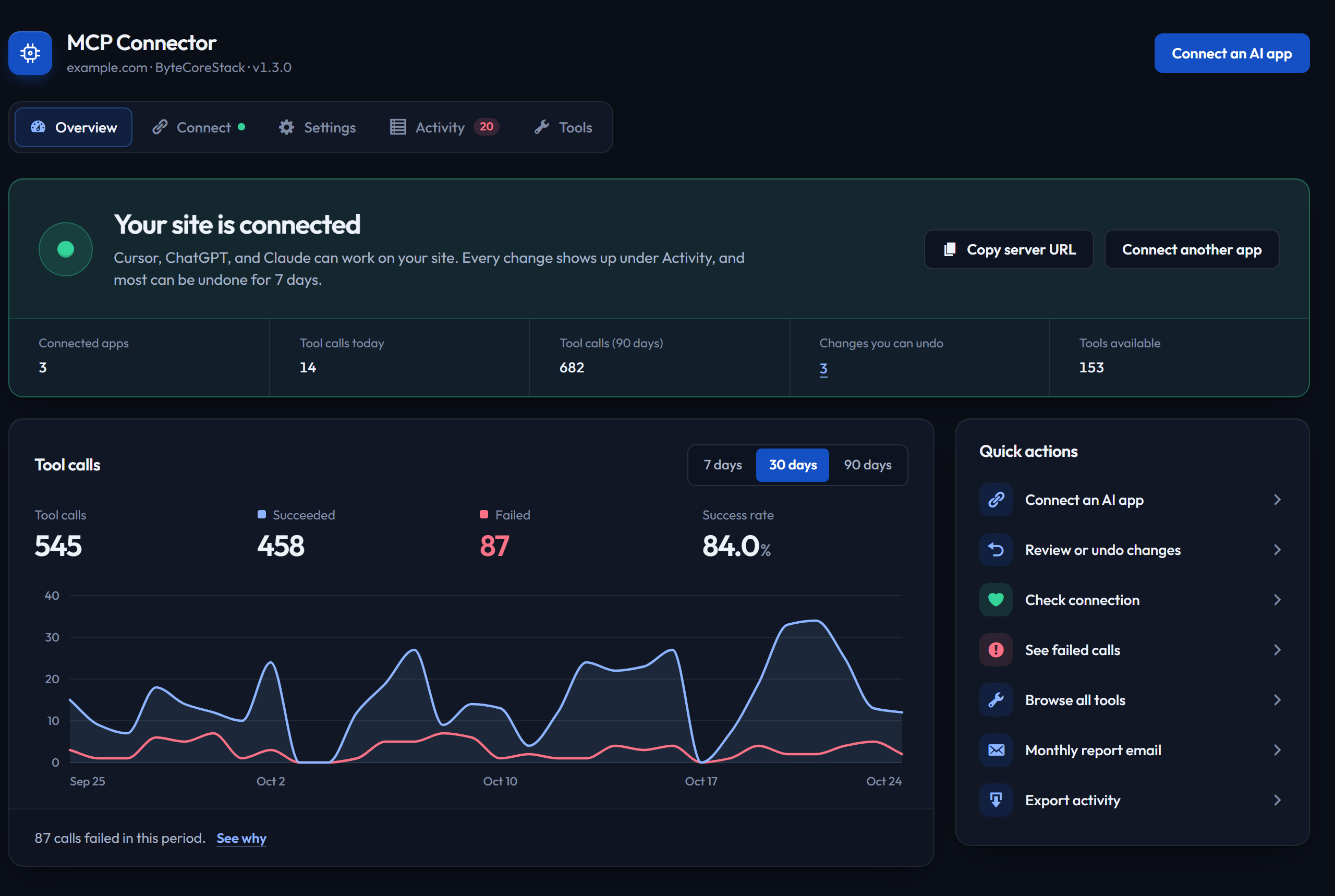
Overview with the connection status, key numbers, and a chart of tool calls.
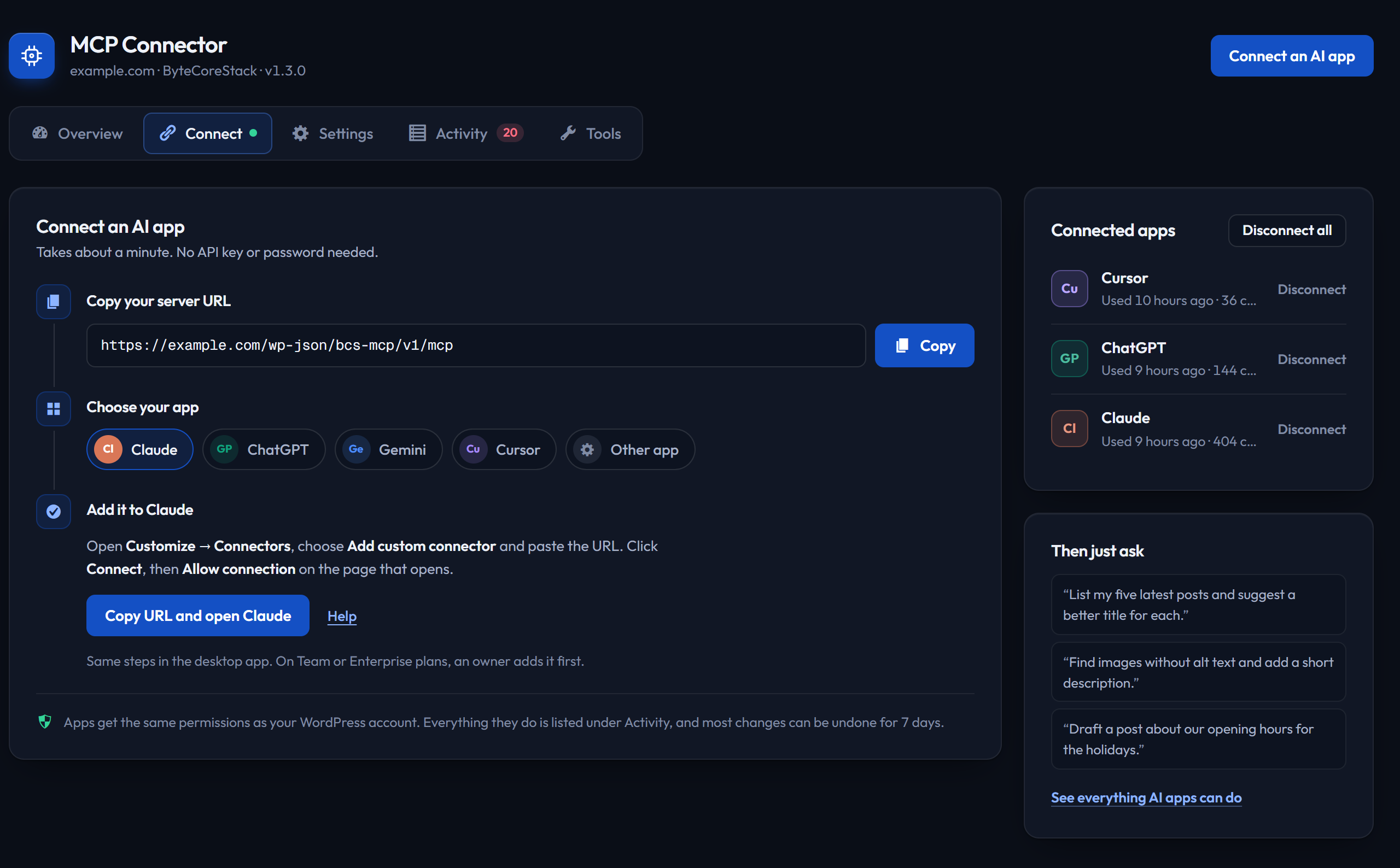
Connect tab with short steps for Claude, ChatGPT, Gemini, Cursor, and other apps.
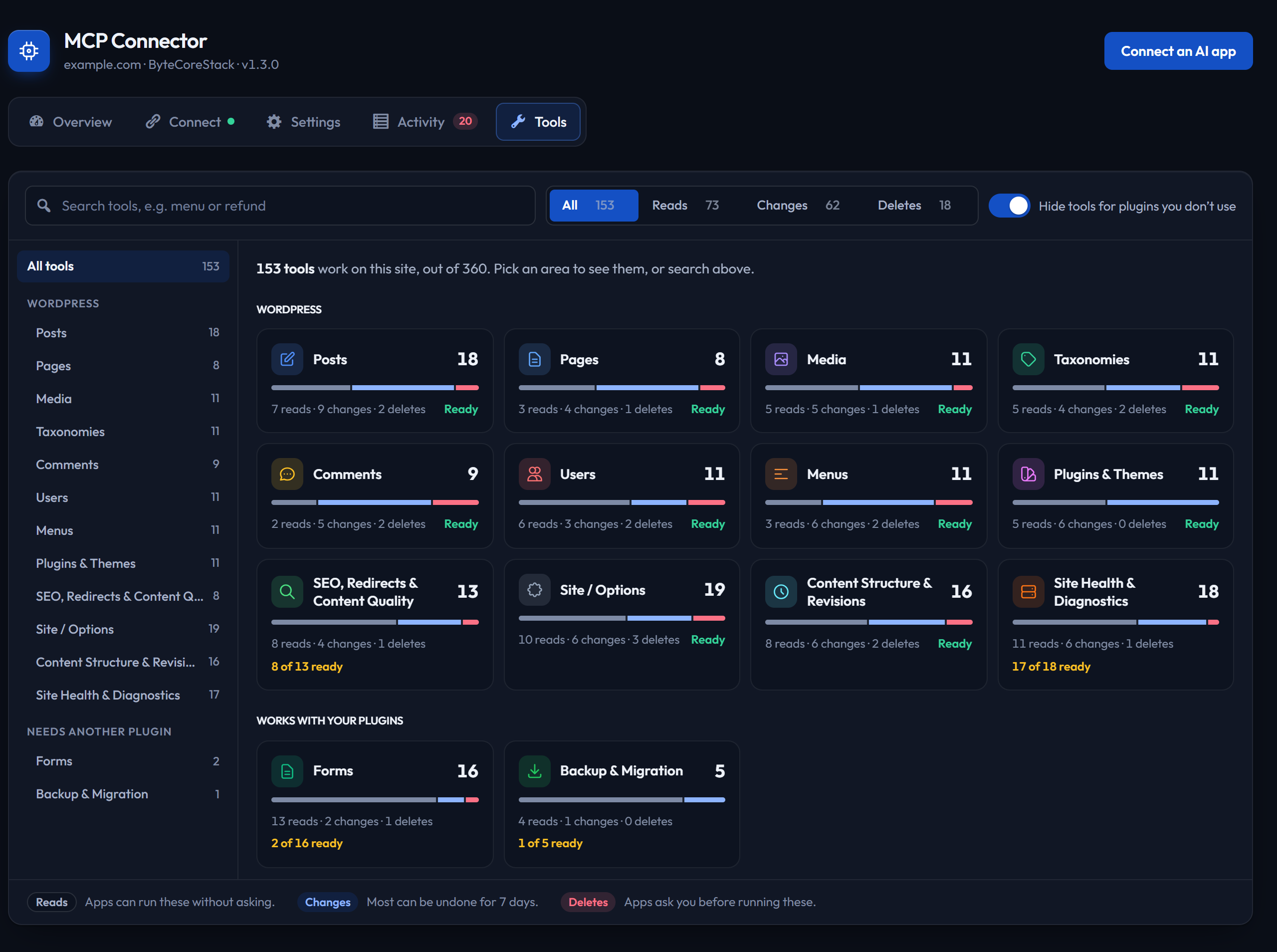
Tools tab: every tool AI apps can use, searchable and filterable by area and by reads, changes, and deletes.
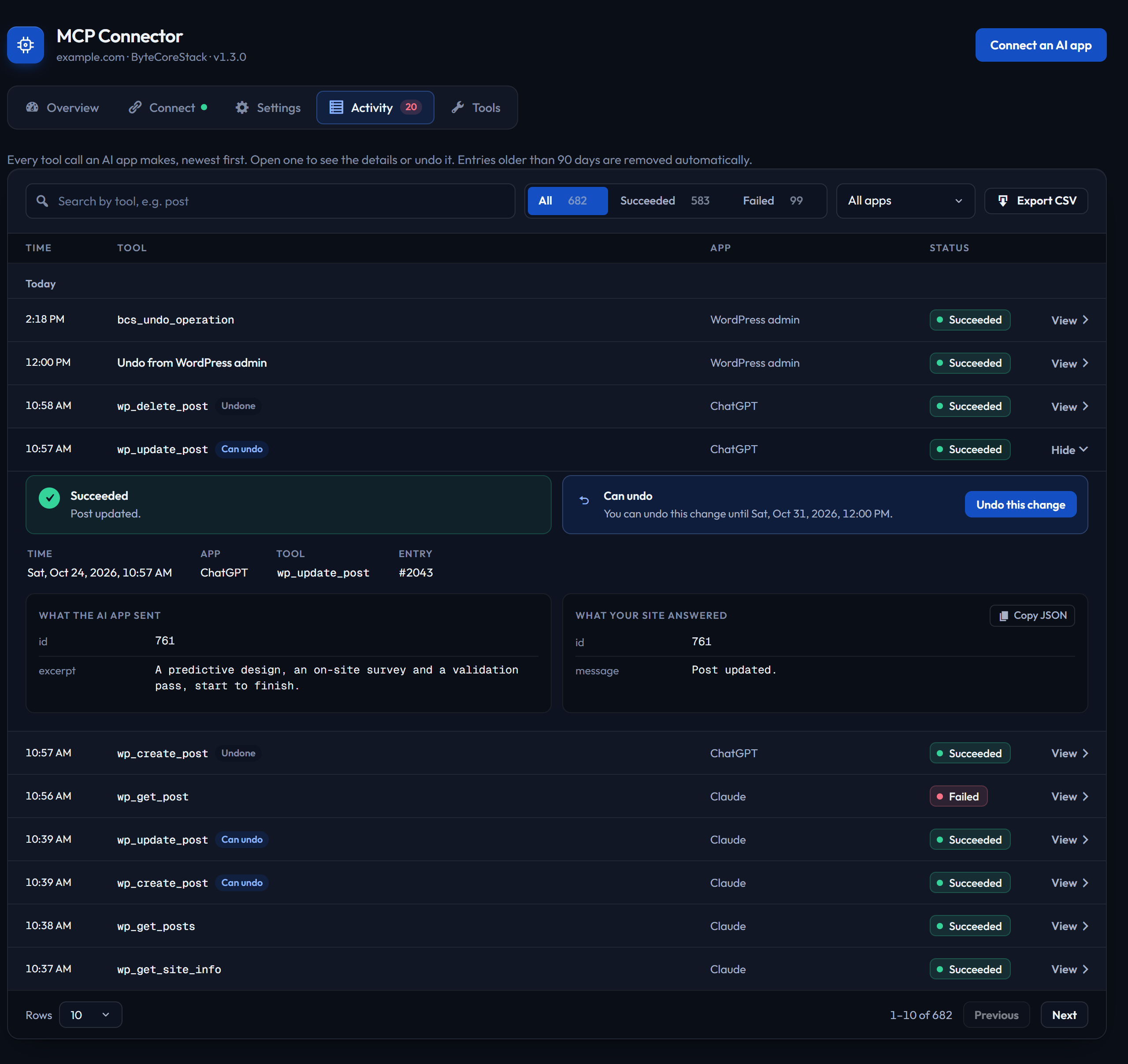
Activity with search, filters, entry details, and one-click undo.
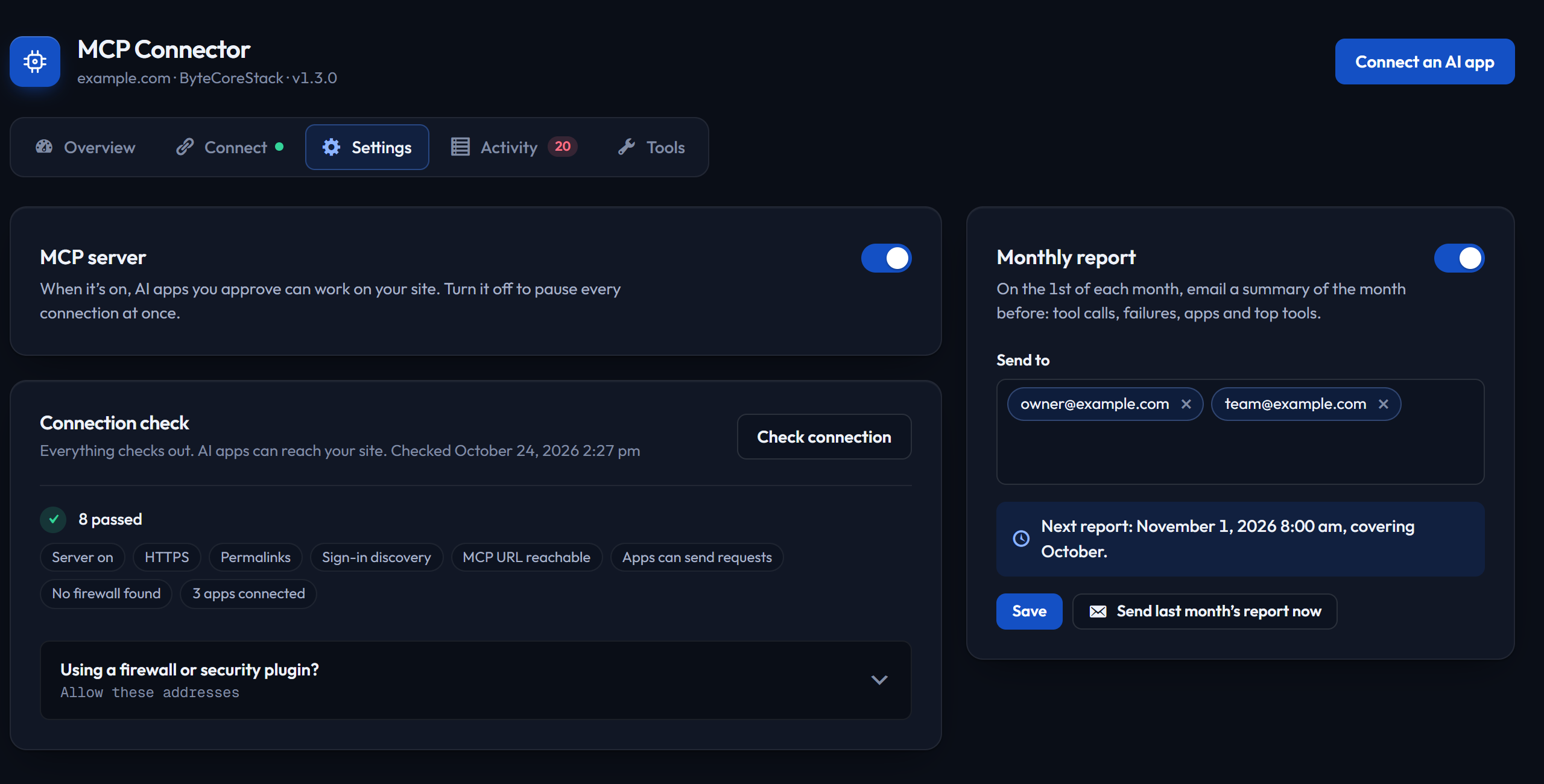
Settings with the server switch, connection check, and monthly report.
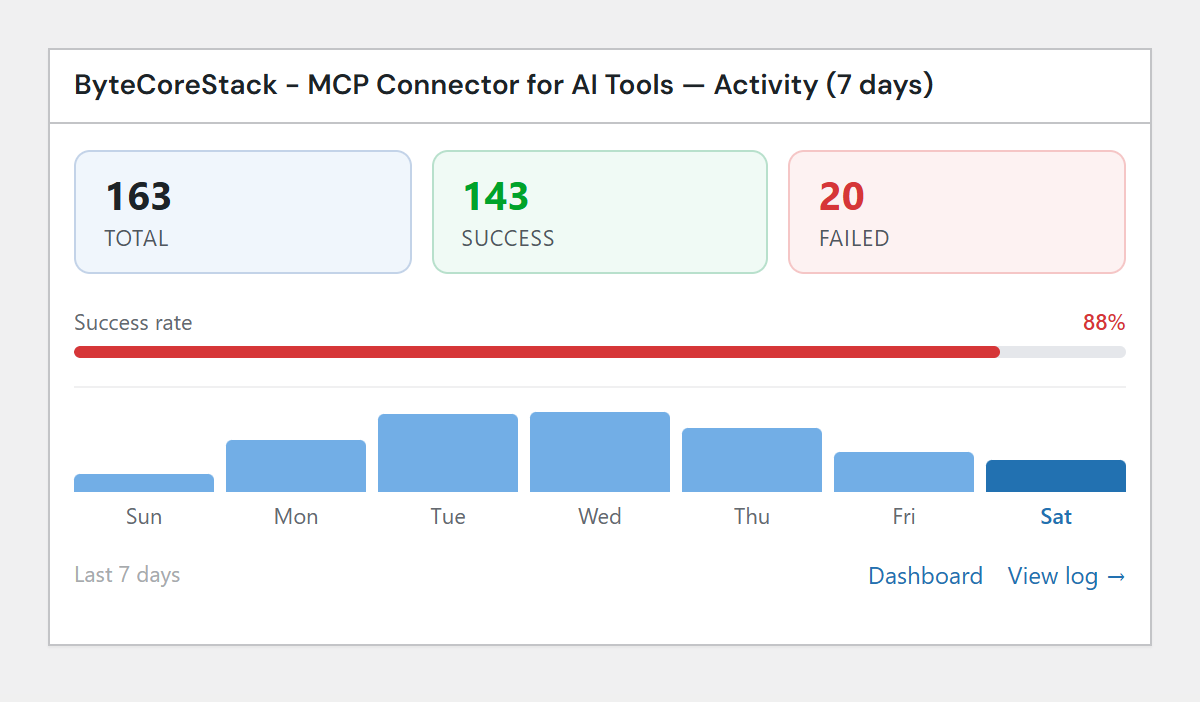
WordPress dashboard widget with recent MCP activity.
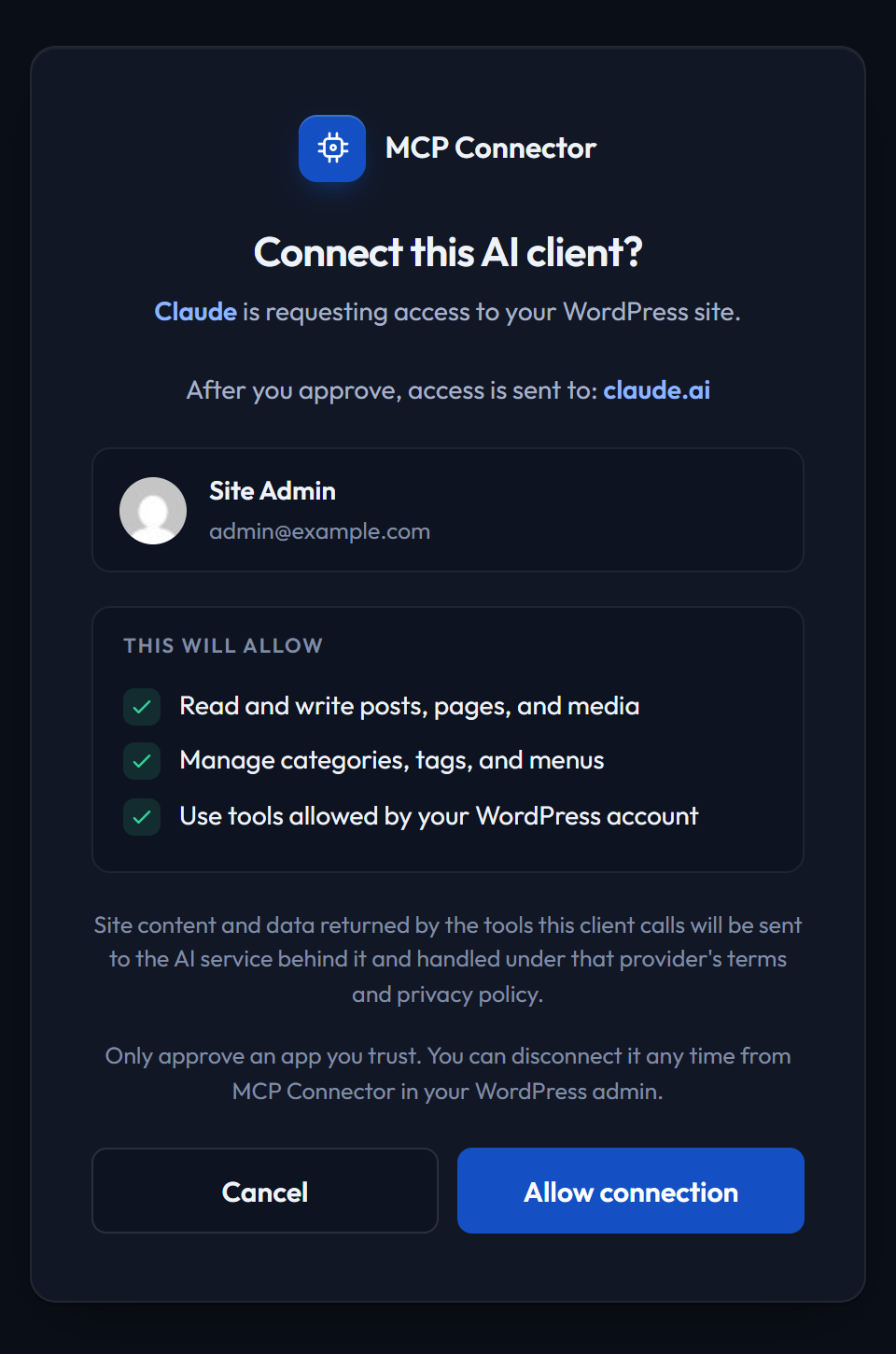
OAuth authorization screen for an AI client.