
Is your WordPress site quietly failing to send email? Order confirmations, password resets and contact form messages that never arrive usually go unnoticed until a customer complains. ByteCoreStack – SMTP & Health Monitor sends your WordPress email through a real, authenticated SMTP server, keeps a searchable log of every email with its full message, and tells your team on Slack, Microsoft Teams, Google Chat or Discord the moment sending breaks.
Why WordPress emails fail
Out of the box, WordPress sends email with PHP mail(). It has no authentication, so Gmail, Outlook and Yahoo often send those messages to spam or reject them, and many hosts disable it entirely. That’s why “WordPress not sending email” is one of the most common WordPress problems. The fix is SMTP: sending through a real mail server that signs in, such as Gmail, Microsoft 365, your host’s mail server or a transactional email service.
Set up in about a minute
- Pick your provider. The server, port and encryption fill in for you, with sign-in tips for that provider.
- Enter your username and password (or app password / API key) and click Save and test connection. The plugin signs in to your server right away and tells you whether it worked.
- Send a test email to confirm a real message arrives.
Features
Reliable sending
- Send all WordPress email through any SMTP server: SSL, TLS or no encryption, with automatic TLS upgrade
- Ready-made settings for Gmail / Google Workspace, Microsoft 365 / Outlook, SendGrid, Amazon SES, Mailgun, Brevo, Zoho Mail and Yahoo Mail, plus any other SMTP server
- Test email with a plain explanation when it fails: sign-in failed, rejected by the server, or couldn’t connect, along with the server’s own reply
- SMTP password encrypted at rest
Email log
- Every email WordPress sends, grouped by day, with its delivery status and the server’s reason for any failure
- Open any email on its own page: a safe preview of the message, its HTML source, a text version, every header and attachment names, with a phone-width preview to check mobile layout
- Search, filter by status (with counts) and date range, and export to CSV
- Keeps the last 90 days and removes older entries automatically
Health checks and failure alerts
- Automatic health check every 15 minutes once SMTP is set up: a real sign-in and sender check, with no email sent
- Alerts to Slack, Microsoft Teams, Google Chat, Discord and a custom webhook (for Zapier, Make or n8n), as many at once as you like
- An alert on the first failed check, and one alert per outage, so a long outage never floods your channel
- Checks whether Microsoft 365 reports an outage before alerting, when you send through Microsoft 365
Reports
- Delivery chart and totals for the last 7, 30 or 90 days, with highlights such as your busiest day, failure-free days and how many people your email reached
- Monthly summary email on the 1st of every month at 9:00, covering the previous month, sent to whoever you choose
Built for WordPress
- Overview screen showing whether mail is flowing, when the last and next checks run, and what’s left to set up
- Dashboard widget with SMTP health and 30-day totals
- WP-CLI commands:
wp bcs-smtp testandwp bcs-smtp log list - Dark, responsive admin that works on phones and tablets, with keyboard-accessible controls and bundled fonts (no external requests)
Works with any plugin that sends email
WooCommerce, Contact Form 7, WPForms, Gravity Forms, Elementor Forms, Easy Digital Downloads, membership and booking plugins, and WordPress’s own password reset and new user emails all send through wp_mail(), so they use your SMTP connection automatically. There’s nothing to change in those plugins.
Supported SMTP providers
Any provider that offers standard SMTP sign-in works:
- Gmail / Google Workspace (app password, or the Workspace SMTP relay for higher volume)
- Microsoft 365 / Outlook
- SendGrid
- Amazon SES
- Mailgun
- Brevo
- Zoho Mail
- Yahoo Mail, SMTP.com, or your web host’s mail server
Privacy
Everything the plugin stores stays in your own WordPress database: your SMTP settings, and the email log (each email’s date, subject, sender, recipients, delivery status, message body, headers and attachment file names). Attached files themselves are never copied. Log entries are deleted automatically after 90 days, only administrators can see them, and uninstalling the plugin removes all of its data. Nothing is sent to ByteCore Stack. See External services below for the services the plugin contacts.
Documentation and support
Plugin home page: bytecorestack.com/plugins/smtp-manager. For questions or bug reports, use the support forum on this plugin’s WordPress.org page.
Credits
The admin screens use two fonts bundled with the plugin, both under the SIL Open Font License 1.1 (license files included in assets/fonts): Outfit and Geist Mono.
External services
The plugin contacts the services below. None of them receive data from ByteCore Stack, and nothing is sent to ByteCore Stack.
1. Your SMTP server (set up by you)
All email WordPress sends goes through the SMTP server you enter on the Connection tab, using the credentials you provide. Health checks, run every 15 minutes once SMTP is set up, sign in to the same server without sending an email.
2. Slack (optional)
If you turn on Slack alerts, the plugin sends a failure notification (site name and address, time, the problem and the mail server’s error, mail server and sending address) to the Slack incoming webhook URL you provide, only when a health check fails or you click “Send test alert”.
* Service: Slack Technologies, LLC
* Terms of service: https://slack.com/terms-of-service
* Privacy policy: https://slack.com/privacy-policy
3. Microsoft Teams (optional)
If you turn on Teams alerts, the same notification is sent to the Teams webhook URL you provide, only when a health check fails or you click “Send test alert”.
* Service: Microsoft Corporation
* Terms of service: https://www.microsoft.com/en-us/servicesagreement
* Privacy policy: https://privacy.microsoft.com/en-us/privacystatement
4. Google Chat (optional)
If you turn on Google Chat alerts, the same notification is sent to the Google Chat webhook URL you provide, only when a health check fails or you click “Send test alert”.
* Service: Google LLC
* Terms of service: https://policies.google.com/terms
* Privacy policy: https://policies.google.com/privacy
5. Discord (optional)
If you turn on Discord alerts, the same notification is sent to the Discord webhook URL you provide, only when a health check fails or you click “Send test alert”.
* Service: Discord Inc.
* Terms of service: https://discord.com/terms
* Privacy policy: https://discord.com/privacy
6. Custom webhook (optional)
If you turn on the custom webhook, the notification is sent as JSON to the URL you provide (the same details, plus your server’s IP address and the number of failed checks), only when a health check fails or you click “Send test alert”. The URL is entirely your choice, such as Zapier, Make, n8n or your own server.
7. ipify (automatic, only on some servers)
The server’s outgoing IP address is included in diagnostics and alerts. If your server doesn’t report its own address (common on local, Docker or some proxied setups), the plugin asks the ipify public API for it, at most once a day. The request carries no site or email data; the reply is just an IP address.
* Service: ipify
* Website and terms: https://www.ipify.org/
8. Microsoft 365 service status (automatic, only for Microsoft 365)
When a health check fails and your SMTP server is Microsoft 365 / Outlook, the plugin reads Microsoft’s public service status page to tell you whether Microsoft is reporting an outage. No site or email data is sent.
* Service: Microsoft Corporation
* Terms of service: https://www.microsoft.com/en-us/servicesagreement
* Privacy policy: https://privacy.microsoft.com/en-us/privacystatement
Screenshots
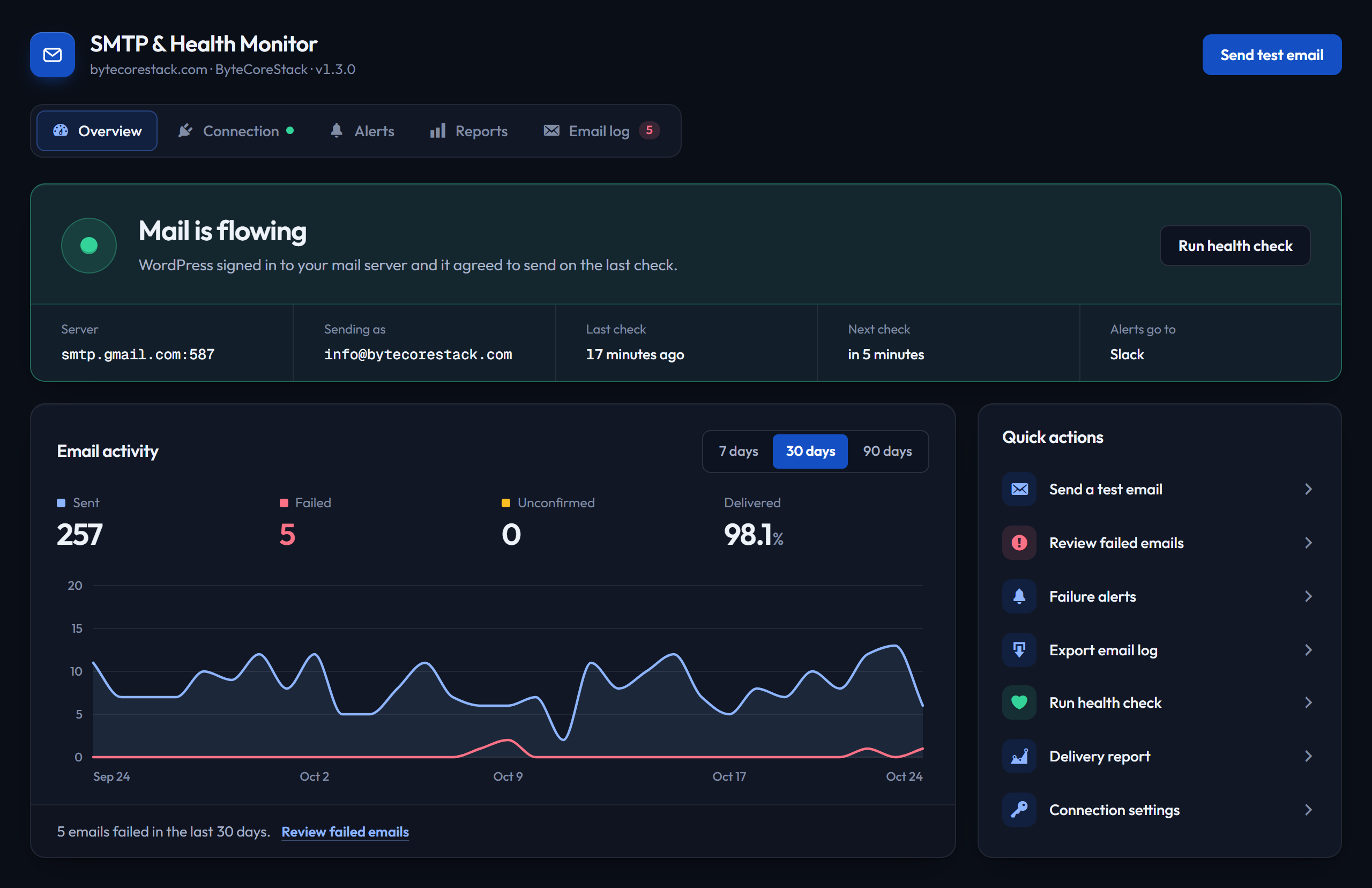
Overview — whether mail is flowing, last and next health check, email activity chart and what's left to set up
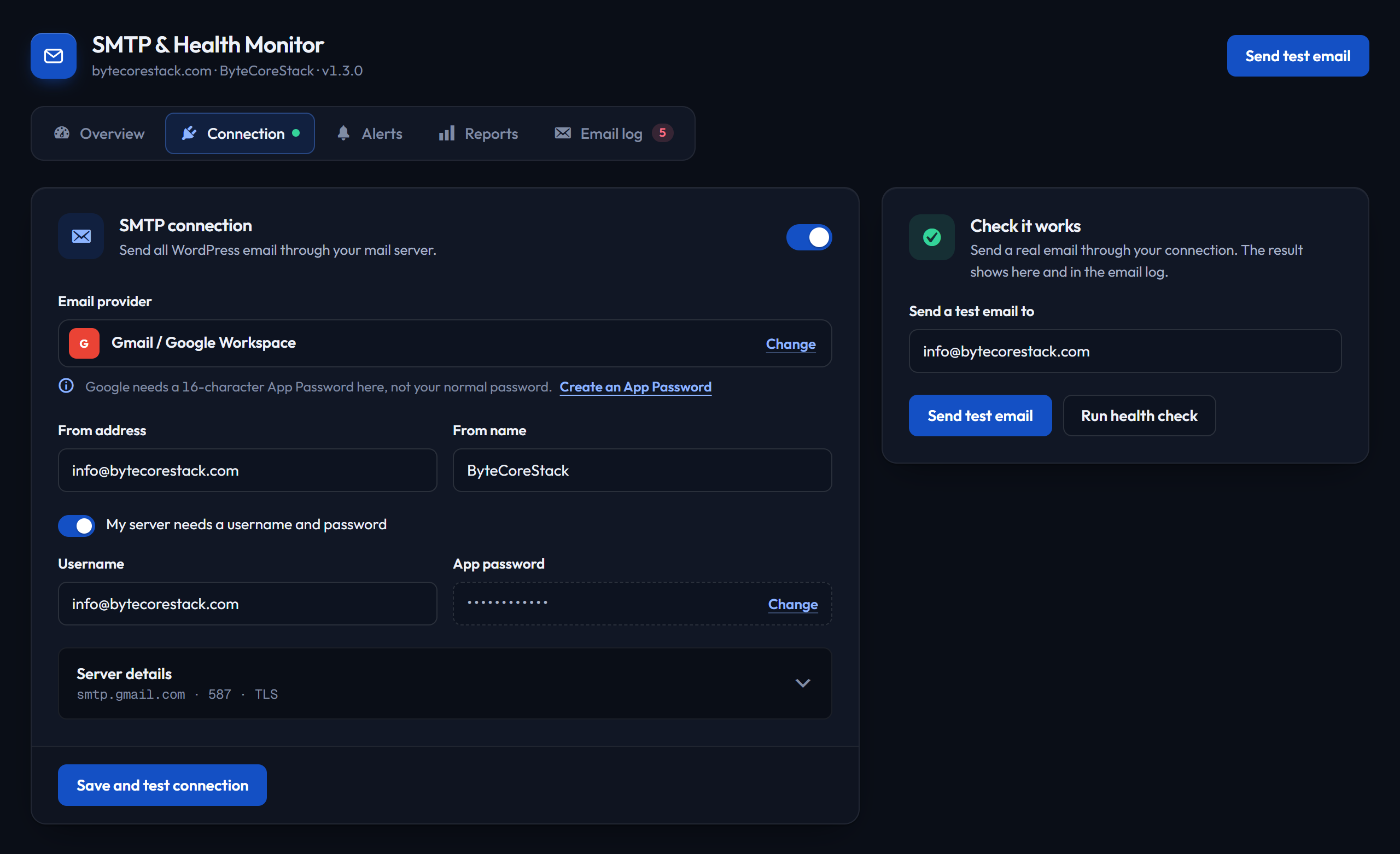
Connection — pick your provider and the server details fill in; send a test email right alongside
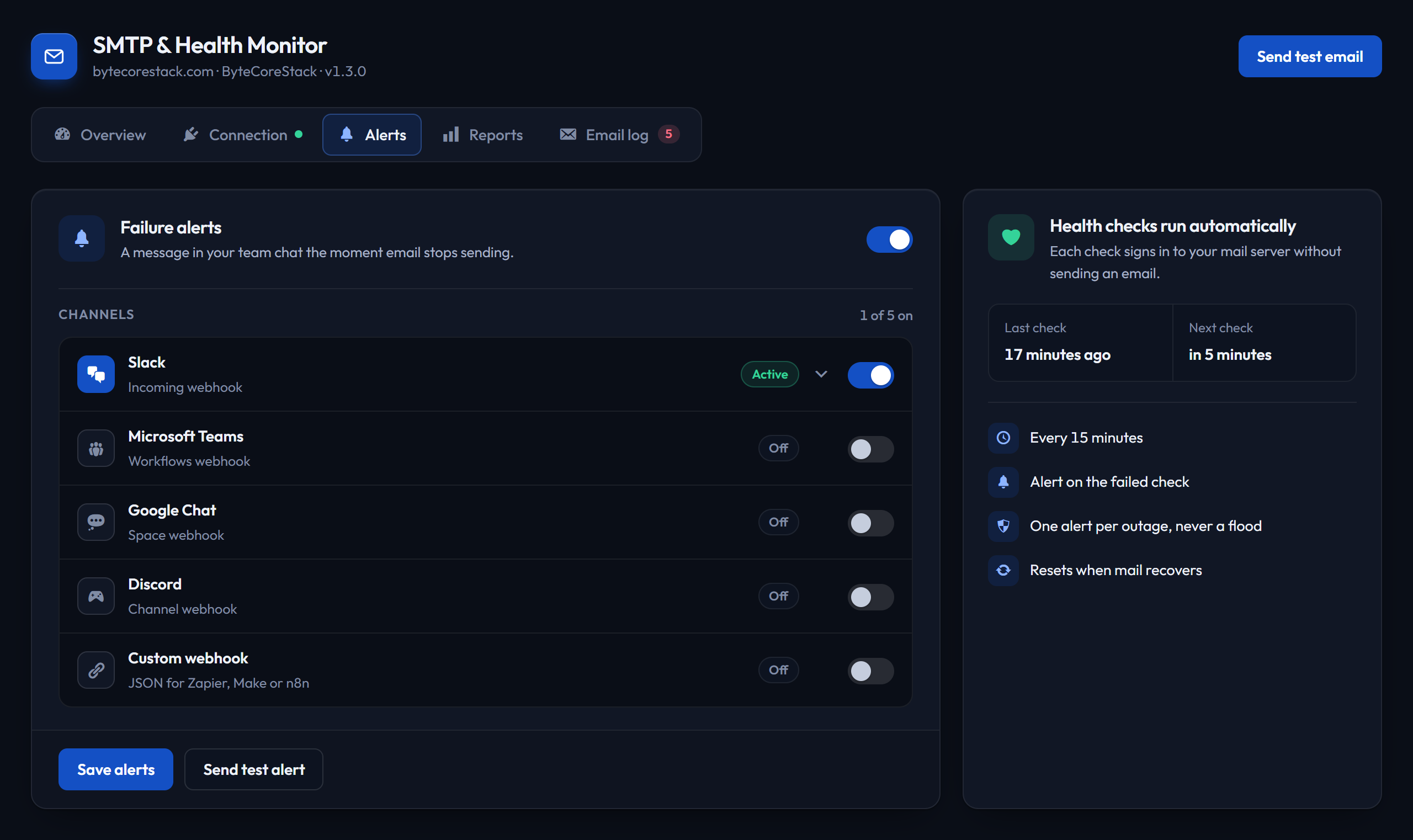
Alerts — automatic health checks and failure alerts to Slack, Teams, Google Chat, Discord or a webhook
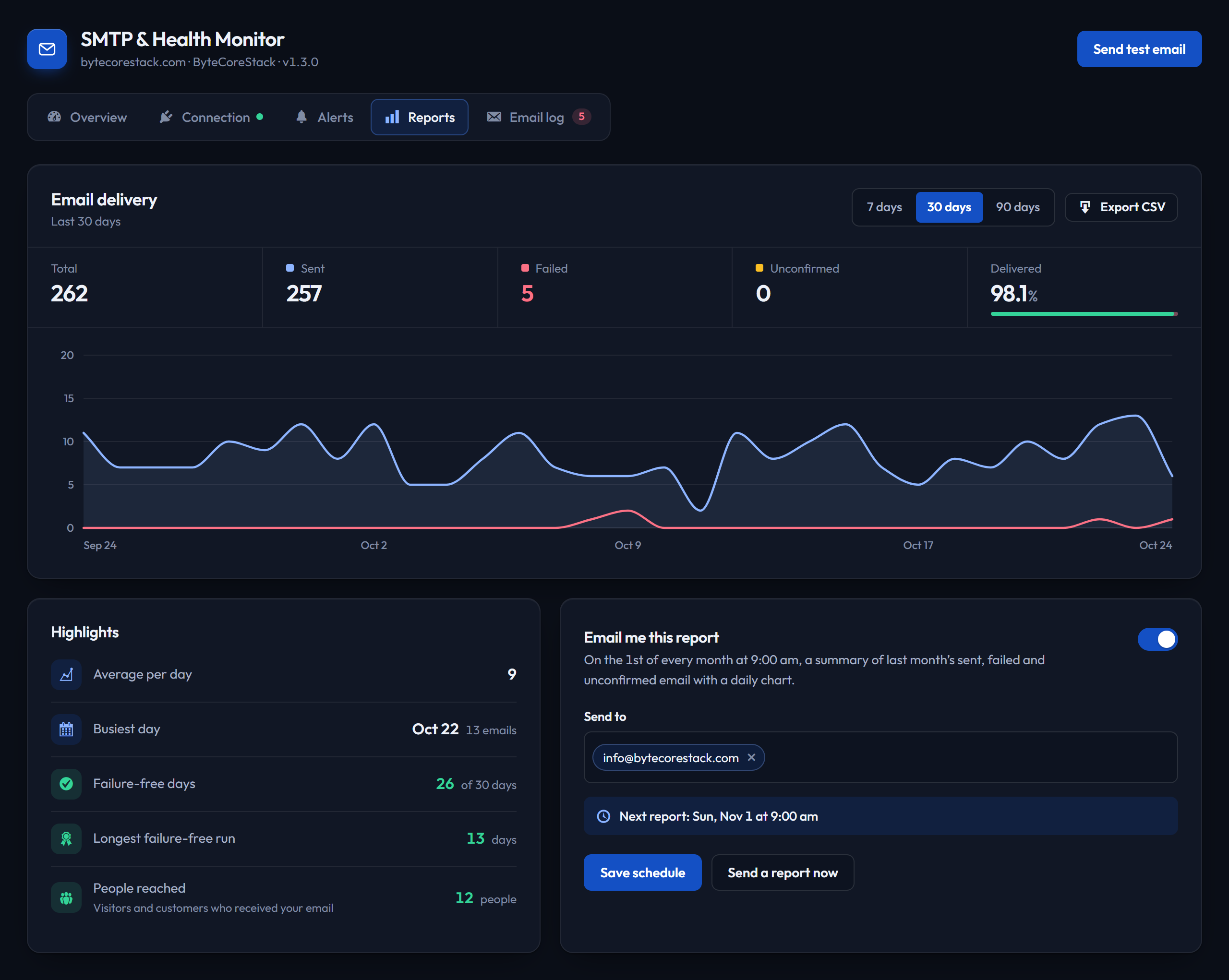
Reports — delivery chart, totals, highlights and the monthly report email
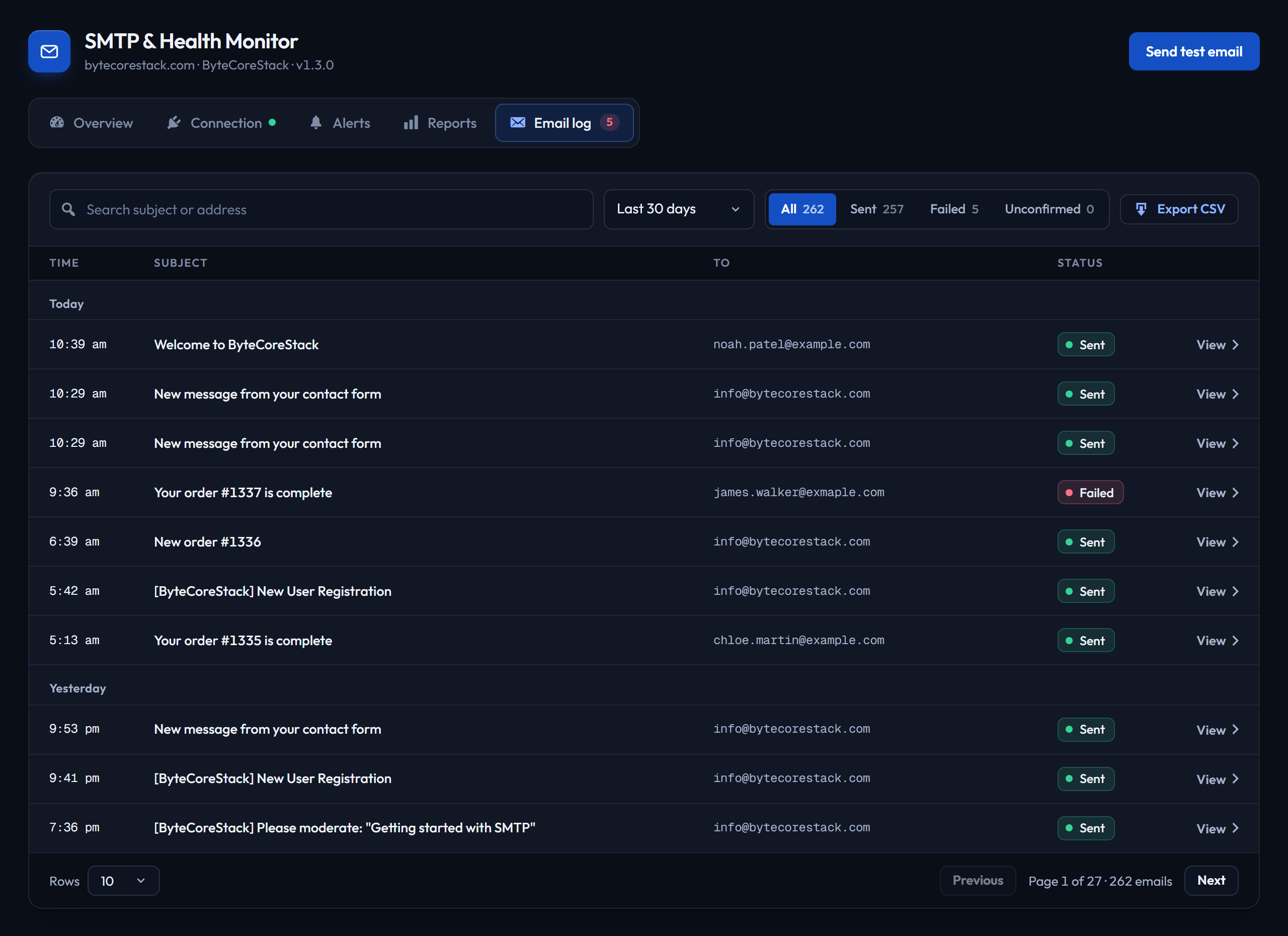
Email log — grouped by day, with status filters, counts and search; open any email to see the full message
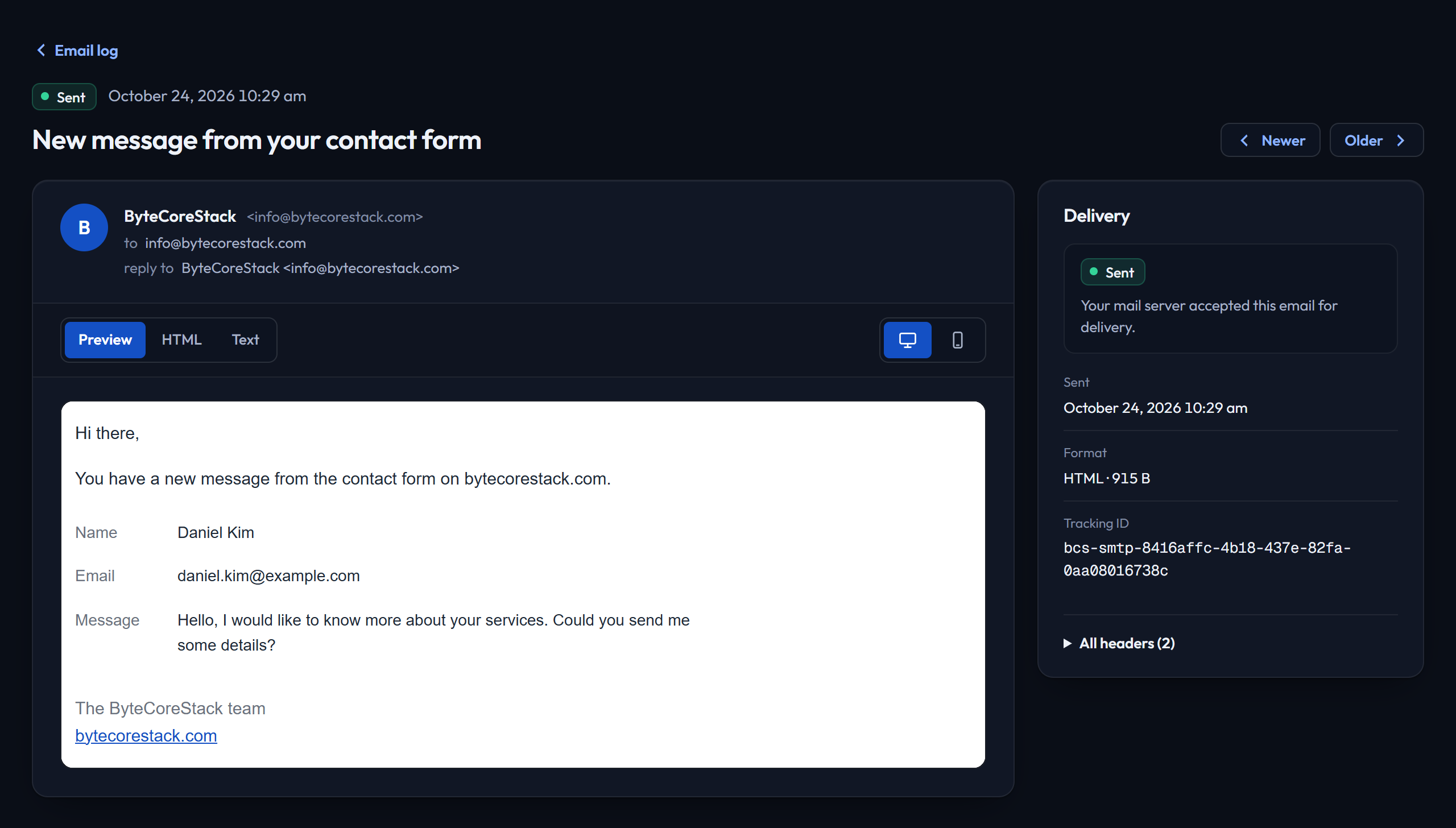
Email details — the full message as it was sent, with delivery status, recipients and headers