
This powerful email marketing plugin allows scheduling of automated autoresponder messages and newsletters, and managing a mailing list. Use it for all kind of drip marketing campaigns, email based courses, product or service updates, and many more.
Features
- Unlimited number of subscribers
- Unlimited number of newsletters
- Unlimited number of auto-responder / drip marketing email messages
- Import and exports members from / to CSV file
- Send messages X days after user registration
- Send messages on fixed dates
- Send newsletters / news flashes
- Add attachments
- Double opt-in
- Google reCaptcha against spam
- Question based captcha
- Selected user role can manage the auto-responder
- Sends hooks for integration with other plugins
- Redirecting after registration
- Optional admin notifications on subscribe / unsubscribe
- Automatically subscribe users who register on your site / blog (optional)
- Automatically create WP user accounts for mailing list subscribers (optional)
- Optional public newsletters archive
- Detailed email log
- Compatible with all SMTP plugins: will send emails through them
- GDPR compliance features
- Webhooks for integration to CRM and any other systemsthrough Zapier and similar services
- PHP 6, PHP 7, PHP 8 compatible
- Always updated and supported
Integrations
Built-in integration with Contact Form 7
Built-in integration with Jetpack Contact Form
Built-in integration with Ninja Forms
Built-in integration with Formidable Forms
Built-in integration with WPForms
Hooks
The plugin will send the following hooks:
- do_action(‘arigato_subscribed’, $status, $user_id) – when an user subscribes. The variable $status is true when the subscription is immediately activated and false if email confirmation is required,
- do_action(‘arigato_confirmed’, $member->id) – when a subscriber confirms their email address.
- do_action(‘arigato_unsubscribed’, $user) – when a subscriber unsubscribes. Sends the user object and not the ID so you don’t need to run a select query with this action.
- do_action(‘arigato_welcome_email’, $user_id, $mail, $user) – when the user receives a welcome (first “0 days” email).
- do_action(‘arigato_subscribed’, $status, $user_id) – called when the new user subscribes. The argument $status is true when the subscriber is already activated and false when double optin confirmation is expected.
- do_action(“arigato_cron_job_ran”) – called when the plugin completes the cron job (once on each run). No arguments passed.
- do_action(“arigato_sent_newsletter”, $newsletter_id, $num_mails_sent) – called after sending newsletter. Passes the newsletter ID and the number of emails sent.
Community Translations
Swedish translation available thanks to Patrik: .po / .mo
German translation available thanks to @mpek: .po / .mo
Japanese translation is included thanks to Takeshi Abe
Screenshots

Main settings page. Get the signup form code, configure double opt-in, and more.

Manage your mailing list, add/edit/delete subscribers
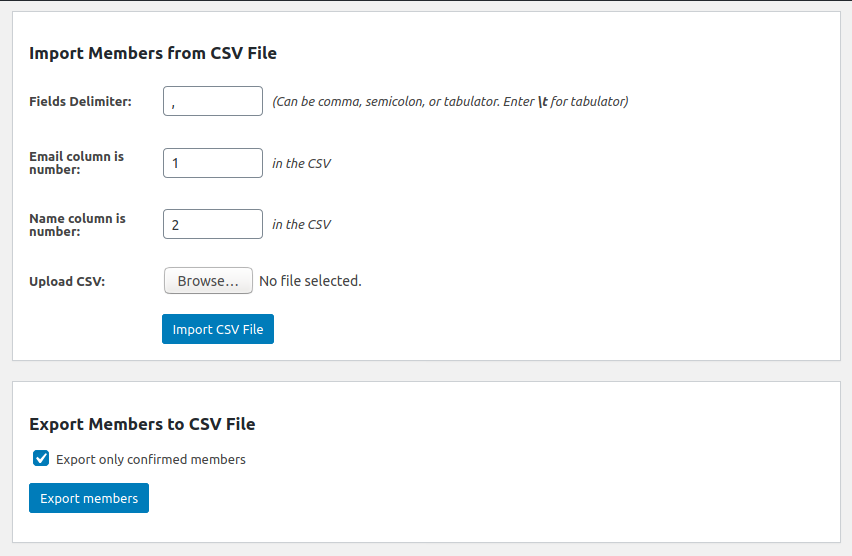
Import and export contacts to/from CSV file

Create a new autoresponder message

Send instant newsletter to all active subscribers