
BG Couriers is shipping with Bulgaria’s own couriers inside WooCommerce: your customer chooses where the parcel goes and sees what that delivery costs, and you print the label and follow the parcel without leaving WordPress.
At the checkout every courier you switch on shows its own price for the basket, live from that courier’s API. Your customer picks how the parcel is delivered (to an office, to an address, or to a locker/APS) and finds the office by typing the town, or by pointing at it on one map that carries every courier’s offices and lockers at once, each with its own price. The map can also say which pickup point is closest to them.
In the admin one click issues the waybill and the label: one order, or fifty of them into a single PDF (A6 labels or an A4 sheet). The plugin then keeps each shipment’s status up to date by itself, and your customer sees the waybill and a tracking link on their order and in the e-mails you already send them.
It is free, GPL, and stays that way: every courier, every feature, no paid tier. Deliveries are within Bulgaria.
На български: доставка с куриер за WooCommerce: Спиди, Еконт, BOX NOW, Sameday (easyBox), Pigeon Express, Express One и Европът. Всички куриери в един плъгин: до офис, до адрес или до автомат, наложен платеж, товарителници и етикети с едно кликване, проследяване на пратката. Интерфейсът е изцяло на български.
Couriers
- Speedy (Спиди): office / address / APS. Live rates, labels, tracking.
- Econt (Еконт): office / address / Econtomat. Live rates, labels, tracking, and cash on delivery (наложен платеж) with an itemised packing list.
- Pigeon Express: office / address / locker. Live rates, labels, tracking.
- Sameday: office / address / easyBox. Live rates, labels, tracking.
- BOX NOW (BoxNow): lockers (APM) only, picked by town and locker like every other courier (the towns are read off its lockers). Flat rate.
- Express One: office / address / EXOBOX locker. Live rates, labels, tracking. The address is chosen from Express One’s own street list, which is what its waybills require.
- Европът (Evropat): office / address. Live rates, labels, tracking. The address is chosen from Европът’s own street list, which its waybills require.
Setting it up
You need your own account with each courier you want to offer: the prices your customers see and the labels you print are your own contract’s, and nothing is resold through this plugin. Once you have the API credentials, a courier takes a couple of minutes:
- Paste the credentials on that courier’s tab and switch the courier on; it checks them with the courier there and then, and says so plainly if they are refused.
- Sync its towns and offices: one button.
- Add it to your Bulgaria shipping zone, and to the zone of any other country you deliver to.
Everything else already has a working default: the prices, the map, the checkout fields and the label size all work as they ship.
Also included
- Cash on delivery (наложен платеж), with the choice of who pays the delivery, and the amount to collect follows that choice.
- Free-shipping thresholds, per courier and per delivery type.
- Several parcels in one shipment, and insurance for a value you set (Speedy, Sameday).
- A delivery estimate on the cart page, before the customer reaches the checkout.
- Labels issued automatically when an order reaches a status you choose, or per courier, or not at all.
- Works on both the classic and the block checkout.
- Fully translated to Bulgarian.
External services
The plugin uses the online API of each courier you enable, to price a delivery, to create a label and to track a parcel. Nothing is sent to a courier you have not configured.
What is sent, and when
- Price quote (cart / checkout): the parcel weight, the destination town or office, and the delivery type. When the customer views the shipping options.
- Label (admin): the recipient’s name, phone, e-mail, the chosen address or office/locker, the parcel weight, and, with cash on delivery, the amount to collect and the item list. When you generate the label.
- Tracking: the waybill number. When tracking is opened or refreshed.
Courier APIs
- Speedy: api.speedy.bg. Terms · Privacy
- Econt: ee.econt.com. Terms · Privacy
- Pigeon Express: api.pigeonexpress.com (api-demo.pigeonexpress.com in test mode). Terms · Privacy
- Sameday: api.sameday.bg (sameday-api-bg.demo.zitec.com in test mode). Terms · Privacy
- Express One: system.expressone.bg. Terms · Privacy
- BOX NOW: api-production.boxnow.bg (api-stage.boxnow.bg in test mode). Terms · Privacy
- Европът (Evropat): api.evropat.com. Terms · Privacy
Maps and address lookup
- OpenStreetMap tiles: tile.openstreetmap.org. Map tiles only, loaded when the customer opens a map. Tile policy · Privacy
- OpenStreetMap Nominatim: nominatim.openstreetmap.org. One set of coordinates, turned into an address or a town name. It happens in two cases only: the customer drops a pin on the address map picker (a setting, off by default), or presses “find me” on the map before naming a town, so the town can be filled in for them. Nominatim policy · Privacy
- Google Maps Geocoding: maps.googleapis.com. Takes over those same lookups, and only if you set a Google Maps API key in the settings (optional; OpenStreetMap is used if the key is empty or Google does not answer). It receives the coordinates and nothing else. Terms · Privacy
The map’s “closest to you” (on by default, switchable off) works out the distances in the customer’s own browser. Their position is never stored on the site and is forgotten when the page is closed.
No data is sent to any service you have not configured, and the plugin sends nothing to its author.
Contributing
The plugin is developed in the open. Bugs, ideas and pull requests are welcome on GitHub.
Screenshots

Checkout: every courier with its own live price, delivery-type tabs (to office / to address / to APS locker) and searchable city and office pickers.

Checkout: choosing an office. The list searches as you type, and each entry shows the full address.
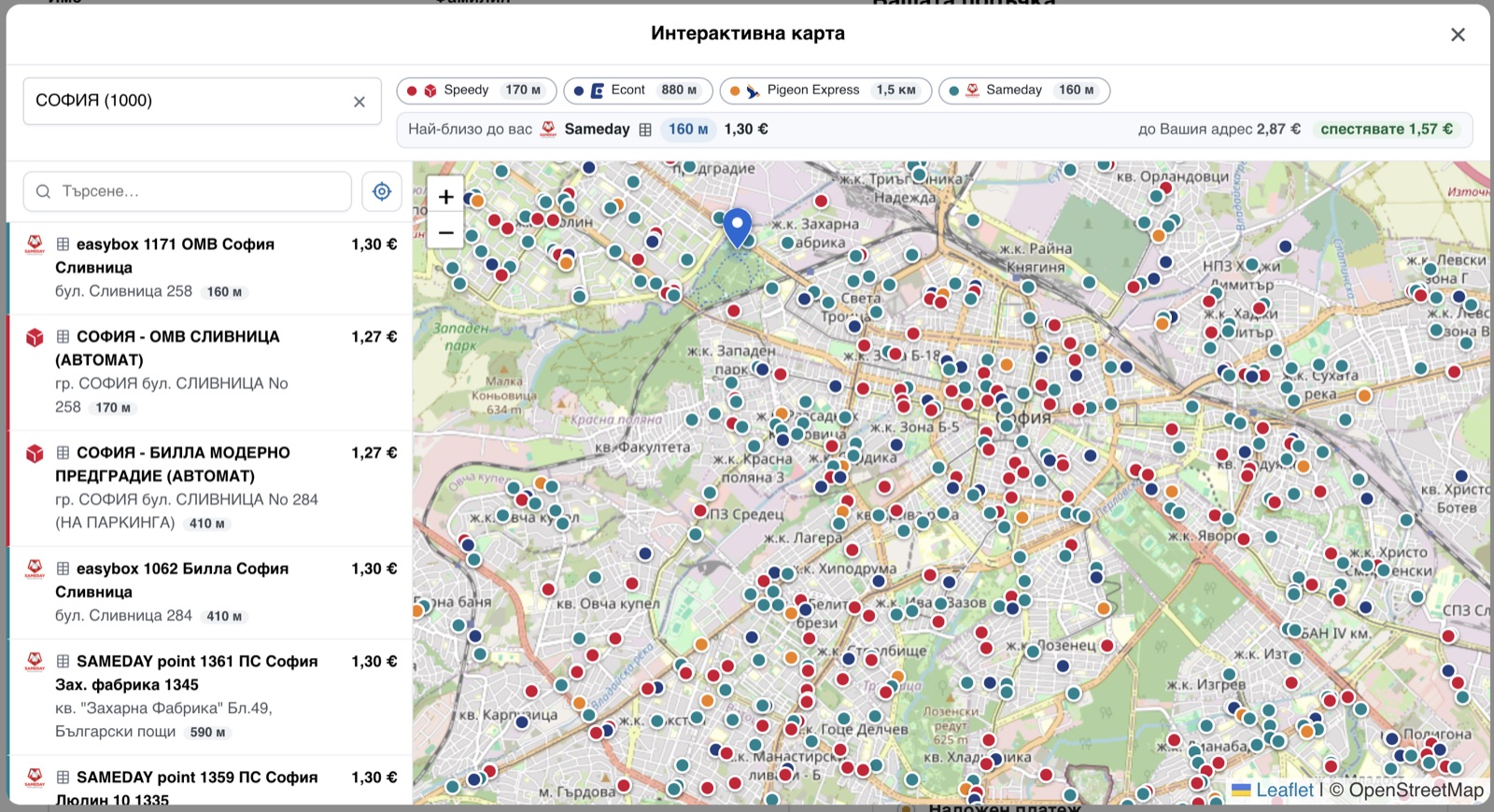
The interactive map: every courier's offices and lockers for a town at once, each with its own price, and, once the customer shows where they are, how far each one is and which is closest.
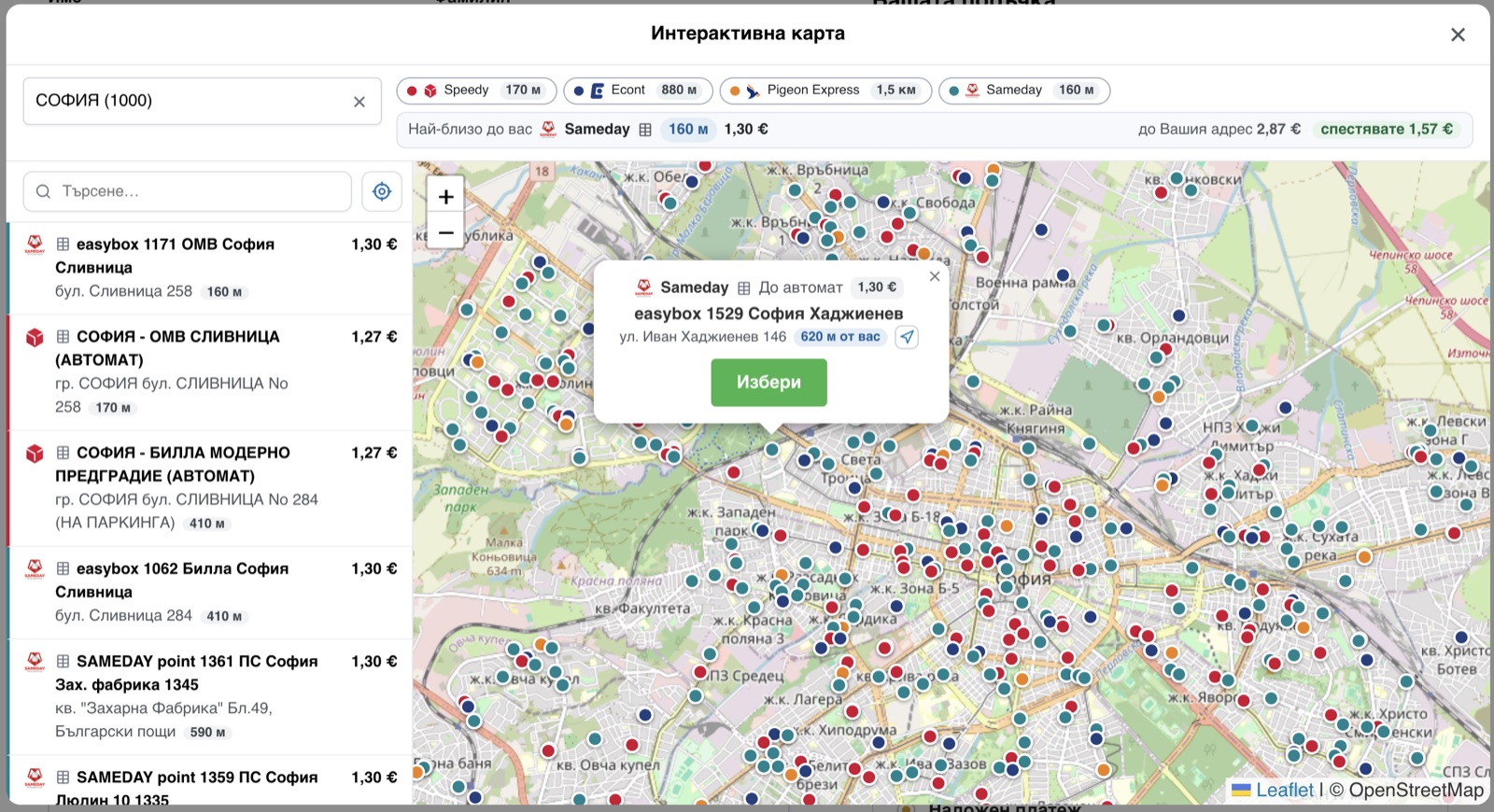
Choosing a point: which courier, how the parcel is collected, the price, the address and how far away it is, with one button to take it.

Cart: what each courier charges, before the customer reaches the checkout.

Order screen: the shipment panel (waybill, print, track, cancel) and the delivery editor: courier, delivery option, town and office, changed in place.

Orders list: the Waybill column. Generate a label, or print, track and cancel an existing one, per order.

Orders list: the shipment's current state, and when it was last checked, on hover.