Events & Tickets runs the evening from the first booking to the last guest
through the door. It was built for clubs, bars and party promoters — the people
for whom an event is a door, a list, and a queue outside — and it has since been
used for seated dinners, concerts, conferences and weddings, because they are
the same problem wearing different clothes.
Nothing is capped and nothing is metered. There is no per-ticket fee, no
external service to sign up for, no account to create, and no telemetry. Your
guest list lives in your own database, on your own server.
It speaks seven languages, and it brought them with it
English, French, Spanish, Portuguese, German, Italian and Arabic — not a
promise that somebody will translate it one day, but seven finished catalogues in
the download.
Install it and it is already in your language.
It works the language out for itself. Whatever WordPress is set to, the
plugin follows — and it follows by language rather than by locale, so pt_BR,
pt_PT and pt all land on Portuguese and ar_DZ, ar_MA and ar_SA all land
on Arabic. A site in a language it does not have falls back to French rather than
serving a screen that is half one language and half another. If you would rather
say it outright, there is one setting: Settings Language.
Everything is translated, not just the buttons. The booking form the guest
fills in, the emails they receive, the words printed on the ticket itself, the
door station held at the entrance, and the admin screens you work in. Dates too —
the month and the weekday come out of the plugin’s own catalogue rather than
WordPress’s, so a French ticket does not print September under a French
heading on an English site.
Arabic really is Arabic. The screens, the emails and the booking form read
right to left. And the ticket — which is a drawn image, not a web page — is drawn
with an Arabic typeface that travels with the plugin, with the letters joined the
way Arabic joins them and the line put in reading order. A time, a price, a table
number or a ticket reference still runs the other way inside the sentence, as it
should. Most plugins that claim Arabic print a row of disconnected letters
backwards on the one thing the guest actually holds.
The language travels with the booking. A guest who booked in Spanish gets
their ticket in Spanish — including a ticket re-sent months later, from a screen
you are reading in French. And your own words stay yours: event titles, venue
names, payment instructions and the success message are your text, and the plugin
will not rewrite them.
A calendar of your events, and a page for every one
An agenda your guests can use. One shortcode, one block in the editor or
one Elementor widget, and your events are on a calendar: Compact (a dot a
night), Month (the time and the title in each day), Large (the picture of
each night) and List, in rows or as a grid of cards. It shows dates, not
events — every date of a series in its day, each with its own state: open, few
places left, sold out, closed, cancelled. Guests go to a date, keep only the
events they care about or one category, add a night to their calendar and
share it. The month they open comes with the page; the next one is asked for
when they turn to it. Without JavaScript, it is a list of links search engines
can follow.
Shaped from one screen. The view it opens on, the views on offer, the
number of nights a day, the pictures and their size, rows or a grid, the
corners, the colour of each state, your theme’s style or its own — with a
sample beside the settings that changes as you choose, before you save.
A page for every event, and for every date. One page lists every event to
come, and under its address each event has its own: /events/opening-night/,
and /events/opening-night/2026-10-09/ for one date of a series. The address
speaks your site’s language — /evenements/, /eventos/, /veranstaltungen/ —
and the page wears your theme or the Classic look: the picture, the date and
the place at the top, the details beside, the booking form below. An event can
also live on a page of its own, built with your editor or with Elementor; the
plugin finds it, and every link then leads there. Links already shared keep
working, with a permanent redirect.
Categories, venues and organizers, each with a page. Sort events into
families — Jazz under Concerts — each with a colour, a picture and a few words.
Guests filter the agenda by category, and every category, every venue and every
organizer has its own page with its own events to come. A venue’s page shows
the address, the map and the website; an organizer’s, the logo and the links —
never their email address or phone.
Your own agenda, to run the season. Under Events, a calendar for whoever
runs the events: every state, drafts included, what the site shows and what it
hides, how full each night is. Year, month, week or list; filters and a search.
Drag a night onto another day to move it; change the state of one event or of
several at once; start a new event from the day it falls on. A night somebody
has booked never moves from there.
Found by search engines. Every event page describes its date, its place, its
line-up and its prices in the structured data search engines read; a date of a
series says which series it belongs to, and the page of a series lists every
date on sale. Category, venue and organizer pages describe themselves too, and
every page carries the breadcrumb from the list of events.
When it is full, when it sells, and what guests are told
A full date keeps the people it would have turned away. Under “sold out”,
the page offers to join the waiting list. When a place comes free — a
cancellation, a refund, a payment that ran out, a capacity you raised — it is
held for the first person in line, who gets a link to book it. Nobody else can
buy it in the meantime; if they do not book in time, it goes to the next
person. Not “first to click wins”: first in line, for real. How long a place
is held is yours to set, and shortens on its own close to the date.
Each category sells when you say. An early bird that closes on the 1st, a
door price that opens on the day, a table sold by four: sale dates and a
minimum per booking on each category. A category outside its dates stays on
the page, greyed, with the reason, rather than vanishing; the server refuses
it whatever the browser sends.
Reminders that bring people in. The day before and two hours before by
default — a week before and the morning after if you want them — in the
language each guest booked in, with the doors, the address, the online link
and a fresh link to every ticket. Each one goes once and only once. The
morning after thanks them, offers the next date and, if you give one, the link
where they can review your event.
Write to everybody who booked. One date or all, one category or all,
confirmed, waiting for payment, came in or did not: preview it, send yourself a
test, then send. One email per address, in batches your host accepts, with a
record of every one. Nothing tracks who opens it.
After the booking: a page of their own, the money, the paperwork
Every booking has a page of its own. Each email about a booking ends with
a link to the guest’s own page — no account, no password: where the booking
stands, every guest and their ticket to download, the venue, the way into the
online room, the invoice, and what happened when. A guest who has lost their
emails types the address they booked with and receives the links there; the
page never says whether an address has booked.
Guests can cancel, if you let them. Off unless you turn it on, for the site
or one event, until 48 hours before the date or the deadline you choose. The
guest cancels the whole booking from their page, after a question: its tickets
stop opening the door, its places go back on sale and the waiting list is
served. The money stays where it is: refunds are yours to make, in one click.
A booking and its money are two facts. A booking is pending, confirmed,
cancelled or expired; its money is due, paid or refunded. A paid booking you
cancel keeps its money until you decide — Cancelled — paid — and a payment
that arrives late never reopens a booking somebody cancelled.
Refunds that give the money back. From the booking’s screen: by card,
through Stripe, back to the card that paid — or recorded, when you gave it back
by transfer or in cash. All of it or part: the guests you tick leave the
booking, their tickets stop working and their places go back on sale, and the
guest is told what was refunded, how, and who is no longer coming. A refund
here is money returned, not a word changed on the booking.
Invoices and credit notes, when you turn them on. Two series without a gap,
issued as the money moves: an invoice when a payment is confirmed, a credit
note when money goes back. Your name, your legal details, VAT none or included
in the price, in your site’s language; an A4 PDF attached to the email and kept
on the guest’s page; every document as a spreadsheet for your accountant. The
plugin follows your settings, not a tax law: what your invoices must say is
yours to check.
Your words in the emails. The subject, the title and the first paragraph of
each of the nineteen emails a guest can receive, in each language, with
{first_name}, {event} and the other words filled in for each guest. Below
your words the plugin still writes the evening, the tickets and the links, so
nothing a guest needs can go missing. Preview it as a guest will see it, send
yourself a test, and go back to the shipped text in one click.
Questions for your guests. A menu, a size, a company to invoice: each
question is asked of every guest or once per booking, in the ticket categories
it concerns — a child’s age only of the Child category. The answers go to the
booking, the export and the team’s email, and to the ticket or the invoice when
you choose. The server checks them against the category it records, and a
booking’s answers are erased in one click.
Who it is for
- Clubs, bars and late-night venues
- Party and concert promoters
- Seated dinners, galas and weddings
- Conferences, seminars and school evenings
- Associations and community groups
- Anyone taking bookings by card, by transfer, by WhatsApp or in cash
Set an event up by answering questions
Creating an event asks three things first: how guests attend — at a venue,
online, or both — what it is called and when, and whether it repeats. Then an
assistant takes over, and it is the shortest way to describe a night that
exists. It starts with a drawing rather than a form:
fifteen kinds of event, from a standing club night to a banquet, a theatre, a
podium in I or in T, a stadium, a classroom. You point at the one that looks
like your room.
From there every answer decides the next question, and nothing is asked twice.
Are seats numbered? Then how is the room laid out — tables in rows, rows of
chairs, or no order at all? How many rows, how many tables to a row, how many
chairs to a table? Are there levels — a balcony, a terrace, a gallery? Which
parts are sold at which price? Do guests buy a ticket, or simply reply? How
are you paid, and what should somebody who
pays by transfer be told? Does the ticket leave immediately, or once you have
assigned the places yourself? Who chooses the place — the guest, or you?
The panel on the right draws the room while you answer, and shows the prices as
the booking page will show them and the line the ticket will print. When you
finish, the event is ready to sell: places, zones, prices, payment, delivery.
The assistant owns nothing. It adds no setting of its own and keeps no
column of its own — it fills in the panels that already held each answer, and
every one of them stays editable field by field afterwards. An assistant that
knows something the editor does not is a second source of truth, and this
plugin has already paid that bill. For the same reason it refuses to rebuild
the room of an event that already has bookings: it will not renumber a table
somebody has already been sold.
The room is an inventory, and a zone is an interval of it
Say the room once — six rows of eight tables, ten chairs a table, plus a
balcony — and the plugin numbers every place in it. A zone then claims a slice
of that inventory: tables 1 to 5, rows A to C, the whole balcony. It
invents nothing, so nothing can be sold twice and nothing is quietly lost:
whatever no zone claims is named on screen as unclaimed rather than forgotten.
A price category is not a zone. A category has a name and a price, and several
zones can share it — Premium is Premium on the left balcony and on the right.
The booking page sells the categories; the ticket prints the zone, because
the zone is what somebody reads at the door.
Each zone also says what it controls: access only — a standing area where
nobody has a seat — or exactly where each person sits. One event can hold all
three at once: a standing floor, a seated balcony, and a numbered block.
And if you want to draw the room instead of describing it, the builder is
there: drag tables and rows onto a plan, rectangle-select or shift-click,
align, space evenly, nudge with the arrow keys, place a stage, a bar, a door.
The plan you draw is the plan the guest picks from, and the plan you watch on
the night.
= One event, many dates …
Screenshots

The event assistant. Fifteen kinds of night, drawn rather than listed — pick the one that looks like your room, and every answer from there decides the next question. The panel on the right builds the room as you go, and shows the prices the booking page will show and the line the ticket will print. It refuses to rebuild a room that already has bookings.

The room builder. Describe the room in numbers — rows, tables to a row, chairs to a table, levels — or draw it: drag a stage in, rectangle-select a whole row, shift-click, align, space evenly, nudge with the arrow keys. The plan you draw is the plan the guest picks from and the one you watch on the night.

Prices & places, on one panel. What a ticket will say, how places are given out, the levels, and each part of the room with the price category it is sold as and the first places it hands out. The capacity is counted from the room, not typed beside it.

The booking page. One shortcode on any page. It asks for the name of every person coming — five names for a booking of five — and it knows what is left while the form is being filled in, counting the lines above and the other people booking at the same moment.

The floor, on the night. Every part of the room on one screen, filling in real time, with three facts kept apart: sold, seated, and arrived. The pale bar is what has been sold; the solid one inside it is who has walked in.

The door check-in station. A web page on any phone, opened with a per-event door code — no app to install. Camera, photo or keypad, a live count of who is inside, and one screen per scan: let in, already inside, or not for tonight.

Every ticket issued. One per guest, with its own serial and its own QR code, the place it carries, and whether that guest has walked through the door — with the minute and the entrance they came in by.

The control room. Every event, what has sold, what is still waiting on a payment, who has arrived — and the shortcode for the event you are looking at, ready to paste.

Help, inside the plugin. The whole guide on the screen where you are stuck: a first event in ten minutes, then the assistant, the room, payment, tickets, the night, and what to do when something does not arrive. Every step links to the screen it talks about.

Dates that repeat. One event, every Friday: each date keeps its own bookings, capacity and door. Change one date, this one and the following, or all of them — a date somebody has booked is never moved with the others.

The guest chooses the date. A series shows its dates on the booking page, and the one chosen travels to the emails, the ticket and the calendar file.

The door works one date at a time. A ticket for another Friday is refused as "Not tonight", and the screen says which date it is for.

Online and hybrid events. Every guest gets a personal join link that goes through your site and is checked when clicked, so the meeting link can change at any time. You choose who gets it, and when the room opens.
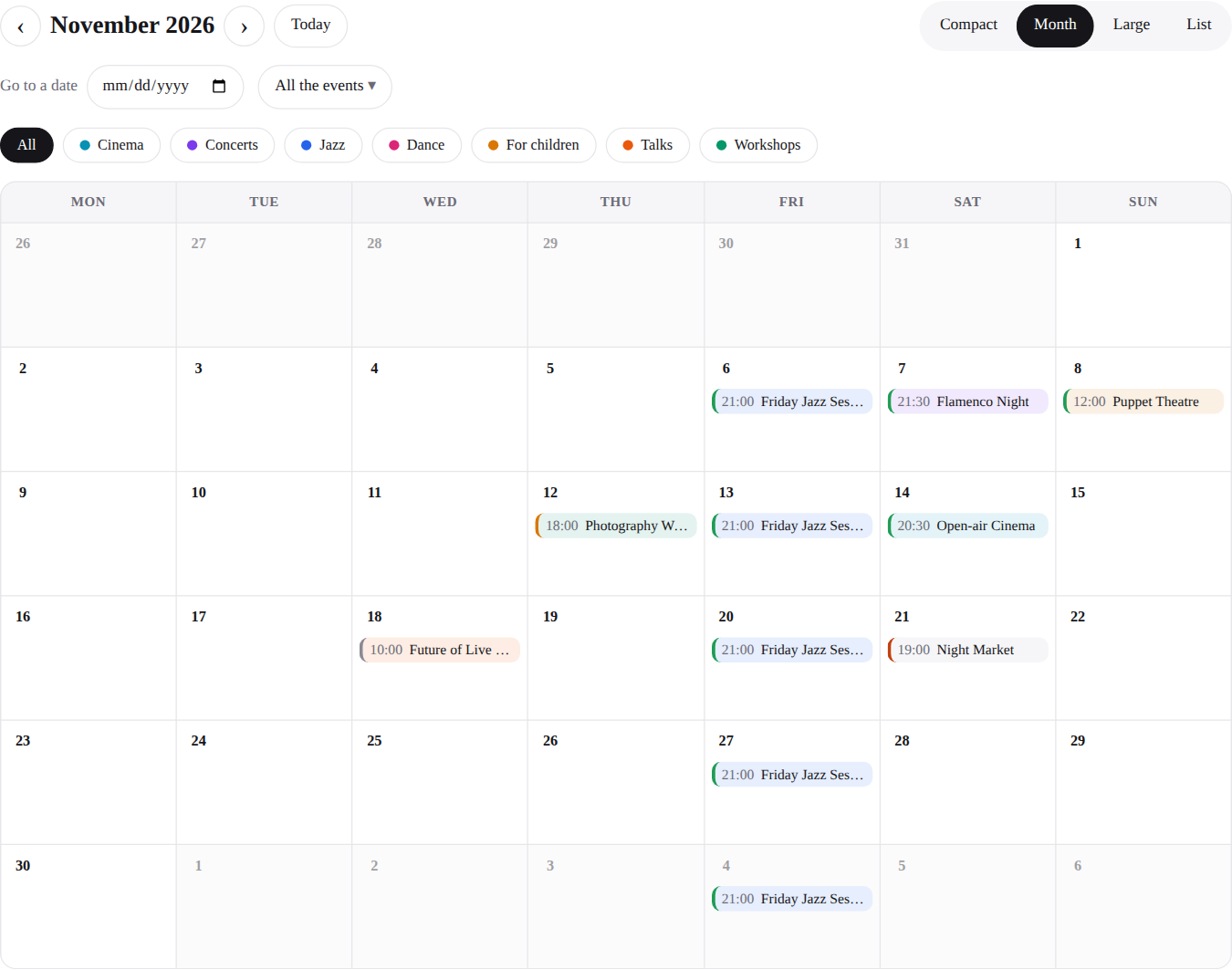
The agenda, month view. Every date of every event in its day, each with its own state; switch to compact, large or list, go to a date, keep only some events or one category.
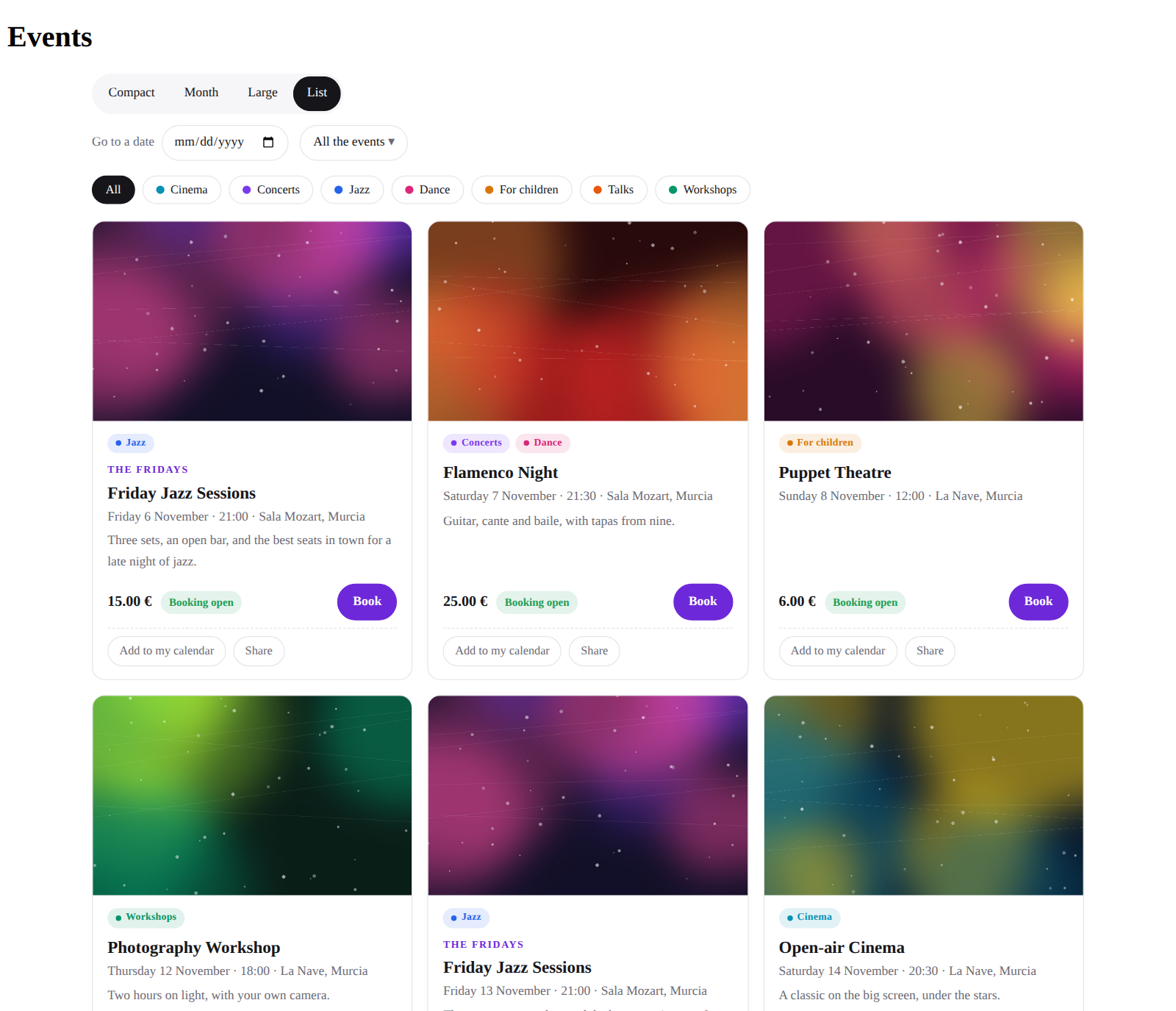
The agenda as a grid of cards. The picture on top, the price, the state, the category, a button to book — and add to my calendar, and share.
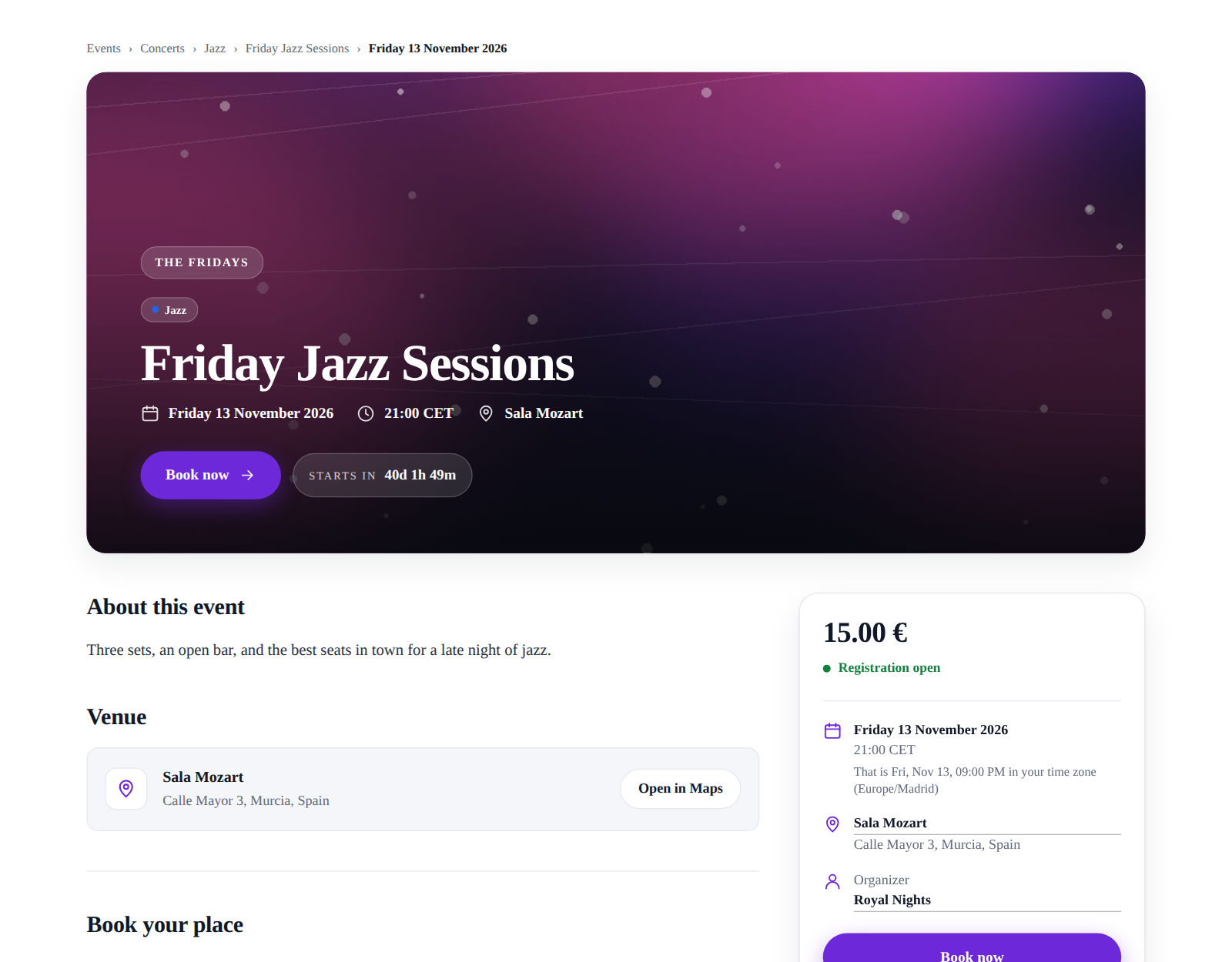
The page of an event. Your theme's look or the Classic one: the path from the list of events, the picture, the date and the place, the categories, the booking form below. Each date of a series has its own page.
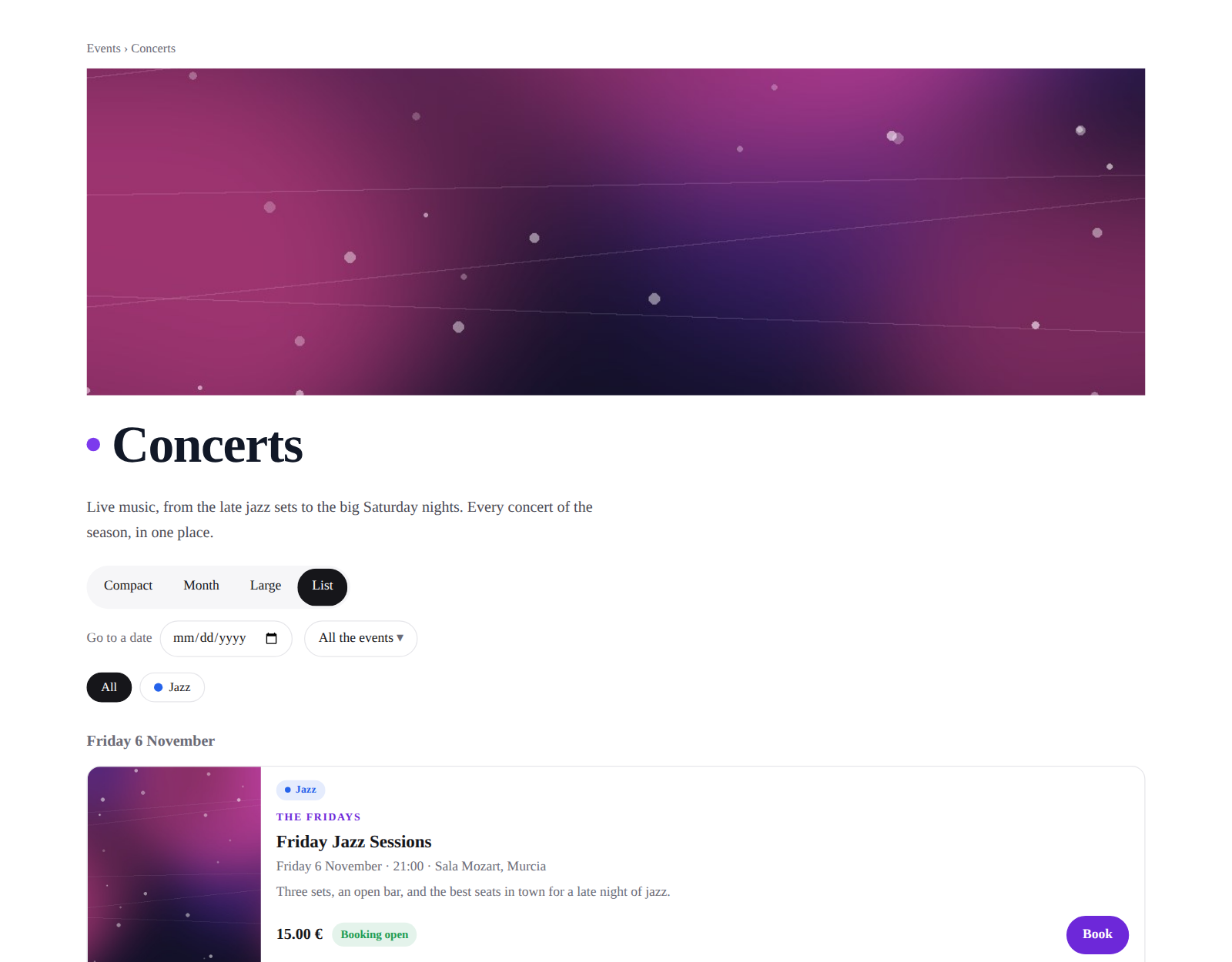
A category's page. Its picture, its words and only its events — the agenda filtered for it, with the categories under it.
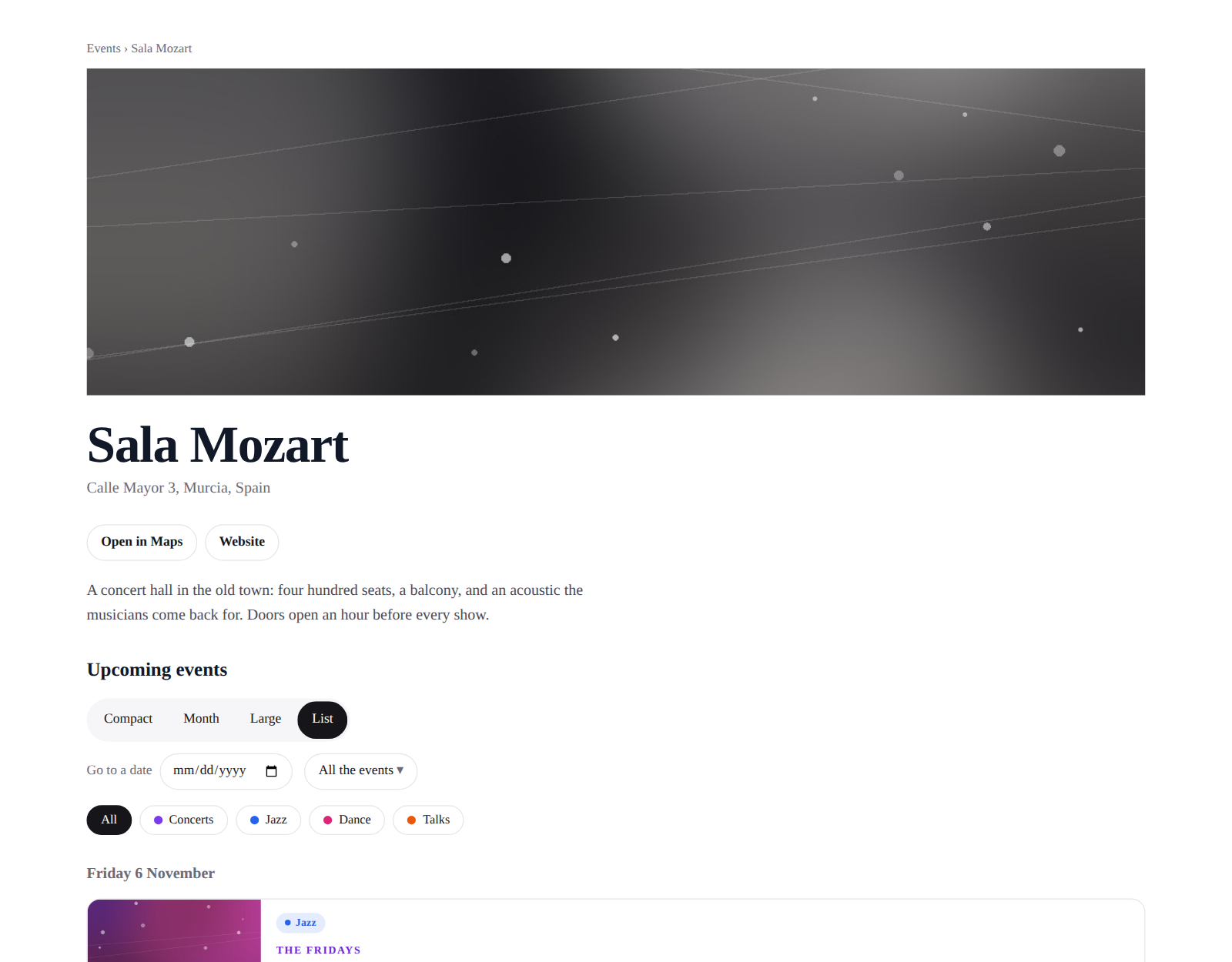
A venue's page. The address, the map, the website, a few words, and the events to come there.
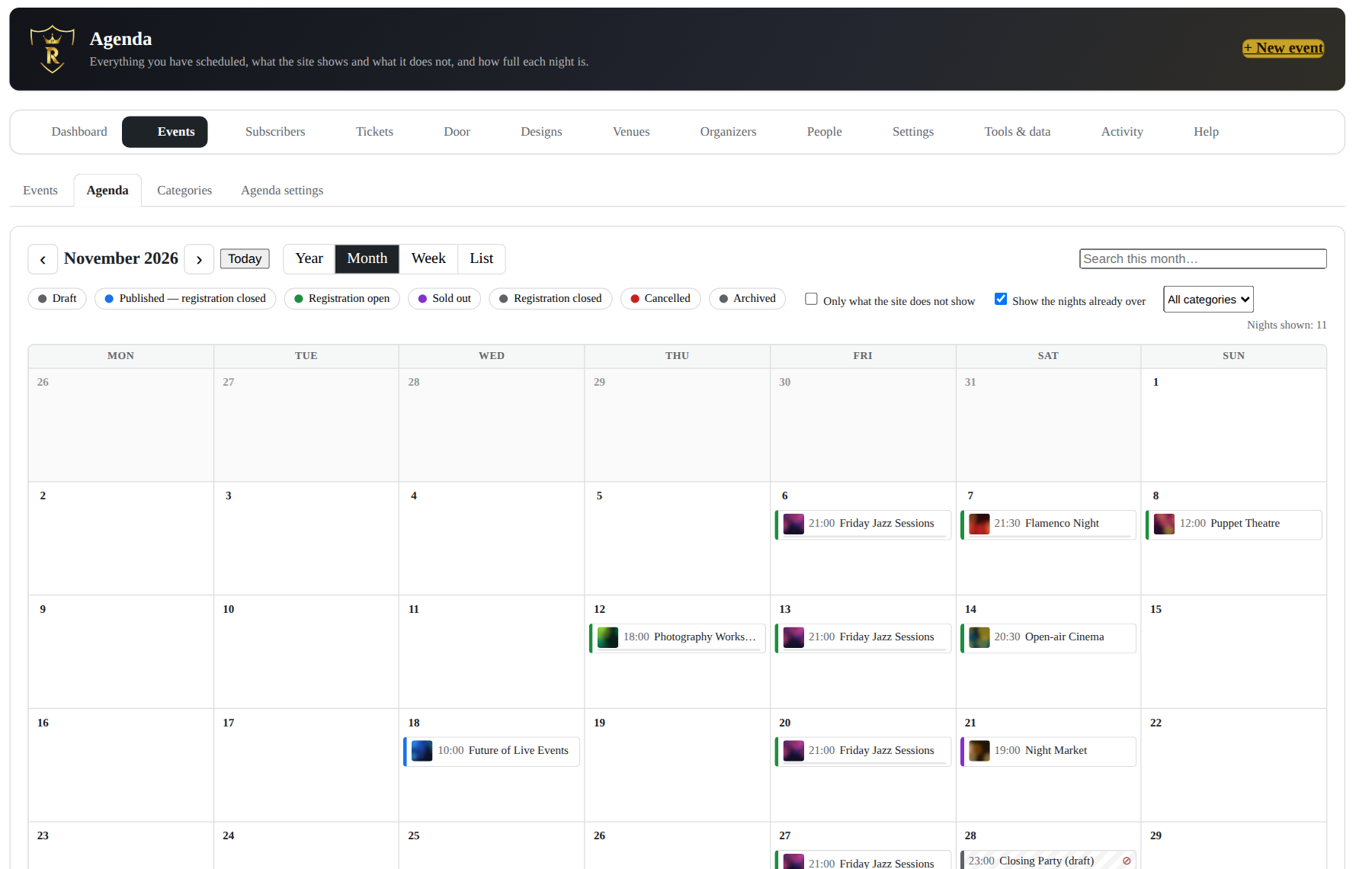
Your own agenda. Every state, drafts included, what the site shows and what it hides, how full each night is. Drag a night to another day; change several at once.
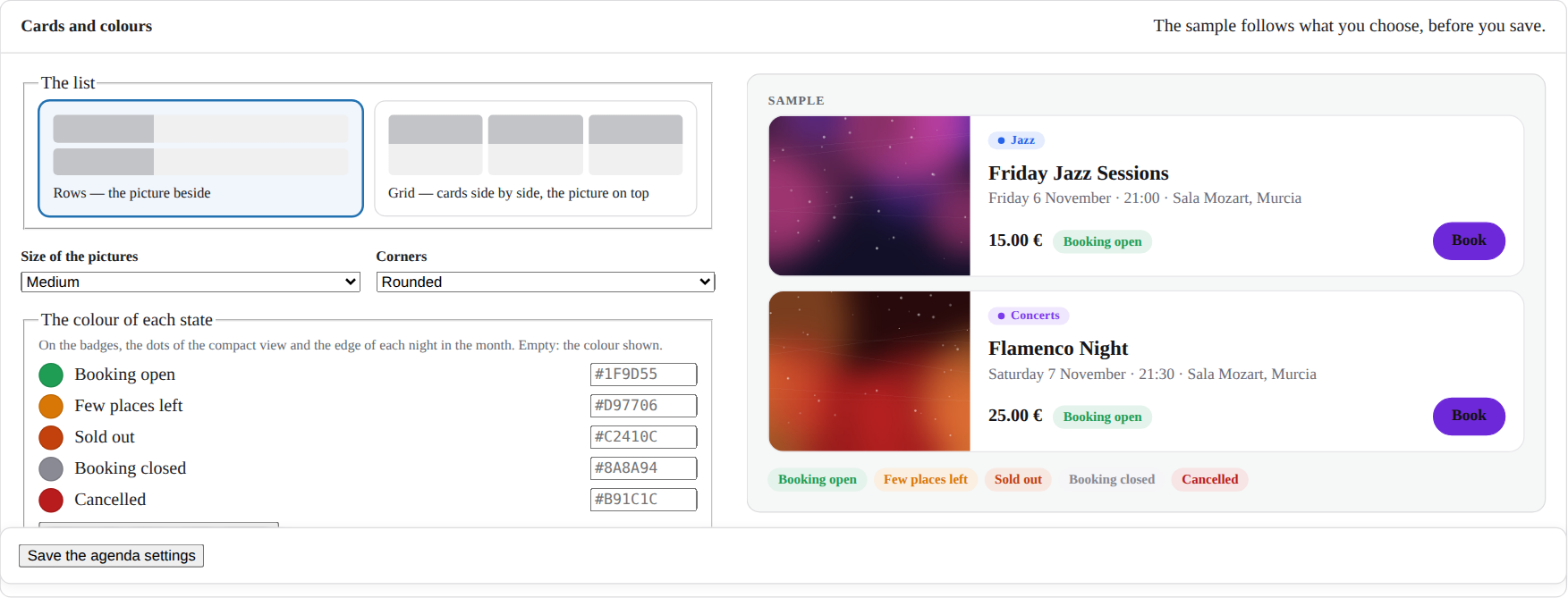
Cards and colours. Rows or a grid, the size of the pictures, the corners and the colour of each state, with a sample that changes as you choose.
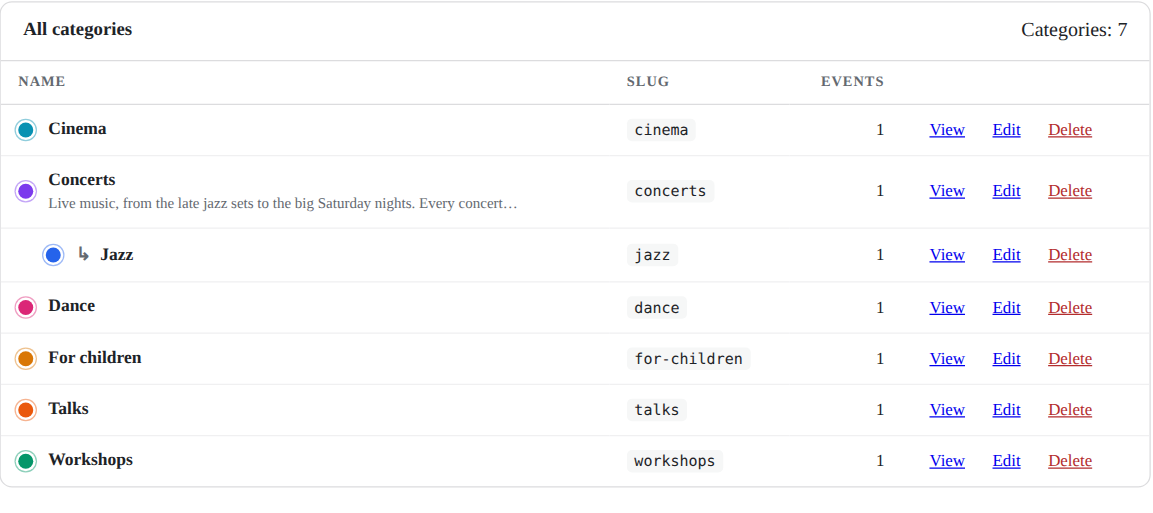
Categories. A tree of families, each with a colour, a picture and its own page; ticked on each event.
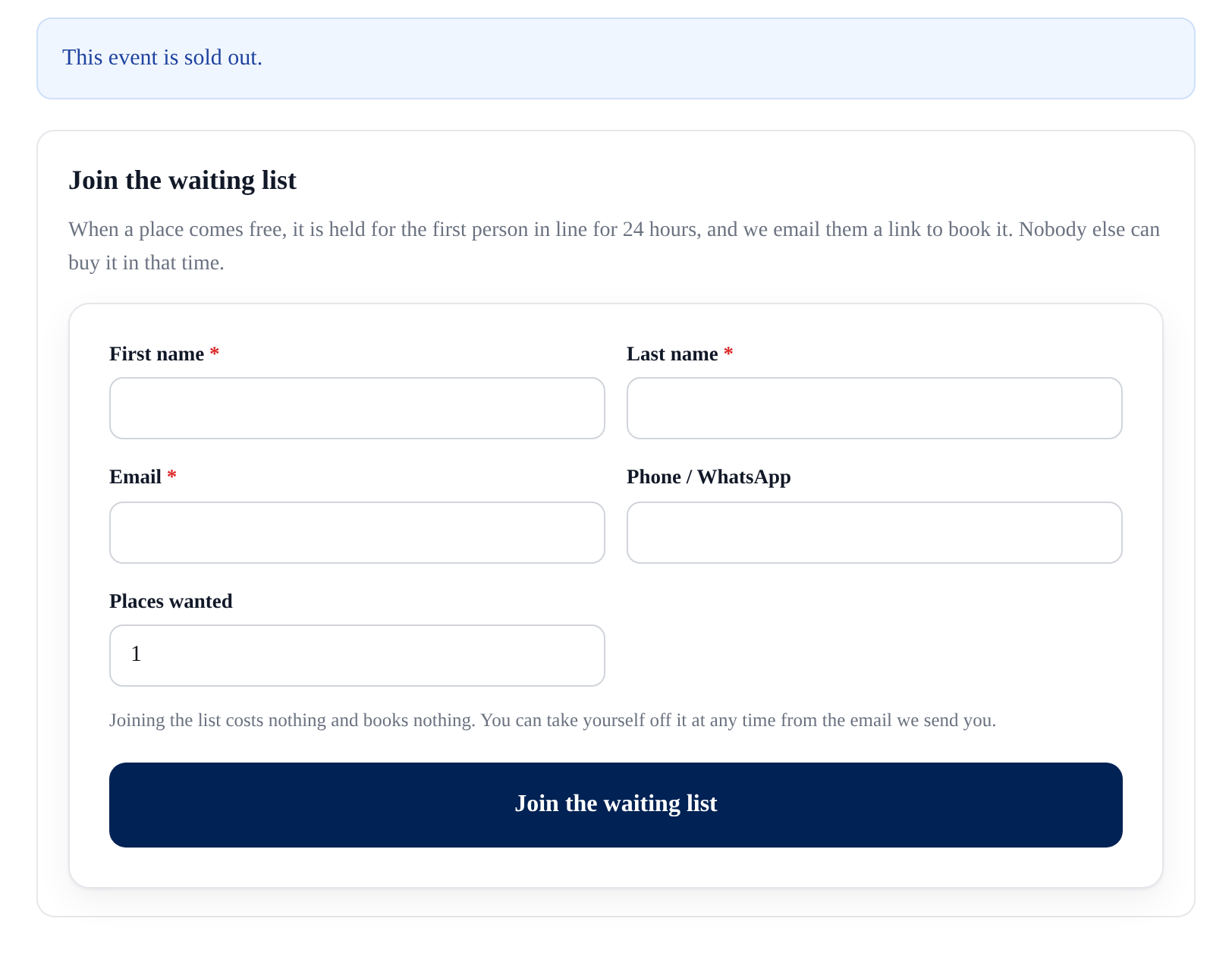
A full date keeps its guests. Under "sold out", the waiting list: a name, an email, how many places. A freed place is held for the first in line.
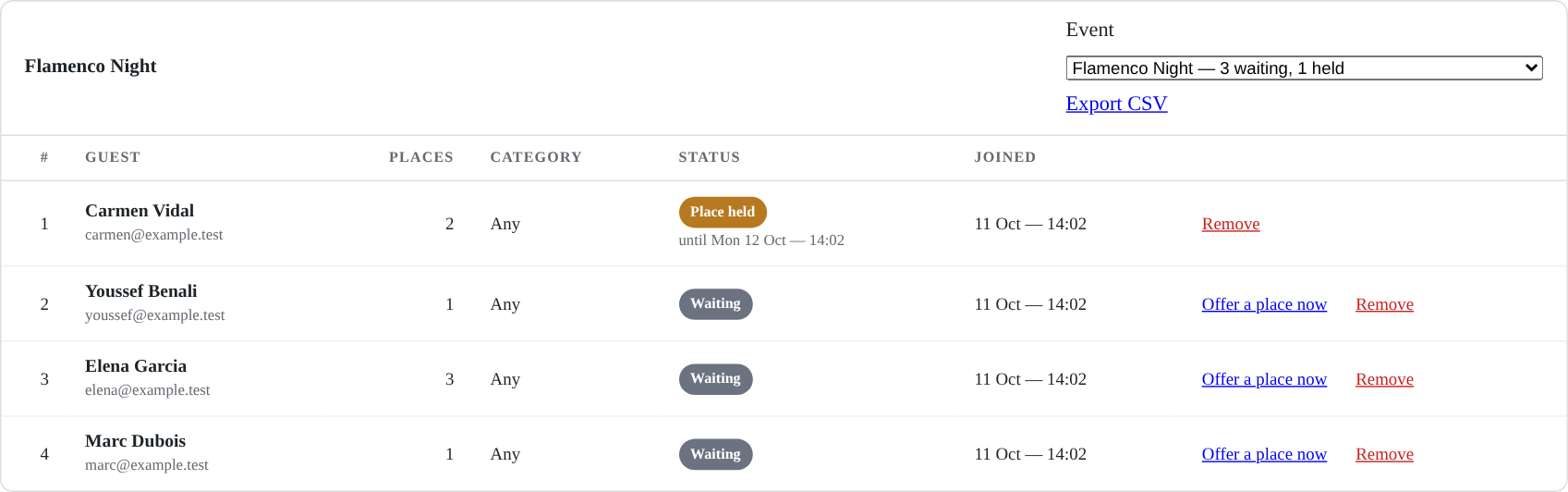
The waiting list of each date: who waits, in which order, whose place is held until when. Offer a place by hand, take somebody off, export.
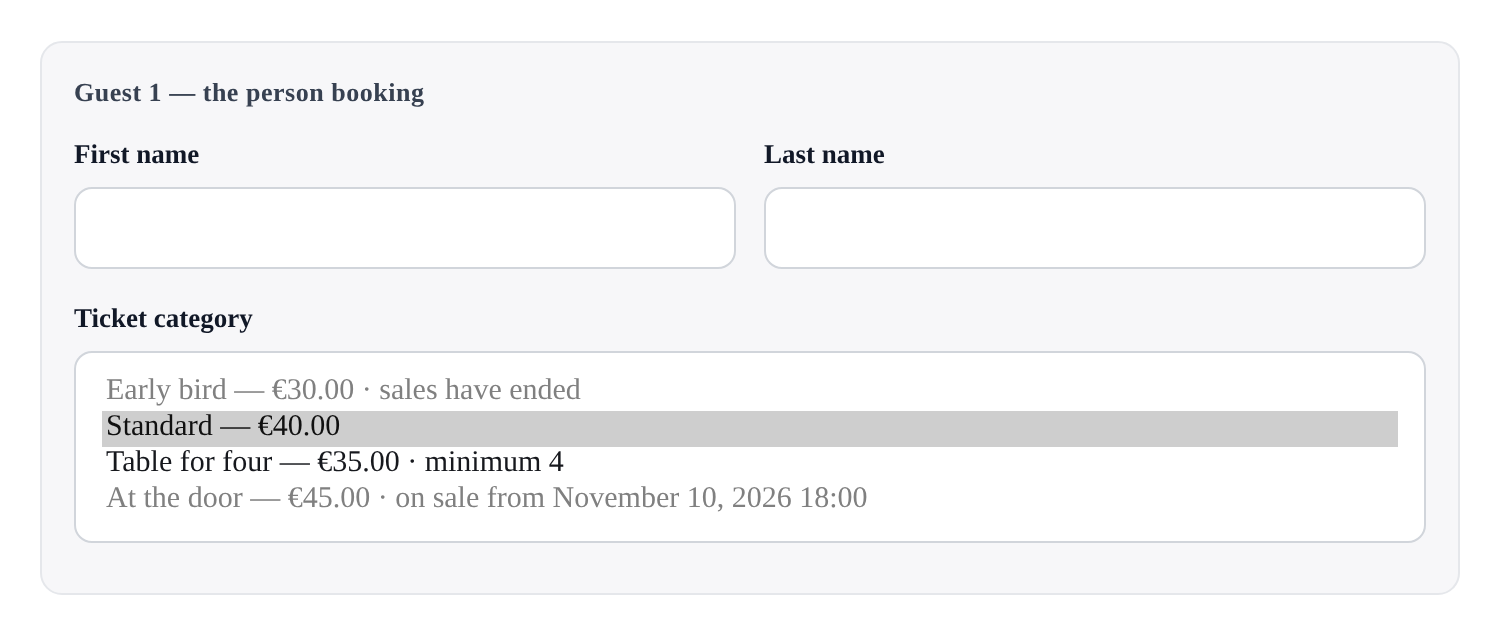
Sale dates and a minimum. An early bird whose sale has ended stays on the page, greyed, with the reason; a group category says its minimum.
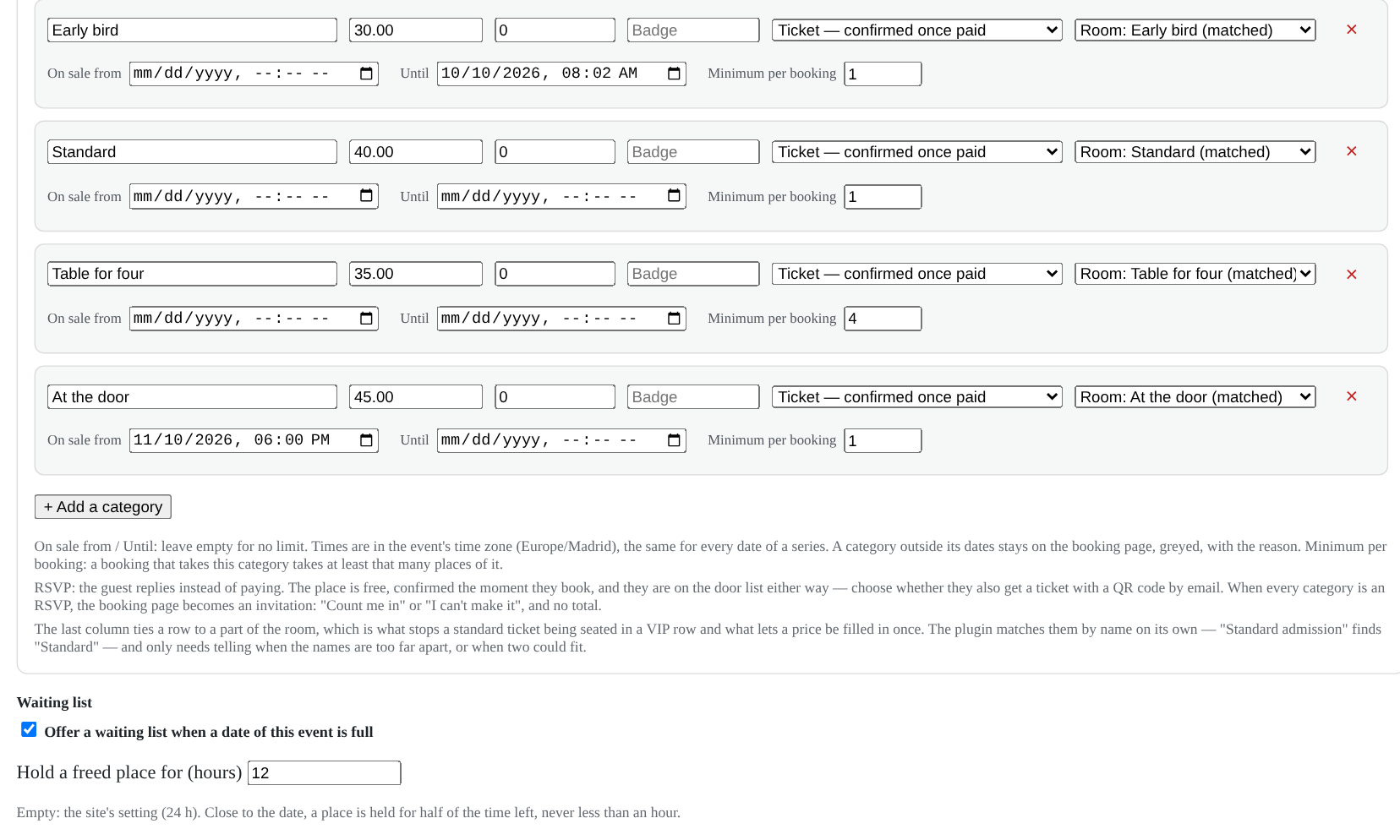
On each category: on sale from, until, and the minimum per booking — and the event's own waiting list, beside it.
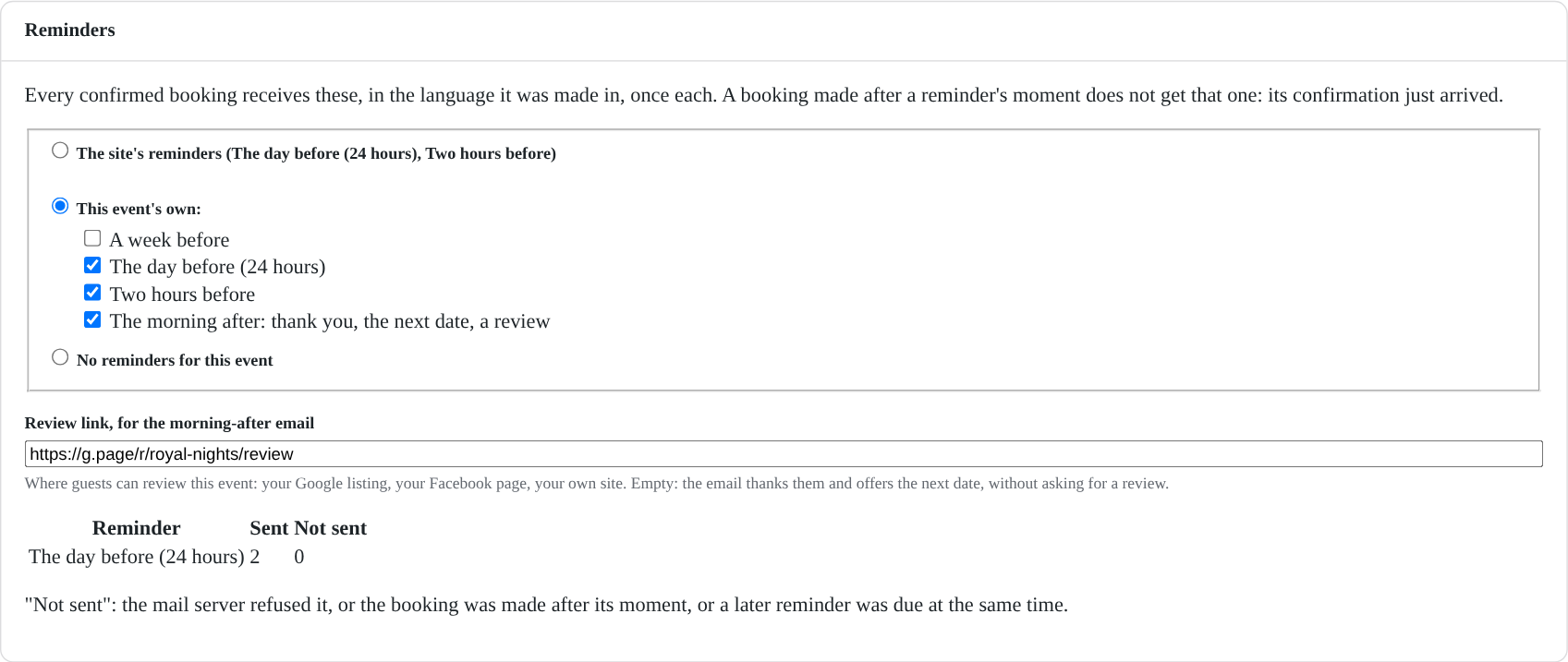
Reminders, per event: the site's, its own, or none; and the link where guests can review the event the morning after.
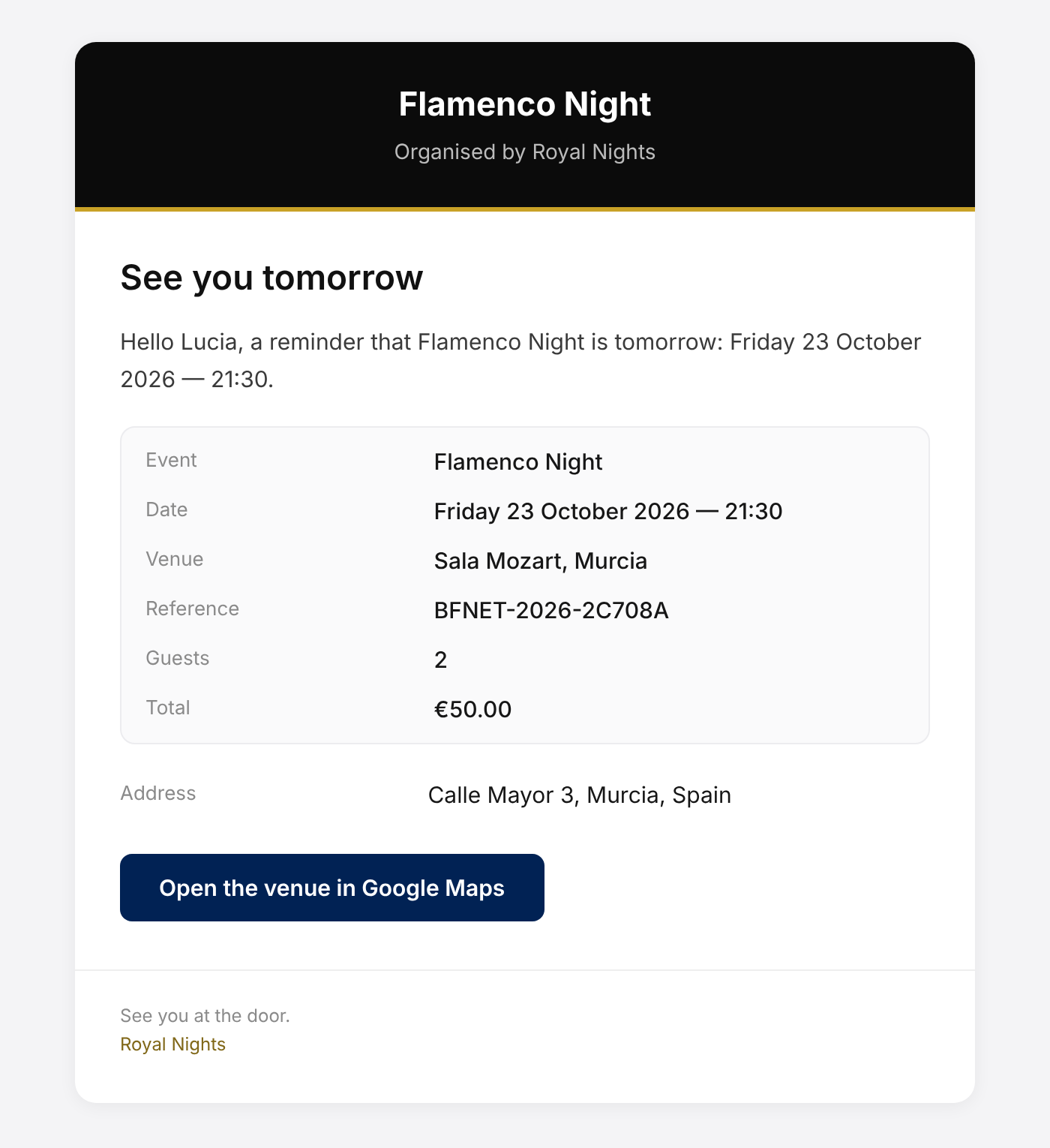
A reminder the day before, in the guest's language: the night, the venue and the way there.
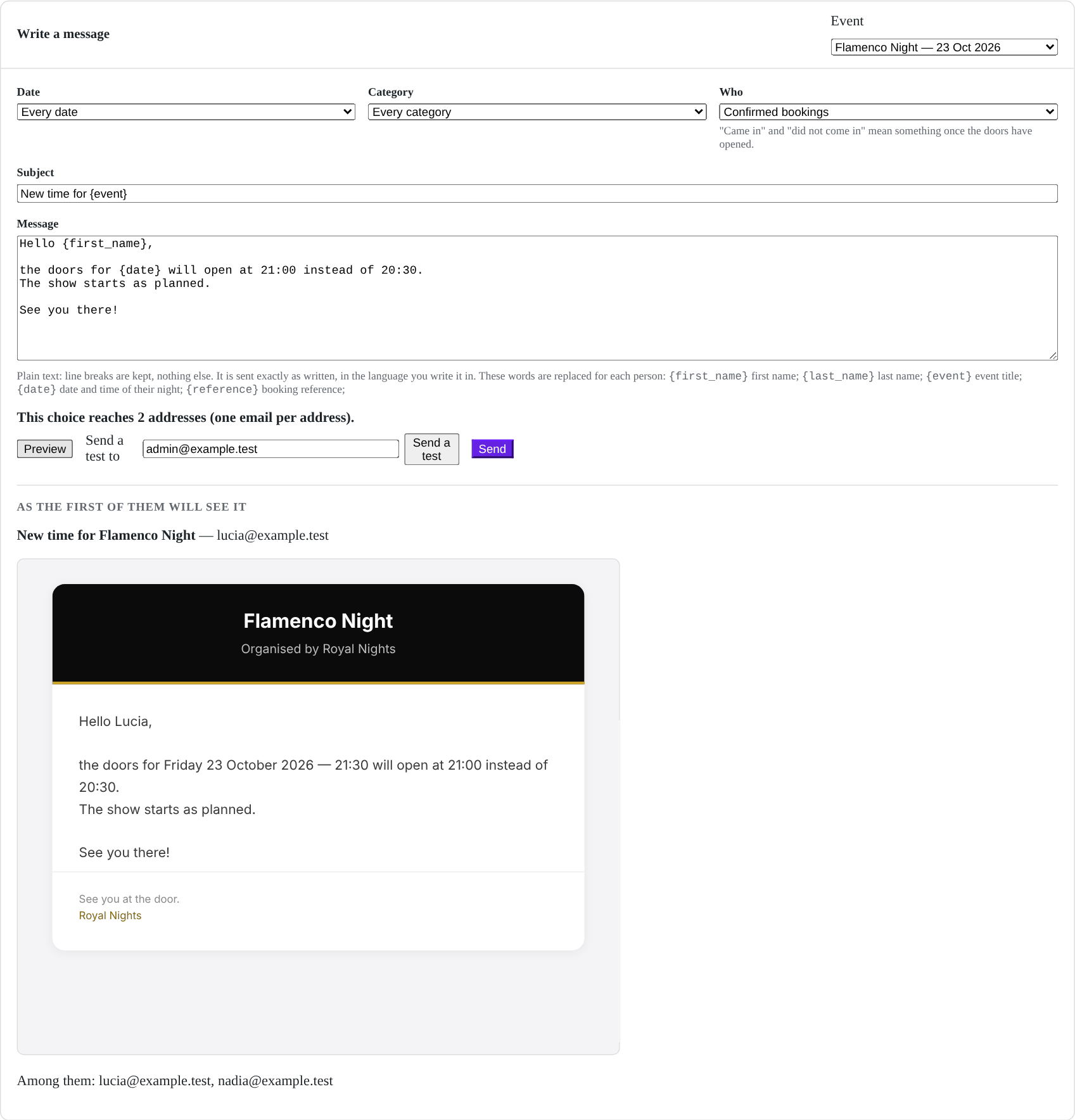
Messages to participants. Choose who, write once, see it as they will, send yourself a test, then send in batches. Nothing tracks who opens it.
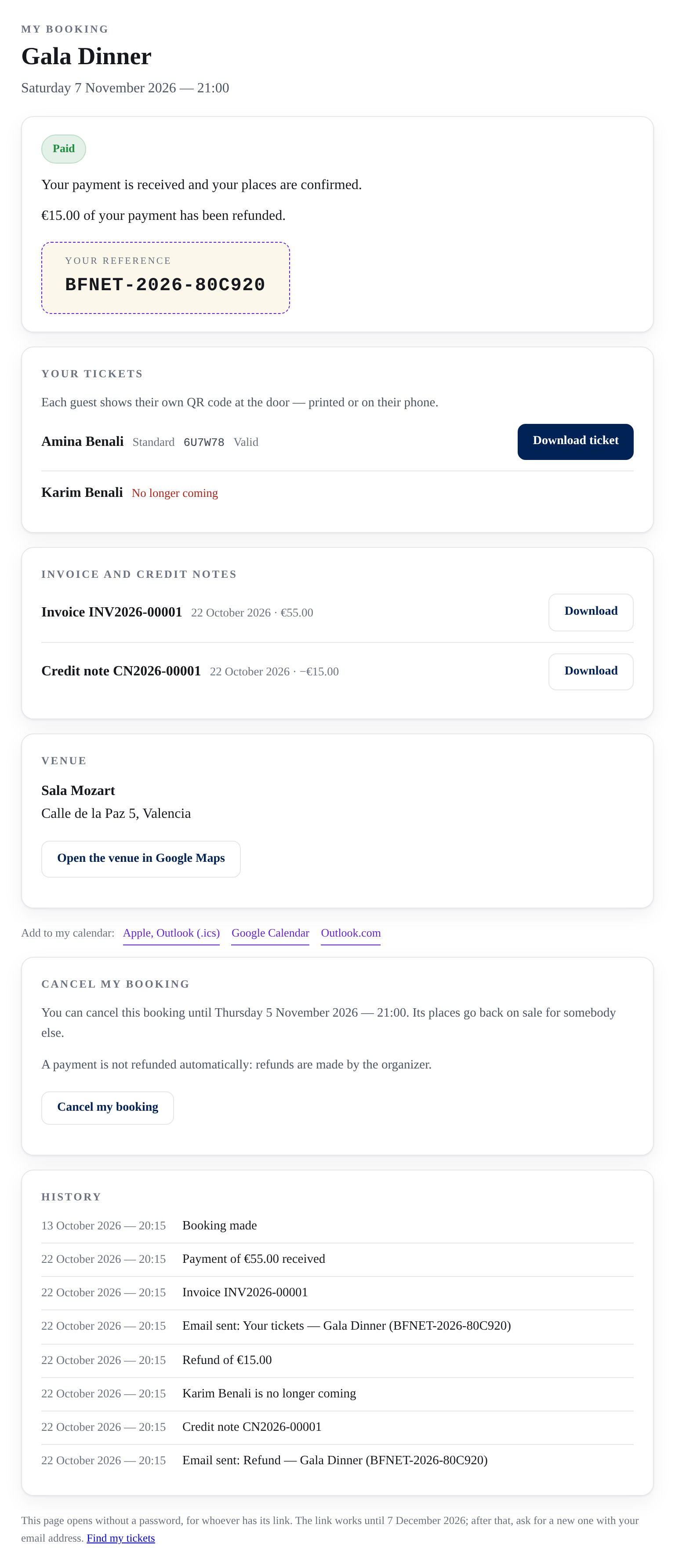
The guest's own page, opened by the signed link in every email: where the booking stands, each guest and their ticket — one who left with a refund — the invoice and its credit note, and what happened when.
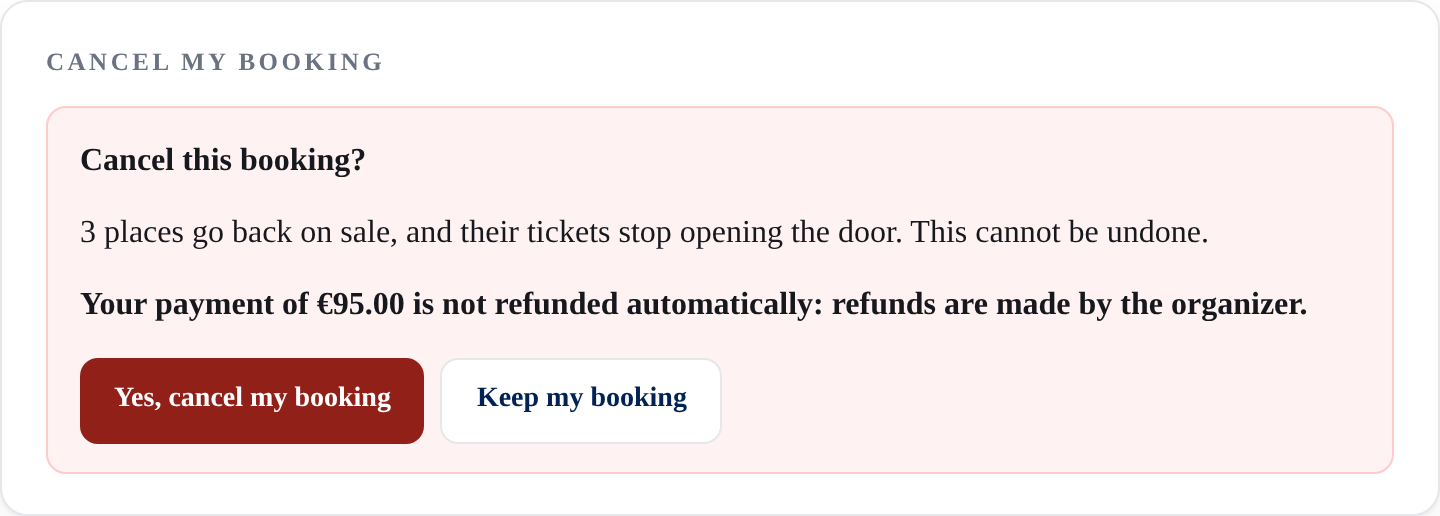
A guest cancels, if you allow it: a question first, with what it means. Their places go back on sale; a payment is not refunded on its own.
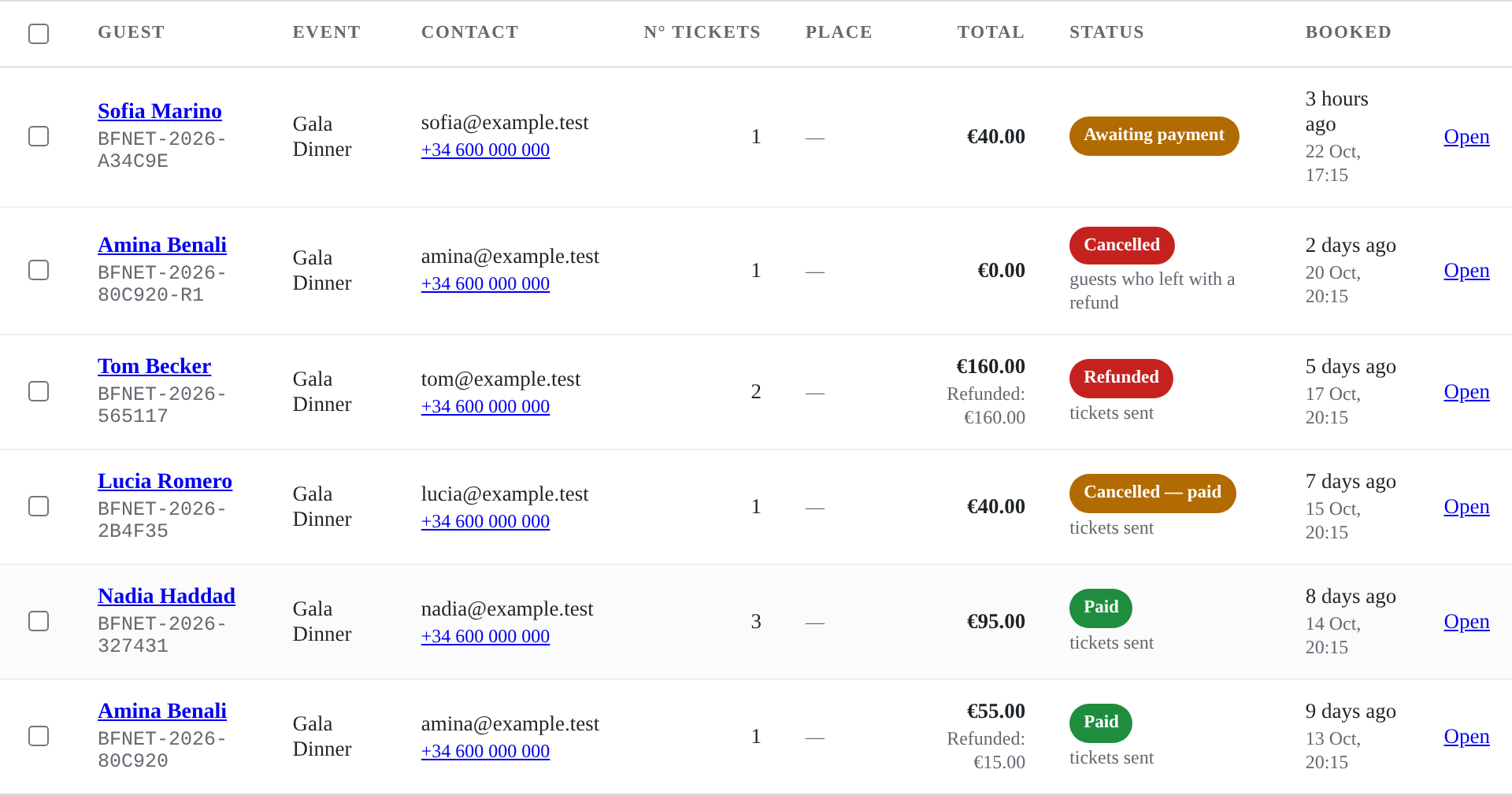
A booking and its money, in one word: paid, awaiting payment, cancelled but paid, refunded — and how much was given back.
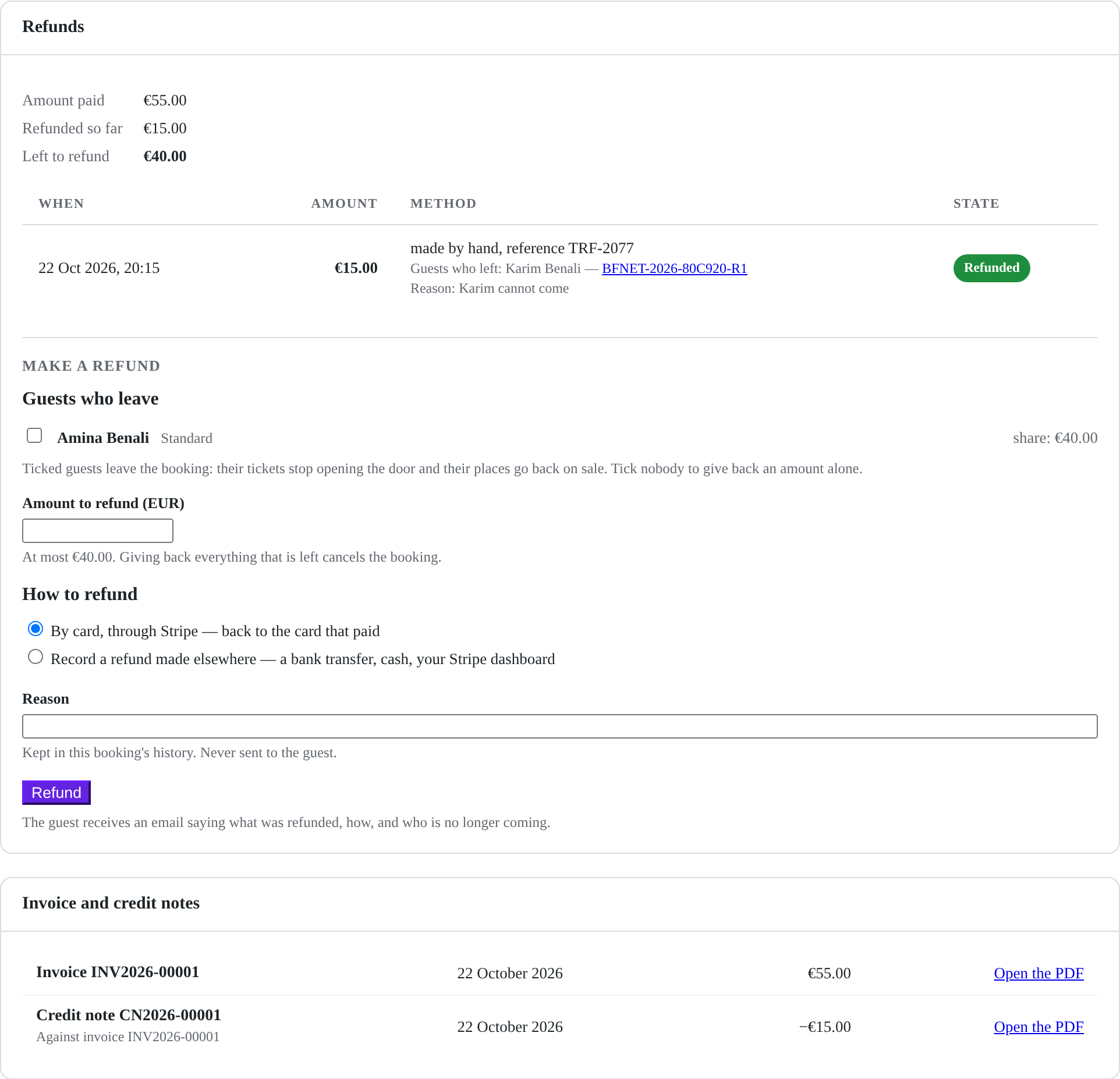
Refunds, on a booking's screen: by card through Stripe or recorded when made elsewhere, for the guests who leave or an amount alone. Below, the invoice and its credit note.
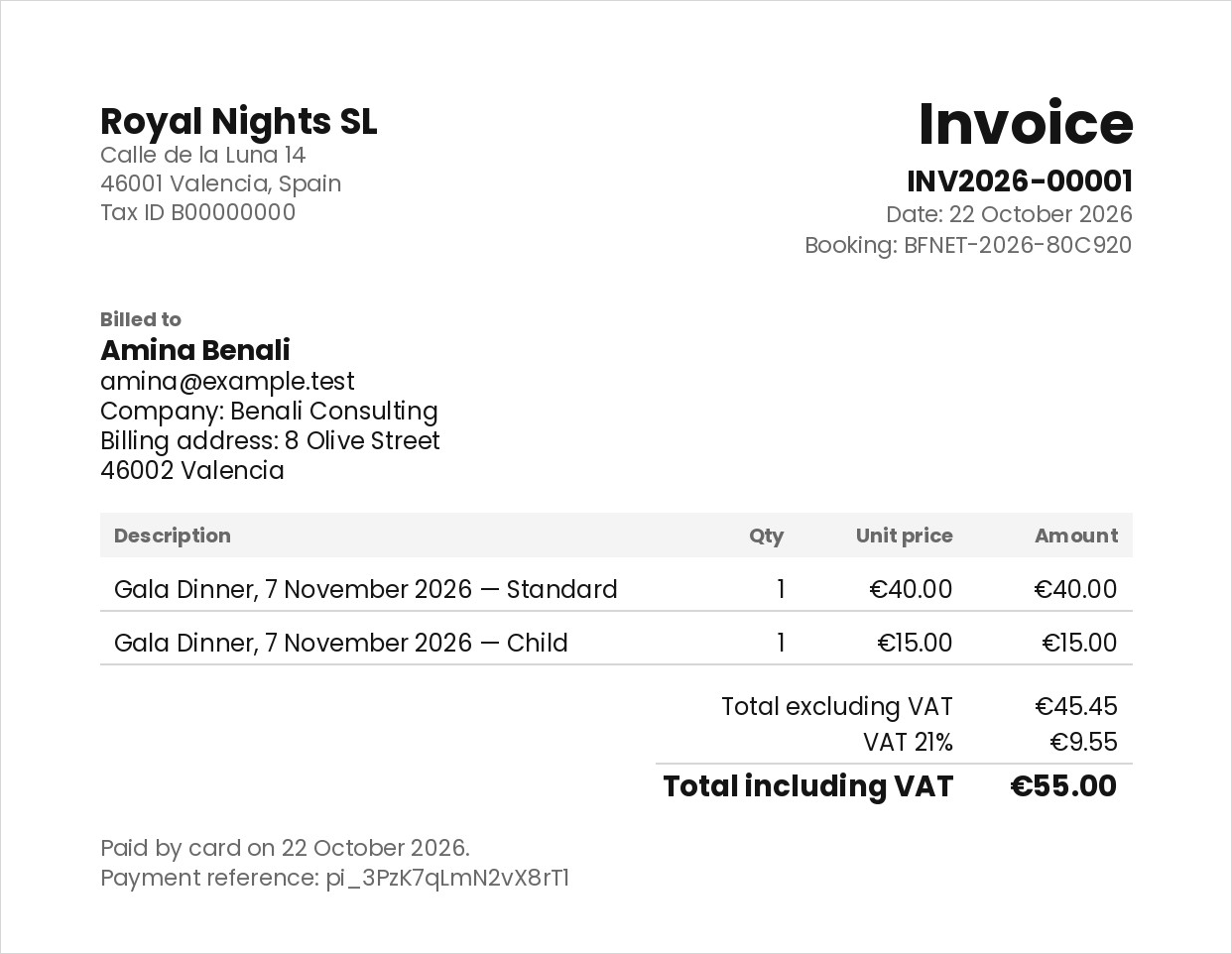
An invoice, when you turn them on: your name and legal details, the categories sold, VAT included at your rate, and the answers marked for the invoice.
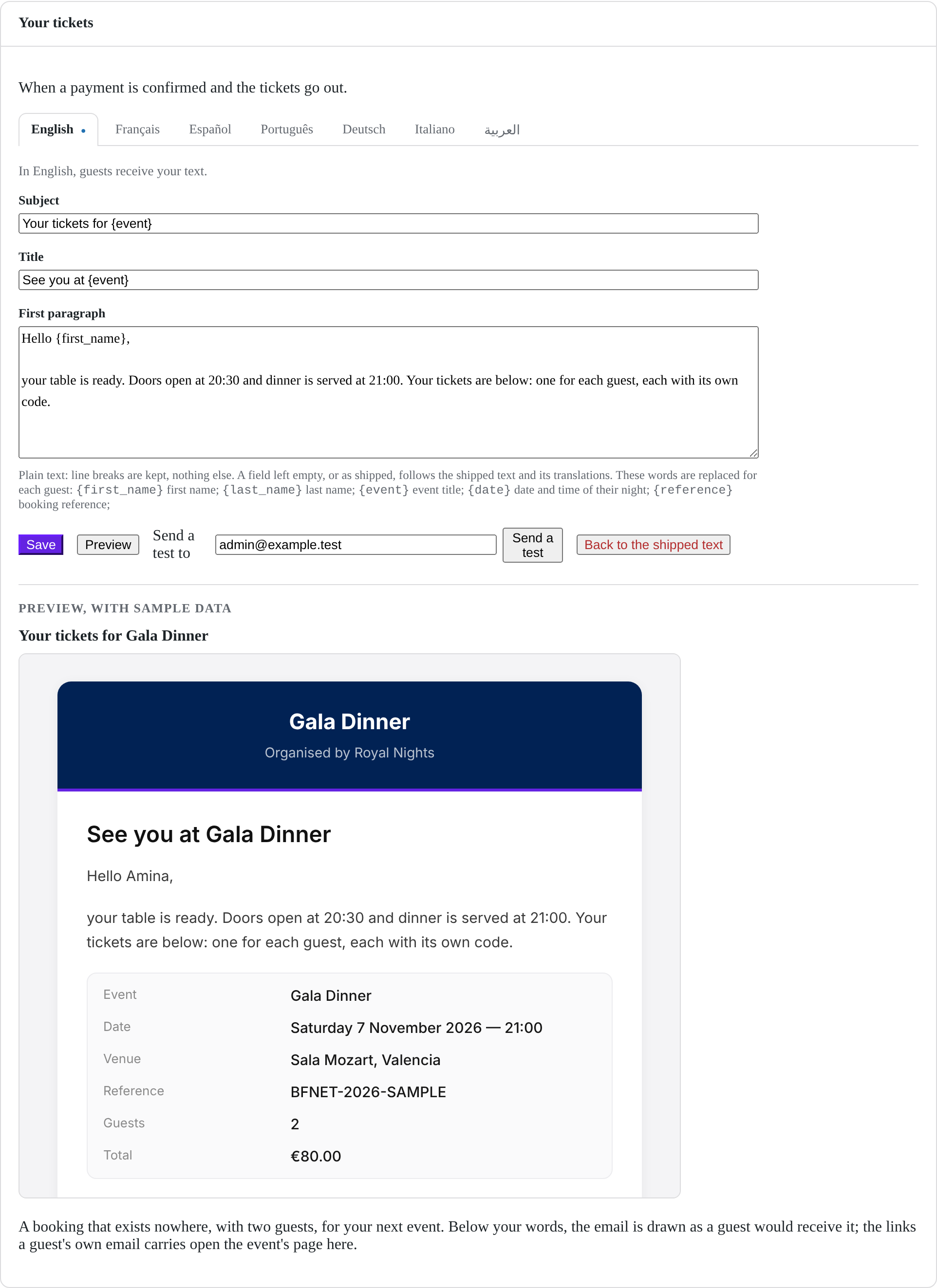
The words of an email, in each language: the subject, the title and the first paragraph, previewed as a guest will receive it. The plugin writes the rest.
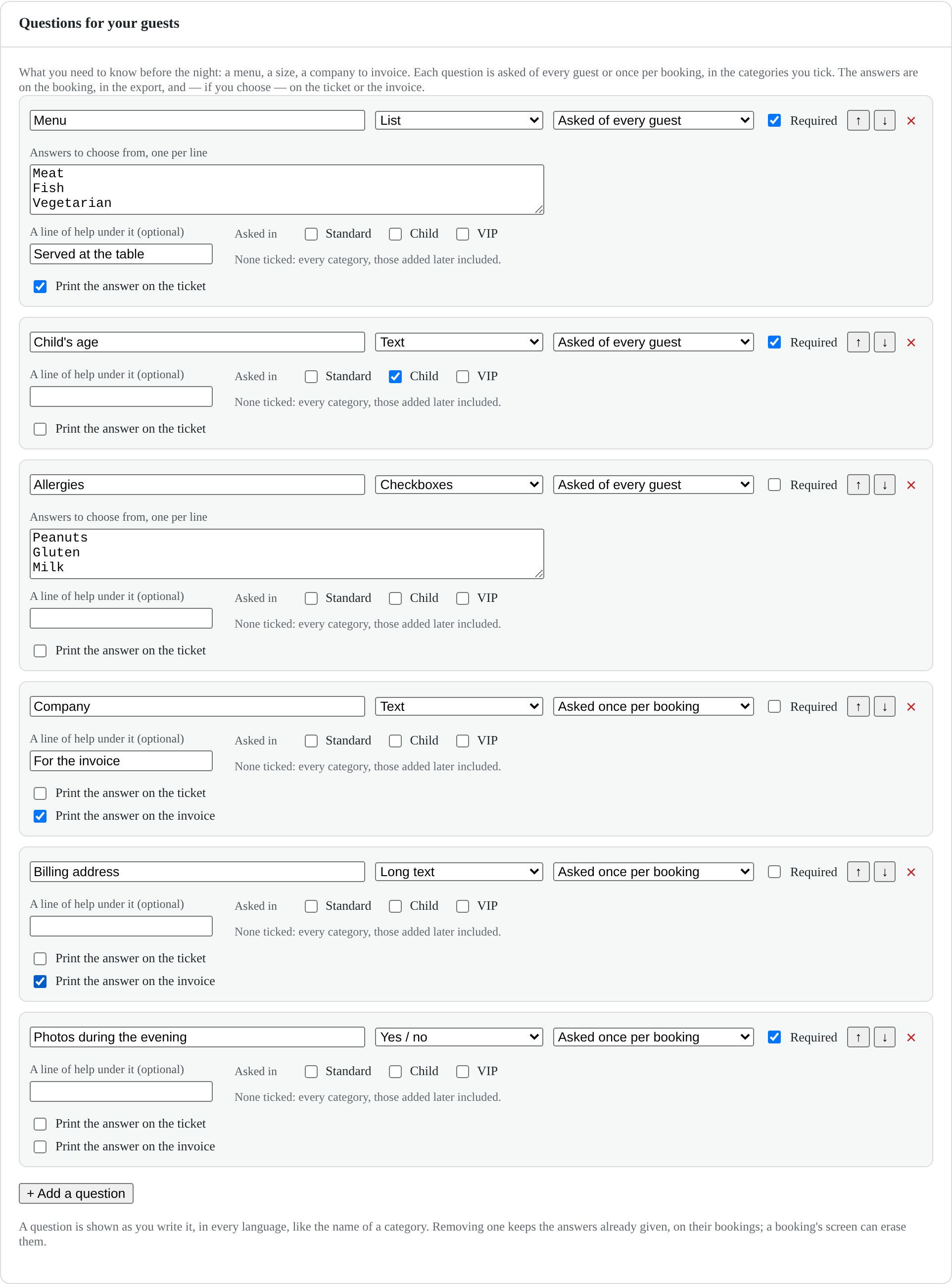
Questions for your guests: a menu for everyone, a child's age only in the Child category, a company asked once per booking for the invoice.
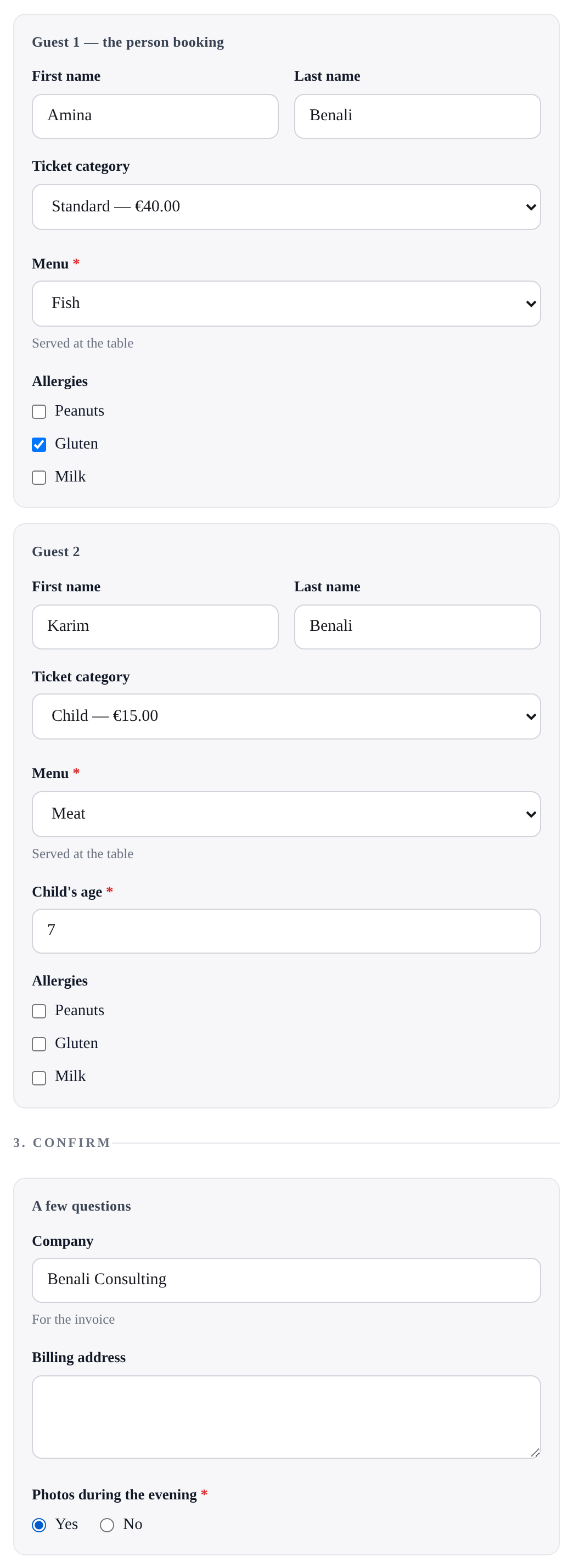
The booking page asks them: the second guest, in the Child category, gets their own question; the questions asked once come before confirming.