
CarbonGuru Embedded Merchant Offsetting connects your WooCommerce store to your CarbonGuru account (Plus plan or higher required):
- Per-product carbon footprints displayed on your product pages — from actual analysis of your products, not order-level estimates.
- Automatic offsetting of every paid order — merchant-settled: your shoppers are never charged and never see a payment surface. Nothing is added to your checkout total or your payment flow.
- Your choice of offsets — you pick the specific carbon offsets or carbon removals your store supports from CarbonGuru’s catalog of project portfolios, and you can change your choice at any time in your CarbonGuru panel.
- A configurable footprint card — the carbon footprint always shows; everything else is up to you. Optional fields: the offset or removal price, the other option’s price, the estimated climate impact in dollars, product category details and a “how this was calculated” link in a more-info tooltip, and the carbon portfolio you support (name, image, and a link to its information page). The footprint badge can also follow through to cart and checkout line items.
- Footprints on your shop and category pages — switch on listing tiles and every product in your shop, category, tag and search grids carries its own footprint tile automatically. For pricing pages, collections and landing pages you build by hand, your CarbonGuru panel generates a tiles block with one tile per active product.
- Per-item control — footprint cards and offsetting switch on and off for each item in your catalog, so you decide exactly which products participate.
- For any seller — B2C and B2B stores, marketplaces, and catalogs alike can embed footprints, offsetting, or both, as they choose.
- No code: the plugin places the display card, reports paid orders, and gives you the display settings in WooCommerce CarbonGuru Display. Offsets, payment, and consent are managed in your CarbonGuru panel.
How it works
- One-click connect: sign in to CarbonGuru, accept the merchant terms, and your keys are provisioned automatically — nothing to copy or paste.
- Your product catalog is analyzed for carbon footprints (within your plan’s allowance; nothing is analyzed or charged without your confirmation).
- You review each footprint and switch on the products you want live — from your WooCommerce Products list or your CarbonGuru panel.
- The footprint card appears on your product pages automatically — and, if you switch on listing tiles, a footprint tile under each product on your shop and category pages.
- When an order is paid, the plugin reports its line items; with automatic offsetting on, the order’s carbon is offset through the offset or removal portfolio you’ve chosen and billed to the payment method saved in your CarbonGuru account.
External service disclosure: this plugin communicates with carbonguru.io. Terms of service: https://carbonguru.io/merchant-terms/ — Privacy policy: https://carbonguru.io/privacy/
- Product pages load the CarbonGuru display card script. The card sends only your embed key and the product page address — never anything your customer types, and no cookies are set.
- When an order is paid, the plugin sends the order’s line items (product identifiers and quantities) and an order reference to your CarbonGuru merchant account — no customer names, emails, or addresses.
- Offset purchases are billed to the payment method saved in your CarbonGuru account. Retired carbon cannot be un-retired — offset purchases are non-refundable.
Screenshots
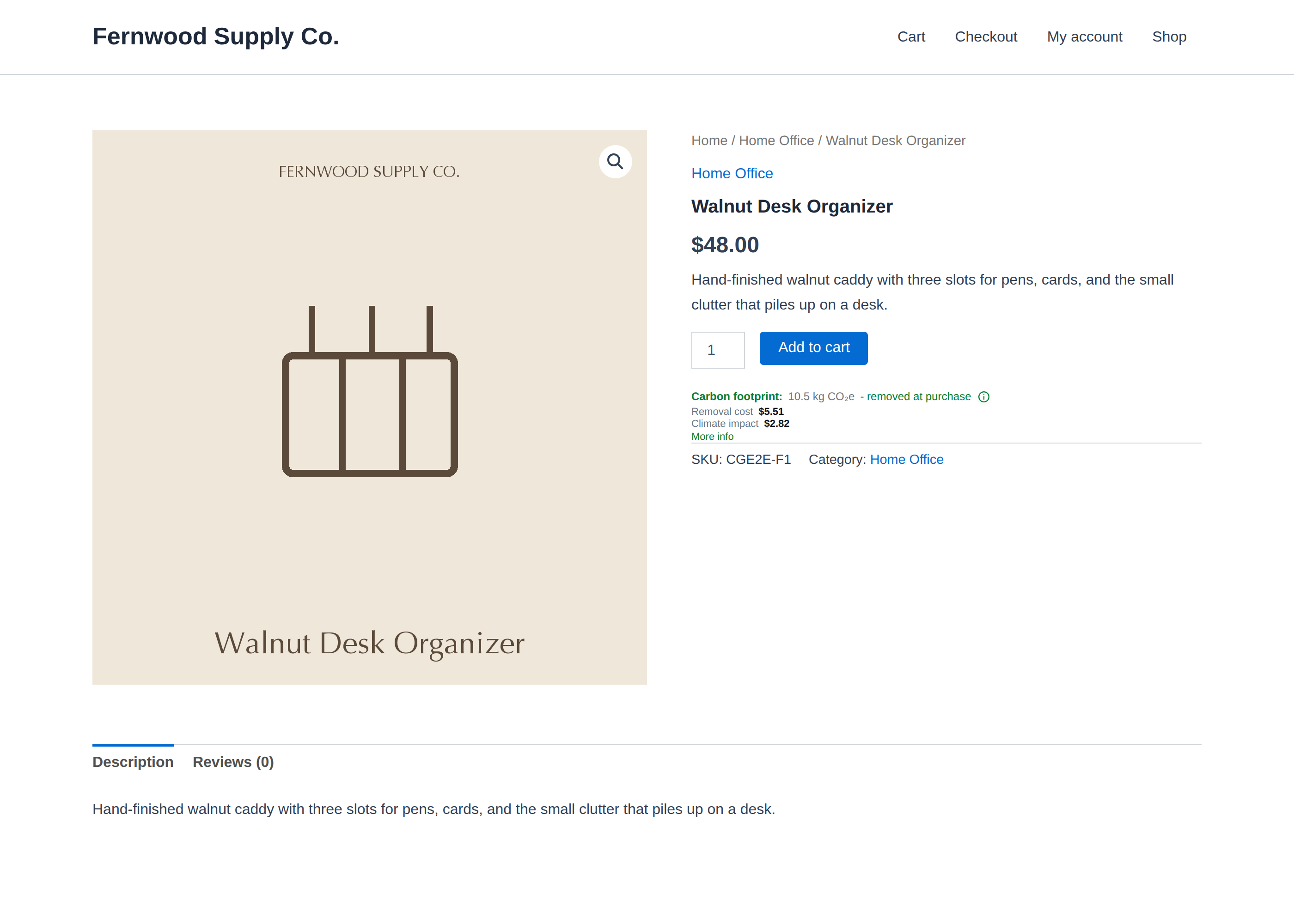
The carbon footprint card on your product pages — shown to shoppers, offset at purchase.

One-click setup: connect your CarbonGuru account, then choose where the card appears and what it shows, all from WooCommerce → CarbonGuru.
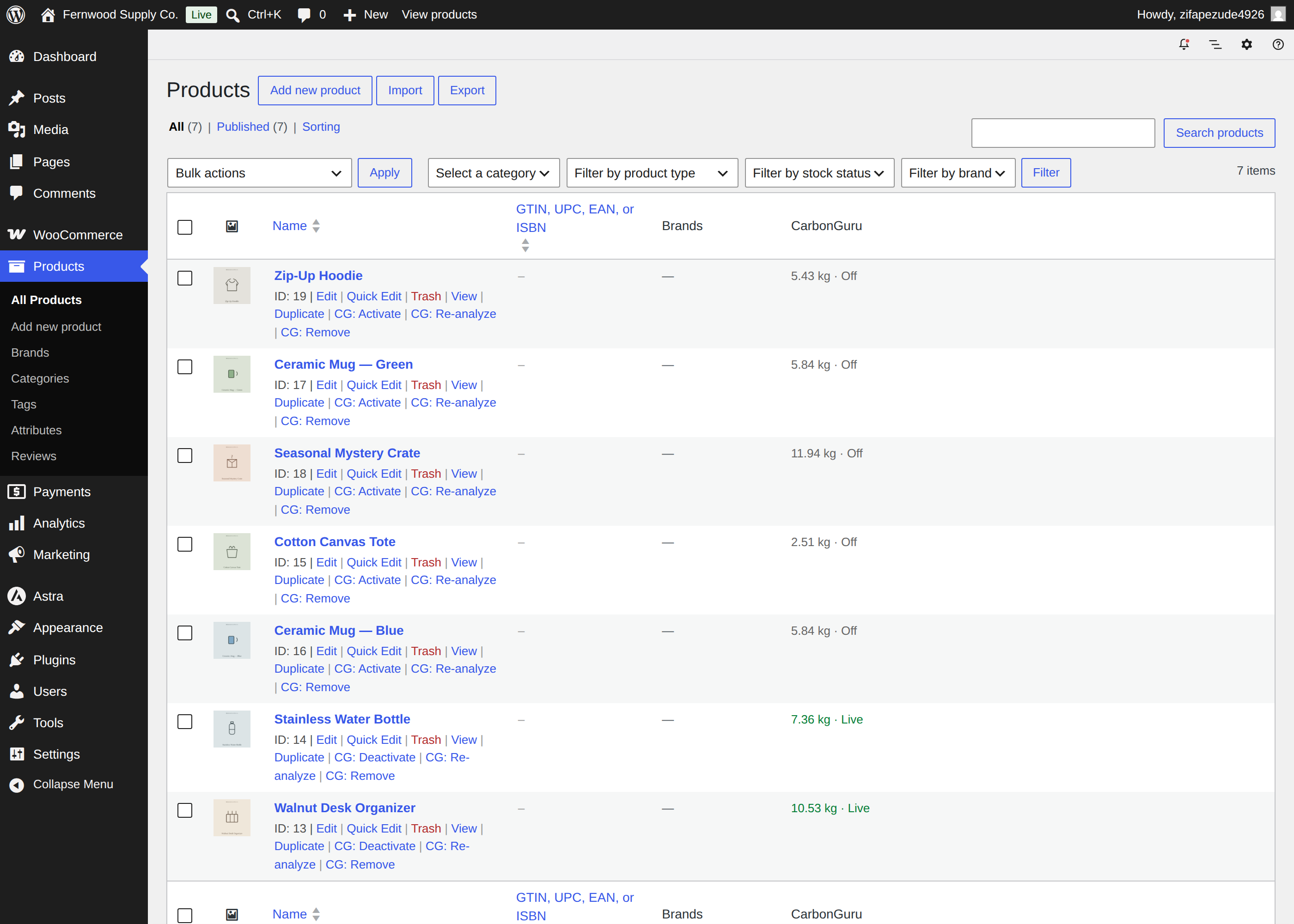
Manage every footprint from your Products list: per-product Activate / Deactivate / Re-analyze / Remove row actions, live/off state, and bulk actions.

Your shop page with listing tiles on — a footprint tile under every product you have switched on.

The CarbonGuru meta box on the product editor — per-product footprint, live/off state, and quick actions.

Footprint tiles on a listing page — one tile per product on your shop and category pages (the Display option), or on any page via the tiles block your CarbonGuru panel generates.

The footprint badge on cart line items — the same footprint follows the shopper into the cart and checkout when you switch those Display options on.

The offset card on the order-received page — the order's carbon amount and offset status, shown to the shopper right after checkout (also available on the My Account order view and as a receipt link in the order email).