Catalogafe – Product CSV Import Validator, Dry Run & Catalog Audit for WooCommerce
by CommerceWP
Catalogafe checks a WooCommerce product CSV before you import it, and audits the products already in your store. It reads only: it never creates, updates or deletes a product. When the dry run is clean, you import with the normal WooCommerce product importer, as before.
WooCommerce CSV import validator and dry run
Upload a CSV under Products CSV Dry Run, choose the same update mode you will use in the WooCommerce importer, and see what the import would do before it touches anything: how many products would be created, updated or skipped, which rows have errors, and which only have warnings.
Check a product CSV before you import
Every row is checked for the mistakes that break or silently damage an import:
- Rows with no ID, SKU or global unique ID
- Invalid product types, type flags, prices, stock values, dates and statuses
- A sale price that is not lower than the regular price
- Existing products that will be skipped or updated
- External product URLs, image URLs (format) and empty category or tag terms
- Duplicate required headers, UTF-8, delimiter, header, file size and row-limit problems
Find duplicate SKUs, missing SKUs and duplicate GTIN/EAN/UPC
Catalogafe finds the same SKU, ID or GTIN/UPC/EAN/ISBN used on more than one row, and SKUs or global IDs that already belong to a different product in your store.
Fix variation and parent errors before they break an import
Variation rows are checked for a missing or wrong parent ID or SKU, and for variation attributes and global attribute names that don’t match.
CSV delimiter detection: comma, semicolon, tab and pipe
Exports from Excel, Numbers, Google Sheets and other shops use different separators. Catalogafe detects comma, semicolon, tab and pipe automatically, or you can choose one.
WooCommerce CSV column mapping and update-mode prediction
Headers from the WooCommerce exporter and common alternatives are mapped to WooCommerce fields, including attribute, download and meta columns, so you see which columns WooCommerce will use and which it will ignore.
Catalog audit: product health check for your existing store
Products Catalog Health audits the products already in WooCommerce: duplicate SKUs and global IDs, missing SKUs, pricing and stock problems, missing images, short or missing descriptions, uncategorised products and product structure. It is read-only too.
Import quality score and downloadable CSV or JSON fix reports
Each check gives a quality score out of 100 and a list of issues with line numbers. Download the issues as CSV or JSON, fix your spreadsheet and check again.
WooCommerce CSV template download
Start from a WooCommerce-compatible CSV template with simple and variation examples.
Read-only by design: Catalogafe never imports
Catalogafe never writes products, never repairs your file and never contacts other servers while checking. Uploaded files are processed in memory for the check.
100% free
Catalogafe is free, with no paid version and nothing locked.
Screenshots

Products → CSV Dry Run: upload a product CSV, pick the delimiter and the WooCommerce update mode.

The dry run result: quality score, predicted create/update/skip totals, column mapping, fix reports and every issue with its line number.
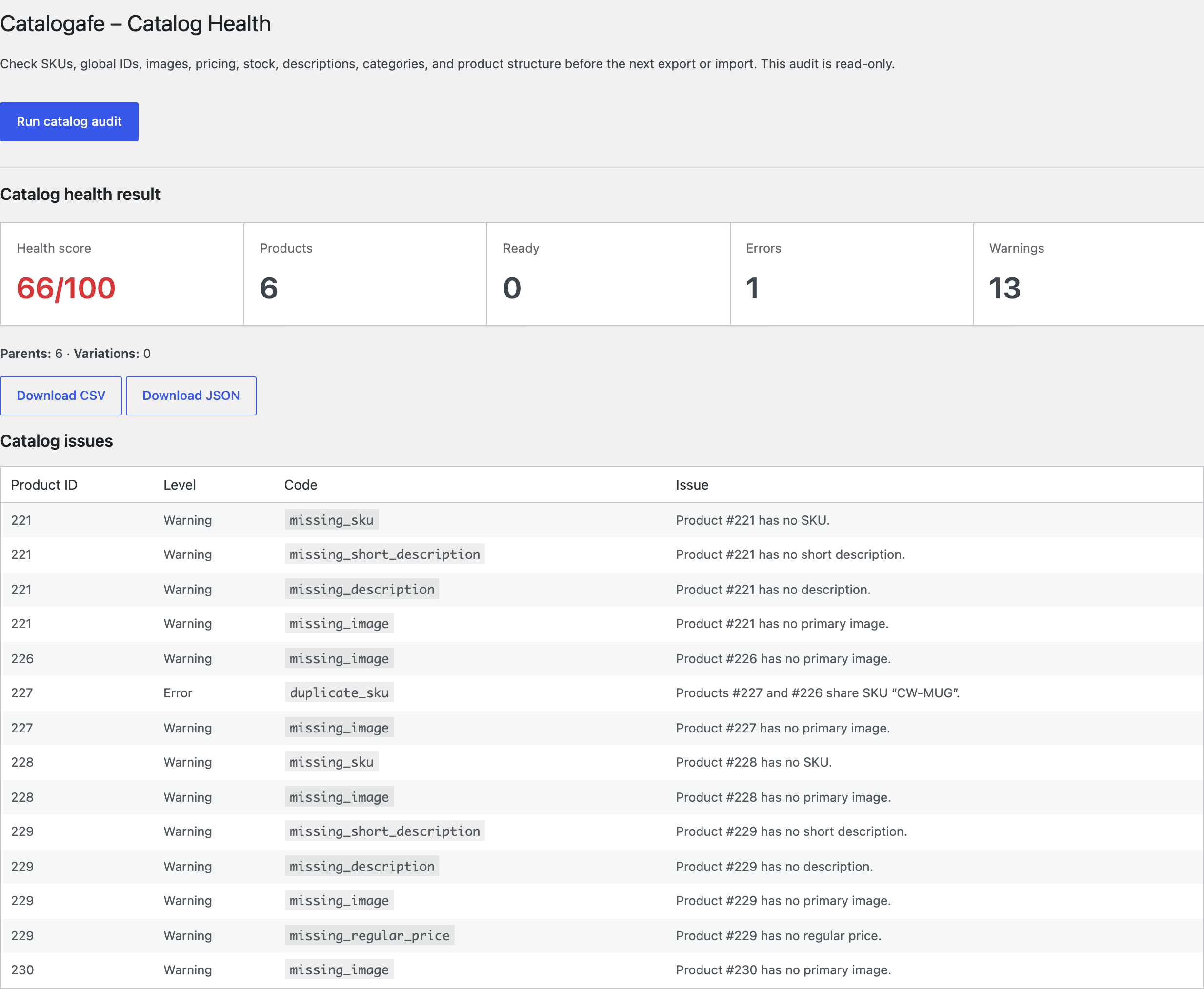
Products → Catalog Health: a read-only audit of existing products with duplicate SKUs, missing SKUs, images, prices and descriptions.