
Christmas Snow adds an elegant falling snow effect to your WordPress site using a lightweight HTML5 Canvas engine. It still works the moment you activate it, and now you can shape every part of it from a friendly settings screen with a live preview.
- Live demo: demo.propluginslab.io/christmas-snow-for-wordpress
- Documentation: docs.propluginslab.io/christmas-snow-for-wordpress
- Support: propluginslab.io/support
Choose classic snowflakes, soft dots, festive emoji or your own image. Set how heavy the snow falls, which way the wind blows, where it appears and exactly which weeks of the year it should run. Everything you change is shown in a preview panel before you save.
Built for real sites
The effect is designed to stay out of the way of your content and your customers:
- Sprite based rendering keeps the frame cost flat even at high flake counts
- The animation pauses completely while the browser tab is in the background
- A separate, lower flake count is used on phones
- WooCommerce cart, checkout and account pages are excluded by default
- Visitors who ask their device to reduce motion never see the animation
- Optional on/off button so visitors can switch the snow off, remembered in their browser
- Optional time limit, so the snow falls for a set number of seconds and then gently fades out
- The canvas is marked as decorative so screen readers ignore it
Everything you can control
Appearance
- Flake type: characters and emoji, soft dots, or a custom image from your media library
- Any characters you like, so snowflakes, sparkles, stars or holiday emoji all work
- One colour or a mix of up to eight, blended randomly across the flakes
- Minimum and maximum flake size
- Minimum and maximum opacity
- Softness, for a dreamy out of focus look
- A depth effect that makes distant flakes smaller, slower and fainter
Motion
- Separate flake counts for desktop and mobile, plus the breakpoint between them
- Slowest and fastest fall speed
- Wind direction, gusts that swing the wind back and forth, and per flake sway
- Optional spin, with adjustable speed
- Cursor interaction: push flakes away, pull them in, or blow a gentle wind towards the pointer
- Settling snow that builds a drift along the bottom of the screen
Where it appears
- The entire site, the home page only, or a selection of content types and pages
- Always show on specific post or page IDs
- Never show on specific IDs
- Exclude WooCommerce cart, checkout and account pages
- Exclude search results and 404 pages
- Target desktop only or mobile only
- Hide the snow on small screens, checked in the visitor’s browser so it works with page caching
- Show to everyone, only logged in users, or only logged out visitors
- Hide the effect from chosen user roles
Seasonal schedule
- Turn the snow on and off between two dates
- The range repeats every year, so you set it once
- Ranges that cross New Year work correctly, for example 1 December to 6 January
Presets
Six one click looks to start from: Gentle Drift, Classic Christmas, Heavy Blizzard, Golden Sparkle, Festive Emoji and Settling Snow. A preset fills in the appearance and motion settings and leaves your display rules and schedule untouched.
Tools
- Export your configuration as a JSON file
- Import a configuration onto another site
- Reset everything back to the defaults
- Copy the shortcode straight from the settings screen
Shortcode
Add [christmas_snow] to any page or post to force the snow on there, even where your display rules would normally hide it.
You can override a few settings for that page only:
[christmas_snow density="150" color="#ffd700" size="20" speed="1.5" wind="2"]
Supported attributes are density, color, characters, type, speed, wind, size and zindex.
For developers
Three filters are available:
cwg_ppl_snow_settingsfilters the resolved settings arraycwg_ppl_snow_should_displayfilters the final decision about showing the effectcwg_ppl_snow_configfilters the configuration passed to the JavaScript engine
Perfect for:
- Christmas and holiday campaigns
- WooCommerce stores
- Blogs and business websites
- Temporary seasonal decoration
External services
The settings screen has a Plugins tab that lists plugins from ProPluginsLab, the team behind Christmas Snow. Out of the box that tab shows a list built into the plugin and nothing is requested from anywhere.
Only if an administrator turns on “Keep the Plugins tab up to date” under Advanced (off by default), the plugin requests the catalogue from https://propluginslab.io/wp-json/cwg-feed/v1/products and the current offer from https://propluginslab.io/wp-json/cwg-feed/v1/promotion once a day with WP-Cron, and when an administrator clicks Refresh on that tab. The request sends the plugin version and your site address in the user agent, nothing else. While that setting is on, product icons on the Plugins tab are loaded from propluginslab.io. Turning the setting off stops the requests and removes the scheduled event. Your visitors never trigger any of this: the front end makes no external requests.
ProPluginsLab terms and conditions and privacy policy.
More plugins from ProPluginsLab
Free on WordPress.org:
- Back In Stock Notifier for WooCommerce – Waitlist and restock email alerts for out of stock products.
- Recovero – Cart Recovery for WooCommerce – Recover abandoned carts with automated emails.
- Anticipo – Pre-Orders for WooCommerce – Take pre-orders before a product launches.
- Affireo – Affiliates for WooCommerce – Run an affiliate and referral program.
- Storefold – Multivendor Marketplace for WooCommerce – Turn your store into a multivendor marketplace.
- Dispatchio – Shipment Tracking for WooCommerce – Add tracking numbers and shipment updates to orders.
- Presentero – Gift Cards for WooCommerce – Sell and redeem digital gift cards.
- Kitero – Product Configurator for WooCommerce – Build composite products and kits.
- Plusero – Extra Fees for WooCommerce – Add conditional checkout fees and surcharges.
- Inputo – Name Your Price for WooCommerce – Let customers choose what they pay.
- Mercenza – B2B for WooCommerce – Sell wholesale with customer groups, wholesale prices and trade accounts.
- Visuaro – Product Designer for WooCommerce – Let customers design custom products in the browser.
Pro plugins at propluginslab.io:
- Recovero Pro
- Anticipo Pro
- Affireo Pro
- Storefold Pro
- Dispatchio Pro
- Presentero Pro
- Kitero Pro
- Plusero Pro
- Inputo Pro
- Mercenza Pro
- Visuaro Pro
- Back In Stock Notifier Add-ons – 26 add-ons incl. Mailchimp, Klaviyo, Twilio SMS, WPML, or all of them in the Bundle.
Screenshots

Christmas snow animation on the frontend
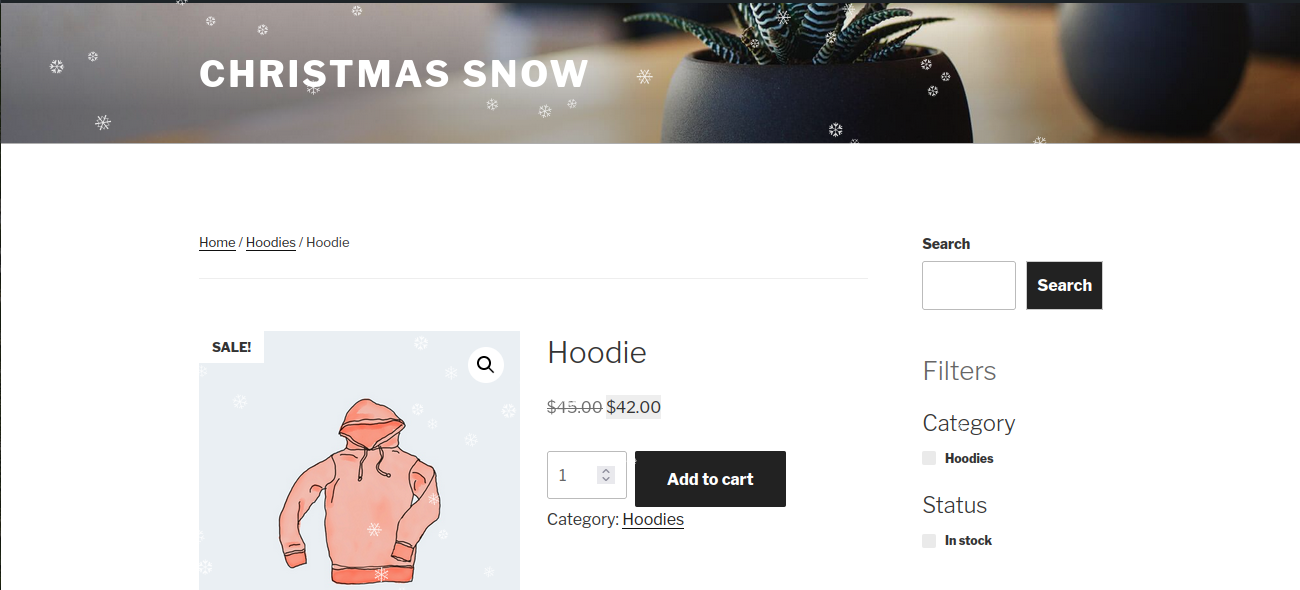
Snow effect on a WooCommerce product page

General settings, with the live preview, presets and shortcode always in view

Appearance: flake type, custom characters and emoji, colours, size and opacity

Motion: how much snow falls, speed, wind, gusts, sway and cursor interaction

Display Rules: where the snow appears, what it skips and who sees it

Schedule: an annual season that can cross New Year

Advanced: frame rate limit, script loading and shortcode only mode

Tools: export, import and reset your configuration