
ClickReach – Social Share Buttons & Counter adds fast, beautiful social share buttons with live share counts to your WordPress posts, pages, and custom post types. Let visitors share your content on WhatsApp, Facebook, X (Twitter), LinkedIn, Pinterest, and Reddit, or copy the link in one click, while the built-in share counter shows how often each post is shared.
ClickReach is 100% free, has no Pro version, and is built for speed and privacy: pure inline SVG icons, no jQuery, no external scripts, and no cookies. Your share buttons load instantly and will not hurt your Core Web Vitals or PageSpeed score.
Why choose ClickReach?
- Share counts that just work: Counts come from clicks on your own share buttons, so there are no social network API keys, access tokens, or third-party count services to set up.
- Honest, abuse-resistant numbers: Each visitor is counted once per post and network per hour, so bots and scripts cannot inflate your share counts.
- Works with page caching: Share counting works on cached pages (WP Rocket, LiteSpeed Cache, W3 Total Cache, WP Super Cache, and others).
- Privacy first: No cookies, no browser storage, no tracking scripts, and no personal data collection.
- Everything free: No locked features, no upsell screens, and no subscription.
🚀 Key Features
- Social Share Buttons for Top Networks:
- WhatsApp (great for mobile sharing)
- X (formerly Twitter)
- Copy Link (with an instant “Copied!” message)
- Live Share Counter: Per-network click counts and an optional Total Shares badge that update instantly without a page refresh.
- Ultra-Lightweight & Fast: Pure inline SVG icons. Zero external HTTP requests, zero web fonts, and no render-blocking styles. CSS and JavaScript load only on pages that show buttons.
- Button Styles: Choose Rounded, Pill, or Flat share buttons.
- Flexible Placement: Show share buttons above content, below content, or both, on posts, pages, or any public custom post type.
- Shortcode: Place share buttons anywhere with
[clickreach_social_share_buttons], including the block editor (Gutenberg), Classic Editor, Elementor, Beaver Builder, and theme templates. - Share Count Visibility: Show counts to everyone, only to logged-in users, or hide them.
- Per-Post Controls: Turn share buttons on or off for any single post or page from the editor.
- Clean, Secure Code: Follows WordPress coding standards with full sanitization, escaping, and rate-limited click tracking.
Perfect for
Bloggers, news and magazine sites, recipe and travel blogs, portfolios, and small business websites that want simple, fast social sharing buttons with share counts and without slowing down their site.
External Services
This plugin generates share links that redirect visitors to external social media platforms when they choose to click a share button. No data is sent automatically or in the background — connections only happen when a visitor actively clicks a share button, opening the social platform’s standard share page in a new tab.
The following external services are used as share destinations:
X (Twitter)
Used to share a post title and URL on X (formerly Twitter).
Data sent: Post URL and post title (only when user clicks the share button).
Service URL: https://twitter.com/intent/tweet
Terms of Service: https://twitter.com/en/tos
Privacy Policy: https://twitter.com/en/privacy
Facebook
Used to share a post URL on Facebook.
Data sent: Post URL (only when user clicks the share button).
Service URL: https://www.facebook.com/sharer/sharer.php
Terms of Service: https://www.facebook.com/terms.php
Privacy Policy: https://www.facebook.com/policy.php
LinkedIn
Used to share a post title and URL on LinkedIn.
Data sent: Post URL and post title (only when user clicks the share button).
Service URL: https://www.linkedin.com/feed/
Terms of Service: https://www.linkedin.com/legal/user-agreement
Privacy Policy: https://www.linkedin.com/legal/privacy-policy
WhatsApp
Used to share a post title and URL via WhatsApp.
Data sent: Post URL and post title (only when user clicks the share button).
Service URL: https://api.whatsapp.com/send
Terms of Service: https://www.whatsapp.com/legal/terms-of-service
Privacy Policy: https://www.whatsapp.com/legal/privacy-policy
Pinterest
Used to share a post URL and description on Pinterest.
Data sent: Post URL and post title (only when user clicks the share button).
Service URL: https://pinterest.com/pin/create/button/
Terms of Service: https://policy.pinterest.com/en/terms-of-service
Privacy Policy: https://policy.pinterest.com/en/privacy-policy
Reddit
Used to share a post URL and title on Reddit.
Data sent: Post URL and post title (only when user clicks the share button).
Service URL: https://reddit.com/submit
Terms of Service: https://www.redditinc.com/policies/user-agreement
Privacy Policy: https://www.reddit.com/policies/privacy-policy
Copy Link (no external service)
Copies the post URL to the visitor’s clipboard. No external connection is made.
Screenshots
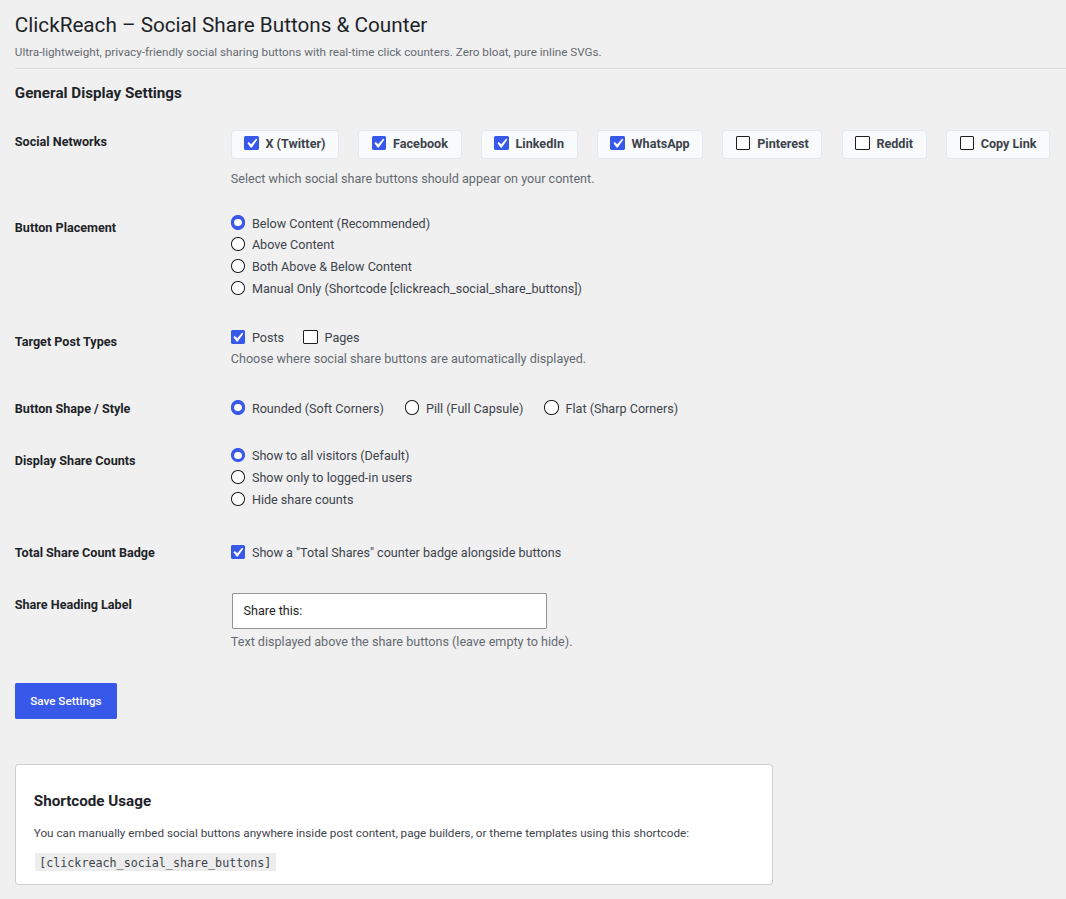
Settings page (Settings > ClickReach Social Share Buttons): choose social networks, button placement, post types, button style, share count visibility, the Total Shares badge, and the share heading label.