
CommentXpert – Private Comments, Comment Modifications, and Advanced Commenting Features
by Raghav Chudasama
CommentXpert is a powerful and easy to use plugin that gives administrators complete control over comment functionality on their websites. It introduces the ability for users to mark comments as private, making them visible only to the comment author and site administrators. This feature is perfect for confidential discussions or sensitive feedback. Private comments submitted by users go through an admin review and approval process, ensuring a secure and moderated environment. Once approved, these comments remain hidden from other users or visitors. Admins also have the flexibility to convert private comments into public ones if deemed helpful to others, or vice versa, upon the comment author’s request. With an intuitive settings page, admins can effortlessly customize comment behavior to suit their specific needs, enhancing moderation, security, and user experience.
New! Private Comments Feature
CommentXpert introduces the ability for users to mark their comments as private, ensuring they are visible only to the comment author and site administrators. Perfect for sensitive feedback or confidential discussions, this feature allows admins to review and approve private comments securely. Approved private comments remain hidden from other users or visitors, maintaining privacy. Admins also have the flexibility to convert private comments into public ones if they find them valuable for broader visibility or revert public comments to private upon the author’s request. This feature enhances user trust and provides a secure communication channel on your website.
New! Cleanup Pending/Spam Comments Feature
CommentXpert now includes a powerful cleanup tool to remove all pending and spam comments in bulk. This feature helps administrators maintain a clean and optimized comment section by eliminating unwanted or unapproved comments. With secure confirmation and a user-friendly interface, this tool ensures easy management of pending/spam comments while protecting approved ones from accidental deletion.
New! Enable Rich Text Editor in Comment Form Feature
New! Enable Comment Votes (Upvotes/Downvotes) Feature
New! Enable Comment Captcha Feature
Key Features
-
Enable Private Comments
- Allow users to mark comments as private, ensuring visibility only to the comment author and site administrators.
- Ideal for sensitive discussions and confidential feedback.
-
Eliminate Comment Author Hyperlink
- Remove hyperlinks associated with comment authors to prevent spam and unnecessary outbound links.
-
Eliminate Website Input from Comment Form
- Disable the “Website” field in the comment form for non-logged-in users, reducing spam submissions.
-
Prevent Automatic Hyperlinking of URLs
- Turn off the conversion of plain URLs in comments into clickable hyperlinks, maintaining a cleaner comment section and reducing the risk of spam or malicious links being shared.
-
Turn Off Comments Across the Entire Site
- Completely disable the comments feature across your website with a single click.
- Perfect for blogs or sites that do not require user feedback.
-
Cleanup Pending/Spam Comments
- Easily bulk delete all pending and spam comments from your site with a secure confirmation process.
- Helps maintain a clean database and declutters your comment section.
-
Cleanup Pending/Spam Comments
- Easily bulk delete all pending and spam comments from your site with a secure confirmation process.
- Helps maintain a clean database and declutters your comment section.
-
Enable Rich Text Editor in Comments
- Enhance the comment field with a TinyMCE-based lazy loading rich text editor for better formatting.
- Allow users to style comments using bold, italics, lists, and links while maintaining security.
-
Enable Comment Upvote/Downvote
- Allow users to upvote or downvote comments, promoting valuable contributions and helping surface the most useful discussions.
- Encourages community engagement and helps highlight popular opinions.
-
Enable CAPTCHA in Comment Form
- Add a CAPTCHA to the comment form to block bots and reduce automated spam submissions.
- Supports multiple CAPTCHA types, like Google reCAPTCHA v2, Google reCAPTCHA v3 or hCaptcha, for flexible security options.
Benefits
- Enhanced control over comment moderation.
- Improved website security by reducing spam and malicious links.
- Better user experience by decluttering the comment section.
- Flexibility to manage comments in line with site-specific requirements.
- Streamlined database performance by removing unnecessary comment records.
- Improved comment readability and engagement with rich text formatting options.
- Increased user interaction through comment upvotes and downvotes.
- Reduced spam submissions with CAPTCHA protection in the comment form.
Screenshots
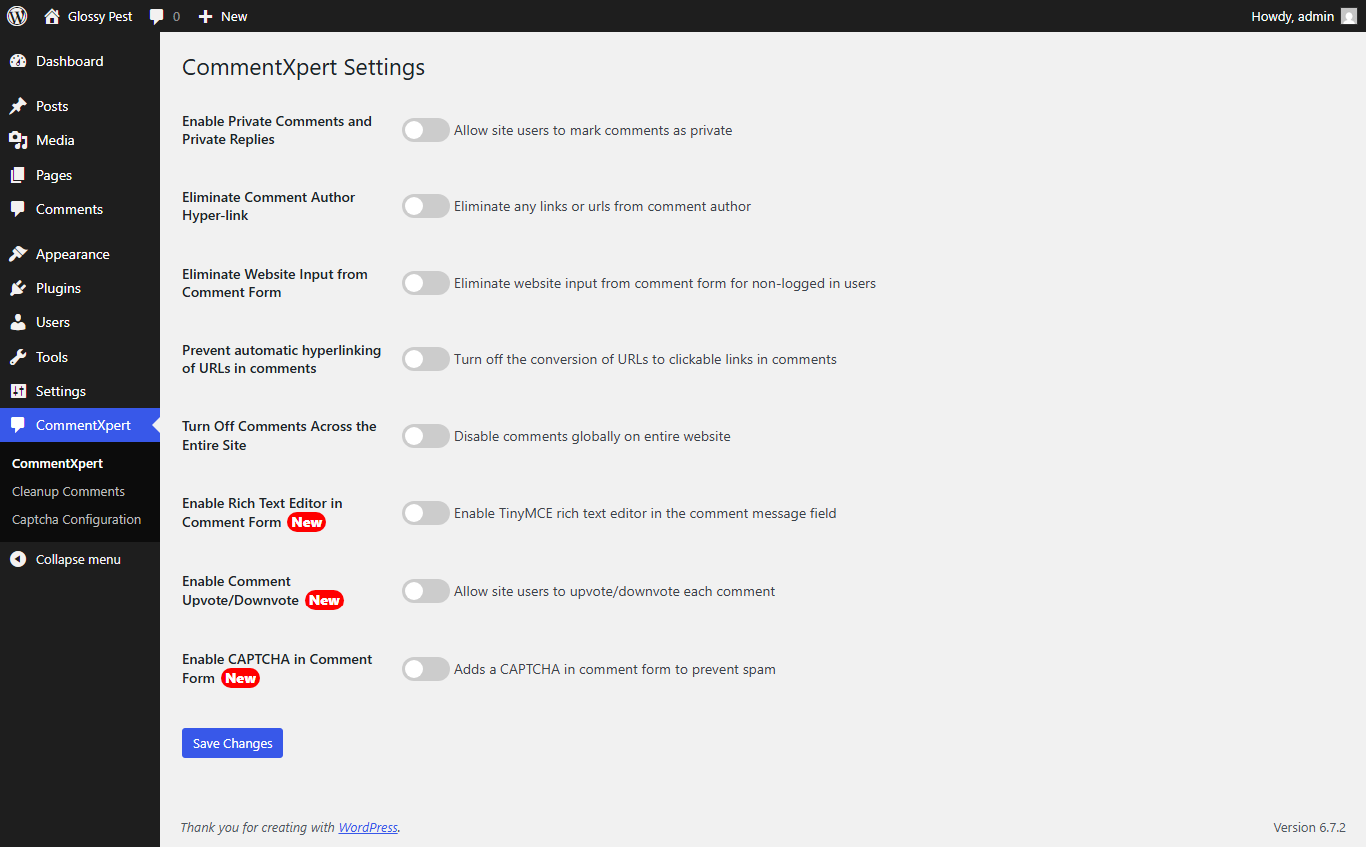
Go to WP Admin -> CommentXpert which will display the CommentXpert Settings page, Enable Private Comments setting to post private comments.

Based on website general discussion settings in admin panel, CommentXpert will add a checkbox option under comment form on any post to do private comment on that post.

Once any comment received on any post, it will be displayed under comments menu for comment approval by admin user where admin has option to make it public and make it private vice versa.

If your website has any pending comments then comments cleanup will show the count of pending comments and provides an option to cleanup all pending comments with your confirmation.

The commentxpert's settings page where the "Enable Comment Voting" option can be toggled on or off. This setting enables users to express their opinions on comments by voting them up or down.

The front-end view of the comment voting system in action, where users can click the upvote or downvote buttons on comments.

The settings page where the "Enable CAPTCHA on Comment Form" option is activated. This setting enhances security by adding an extra verification step before submitting a comment.

The settings page "Captcha Configuration" where admin can select from options "Select CAPTCHA Type". And based on the selected CAPTCHA type it will display CAPTCHA key and secret key settings where admin needs to configure the keis and click on save.

Displayed the front-end comment form with the CAPTCHA field included, requiring users to complete the verification before submitting their comment.

The front-end comment form with a lazy-loaded Rich Text Editor, allowing users to format their comments with bold, italics, lists, and links for an enhanced commenting experience.