Turn one product into a blog post on 19 platforms — with one click.
ComputeLib Blog Genie AI reads your WooCommerce catalogue (or your WordPress posts), writes SEO-scored, on-brand articles with AI, and publishes them straight to WordPress, Shopify, Wix, LinkedIn, Medium, HubSpot, Google My Business and 13 more — all from inside your wp-admin. No copywriter, no agency, no juggling a dozen tabs.
Why store owners install this
- AI blogging on autopilot — click Generate Blog and get a publish-ready, e-commerce-specific article built from your real product data. No prompts to write, no blank page.
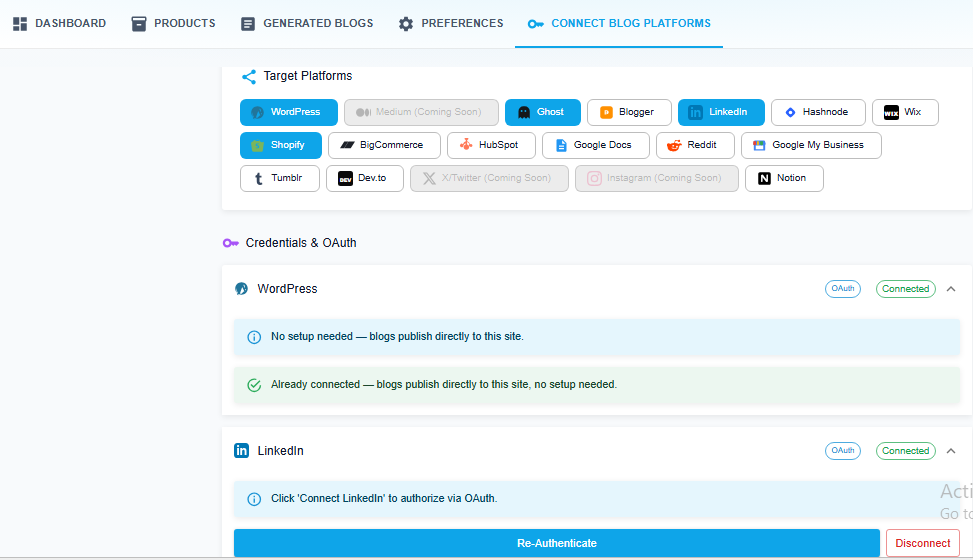
- 19 platforms, one dashboard — connect WordPress, Shopify, Wix, LinkedIn, Medium, HubSpot, Google My Business and more once, then publish or schedule to all of them from the same screen.
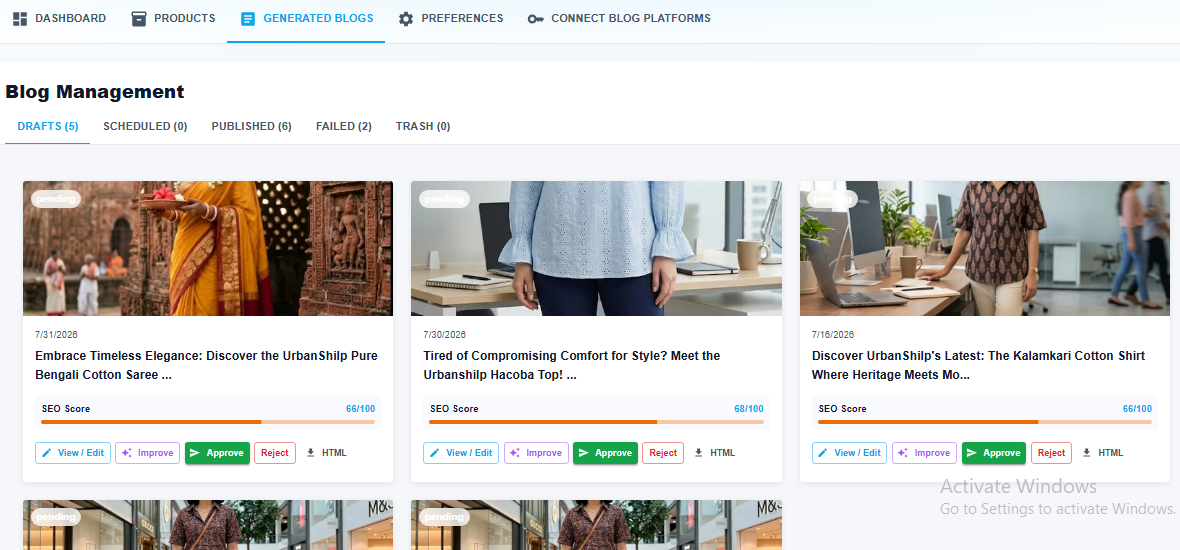
- An AI Quality Scorecard on every draft — grammar, readability, structure, keyword density and word count are scored automatically, so what you publish is actually built to rank.
- Images generated for you — every post gets custom, on-brand images embedded automatically. No stock photo subscriptions, no manual uploads.
- You approve everything — nothing goes live without you. Edit in a rich text editor, send a draft back for another AI pass, or approve and it’s queued for publishing.
- Precision scheduling — set a different publish time per platform and stagger releases to build SEO authority over time, instead of dumping everything at once.
- Live progress, live usage — watch generation happen in real time, and see exactly how many credits and plan limits you have left.
What you can do
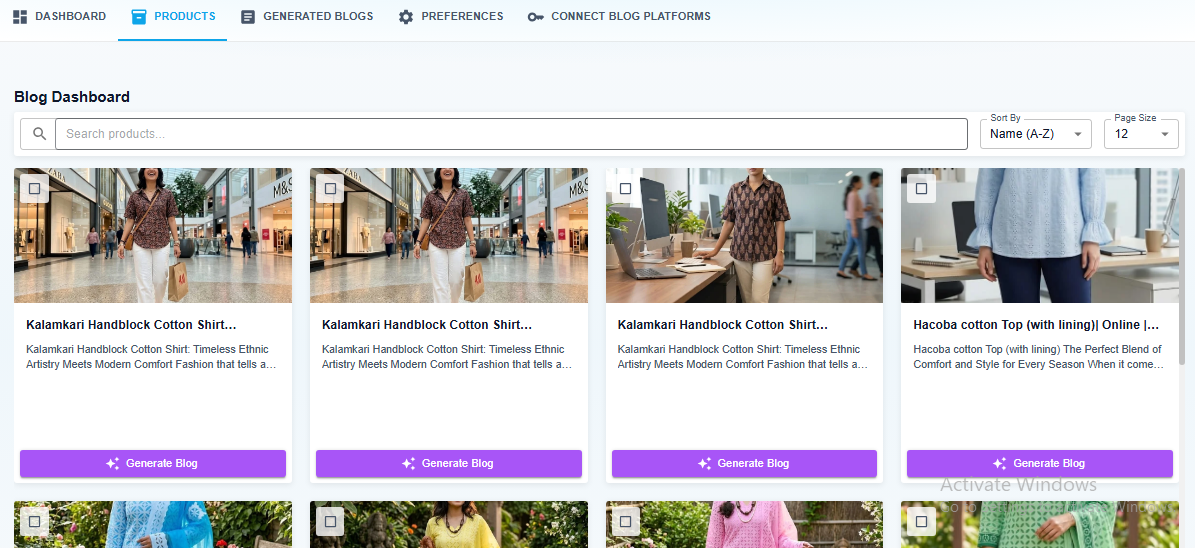
- Browse your catalogue — the dashboard lists your WooCommerce products (or your posts on a plain WordPress install) with search, sorting and pagination.
- Generate blogs from products — generate an article for one product, or select several products and generate in bulk.
- Set your content preferences — niche/topic, comma-separated keywords, tone of voice, language and target age group are applied to every generation.
- Review before anything goes live — generated articles land in Generated Blogs with a live status (
generating,pending,improving,approved,rejected). Nothing is published without your approval. - Improve with AI — send a draft back for another AI pass with your own instructions.
- Edit in a rich text editor — fix wording, headings or formatting yourself before approving.
- Publish or schedule to many destinations — pick which connected platforms each approved article goes to, and optionally set a publish time per platform.
- Track usage — remaining credits and plan limits (blogs generated, AI improvements used) are shown in the app and enforced by the backend.
- Live progress updates — a WebSocket/Socket.IO connection streams generation progress into the admin screen.
On activation the plugin registers your site with the service and receives a store API key. Every REST request the admin app makes is then proxied server-side through WordPress, so your browser does not talk to the backend cross-origin for those. The live progress connection (Socket.IO) is the exception: it is opened directly from your browser to the service, so the store API key is exposed to the plugin’s admin screen in order to authenticate it.
Supported publishing destinations
WordPress, Medium, Ghost, Blogger, LinkedIn, Hashnode, Wix, Shopify, BigCommerce, HubSpot, Google Docs, Reddit, Google My Business, Tumblr, Dev.to, X/Twitter, Instagram and Notion.
Options created
blog_genie_ai_consumer_key— generatedck_…publishing keyblog_genie_ai_consumer_secret— generatedcs_…publishing secretblog_genie_ai_store_api_key— key returned by the backend; sent asX-Store-Api-Keyblog_genie_ai_platform_id—woocommerceorwordpress, kept in sync on each loadblog_genie_ai_synced_platform_id— platform type at the last successful backend sync
External services
This plugin connects to the ComputeLib Blog Genie AI service, an external API operated by ComputeLib and hosted at https://proxy-outbound2.helpusbloom.com
The service performs the AI article generation and the publishing to third-party destinations. The plugin is a client for that service and does not function without it. No data is sent before the plugin is activated.
What is sent, and when:
- On activation, and each time the plugin’s admin screen is opened: your site name, your site URL, the site administrator email address, the detected platform type (“wordpress” or “woocommerce”) and a randomly generated access token pair. This registers your site with the service and returns the store API key used to authenticate later requests.
- When you generate an article, in bulk or for a single item: the selected product or post data (title, description, price, category and image URLs) together with the content preferences you set (topic, keywords, tone, language, target age group).
- When you request an AI improvement: the article identifier and the instructions you type.
- When you view, edit, approve, reject or delete generated articles: the article identifier and, when editing, the article content.
- When you connect a publishing destination: the API credentials you enter for that destination, so the service can publish on your behalf.
- When you open a plan upgrade: the name of the plan you selected, to start a Stripe checkout session.
- While an article is generating: the plugin holds an authenticated Socket.IO connection to the same host to stream progress into the admin screen.
All of the above except the last are sent from your server, not from your browser: they are proxied through this plugin’s own REST routes, which add the store API key server-side. The Socket.IO progress connection is made directly from your browser to the service, and the store API key is available to the plugin’s admin screen so that connection can authenticate.
This service is provided by ComputeLib.
Terms of Service: https://computelib.com/terms-and-condition.html
Privacy Policy: https://computelib.com/privacy-policy.html
Source code
The admin interface is a React application. The plugin ships the compiled bundle
in dist/assets/, and the complete, unminified source for that bundle is included
in the source/ directory of this plugin. No separate download is required.
To rebuild the bundle from the included source:
- Install Node.js 18 or newer.
- From the source/ directory, install the dependencies:
npm install - Build the application:
npm run build - Copy the generated source/dist/assets/*.js and *.css files into the plugin’s
dist/assets/ directory, replacing the existing files.
The build uses Vite (see source/vite.config.ts) and TypeScript. Environment
variables are documented in source/env.example. All third-party libraries are
declared in source/package.json and are installed from the public npm registry.
Screenshots