
Codiepress WooCommerce Conditional Shipping and Payments – Hide Shipping & Payment Methods
by Codiepress
The Conditional Payment Rule is not yet compatible with the latest version of WooCommerce. We are currently working on an update.
Looking for an easy way to restrict shipping methods or payment gateways in WooCommerce? The Conditional Shipping and Payments for WooCommerce plugin allows store owners to:
✔ Hide or enable specific shipping methods based on cart total, weight, quantity, shipping class, or product categories.
✔ Restrict payment gateways based on customer roles, billing country, products in the cart, or order history.
✔ Set custom shipping rules for different user types (wholesale, retail, or VIP customers).
✔ Disable cash on delivery (COD) or specific payment methods for certain locations.
✔ Control shipping options dynamically based on flexible rules.
This plugin is perfect for WooCommerce store owners who want to optimize the checkout experience by displaying only relevant shipping and payment options to customers.
Looking for Complete Shipping & Checkout Control? Try ShipQora
Take full control of your WooCommerce store’s checkout logic with ShipQora – All-in-One Shipping Solution.
Whether you need to manage complex shipping rules or streamline your checkout flow, ShipQora allows you to:
- Configure Dynamic Shipping Rates: Set up flexible, rule-based shipping options tailored to cart totals, weight, item quantity, or location.
- Control Shipping & Payment Visibility: Easily hide or display specific shipping methods and payment options based on conditional logic.
- Optimize Order Rules: Create tailored checkout conditions without writing a single line of code.
Upgrade your store’s flexibility and deliver a seamless checkout experience for every customer with ShipQora.
Key Features
✅ Hide WooCommerce shipping methods based on:
– Cart total, weight, or quantity
– Specific products or product categories
– Customer roles and user meta
– Shipping and billing address
– Date and time (e.g., restrict methods on weekends)
✅ Restrict WooCommerce payment gateways dynamically:
– Disable payment methods for specific users or roles
– Hide certain payment gateways for high or low cart totals
– Restrict gateways based on country, state, or zip code
– Block payments for specific coupons or discounts
✅ Advanced Conditional Rules
– Use multiple conditions together
– Works with WooCommerce shipping zones & shipping classes
– Compatible with all major WooCommerce payment gateways
Why Use Conditional Shipping & Payments for WooCommerce?
🚀 Enhance customer checkout experience – Show only relevant shipping & payment methods.
🛒 Improve conversion rates – Avoid abandoned carts by offering the right options.
🔄 Flexible & easy-to-use – No coding required!
Installation
- Upload the plugin files to the
/wp-content/plugins/directory or install the plugin via WordPress. - Activate the plugin through the ‘Plugins’ screen.
- Add conditions for hiding or showing shipping and payment methods based on cart rules.
Upgrade to Pro
Get the Pro version to unlock advanced rules, more shipping conditions, and priority support!
Support
For any questions, issues, or feedback regarding the Conditional Shipping and Payment Method plugin, feel free to post here.
Screenshots
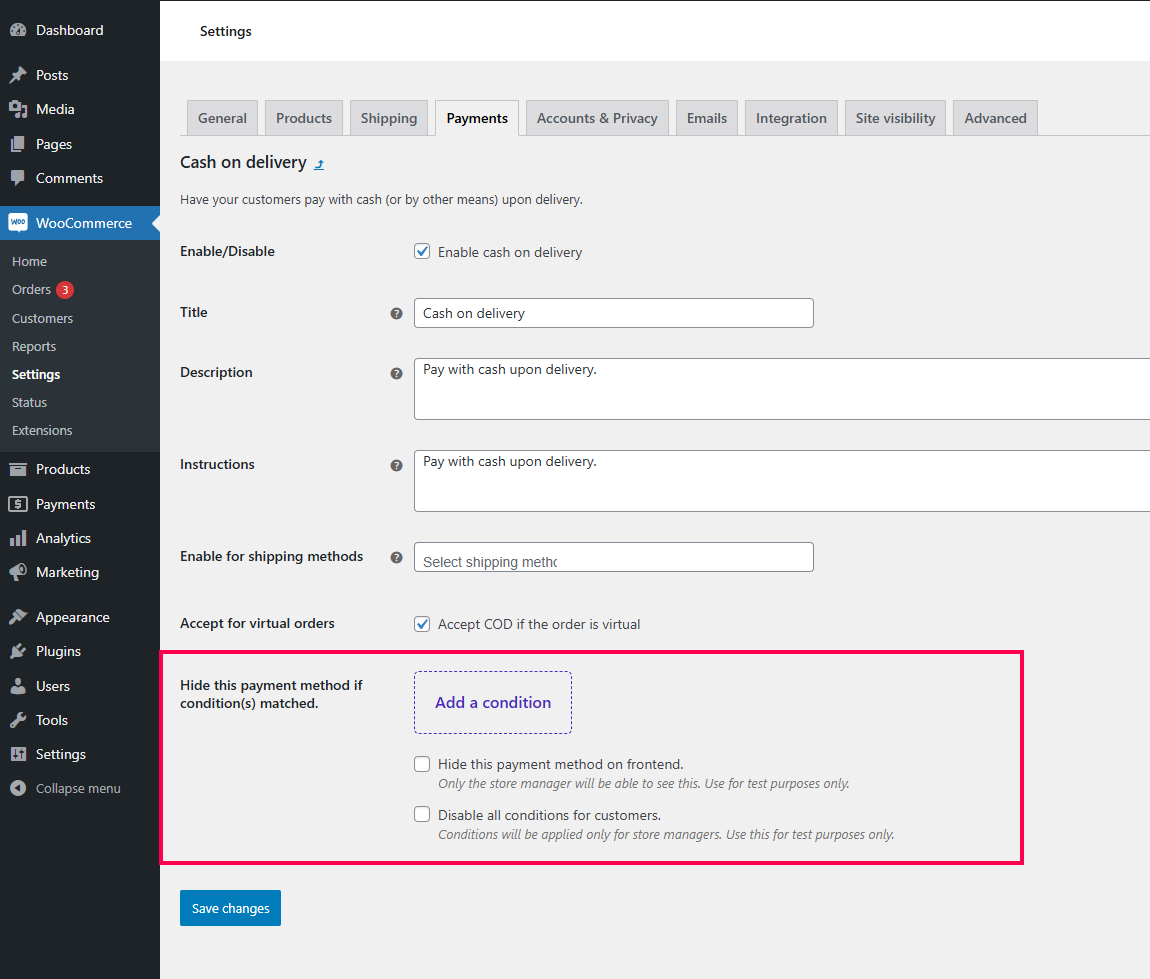
Add Condition – Easily set up conditional rules for Cash on Delivery (COD).

Hide Payment Gateway – Restrict payment gateway options based on cart conditions.

Configure Shipping Method – Apply conditions to control shipping rates.

Hide Shipping Method – Set conditions to hide specific shipping methods.

Restrict Shipping Methods – Use multiple conditions to limit available shipping options.