Crawlsure looks after the technical SEO of your WordPress site, for Google, Bing and AI tools such as ChatGPT, Perplexity and Gemini.
What it does, free:
- SEO checklist: about 80 technical SEO checks for the whole site, each Pass, Needs work or Fail, with a one-click fix or a button to the fix for every problem
- SEO title and meta description for every post, page and product, with templates for every page type
- SEO fields for categories, tags and author pages
- Crawlsure panel in the block editor sidebar with a Google preview and length checks
- SEO title and description in the Posts and Pages lists, editable with Quick Edit
- Main category for posts in several categories, used in post addresses and %category%
- AI bot controls: block AI training bots while keeping the bots that cite you in ChatGPT, Claude and Perplexity answers
- robots.txt editor that refuses rules which would stop Google reading your main pages
- XML sitemap cleaned up: hidden pages left out, last-changed dates added, /sitemap.xml works
- llms.txt and llms-full.txt for AI tools
- Markdown copies of your pages for AI tools (add .md to any address), linked from the page head and llms.txt
- AI readiness score for every page, live in the editor, with the weakest pages listed
- Crawl clean-up (attachment pages, date archives, empty categories, single-author pages, ?replytocom) and page head clean-up
- IndexNow: new and changed pages reach Bing and others within a minute
- Breadcrumbs block, shortcode and theme function, with BreadcrumbList schema
- Staging copies hidden from search engines; warnings when a live site blocks search engines
- Canonical and robots tags, with noindex and nofollow per page
- Search results and “page not found” pages kept out of search engines by default
- Stays quiet while another SEO plugin is active, so your pages never get duplicate tags
- Brand profile and schema: organisation, local business (address, opening hours) or person, website, pages, articles, authors, breadcrumbs and FAQs, as one connected graph
- Social sharing tags for Facebook, LinkedIn, WhatsApp and X, with a share title, description and image per page
- Google Analytics 4 with Google consent mode v2 and enquiry tracking for popular form plugins
- Redirect manager, with automatic redirects when a page’s address changes, and “deleted” (410) pages
- Quick answer, FAQ and Table of contents blocks
- 2-minute setup wizard
- One-click import from Yoast SEO, Rank Math, All in One SEO, SEOPress, SmartCrawl and The SEO Framework: titles, descriptions, canonicals, noindex, social sharing, main category, category and tag SEO, and redirects
- SEO health score with plain-English explanations and one-click fixes
- Conflict detector: finds titles, descriptions and canonical tags printed twice by your theme or another plugin
- SEO fields in Elementor’s page settings
- Redirects import and export as a spreadsheet (CSV)
- Link checker: finds broken links in your content in the background, with one-click redirect, remove or ignore
- 404 log: missing addresses people and search engines still visit, with one-click redirects (no personal data stored)
- Old address finder: deleted pages and addresses Google still asks for, with suggested redirects
- Page checks: SEO tags pushed out of the page head, missing or extra main headings, images without alt text or too large, links Google can’t follow, pages hidden by something other than Crawlsure, error pages that answer “200 OK”, very little text, vague link text and missing page language
- AI crawler check: finds pages whose text only appears with JavaScript, which ChatGPT, Claude and Perplexity can’t read
- Bot access check: finds firewalls or security plugins that turn away Googlebot or AI bots your robots.txt allows
- Crawl traps: finds sorting, filter and calendar links that create endless page versions, and blocks them in robots.txt in one click
- Change log with one-click undo for every SEO change
- Safe-publish checks in the editor before a page goes live
- Light speed fixes: no emoji script, only the block styles a page uses, optional featured image preload
- WP-CLI commands: wp crawlsure health, scan, links, pages, redirects, changes, undo and import
- Search performance: connect Google Search Console (read-only) and get its Performance report inside WordPress: clicks, impressions, click rate and position over 7 days to 16 months, compared with the period before, by search, page, country, device and date, with filters
- Bing Webmaster Tools (optional): clicks, impressions and top searches from Bing, which ChatGPT search relies on, and links from other sites
- Not in Google: which of your pages Google has left out and why, with a button for the fix (also shown in the Posts and Pages lists)
- PageSpeed and phones: Google’s PageSpeed scores for phones and computers, whether your home page works properly on phones, and the biggest fixes in plain English
- Public files: robots.txt, sitemap, llms.txt and the Markdown copies as search engines see them, checked, with your own robots.txt rules and llms.txt text
Crawlsure Pro, a paid add-on from WordPromise (https://www.wordpromise.com/crawlsure/), adds search opportunities (quick wins, low click rates, pages losing clicks, competing pages), a traffic-drop detective, Google Analytics and speed for real visitors. Everything listed above is free.
External services
When you enter a Google Analytics 4 measurement ID in Crawlsure Analytics, your site loads Google’s tag (https://www.googletagmanager.com/gtag/js) for visitors, which sends visit data to Google Analytics. Nothing is loaded until you enter an ID. Google’s terms: https://marketingplatform.google.com/about/analytics/terms/us/ and privacy policy: https://policies.google.com/privacy
IndexNow is off until you switch it on (Crawlsure Crawling and AI). When it is on and the site is live, the addresses of new, changed and removed pages are sent to https://api.indexnow.org, which shares them with Bing, Yandex, Seznam, Naver and other search engines. No visitor data is sent. Terms: https://www.indexnow.org/terms
When the link checker checks links to other websites (Crawlsure Links and 404s, on by default, can be switched off), your site asks each linked website whether the linked page still exists. Only the page address is requested; nothing about your site’s visitors is sent. A few addresses are checked at a time, and each one again after two weeks.
The page checks and the bot access check load pages of your own site from your own server. No outside service is used.
Crawlsure Settings Get Pro (shown until the separate Crawlsure Pro add-on runs) sends nothing until you paste a licence key and click “Check key”. Then the key, your site’s address and the Crawlsure version are sent to WordPromise’s licence server (https://www.wordpromise.com/wp-json/wpl/v1/check), which says whether the key is valid, and the same details are sent to https://www.wordpromise.com/wp-json/wpl/v1/update to get the private download link of Crawlsure Pro. Crawlsure never downloads or installs anything itself: you download the add-on and upload it in WordPress yourself. WordPromise’s terms: https://www.wordpromise.com/terms-condition/ and privacy policy: https://www.wordpromise.com/privacy-policy-2/
The PageSpeed test (Crawlsure Site health Page checks) is off until you click “Test now”. Then, and once a week after that until you click “Stop weekly tests”, the public address of your home page (with Crawlsure Pro also your 4 busiest pages) is sent to Google PageSpeed Insights, which loads the page like a visitor and returns its speed scores. The request goes through WordPromise’s connection service (https://www.wordpromise.com/wp-json/crawlsure-connect/v1/psi), which adds WordPromise’s Google API key and stores and logs nothing; if that service can’t answer, your site asks Google directly (https://www.googleapis.com/pagespeedonline/v5/runPagespeed). No visitor data is sent. Google’s terms: https://developers.google.com/terms and privacy policy: https://policies.google.com/privacy; WordPromise’s terms: https://www.wordpromise.com/terms-condition/ and privacy policy: https://www.wordpromise.com/privacy-policy-2/
When you connect Google Search Console (Crawlsure Search performance Connect to Google, off until you click it), two services are used:
- WordPromise connection service (https://www.wordpromise.com/wp-json/crawlsure-connect/v1): shows a page naming your site, sends you to Google’s sign-in, hands Google’s one-time code back to your site, and swaps it for access keys (and renews them) using WordPromise’s Google client. It receives your site’s admin address and, while passing them on, the code and access keys. It stores and logs none of them. Terms: https://www.wordpromise.com/terms-condition/ and privacy policy: https://www.wordpromise.com/privacy-policy-2/
- Google (accounts.google.com, oauth2.googleapis.com, www.googleapis.com and searchconsole.googleapis.com): your site asks Google Search Console, read-only, for the list of your properties and the search performance of the property you choose (pages, searches, countries, devices, clicks, impressions, position), once a day and when you open the report with a date range or filter it has not downloaded, and sends the addresses of your published pages to Google’s URL Inspection service (about 40 an hour) to learn whether each one is in Google. Disconnecting asks Google to cancel the access. Google’s terms: https://policies.google.com/terms and privacy policy: https://policies.google.com/privacy
When you connect Bing (Crawlsure Search performance Bing, off until you paste a key), your site uses your own Bing Webmaster Tools API key to read, once a day, your verified sites, the clicks and impressions from Bing, your top Bing searches and the number of links to your site that Bing has found, from Bing Webmaster Tools (https://ssl.bing.com/webmaster/api.svc). The key is sent with each request, as Bing requires. Microsoft’s terms: https://www.microsoft.com/servicesagreement and privacy statement: https://privacy.microsoft.com/privacystatement
Privacy
The 404 log stores only the missing address, how many times it was visited (by people, by bots and by search engines) and the page the visitor came from without its query string. No IP addresses, user agents or other personal data are stored. The change log stores which logged-in user made each SEO change.
If you connect Google Search Console, the access keys (encrypted with your site’s secret keys) and the downloaded search data, and each page’s indexing status are stored in your own site’s database only, and the search data is deleted after 16 months (figures fetched for a report view are kept for 12 hours). A Bing key is stored the same way, encrypted, with the Bing figures; “Disconnect Bing” deletes them. Disconnecting, or deleting the plugin, deletes them and asks Google to cancel the access. Crawlsure’s use and transfer of information received from Google APIs adheres to the Google API Services User Data Policy, including the Limited Use requirements.
Screenshots
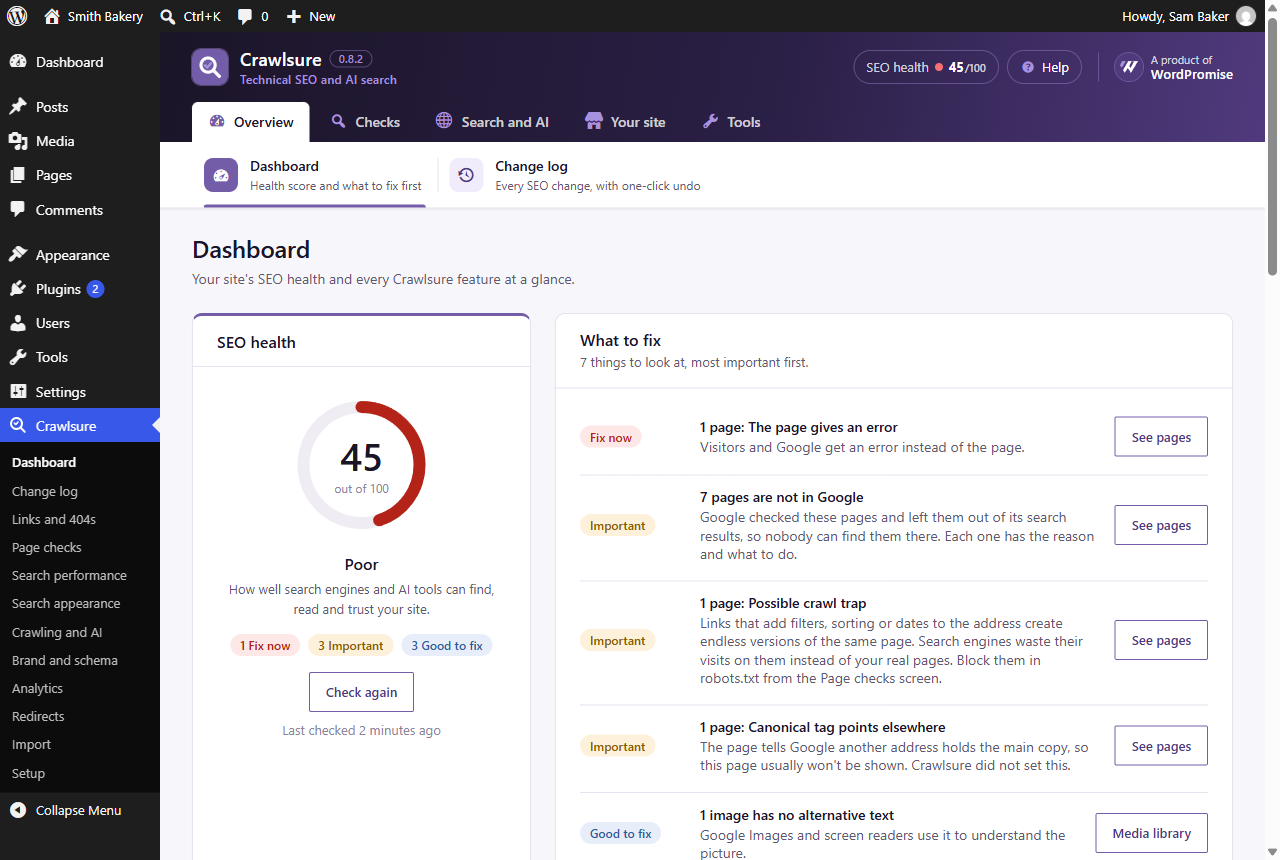
Dashboard: your SEO health score and what to fix first, in plain English.
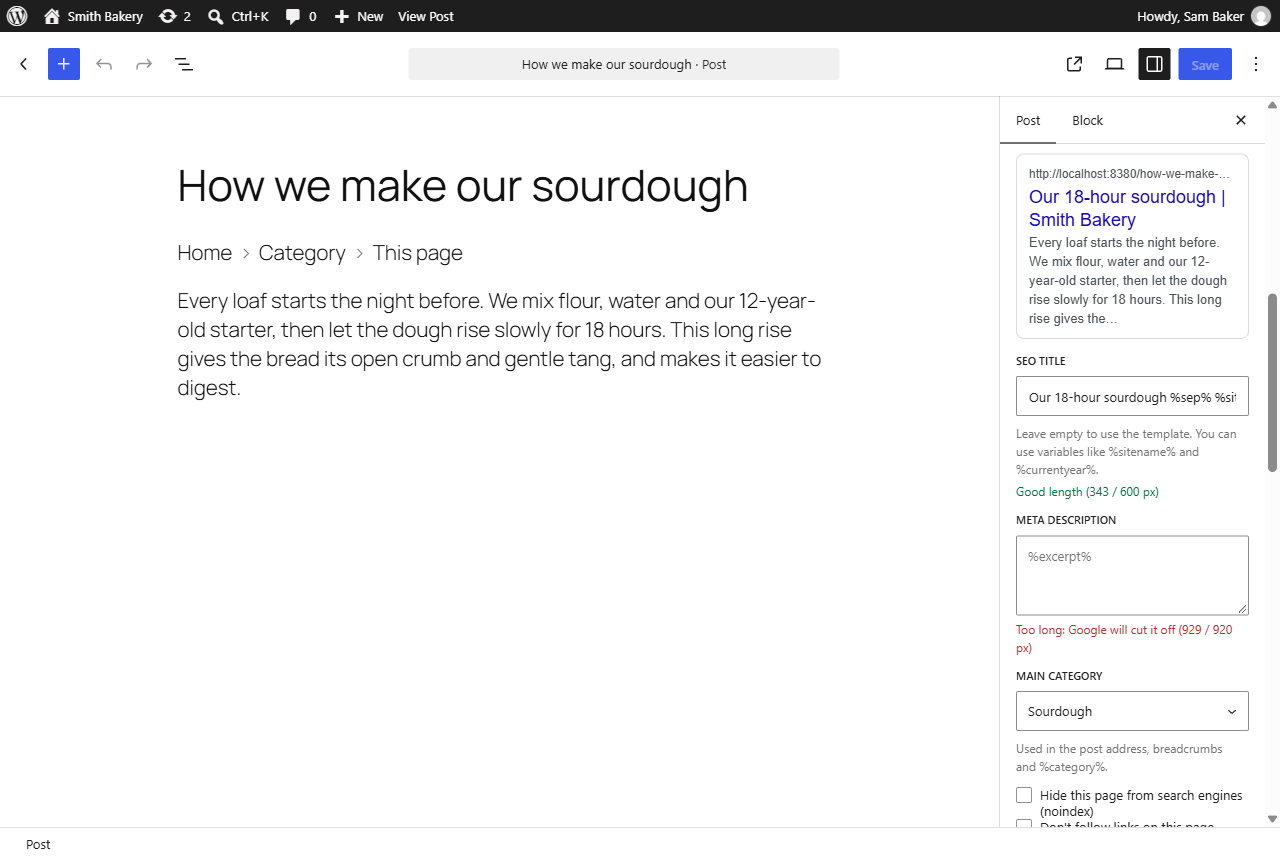
The Crawlsure panel in the block editor, with a Google preview and length checks.
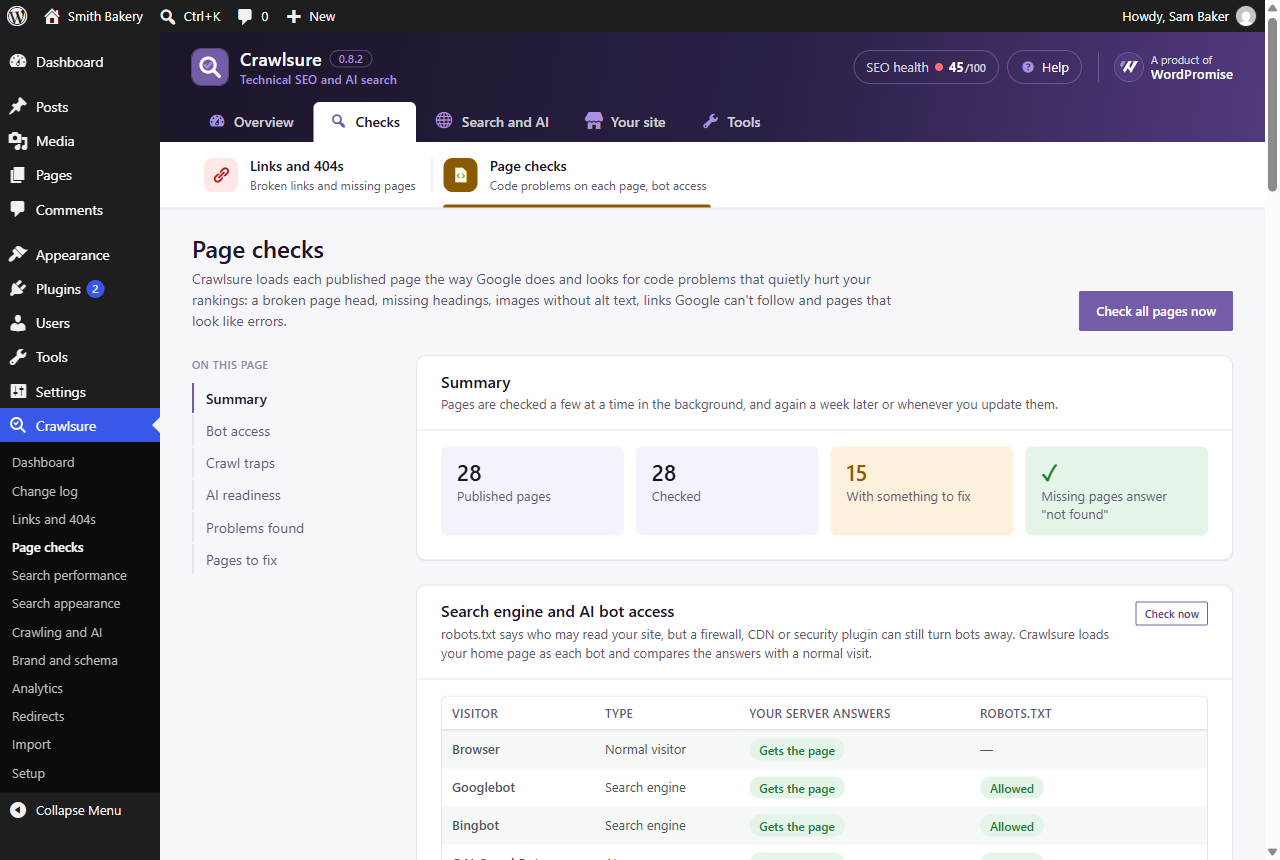
Page checks: code problems on each page, and whether Google and AI bots can reach your site.
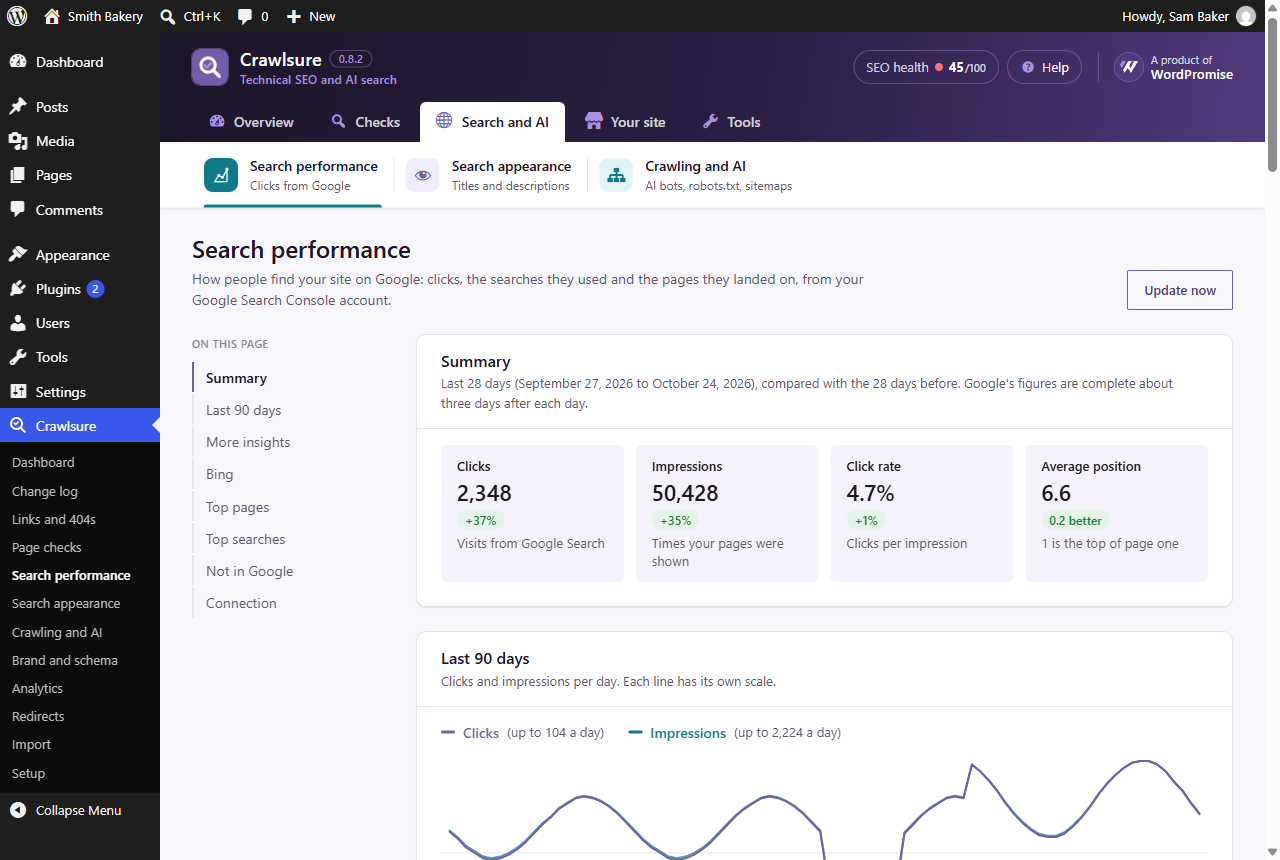
Search performance: clicks, impressions and top searches from Google Search Console, inside WordPress.
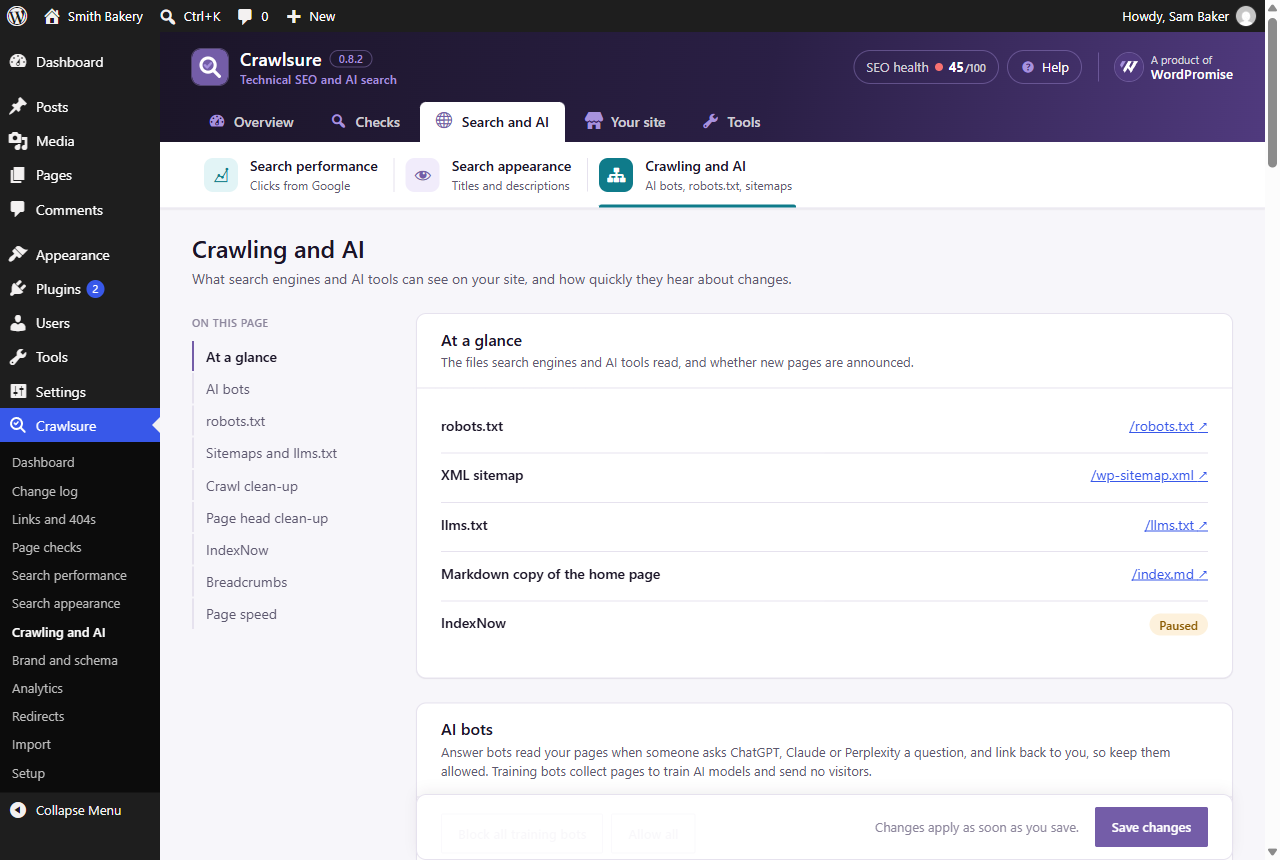
Crawling and AI: robots.txt, sitemaps, llms.txt, Markdown copies and AI bot controls.
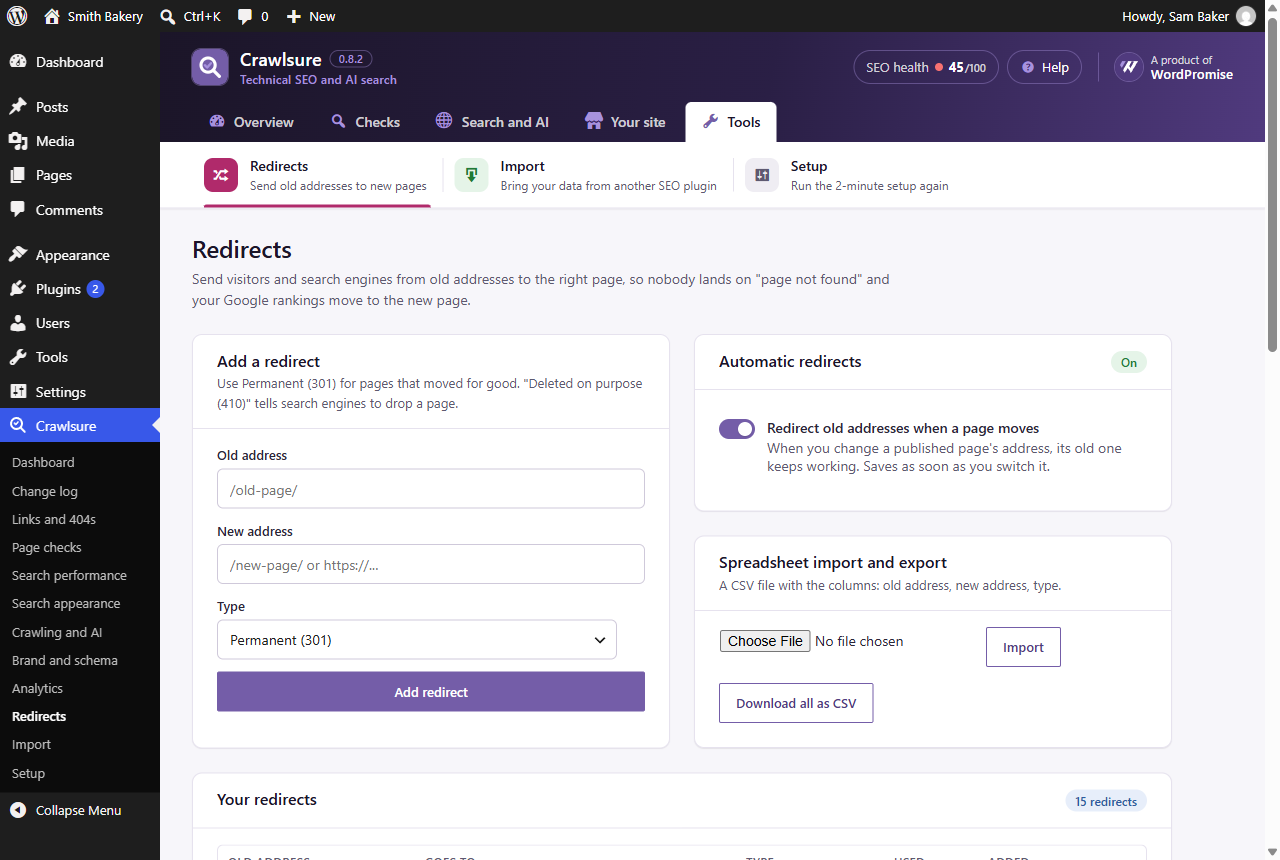
Redirects, with automatic redirects when a page moves.
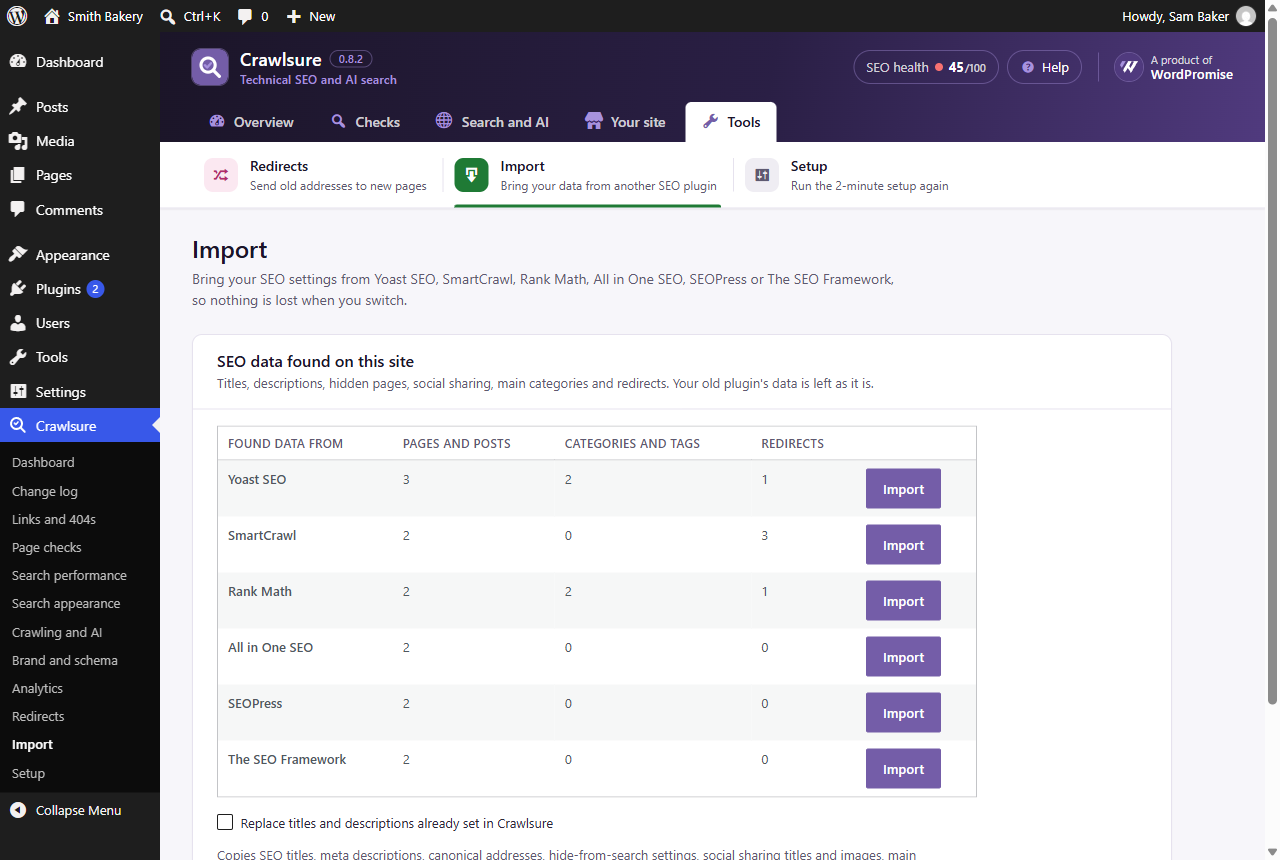
One-click import from Yoast SEO, Rank Math, All in One SEO, SEOPress, SmartCrawl and The SEO Framework.