
Customer Email Verification for WooCommerce – OTP Verification, Block Fake Signups
by Zorem
Customer Email Verification for WooCommerce stops fake accounts and spam registrations at the source. When a customer tries to register on your WooCommerce store, they must verify their email address with a one-time OTP code before their account is created — so every account on your store has a real, working email address behind it.
The verification popup appears seamlessly during registration, the OTP is sent immediately via WooCommerce’s email system, and accounts are only created after successful verification. Setup takes minutes, requires no coding, and works out of the box with WooCommerce’s standard registration flow.
HPOS Compatible · 2,000+ Active Stores · Free & Open Source
How It Works
- A customer enters their email and clicks to register on your WooCommerce store.
- A verification popup appears and an OTP code is sent to their email address immediately.
- The customer enters the OTP. If correct, their account is created. If not verified, no account is created.
An address that doesn’t exist, or that nobody can actually open, never receives a code — so the account is never created. Blocking disposable and temporary email providers outright, and scoring each signup for risk before it becomes a customer, are available in CEV PRO.
What’s Included in the Free Version
- OTP-based email verification at registration — Customers must verify their email with a one-time code before their WooCommerce account is created. No verification, no account.
- Verification popup on the registration form — A modal popup appears instantly after the customer enters their email, prompting them to check their inbox and enter the OTP. No page reload required.
- Resend OTP option — Customers can request a new OTP if they didn’t receive the first one.
- OTP length, expiry and resend limit — Choose 4- or 6-digit codes, how long a code stays valid, how many resends are allowed, and the message shown when the limit is reached.
- Customizable verification popup — Modify the popup’s design, colors, and messages to match your store’s branding using the built-in live preview customizer.
- Customizable verification email — Edit the OTP email subject, heading, and message content to match your brand voice.
- Admin verification management — View and manage email verification statuses for all users from the WordPress Users admin panel. Manually verify or re-send verification emails in bulk.
- Unverified Users list — See everyone who started signing up but never verified, resend the verification email to any of them, or delete pending signups.
- Verification stats — See how many customers verified this month, in total, and how many signups are still pending.
- Setup checklist — A short checklist on the settings page walks you through turning verification on, sending a test email and customizing it.
- HPOS Compatible — Fully compatible with WooCommerce High-Performance Order Storage.
Free vs PRO — What’s the Difference?
CEV Free covers registration verification. CEV PRO is a full anti-spam and identity layer for WooCommerce — checkout and guest verification, disposable email blocking, AI risk scoring, SMS OTP, two-factor authentication and a verification analytics dashboard.
CEV Free includes:
- OTP email verification at registration
- Verification popup on the registration form
- Resend OTP option
- OTP length, expiration and resend limit
- Customizable popup design and messages
- Customizable verification email template
- Admin verification management panel
- Unverified Users list with resend
- Verification stats and setup checklist
- HPOS compatible
CEV PRO adds:
- Disposable email blocking — Block signups from temporary and throwaway email providers, covering 430+ known domains.
- AI risk scoring — Score every signup from 0 to 100 before it becomes a customer, so risky registrations are caught even when the address looks ordinary.
- AI temp-mail matcher — Catch brand-new disposable domains before public blocklists have caught up with them.
- Bot-cluster detection — Identify coordinated attack patterns across multiple signups rather than judging each one in isolation.
- DNS-based MX record validation — Confirm the email domain has a working mail server before an OTP is ever sent.
- OTP verification at checkout — Require guest users to verify their email before completing a purchase, blocking fake and fraudulent orders at checkout.
- Cart page verification — Optionally trigger email verification from the cart page, before the customer even reaches checkout.
- Phone (SMS) verification — Verify customers with an SMS OTP instead of, or alongside, email — via MSG91, Twilio, Vonage or WhatsApp.
- Two-factor authentication (2FA) — Add Google Authenticator, Authy or Microsoft Authenticator for stronger account security.
- Login authentication — Require OTP verification when a customer logs in from an unrecognized device or browser.
- New device/location detection — Define what counts as an unrecognized login — new device, new browser, new location, or after a set period of inactivity.
- Require OTP at every login — A universal authentication mode for stores that need it.
- B2B allowlist and address blocklist — Allow only specific domains to register, or block specific addresses outright.
- Role-based verification rules — Enforce different verification rules per user role.
- Paid-order gatekeeping — Hold customer perks until their first paid order is completed.
- Smart Form — branded login and registration — Replace WooCommerce’s default forms with fully branded registration and login layouts, from four ready-made templates.
- Verification analytics dashboard — Track signups, verification rates, failed attempts and blocked spam over time.
- Login notification emails — Email the customer whenever their account is accessed, so an unexpected login is noticed straight away.
- WooCommerce Block Checkout support — Verification works on the new block-based checkout as well as the classic one.
- Polylang compatibility — Works alongside the existing WPML support for multilingual stores.
- Auto-cleanup verification log — Purge old verification log entries automatically on a schedule.
- Re-engagement reminder emails — Automatically remind unverified customers to finish verifying, at intervals you choose.
- Force re-verify all customers — Flip every verified account back to unverified in one action, after a breach or a list cleanup.
- Automatic database cleanup — A daily cron job removes stale unverified accounts so your user table stays clean.
- Advanced email and popup customization — Additional control over OTP email templates and verification popup styling.
- Priority support — Faster, dedicated assistance from the Zorem team.
What It Stops
Email verification is the cheapest defence a WooCommerce store has against junk accounts and junk orders:
- Fake accounts and fake signups — registrations using an address nobody owns or can open. Blocked at registration in the free version.
- Bot registrations and spam signups — automated signups that bloat your user table, skew your customer counts and poison your email list.
- Unverified accounts piling up — see and manage every account’s verification status from the WordPress Users screen, and verify or resend in bulk.
- Disposable and temporary email addresses — throwaway inboxes used to farm coupons and free trials. Blocking 430+ known providers is available in CEV PRO.
- Fake and fraudulent orders, including fake cash-on-delivery (COD) orders — unverified COD orders become failed deliveries and returns to origin (RTO), and each one costs you a real shipment in both directions. Verify a guest’s email before the order is placed. Available in CEV PRO.
- Account takeover at login — OTP and two-factor authentication on unrecognized devices. Available in CEV PRO.
Who Uses Customer Email Verification
Any WooCommerce store with open registration collects junk accounts, but some business models pay for them more than others:
- Cash-on-delivery stores — in India, Southeast Asia and the Middle East, a fake COD order becomes a real shipment that comes back as an RTO, costing the courier fee in both directions. Verifying the buyer before the order is placed is checkout verification, available in CEV PRO; registration verification in the free version cuts the fake accounts those orders are placed from.
- Stores running a welcome coupon or first-order discount — a discount on registration is an invitation to register repeatedly. Verification means each code costs a working inbox.
- Free trials and digital downloads — when the product is delivered instantly by email, an address that cannot receive mail is a delivery failure, not just a bad record.
- Membership sites and online courses — every password reset, renewal notice and course email depends on the address being real.
- Wholesale and B2B stores — registration should be a real buyer at a real company. Restricting signups to approved domains is available in CEV PRO.
- High-ticket and made-to-order stores — one fraudulent order is expensive enough to justify verifying before it enters production.
- Dropshipping and print-on-demand stores — a bad address means a supplier ships to nowhere and you absorb the cost.
- Any store whose order emails have to land — order confirmations, shipment tracking and delivery updates are worthless if the address behind the account was never real.
Email verification is not a spam filter and it is not fraud screening. It proves one thing well: that the address attached to an account can actually receive mail.
Compatible With
Customer Email Verification is built to work smoothly with plugins that follow WooCommerce’s standard registration and checkout templates. The following plugins have been tested and confirmed compatible:
- Checkout builders — Checkout WC, WooCommerce Checkout & Funnel Builder by CartFlows
- Social login — WooCommerce Social Login, Nextend Social Login and Register
- Memberships — WooCommerce Memberships
- Affiliates — Affiliate For WooCommerce
- Store management — Smart Manager, Cashier
- Multilingual — WPML
Documentation & Support
More Plugins by Zorem
- Advanced Shipment Tracking for WooCommerce — The #1 WooCommerce shipment tracking plugin. Trusted by 70,000+ stores.
- SMS for WooCommerce — Automated SMS order and shipping notifications via Twilio, WhatsApp, and 18 other providers.
- Advanced Local Pickup PRO — Advanced local pickup with multiple locations, appointment scheduling, and ready-for-pickup notifications.
- Country Based Restrictions PRO — Restrict products and payment gateways by customer country using WooCommerce geolocation.
- Zorem Returns — Self-service returns, exchanges, and store credit management for WooCommerce.
Explore the full catalog at zorem.com
Screenshots
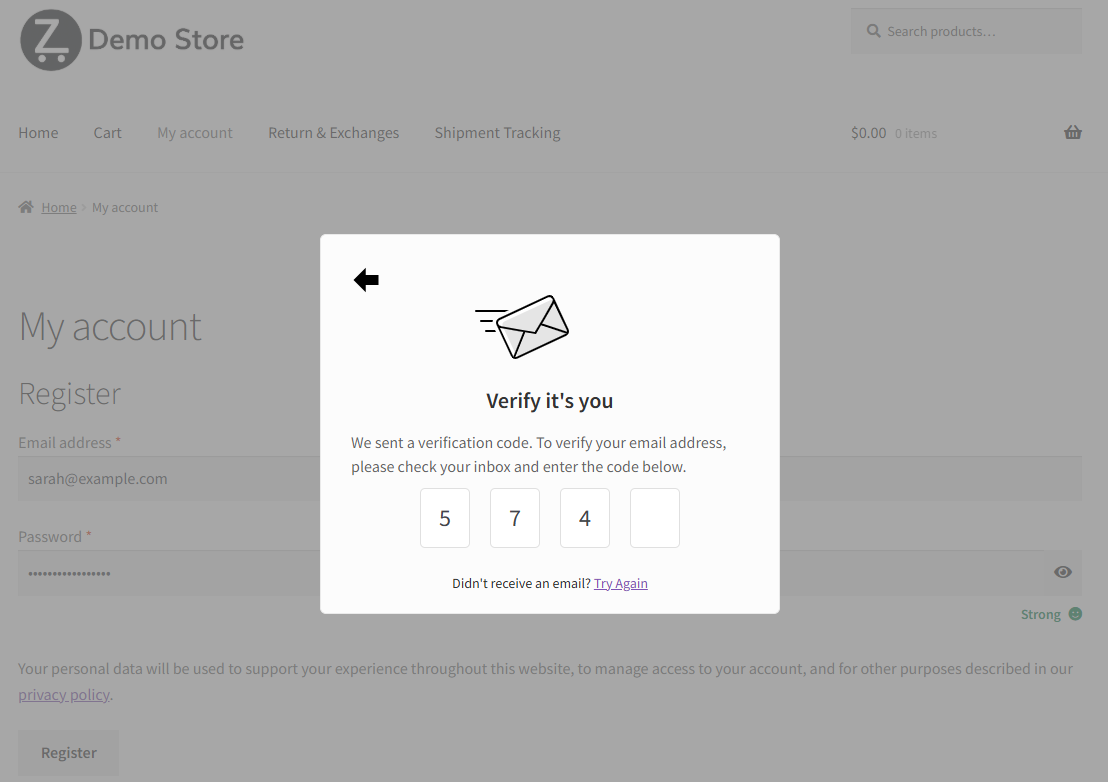
The OTP verification popup your customer sees — it appears inline on the registration form with no page reload, and the account is only created once the correct code is entered.
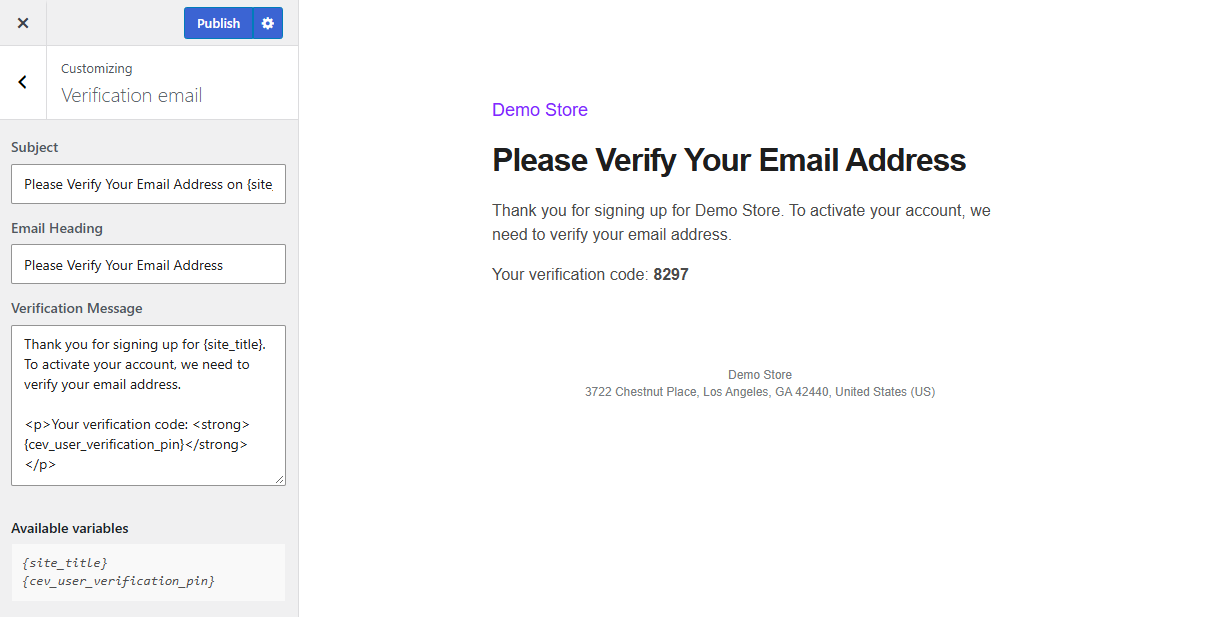
The verification email, with the subject line, heading and message all editable from the built-in live preview customizer.
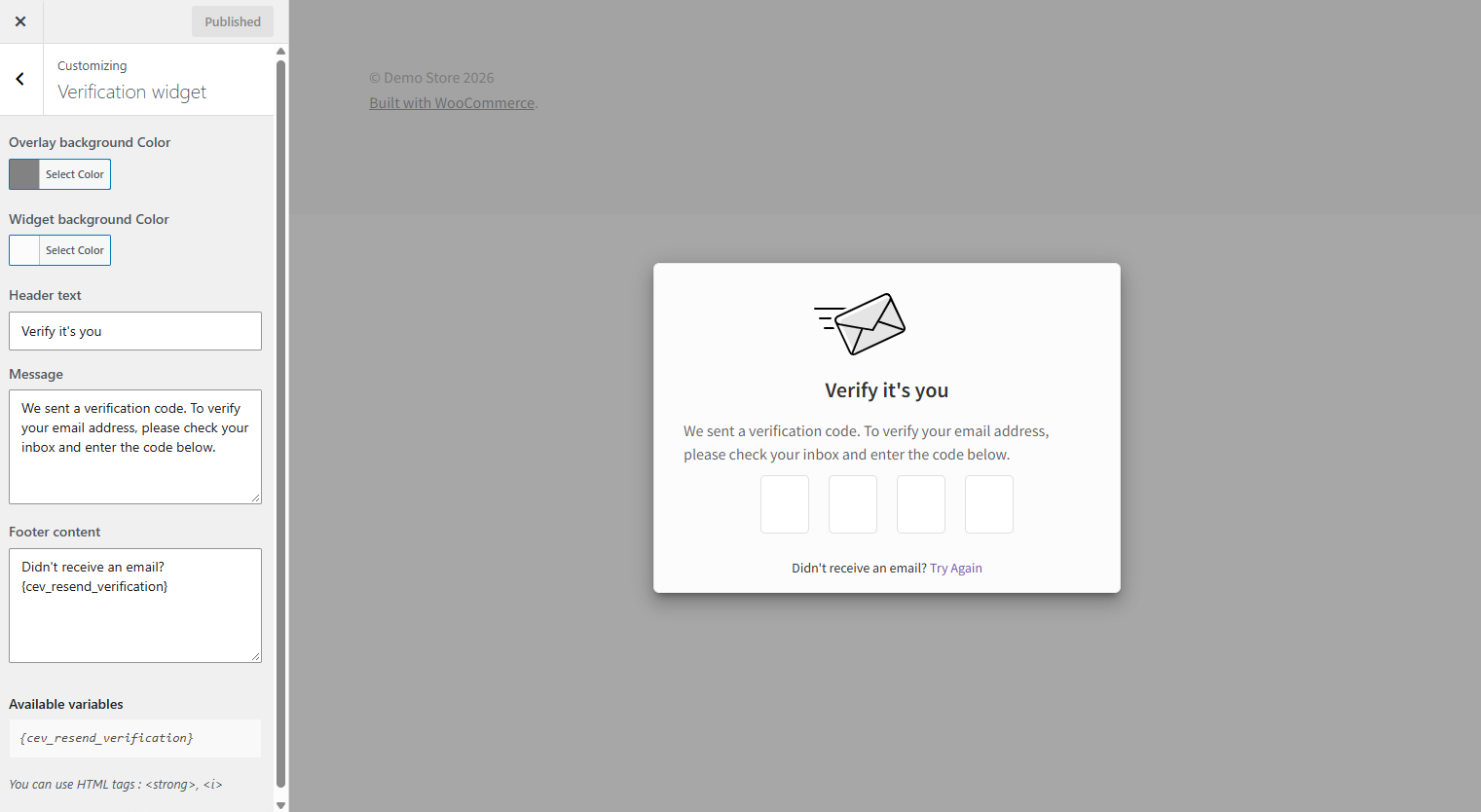
Customize the verification popup to match your store — colours, header text, message and footer, with a live preview as you edit and no code required.
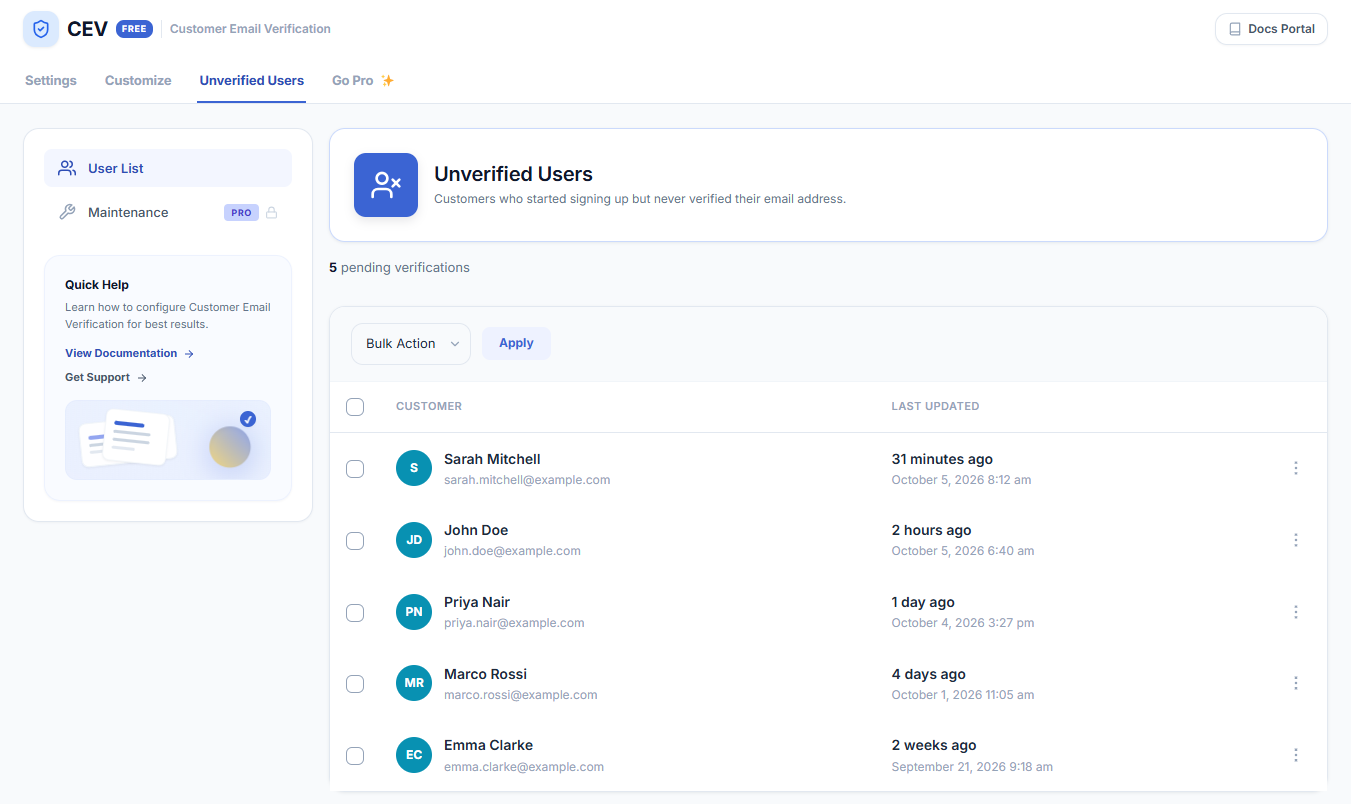
The Unverified Users screen: every customer who started signing up but never verified their email address, with verification stats and a resend option for each one.
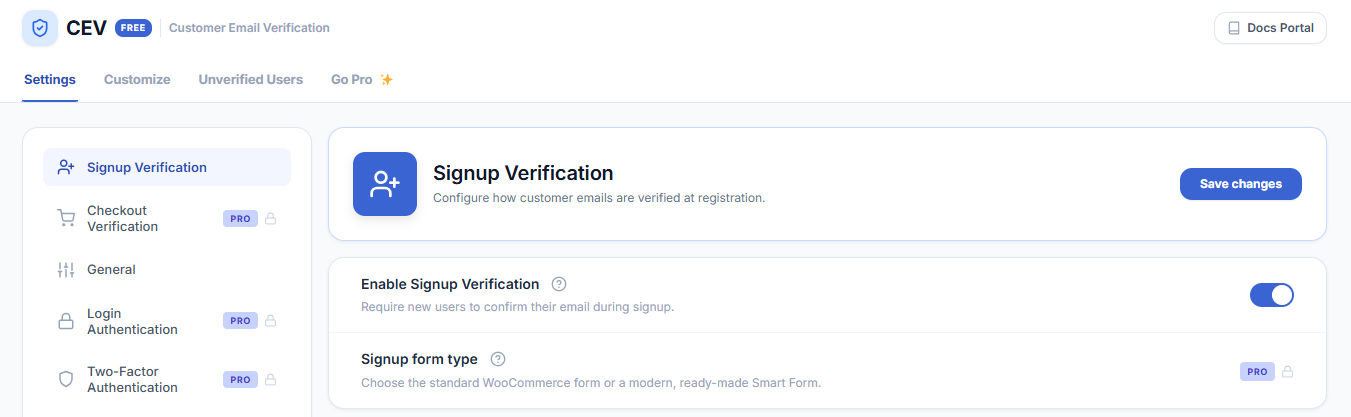
Signup verification settings — switch email verification on and configure it in a couple of minutes.