
The plugin makes it possible to sell Products as whole or in parts: 0.5 1.5 etc.
(Piece of Product). Min, Max, Step & Default preset Quantity. Variable Products Supported.
For example:
Pizza. You can sell 1.5 Pizzas, or a quarter. With the price set for 1 piece.
Liquids on tap. For example, Kerosene or Olive Oil. You can sell 1.5 liters, with the price set for 1 liter.
Bulk materials. For example, Tobacco or Golden Sand. You can sell 0.1 g at a price quoted for 1 g.
Futured
- You can set the Minimum product Quantity for all Products by default (preset = 1). But at the same time, each Product / Categories can have its own Minimum Quantity value.
- You can set the Step of Changing the Quantity of goods for all Products by default (preset = 1). But at the same time, each Product / Categories can have its own value for the Change in Quantity Step.
- You can set the Default – Choice product quantity for all Products by default (preset = 1). But at the same time, each Product / Categories can have its own Default – Choice Quantity value.
- You can set the Maximum product Quantity for all Products by default. But at the same time, each Product / Categories can have its own Maximum Quantity value.
- Works correctly with Variable Products.
- Auto correction “No valid value” customer enters to nearest valid value.
- Auto correction considering with “Maximum allowed for Product”.
- Column “Quantity” on Products List.
- Update Cart Automatically on Quantity Change (AJAX Cart Update)
- You can set a “Value Label” for each individual Item. Individually or as a whole for the Category. For example: “Price per Meter”, “Price per Liter”.
- It is possible to use Product – JS Object for Ext.Integration: QNT_Data. Function: WDPQ_Get_QuantityData (Product_ID).
- Works with WooCommerce specifics from v3.4.8 & more
- Buttons: +/- To select the Quantity on the Product page and in the Cart.
-
Compatibility with Plugin: “WPGear Composite Products for WooCommerce” (https://wpgear.xyz/wpgear-composite-products-woo).
PRO Version Features:
- You can set separate Minimum Product Quantity, Step of Changing the Quantity & Default preset Quantity – for each Variable Product Variation.
- You can create RSS Feed for WooCommerce. Support: “Google Merchant Center” (Product data specification) for “Price_Unit_Label” -> [unit_pricing_measure], separate hierarchy Categories -> Products.
Screenshots
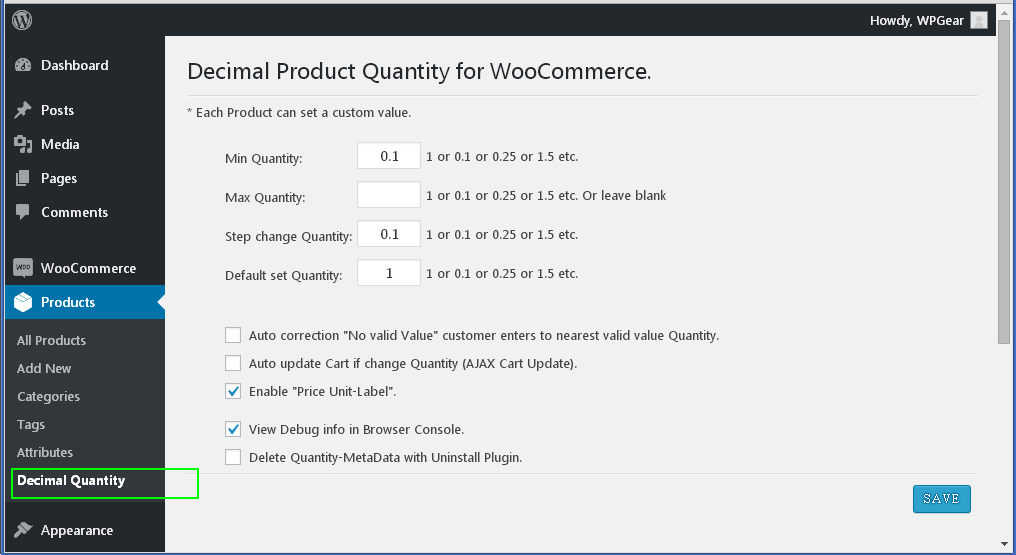
screenshot-1.png Admin page | WooCommerce Products -> Decimal Quantity. Here are the all Options: "Defaults for all Products" and Setup.

screenshot-2.png Admin page | WooCommerce Products -> Decimal Quantity. Validation Settings.

screenshot-3.png Admin page | WooCommerce Products -> All Products. Column "Quantity".

screenshot-4.png Admin page | Product -> General. Here are the Fields: "Minimum cart Quantity", "Step change Quantity", "Default preset Quantity", "Maximum cart Quantity" which override the "default" values. And "Price Unit-Label".

screenshot-5.png Front page | Product page. The Quantity field has a Decimal value and "Price Unit-Label".

screenshot-6.png Front page | Cart page. The Quantity field has a Decimal value. Subtotals / Totals are recalculated.
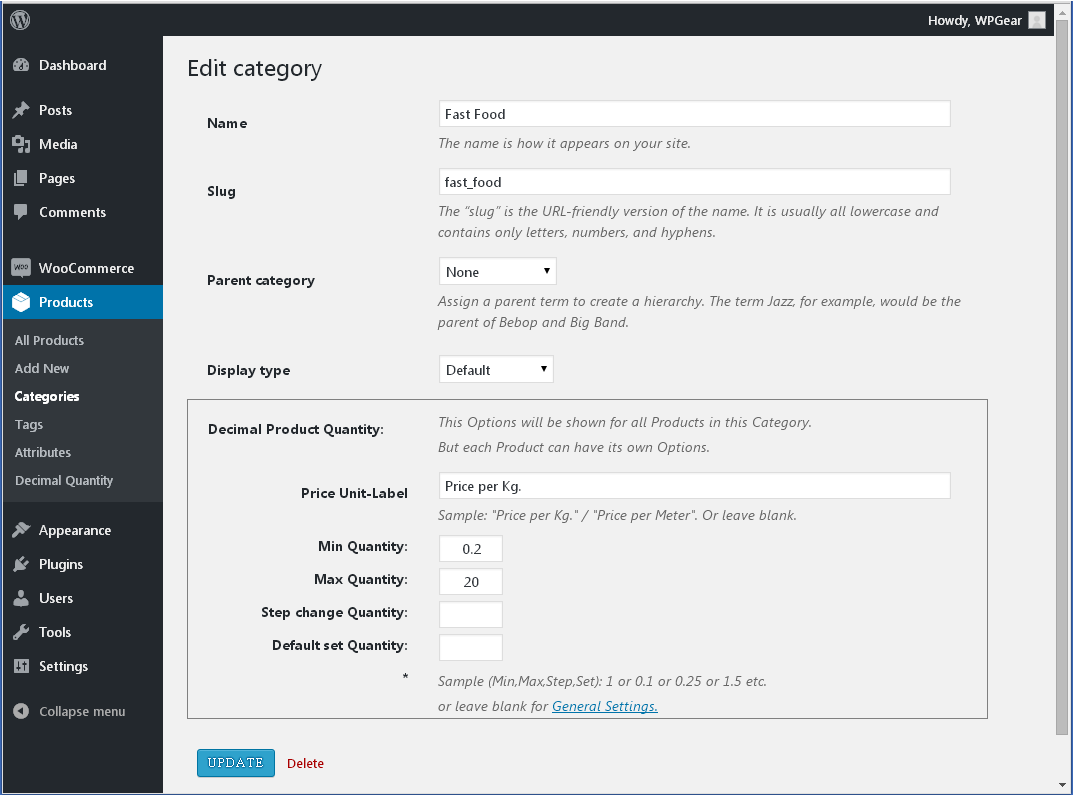
screenshot-7.png Admin page | WooCommerce Products -> Categories. "Price Unit-Label" and "Quantity options" for all Products in this Category.