BACK TO DIRECTORY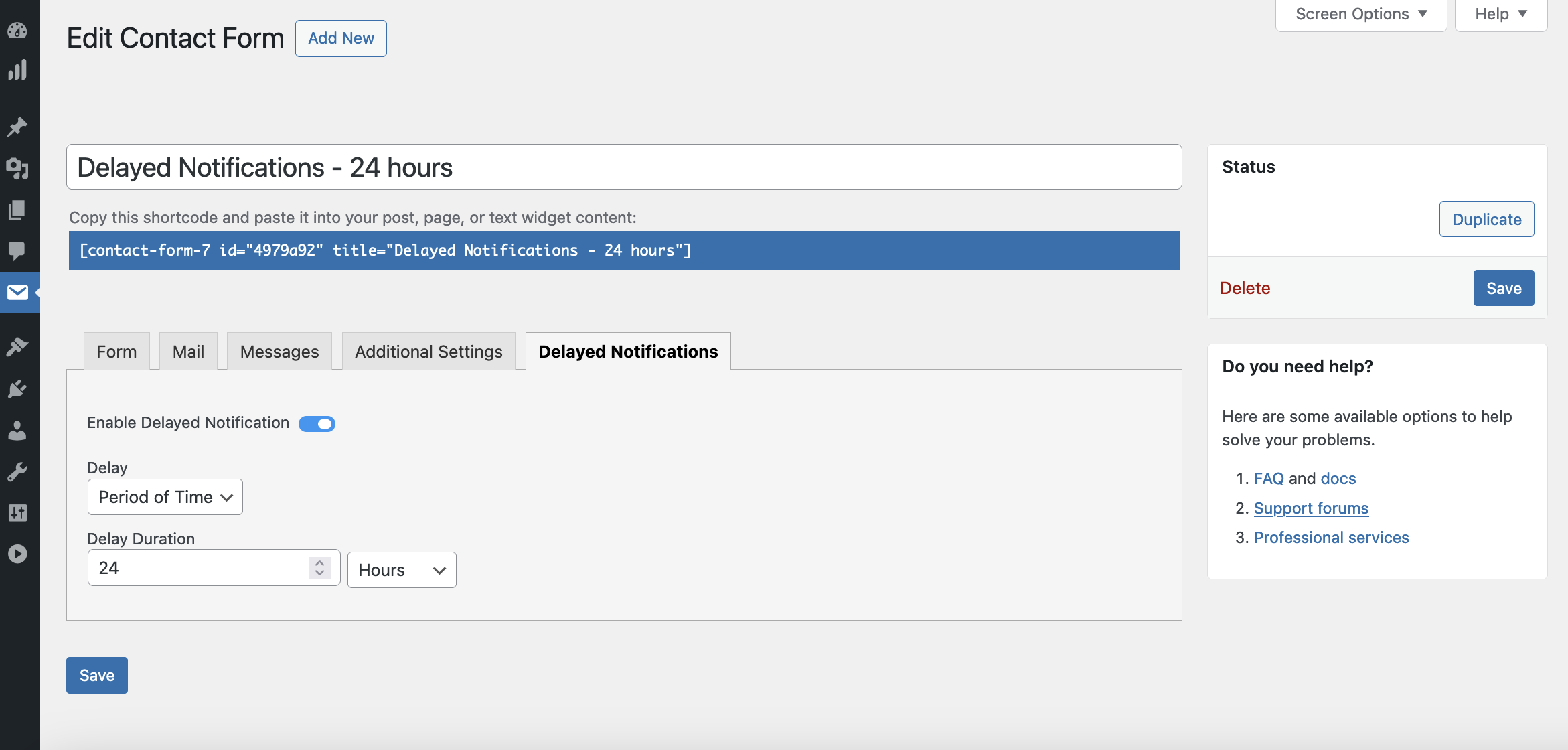


Delayed Email Notifications for Contact Form 7 enhances your control over Contact Form 7 by allowing you to delay email notifications. Whether you need to manage email traffic better or stagger notifications to avoid server overload, this plugin gives you the flexibility to adjust notification timing to your needs.
Features:
- Delay Email Notifications Based Upon a Specified Period of Time: select the period of time you’d like from the drop-down and enter the time period you want to delay the message.
- View Scheduled Delayed Notifications: The Delayed Notifications screen will show you all email notifications that scheduled to go out.
- Reliable Delivery: Ensures that your delayed emails are sent out reliably.
Use Cases:
- Customer Support Forms: Delay notifications during off-hours to manage support staff workload.
- Event Registration: Stagger confirmation emails to avoid server spikes during high registration periods.
Screenshots
Setting up a delay in the Contact Form 7 interface.
Contact Form 7 form submission
Scheduled delayed email notifications screen
Plugin Details
Active Installs
10Total Downloads
1,430Version
1.1.1Requires WP
5.0Requires PHP
7.0Tested Up To
6.6.11Added
2024-09-23Last Updated
2024-11-04 5:08am GMTRatings
5
3
4
0
3
0
2
0
1
0