BACK TO DIRECTORY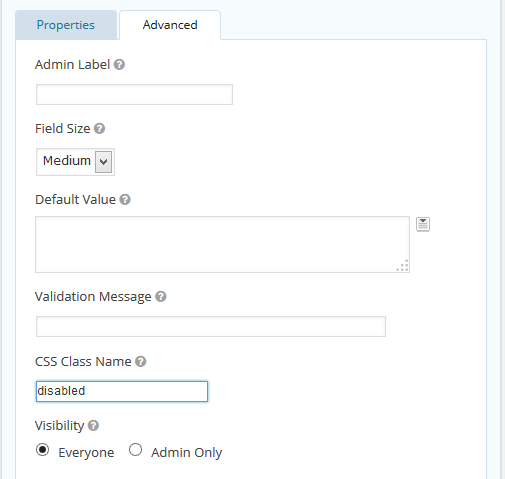
Simply install the plugin and add the appropraite CSS class to the form field you want to assign an attribute. This is done within the Form Editor under the Advanced tab of the field. The classes are “disabled” for the disabled attribute and “readonly” for the readonly attribute (don’t include the quotation marks).
Screenshots
Gravity Forms Advanced Tab w/ a CSS class of "disabled". This will set the field's attribute to disabled. Alternatively, you can enter the CSS class "readonly" to set the attribute to readonly.
Plugin Details
Active Installs
600Total Downloads
14,129Version
1.4Requires WP
—Requires PHP
—Tested Up To
5.0.31Added
2014-05-25Last Updated
2018-12-09 12:08am GMTRatings
5
11
4
0
3
0
2
0
1
0