
Dragwyb Click to Chat is an all-in-one customer communication, AI automation, and support ticketing suite for WordPress.
Turn your website into a 24/7 sales and customer support powerhouse. Answer visitor questions instantly using smart AI (OpenAI & Google Gemini), manage support tickets with a full-featured helpdesk, boost WooCommerce revenue with an interactive AI shopping assistant, capture and score high-intent leads, and connect visitors to WhatsApp, Telegram, Facebook Messenger, Instagram, Twitter (X), LinkedIn, Phone, SMS, and Email.
Live Demo | Upgrade to Pro | Documentation
Modular Feature Management
Enable only the modules your website needs under Click to Chat Settings General to Disabling any module completely stops its scripts, styles, and assets from loading on your site:
- Social Channels: floating or embedded contact options.
- AI Assistant: chatbot and knowledge-base features.
- Support Center: ticketing and customer portal features.
Core Highlights
-
🌟 5-in-1 Communication Suite: Combines an AI Chatbot, Customer Support Helpdesk, WooCommerce Shopping Assistant, Lead Capture Engine, and WhatsApp Floating Widget into a single lightweight plugin.
-
✨ Multi-Provider AI Intelligence: Connect your OpenAI (GPT-4o, GPT-4o-mini, GPT-3.5) or Google Gemini (Gemini 2.5 Flash, Gemini 2.0 Flash, Gemini 1.5 Flash & Pro) API key (BYOK).
-
🧠 Accurate RAG AI (No Hallucinations): Uses Retrieval-Augmented Generation to answer questions strictly from your WordPress content and WooCommerce catalog, complete with verified clickable source links.
-
🛍️ WooCommerce Sales Booster: Shoppers ask for product advice, view live product cards, add items to cart in 1 click, and track their order delivery status directly inside the chat window.
-
🎧 Complete Customer Helpdesk: Manage the entire ticket lifecycle from your WordPress admin, assign tickets to agents, write private staff notes, and embed self-service customer portals with simple shortcodes.
-
🏷️ Dynamic Custom Taxonomies: Create custom ticket classifications (Departments, Regions, Platforms) alongside Categories, Tags, and WooCommerce Products with category-controlled sub-field ordering.
-
🎯 Conversational Lead Capture: Collect visitor contact details naturally and automatically score buyer readiness (0–100) so you know which leads to prioritize.
-
💬 Omnichannel Floating Widget: Connect WhatsApp, Telegram, Facebook Messenger, Instagram, Twitter (X), LinkedIn, Phone, SMS, and Email with dynamic page title and URL tags.
-
🔒 100% Privacy & BYOK: Bring Your Own Key (OpenAI & Google Gemini). No middleman subscription fees, no markup on AI usage, and full control over your data.
🤖1. Smart AI Chatbot & Knowledge Base
-
RAG Vector Knowledge Base: Automatically indexes your WordPress pages, posts, documentation, FAQs, and custom post types into vector embeddings.
-
Built-in Fast SQLite Vector Engine: High-performance vector search running right on your server with zero third-party database dependencies.
-
Pinecone Cloud Vector Database: Connect remote Pinecone indexes for enterprise catalogs or high-traffic sites.
-
Clickable Source Citations: AI displays verified links to your website pages so visitors can verify facts and explore related content.
-
Real-Time Content Sync: Automatically updates or deletes vector index embeddings when posts are published, edited, or trashed.
-
Confidence Fallback & Handoff: Gracefully passes unresolved questions to human support or creates a ticket when confidence is low.
🛍️ 2. WooCommerce AI Shopping & Order Assistant
-
Conversational Product Recommendations: Shoppers find products in plain language (e.g., “Show me waterproof hiking boots under $100”).
-
Interactive Live Product Cards: Displays real-time price, stock status, ratings, and featured product images directly inside the chat window.
-
1-Click Add to Cart: Customers can add recommended items to their WooCommerce cart directly from chat.
-
Secure Order Status Lookup: Customers check real-time order status and shipment tracking by providing their Order ID and verified billing email.
-
Agent WooCommerce Context: Support agents view customer lifetime value, recent orders, and cart items directly within the support ticket workspace.
🎧 3. Built-In Support Helpdesk & Customer Portal
-
Complete Ticket Workspace: Create, assign, reply to, prioritize (Low, Normal, High, Urgent), resolve, and close support tickets from a streamlined dashboard.
-
Active Viewer Presence Indicators: Real-time badge shows when another agent is viewing or drafting a reply on a ticket to prevent duplicate responses.
-
Private Staff Notes: Leave internal notes on tickets visible only to your support team.
-
Auto-Pause AI on Staff Reply: Automatically pause AI chatbot responses when a human agent replies, with manual Take/Release AI controls.
-
Self-Service Customer Portals: Embed front-end support portals anywhere on your site using shortcodes:
[dctc_support_portal]– Full customer support desk with ticket submission, status tracking, and message history.[dctc_support_ticket_form](alias:[dctc_support_ticket_form]) – Standalone ticket submission form with trigger button or inline mode.[dctc_support_user_tickets](alias:[dctc_support_user_tickets]) – Customer dashboard table showing submitted tickets with status filters.
-
Guest Ticket Access & Security: Non-logged-in visitors can submit tickets with email confirmation verification, secure tokenized tracking links, and guest session countdown controls.
-
Automatic Guest-to-User Linking: When a guest user later logs in with the same email, their past guest tickets automatically link to their WordPress user account.
-
Automated Email Notifications: Notify customers and agents instantly on ticket creation, status changes, and new replies.
🏷️ 4. Dynamic Custom Taxonomies & Routing Engine
-
Unlimited Custom Taxonomies: Create user-defined ticket taxonomies (e.g., Department, Problem Type, Region, Platform) with custom colors and Dashicons or uploaded image icons.
-
WooCommerce Store Catalog Sync: 1-click sync WooCommerce store products into support ticket terms for instant product issue classification.
-
Category-Controlled Sub-Field Ordering: Choose exactly which taxonomies appear on ticket submission forms per category, and reorder them with intuitive controls.
-
Polymorphic Ticket Relationships: Link tickets to multiple taxonomies simultaneously for comprehensive agent filtering and queue segmentation.
🎯 5. Conversational Lead Capture & 0–100 Scoring
-
Natural Lead Collection: Collect visitor names, emails, phone numbers, and project requirements seamlessly during chat conversations.
-
Smart Intent Scoring (0–100): AI evaluates messages and automatically scores buyer intent, urgency, and purchase readiness.
-
Full Transcript Inspection: View the complete chat history behind every lead to understand customer context before following up.
-
Lead Pipeline Stages: Organize leads by status (New, Contacted, Qualified, Closed).
-
1-Click CSV Export: Export leads directly to CSV for CRM import or spreadsheet analysis.
💬 6. Multi-Channel Floating Contact Widget
-
Omnichannel Chat Launcher: Connect WhatsApp, Telegram, Facebook Messenger, Instagram, Twitter (X), LinkedIn, Phone, SMS, and Email.
-
Dynamic WhatsApp Page Tags: Pre-fill WhatsApp greetings with
{title}and{url}tags so you know exactly which product or page the visitor was browsing. -
Display Flexibility: Display as a floating launcher button or display channels directly on the page without the button.
-
Device Visibility Controls: Enable or disable specific channels separately on Desktop and Mobile devices.
🛡️ 7. Staff Roles & Granular Permission Matrix
-
5-Tier Staff Hierarchy: Assign roles including Administrator, Support Manager, Senior Specialist, Support Agent, and Junior/Fresher.
-
Granular Capability Matrix: Manage granular privileges for ticket assignment, AI takeover, category management, ticket deletion, and WooCommerce data access.
-
Agent Availability Controls: Staff set their availability (Available, Away, Offline) to ensure incoming inquiries route only to active agents.
⚙️ 8. Setup Wizard, Module Management & Privacy
-
4-Step Interactive Setup Wizard: Configure your active modules, AI credentials, knowledge base, and support desk in under 2 minutes.
-
Granular Module Toggles (Settings General): Independently enable or disable Channels, AI Assistant, and Support Center. When a module is turned off, its JavaScript, CSS, and background queries are completely stopped from loading.
-
Built-in Error Logger: Track and inspect AI API responses, timeouts, and vector database sync errors directly in the dashboard.
-
Interactive Guide Center: In-dashboard documentation, shortcode references, and configuration walkthroughs.
-
Settings JSON Import & Export: Easily migrate or backup your entire plugin configuration and live application data.
-
GDPR & Privacy Controls: Selectively preserve or delete options, AI data, RAG embeddings, support tickets, error logs, and transients upon plugin uninstall.
💎 Free vs Pro – Which Version Is Right For You?
🌟 Always Included in the Free Version:
-
OpenAI & Google Gemini AI: Connect GPT-4o, GPT-4o-mini, GPT-3.5, and Gemini 2.5/2.0/1.5 using your own API keys (BYOK).
-
Feature & Module Management: Toggle modules in Settings General to stop unused file and asset loading for maximum speed.
-
Custom Chatbot Sizing & Appearance: Full control over container height (px, vh, %), width, position, custom avatars, and colors.
-
RAG Knowledge Base: SQLite vector search & Pinecone integration with real-time content sync.
-
Clickable Source Links: Displays verified links back to your pages and products in AI answers.
-
WooCommerce Shopping Assistant: Conversational product search, interactive product cards, and 1-click Add to Cart.
-
Live WooCommerce Order Lookup: Customers track order shipping status securely with Order ID and billing email.
-
Support Helpdesk Ticketing: Full ticket lifecycle, private staff notes, manual assignment, and viewer presence indicators.
-
Dynamic Custom Taxonomies: Categories, Tags, WooCommerce Products, and custom user-defined taxonomies with dynamic form sub-fields.
-
Front-End Customer Portals: Embed support anywhere using
[dctc_support_portal],[dctc_support_ticket_form], and[dctc_support_user_tickets]. -
Guest Ticket Access: Secure guest ticket creation, session expiry countdown, confirmation alerts, and auto-linking to user accounts.
-
Conversational Lead Capture: Collect visitor inquiries with automatic 0–100 buying intent scoring and CSV export.
-
Multi-Channel Contact Widget: WhatsApp with dynamic
{title}&{url}tags, Telegram, Messenger, Instagram, Twitter, LinkedIn, SMS, Phone, and Email. -
Setup Wizard, Diagnostics & Privacy: 4-step onboarding, Guide Center, diagnostic log viewer, JSON settings backup, and GDPR uninstall controls.
🚀 Supercharge Your Workflow with Click to Chat Pro:
-
☑️ More AI Providers: Unlock Anthropic Claude (3.5 Sonnet, 3.5 Haiku, Opus), Groq LPUs, DeepSeek (V3 & R1), OpenRouter, and local Ollama models.
-
☑️ Automatic Provider Failover: Keep your chatbot 99.99% online with automated failover to backup AI providers.
-
☑️ AI Reply Suggestions for Agents: Help support staff answer tickets faster with 1-click AI-suggested responses.
-
☑️ AI Ticket Summarization: Instantly generate concise summaries of long customer ticket threads.
-
☑️ Automated Ticket Assignment: Automatically distribute and balance incoming tickets across your support team based on skills and capacity.
-
☑️ CRM & Webhook Automations: Instantly send leads and tickets to Zapier, Make, HubSpot, ActiveCampaign, or custom webhook endpoints.
-
☑️ Admin AI Copilot: Built-in AI assistant inside your WordPress admin to draft documentation, analyze gaps, and answer questions.
-
☑️ Advanced Usage & Token Limits: Set strict per-user rate limiting and daily token budgets to control API costs.
👉 Upgrade to Click to Chat Pro Now
Shortcodes Reference
-
[dctc_support_portal]– Displays the full interactive customer support desk (Submit Ticket, My Tickets, and Guest Access tabs). -
[dctc_support_ticket_form]– Displays a standalone ticket submission form. Supports attributes:inline="true"– Embeds form directly inline.trigger_id="my-custom-btn"– Opens ticket modal when clicking an existing button with that HTML ID.- (Alias:
[dctc_support_ticket_form])
-
[dctc_support_user_tickets]– Displays a filterable customer ticket history table with status badges and thread access.- (Alias:
[dctc_support_user_tickets])
- (Alias:
-
[dctc-widget]– Embeds the omnichannel floating contact widget on specific pages or templates. -
[dctc_ai]– Embeds the AI Chatbot assistant window or launcher button.
Recommended Plugins
- 🤖 AI Agent Workflows – Build visual automation workflows in WordPress with webhooks, form triggers, WooCommerce events, and AI agent actions.
- 🔄 Flipbox Addon for Elementor – Design animated flip boxes and 3D cards inside Elementor.
- 🧩 Smart Form Builder – A drag and drop form builder plugin for WordPress.
- 🎨 Contact form 7 Addon – Enhances the functionality of Contact Form 7.
External Services
This plugin connects to external third-party services only when configured and enabled by an administrator:
- OpenAI API: When enabled, user prompts, chat messages, and knowledge base text are sent to OpenAI to generate responses and search embeddings.
- Google Gemini API: When enabled, chat inquiries and knowledge base text are sent to Google AI to generate responses and embeddings.
- Pinecone: When selected as your vector storage provider, text embeddings are stored in Pinecone indexes for semantic search.
- Dragwyb Feedback API: Optional diagnostic or deactivation feedback is sent to https://feedback.dragwyb.com only when explicitly submitted by an administrator.
Contribute
Dragwyb Click to Chat is an open-source project, and we welcome contributions from the community.
- GitHub Repository
- Submit Bug Reports & Feature Requests Please report any issues or bugs on the [GitHub Issues page].
- Pull Requests: Feel free to fork the repository and submit pull requests for review.
Screenshots
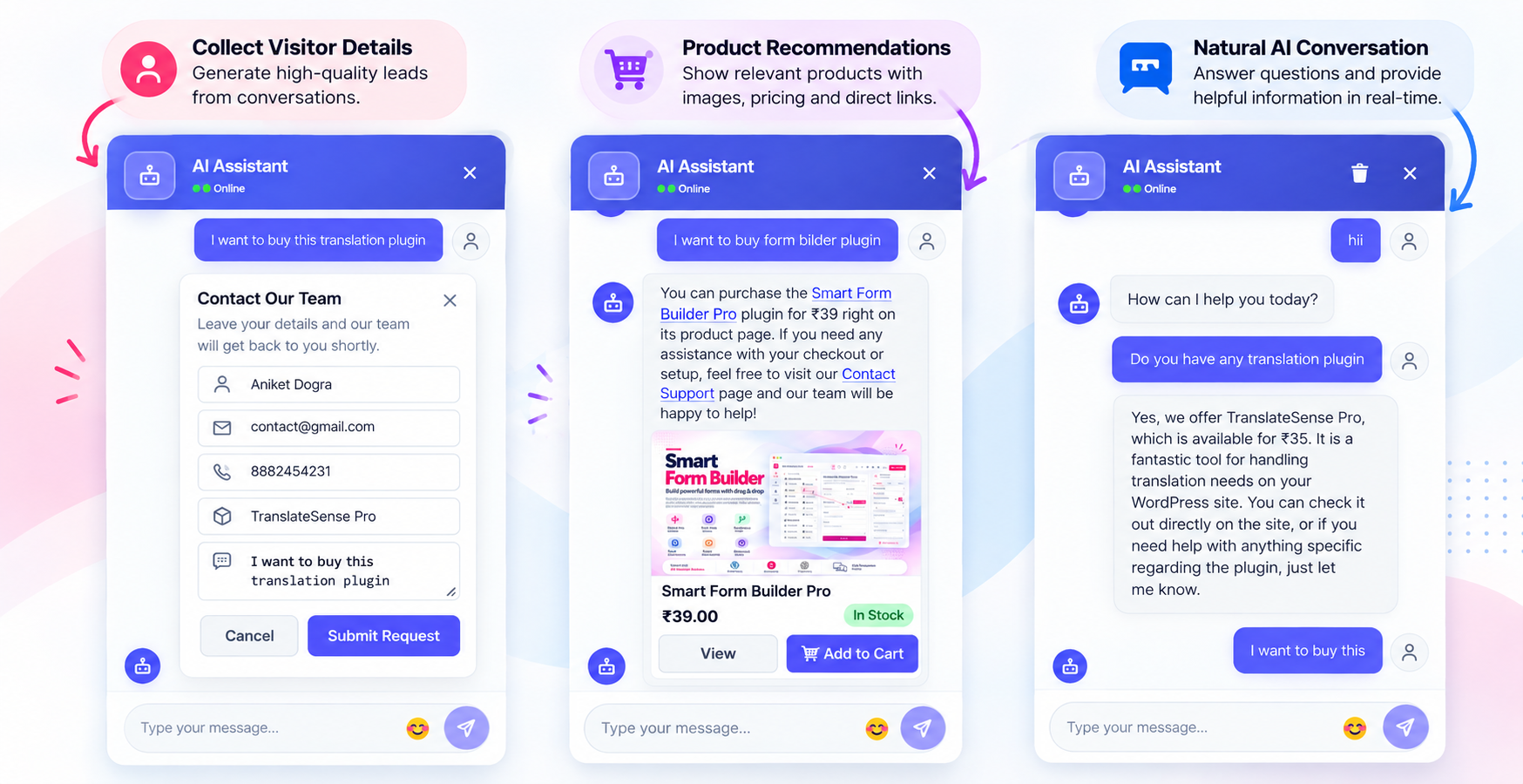
AI chatbot live chat interface on the frontend.
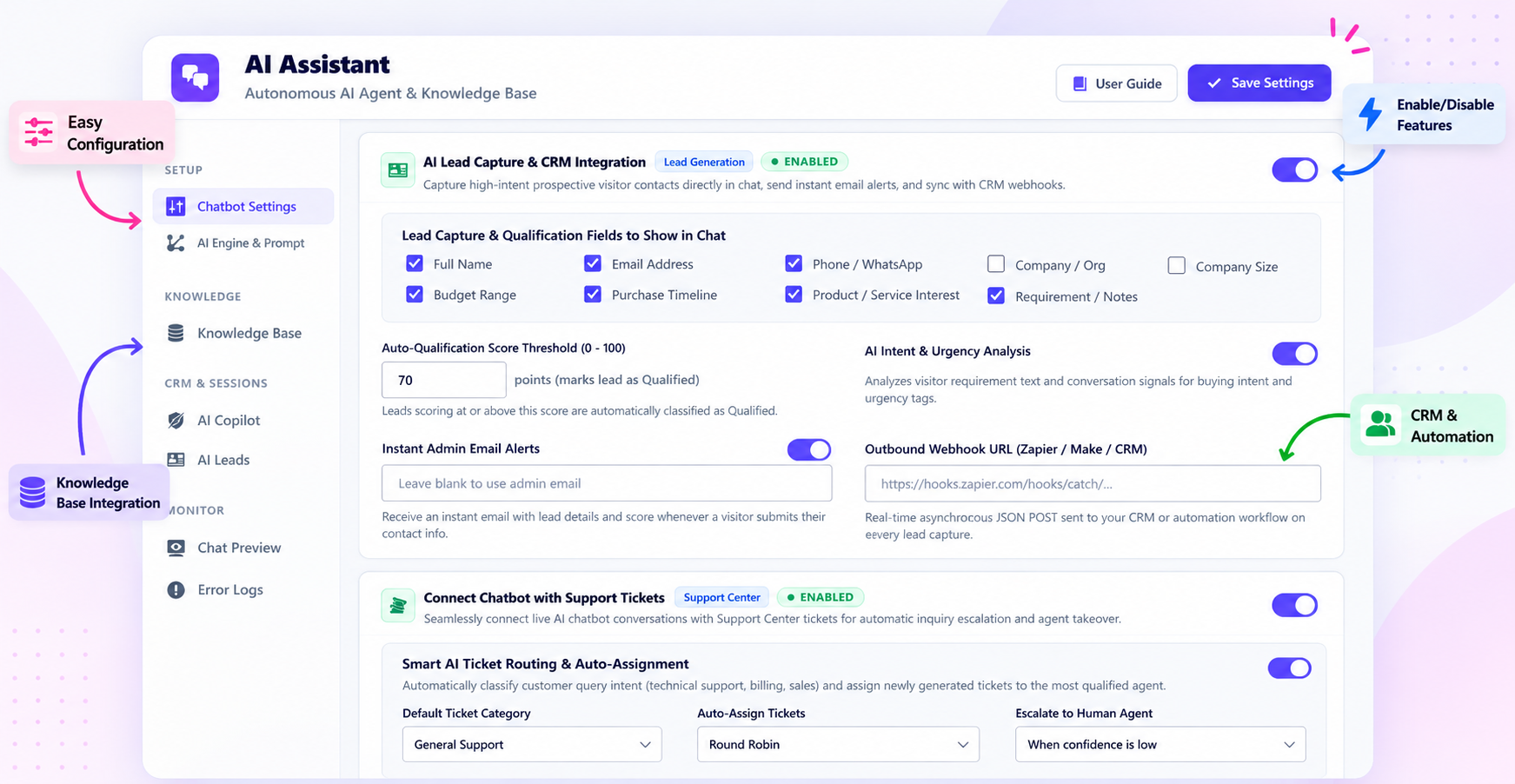
Configure your AI assistant and chatbot behavior.
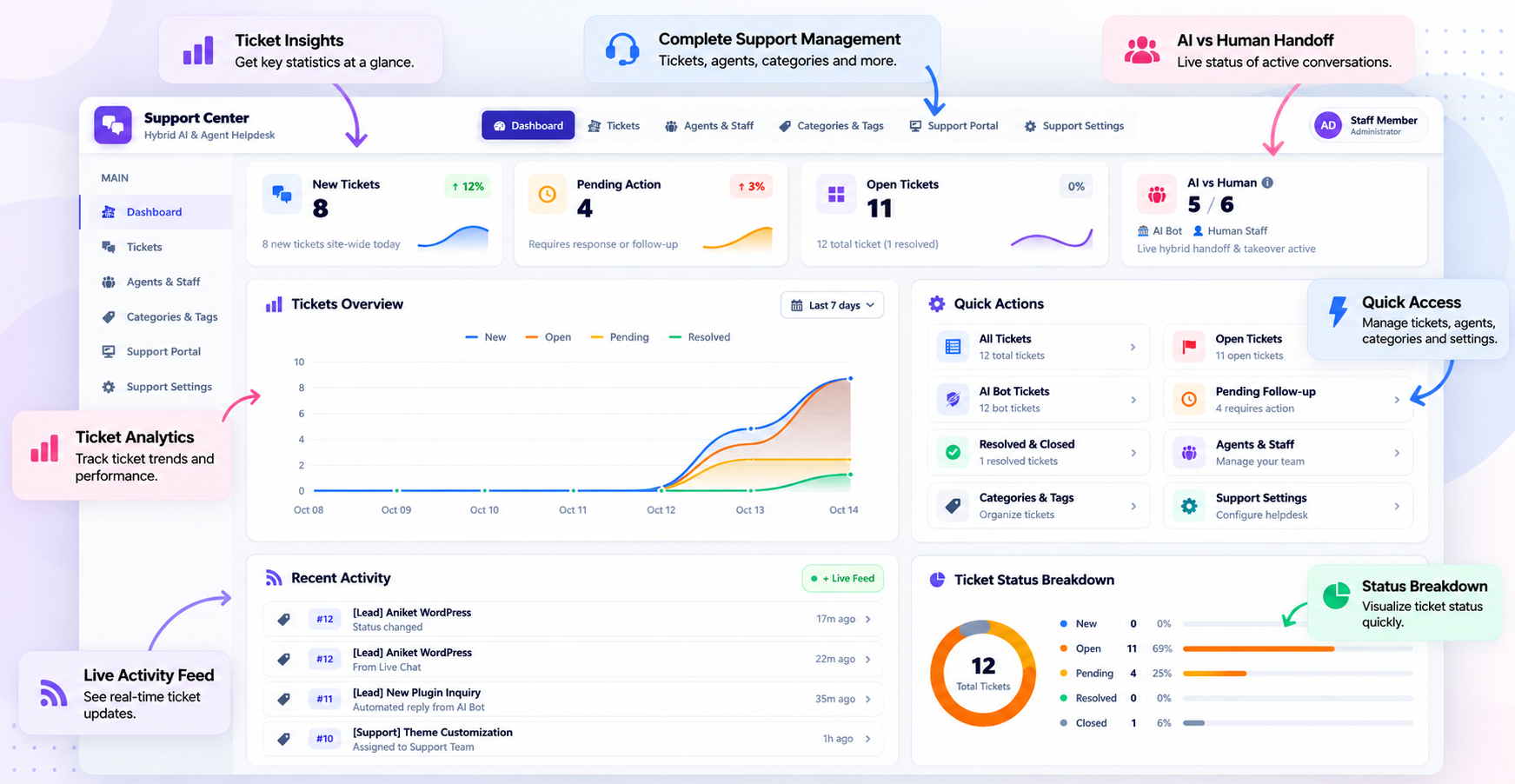
Manage customer support tickets from one dashboard.
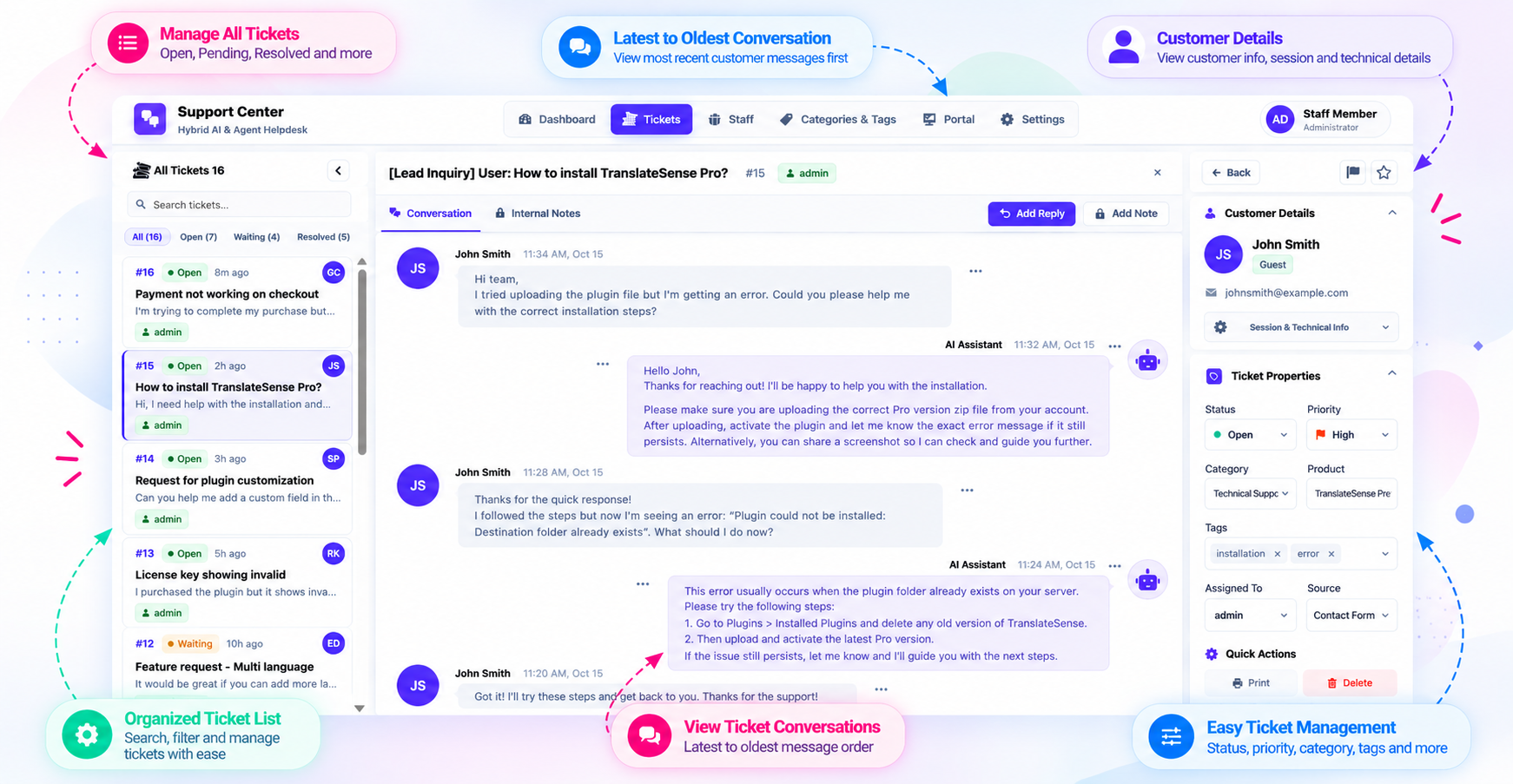
View ticket conversations and respond to customers.
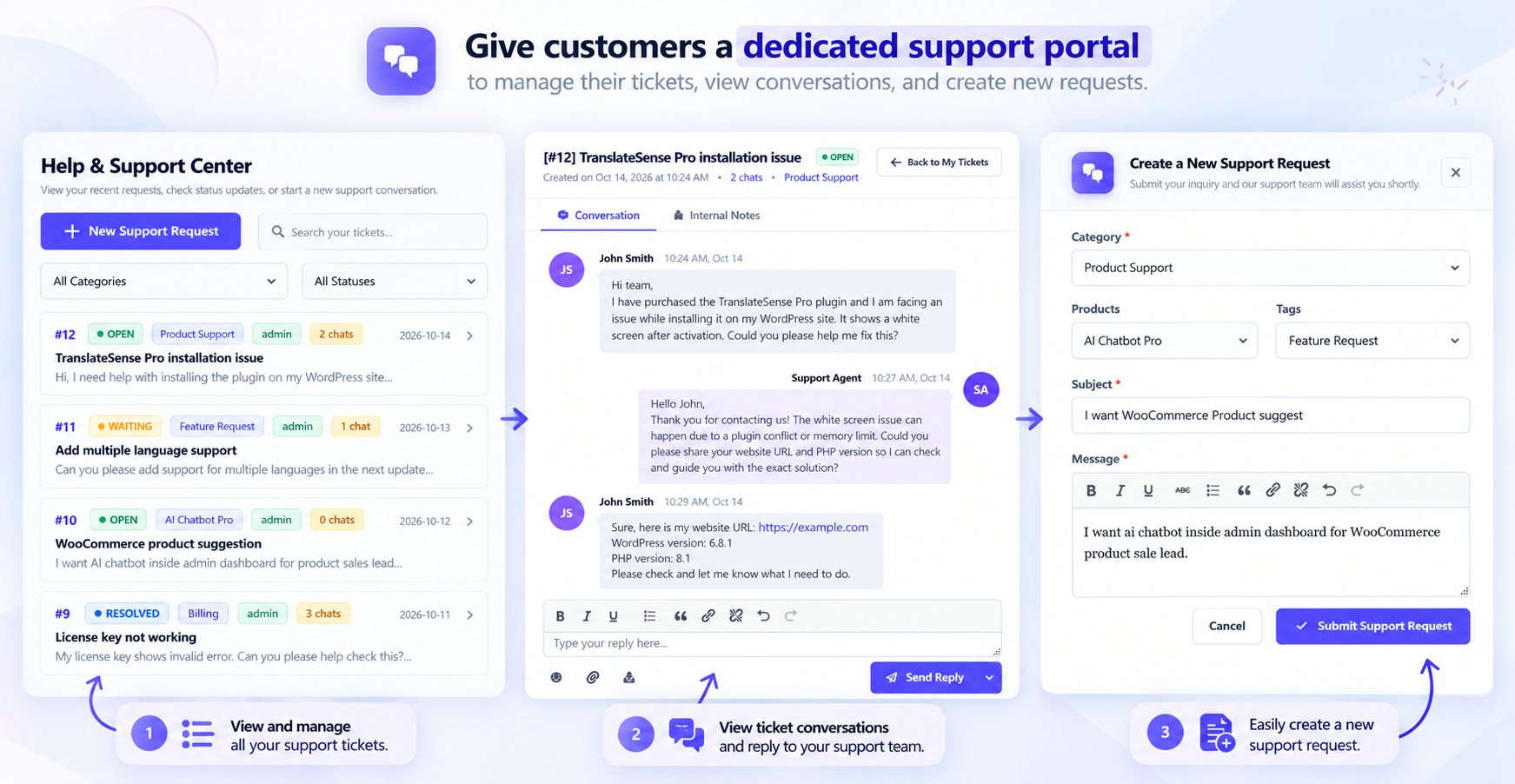
Give customers a dedicated support portal to manage their tickets.
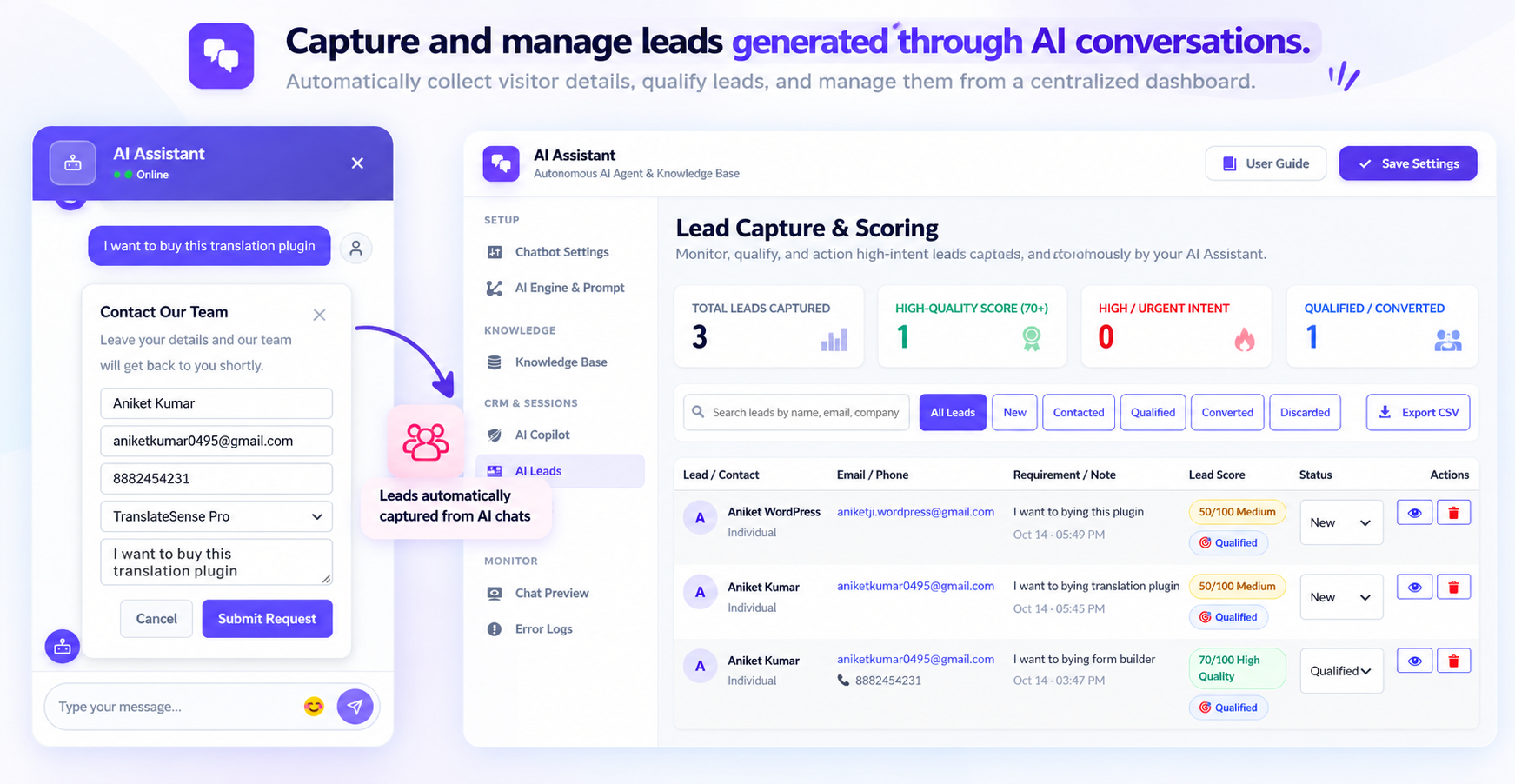
Capture and manage leads generated through AI conversations.
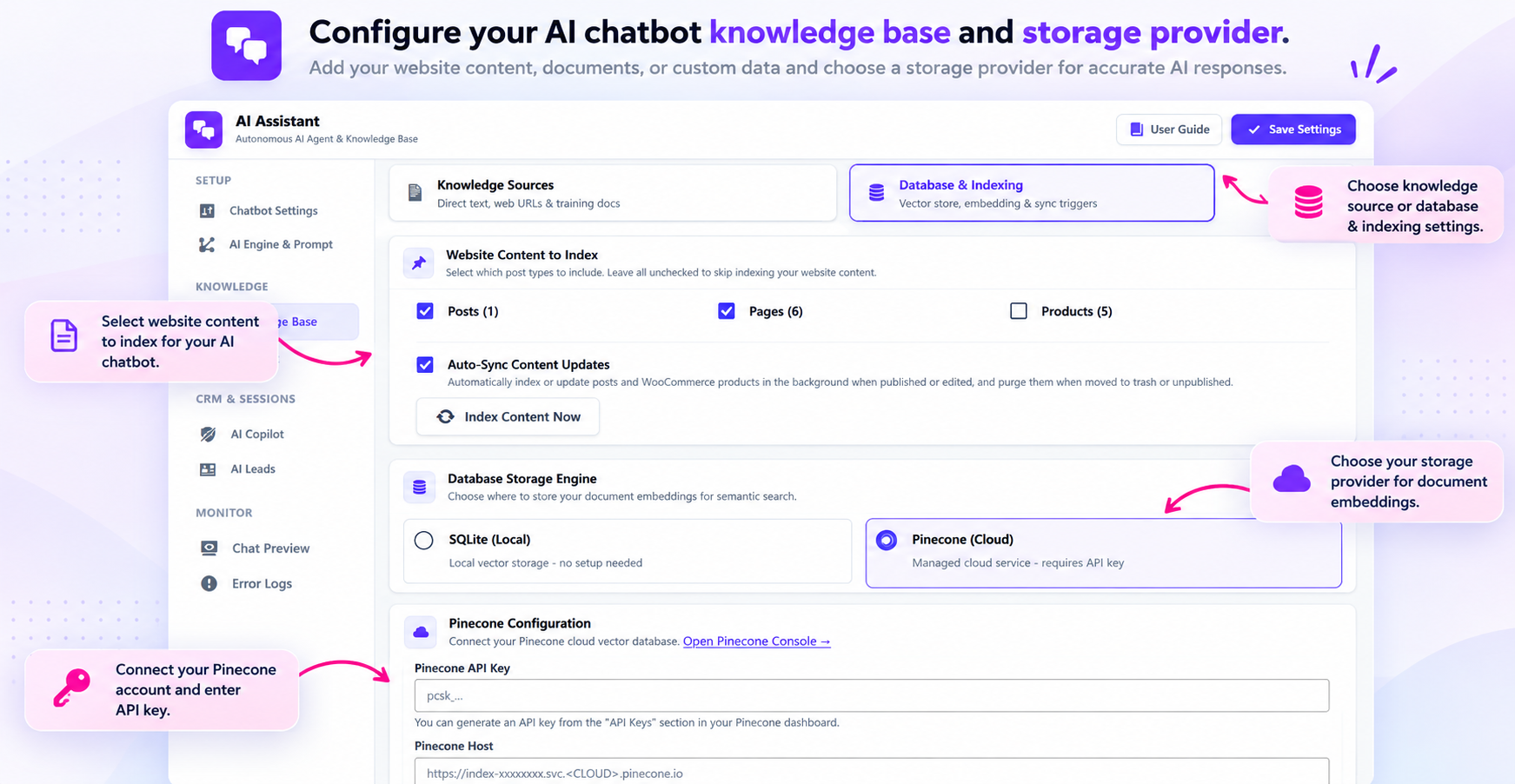
Configure your AI chatbot knowledge base and storage provider.
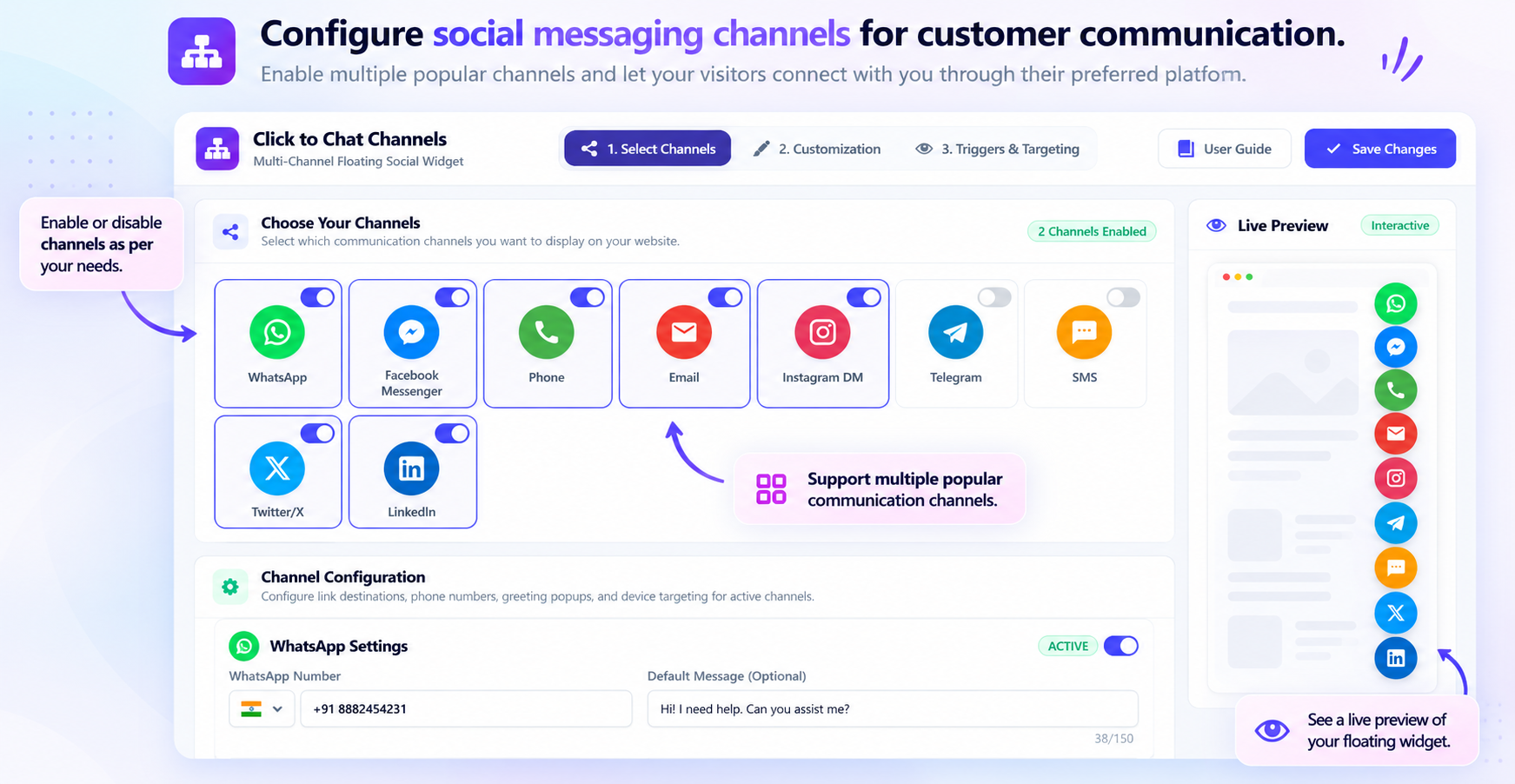
Configure social messaging channels for customer communication.