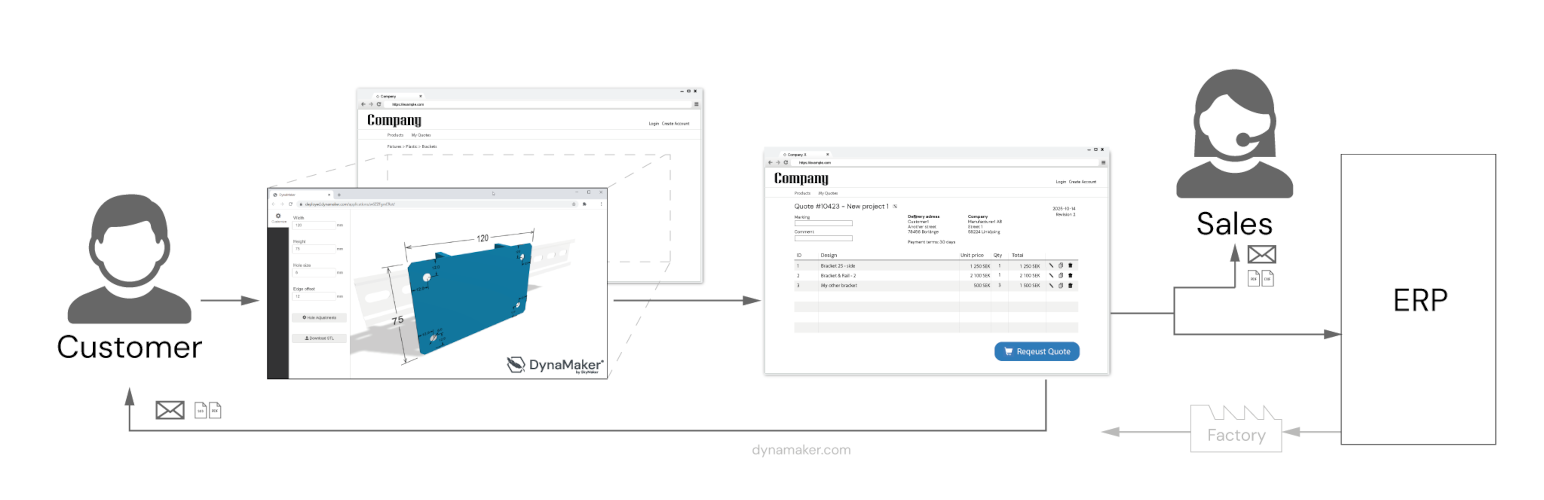
With the DynaMaker Plugin for WordPress you can easily display your Online CAD onfigurators in a WordPress page or post, with very few clicks and short setup time.
DynaMaker CAD Configurator features
– Embed your DynaMaker CAD Configurator on your WordPress
– Open your DynaMaker CAD Configurator with a button
– Include page specific meta and preselected choices in url
– Use wordpress login and registration to limit access and enable save / load of configurations in DynaMaker (optional)
– Connect DynaMaker with other services like SendGrid to enable Quotation Requests direct to the sales teams inbox
Request for Quote (RFQ) Portal
– Useful features for logged in WordPress users to submit a quotation request with data from their CAD Configurators
– Checkout of several configurations as individual rows before submit
– Form fields for what information to include with the request (JSONForm)
– History of users requested quotes (optional)
– Send Request trigger endpoint (eg Microsoft Power Automate) to forward request
Screenshots

Example with hydraulic calculator

Example with visual configuration of housing

Example of parametric CAD application with aluminum profiles and racks

Example of an embedded DynaMaker CAD Tool on homepage

The DynaMaker CAD Configurator block and its settings in the Wordpress editor

Where to find the button for adding the Configurator