A simple shopping cart using shortcodes.
Be sure your permalinks in WordPress settings supports slug urls e.g. your-domain.tld/slug. Once you have proper permalink setting, Create a page with slug /cart. Then edit the cart page and add [easy_cart /] and [empty_cart /] shortcodes.
Create add to cart buttons using [add_to_cart /] shortcodes on other posts or pages of your WordPress site.
Use the following attributes to define your add_to_cart products:
- itemid
- product_name
- product_desc
- product_qty
- price
Here is a example usage of add_to_cart shortcode using all the attributes. Be sure to use single quotes:
[add_to_cart itemid=’your-item-id’ product_name=’Your product name’ product_desc=’description of your product.’ product_qty=1 price=1.00 /]
You can have as many add_to_cart shortcodes as you like, in posts and pages.
Shopping cart allows you to store items and calculate total but doesn’t allow you to checkout. At least not yet as of version 1.2.
Screenshots
![After activating the plugin create a page with name (also known as slug) cart and add [easy_cart /] and [empty_cart /] shortcodes.](https://ps.w.org/easy-cart/assets/screenshot-1.PNG?rev=2488042)
After activating the plugin create a page with name (also known as slug) cart and add [easy_cart /] and [empty_cart /] shortcodes.
![On other pages you can create add to cart buttons using [add_to_cart /] shortcodes using the following attributes - itemid, product_name, product_desc, product_qty.](https://ps.w.org/easy-cart/assets/screenshot-2.PNG?rev=2488042)
On other pages you can create add to cart buttons using [add_to_cart /] shortcodes using the following attributes - itemid, product_name, product_desc, product_qty.

Add to cart button takes on the button styling from your Wordpress theme.\

Cart page displays and totals the items selected using add to cart button.

This is the JSON error in the editor you can simply ignore.

Use shortcode blocks and column block to create cart page slug.

Minimum permalink setting uses post name for the cart to function properly

Add to cart buttons using shortcode blocks. Notice there are no quote marks used for product_qty and price.
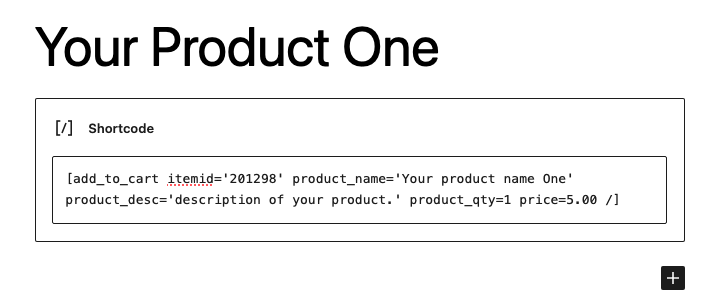
Using Gutenberg shortcode