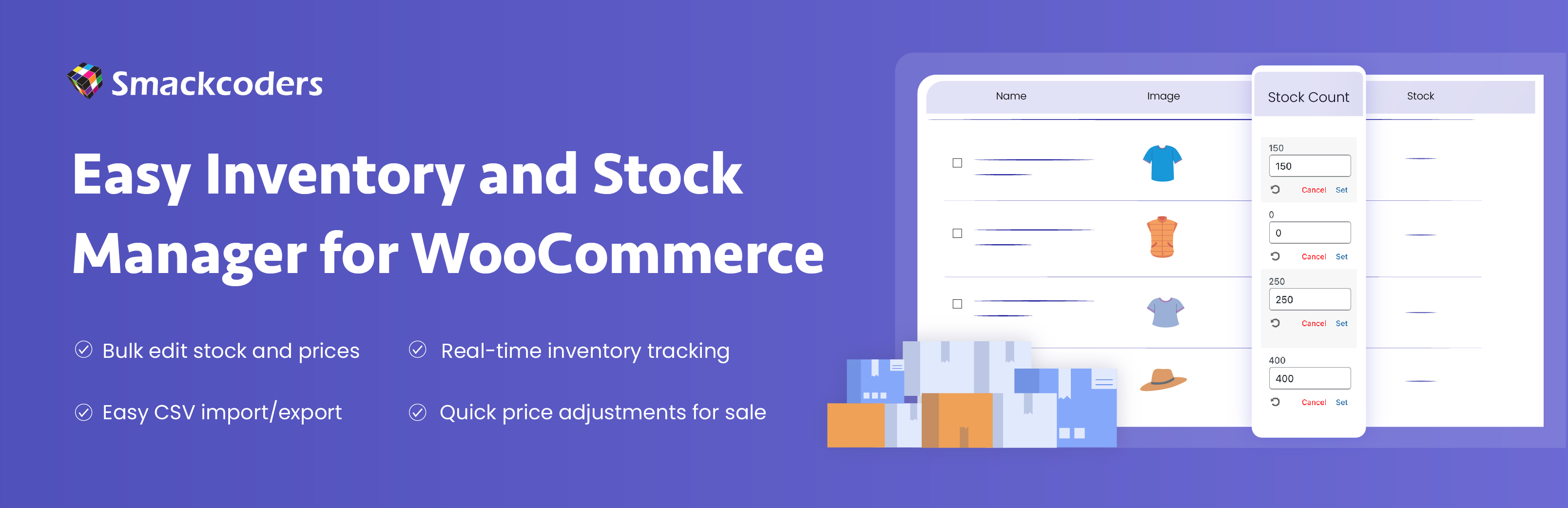
Easy Inventory And Stock Manager turns the WooCommerce Products screen into a working inventory sheet. Instead of opening product pages one by one to change a price or a quantity, you click a value in the list, type the new one and press Set. Almost everything happens on the standard Products > All Products screen, so there is nothing new to learn.
New in 2.0: inline variation editing, an inventory summary bar, one-click stock filters, review before saving, rollback history and more.
The plugin hands every edit to WooCommerce’s own product functions, so stock status and the price shoppers pay stay consistent with what you enter. Changes are checked against each user’s permissions, and bulk changes are reviewed before they are saved.
Edit faster
- Inline Editing, click a value in the Products list to change regular price, sale price (with optional start and end dates), stock count, sold individually, low stock threshold, weight, height, width, length or shelf location, then press Set to save.
- Variations in place: a Variations link on variable products opens each variation as its own row under the parent. Edit its price, sale price, stock, low stock threshold, weight, dimensions and shelf location without opening the product. The parent’s price range and stock status update straight away.
- Minus and plus stock buttons: small buttons beside the stock count change the quantity by one, or by five with Shift-click. Quick clicks are combined into a single save.
- Sticky table header: column names stay visible while you scroll a long product list, and the product name stays pinned when you scroll sideways.
Find problem products
- Inventory summary bar: a strip above the product table showing products, units in stock, stock value at regular price, out of stock and low stock counts.
- One-click stock filters: Out of stock, Low stock and On sale links beside All and Published, each with a live count. Low stock follows each product’s own threshold or your store-wide default.
- Automatic stock status: a saved quantity immediately shows In stock, Out of stock or On backorder, for products and variations alike, so customers can’t order what you don’t have.
Edit safely
- Review Before You Save, a window that lists each product’s current and new value when you edit a whole column and click Save All, with nothing saved until you click Confirm & Apply.
- Rollback History, a rollback icon in any edit box that lists up to the last three earlier values with how long ago each was set, so you can restore one in a click.
- Clear Sale Price Bulk Action, an option in the Bulk actions menu that removes sale prices and sale dates from selected products, including variations, while keeping the old sale prices in rollback history.
Stockroom and data
- Shelf / Bin Location, a column to record where each product or variation is kept in your stockroom, editable in place and included in CSV export and import.
- Inventory Logs, a page under Products, for administrators, that lists every published product with its stock quantity, stock status and returns, counted on stores that use WooCommerce High-Performance Order Storage (HPOS).
- CSV Import and Export, an EISM Import | Export panel beside Screen Options to export stock data by product type and category with the columns you choose, or import a CSV that updates the product with the same SKU or creates a new simple product.
Use cases
- Running a sale: edit the Sale Price column for the whole line and check every change in the review window before it’s saved. When the sale ends, select the products and choose Clear sale price from Bulk actions.
- Receiving a delivery: click the Low stock filter to list what needs restocking, then raise quantities with the plus button (Shift-click for 5) or by typing the new count.
- Selling sizes and colours: open a T-shirt’s variations from the product list and update the price and stock of each size in one place, without expanding a single panel.
- Fixing a mistake: typed the wrong price? Open the cell, click the rollback icon and restore the earlier value.
Who it is for
- WooCommerce store owners who update prices and stock often
- Shop managers who receive deliveries and handle returns
- Stores that sell variable products
- Stores that run regular promotions and sales
- Agencies and freelancers who manage client stores
Pro features
Easy Inventory And Stock Manager Pro is a separate, optional plugin for stores that need accountability, safety and planning on top of fast editing. Pro works on its own, so if the free plugin is installed, deactivate it before you activate Pro.
- Stock Audit Log, a dated record of stock changes with the person, the old and new quantity and a reason, with filters and CSV export.
- Undo Bulk Changes, a one-click way to reverse a whole bulk edit for two hours after it was made.
- Days of Supply, a column that estimates how long stock will last, based on the last 30 days of sales.
- Field Permissions, which lets each staff role edit, only view, or not see stock quantity, prices, and SKU with dimensions.
- Adjust Prices by Percentage, to raise, lower or set sale prices across selected products, with optional .99, .95 or whole-number rounding.
- Barcode Scan Mode, which adds one unit of stock per scan and records each scan in the audit log.
- Export This View, a CSV of only the products matching your current search and filters, with the columns you choose.
- Suppliers and Reorder List, supplier details plus a reorder spreadsheet grouped by supplier, with a suggested quantity to order.
- Dead Stock Report, a list of products that have not sold in 60, 90 or 180 days, with the money tied up and a discount tool.
- Keyboard Shortcuts, to fill in the product table like a spreadsheet with Tab, Enter and Esc.
None of this is required to use the free plugin well. It exists for stores that have outgrown everyday editing.
How it works
- Install and activate WooCommerce, then install and activate the plugin
- Go to Products, then All Products
- If a column is not visible, open Screen Options and tick it
- Click a value, type the new one and press Set
- Use Variations, the stock filters and the summary bar to find and fix problem products
- Edit a whole column with the pencil icon, review the changes and confirm
- Use the rollback icon if you need an earlier value back
Requirements
- WordPress 5.0 or later
- PHP 7.4 or later
- WooCommerce installed and active
The plugin is compatible with WooCommerce High-Performance Order Storage (HPOS) and is tested up to WordPress 7.1.
Links and support
Screenshots
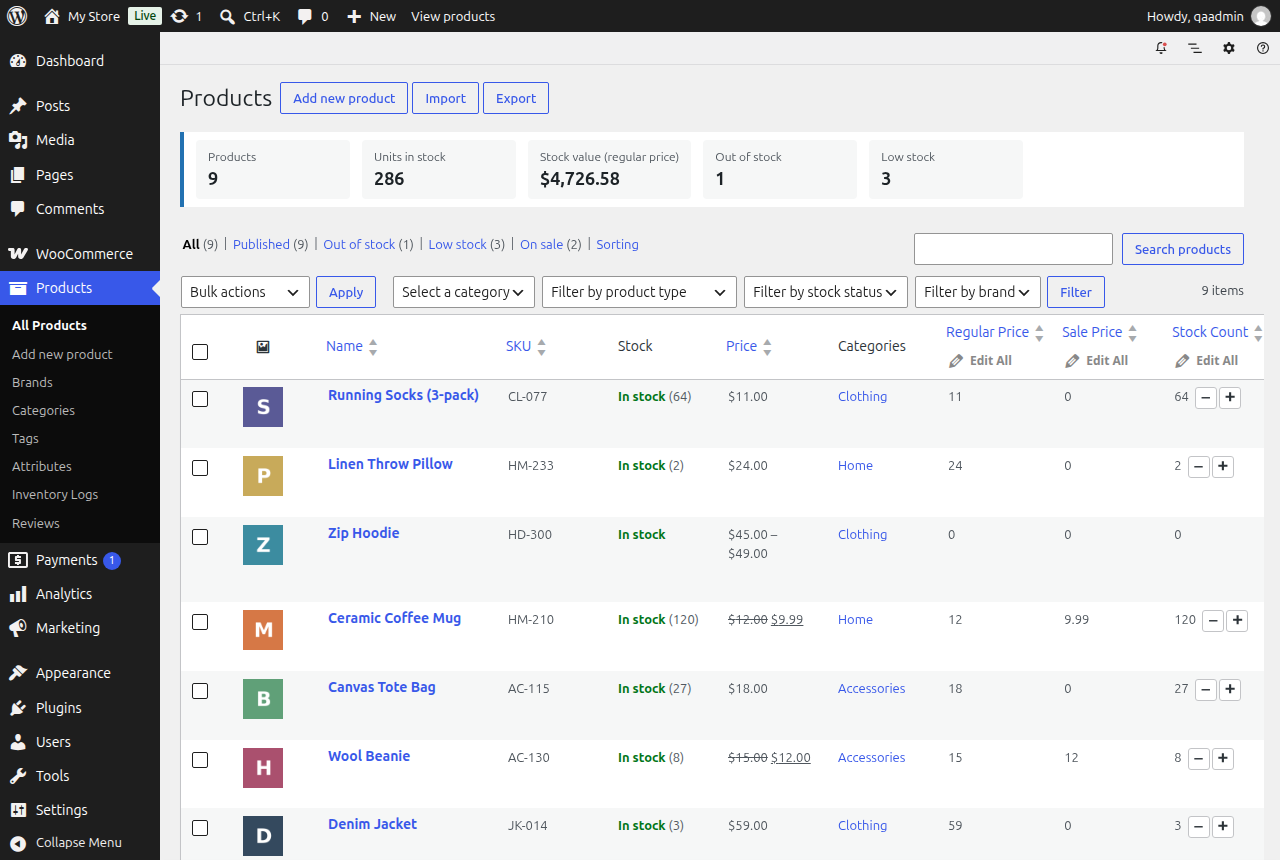
Inventory summary bar and one-click stock filters
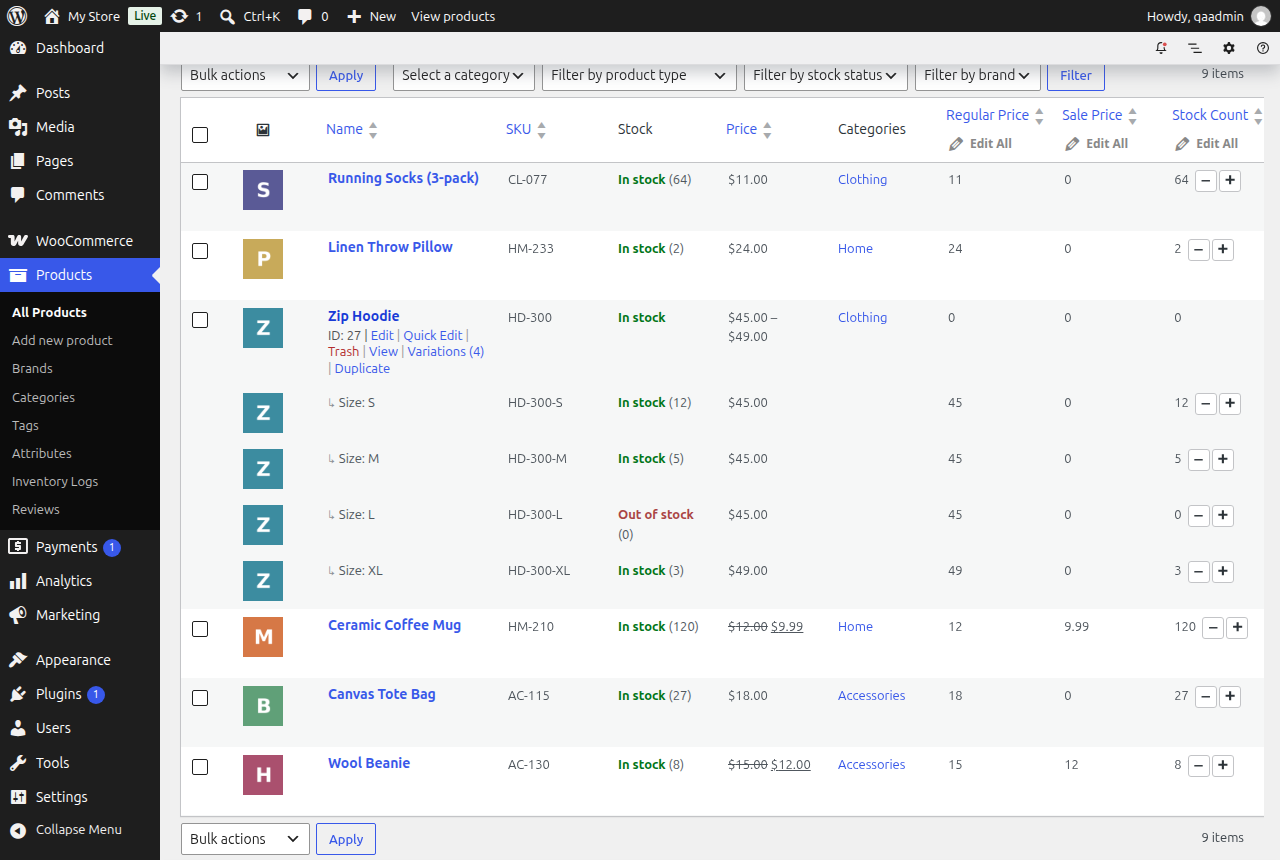
Edit variations inline from the Products list

Review changes before Save All
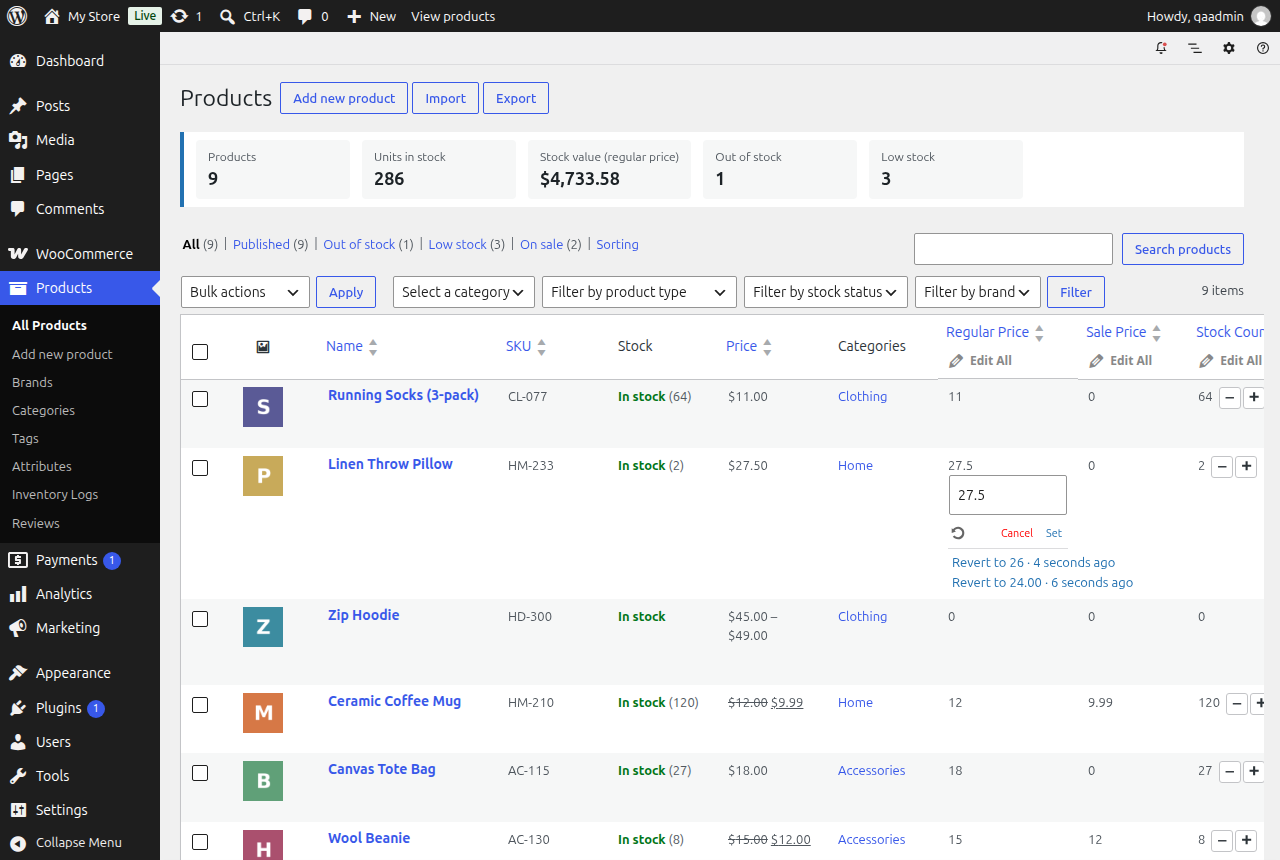
Rollback history showing the last three values

Low stock filter with Shelf / Bin location
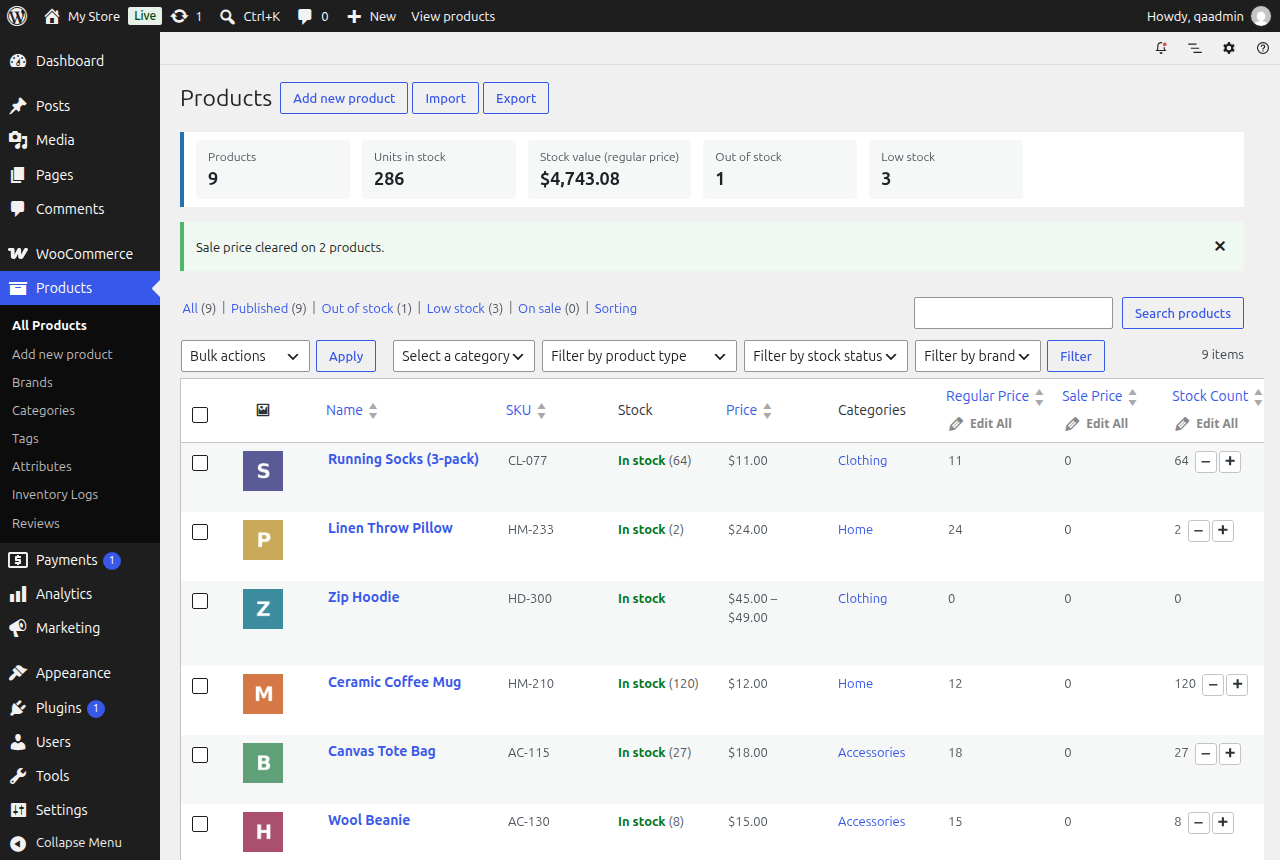
Clear sale price bulk action