
Enhanced Addon for Contact Form 7 extends Contact Form 7 with additional form styling and field customization options.
Customize the appearance of your Contact Form 7 forms directly from the WordPress admin without editing theme files or writing custom CSS. Use the built-in live preview to see changes while configuring your form.
The addon also provides enhanced form fields and label features, including a Flatpickr date and time picker, international telephone country codes, field label icons, tooltips, and floating labels.
Each Contact Form 7 form can have its own customization settings, making it easier to create forms that match the design of different pages or sections of your website.
Video Tutorials
Watch these videos to see how to use the plugin’s enhanced features.
Advanced Flatpickr Date & Time Field
Watch how to configure the Flatpickr date and time field.
Country Code Telephone Field
Watch how to add a telephone field with country code selection.
Label Icons, Tooltips & Floating Labels
Watch how to add label icons, tooltips, and floating labels.
Key Features
- Contact Form 7 Form Styling – Customize the appearance of your Contact Form 7 forms without writing custom CSS.
- Live Form Preview – Preview styling changes directly while editing your form.
- Per-Form Customization – Configure different styling settings for individual Contact Form 7 forms.
- Responsive Styling – Configure supported styling options for different device sizes.
- Form Fields Styling – Customize supported colors, typography, spacing, borders, radius, shadows, and other field properties.
- Button Styling – Customize button alignment, typography, colors, spacing, borders, radius, and box shadow.
- Form Message Styling – Customize success and error message appearance.
- Flatpickr Date & Time Field – Add an enhanced date and time picker to Contact Form 7 forms.
- Telephone Country Code Field – Add international telephone inputs with selectable country codes.
- Field Label Icons – Add icons to Contact Form 7 field labels.
- Label Tooltips – Add tooltip text to field labels.
- Floating Labels – Create modern floating-label form fields.
- Reset Controls – Reset individual settings or restore all addon settings to their defaults.
- Easy Contact Form 7 Integration – Configure addon features directly from the Contact Form 7 editor.
Requirements
- WordPress 5.0 or later
- PHP 5.6 or later
- Contact Form 7
Contact Form 7 must be installed and activated to use this plugin.
Usage
- Make sure Contact Form 7 is installed and activated.
- Go to Contact > Contact Forms.
- Edit an existing Contact Form 7 form or create a new form.
- Open the Addon Settings tab.
- Configure the available form styling and field options.
- Use the live preview to review your changes.
- Save the form.
Addon styling settings are managed separately for each Contact Form 7 form.
Enhanced Fields
Flatpickr Date & Time Field
The Flatpickr field provides a modern date and time picker for Contact Form 7.
It can be used for forms that require visitors to select dates, times, or both.
Telephone Country Code Field
The Telephone Country Code Field adds international country code selection to telephone inputs.
Visitors can select a country code when entering their phone number, making the field suitable for websites that receive submissions from users in different countries.
Label Features
Field Label Icons
Add an icon to supported Contact Form 7 field labels to improve visual identification and form usability.
Label Tooltips
Add tooltip text to field labels to provide additional information or instructions to visitors.
Floating Labels
Enable floating labels for supported fields to create a modern form input layout while keeping field labels visible during interaction.
External Services
This plugin includes or integrates with the following libraries and services:
Flatpickr
Flatpickr is used for date and time field functionality.
- Source: https://github.com/flatpickr/flatpickr
- Local Paths:
assets/lib/flatpickr/js/flatpickr.min.js,assets/lib/flatpickr/css/flatpickr.min.css
Intl-Tel-Input
Intl-tel-input is used for country code selection functionality.
- Source: https://github.com/jackocnr/intl-tel-input
- Local Paths:
assets/vendor/intl-tel-input/
Dragwyb Feedback API
The Dragwyb Feedback API is used to submit optional user feedback and diagnostic reports directly to the plugin developers from the WordPress admin dashboard.
Data is only sent when the site administrator explicitly submits the feedback form.
- Service: https://feedback.dragwyb.com
- Privacy Policy: https://dragwyb.com/privacy-policy/
Privacy
Dragwyb Forms may store form submissions and related form data in the WordPress database.
Depending on the features configured by the website administrator, form entries may contain information submitted by website visitors.
Website administrators are responsible for configuring their forms and privacy settings according to their applicable privacy and data protection requirements.
Additional Information
Compatibility
Enhanced Addon for Contact Form 7 requires Contact Form 7 and is designed to work with WordPress 5.0 and later.
Source Code
The plugin includes development and production assets within the admin-panel/src and assets/build directories.
admin-panel/srccontains development versions of JavaScript and CSS assets.assets/buildcontains production-ready assets used by the plugin.
The source code is also available on GitHub:
https://github.com/aniketji07/enhanced-addon-for-contact-form-7
Screenshots
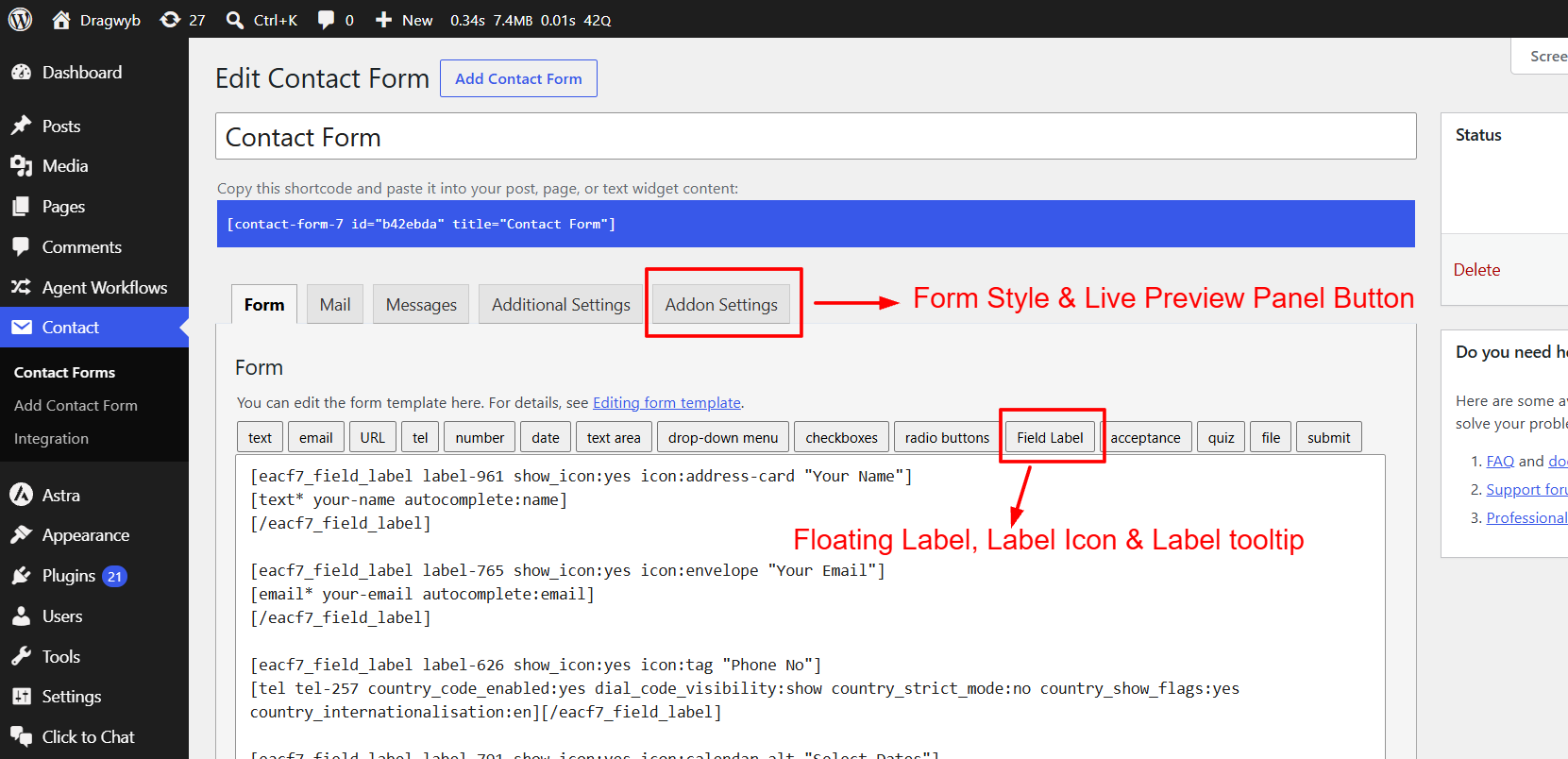
Enhanced Addon for Contact Form 7 Addon Settings.
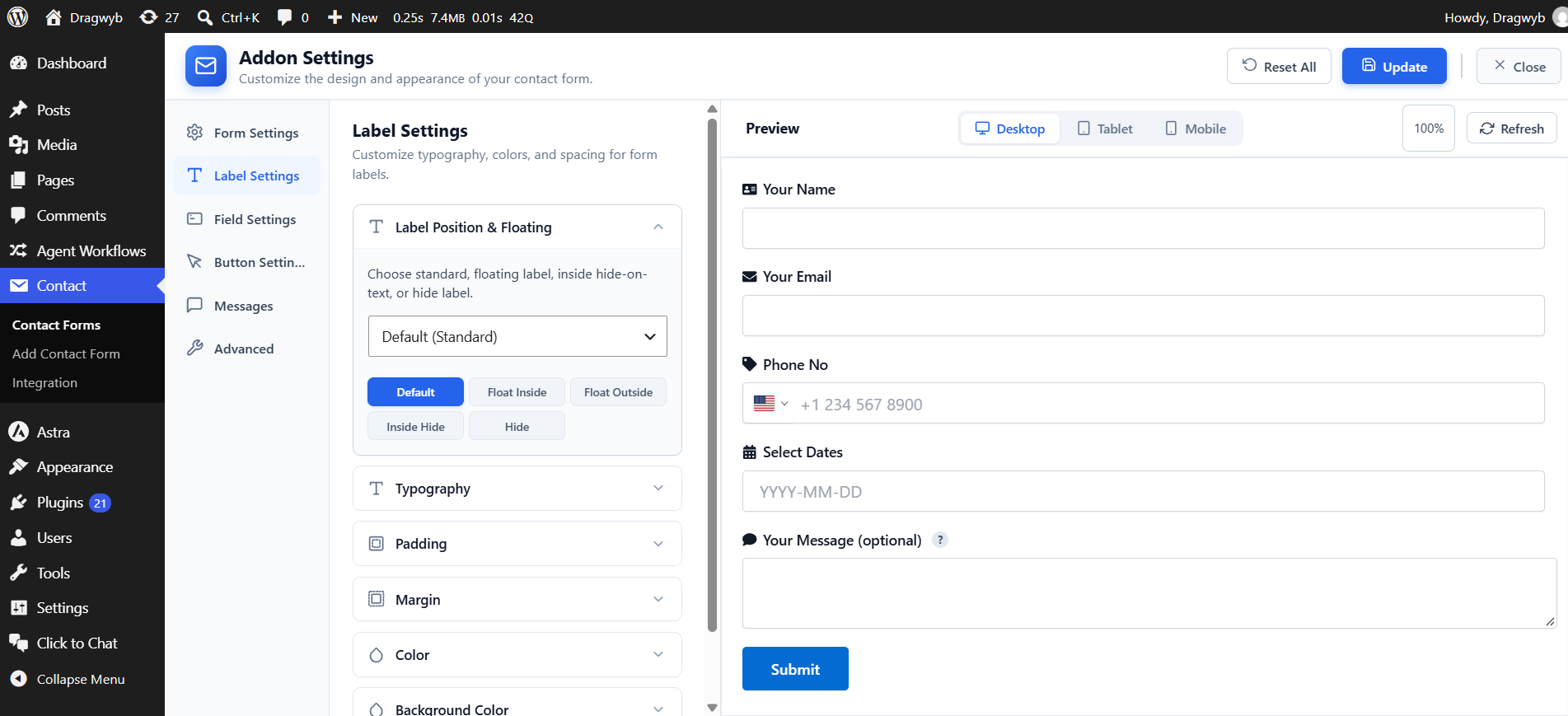
Contact Form 7 form styling and customization controls.
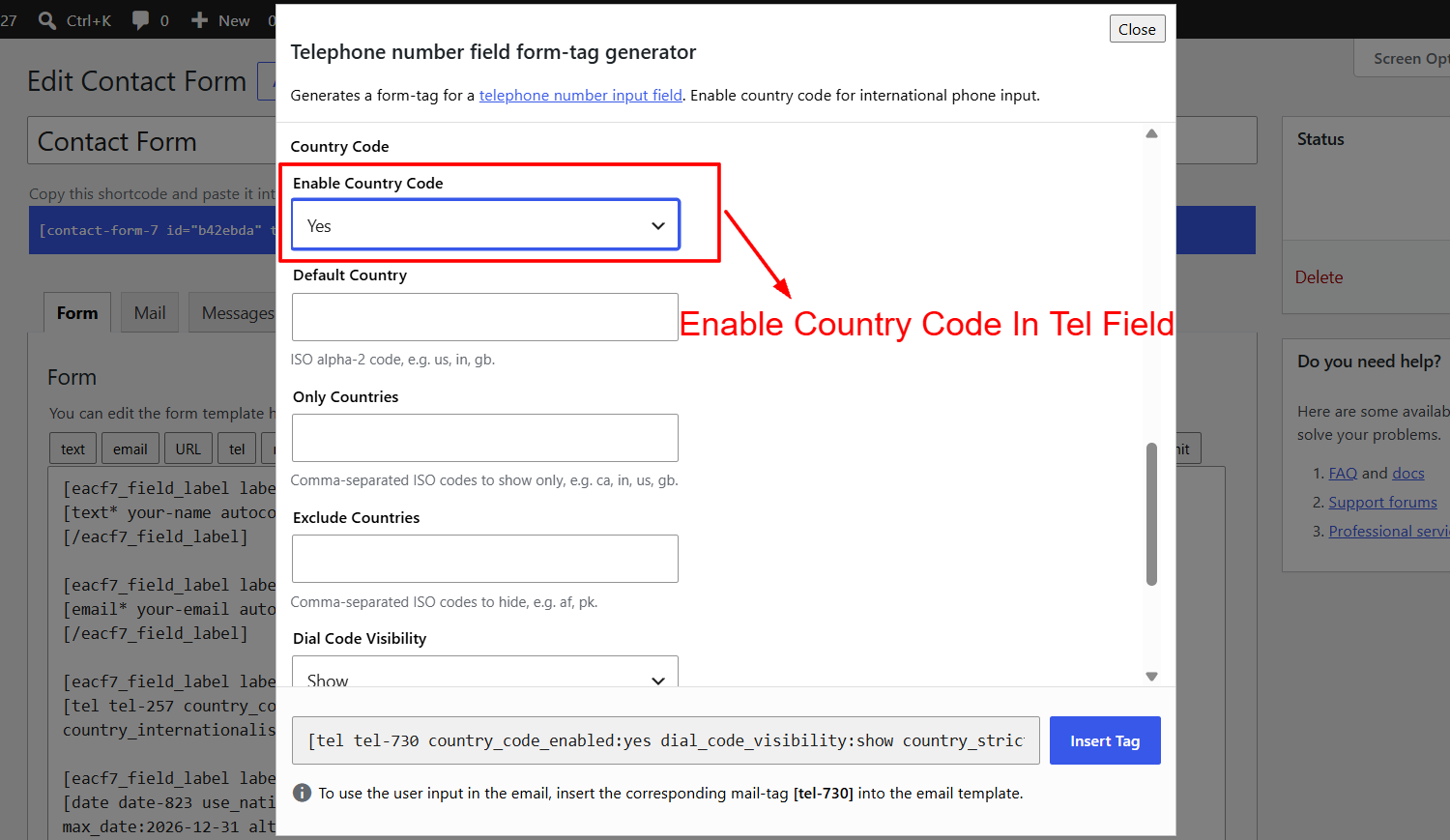
Telephone Country Code option.
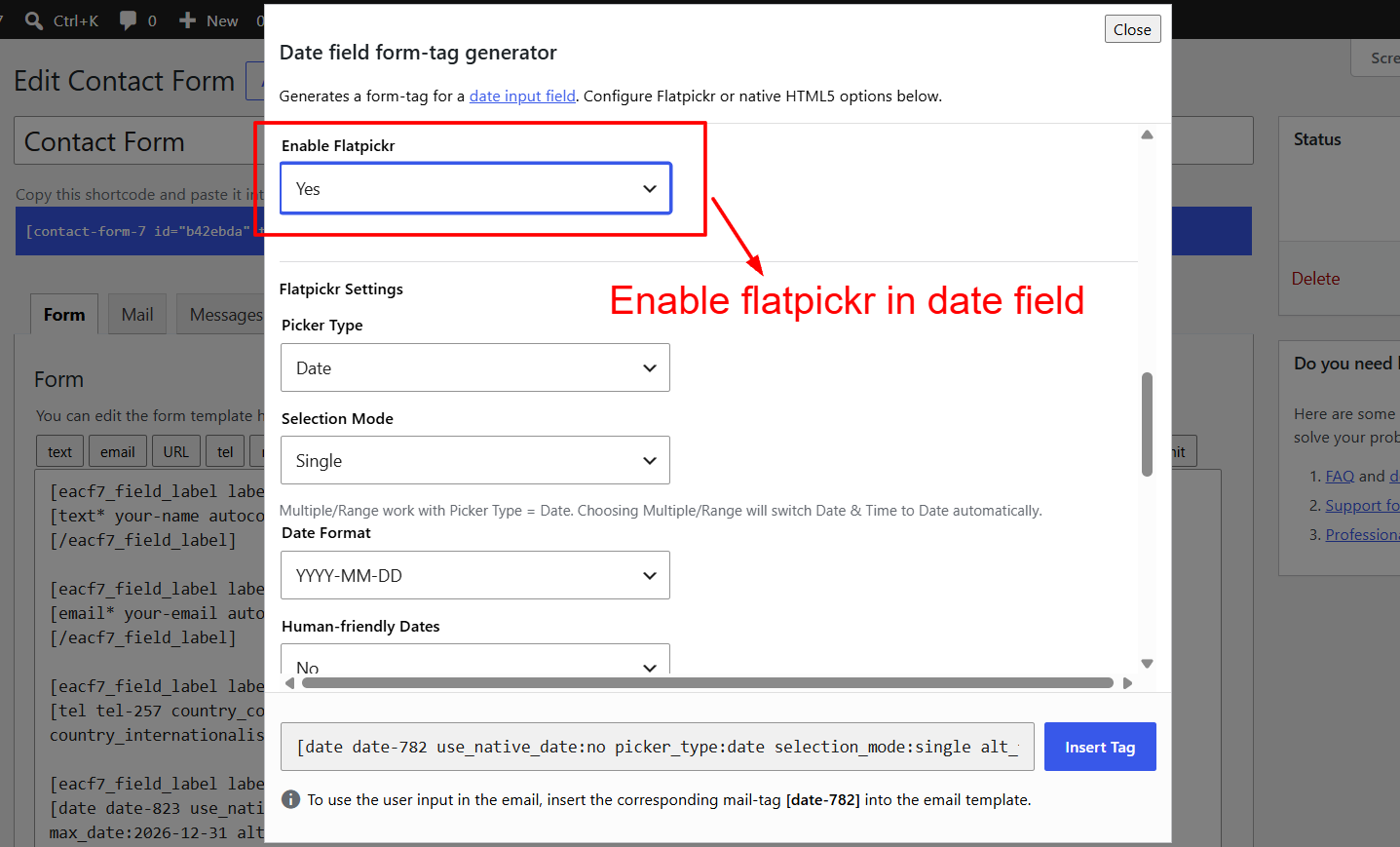
Flatpickr date and time field option.
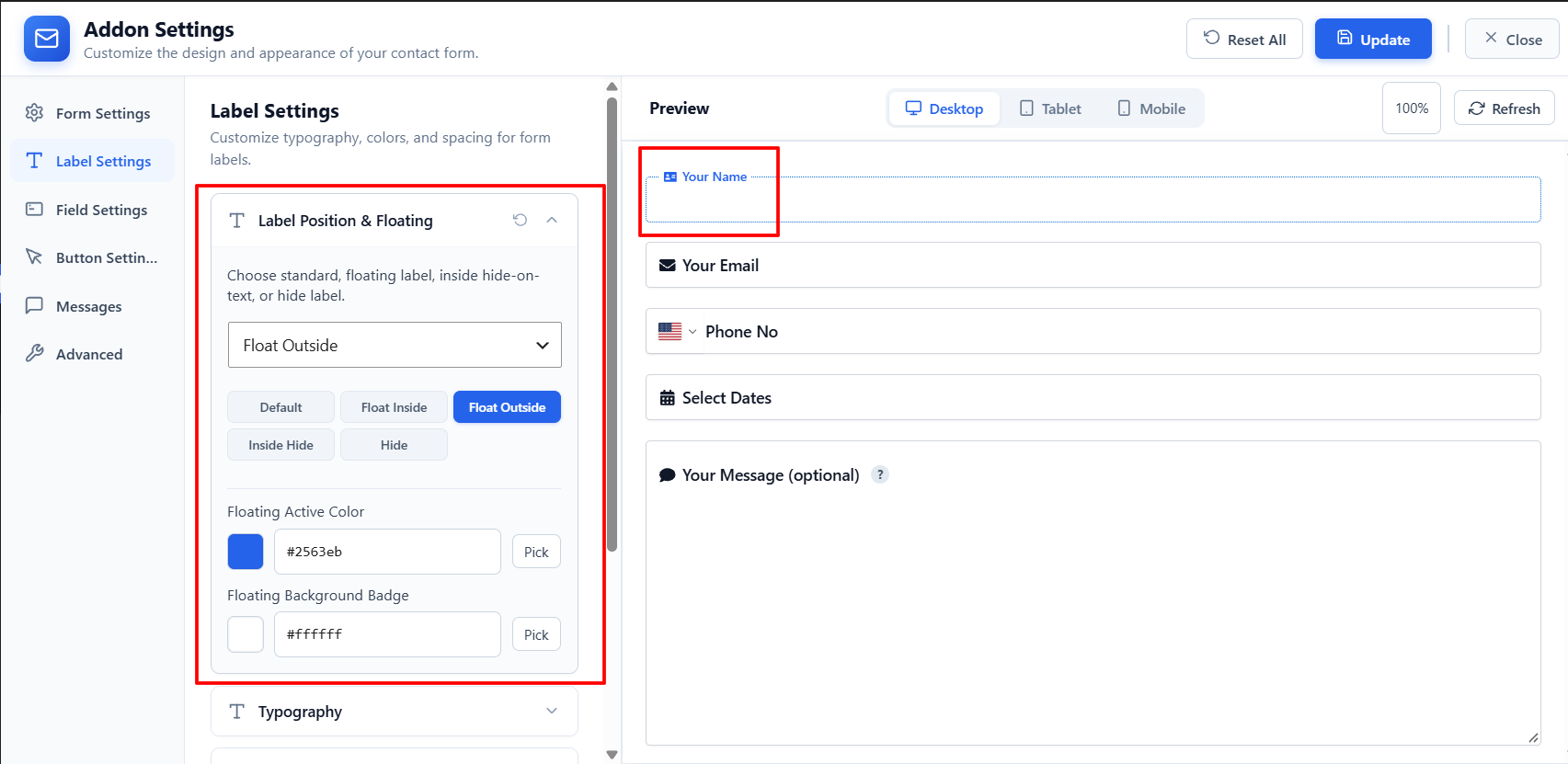
Floating Label Preview.