
Evosolve Marketing Studio turns what is already on your website into social media posts. Pick a page, post or WooCommerce product, and the Studio drafts the post for you: AI writes the caption, headline, button text and hashtags from the page’s real facts (it never invents prices or claims), and helps you make the picture. You edit anything, approve it, and publish it to your Facebook Page and its linked Instagram account.
Pictures. Ask your AI provider for a picture or a background based on the page’s facts, or use a clean brand design, free stock photos (Openverse, Pexels, Pixabay) or your own Media Library. AI pictures are illustrations: they do not show your real product, and you confirm that before posting.
A full-screen studio. Templates, layers, carousels, “Ideas” with three ready designs, one-click caption tools, a brand kit filled in from your own site, and phone previews with safe zones.
Your keys, your costs, your data. Bring your own AI key: OpenAI, Google Gemini, Anthropic Claude, Amazon Bedrock, Mistral, xAI Grok, Meta, DeepSeek, OpenRouter or any compatible address. Setup guides are linked from Settings. The Studio shows the estimated cost before every AI action and lets you set a monthly spend cap. With a key set, it drafts with AI as soon as you pick a page (switch this off in the More menu). Without AI, it drafts from templates. There is no account with us, no licence key and no tracking.
Honest by design. AI pictures carry a machine-readable marker, and photorealistic ones a visible label, as the EU AI Act requires.
Publishing you can trust. Connect your own free Meta app, so your tokens never leave your site. Share now, optionally share new posts automatically after a short delay, test everything first in a private test mode, and follow it all on one Activity screen with plain statuses, failure reasons and a CSV export. Picking a date and time for a post is added by Marketing Studio Pro, a separate paid add-on: https://aipluginfactory.com/marketing-studio/pro/
External services
The plugin contacts a service only for a feature you use. Meta is contacted after you connect your Page. An AI provider is contacted only after you save a key for it. The stock photo services are contacted when you search the Studio’s Stock tab; Openverse needs no key. Nothing else is contacted, and nothing is sent to us.
When the AI providers are contacted. With an AI key saved, the Studio drafts a post with AI as soon as you pick a page. This automatic draft is on by default and you can switch it off in the Studio’s More menu (“Draft posts automatically with AI”); a one-time note explains it the first time. Every other AI action runs only when you press its button: the caption tools, rewrites, Ideas, “Suggest a caption” in the post editor, “Generate image” and “Generate background”, “Send a test” and, for Amazon Bedrock, “Test this model” and “Load models from your account”.
What the AI providers receive.
- Text requests (the draft, the caption tools, Ideas, rewrites and “Suggest a caption”): the page title; a short excerpt of the page text, at most 1,500 characters, with web addresses and email addresses removed; your brand tone words and the words you never want written; and the site language. The draft also receives the list of design templates the AI may choose from. A rewrite or caption tool also receives the current caption or wording and the hashtags already used. “Suggest a caption” in the post editor also sends the network and the caption template. The plugin adds no prices, orders, customer data or visitor data; only the page’s own title and text are sent.
- The photo: if you tick “Let the AI look at the photo” in Settings > AI and your provider can read pictures (OpenAI, Google Gemini or Anthropic Claude), “Suggest a caption” in the post editor also sends the featured image. Nothing else sends a photo.
- Picture requests (“Generate image” and “Generate background”, OpenAI, Google Gemini, xAI, Meta Model API, Mistral, OpenRouter and Amazon Bedrock image models only): the picture prompt shown in the Studio, which you can read and edit before you press the button. It is built from the page title (at most 200 characters), one sentence of the excerpt and your brand colours as plain colour words. The provider returns an image, which is saved to your Media Library and marked as AI-generated.
- “Send a test” sends only the two words “Say OK”.
Meta Graph API – graph.facebook.com (and the www.facebook.com login dialog)
Used to check that your App ID and App secret belong together, to connect your Facebook Page, to check the connection, and to publish the posts and images you chose to share to your Facebook Page and linked Instagram account.
Data sent: your App ID and App secret (the app check and the token exchange only; sent from your server, never shown or logged), access tokens, the caption text, the post link, and the image address (Meta downloads the image from your site when publishing).
Terms: https://developers.facebook.com/terms/ and https://developers.facebook.com/devpolicy/
Privacy: https://privacycenter.instagram.com/policy (the Meta Privacy Policy, which covers Facebook)
Evosolve connection service – aipluginfactory.com (optional, off by default)
Used only if you switch on “One-click connect (preview)” in Settings and then press “Connect with Facebook (one click)”. It lets you sign in to Facebook through the Evosolve Marketing Studio app instead of creating your own Meta app. It is never contacted on activation or in the background, and posts are published from your site straight to Meta, not through this service. Connecting with your own Meta app does not use it.
Data sent to aipluginfactory.com when you press the button: your site’s receiving address, a one-time public key and a random value made by your site, and whether Instagram and results permissions are wanted. After you approve at Facebook, Facebook’s one-time code also reaches the service, which exchanges it for your access with our Meta app. The access (your Page’s token) is encrypted for your site’s one-time key, so only your site can open it, and is sent back to your site in a form post. The service does not store your Facebook ID, Page, token or site address; it keeps only a short-lived counter per hashed IP address to prevent abuse and does not log tokens.
Terms: https://aipluginfactory.com/terms/
Privacy: https://aipluginfactory.com/privacy-policy/
Your own AI endpoint (optional, user-configured)
Used when you choose the Custom or Local / other preset, enter a base address and save a key, if one is needed. The automatic draft and the AI buttons then send the standard text request to that address. Terms and privacy: those of the provider you run or choose; check that your plan does not train on your data.
Anthropic (Claude) – api.anthropic.com
Used when you choose the Claude (Anthropic) preset and save an API key.
Data sent: the standard text request (see “What the AI providers receive” above). Claude can also receive the featured photo, as described above.
Terms: https://www.anthropic.com/legal/commercial-terms
Privacy: https://www.anthropic.com/legal/privacy
OpenAI (ChatGPT) – api.openai.com
Used when you choose the ChatGPT (OpenAI) preset and save an API key.
Data sent: the standard text request (see “What the AI providers receive” above). OpenAI can also receive the featured photo and the picture prompt, as described above. Pictures: the picture prompt (see above) is sent, and the picture that comes back is saved to your Media Library and marked as AI-generated.
Terms: https://openai.com/policies/terms-of-use
Privacy: https://openai.com/policies/privacy-policy
Google Gemini – generativelanguage.googleapis.com
Used when you choose the Google Gemini preset and save an API key.
Data sent: the standard text request (see “What the AI providers receive” above). Gemini can also receive the featured photo and the picture prompt, as described above. Pictures: the picture prompt (see above) is sent, and the picture that comes back is saved to your Media Library and marked as AI-generated. Picture generation needs billing switched on for your Google AI Studio project; text works on Google’s free tier.
Terms: https://policies.google.com/terms
Privacy: https://policies.google.com/privacy
xAI (Grok) – api.x.ai
Used when you choose the Grok (xAI) preset and save an API key.
Data sent: the standard text request (see “What the AI providers receive” above). xAI can also receive the picture prompt, as described above. Pictures: the picture prompt (see above) is sent, and the picture that comes back is saved to your Media Library and marked as AI-generated.
Terms: https://x.ai/legal/terms-of-service-enterprise
Privacy: https://x.ai/legal/privacy-policy
Mistral – api.mistral.ai
Used when you choose the Mistral (EU provider) preset and save an API key.
Data sent: the standard text request (see “What the AI providers receive” above). Mistral can also receive the picture prompt, as described above. Pictures: the picture prompt (see above) is sent when you press Generate image or Generate background, and the generated image is downloaded from the address Mistral returns (Mistral’s files endpoint on api.mistral.ai, or Mistral’s own image storage at mistralaiblackforestprod.blob.core.windows.net), saved to your Media Library and marked as AI-generated.
Terms: https://mistral.ai/terms
Privacy: https://legal.mistral.ai/terms/privacy-policy
Amazon Web Services – Amazon Bedrock (bedrock-runtime.REGION.amazonaws.com and bedrock.REGION.amazonaws.com)
Used when you choose the Amazon Bedrock (AWS) preset and save a Bedrock API key and a region. The plugin calls the Bedrock Converse API at the region you chose for text, the InvokeModel API (bedrock-runtime.REGION.amazonaws.com/model/MODEL/invoke) at the region you chose when you generate a picture with a Bedrock image model, and the model list endpoints when you press “Load models from your account”.
Data sent: the standard text request (see “What the AI providers receive” above), your Bedrock API key as a Bearer token, and the model id. Some model ids route a request to other AWS regions inside the same geography, or worldwide for “global” profiles; the model list says so. When you generate a picture, the picture prompt (your description of the picture) is sent to bedrock-runtime in your region, and the picture comes back. Your own AWS account and its terms govern what Amazon and the model maker do with the data.
Terms: https://aws.amazon.com/service-terms/
Privacy: https://aws.amazon.com/privacy/
Meta Model API – api.meta.ai
Used when you choose the Meta Model API preset and save an API key.
Data sent: the standard text request (see “What the AI providers receive” above). Meta Model API can also receive the picture prompt, as described above. Pictures: the picture prompt (see above) is sent, and the picture that comes back is saved to your Media Library and marked as AI-generated.
Terms: https://dev.meta.ai/legal/terms-of-service
Privacy: https://privacycenter.instagram.com/policy (the Meta Privacy Policy)
OpenRouter – openrouter.ai
Used when you choose the OpenRouter preset and save an API key. OpenRouter forwards the request to the model you selected.
Data sent: the standard text request (see “What the AI providers receive” above). When you choose an image model, OpenRouter also receives the picture prompt (see above) and returns the picture, which is saved to your Media Library and marked as AI-generated. “Load models from your account” sends your key to openrouter.ai to read the list of image models.
Terms: https://openrouter.ai/terms
Privacy: https://openrouter.ai/privacy
DeepSeek – api.deepseek.com
Used when you choose the DeepSeek preset and save an API key.
Data sent: the standard text request (see “What the AI providers receive” above).
DeepSeek processes data in China. If you run an EU business, check whether that suits your data protection duties before you use this preset.
Terms: https://cdn.deepseek.com/policies/en-US/deepseek-terms-of-use.html
Privacy: https://cdn.deepseek.com/policies/en-US/deepseek-privacy-policy.html
Openverse – api.openverse.org
Used when you search the Studio’s Stock tab with Openverse as the source. Openverse needs no key and no account.
Data sent: the search words you type. A photo you choose is downloaded to your Media Library together with its author, source and licence.
Terms: https://docs.openverse.org/terms_of_service.html
Privacy: https://wordpress.org/about/privacy/
Pexels – api.pexels.com
Used when you search the Studio’s Stock tab with Pexels as the source, after you add your own free Pexels API key. Pexels has paused issuing new API keys at the time of writing, so only existing keys work.
Data sent: the search words you type, and your Pexels API key in the request header. A photo you choose is downloaded to your Media Library together with its author, source and licence.
Terms: https://www.pexels.com/terms-of-service/ (licence: https://www.pexels.com/license/)
Privacy: https://www.pexels.com/privacy-policy/
Pixabay – pixabay.com/api/
Used when you search the Studio’s Stock tab with Pixabay as the source, after you add your own free Pixabay API key.
Data sent: the search words you type, and your Pixabay API key as part of the request address. A photo you choose is downloaded to your Media Library together with its author, source and licence.
Terms: https://pixabay.com/service/terms/ (API documentation: https://pixabay.com/api/docs/)
Privacy: https://pixabay.com/service/privacy/
Privacy
This plugin does not track you: it sends no usage reports, analytics or advertising data anywhere, sets no cookies, and collects no data about your visitors.
Everything is stored on your own site: captions, the network, scheduled and published times, links to the published posts, and the user IDs of who created, shared and approved each post; the Page name with encrypted access tokens in the site settings.
Published and cancelled posts are kept for 365 days and then deleted automatically; you can change this period in Settings (0 keeps them forever). Disconnecting removes the stored tokens. Uninstall deletes the plugin data as described in the FAQ. The standard WordPress personal-data tools can export and erase a user’s posts through the plugin’s exporter and eraser.
Marketing Studio also keeps a time-stamped audit log of actions on your own site (5 years by default, adjustable). It stores content fingerprints (hashes) and user IDs, not the content itself, and it is never sent to us. When a user asks for their data to be erased, their entries are pseudonymised and the records are kept for legal claims.
Screenshots
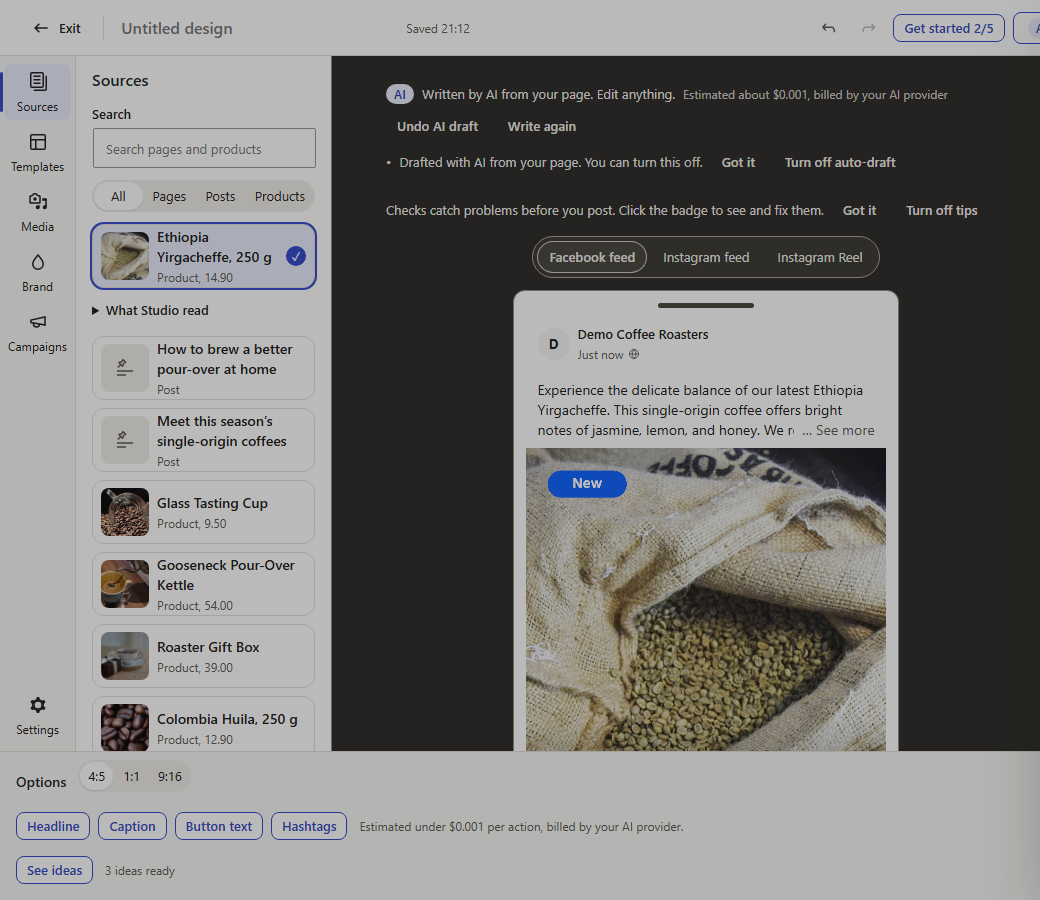
The Studio: pick a page, post or product, and the AI you connect drafts the post from its facts. You can edit anything.
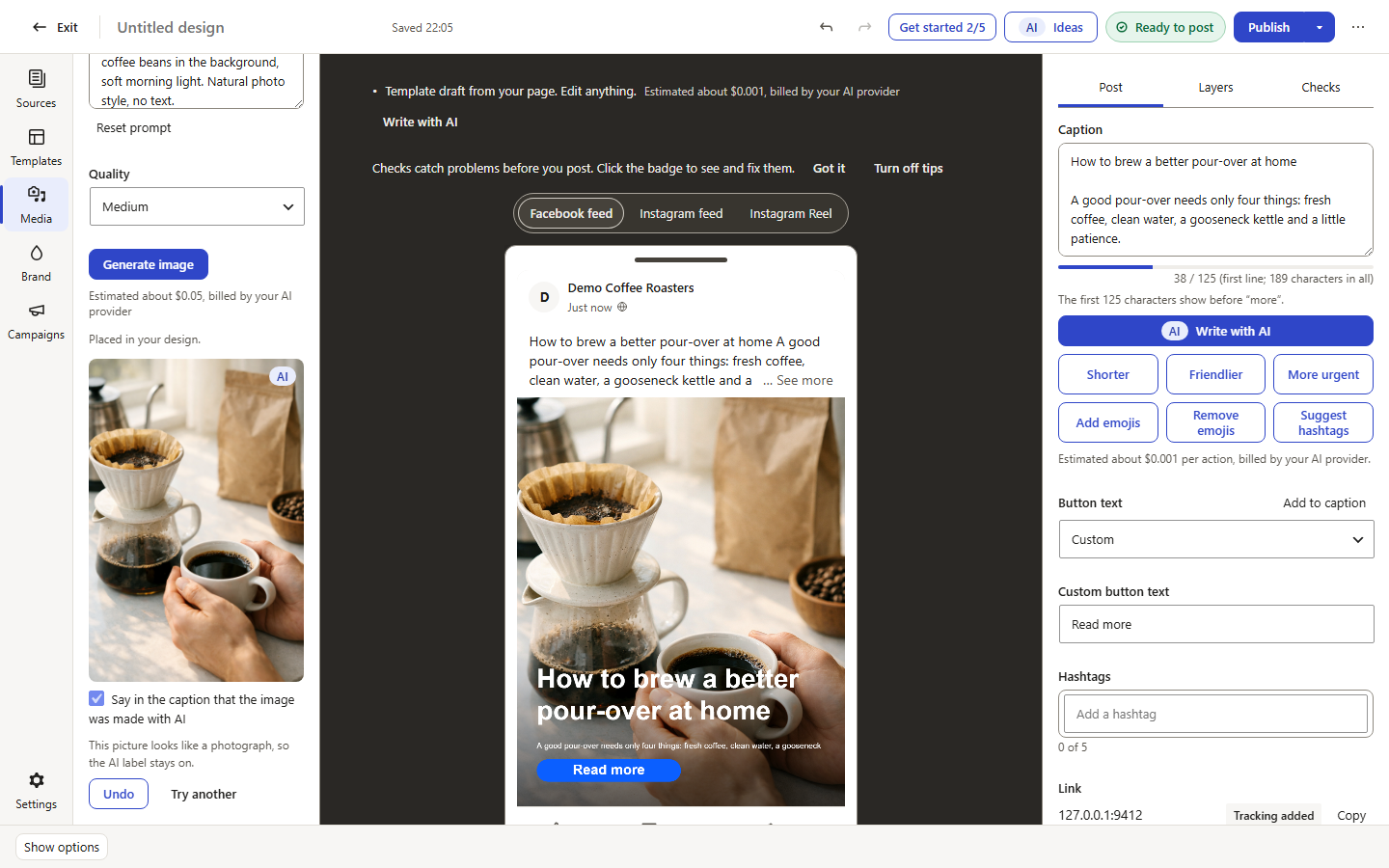
Ask for a picture in your own words: the AI makes it, it is marked as AI, and a line in the caption can say so.
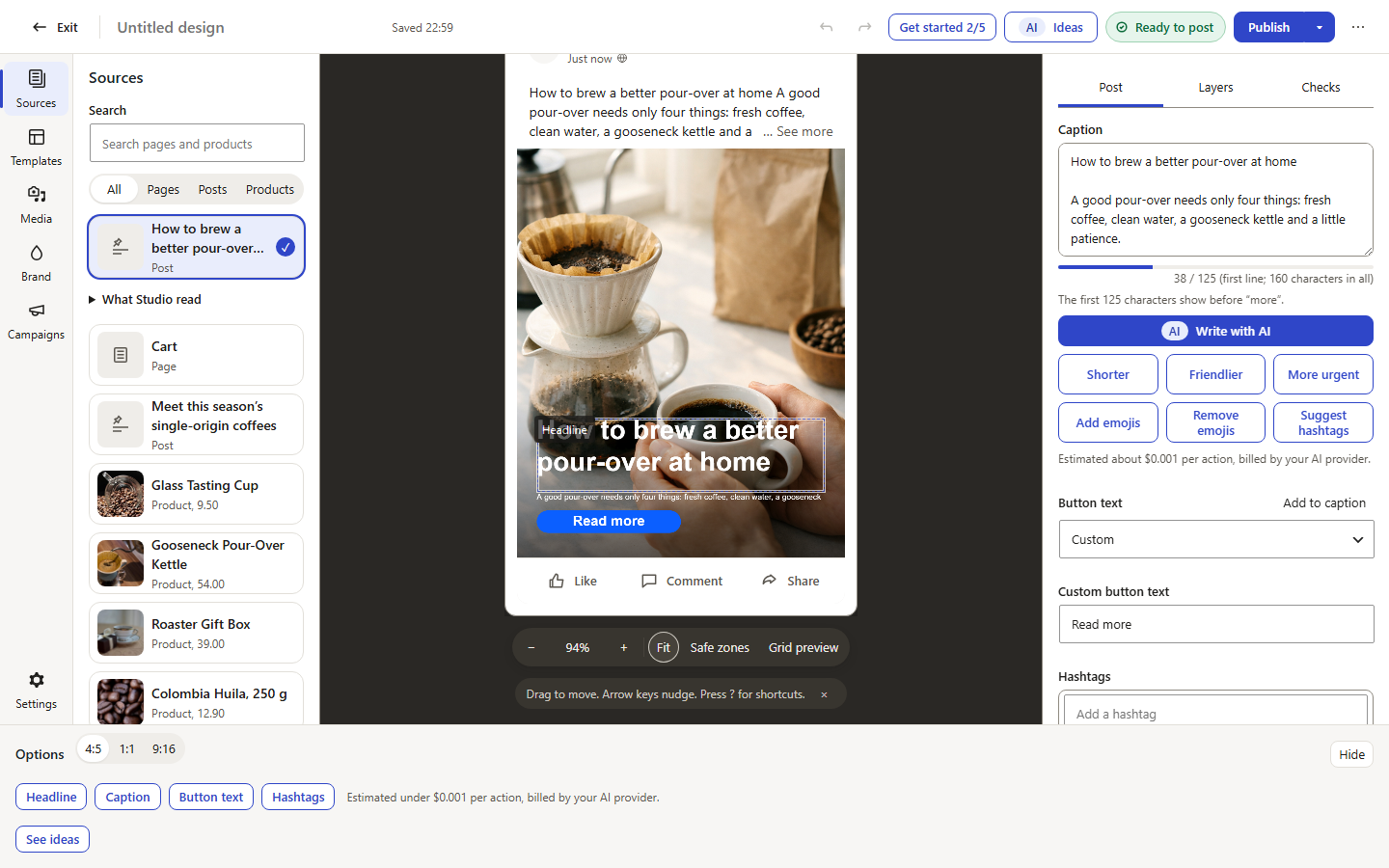
The Facebook preview, before anything is published. (The picture in this example was made with AI.)
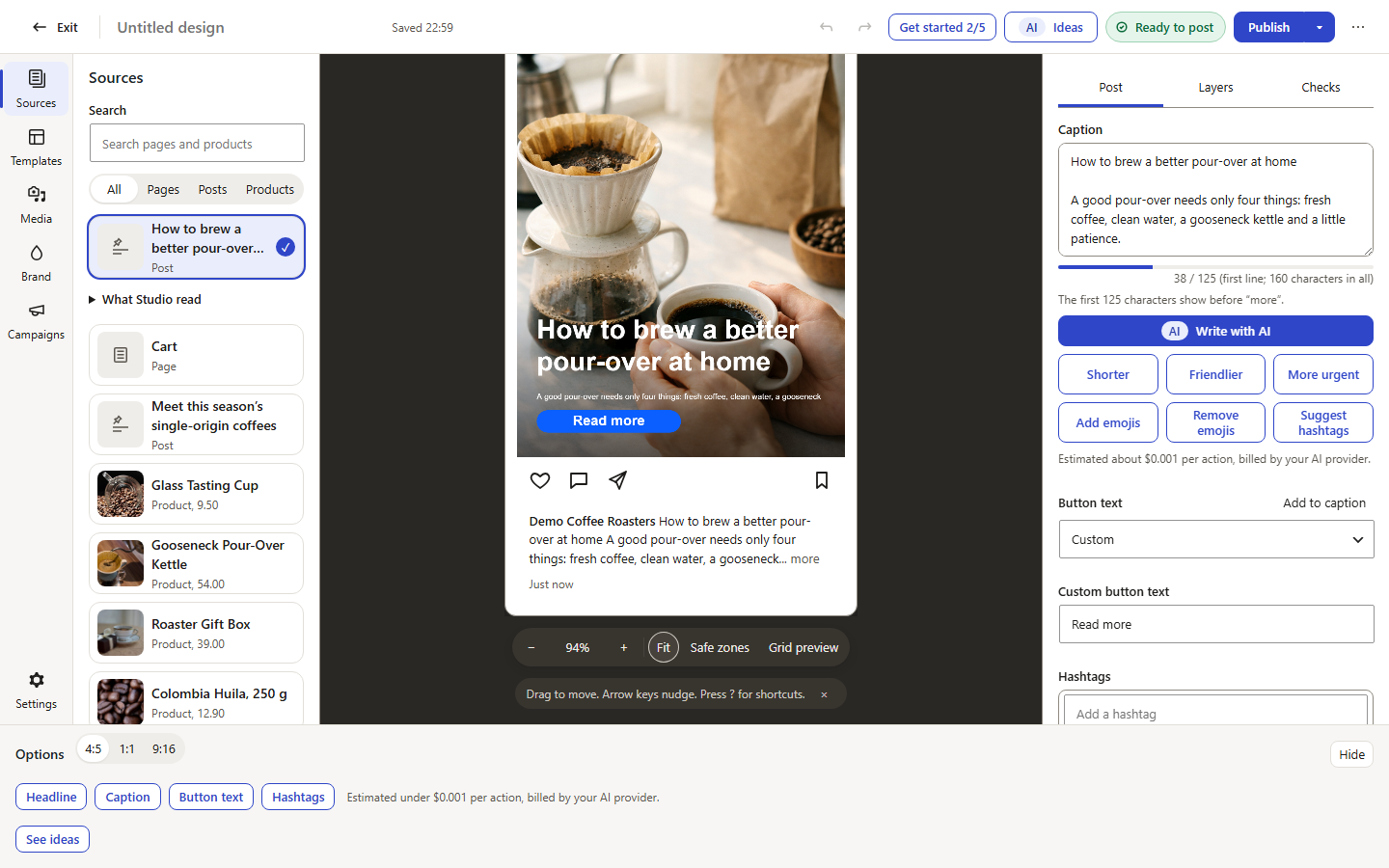
The Instagram preview of the same post. (The picture in this example was made with AI.)
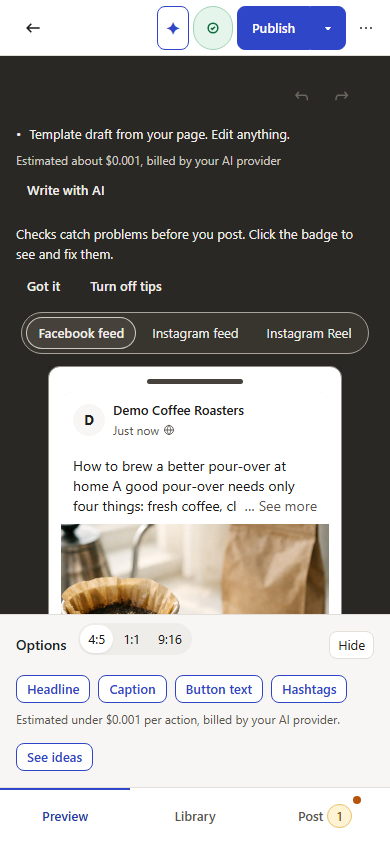
The Studio on a phone.