Most websites lose 80% of their visitors because they don’t find what they are looking for within 5 seconds. Fabio AI ChatBot Lite adds an AI chatbot that answers visitors’ questions and drives them to the right content.
Fabio AI ChatBot Lite is a WordPress plugin that installs an AI-powered chatbot to help visitors quickly find accurate information on your website. Fabio AI ChatBot Lite answers exclusively from your WordPress, WooCommerce, and bbPress content. The chatbot never uses external knowledge or the public internet. Fabio Lite answers in your WordPress installation language, fitting nearly all languages on earth. Icing on the cake : the analytics features.
You choose which AI provider generates the answers: OpenAI, Google Gemini, Mistral AI, or Anthropic (Claude). Bring your own API key from any of these providers. The cost with entry-level models is about 1 USD for 300 conversations (questions and answers).
Video tutorials (“how to” guides) are available on the official YouTube channel
A complete feature comparison list is available here
A live demo site is available at getfreeplugins.com
Key principles:
- ✅ Answers based only on scanned website content
- 🌍 Answers in your WordPress installation language
- 🔄 Manual or automatic site scanning
- 💬 Unlimited conversations
- ⬇️ Unlimited conversation download
Features
- 📄 Full scan of WordPress content
- Blog: scans pages, posts, tags, and categories, check the set-up guide
- Blog: cross-references information across multiple articles, categories, and tags to deliver comprehensive, summarized answers — even across 500+ pages
- 🛒 WooCommerce integration
- WooCommerce: scans products, prices, discounts, reviews, and descriptions
- WooCommerce: finds the cheapest or most expensive product among more than 1000 products, and identifies the ones matching specific features requested by the user
- 💬 bbPress forum support: scans forum topics and replies to provide the most relevant answer to support questions
- 🧩 Custom fields: add the text of your custom fields (ACF, Meta Box, Pods, Toolset, JetEngine) and of your own content types to what the chatbot reads
- Manual scan or automatic daily scan
- Front-end chatbot via shortcode, pop-up bubble, or automatic insertion, check the set-up guide
- Customizable welcome message to increase user engagement, check the set-up guide
- 🎨 Customizable colors, gradients, and bubble position for a chatbot that blends into your design, check the set-up guide
- 🔒 Secure and reliable answer generation
- 🤖 Support for multiple AI providers: OpenAI, Google Gemini, Mistral AI, and Anthropic (Claude) — bring your own API key, check the set-up guide
- OpenAI models: GPT-5.6 Luna, GPT-6 Luna
- Google Gemini models: Gemini 3.1 Flash-Lite, Gemini 3.8 Flash
- Mistral AI models: Mistral Large 3
- Anthropic models: Claude Haiku 5.5, Claude Sonnet 5.5
- Compatible with large, small, and medium-sized AI language models, so you can balance answer quality against API cost depending on your traffic volume
- 📊 Built-in analytics for the last 24 hours, filterable by keyword:
- Conversations: one line per visitor conversation, with the first page, the intent, and which links shown by the chatbot were clicked
- Visitor intent: see what visitors want (purchase, price, delivery, support, comparison, contact, complaint, information) and filter the conversations by intent
- Word cloud: the words visitors type the most, click a word to filter the page
- Optional AI analysis of the intent of older conversations, using your own API key
- Supports any language available on your WordPress installation
- Unlimited CSV export of conversation history
- 🧠 Conversation memory: the chatbot understands short follow-up answers such as “yes” or “the first one” by using the last messages of the conversation
- 🗂️ Conversation kept while visitors browse your site: the chat history survives page changes, and the chatbot opens closed on every new page
Usage
- 🔌 Install and activate the plugin
- 🔑 Configure your own API key in the settings (OpenAI, Gemini, Mistral, or Anthropic)
- 🔍 A site scan runs automatically
- 🖥️ Choose how to display the chatbot: shortcode
[fabioai_chatbot], floating bubble, or automatic insertion - 📊 Analyze the questions asked by users and the answers given by Fabio AI ChatBot Lite
Settings
From the WordPress admin panel, you can:
- 🔍 Launch a manual site scan
- 💬 Define the chatbot welcome message
- 🔑 Configure the OpenAI, Gemini, Mistral, and/or Anthropic API key
- 🤖 Choose the specific AI model per provider (e.g. Claude Haiku 5.5 for lower cost, Claude Sonnet 5.5 for higher accuracy)
- 🎨 Customize the chatbot’s appearance (colors, gradients, bubble position)
- ⬇️ Download conversations
Security & Reliability
- 🔒 Responses are strictly limited to scanned site content
- 🚫 No document uploads
- 🧹 Automatic content cleaning and segmentation
- 🛡️ Protection against invented or out-of-scope answers
External services
This plugin connects to third-party AI providers to generate chatbot responses based on your website’s scanned content. You must provide your own API key for the provider you choose to use; no data is sent unless you configure a key.
— OpenAI —
* 🎯 Usage: Generates chatbot responses when OpenAI is selected as the provider.
* 📤 Data sent: user questions (prompts), the last few messages of the visitor’s current conversation, site content segments used as context, and your API key (for authentication). If you click “Analyze with AI” on the Analytics page, the text of past visitor questions (shortened) is also sent, to label their intent.
* 📄 Terms of Use
* 🔐 Privacy Policy
— Google Gemini —
* 🎯 Usage: Generates chatbot responses when Gemini is selected as the provider.
* 📤 Data sent: user questions (prompts), the last few messages of the visitor’s current conversation, site content segments used as context, and your API key (for authentication). If you click “Analyze with AI” on the Analytics page, the text of past visitor questions (shortened) is also sent, to label their intent.
* 📄 Terms of Service
* 🔐 Privacy Policy
— Mistral AI —
* 🎯 Usage: Generates chatbot responses when Mistral is selected as the provider.
* 📤 Data sent: user questions (prompts), the last few messages of the visitor’s current conversation, site content segments used as context, and your API key (for authentication). If you click “Analyze with AI” on the Analytics page, the text of past visitor questions (shortened) is also sent, to label their intent.
* 📄 Terms of Service
* 🔐 Privacy Policy
— Anthropic —
* 🎯 Usage: Generates chatbot responses when Anthropic (Claude) is selected as the provider.
* 📤 Data sent: user questions (prompts), the last few messages of the visitor’s current conversation, site content segments used as context, and your API key (for authentication). If you click “Analyze with AI” on the Analytics page, the text of past visitor questions (shortened) is also sent, to label their intent.
* 📄 Terms of Service
* 🔐 Privacy Policy
API keys are stored locally in your WordPress database and are only used to authenticate requests to the provider you selected. You are responsible for complying with the terms and policies of the AI provider you choose to use.
Privacy
The analytics features store the following data in your own WordPress database. Nothing is sent to Fabio-Plugins.com or to any server other than the AI provider you selected.
- Each visitor question, the chatbot answer, the date and time, the sources shown, and an intent label (for example “price” or “support”).
- A random session identifier, generated in the visitor’s browser and kept in the browser session storage only. It is not a cookie, it is deleted when the tab is closed, and it only links the questions of one visit together.
- The path of the page where the question was asked (without the query string).
- The clicks on the links shown by the chatbot (link address and time), linked to the conversation by the session identifier.
The plugin does not store IP addresses, names, email addresses or user accounts. Questions typed by visitors are free text: please inform your visitors, in your privacy policy, that their questions are processed by the AI provider you selected. You can download the conversations as a CSV file and delete them from the Analytics page. The intent label is returned by the AI provider together with the answer, without any additional request.
Upgrade to Biz
Need more control over your chatbot? Fabio AI ChatBot Biz unlocks advanced features for growing sites:
- 🔄 Incremental scan: automatically scans any new or updated content, so your chatbot always answers with up-to-date information
- 🧩 Automatic re-indexing of custom fields: a page is re-indexed as soon as it or its fields change
- 💬 Comments scanning: choose whether the chatbot scans and reads your visitors’ comments
- 🎯 Buying-intent detection: an additional instructions field to fine-tune how the chatbot detects and reacts to buying intent, guiding visitors toward a call-to-action
- 🎭 2 extra tones: Friendly, and Professional & Serious, in addition to the default tone
- 🖼️ Custom bubble icon: replace the default chat icon with your own logo for more virality and engagement
- 📅 Extended analytics: filter your analytics by the last 30 days, all time or a custom date range, and receive a daily report by email
- 🆓 14-day free trial
All your Lite settings, scanned content, and conversation history carry over automatically when you upgrade — nothing to reconfigure.
More Information
Author
Fabio-Plugins.com
Screenshots
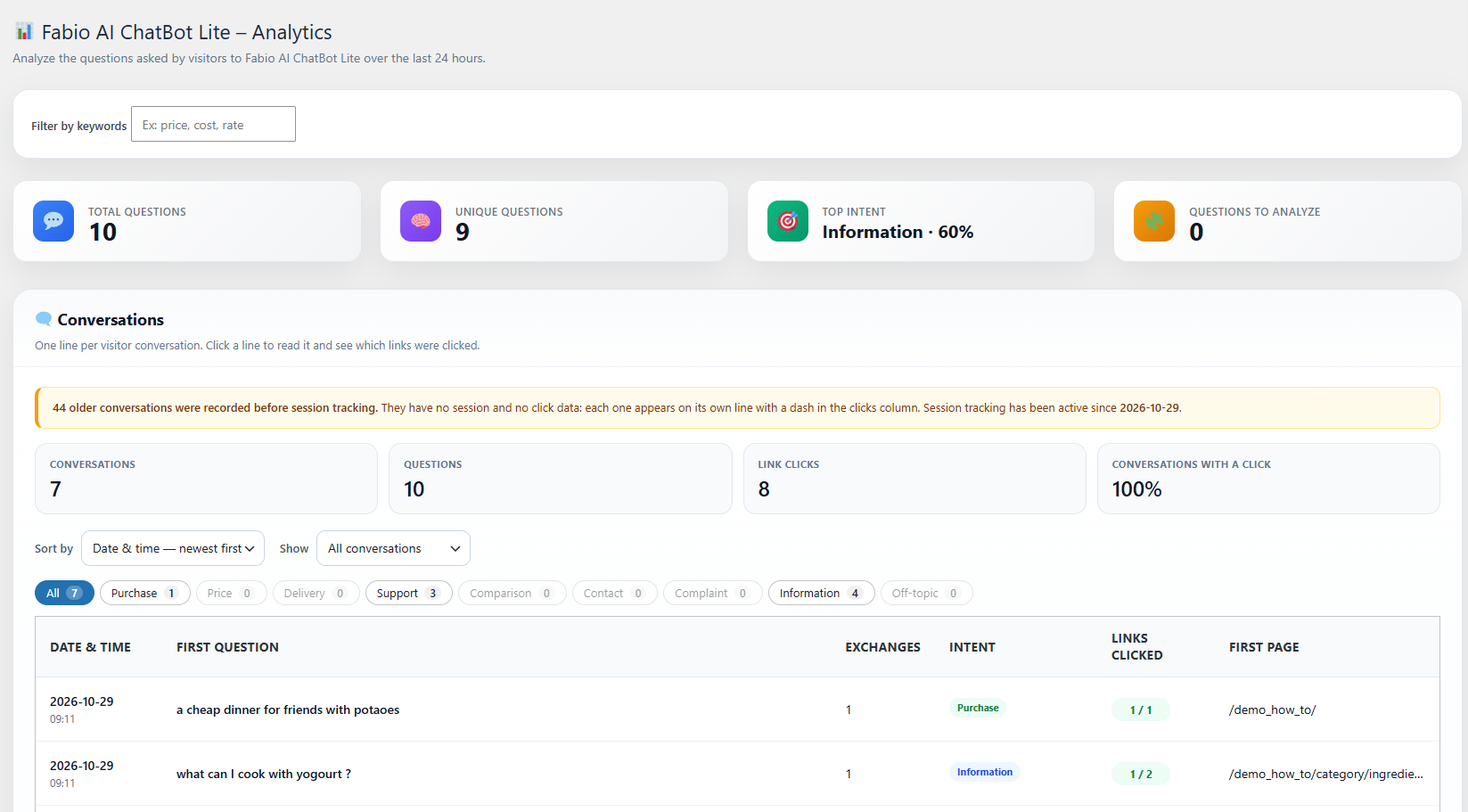
Analytics summary: questions, top visitor intent and conversations of the last 24 hours
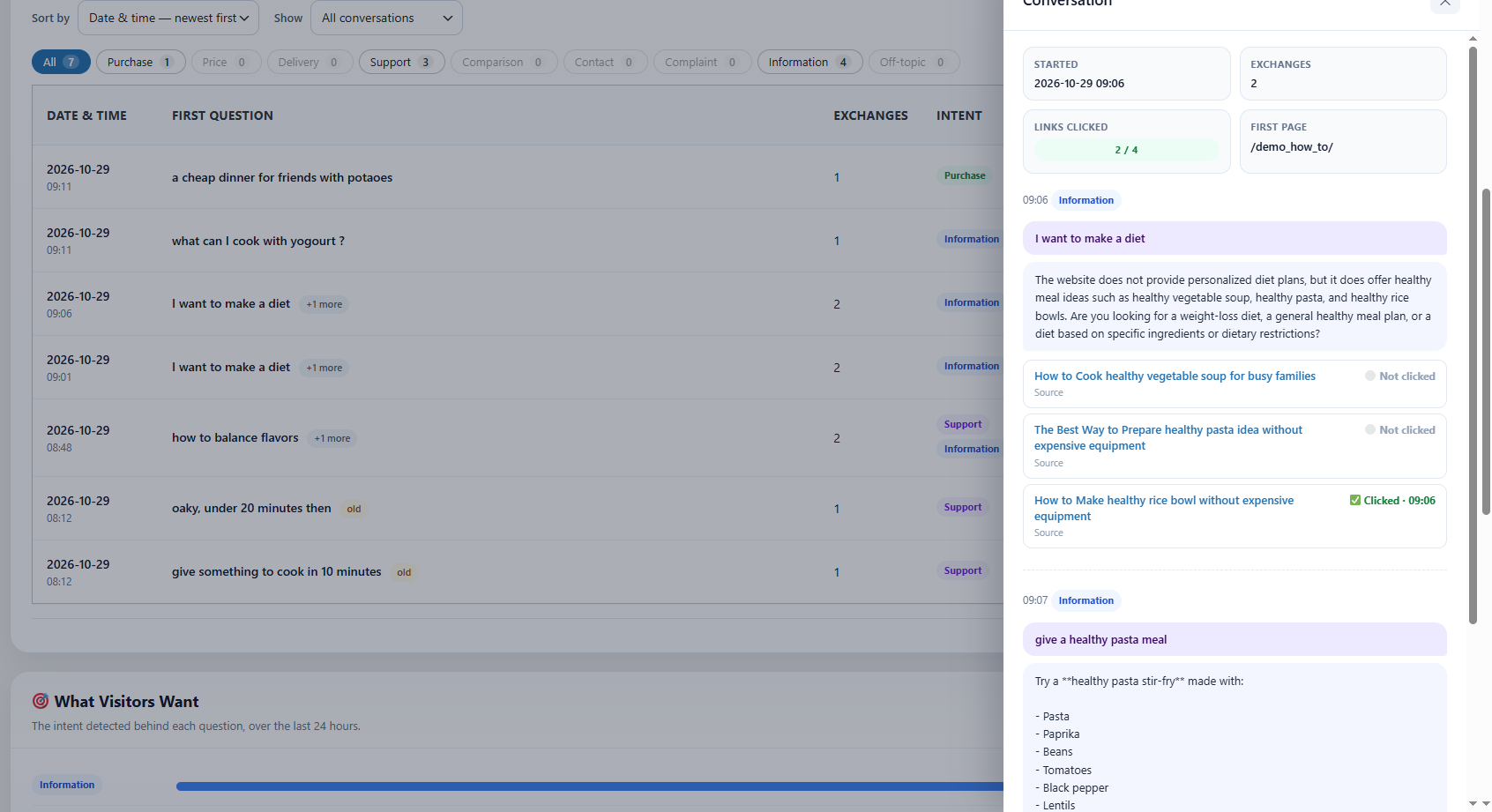
Conversation and clicks details: the exchanges and the links the visitor clicked
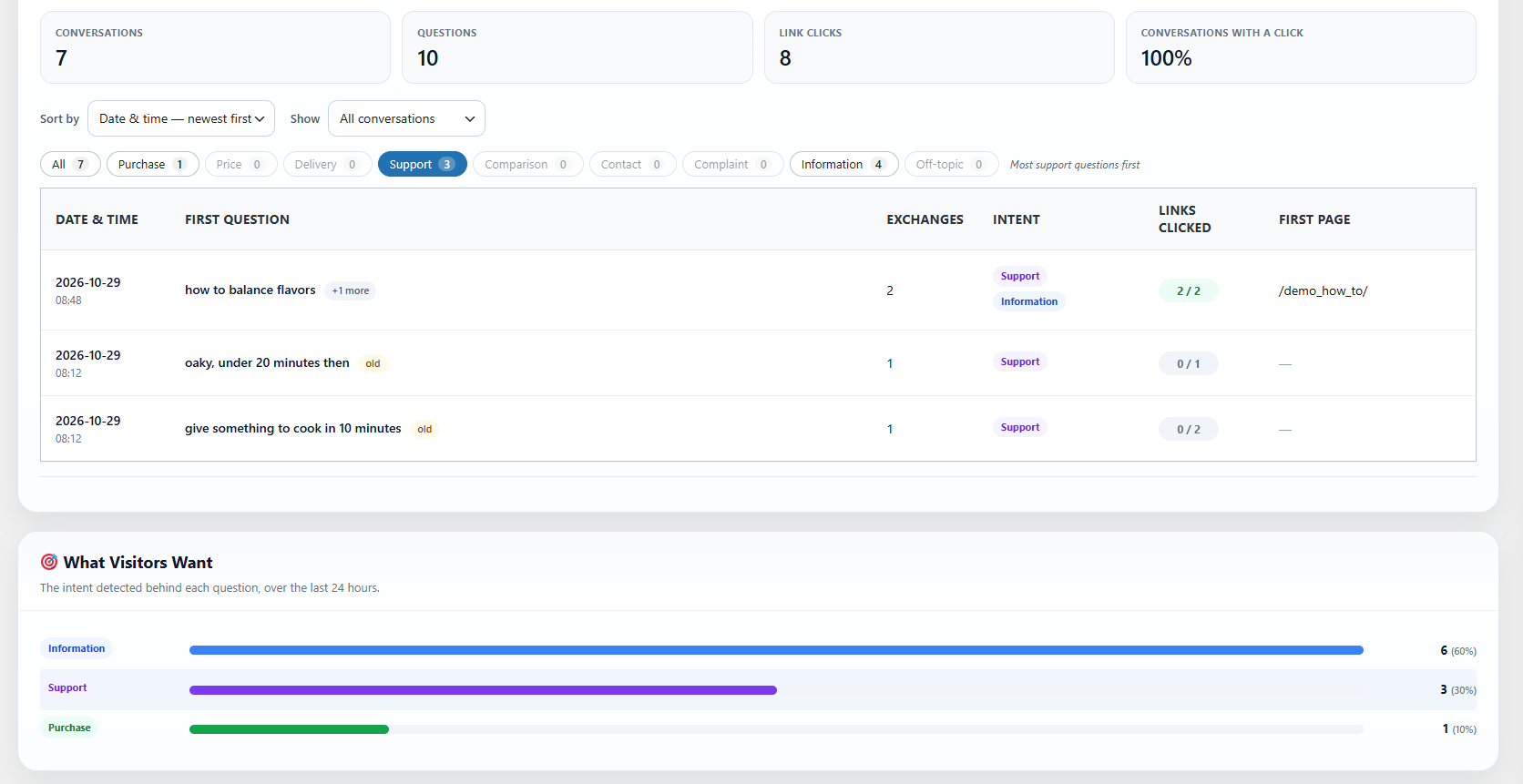
Conversation analytics by visitor intent
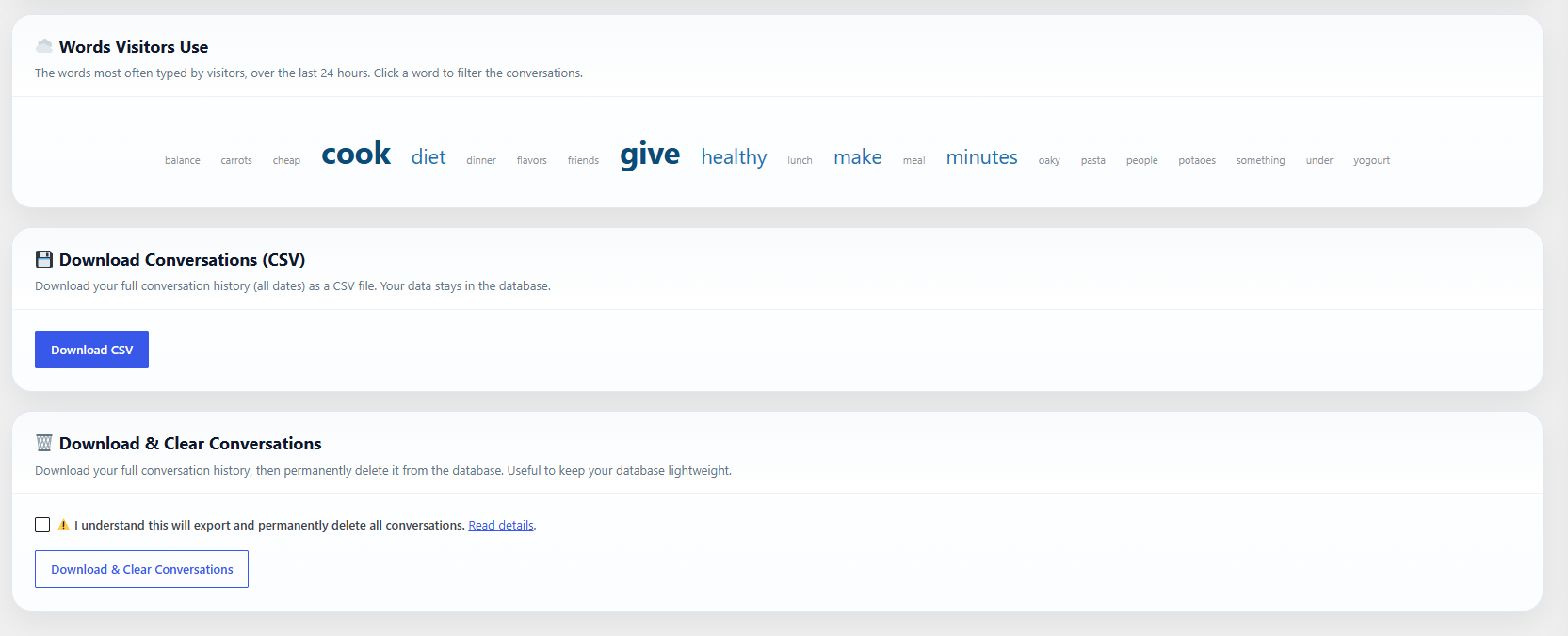
Cloud of the keywords typed by visitors
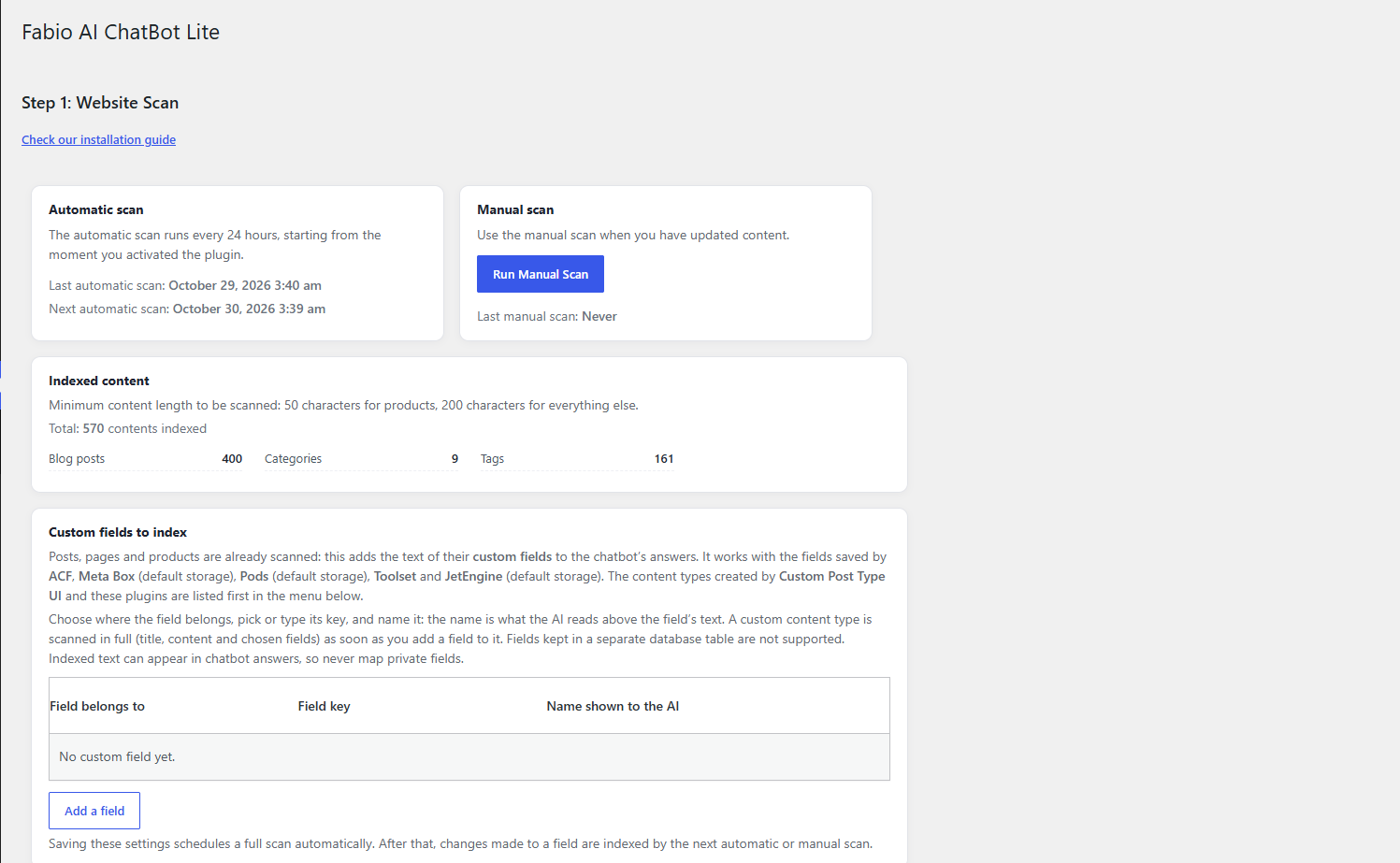
How the site scan works
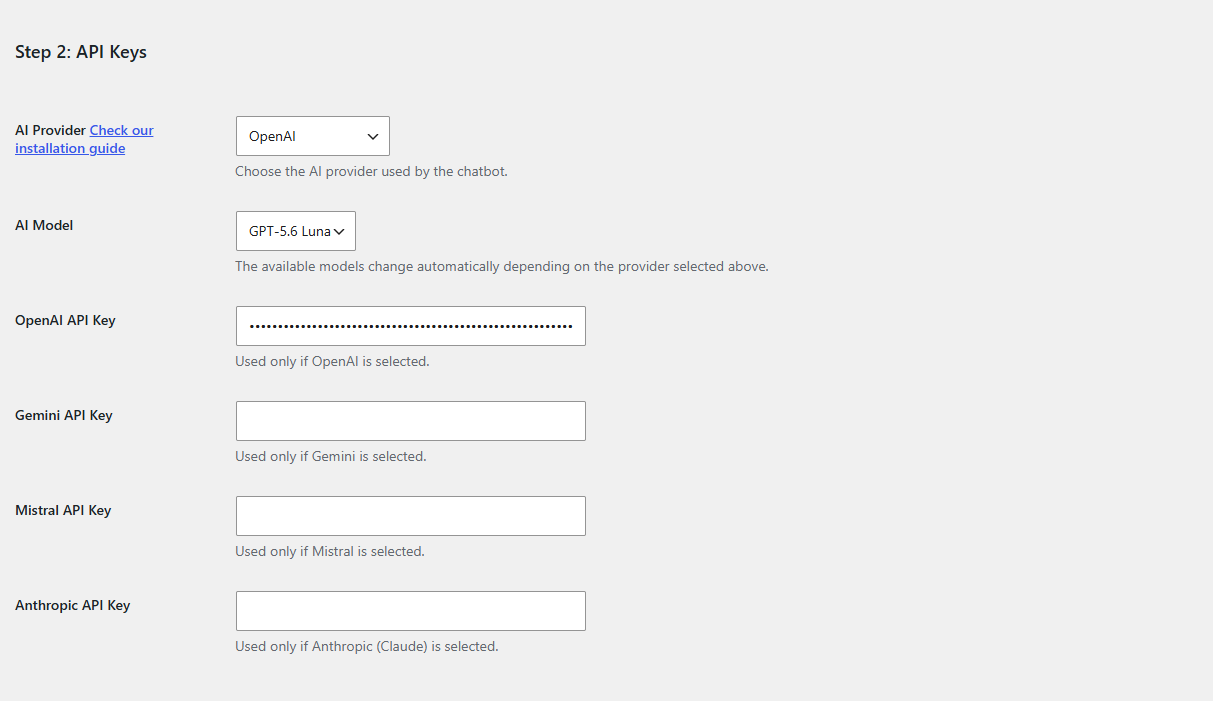
Bring your own API key (BYOK) and choose your AI provider
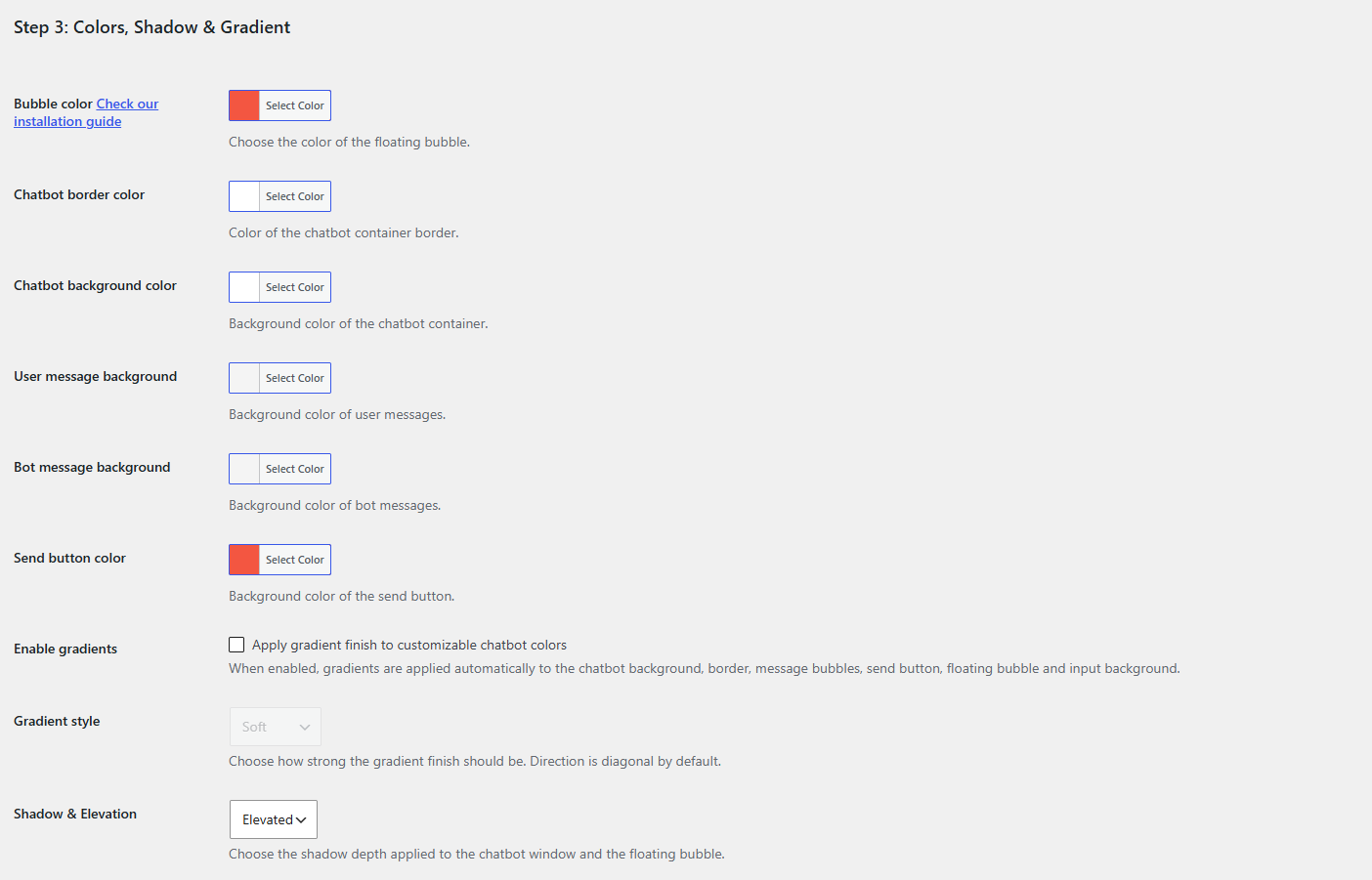
How to customize the chatbot
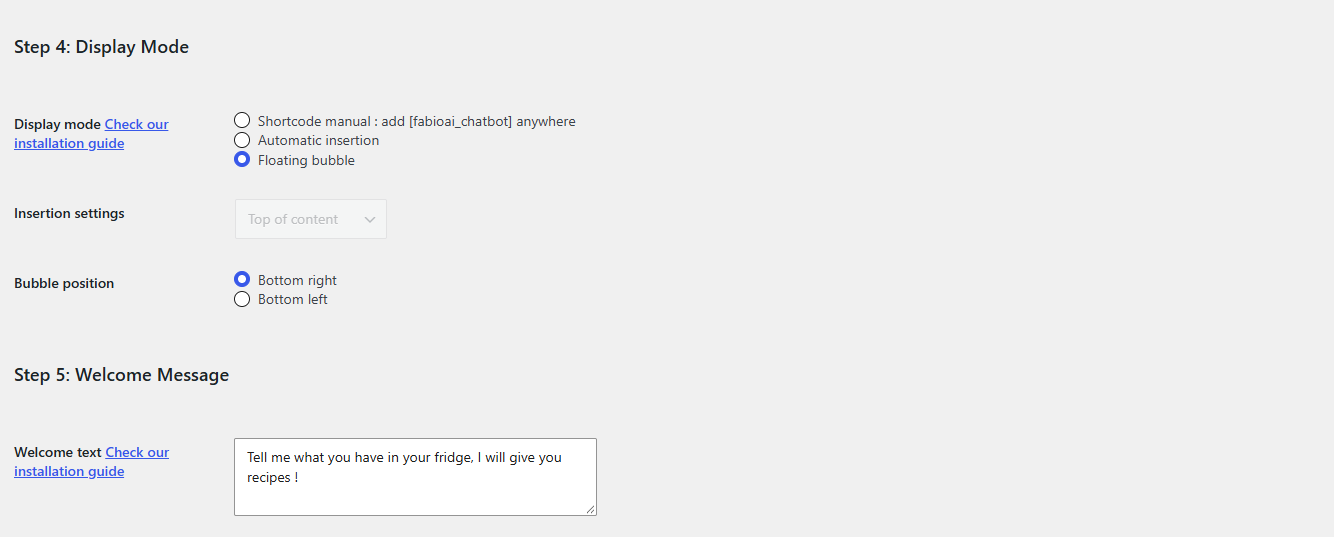
How to display the chatbot and add a welcome message