
Write your FAQs once and show them everywhere: help pages, a one-click Help Center, and WooCommerce product pages. AI writes the first drafts for you, with no API key on WordPress 7.0+.
Product FAQs that fill themselves in. Assign an FAQ to a product category or tag once, and every product in it shows that FAQ. Free, with no add-on needed.
Documentation | Video Tutorials | Get Support | Happy FAQs Pro
Site FAQs: create FAQs once in one library and show them anywhere: a FAQ page, a one-click Help Center, posts, Gutenberg, Elementor, Divi, or a shortcode. Product FAQs: add FAQs to products, product categories, and tags. WooCommerce is optional: start with site FAQs, then add product FAQs when you open a store. Happy FAQs Pro adds product Q&A and FAQs on shop, cart, and checkout pages.
✨ New in Happy FAQs 3.0
- 🎛️ Brand-new admin: a fast, modern dashboard with a slim header, live previews, and no page reloads
- 🗂️ One FAQs screen: All FAQs, Add New, and Categories in tabs, with quick edit and bulk actions
- 🧩 21 ready-made FAQ patterns: help center, shipping and returns, pricing, and 10 industries, in one click
- 🏠 One-click Help Center page: search, most asked questions, and every FAQ by topic
- 🎨 22 toggle icon sets and 3 modern FAQ styles (Cards, Minimal, Soft)
- 🤖 AI FAQ generator without an API key: uses the AI provider connected in WordPress, plus Improve with AI in the editor
- 🔗 Shortcode builder with a live preview, and Gutenberg, Elementor, and Divi 4/5 blocks
- 📈 Most viewed and newest FAQ lists, “Was this helpful?” votes, and view counts
- 💬 Product Q&A with voting (PRO): customers answer each other, you mark the best answer
- 📊 FAQ analytics dashboard (PRO): top FAQs, helpful rate, and searches with no answer
- 📥 Spreadsheet import and export (PRO): CSV and Excel with a preview and undo
Write the answer once. Reuse it on a FAQ page, in Gutenberg, Elementor, or Divi, and on WooCommerce products. WooCommerce is optional — use it as a site FAQ plugin, then add product FAQs when you have a store.
21 ready-made FAQ patterns give you a designed FAQ section in one click: help center, shipping and returns, pricing, product questions, and FAQ sections for restaurants, hotels, courses, events, agencies, and more. Every pattern is bundled with the plugin, free, and comes with real starter questions.
22 toggle icon sets (chevrons, arrows, carets, plus/minus, plus-to-close, folder, switch, and more) work with every accordion layout. Choose one site-wide or per block and widget, and set its position, color, and size.
FAQ schema (FAQPage structured data), an AI FAQ generator that works with the AI provider connected in WordPress (no extra API key), a category filter, “Was this helpful?” votes, accessible keyboard-friendly accordions, RTL support, and custom accordion layouts are included. Scripts and styles load only on pages that show FAQs.
Happy FAQs Pro
See the questions you haven’t answered yet. FAQ analytics shows the searches that found no answer, with one click to add the missing FAQ, and AI gap filling drafts those answers overnight from the product’s own data.
Stop support tickets before they’re sent. FAQ suggestions inside WPForms, Contact Form 7, and Fluent Forms show a matching answer while visitors type, and Pro counts every ticket avoided.Pro also adds product Q&A with voting, visitor questions on any page, variation product FAQs, shop, cart, and checkout FAQs, course FAQs, bulk AI FAQs, FAQ Groups, nested FAQs, AJAX FAQ search, extra accordion layouts, CSV and Excel import/export, and priority email support. See Happy FAQs Pro
Who it is for
- WordPress sites that need a FAQ accordion, help center, or FAQ page with FAQ schema
- WooCommerce stores that need product FAQs, category FAQs, and question-and-answer content on products
- Builders using Gutenberg, Elementor, or Divi
How it works
Create a FAQ once. On that FAQ screen, the Happy FAQs Panel metabox is where you choose where it appears.
- Go to Happy FAQs Add New. The title is the question. The editor is the answer (HTML, images, and video are allowed).
- Optionally assign a FAQ category (for example Shipping or Returns). You can later show that whole category on a help page.
- Open the Happy FAQs Panel metabox and assign:
- Products — search and attach specific WooCommerce products.
- Product categories — every product in those categories inherits this FAQ.
- Product tags — every product with those tags inherits this FAQ.
- Display in pages — product pages (free). Shop, cart, and checkout are (PRO).
- Global FAQs (PRO) — show this FAQ on every product.
- Product attributes (PRO) — insert live values such as
{product_price}in the answer. - Nested FAQs (PRO) — show other FAQs inside this answer as a smaller accordion.
- To show FAQs on a normal WordPress page, use a shortcode, Happy Prebuilt FAQs or Happy Custom FAQs (Gutenberg block, Elementor widget, or Divi 4/5 module), or Settings FAQ page.
You can also attach FAQs from the product edit screen. One FAQ can appear in more than one place.
Top features
- Unlimited WordPress FAQs and WooCommerce product FAQs
- A fast, modern admin: a slim header on every screen, actions without page reloads, search across settings, and live previews
- One FAQs screen: All FAQs, Add New, and Categories in tabs on one page, with no page reloads
- 21 ready-made FAQ patterns with live previews and one-click pages
- One-click Help Center page: search, most asked questions, every FAQ by topic (filter tabs or a category sidebar), and a “Still need help?” section
- 3 modern FAQ styles for the blocks: Cards, Minimal, and Soft
- 22 toggle icon sets with position, color, and size controls, for every layout
- Per-block style controls: question and answer colors, font sizes, border, corner radius, and spacing
- FAQ accordion layouts (5 free, 4 more in Pro)
- FAQ schema (FAQPage) on pages and products, one merged block per page with duplicates removed
- FAQ categories, shortcodes, and an FAQ page setting
- Happy Prebuilt FAQs: Gutenberg block, Elementor widget, and Divi 4/5 module (library FAQs)
- Happy Custom FAQs: Gutenberg block, Elementor widget, and Divi 4/5 module (write Q&A on the page)
- AI FAQs without an API key: uses the AI provider connected in WordPress (Settings Connectors), with your own OpenAI key as a fallback
- Inline FAQ search and FAQ category filter
- “Was this helpful?” votes and FAQ view counts
- “Show more” button for long FAQ lists
- Accessible FAQ accordions: keyboard and screen reader friendly
- Lightweight: CSS and JS load only where FAQs appear
- Setup wizard with ready-made common questions
- Comments, media in answers, expand/collapse all
- Assign FAQs to products, product categories, and product tags
- WPML, Polylang, and RTL (right-to-left) languages
- FAQ analytics dashboard: top FAQs, helpful rate, top searches, and searches with no answer (PRO)
- FAQ Groups, AJAX search (PRO)
- Spreadsheet import and export: CSV and Excel files with column matching, a preview of every change, and undo (PRO)
- Nested FAQs: FAQs inside an answer as a smaller accordion, up to three levels deep (PRO)
- Visitor questions on any page: “Ask a question” form, moderation queue, “Publish as FAQ”, and answered questions shown on the product or page (PRO)
- Product Q&A with voting: customers answer each other’s questions, you mark the best answer, and votes bring the most useful questions and answers to the top (PRO)
- AI gap filling: turn searches with no answer and unanswered questions into draft FAQs, by hand or every night (PRO)
- FAQ suggestions in contact forms: WPForms, Contact Form 7, and Fluent Forms show matching answers while visitors type, and count the tickets they avoid (PRO)
- Course and lesson FAQs for Tutor LMS, LearnDash, and LearnPress (PRO)
- Variation FAQs, shop/cart/checkout FAQs (PRO)
FAQ accordion
- Unlimited FAQs in one reusable library, with FAQ categories (Shipping, Returns, and so on)
- Five accordion layouts (Classic, Whitish, Trip, Pop, Basic), colors, width, and display options
- 22 toggle icon sets for the open and close icon: chevron, bold chevron, chevron in circle, solid circle, or square, chevron right, double chevron, arrow, arrow in circle, arrow right, caret, caret right, caret in circle, plus/minus (regular, light, in circle, solid circle, or square), plus to close (plain or in circle), folder, and switch
- Every icon animates between closed and open, and works with all accordion layouts (5 free, 4 Pro)
- Icon position (left or right of the question), color, and size: site-wide in Settings Style, or per block, Elementor widget, and shortcode
- 3 block styles: Cards, Minimal, and Soft, for Happy Prebuilt FAQs and Happy Custom FAQs
- Per-block style controls: question and answer colors, font sizes, border color, corner radius, and spacing
- Inline search that filters the FAQs already on the page
- FAQ category filter: buttons that show one FAQ category at a time
- “Show more” button: show a few FAQs first, reveal the rest on click (all FAQs stay in schema)
- Expand / collapse all, or open every answer on load
- Images, video, and other media in answers, and comments on FAQs
- Right-to-left (RTL) layouts for Arabic, Hebrew, Persian, and other RTL languages, automatic for RTL site languages
- Light, elegant design that follows your theme’s fonts and works on mobile
FAQ page and Help Center
- Help Center builder on Happy FAQs Help Center Page: pick filter tabs or a category sidebar (topic list with a section per category and one search box for every topic), a Cards, Minimal or Soft style, a most asked questions section, and a contact button, with a live preview. Create a draft or publish in one click; the page stays in sync with your FAQ library. With Pro, the page gets a search across every FAQ at the top and an “Ask a question” form
- 21 ready-made FAQ sections, bundled with the plugin: no account, no remote downloads, works offline
- 6 general patterns: centered, two-column, contact card, minimal, two lists, and a help center with search
- 2 live lists: most viewed questions and newest questions, updated automatically
- 3 store patterns: shipping and returns, orders and payments, and product questions
- 10 industry patterns: pricing and billing, getting started, agency services, online course, restaurant, events, hotel, gym membership, real estate, and privacy
- Happy FAQs Patterns gallery with live previews in your theme, category tabs, and search
- One click creates a draft page from a pattern, or copy it into any page. Also in the block editor inserter under Patterns Happy FAQs
- FAQ page setting: pick a page and Happy FAQs adds the accordion to it
WooCommerce product FAQ
- Assign FAQs to products from the product screen or the FAQ screen
- Inherit FAQs from WooCommerce product categories and tags, free
- Drag to sort FAQs on each product
- Product tab, show/hide answers on load, and tab order
[ffw_template dynamic_post="true"]for product templates
AI FAQ generator
- AI FAQ generator: write FAQs from a WooCommerce product, any page or post, or a topic you type. Pick how many, the language, and what to focus on. Questions already on the product or page are skipped. Edit every question and answer before saving, publish or save as drafts, and add them to the page in one click
- No Happy FAQs API key needed: AI uses the provider connected in WordPress (Settings Connectors, WordPress 7.0 or later). Your own OpenAI key still works as a fallback, or on older WordPress
- Improve with AI in the FAQ editor (block and classic): improve, shorten, expand, or make an answer friendlier or more professional, and review it before it replaces the old one
FAQ schema
- FAQPage structured data (JSON-LD) on help pages and product pages
- One merged schema block per page, with duplicate questions removed, even with several FAQ lists on the page
- Answers in schema as HTML or plain text, or switch schema off
- Choose whether single FAQ pages are indexed by search engines
Structured FAQs give search engines and AI assistants a clean version of your answers to read. Google now shows FAQ rich results only for a limited set of sites, so don’t count on them.
Elementor, Divi and Gutenberg FAQ
- Happy Prebuilt FAQs: Gutenberg block, Elementor widget, and Divi 4/5 module (library FAQs, same markup as the shortcode)
- Happy Custom FAQs: Gutenberg block, Elementor widget, and Divi 4/5 module (write Q&A on the page)
- Shortcodes for all FAQs, a FAQ category, selected FAQ IDs, or the current product, with a shortcode builder and live preview
- Classic Editor and block editor support
Accessible
Every layout uses button semantics, an aria-expanded state, Enter and Space keys, and a visible focus outline.
Lightweight
CSS and JS load only on pages that show FAQs, and only for the layouts in use.
Easy to manage
- FAQs screen: All FAQs, Add New, and Categories in tabs on one page, with no page reloads. Search questions and answers, filter by status or category, sort by views or helpful votes, quick add, quick edit, duplicate, copy a shortcode, and bulk publish, move to drafts, trash, or add to a category. Each FAQ shows where it appears (products, categories, tags, store pages, or global), and the full editor with the Happy FAQs Panel opens in place
- Setup wizard on first activation: pick General or Product FAQs, start from common questions, and copy your shortcode
- “Was this helpful? Yes / No” votes and answer view counts, with sortable Views and Helpful columns on All FAQs. No IP addresses are stored
- WPML and Polylang support
Shortcodes
Show all FAQs:
[ffw_template]
Show a FAQ category. faq_cat is the FAQ category ID (Happy FAQs Categories):
[ffw_template faq_cat="32"]
Show selected FAQs. faq_ids are FAQ post IDs (Happy FAQs All FAQs):
[ffw_template faq_ids="10,11,12"]
Show FAQs for a WooCommerce product:
[ffw_template id="20"]

id is the WooCommerce **product ID**, not the FAQ ID. Find it under **Products → All Products**: hover the product, or open it and read `post=20` in the browser URL. Replace `20` with your product’s ID.
Show FAQs for the current product (use this on a single product page or product template):
[ffw_template dynamic_post="true"]
Pick an accordion layout with template:
- 1 Classic, 2 Whitish, 3 Trip, 4 Pop, 5 Basic
- Pro layouts (PRO): 6 Glow, 7 Smart, 8 Wow, 9 Zoom
Example: [ffw_template template="1" id="20"]
Sort with …
Screenshots

Answer every question from one FAQ library: on FAQ pages, product pages, and (with Pro) cart and checkout (Free + Pro)
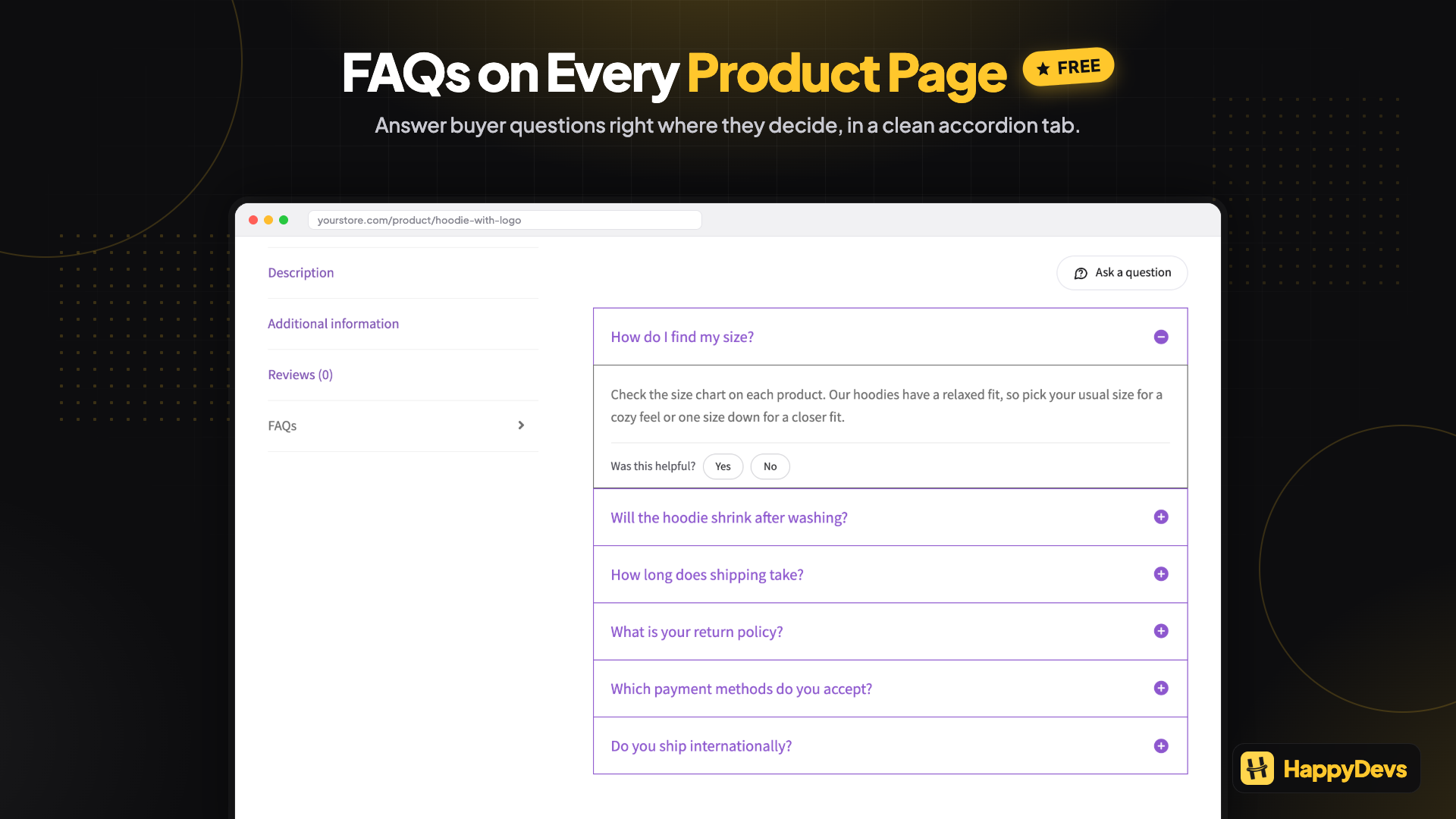
Answer buyer questions right on the product page, in a clean FAQ tab (Free)
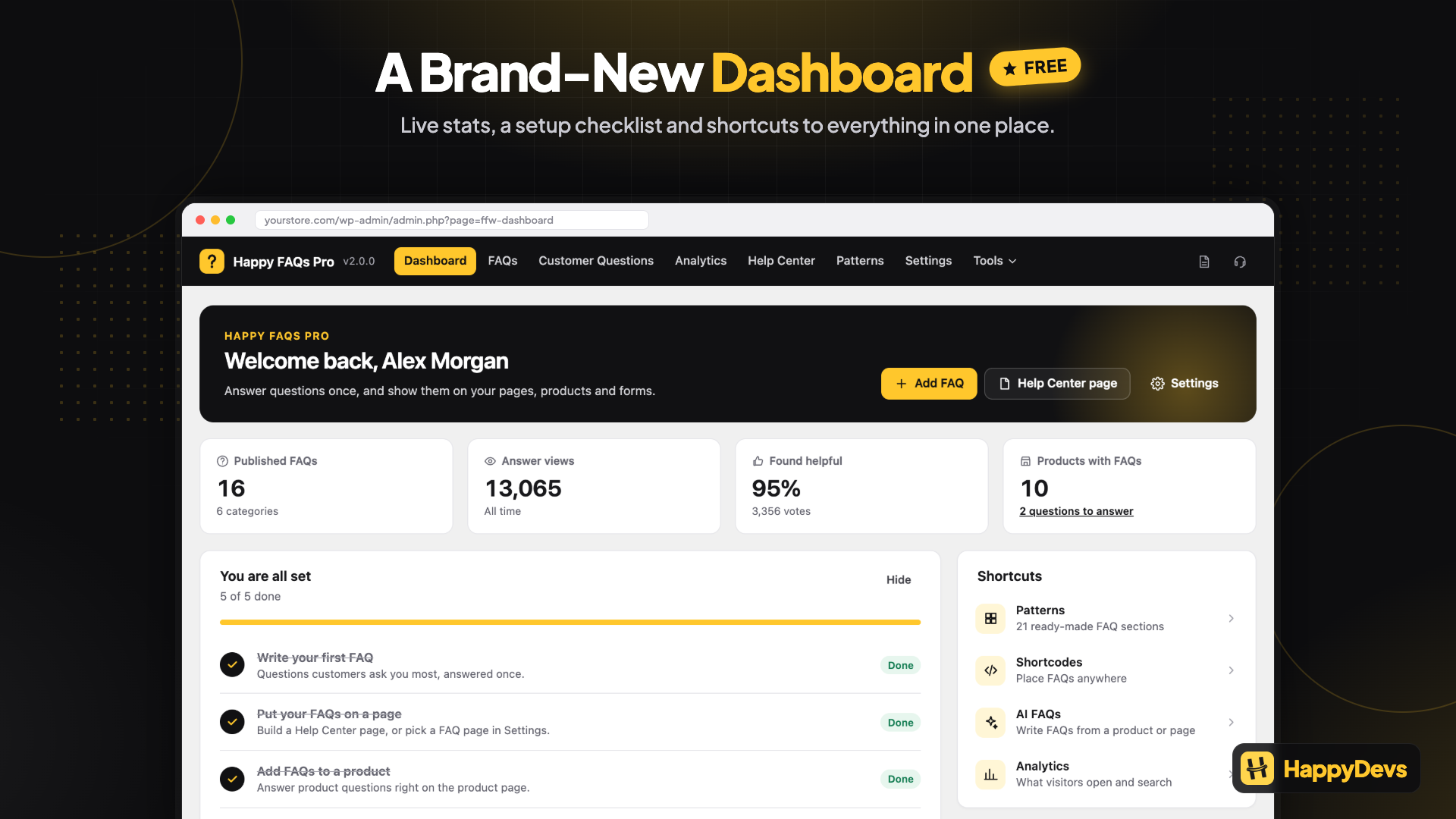
See your setup progress, live counts, and next steps on the dashboard (Free)

Start from 21 ready-made FAQ sections for stores, services, and industries (Free)
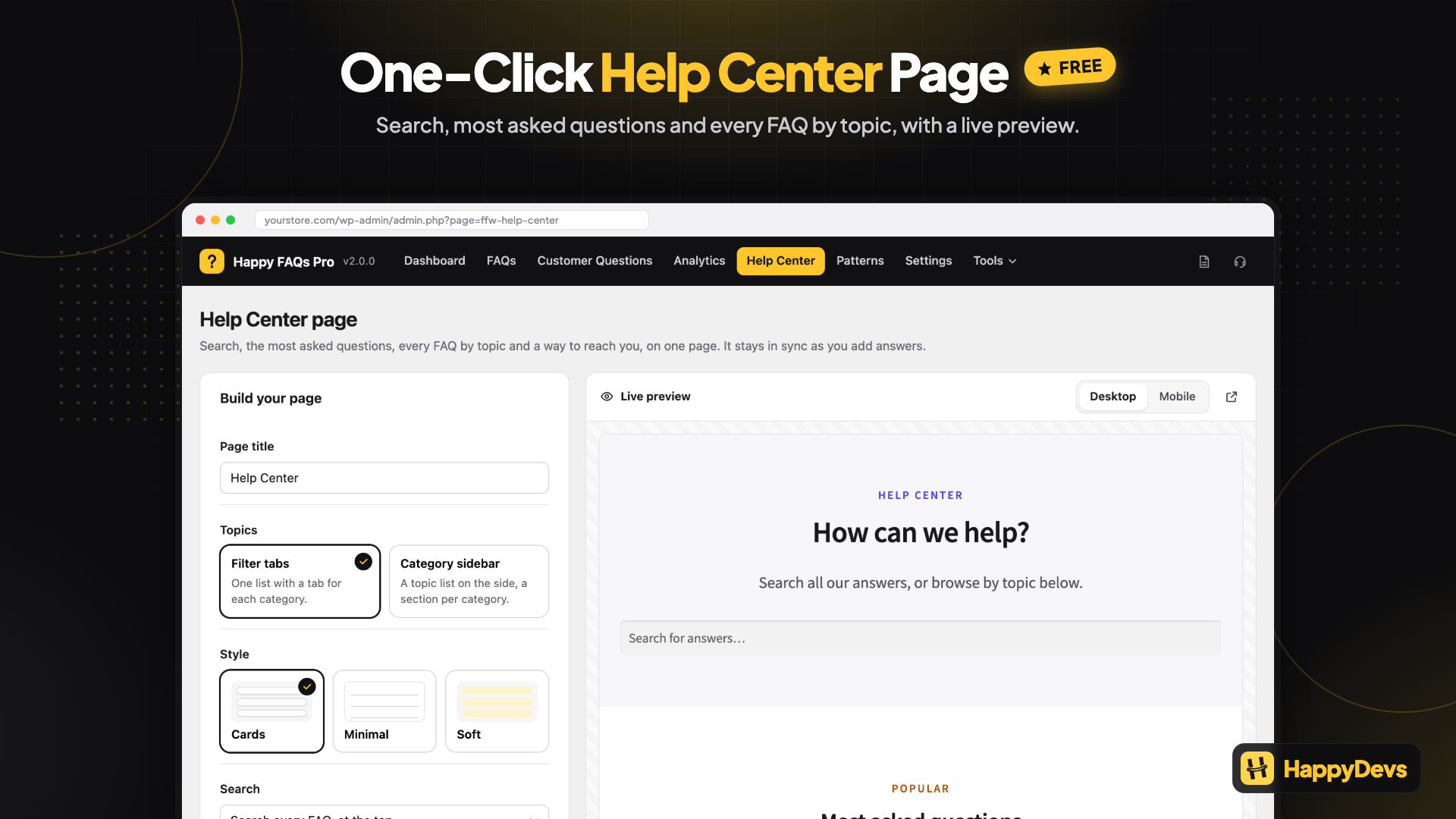
Build a Help Center page in one click, with search, most asked questions, and topics (Free)

Let AI write FAQs from a product, page, or topic, with no extra API key (Free)
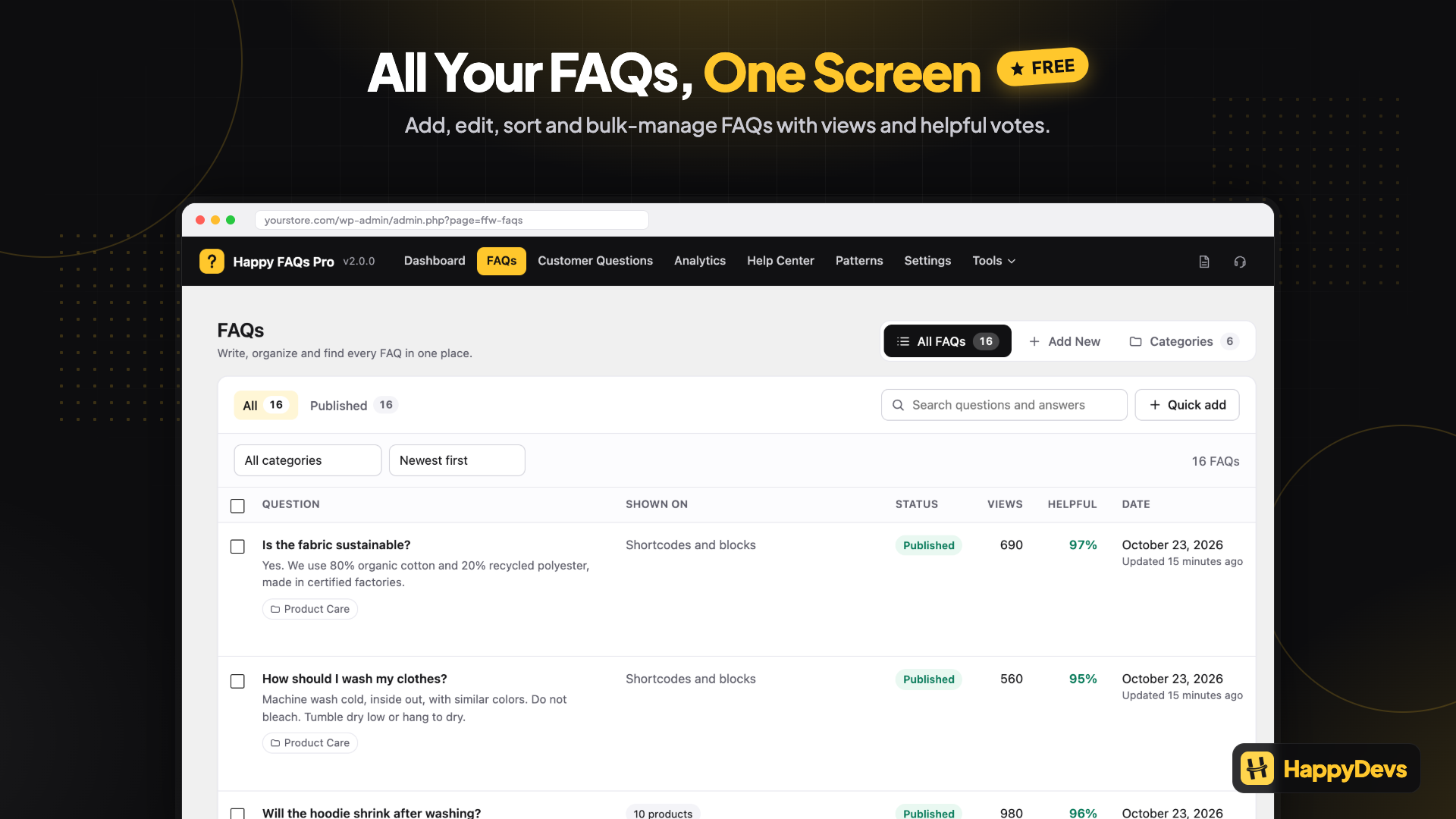
Manage every FAQ on one screen: views, helpful votes, and bulk actions (Free)
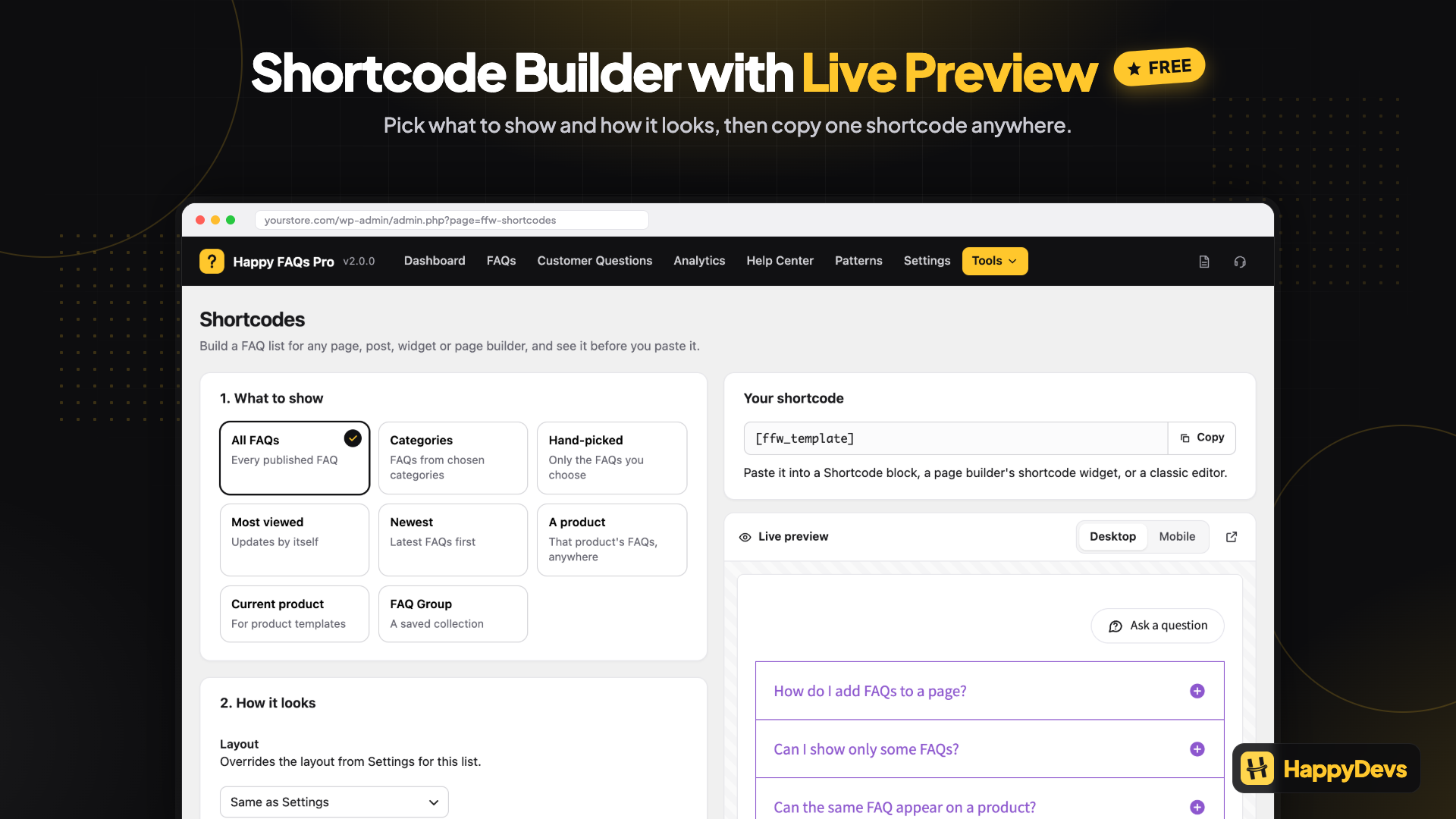
Build any shortcode with a live preview, no docs needed (Free)
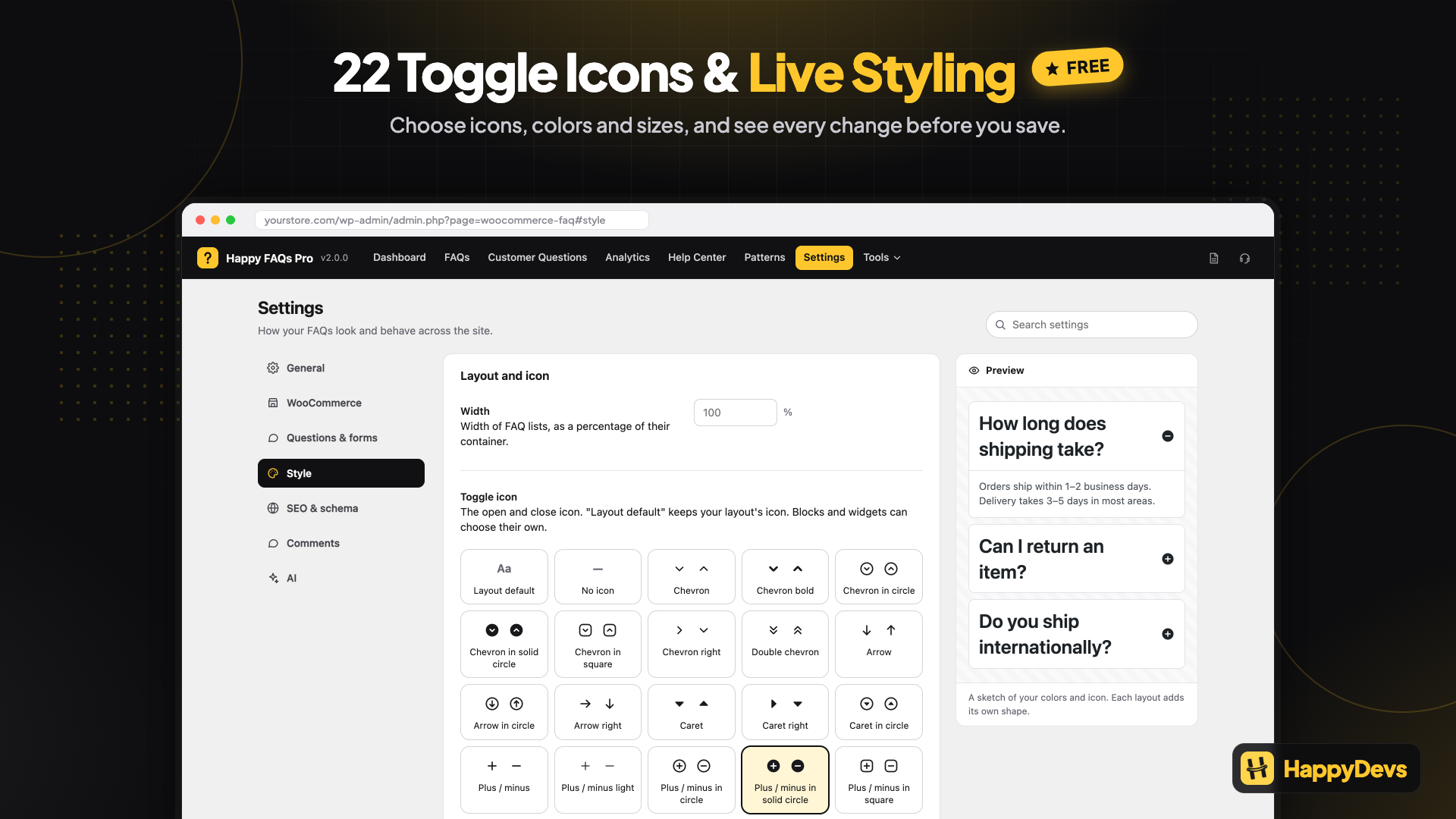
Match your site with 22 toggle icons and live styling (Free)
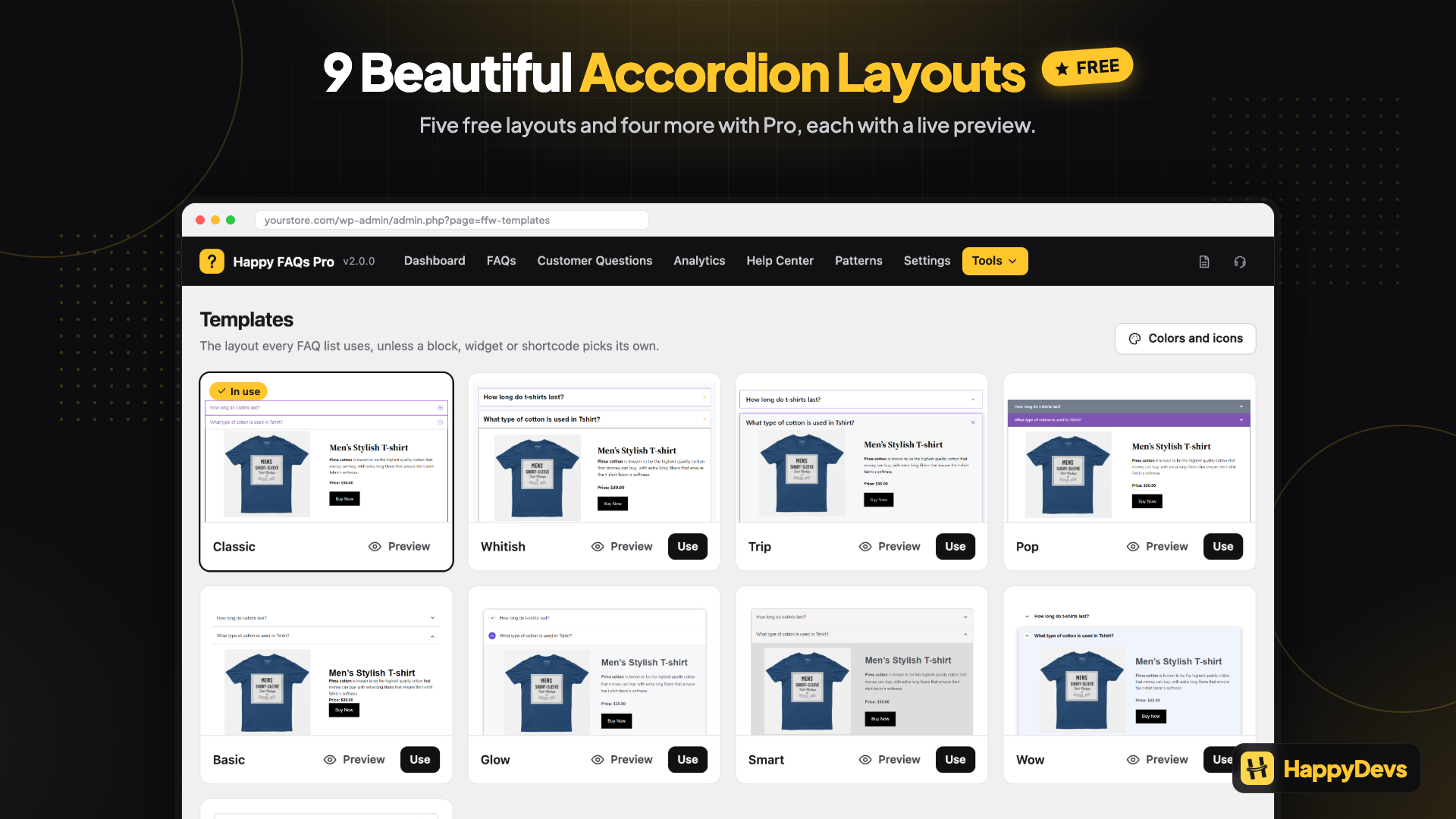
Pick from 9 accordion layouts: 5 free and 4 more in Pro (Free + Pro)

Let customers answer each other with product Q&A and voting, moderated by you (Pro)
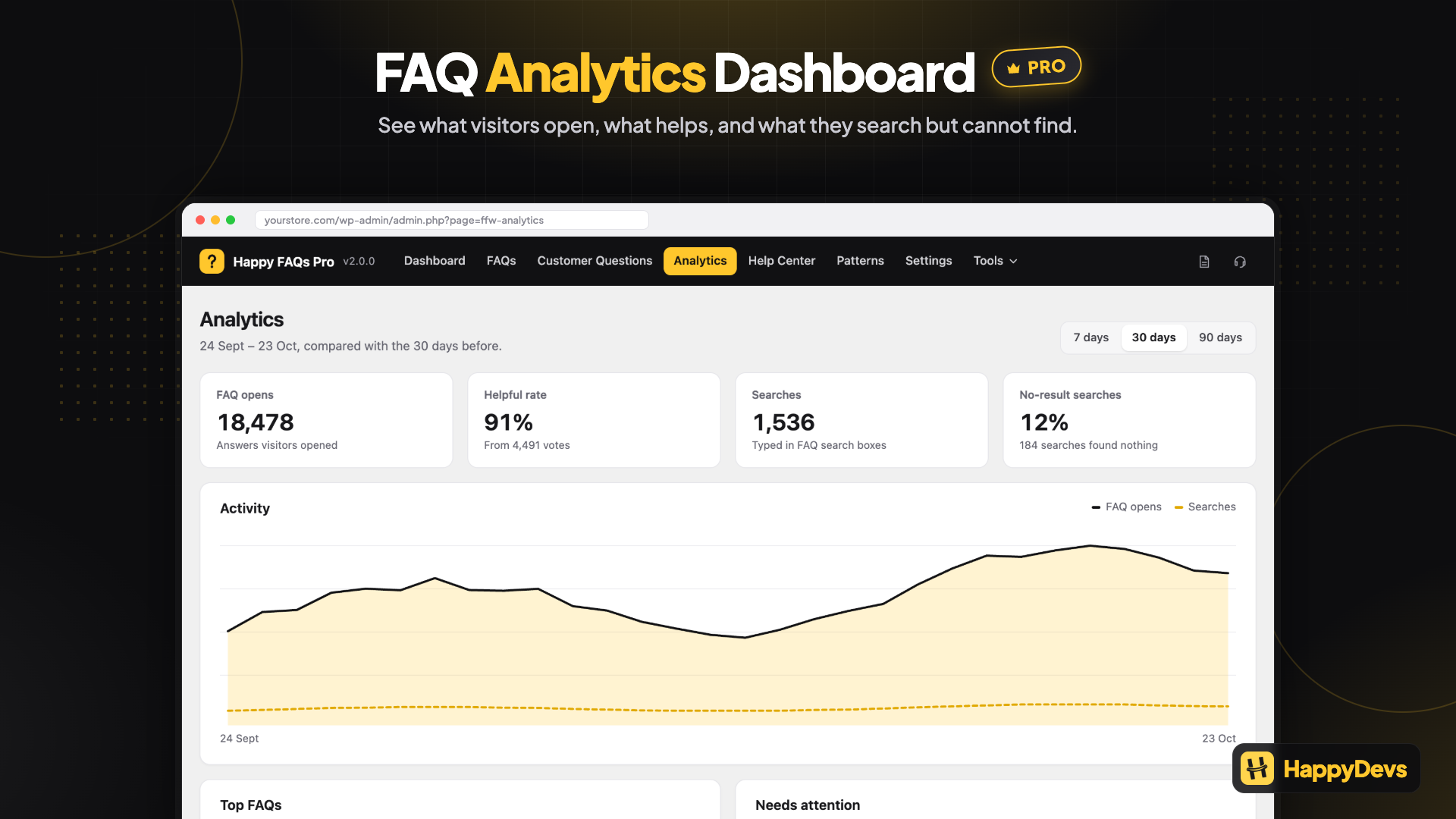
See what visitors searched for and couldn't find, then add the missing FAQ (Pro)

Move FAQs in and out with spreadsheet import and export, with a preview of every change (Pro)