
Fast Index tells the Google Indexing API when a post is published, updated or removed. You connect your own Google Cloud service account once. After that, Fast Index sends the address of the post in the background and keeps a History of every answer from Google. If you turn it on, the same addresses also go to IndexNow, which shares them with Bing, Yandex, Naver, Seznam.cz, Yep and other search engines.
What Google supports. Google states that the Indexing API can only be used to crawl pages with either JobPosting or BroadcastEvent embedded in a VideoObject. For other pages, such as ordinary posts, pages or products, Google may accept a notification and answer 200, but its documentation does not promise that the page will be crawled or indexed, or that this happens sooner. Fast Index cannot change that. Keep your sitemap and Search Console as they are. Google also checks every submission for spam and may revoke access for abuse. Details: https://developers.google.com/search/apis/indexing-api/v3/quickstart
Who it is for
- Sites with job postings or livestream pages that want to tell Google about changes through the Indexing API.
- Site owners who already use the API and want WordPress to send the notifications and show Google’s answers.
- Sites that want Bing and the other IndexNow search engines to hear about changes too.
- Developers and agencies who want a clear record of what was sent and what each search engine answered.
How it works
- You create a Google Cloud project, turn on the Web Search Indexing API and download a JSON key for a service account.
- You add that service account as an Owner of your site in Google Search Console.
- You upload the key on the Fast Index settings screen.
- When a post is published, updated, trashed or deleted, Fast Index queues a notification. WP-Cron sends it a moment later, so saving a post is not slowed down.
- The History screen shows each notification with the answer of Google, for example 200 OK.
Features
- Notifications for every public post type (posts, pages, custom post types such as products or job listings): URL_UPDATED when content is published or updated, URL_DELETED when it is trashed or deleted. You choose the post types and the events. Password-protected posts are never sent.
- IndexNow, off by default: the same addresses also go to api.indexnow.org, which shares them with Bing, Yandex, Naver, Seznam.cz, Yep and the other search engines that take part. Fast Index creates the key and answers the key file itself, without a file on disk.
- History marks pages with JobPosting or BroadcastEvent data, the kinds Google supports, as Eligible for Google Indexing API. An option sends only those pages to Google; IndexNow still gets the others.
- Sending by hand: a Notify search engines row action and bulk action in the post lists, up to 100 items at a time, with the result on the same screen.
- Background sending through WP-Cron, with a time limit for each request.
- History screen with a summary (sent in total, waiting, sent today) and every answer of Google and IndexNow, with a Channel column and a filter for each channel. History keeps the entries of the last 90 days and removes older ones once a day; the newest accepted entry of each post stays.
- When Google rejects the key (401 or 403), it is paused for six hours. When the daily quota is used up (429), every key is paused until Google resets the quota at midnight Pacific Time, and no other key is tried.
- A notification that cannot be sent is listed in History as Not sent. Without a key or without OpenSSL it is only recorded; while the key is paused it waits and is sent when the key is ready again.
- The service account key is stored in the database, never in a file. The screens show only the email address and the key ID.
- Help & FAQ screen with step-by-step Google Cloud setup, an explanation of every setting, troubleshooting and system information.
- Multisite: activate for the whole network or for single sites. Settings, keys and history belong to each site.
- Translated into 10 languages: Arabic, Dutch, French, German, Italian, Japanese, Portuguese (Brazil), Russian, Spanish and Turkish.
- Deleting the plugin keeps your settings, keys and history unless you turn on Delete data on uninstall.
Free and premium
The free version is not limited in time or in the number of notifications, and it contains no premium code and no locked option. The premium plan is a separate package, sold through Freemius, for older content, larger sites and the question whether your pages are indexed. It adds:
- Old posts sent in small hourly batches, within a daily limit you set, and a Send Old Posts Now screen.
- Categories whose posts are never sent.
- Backup service account keys, used only when Google rejects the main key (401 or 403). They are never used to get past the daily quota.
- Index status from Google Search Console (URL Inspection API) in a History column: Indexed; Crawled, not indexed; Discovered, not indexed; or Unknown to Google, with the last crawl date. A Check button checks one address now, every accepted address is checked again 24 and 72 hours after sending, and a card counts the indexed addresses of the last 30 days.
- A weekly email report to the administration address of the site, in the language of the recipient, sent with WordPress’s own email function. It can be turned off.
To get it, open Fast Index > Upgrade, or click Upgrade to Premium in the Premium box of the settings screen; on a network activation the plans page is in the network admin. After the purchase Freemius emails you the premium package (a .zip file) and a license key. Upload the package under Plugins > Add New > Upload Plugin, activate it and enter the key; Freemius deactivates the free version. Your settings, keys and history are kept. Settings of these options that an earlier version saved are kept by the free version, unused, and the premium package uses them again.
What it does not do
Fast Index does not submit sitemaps, does not use the Bing Webmaster API, and cannot make Google or any other search engine index a page.
External services
Fast Index connects to the services below. It sends nothing to Google until you have uploaded a service account key and the status is Active, and nothing to IndexNow until you turn IndexNow on.
Google OAuth 2.0 token service (https://oauth2.googleapis.com/token)
- What it is used for: to exchange a signed request for a short-lived access token for the Indexing API.
- When: before the first notification, and again when the stored access token (valid for about an hour) has expired.
- Data sent: a signed JWT. It contains the email address of your service account, the scope https://www.googleapis.com/auth/indexing (in the premium package also https://www.googleapis.com/auth/webmasters.readonly for the index status), the time of the request and the key ID. It is signed on your site with the private key; the private key itself is never sent. Google also receives the IP address of your server.
- Why: Google requires an access token for every Indexing API request.
- Terms of Service: https://policies.google.com/terms and https://developers.google.com/terms
- Privacy Policy: https://policies.google.com/privacy
Google Indexing API (https://indexing.googleapis.com/v3/urlNotifications:publish)
- What it is used for: to tell Google that a page was updated or removed.
- When: after a post is published, edited, trashed or deleted, as the settings say, when you send posts by hand from a post list, and in the premium package for each post of an old-posts batch.
- Data sent: the address (URL) of the post, the kind of notification (URL_UPDATED or URL_DELETED) and the access token. Titles, content and visitor data are not sent. Google also receives the IP address of your server.
- Why: this is the purpose of the plugin.
- Terms of Service: https://policies.google.com/terms and https://developers.google.com/terms
- Privacy Policy: https://policies.google.com/privacy
Google Search Console API (premium package only: https://www.googleapis.com/webmasters/v3/sites and https://searchconsole.googleapis.com/v1/urlInspection/index:inspect)
- What it is used for: to check whether an address that Google accepted is indexed (URL Inspection), and to find the Search Console property of the site.
- When: only in the premium package, never in the version from WordPress.org: when you click Check in History, and automatically 24 hours and, if the address was not indexed yet, 72 hours after Google accepted it. The property is looked up once a day when you have not entered it on the settings screen.
- Data sent: the address (URL), the Search Console property, the language code en-US and an access token of your service account. Google also receives the IP address of your server.
- Why: to show whether the pages you sent are indexed.
- Terms of Service: https://policies.google.com/terms and https://developers.google.com/terms
- Privacy Policy: https://policies.google.com/privacy
IndexNow (https://api.indexnow.org/indexnow)
- What it is used for: to tell the search engines that take part in IndexNow, such as Bing, Yandex, Naver, Seznam.cz and Yep, that a page was added, updated or removed. api.indexnow.org shares each submission with all of them.
- When: only after you turn on Also send to IndexNow on the settings screen (it is off by default), after a post is published, updated, trashed or deleted, and when you send posts by hand from a post list. While IndexNow is off, no request is made and no key file is answered.
- Data sent: the host name of your site, the IndexNow key that Fast Index created for the site, the address of the key file and the addresses (URLs) of the changed posts. The search engines then read the key file from your site. Titles, content and visitor data are not sent. The receiving servers also get the IP address of your server.
- Why: so that search engines other than Google hear about your changes.
- Terms of Service: https://www.indexnow.org/terms
- Privacy: the Privacy section of the IndexNow terms, and the privacy statement of each search engine, for Bing: https://privacy.microsoft.com/privacystatement
Freemius (https://api.freemius.com, https://wp.freemius.com and https://checkout.freemius.com)
Fast Index includes the Freemius SDK (version 2.13.4), which sells the premium plan and manages its licenses. What it sends was measured on a new installation of this version, with every outgoing request recorded:
- Before you choose anything on the Freemius opt-in screen, and if you choose Skip: nothing is sent to Freemius, from your server or from your browser.
- If you choose Allow & Continue: your browser sends the data listed on that screen to wp.freemius.com: the first and last name and email address of your WordPress user, the site address and title, the site language, the WordPress, PHP, plugin and SDK versions, an anonymous site identifier and whether the plugin is active. After that the SDK reports later events (activation, deactivation, uninstall), sends the names, slugs, versions and active state of your plugins and themes as that screen lists, and keeps this data in sync with a daily WP-Cron task. You can opt out later on the Account screen of Fast Index.
- If you open Upgrade: your server asks api.freemius.com for the plans and prices of Fast Index. The request contains the plugin ID and the SDK version and no data about your site; Freemius receives the IP address of your server. The page itself is part of the plugin, not an iframe. Once the plans are shown, your browser loads the Freemius checkout script from checkout.freemius.com. The pricing script of the SDK would also load Google Analytics; Fast Index stops that script on this page, so nothing goes to Google Analytics.
- If you choose a plan there: your browser opens the Freemius checkout at checkout.freemius.com with the details needed for the purchase and the license: the name and email address of your WordPress user and the site address.
- If you deactivate the plugin: Freemius may ask why. A reason you submit is kept on your site and sent to api.freemius.com when the plugin is deleted, with an anonymous identifier (with your details only if you untick the anonymous option in that form). Nothing is sent if you skip the form.
- Why: to sell the premium plan and manage its licenses.
- Terms of Service: https://freemius.com/terms/ and https://freemius.com/product/opt-in/11893/fast-index/
- Privacy Policy: https://freemius.com/privacy/
Privacy
Fast Index stores your settings, the service account keys you upload (in the database, not in a file) and a History of notifications (post title, address, time and the answer of Google or IndexNow) in your own database. It collects nothing about your visitors, sets no cookies and shows nothing on the public side of your site, apart from the IndexNow key file when you turn IndexNow on. The premium package can email a weekly report to the administration address of your site with WordPress’s own email function. It does not add text to the privacy policy of your site.
What leaves your site is described under External services: post addresses and signed requests go to Google, post addresses go to IndexNow only if you turn it on, and the Freemius SDK contacts Freemius only after one of the choices described there. Deleting the plugin removes temporary data and, if you turned on Delete data on uninstall, your settings, keys and history. Records kept by Freemius are not touched, and a key stays valid in Google Cloud until you delete it there.
Screenshots
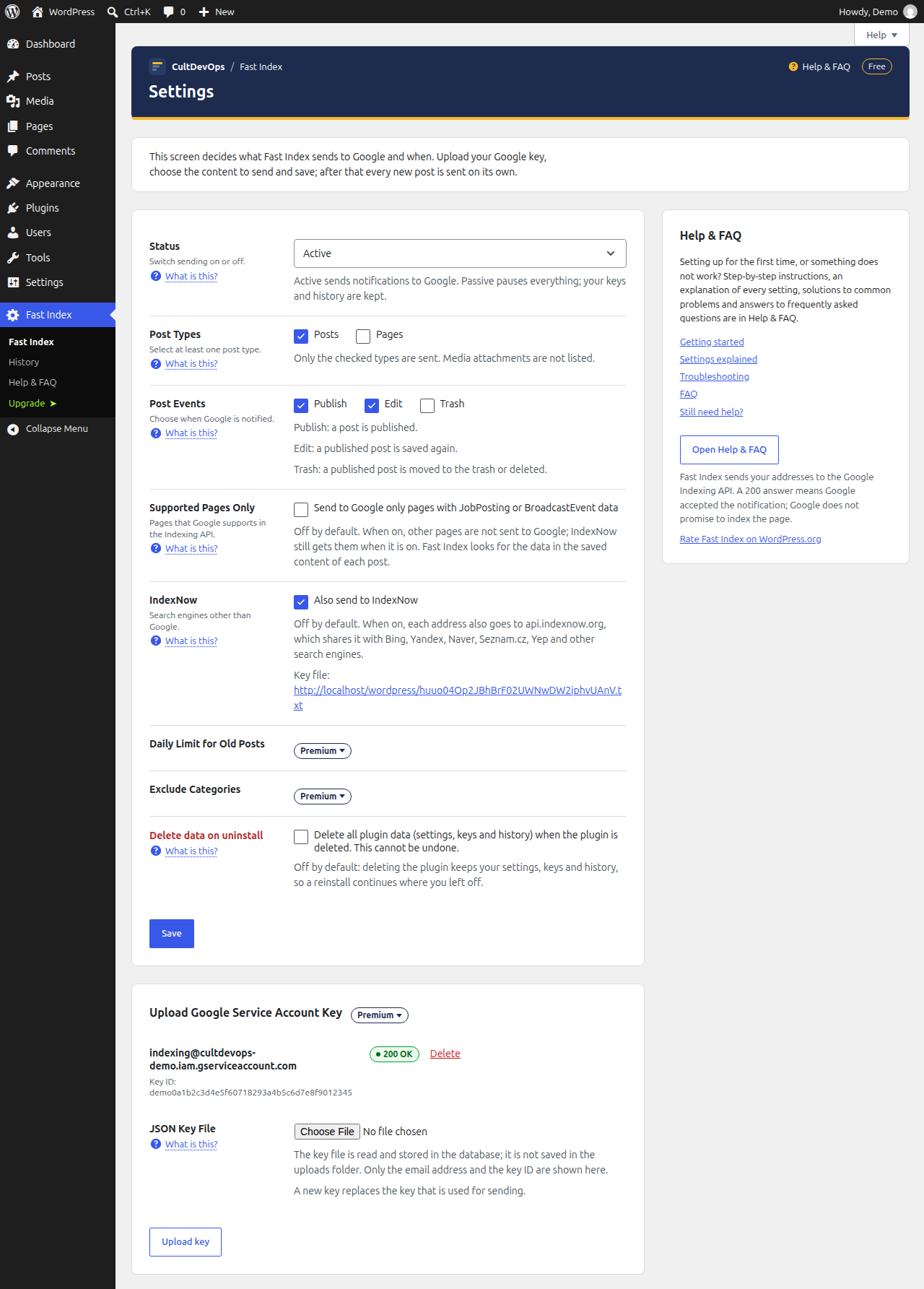
The settings screen: status, post types, post events, IndexNow and the upload of the service account key.
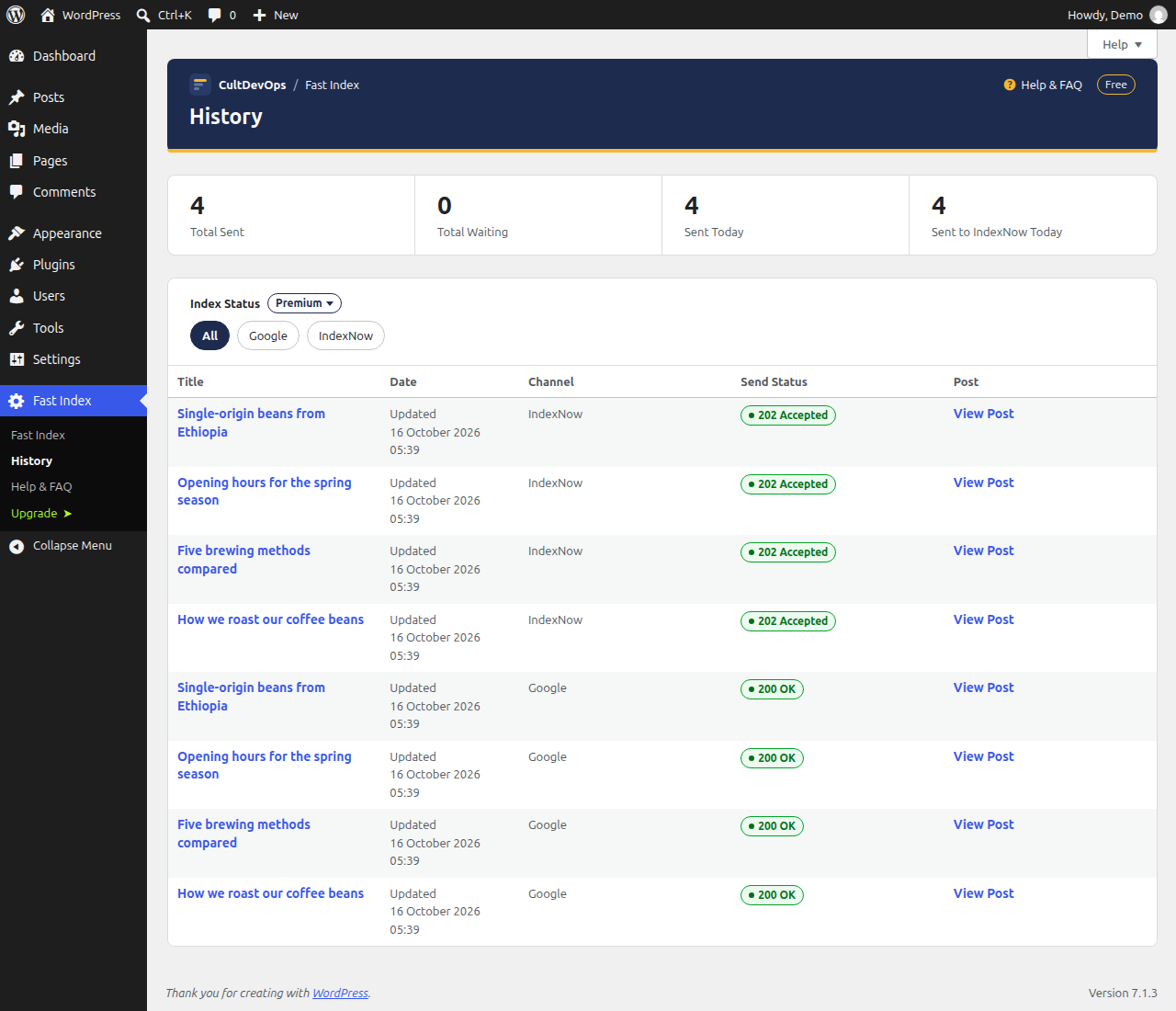
History: a summary, a filter by channel and every notification with the answer of Google or IndexNow.
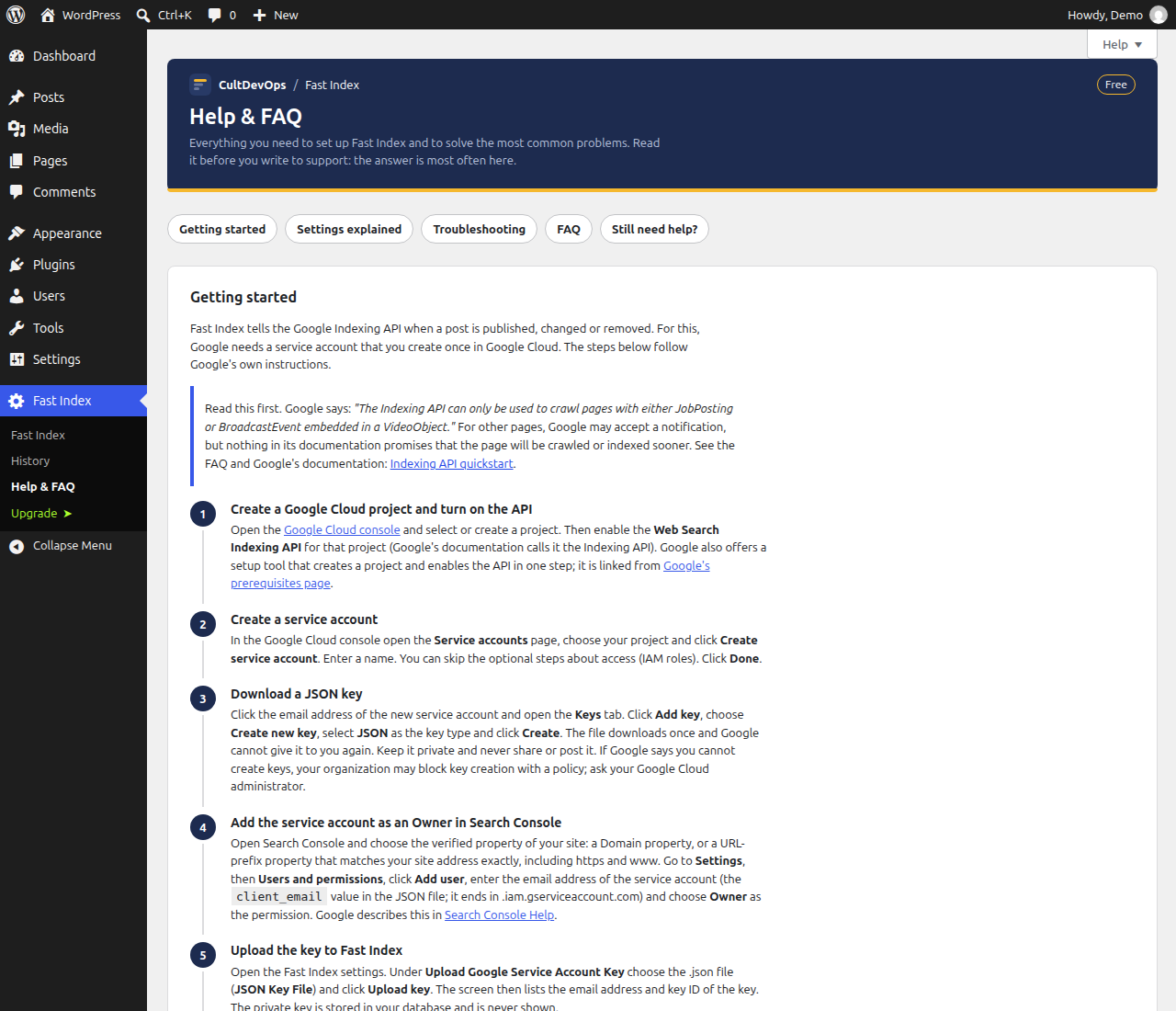
Help & FAQ: step-by-step setup of the Google service account.
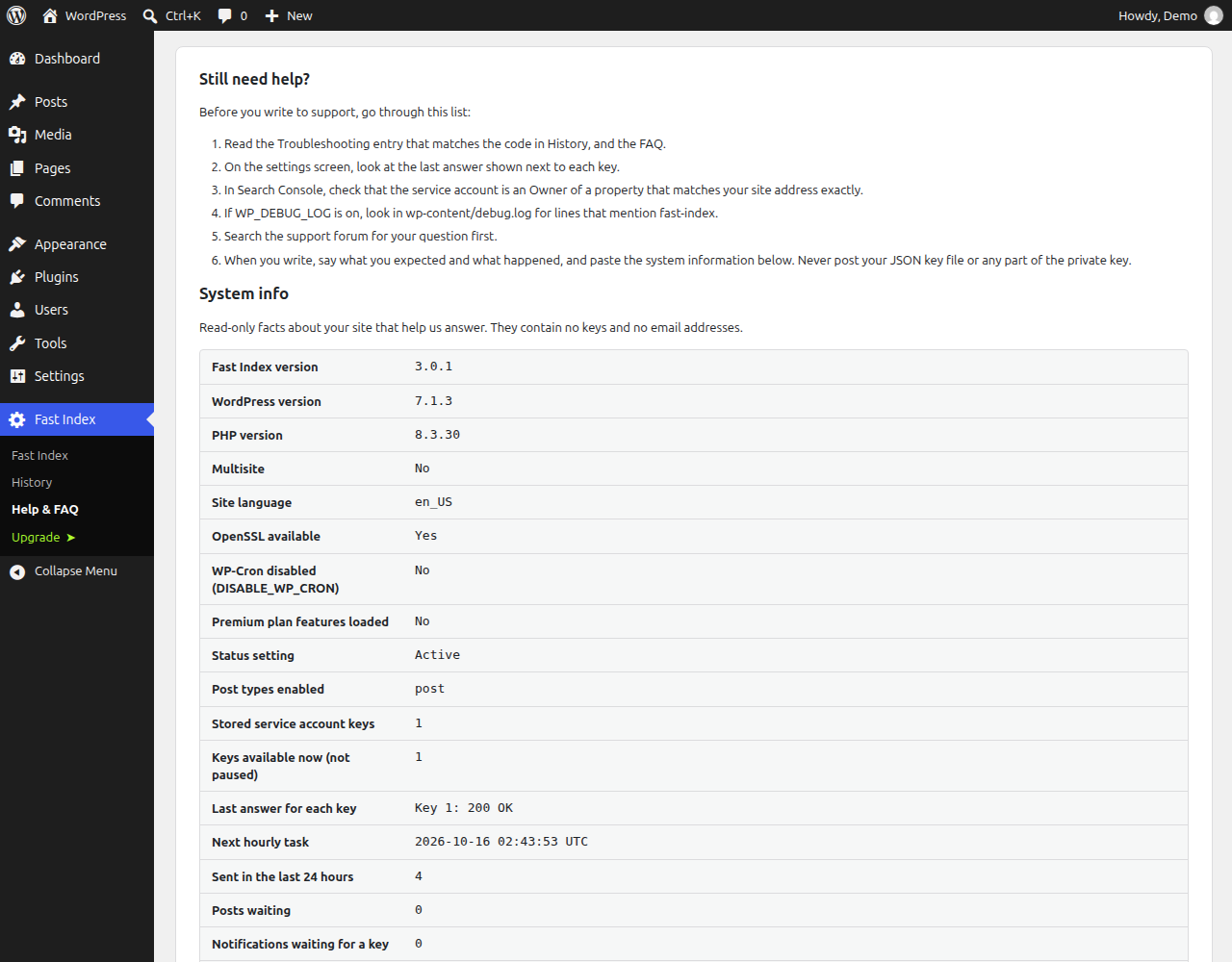
System info on the Help & FAQ screen, to attach when you ask for support.