BACK TO DIRECTORY


FESlider is fast and responsive slider that act like featured image. You can just directly add the slides from your post editor page.
Features :
- Fast and responsive slider
- Rich of setting options
- Slide caption
- As easy as featured image
- Ability to replace the featured image
- Enable for all post type
Usage Instruction
- After installation, go to your post editor, you will notice a new FESlider metabox
- Add your image(s) for use as slides. You can add multiple images by hold CTRL while select/click the images
- Add the slide text if you wish by edit the caption field on the wordpress media library editor
- The slideshow will automatically appears on the top of the post. You can also place the slideshow manually by put the shortcode
[feslider]on the current post content - Visit the slideshow settings page by click the settings button on post editor or click the FESlider menu on wordpress admin sidebar
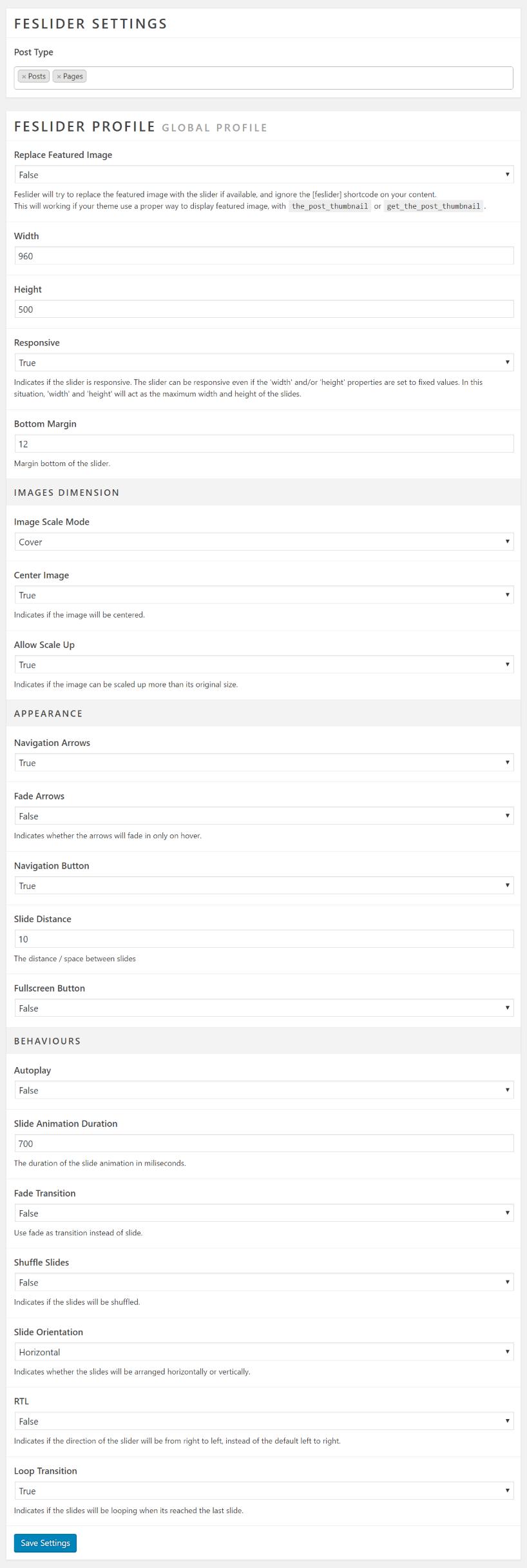
- Slideshow settings values will working on all FESlider slideshow on the site.
Screenshots
Feslider in action.
Feslider metabox on admin post editor.
Feslider settings page.
Plugin Details
Active Installs
70Total Downloads
6,359Version
1.3Requires WP
4.0Requires PHP
—Tested Up To
6.1.16Added
2016-11-29Last Updated
2023-02-15 7:09am GMTRatings
5
5
4
0
3
0
2
0
1
0