
Forensix Digital is a modular toolkit for your website. It shows you what is wrong, explains it in plain language and tells you where to fix it. It has 16 free apps, and you switch on only the ones you want. An app that is switched off adds no code to your pages and runs no scans.
Every finding in full
The free plugin shows every finding with all affected addresses and the full explanation.
Scan and fix
Site Scan
- Finds broken and redirected links, missing images and files, mixed content and old domain names left in your content.
- Shows every affected address and where the problem comes from (block editor, classic editor, Elementor, menu or widget) so you know where to fix it.
- Works in small steps, so it runs fine on shared hosting.
SEO Basics
- Checks titles, meta descriptions, headings, canonical addresses, indexing settings, social tags and structured data on the pages as visitors and search engines see them.
- Finds duplicate titles, descriptions and near-duplicate page text.
- Checks robots.txt and your XML sitemap, and tells you whether AI crawlers are blocked and whether an llms.txt file exists.
- Works next to Yoast SEO, Rank Math, SEOPress, All in One SEO, SureRank, The SEO Framework, Slim SEO, SmartCrawl and Squirrly SEO. If one of them is active, Forensix reads its values and does not add a second set of tags. Without one, it adds titles, descriptions and share tags itself.
Accessibility check
- Finds common barriers for people who use a screen reader or a keyboard: links and buttons without a name, fields without a label, images without an alt attribute, a missing page language and more.
- It cannot replace testing by a person, and it does not make your site compliant with any law on its own.
Performance check
- Lists scripts, styles and fonts loaded from other websites, scripts that hold up the page, very large pages and images that could load lazily.
- It does not measure loading time.
Content check
- Finds leftover placeholder text, the sample page and post, the default tagline, empty paragraphs, text repeated on several pages, dates that have passed, embedded videos that no longer exist and an old year in the copyright notice.
Shop and languages check
- With WooCommerce: products without a description, image, price or SKU, and shop settings that need attention.
- With Polylang or WPML: pages and posts that have no translation in one of your languages.
- It only reads and never changes your shop or your pages.
Images
Images & Media
- Finds image files that are too large, images with far more pixels than a screen shows, images without alternative text and images in older formats, with an estimate of how much each could shrink.
- Write alternative text for your images in one list.
- Compress a single image by hand. The original is kept, so you can restore it with one click.
Forms and email
Forms
- Build forms by dragging fields into a live preview, or start from a contact, quote request, callback or newsletter template. Place them with a block, a shortcode or an Elementor widget.
- Field types include text, email, phone, number, date, slider, dropdown, radio buttons, checkboxes, consent, hidden fields, headings and dividers. Paid fields are shown greyed out in the builder.
- Spam protection with a hidden field, a timestamp check, a rate limit and a block list of email addresses or domains. If you want more, add Cloudflare Turnstile or hCaptcha with your own keys.
- Every message is saved first and then emailed, so a failing mail server never loses a message. Failed emails are flagged in the inbox.
- An inbox to read, search and delete messages, retention settings per form, and support for the WordPress tools for exporting and erasing personal data.
- Forms are built with labels, linked error messages and keyboard operation.
Email delivery
- Sends your site’s email through your own mail account (SMTP), so form messages and password resets arrive.
- A test button explains problems in plain words. The password is stored encrypted and never shown again.
Site tools
- Business details: keep your business name, phone numbers, email addresses, address and opening hours in one place. Scans tell you when a page uses a different phone number or email address.
- Google tools: step-by-step help to connect your site to Google Search Console and Google Analytics, optional placement of your verification code, Analytics or Tag Manager tag, and a check that finds missing or doubled tags.
- Launch checklist: what your site needs before it goes live, such as search visibility, https, a privacy page and a first scan.
- Maintenance mode: a “we will be right back” or “coming soon” page for visitors while you work. You and your team still see the real site.
- Pre-publish check: before you publish in the block editor, shows what is worth a second look. It only advises and never blocks publishing.
- Reports: how many problems your last scans found, fixed or left open, and a CSV export of open findings.
- Site health: plain-language notes on hosting, late scheduled tasks, disk use and settings that are easy to get wrong. It is not a firewall and does not scan for malware.
Privacy
The free plugin does not contact any outside service on its own. Requests to other websites happen only when you turn on an app and run its check. The only one that reaches us is the Speed test, and only when you press its button. They are all listed under External services.
External services
The free plugin connects to these services only in the situations described.
- Websites you link to (Site Scan). When you run a scan, the plugin sends a request to each address on another website that your pages link to, to see whether it still works. Only the address is requested; no data about you or your visitors is sent. Each host gets at most two requests per second.
- WordPress.org Plugin Directory API (Site health). When you run the Site health check, the plugin asks api.wordpress.org for public information (last update, closed status) about the plugins installed on your site, by their folder names. WordPress.org privacy policy
- YouTube and Vimeo oEmbed (Content check). When you run a scan with the Content check on, the plugin asks YouTube (https://www.youtube.com/oembed) or Vimeo (https://vimeo.com/api/oembed.json) whether each embedded video still exists. Only the video address is sent. YouTube terms, Google privacy policy, Vimeo terms, Vimeo privacy policy
- Google Analytics and Google Tag Manager (Google tools). Only if you enter an Analytics or Tag Manager ID, the plugin adds Google’s tag to your pages. Your visitors’ browsers then load it from www.googletagmanager.com and send usage data to Google. You can start the tag with consent denied until a consent banner allows it. Google terms, Google privacy policy
- Cloudflare Turnstile or hCaptcha (Forms spam check). Only if you choose one of them under Forms > Spam check and enter your own keys. Visitors’ browsers then load the provider’s script on pages with a form (challenges.cloudflare.com or js.hcaptcha.com), and when a form is sent, your site sends the check result and your secret key to the provider to confirm it (challenges.cloudflare.com/turnstile/v0/siteverify or api.hcaptcha.com/siteverify). Cloudflare terms, Cloudflare privacy policy, hCaptcha terms, hCaptcha privacy policy
- Forensix Digital speed test service and Google PageSpeed Insights (Speed test, part of Performance check). Only when you start a speed test, your browser sends the address of the page you entered and your site’s address to forensix.digital (forensix.digital/wp-json/forensix/v1/psi/free). Our server asks Google’s PageSpeed Insights API with our own key and sends the report back. We keep the report for 10 minutes so a repeat test of the same page is answered at once, and we keep a daily count per site (a hash of the site’s address) to apply the daily limit. Nothing else is stored. If you save your own Google API key on the Speed test screen, or our service is not available, your browser asks Google directly (www.googleapis.com/pagespeedonline) and nothing goes to forensix.digital. Nothing is saved on your site besides your own key, if you add one. Forensix Digital terms, Forensix Digital privacy policy, Google terms, Google privacy policy
- Cloudflare Turnstile or hCaptcha (Forms). Only if you enter your own Turnstile or hCaptcha keys under Forms > Spam check, forms that use the check load the provider’s script (challenges.cloudflare.com or js.hcaptcha.com) in the visitor’s browser, and your site sends the visitor’s answer token to the provider to verify it (challenges.cloudflare.com/turnstile/v0/siteverify or api.hcaptcha.com/siteverify). Cloudflare website terms, Turnstile privacy addendum, hCaptcha terms, hCaptcha privacy policy
- Your mail server (Email delivery). Only if you turn on Email delivery, your site’s email is sent through the SMTP server you enter, with the user name and password you enter. The terms of your mail provider apply.
Screenshots

Overview with the latest scan and what needs attention first.

Apps: turn on only what you need.

Findings with the affected addresses and where to fix each one.
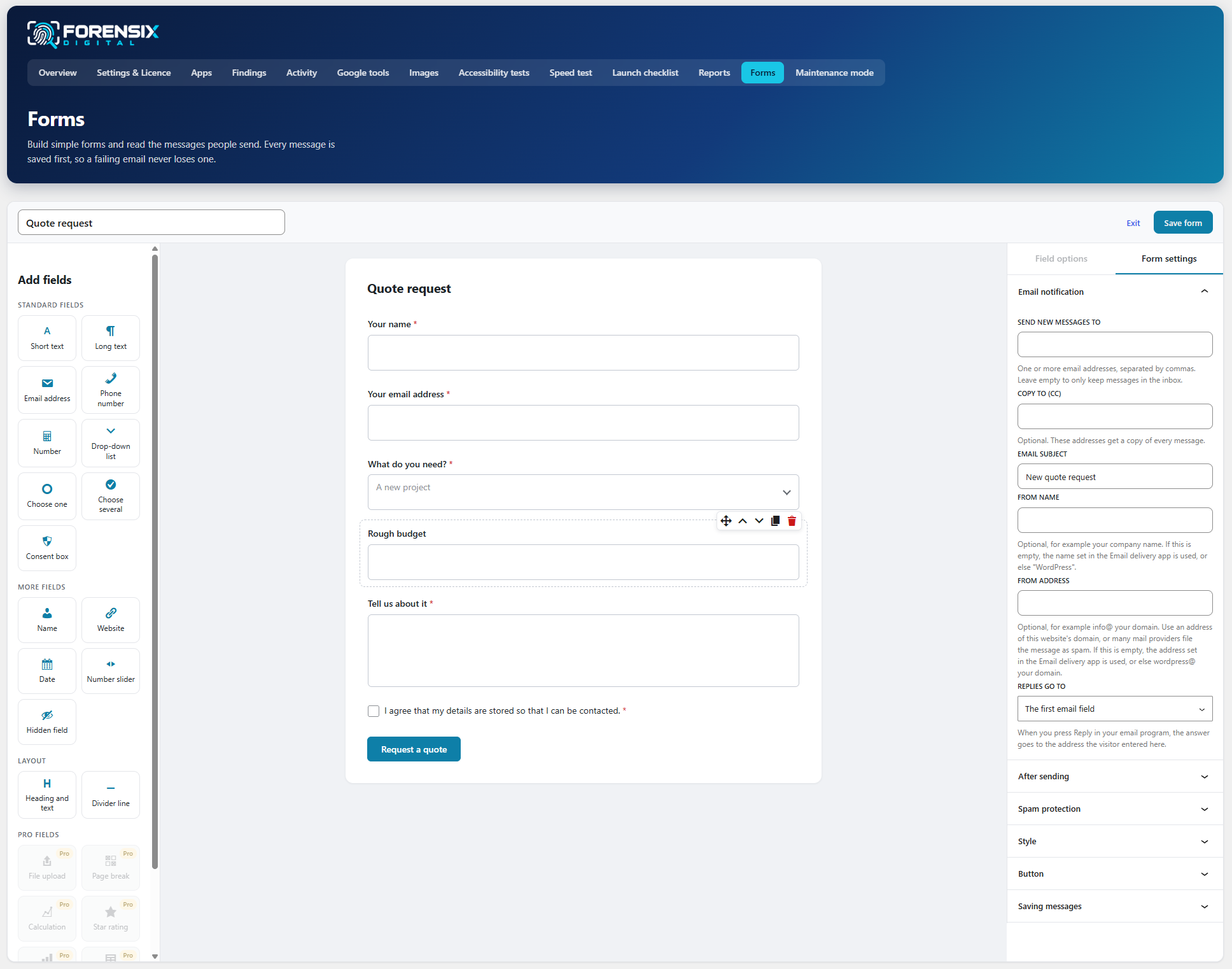
Form builder and inbox.