
Fullworks Active Users Monitor provides administrators with real-time visibility of logged-in users on your WordPress site. Using WordPress’s native session tokens system, this plugin accurately tracks user login states and provides powerful monitoring tools.
Key Features
- Real-Time Tracking – Uses WordPress session tokens for accurate online/offline status
- Comprehensive Audit Trail – Track all login/logout events with detailed logging
- Admin Bar Widget – Quick overview of online users with role breakdown
- Enhanced Users List – Visual indicators, status columns, and filtering options
- Dashboard Widget – At-a-glance view of active users on your dashboard
- Audit Log Export – Export user activity to CSV, JSON, or Excel formats
- Auto-Refresh – Configurable automatic updates without page reload
- Role-Based Display – Color-coded indicators for different user roles
- WP-CLI Support – Command line tools for monitoring and management
- Performance Optimized – Smart caching and efficient queries
- Fully Translatable – Ready for localization
Visual Indicators
The plugin provides clear visual feedback for online users:
- Green status dots for online users
- Gold/orange borders for administrators
- Color-coded role indicators
- Animated pulse effects (optional)
- “ONLINE” badges in user lists
- Last seen timestamps for offline users
Perfect For
- Membership sites monitoring user activity
- Educational platforms tracking student engagement
- Multi-author blogs coordinating content creation
- Support teams managing customer interactions
- Any site requiring user activity insights
Developer Friendly
- Clean, well-documented code
- Action and filter hooks for customization
- WP-CLI commands for automation
- Follows WordPress coding standards
- Compatible with multisite installations
WP-CLI Commands
The plugin provides powerful WP-CLI commands for monitoring and automation:
Basic Commands
wp active-users list– List all online userswp active-users stats– Display online user statisticswp active-users check <user>– Check if a specific user is onlinewp active-users monitor– Real-time monitoring in terminalwp active-users clear-cache– Clear the online users cache
Automation Commands
Check if any users are online (for scripting):
wp active-users any [--quiet] [--count] [--json]
--quiet– Returns exit code only (0 = users online, 1 = no users online)--count– Returns just the number of online users--json– Returns detailed JSON output
Wait until no users are online:
wp active-users wait-clear [--timeout=<seconds>] [--check-interval=<seconds>] [--quiet]
--timeout– Maximum time to wait (default: 300 seconds)--check-interval– How often to check (default: 30 seconds)--quiet– Suppress progress messages
Example Automation Scripts
Safe upgrade script:
`bash
!/bin/bash
Only upgrade when no users are online
if wp active-users any –quiet; then
echo “Users are online, postponing upgrade”
else
echo “No users online, safe to upgrade”
wp core update
wp plugin update –all
fi
`
Maintenance with user wait:
`bash
Wait for users to go offline, then perform maintenance
wp active-users wait-clear –timeout=600 && {
wp maintenance-mode activate
wp db optimize
wp cache flush
wp maintenance-mode deactivate
}
`
Monitoring script:
`bash
Get online user count for monitoring dashboard
ONLINE_COUNT=$(wp active-users any –count)
if [ “$ONLINE_COUNT” -gt “100” ]; then
# Send alert about high user activity
echo “High activity: $ONLINE_COUNT users online”
fi
`
These commands make it easy to create maintenance scripts that respect user activity, ensuring updates and maintenance tasks only run when appropriate.
Privacy Policy
Online status is read from the session data WordPress already keeps. The plugin also stores each user’s most recent login time with their account.
When you enable the audit trail, the plugin records logins, logouts, failed login attempts and expired sessions. Each record holds the username and display name, the IP address and browser user agent of the request, the login method and the time. Failed login attempts are recorded with the username that was tried, even when no such account exists.
Records are deleted after the retention period you choose, and IP addresses are anonymized after the period you choose. The plugin adds suggested text to Settings > Privacy and supports WordPress’s personal data export and erasure tools.
No data is sent to external services.
Credits
Developed by Fullworks
Icons and visual elements use WordPress core styles for consistency.
Screenshots
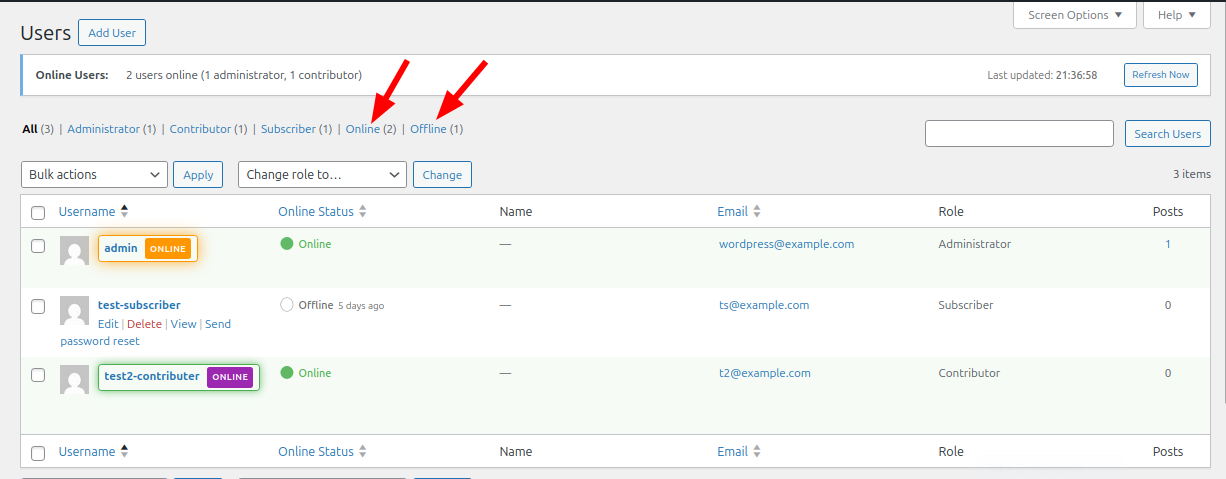
Users list page showing highlighted online users with visual indicators
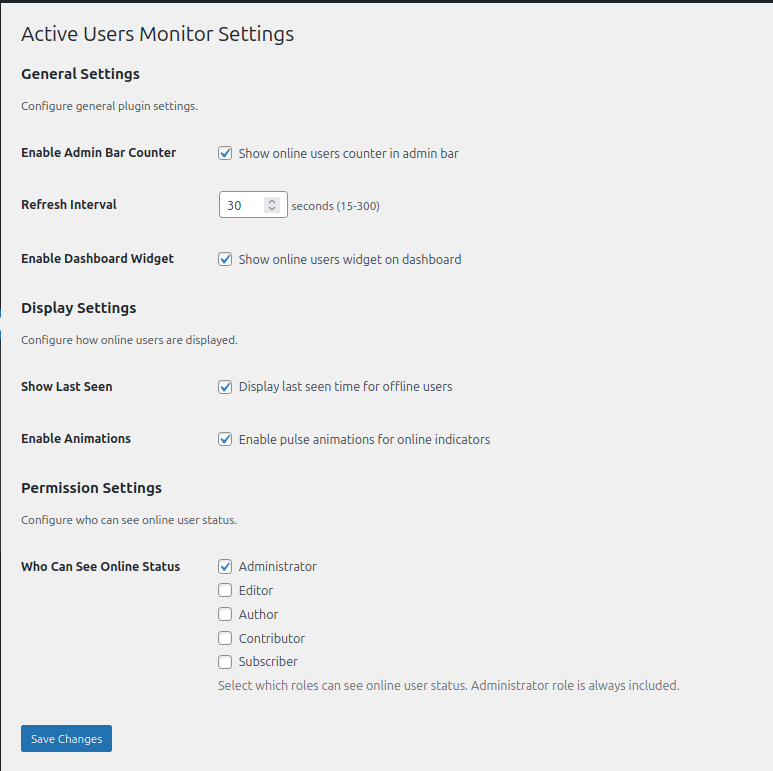
Settings page giving control over who sees online status
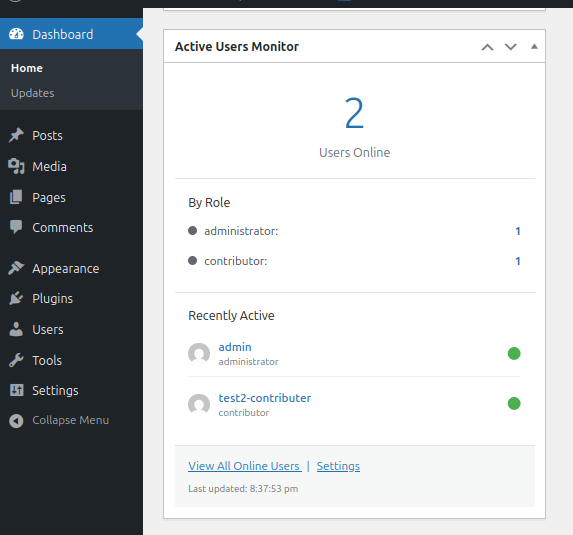
Dashboard widget displaying online users summary
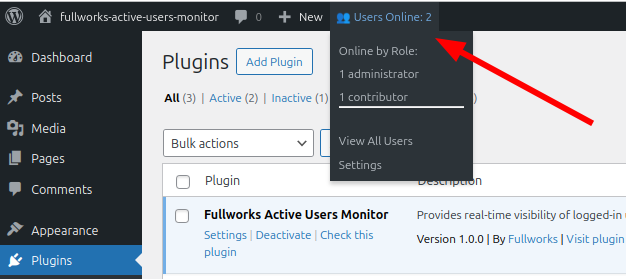
Admin bar dropdown showing online users count and role breakdown