
Add a working finance calculator to any post or page in a few clicks. Your readers type their own numbers and see the answer right there, with a year-by-year table and a chart.
33 calculators, all made for India:
- Investing: SIP, Lumpsum, SWP, Gold Return, Goal SIP, Compound Interest, Stock Average, IPO Allotment Chance, IPO Listing Gain
- Savings and deposits: FD, RD, PPF, Sukanya Samriddhi, NSC, KVP, Post Office MIS
- Loans: EMI, Home Loan EMI, Car Loan EMI, Personal Loan EMI, Home Loan Eligibility, Home Loan Prepayment, Loan Comparison
- Tax: Income Tax (old and new regime), HRA, GST, In-Hand Salary
- Retirement: Retirement, NPS, Gratuity, SCSS, EPF, Inflation
Why site owners use it:
- Three languages. Every calculator works in English, Gujarati (ગુજરાતી) and Hindi (हिन्दी).
- Always up to date. Small savings rates, tax slabs and rules are updated on gainly.in, so the calculator on your page never goes stale. Nothing to update on your side.
- Light and dark. Follows the visitor’s device, or pick always light or always dark.
- Fits your page. The calculator grows to its full height, so there is no scroll bar inside it, and it works on phones.
- No ads, no tracking. The embedded calculator shows no ads and sets no cookies.
- Light on your site. No CSS or JavaScript on pages without a calculator, and only a tiny script on pages with one.
How to add a calculator
Block editor: add the “Gainly Calculator” block and pick the calculator. Language and colours are in the block’s sidebar.
Shortcode (classic editor, widgets, page builders):
[gainly_calculator name="emi-calculator"]
Options:
name: which calculator, for examplesip-calculator,ppf-calculator,income-tax-calculator. The full list is under Settings > Gainly Calculators.lang:en,guorhitheme:auto,lightordarkheight: starting height in pixels before the calculator sizes itself (400 to 3000, default 1100)credit:yesorno, to show or hide the “by Gainly” link on this one calculator
Example: [gainly_calculator name="sukanya-samriddhi-calculator" lang="gu" theme="light"]
Settings
Settings > Gainly Calculators sets the default language and colours for every calculator on your site. You can also switch on a small “by Gainly” link under each calculator. It is off unless you turn it on.
External services
This plugin shows calculators from Gainly (https://gainly.in), an Indian personal finance calculator website. The calculators are not stored in the plugin: each one is loaded in an iframe from gainly.in, so that rates and tax rules stay current.
- What is sent and when: when a visitor opens a page that has a calculator, their browser loads
https://gainly.in/embed/<calculator>(or/gu/embed/…,/hi/embed/…). Like any web page request, this sends the visitor’s IP address, browser user agent and the address of your page (the referrer) to gainly.in. The numbers a visitor types into the calculator are sent to gainly.in only to work out the result. Nothing is sent from your WordPress server, and nothing is sent when no calculator is on the page. - Block editor preview: while you edit a post, the block shows a preview loaded from gainly.in in the same way.
- The embedded calculator shows no ads and sets no cookies.
- Terms of use: https://gainly.in/terms
- Privacy policy: https://gainly.in/privacy-policy
Screenshots

A SIP calculator in a blog post.
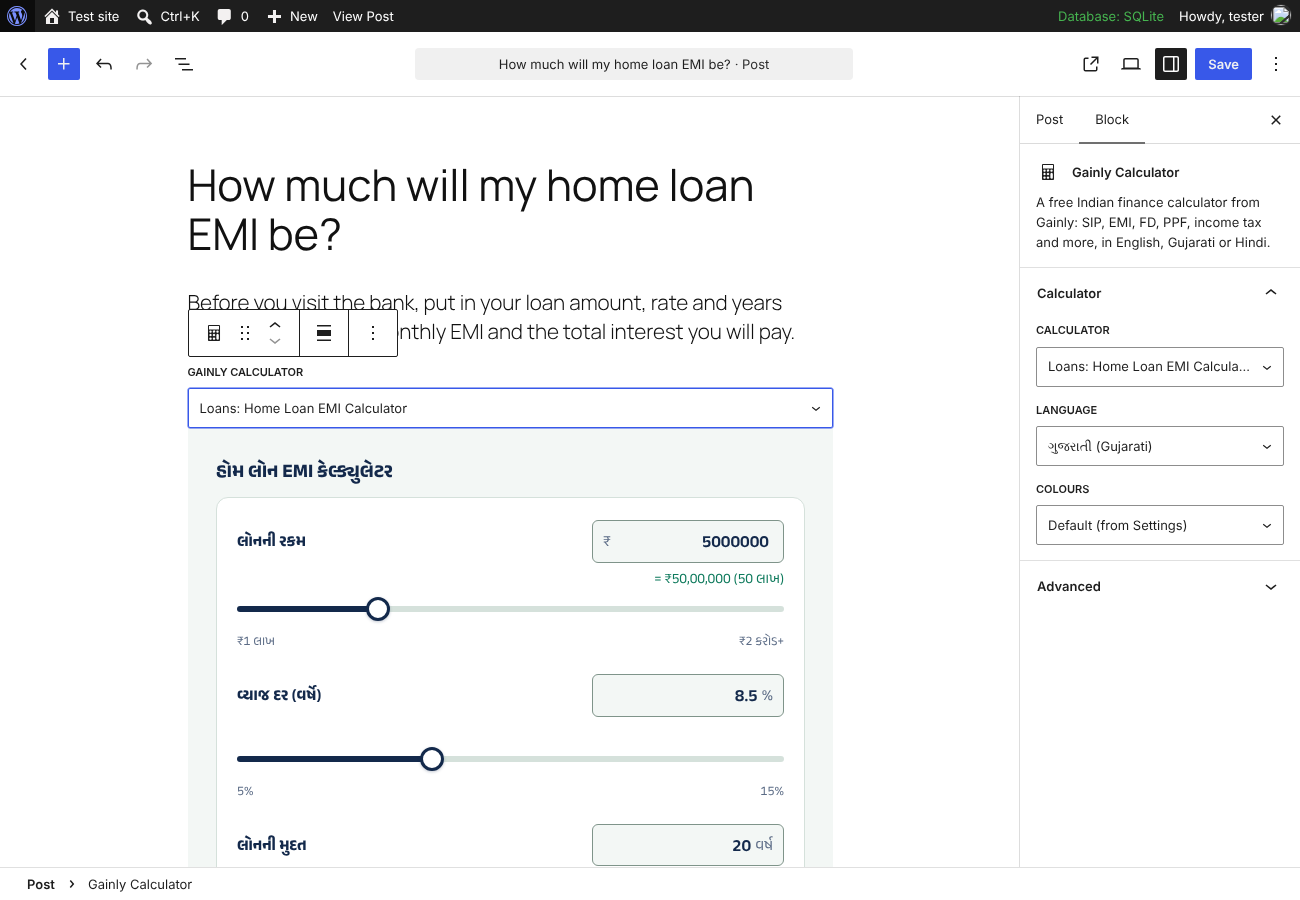
Picking a calculator, language and colours in the block editor.

Settings > Gainly Calculators.