GateCHA CAPTCHA connects your WordPress site to your own GateCHA instance — a self-hosted, open-source CAPTCHA management service based on the ALTCHA proof-of-work protocol.
No server? Every feature of the plugin works with a GateCHA you host yourself, for free. If you would rather not run one, the optional GateCHA Cloud service, for businesses, hosts it for you in France: one click in Settings GateCHA, and you come back with everything filled in.
Why GateCHA?
- Privacy-first — No cookies, no fingerprinting, no user tracking. Fully GDPR-compliant.
- Self-hosted — Your challenges and verifications stay on your own server. No data goes to third parties.
- Proof-of-work — Bots must solve a computational puzzle. No annoying image puzzles for humans.
- Centralized stats — Track challenges issued, verified, and failed across all your sites from one dashboard.
- Interaction signals — Optional second opinion on each submission, scored from counts and durations alone. Off by default.
Supported forms:
- WordPress login, registration, password reset, and comments
- WooCommerce login, registration, and password reset
- Contact Form 7
- WPForms
- Gravity Forms
- Elementor Pro Forms
- Forminator
- Formidable Forms
- HTML Forms
- Custom placement via
[gatecha]shortcode
Setup in 2 steps:
- Enter your GateCHA instance URL
- Enter your API key
That’s it. Enable CAPTCHA on the forms you want to protect.
External Services
This plugin connects to your self-hosted GateCHA instance for CAPTCHA challenge generation and verification. Two API calls are made:
- GET /api/v1/challenge — Fetched by the user’s browser to obtain a proof-of-work challenge.
- POST /api/v1/verify — Called from your WordPress server to verify the solved challenge.
One more request happens only when Collect Interaction Signals is enabled, which it is not by default:
- GET /api/public/his.js — The interaction-signal collector, loaded by the user’s browser from the same instance. It measures aggregates on the pages that carry a CAPTCHA (durations, event counts, total pointer distance, typing rhythm variance) and hands them to your WordPress server with the form, which forwards them to /api/v1/verify. It reads no field values, no pointer coordinates and no key contents.
One more request happens only when a Stats Token is saved in the settings, which it is not by default:
- GET /api/v1/stats — Called from your WordPress server, at most once every 10 minutes and only when an administrator opens the WordPress dashboard or Settings GateCHA, to read this key’s statistics (counts of challenges, verified and failed submissions per day, and per country). It sends the stats token and nothing about your visitors.
One more service is contacted only if an administrator clicks Use GateCHA Cloud on Settings GateCHA:
- GateCHA Cloud (cloud.gatecha.com), the optional hosted GateCHA. The click sends the admin’s browser there with this site’s address, a return address in this site’s admin and a random value that protects the round trip. After sign-up and payment on that service (payments are processed by Stripe), the browser comes back with a one-time code, and your WordPress server exchanges it with cloud.gatecha.com for the GateCHA URL, API key and stats token, which it saves in the settings. From then on, GateCHA Cloud is the GateCHA server of items 1 to 4. Terms: https://gatecha.com/cgv — Privacy policy: https://gatecha.com/confidentialite
No data is sent to any third-party service. All communication is between your WordPress installation and your own GateCHA instance at the URL you configure in Settings GateCHA.
- GateCHA source code: https://github.com/Upellift99/GateCHA
Source Code
The full source of this plugin is available at https://github.com/Upellift99/GateCHA-WordPress.
The plugin’s own JavaScript (assets/js/gatecha.js) and CSS (assets/css/gatecha.css) are shipped unminified and human-readable.
The plugin bundles one third-party library in minified form:
- ALTCHA widget —
assets/js/altcha-widget.min.js- Version: 3.2.2
- License: MIT
- Source code: https://github.com/altcha-org/altcha
This is the unmodified production build distributed on npm as the altcha package (it corresponds to the package’s dist/main/altcha.min.js build). To obtain and review the human-readable source, run npm install altcha@3.2.2 and inspect the package’s src/ directory on GitHub.
Screenshots
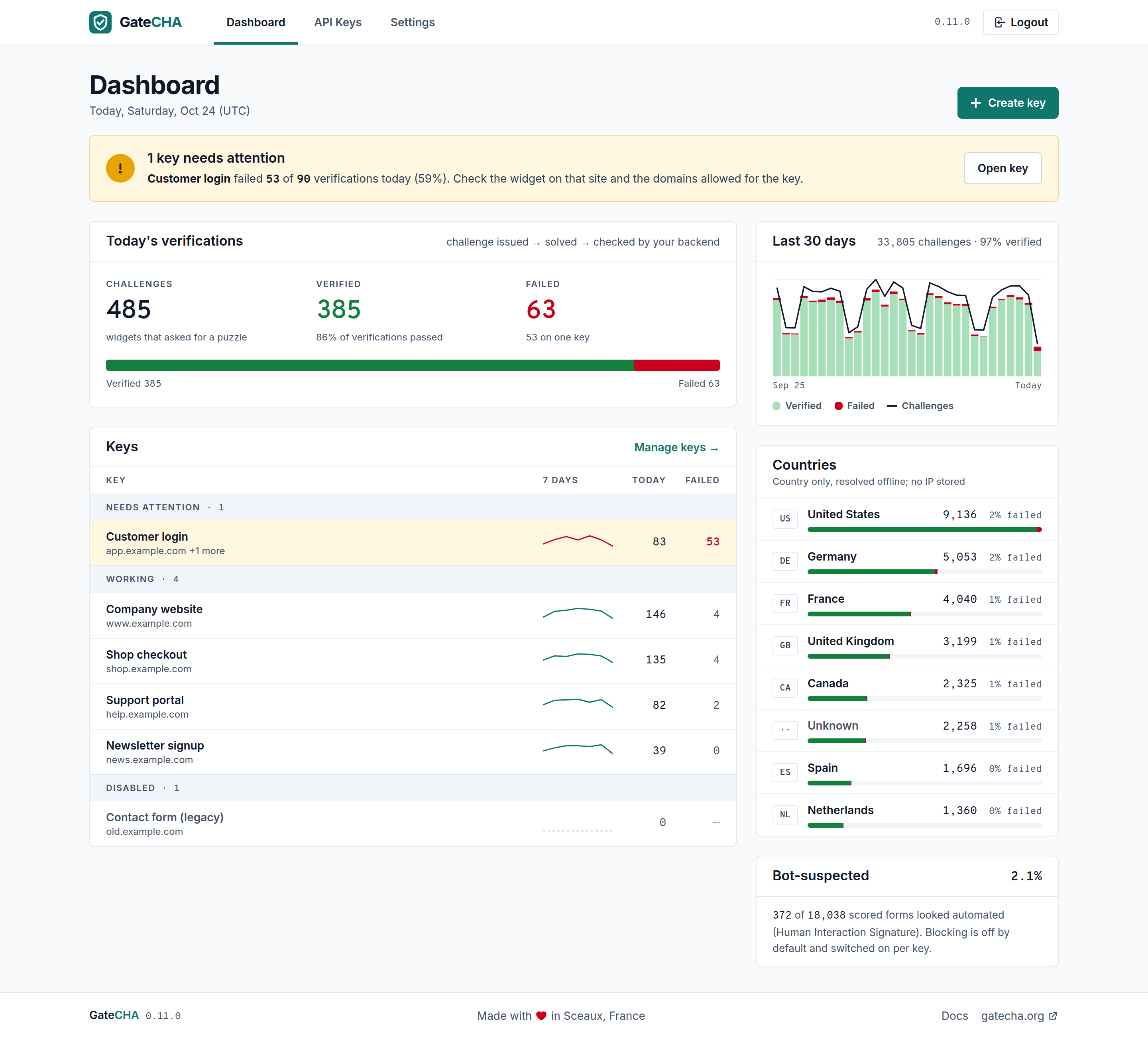
The GateCHA server dashboard leads with what needs attention: a key failing today is named with its numbers, above the day's verifications and every site's key grouped by status.
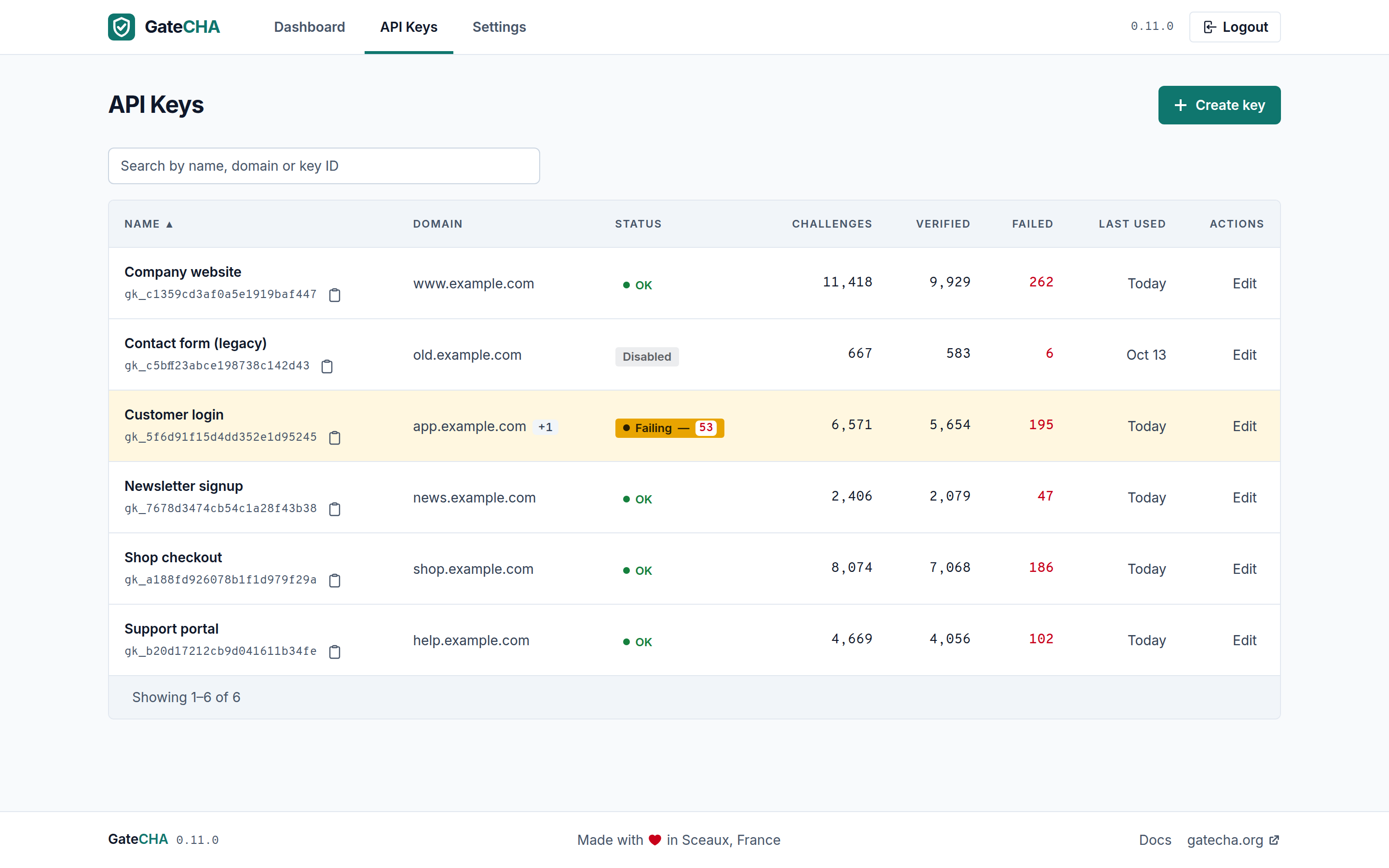
One API key per site, each with its own difficulty, challenge TTL and allowed domains, so a single GateCHA instance serves every site you run.