
Seamless job board with shortcode listings, CF7 & Gravity Forms integration, and easy job management. Simplify functionality for hiring.
Features
1. Job Posting Management
- Custom post type for job postings
- Rich job information fields:
- Job Type (Full-time, Part-time, Contract, Freelance, Internship)
- Location
- Salary Range
- Experience Required
- Application Deadline
- Qualifications
- Responsibilities
- Benefits
- Featured images support
- Category taxonomy for job organization
- SEO-friendly URLs
- Demo Content: Automatically creates 19 sample job postings on activation for easy testing
2. Job Listing Shortcode
Display jobs with flexible options:
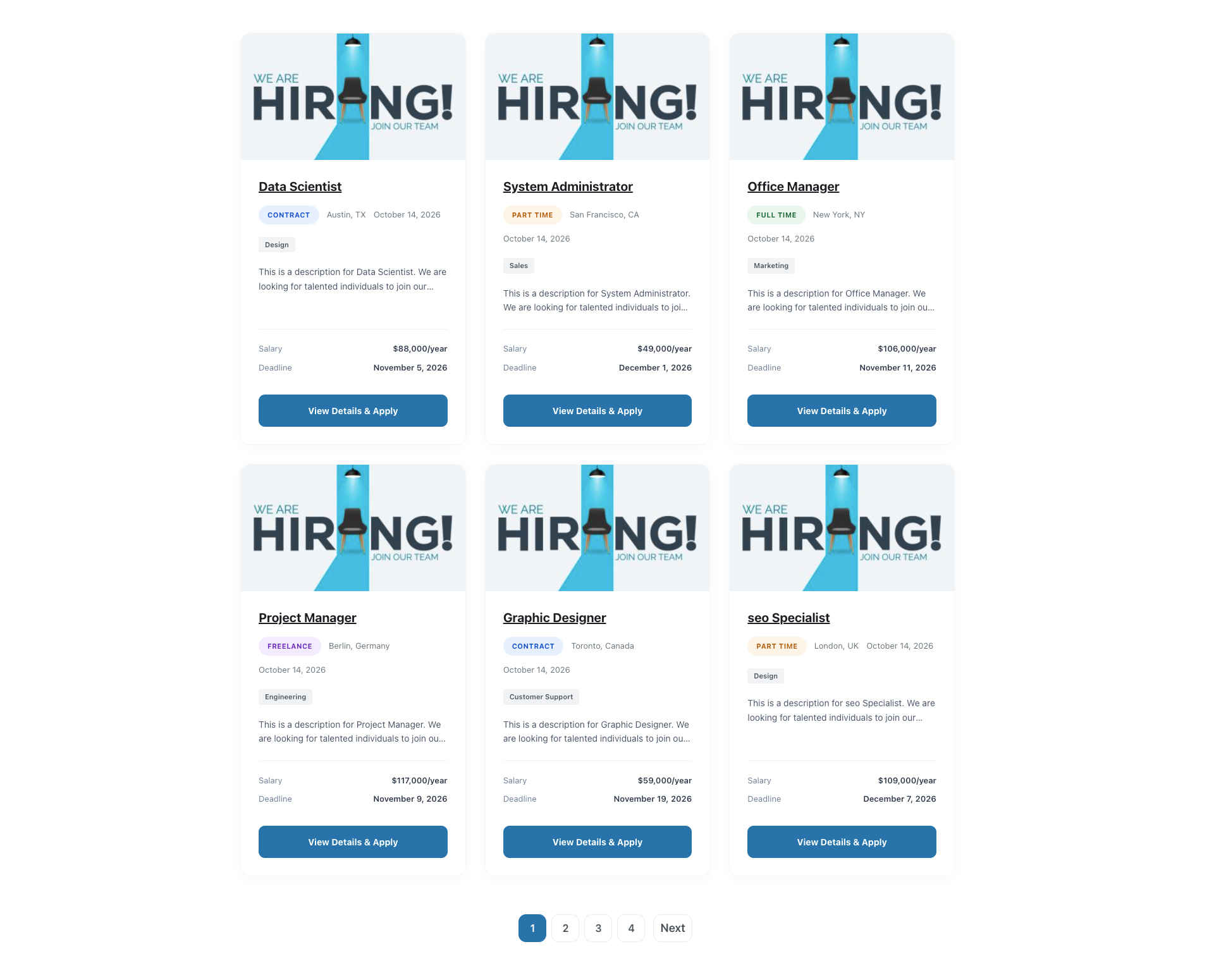
– Layout Options: Grid or Row layout
– Grid Columns: 2, 3, or 4 columns
– Sorting: Ascending or Descending order
– Order By: Date, Title, Modified date, or Meta value
– Filtering: By category
– Pagination: Dual pagination support – Traditional page list or AJAX Load More button
– Customization: Show/hide various elements
3. Job Details Page
- Professional single job template
- Detailed job information display
- Application form integration
- Responsive design
- Sticky sidebar with apply button
4. Form Integration
Supports both Contact Form 7 and Gravity Forms:
– Automatic form insertion on job detail pages
– Hidden fields for job ID and title
– Application tracking
– Application count tracking
5. Additional Features
- Admin settings page
- Application logging
- Responsive design
- Translation ready
- SEO optimized
Requirements
- WordPress 5.8 or higher
- PHP 7.4 or higher
- Contact Form 7 OR Gravity Forms (for application forms)
Configuration
Setting up Contact Form 7
- Install and activate Contact Form 7
- Go to Contact > Contact Forms
- Create a new form or edit existing
-
Add the following hidden fields to your form(Optional):
[hidden job_id]

[hidden job_title] -
Add your application form fields (examples):
`
Your Name (required)
[text* your-name]
Your Email (required)
[email* your-email]
Phone Number
[tel your-phone]
Resume (required)
[file* your-resume filetypes:pdf|doc|docx]
Cover Letter
[textarea your-cover-letter]
[submit “Submit Application”]
`
- Go to Job Postings > Settings
- Select “Contact Form 7” as the form plugin
- Select one Form
- Save settings
Setting up Gravity Forms
- Install and activate Gravity Forms
- Go to Forms > New Form
- Create your application form
- Add two hidden fields:
- Field Label: Job ID
- Parameter Name:
job_id - Check “Allow field to be populated dynamically”
- Field Label: Job Title
- Parameter Name:
job_title - Check “Allow field to be populated dynamically”
-
Add your application fields:
- Name (required)
- Email (required)
- Phone
- File Upload for Resume (required)
- Paragraph Text for Cover Letter
- Any other custom fields you need
-
Configure form settings and notifications as needed
- Copy the form ID
- Go to Job Postings > Settings
- Select “Gravity Forms” as the form plugin
- Select one Form
- Save settings
Usage
Creating a Job Posting
- Go to Job Postings > Add New
- Enter the job title
- Add job description in the content editor
- Fill in the Job Details:
- Select Job Type
- Enter Location
- Enter Salary Range
- Enter Experience Required
- Set Application Deadline
- List Qualifications (one per line)
- List Responsibilities (one per line)
- List Benefits (one per line)
- Assign Job Categories
- Set Featured Image (optional)
- Publish
Using the Shortcode
Basic usage:
[goteja_job_listing]
Shortcode Parameters
Parameter
Options
Default
Description
layout
grid, row
grid
Layout style
columns
2, 3, 4
3
Number of columns (grid only)
order
ASC, DESC
DESC
Sort order
orderby
date, title, modified, meta_value
date
Sort by field
meta_key
any meta key
–
Meta key for sorting by meta_value
posts_per_page
number
6
Number of jobs to display
category
category slug
–
Filter by category
show_excerpt
yes, no
yes
Show job excerpt
show_location
yes, no
yes
Show job location
show_type
yes, no
yes
Show job type
show_date
yes, no
yes
Show post date
pagination
yes, no
yes
Show pagination
pagination_type
pagelist, loadmore
pagelist
Pagination style (pagelist = numbered pages, loadmore = load more button)
Shortcode Examples
Grid layout with 3 columns (default):
[goteja_job_listing]
Grid layout with 4 columns:
[goteja_job_listing layout="grid" columns="4"]
Row layout:
[goteja_job_listing layout="row"]
Show only 6 jobs:
[goteja_job_listing posts_per_page="6"]
Filter by category:
[goteja_job_listing category="developer"]
Sort by title in ascending order:
[goteja_job_listing order="ASC" orderby="title"]
Hide certain elements:
[goteja_job_listing show_excerpt="no" show_date="no"]
Load More pagination (AJAX):
[goteja_job_listing pagination_type="loadmore"]
Traditional numbered pagination:
[goteja_job_listing pagination_type="pagelist"]
Combined example with Load More:
[goteja_job_listing layout="grid" columns="3" order="DESC" orderby="date" posts_per_page="12" category="engineering" show_excerpt="yes" pagination="yes" pagination_type="loadmore"]
Combined example with Page List:
[goteja_job_listing layout="grid" columns="3" order="DESC" orderby="date" posts_per_page="12" category="engineering" show_excerpt="yes" pagination="yes" pagination_type="pagelist"]
Form Handling
How It Works
-
When a user visits a job detail page, the plugin automatically:
- Adds hidden fields with job ID and job title to the form
- Displays the configured form at the bottom of the page
-
When a user submits an application:
- The form data is processed by the respective form plugin
- GoTechArk Easy Job Apply logs the application
- Application count is incremented
Form Fields Recommendations
Minimum Required Fields:
– Name (required)
– Email (required)
– Resume/CV Upload (required)
Recommended Additional Fields:
– Phone Number
– Cover Letter
– LinkedIn Profile URL
– Portfolio URL (for creative positions)
– Availability/Start Date
– Current Salary
– Expected Salary
– Additional Information/Comments
Customization
Template Override
You can override the single job template by copying:
/wp-content/plugins/gotechark-easy-job-apply/templates/single-goteja_job_posting.php
To your theme:
/wp-content/themes/your-theme/gotechark-easy-job-apply/single-goteja_job_posting.php
Styling
The plugin includes comprehensive CSS that can be customized:
– Frontend styles: /assets/css/goteja-frontend.css
– Admin styles: /assets/css/goteja-admin.css
To override styles, add custom CSS in your theme or use Customizer.
Troubleshooting
Form not showing on job page
- Check if form plugin (CF7 or GF) is active
- Verify form ID in settings is correct
- Check if form exists and is published
- Clear cache if using caching plugin
Jobs not displaying in shortcode
- Make sure jobs are published
- Check category slug if using category filter
- Verify shortcode syntax
- Check posts_per_page parameter
- Clear permalinks: Settings > Permalinks > Save Changes
Applications not being tracked
- Verify form has hidden fields (job_id and job_title)
- Check if form submission is working
- Review error logs
- Ensure proper parameter names in Gravity Forms
Support & Customization
Need Help or Guidance?
If you need assistance with installation, configuration, troubleshooting, or general usage, please visit https://gotechark.com/support/ or contact us at support@gotechark.com.
Need Customization or New Features?
If you require custom development, feature enhancements, integrations, or any other customization, please contact us at sales@gotechark.com.
Screenshots
![Frontend Job Listings Grid - The clean and modern grid layout created using the [goteja_job_listing] shortcode, displaying active job postings with pagination, and job badges.](https://ps.w.org/gotechark-easy-job-apply/assets/screenshot-1.png?rev=3765868)
Frontend Job Listings Grid - The clean and modern grid layout created using the [goteja_job_listing] shortcode, displaying active job postings with pagination, and job badges.
Single Job Detail Page - The comprehensive single job view showcasing job metadata, dynamic requirements list, sticky sidebar details, and the integrated application form.
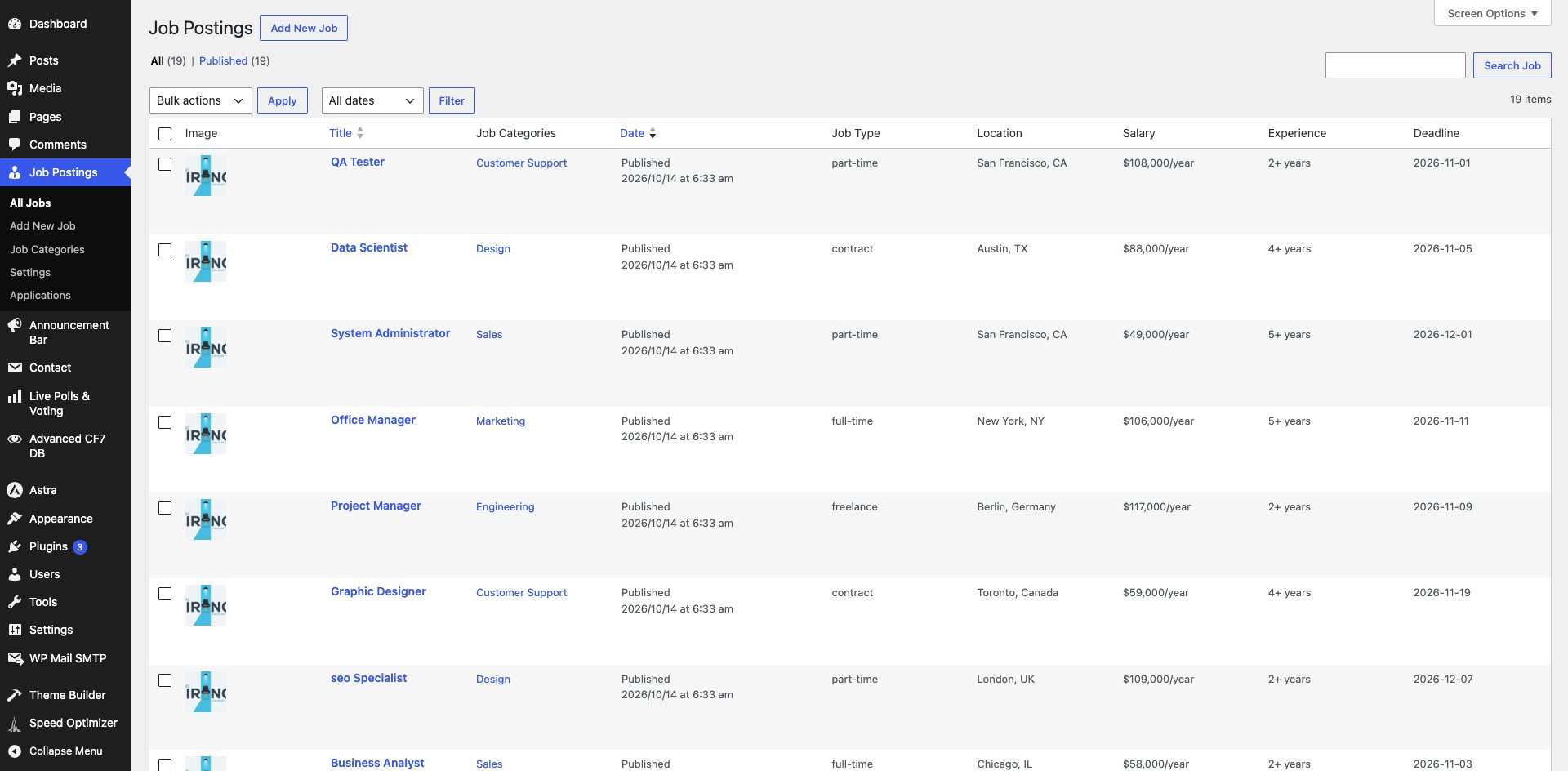
WordPress Admin - Job Postings List - Admin panel displaying all job entries with their categories, job types, and locations.
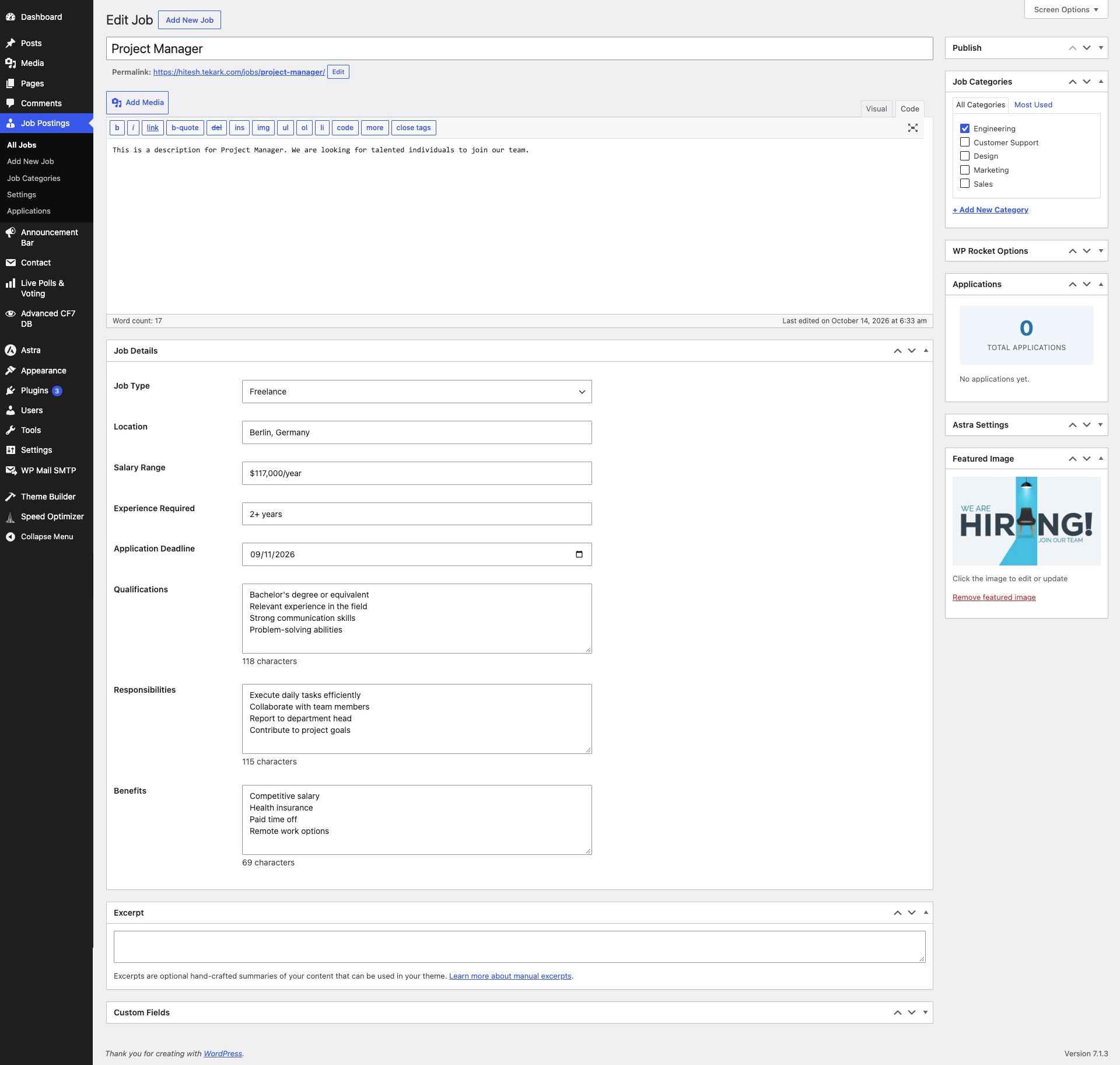
Custom Job Details Meta Box - Backend interface in the post editor allowing easy entry of job specifications such as type, salary, experience, and benefits.

Plugin Settings Page - Configuration page for selecting Form Integration (Contact Form 7 or Gravity Forms) and managing demo dummy data (adding/removing jobs).