
GSheetConnector for Easy Digital Downloads is an addon that connects your WordPress store running Easy Digital Downloads to Google Sheets.
Each time a customer buys a download, the order details go straight to your Google Sheet. You don’t need to export CSV files, copy and paste, or use Zapier. Your sales, customers and payment data stay up to date in a spreadsheet that you can share with your team, accountant or reporting tools.
Homepage | Documentation | Support | Demo | ✨ Upgrade to PRO
🛒 Easy Digital Downloads ➜ to 📊 Google Sheets
Store owners use this plugin to:
- Track every EDD sale in a live Google Sheet without manual exports.
- Keep separate tabs for Complete, Pending, Processing, On Hold, Refunded, Failed, Abandoned, Revoked and other order statuses.
- Share sales reports with partners, accountants or a fulfilment team without giving them WordPress admin access.
- Build dashboards and charts in Google Sheets or Looker Studio from live EDD order data.
- Keep a backup of your store’s purchase history in the cloud.
🚀 Key Features (Free)
- Real-time order sync: new EDD orders are sent to Google Sheets as soon as they are placed.
- Order-status tabs: each enabled order status gets its own sheet tab, and the plugin adds the headers for you.
- Status change tracking: when an order moves from one status to another (for example, Pending to Complete), the row moves to the matching tab.
- Deleted payment cleanup: when a payment is deleted in EDD, its row is removed from the sheet.
- Create or fetch spreadsheets: create a new Google Spreadsheet or load your existing ones from inside WordPress.
- Two Google sign-in methods: one-click Existing Client/Secret (Auto Setup), or Manual Client/Secret with your own Google API project.
- Dashboard: see the connection status, connected Google account and linked spreadsheet in one place.
- Role management: choose which WordPress user roles can open and manage the Google Sheet settings.
- Debug log and System Status: built-in error logs and an environment report make troubleshooting quick.
- Beta updates: opt in to try new features before they are released.
- Lightweight: uses the native WordPress HTTP API with Google Sheets API v4, with no large third-party SDK.
- Works with Easy Digital Downloads (Free) and Easy Digital Downloads Pro.
💎 PRO Features
Get more control over your EDD data with GSheetConnector for Easy Digital Downloads PRO:
- Select fields to sync: send only the order fields you need.
- Rename and reorder headers: turn headers on or off, rename them and drag and drop the column order.
- Bulk sync past orders: send all of your existing EDD orders, or a date range, to Google Sheets.
- Freeze and style headers: freeze the header row and set header and row colors, font size and font style.
- Sheet sorting: sort the sheet by any column in ascending or descending order.
- Custom and merge tags: add custom values to your sheet.
- Date/time format and time zone: control how dates are written to Google Sheets.
- Service Account authentication: connect with a Google Service Account.
- Spreadsheet download: download the connected spreadsheet as a file.
- Priority support from the GSheetConnector team.
⚡️ How to Connect Easy Digital Downloads to Google Sheets
-
Step 1: Connect your Google account
➜ In WordPress Admin, go to Downloads > Google Sheet > Integration.
➜ Choose an authentication method. Existing Client/Secret (Auto Setup) is recommended.
➜ Click Sign in with Google and select the Google account where your sheets are stored.
➜ Make sure you allow access to Google Drive and Google Sheets. The plugin needs both permissions. -
Step 2: Select or create a spreadsheet
➜ Go to Downloads > Google Sheet > EDD Data Settings.
➜ Click Fetch Sheets to load your spreadsheets, or click Create New Spreadsheet.
➜ Select the spreadsheet you want to use. -
Step 3: Choose order statuses
➜ Turn on the EDD order statuses you want to track. The plugin creates a tab with headers for each one.
➜ Save your settings. -
Step 4: Test it
➜ Place a test order and change its status (for example, Pending, Complete or Refunded). The order appears in the matching tab.
🔄 Upgrading from 1.6.x
Version 1.7.0 moves your existing Google connection, spreadsheet and order-status settings to the new storage automatically. You don’t need to set anything up again. We still recommend that you back up your site before you update.
🤝 More GSheetConnector Integrations
Connect your other WordPress forms and stores to Google Sheets:
- Contact Form 7 Google Sheets Connector
- WPForms Google Sheets Connector
- Gravity Forms Google Sheets Connector
- Ninja Forms Google Sheets Connector
- Fluent Forms Google Sheets Connector
- Elementor Forms Google Sheets Connector
- Forminator Google Sheets Connector
- Formidable Forms Google Sheets Connector
- JetFormBuilder Google Sheets Connector
- WooCommerce Google Sheets Connector
- Avada Forms Google Sheet Connector PRO
- Divi Forms Google Sheet Connector PRO
External services
This plugin connects Easy Digital Downloads with Google Sheets through Google APIs.
- Google Sheets API and Google Drive API
– Purpose: Create and list spreadsheets, add sheet tabs and headers, and add, move or remove EDD order rows.
– Data sent: Order data for the order statuses you turn on, such as order ID, customer name and email, products, amounts, payment status and date. Data is sent when an order is created, when its status changes or when it is deleted.
– Terms: https://policies.google.com/terms
– Privacy: https://policies.google.com/privacy
- Google OAuth 2.0
– Purpose: Sign in to Google securely and refresh or revoke access tokens.
– Data sent: Authentication requests and tokens. Tokens are stored only in your site’s database.
– Terms: https://developers.google.com/terms
– Privacy: https://policies.google.com/privacy
- GSheetConnector Auth Service (oauth.gsheetconnector.com)
– Purpose: Handles the Google OAuth connection for the Existing Client/Secret (Auto Setup) method.
– Data sent: Only the site URL and plugin ID during authentication. No order data is sent or stored.
– Terms: https://www.gsheetconnector.com/terms-condition
– Privacy: https://www.gsheetconnector.com/privacy-policy
- Freemius
– Purpose: Optional opt-in usage tracking, license handling and the upgrade to PRO.
– Data sent: Only if you opt in. Freemius may collect your site URL, WordPress and plugin versions, and your admin email.
– Terms: https://freemius.com/terms/
– Privacy: https://freemius.com/privacy/
Screenshots

Google Sheets integration with authentication and the required permissions.
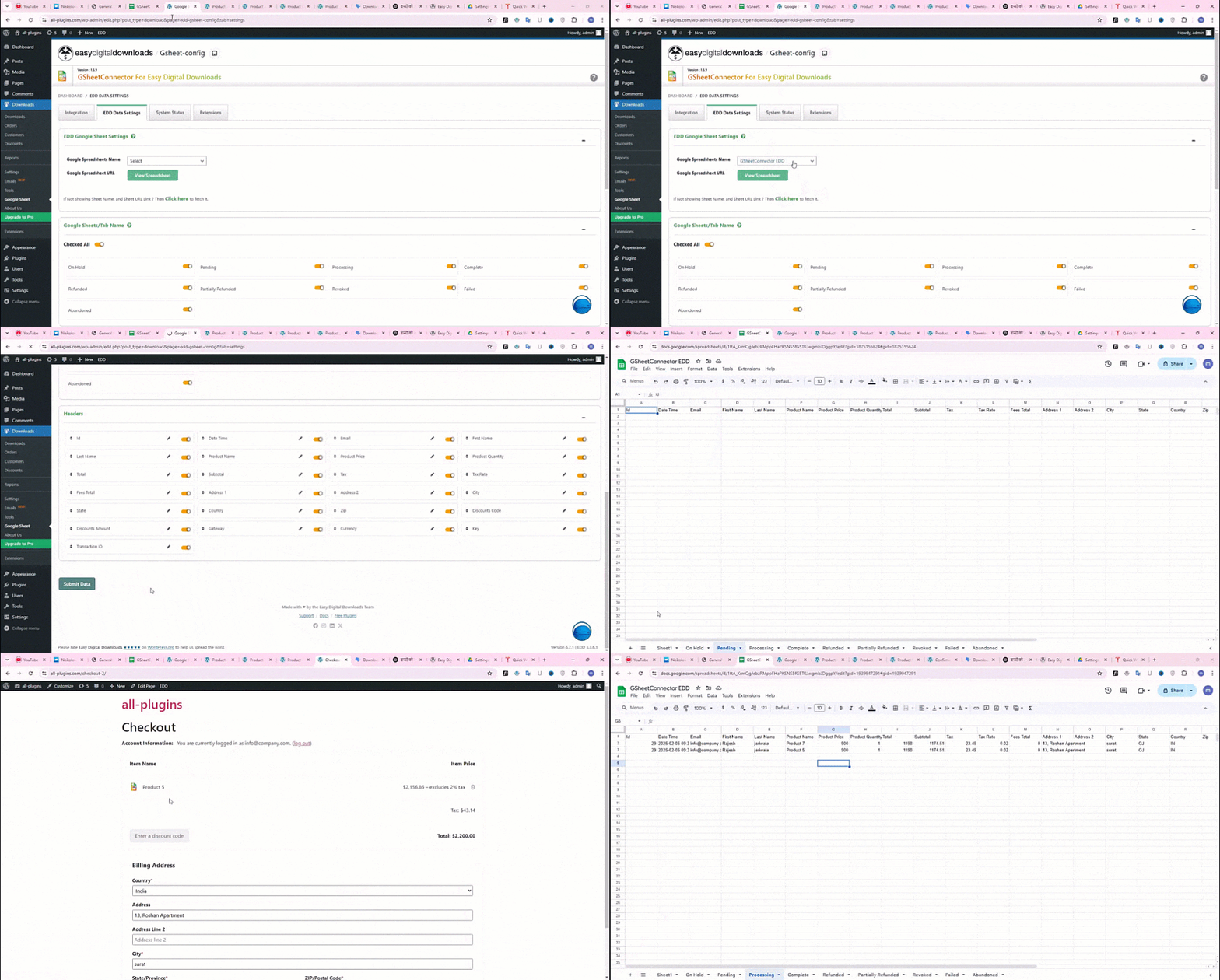
Google Sheet tabs created for each order status, with headers and synced EDD order data.

System Status.
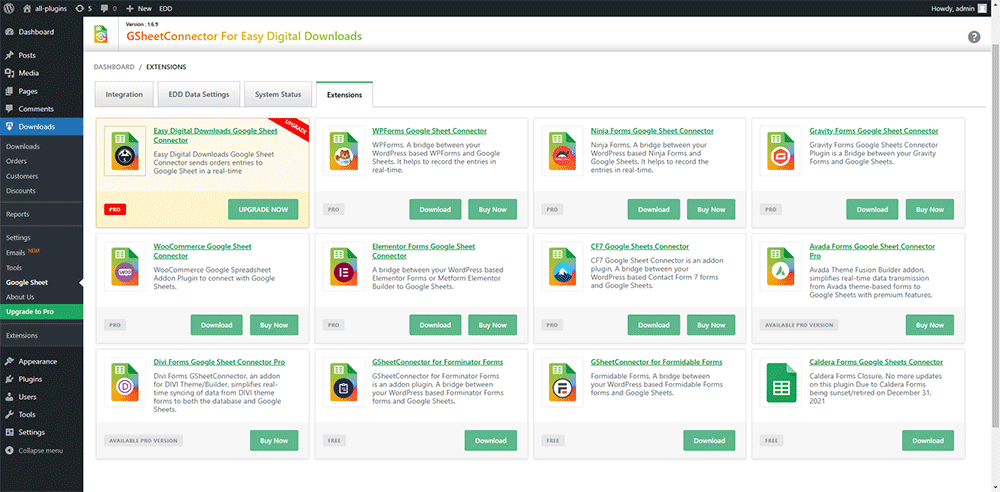
Extensions.