BACK TO DIRECTORY

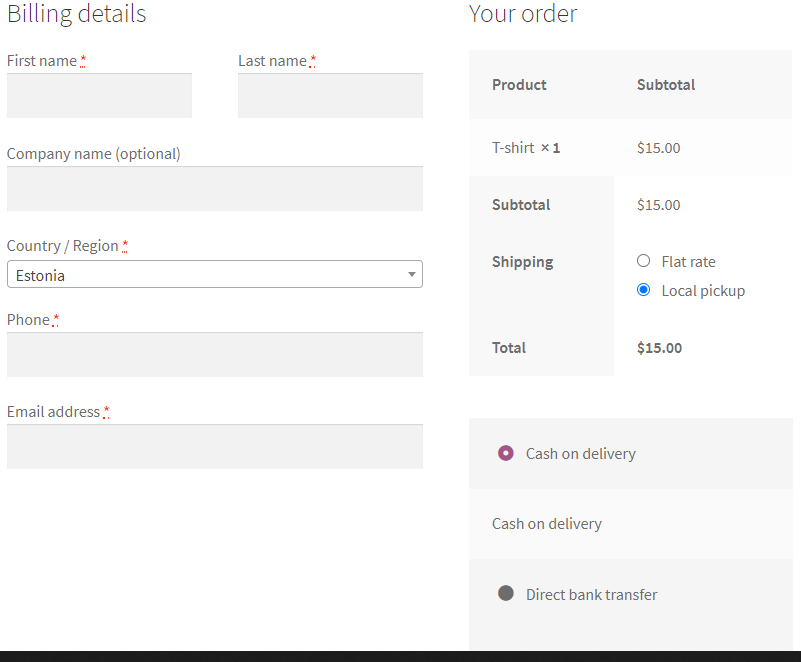

WooCommerce plugin for hiding the billing address fields on checkout based on the selected shipping/payment methods.
How To Use
- Plugin Settings: Choose for which payment/shipping methods the billing address fields will be hidden.
How It Works
- Each time the customer will modify his shipping/payment methods on checkout, the plugin will show/hide the billing address fields accordingly.
Features
- Conditions: Choose which shipping methods and payment methods will cause the billing address fields to be hidden (for example local pickup and cash).
- Billing Address Fields: Choose which billing address fields to hide when conditions are met.
- Top Options: The shipping/payment options can be moved to the billing details section on checkout.
- Customer Address: The address of the customer from previous orders will be kept in his user details after creating an order with no billing address fields.
- Shipping Options Shortcode: Display the shipping options anywhere using the [haf_shipping_options] shortcode.
Screenshots
Hide Address Fields Plugin Settings
Hidden Address Fields on Checkout for Local pickup
Visible Address Fields on Checkout for Flat rate shipping
Plugin Details
Active Installs
300Total Downloads
8,679Version
1.2.5Requires WP
5.2Requires PHP
7.0Tested Up To
7.1.2Added
2020-10-09Last Updated
2026-08-23 2:28pm GMTRatings
5
3
4
0
3
0
2
0
1
0