
A simple and nice plugin to add images easily on gravity forms multiple choice, radio and checkbox fields. It helps to add uploaded images for multiple choice, radio and checkbox fields with a few clicks. It also adds a nice design on the multiple choice, radio and checkbox fields. If the installation is okay, go to gravity forms dashboard. Add a multiple choice/checkbox/radio field on your form. Open the field and you will see a tab called the Image Choices. After clicking that tab, an option will be shown to enable Image choice. Click that checkbox and configure it as your choice. And save the form. You’re done!
Features
- Awesome multiple choice/radio/checkbox design
- Pick custom color
- Add column in multiple choice/radio/checkbox
- Added responsive option (new)
- Global Settings (new)
- Form Settings (new)
- Add multiple choice field (new)
- And more comming…
Premium Features
- Single product field support
- Product option support
- Dropdown field support
- Multiple choice, polls, survey, shipping support
- 7+ beautiful themes
- Responsive options
- Show images in Entry / Notification
- Image Options
- Upcoming more options…
Requirements
- PHP 7.4
- Gravity Forms 2.0.0 or higher
Screenshots
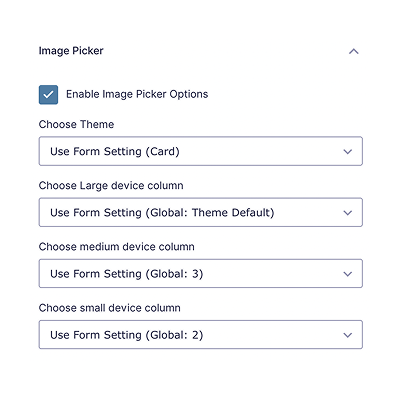
Add multiple choice/radio/checkbox field on gravity form and enable image choice option with click checkbox

Click on edit choices

Click on image icon.

A popup will be show, choose your image and click on select image.

You can see your selected image. you can remove that and choose another one.

After saving form, you will see a beautiful image multiple choice/radio/checkbox field.

New design for multiple choice/radio/checkbox